

1. Introduction
English Version
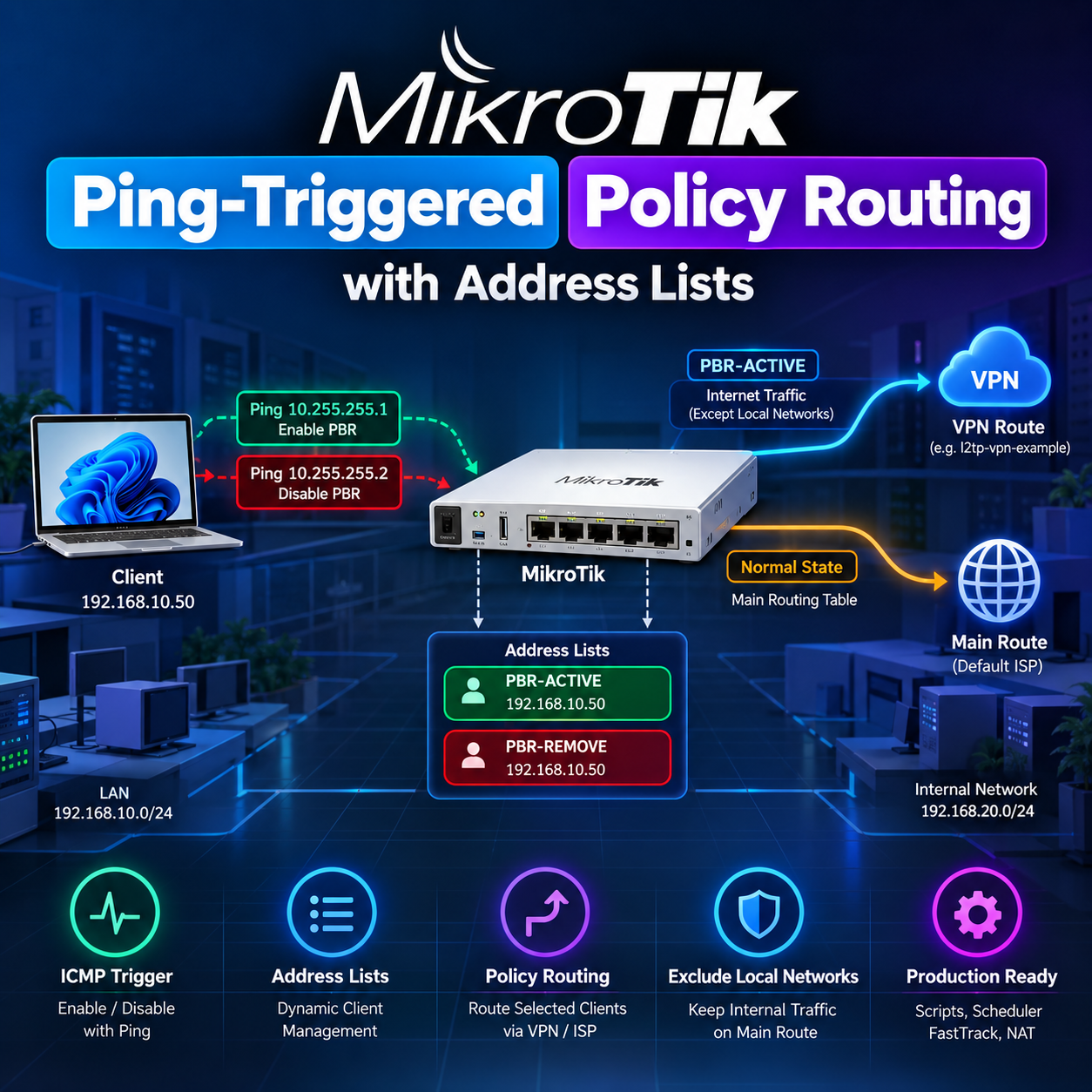
A client can request an alternate IPv4 Internet path by pinging one control address, then return to ordinary routing by pinging another. The router uses the source address of the echo request as the client identity. This is useful for temporary VPN routing, a second ISP, routing experiments, troubleshooting and temporary access to a special path without logging in to MikroTik.
This runbook targets RouterOS v7. Every network, client, interface, list and gateway below is fictional. It assumes an existing working LAN, main default route, firewall and authenticated, running l2tp-vpn-example tunnel. Creating the tunnel, credentials and its upstream Internet service is outside this configuration. No configuration from the hosting environment is used.
The examples steer client-originated IPv4 traffic. IPv6, router-originated traffic and Internet connections initiated by a router DNS proxy need separate policies. This is an operator control mechanism, not an authentication protocol or a VPN leak-prevention policy.
2. Architecture
Normal:  Client -> main -> Default ISP
Enable:  Client -> Ping 10.255.255.1 -> PBR-ACTIVE
                -> Mangle -> VPN-ROUTE -> VPN / Secondary Gateway
Disable: Client -> Ping 10.255.255.2 -> PBR-REMOVE
                -> Script -> Remove from PBR-ACTIVE -> main
The example client is 192.168.10.50 on LAN 192.168.10.0/24. Internal services use 192.168.20.0/24, which may represent an example VLAN 20. LAN is an interface list, not a physical port. The control bridge has no member ports. Echo requests enter prerouting; local delivery and input filtering follow. A successful ping reply is useful feedback, but address-list membership is the authoritative state.
Enable applies to subsequent eligible packets; disable is asynchronous, normally processed at the next one-second scheduler tick. Disable wins while a removal request is queued: the enable rule excludes PBR-REMOVE. Wait for that list to clear before enabling again. Continuous pings are repeated commands, so stop the disable ping before issuing enable.
3. Root Cause / Technical Limitation
Firewall actions can add the packet source with action=add-src-to-address-list. There is no remove-src-from-address-list action in the RouterOS v7 mangle action set. Therefore the second trigger adds a short-lived removal request; a script performs the deletion. Adding a client to PBR-REMOVE alone does not delete PBR-ACTIVE.
4. Control Interface
Create an empty bridge to own both control addresses. The /32 prefix defines an individual host address, avoiding an unnecessary connected subnet and any implication that other control addresses are on-link. The LAN client sends these destinations through its existing default gateway; do not assign them to the client or add bridge ports.
/interface bridge
add name=PBR-Control protocol-mode=none comment="PBR Control Interface"
/ip address
add address=10.255.255.1/32 interface=PBR-Control comment="Enable PBR"
add address=10.255.255.2/32 interface=PBR-Control comment="Disable PBR"
Verify that the bridge exists without ports and both addresses are enabled. This bridge does not replace the LAN bridge or an existing VLAN interface.
/interface bridge print detail where name="PBR-Control"
/interface bridge port print where bridge="PBR-Control"
/ip address print where interface="PBR-Control"
5. Local Networks
List every internal routed subnet that must retain main-table reachability. A remote private network is not automatically local: add the actual internal prefixes required by the example topology. PBR-ELIGIBLE is a separate stable population for FastTrack exclusion and covers all clients allowed to use the triggers, even while inactive.
/ip firewall address-list
add list=LOCAL-NETS address=192.168.10.0/24 comment="LAN example"
add list=LOCAL-NETS address=192.168.20.0/24 comment="Internal VLAN example"
add list=PBR-ELIGIBLE address=192.168.10.0/24 comment="Stable FastTrack exclusion for trigger-capable clients"
Verify both internal prefixes and the eligible range. Local exceptions retain normal routing; they do not grant firewall access or create missing routes.
/ip firewall address-list print where list="LOCAL-NETS"
/ip firewall address-list print where list="PBR-ELIGIBLE"
6. Enable Trigger
Only LAN sources in the example subnet can activate PBR. icmp-options=8:0 matches IPv4 ICMP Echo Request: type 8, code 0. The extra pending-removal exclusion avoids an enable request immediately being undone by the worker. passthrough=yes allows the packet to continue through mangle and local delivery.
/ip firewall mangle
add chain=prerouting in-interface-list=LAN src-address=192.168.10.0/24 \
    src-address-list=!PBR-REMOVE protocol=icmp icmp-options=8:0 \
    dst-address=10.255.255.1 action=add-src-to-address-list \
    address-list=PBR-ACTIVE address-list-timeout=none-dynamic \
    passthrough=yes comment="Enable PBR using ICMP trigger"
none-dynamic keeps the dynamic entry until explicit removal or reboot. It is not disk-persistent. For the first rollout, use src-address=192.168.10.50/32 on both trigger rules; expand to the shown /24 only after validation. Verify a single enable ping produces a dynamic host entry and increments the enable counter.
/ip firewall address-list print where list="PBR-ACTIVE"
/ip firewall mangle print stats where comment="Enable PBR using ICMP trigger"
7. Disable Trigger
The second echo destination queues the source in PBR-REMOVE for ten seconds. This is a queue lifetime, not the access lifetime. The worker must run within that window; if it is stopped or failing, the request can expire without disabling the client. Monitor scheduler health and retry the ping after repair. For loaded routers consider a longer queue timeout, such as one minute.
/ip firewall mangle
add chain=prerouting in-interface-list=LAN src-address=192.168.10.0/24 \
    protocol=icmp icmp-options=8:0 dst-address=10.255.255.2 \
    action=add-src-to-address-list address-list=PBR-REMOVE \
    address-list-timeout=10s passthrough=yes comment="Disable PBR request"
Verify the disable counter increases and PBR-ACTIVE loses the client after the worker runs. PBR-REMOVE may already be empty by the time it is printed; that is expected after successful processing.
/ip firewall mangle print stats where comment="Disable PBR request"
/ip firewall address-list print where list="PBR-REMOVE"
8. RouterOS v7 Routing Table
Create the FIB-enabled table before referring to it in new-routing-mark. The illustrated interface gateway is suitable for an already established point-to-point L2TP tunnel. Confirm upstream forwarding and a return path; an active route alone does not prove Internet access.
/routing table
add fib name=VPN-ROUTE
/ip route
add dst-address=0.0.0.0/0 gateway=l2tp-vpn-example \
    routing-table=VPN-ROUTE comment="PBR default route"
Verify VPN-ROUTE appears with FIB enabled and its default route has the active flag. RouterOS v7 uses routing-table on routes; do not substitute the v6 route property routing-mark.
/routing table print
/ip route print detail where routing-table="VPN-ROUTE"
/interface print detail where name="l2tp-vpn-example"
A production egress can be a VPN interface, WireGuard peer, GRE path, a secondary ISP next hop or a recursive route. These are alternatives, not interchangeable gateway strings. For an example Ethernet ISP, resolve the next hop through main as below; main must have reachability to that next hop. On multi-access Ethernet, use a next-hop IP rather than an interface-only default route.
/ip route add dst-address=0.0.0.0/0 gateway=192.0.2.1@main routing-table=VPN-ROUTE comment="Alternative secondary ISP example"Use this alternative instead of the L2TP default, not alongside it unless equal-cost routing is intended. For WireGuard, configure the correct peer allowed-address ranges and keep the endpoint reachable through the underlay. GRE needs its own remote forwarding and return routing. Recursive routing requires explicit resolver routes and compatible scope/target-scope settings. Validate the chosen design separately.
9. Mangle Policy Routing
Mark only active-client traffic arriving from LAN, with an Internet destination rather than an internal subnet or a router-owned address. Keep both trigger rules before this mark rule, and review any earlier PCC, routing marks, jump chains or terminating actions. passthrough=no prevents later mangle rules from overwriting this decision for a matched packet.
/ip firewall mangle
add chain=prerouting in-interface-list=LAN src-address-list=PBR-ACTIVE \
    dst-address-list=!LOCAL-NETS dst-address-type=!local \
    action=mark-routing new-routing-mark=VPN-ROUTE passthrough=no \
comment="Route PBR clients using VPN-ROUTE"| Matcher | Purpose |
|---|---|
| src-address-list=PBR-ACTIVE | Selects enabled source clients. |
| dst-address-list=!LOCAL-NETS | Excludes listed internal destination subnets. |
| dst-address-type=!local | Excludes every address owned by this router, including both triggers. It does not exclude all private networks. |
| new-routing-mark=VPN-ROUTE | Selects the pre-created v7 routing table for matching packets. |
Verify the counter rises on a fresh Internet connection from 192.168.10.50. An internal-only test should not raise this rule’s counter. Other existing mangle rules can still mark excluded traffic, so audit the complete ruleset.
/ip firewall mangle print stats where comment="Route PBR clients using VPN-ROUTE"
/ip firewall mangle print detail
10. Removal Script
The worker queries the exact client address inside PBR-ACTIVE rather than scanning every active client for every request. Both lists are reserved for this mechanism and contain individual host entries; do not place aggregate prefixes, ranges or DNS names in them. Manual aggregate entries would require different removal semantics.
The job guard avoids normal scheduler overlap. Per-request error handling tolerates an entry expiring during processing; a failed deletion leaves the request available for retry until its timeout. A successful state change produces one info log; repeated disable requests for an inactive client are silent. Permissions are explicit, and permission checks remain enabled.
/system script
add name=PBR-Remove-Worker policy=read,write,test dont-require-permissions=no source={
    :if ([:len [/system script job find where script="PBR-Remove-Worker"]] > 1) do={
        :return
    }
    :foreach request in=[/ip firewall address-list find where list="PBR-REMOVE"] do={
        :local clientIP ""
        :do {
            :set clientIP [/ip firewall address-list get $request address]
            :local active [/ip firewall address-list find where list="PBR-ACTIVE" and address=$clientIP]
            :if ([:len $active] > 0) do={
                /ip firewall address-list remove $active
                :log info ("PBR disabled for client " . $clientIP)
            }
            /ip firewall address-list remove $request
        } on-error={
            :if ([:len [/ip firewall address-list find where list="PBR-REMOVE" and address=$clientIP]] > 0) do={
                :log warning ("PBR removal failed; queued retry for " . $clientIP)
            }
        }
    }
}
Verify manually after queuing one disable request: the worker should remove that exact host from both lists and log the transition. Review warnings and scheduler run-count; a growing run-count alone does not prove successful removal. This is a small operational queue, not a durable transactional message system.
/system script run PBR-Remove-Worker
/ip firewall address-list print where list="PBR-ACTIVE"
/ip firewall address-list print where list="PBR-REMOVE"
/log print where message~"PBR"11. Scheduler
Firewall list actions cannot invoke this removal logic themselves. Run the worker every second with permissions matching the script. Calling the script by name uses its script permissions; the scheduler needs sufficient rights to execute it. start-time=startup with a nonzero interval establishes recurring scheduling after boot; do not rely on an immediate boot-time cleanup.
/system scheduler
add name=PBR-Remove-Scheduler start-time=startup interval=1s \
    on-event=PBR-Remove-Worker policy=read,write,test \
    comment="Process queued PBR disable requests"
Verify enabled status, interval=1s, next-run and an increasing run-count. Test the actual disable operation. A disabled worker, insufficient rights or scheduler delay beyond ten seconds can lose the short-lived request.
/system scheduler print detail where name="PBR-Remove-Scheduler"
/system script print detail where name="PBR-Remove-Worker"12. FastTrack
FastTrack forwards much of an established connection outside the normal firewall processing path and uses main-table routing. A connection requiring a custom routing mark must be excluded in both directions. Some packets still take the slow path, so nonzero mangle counters do not prove that FastTrack is harmless.
The commonly suggested src-address-list=!PBR-ACTIVE and dst-address-list=!PBR-ACTIVE exclude currently active clients. They do not reliably undo FastTrack already attached to a connection before enable. They also make a connection eligible again immediately after disable. For this dynamic scenario, permanently exclude the trigger-capable population with PBR-ELIGIBLE, then start fresh sessions or selectively clear that population’s old tracked sessions during maintenance.
Inspect the existing firewall before any FastTrack change. The following guarded example applies only to one reviewed rule whose example comment was explicitly assigned. If it already has address-list conditions, integrate the exception into its existing logic rather than overwriting those conditions. Audit every FastTrack rule and retain the ordinary established/related accept rule that serves slow-path traffic. Do not insert broad accept rules merely to bypass FastTrack.
/ip firewall filter
print detail where action=fasttrack-connection
# Only after reviewing the existing rule and assigning this example comment:
{
    :local ft [/ip firewall filter find where action="fasttrack-connection" and comment="Example reviewed FastTrack"]
    :if ([:len $ft] != 1) do={ :error "Identify exactly one reviewed FastTrack rule first" }
    /ip firewall filter set $ft src-address-list=!PBR-ELIGIBLE dst-address-list=!PBR-ELIGIBLE
}
Verify no FastTrack rule can match eligible client traffic in either direction. Inspect a newly opened connection from the example client: it must not carry the FastTrack flag. Changing a filter rule does not by itself flush already tracked connections. Excluding a full subnet increases CPU work; measure capacity before expanding the eligible range.
/ip firewall filter print detail where action=fasttrack-connection
/ip firewall connection print detail where src-address~"^192[.]168[.]10[.]50(:|$)"13. NAT
Use masquerade when the example tunnel egress requires translation to its assigned address. Install this scoped rule before any earlier source-NAT rule that would match the same traffic with a different translation. If a site-to-site tunnel already routes the LAN prefix back, NAT may be unnecessary or harmful to source visibility. A VPN interface alone does not imply that NAT is required.
/ip firewall nat
add chain=srcnat src-address-list=PBR-ACTIVE out-interface=l2tp-vpn-example \
    action=masquerade comment="NAT PBR traffic"
Verify the NAT counter on a new connection, remote reachability and return traffic. NAT decisions are stored per connection; membership or rule changes do not rewrite existing mappings. For a fixed-address secondary ISP, a reviewed src-nat rule may be preferable; match the actual example egress and intended source translation.
/ip firewall nat print stats where comment="NAT PBR traffic"
/ip firewall nat print detail14. Connection Tracking
Tracking remembers connection state, NAT mappings and flags such as FastTrack. It does not mean every established connection is unconditionally pinned to its original gateway. Without FastTrack, this packet-based mark rule can reroute subsequent packets immediately, while their old NAT identity remains. The result can be broken sessions or asymmetric replies rather than a clean migration. Existing routing/connection-mark designs may retain their own path decisions.
Test with new sessions first. Only for troubleshooting, preview exact client-originated connections and then remove that same selection if a deliberate session reset is acceptable. This disconnects active TCP, UDP and application sessions from the client. It is not part of either trigger script and does not clear the entire router table or match neighboring addresses.
/ip firewall connection print detail where src-address~"^192[.]168[.]10[.]50(:|$)"
# Troubleshooting only: interrupts this client's active sessions.
/ip firewall connection remove [find where src-address~"^192[.]168[.]10[.]50(:|$)"]
The anchors, literal-dot character classes and port/address boundary prevent an accidental substring match on another host. This targets original-direction client sources; inspect dst-address and reply tuples separately if inbound sessions also require reset. Verify that only the intended rows disappeared, then open a fresh connection.
15. Testing
Before rollout, confirm both trigger IPs are unused, LAN contains the client-facing L3 interface, and the tunnel can carry a fresh test connection. Capture the baseline public IPv4 using a trusted IP-check service of your choice; no real service domain is embedded here. Use an IPv4-specific check so an unrelated IPv6 path does not mask the result.
/ip firewall address-list print where list="PBR-ACTIVE"
/ip firewall address-list print where list="PBR-REMOVE"
/ip firewall mangle print stats
/routing table print
/ip route print detail where routing-table="VPN-ROUTE"
/ip firewall connection print where src-address~"^192[.]168[.]10[.]50(:|$)"
/system scheduler print detail where name="PBR-Remove-Scheduler"
/log print where message~"PBR"
These are the core router diagnostics. Expect an active custom default route, a rising PBR mangle counter only for enabled Internet traffic, and a removal log after disable. The address-anchored connection query is safer than an unescaped substring search.
From the client, send one enable echo, confirm membership, and open a fresh IPv4 IP-check session. Then send one disable echo, wait for the worker, confirm absence from PBR-ACTIVE and repeat with a fresh session. Standard Windows and Linux one-shot commands are shown separately.
# Windows client
ping -n 1 10.255.255.1
# Check public IPv4 with a fresh connection, then:
ping -n 1 10.255.255.2

# Linux client
ping -c 1 10.255.255.1
# Check public IPv4 with a fresh connection, then:
ping -c 1 10.255.255.2
Verify local services on both example subnets in every state. A shared upstream exit can have the same public IP on both paths; in that case use router counters and packet-path observation rather than treating identical public IPs as definitive failure. Do not leave both trigger pings running.
16. Expected Result
| State | Trigger | Address List | Routing Table |
|---|---|---|---|
| Normal | No trigger | None | main |
| Enabled | Ping 10.255.255.1 | PBR-ACTIVE | VPN-ROUTE |
| Disabled | Ping 10.255.255.2 | Removed after worker | main |
The table describes eligible Internet packets after state processing. Internal destinations and router-owned addresses always remain excluded from this PBR rule. Other policy rules and existing sessions still need the checks described above.
17. Troubleshooting
Use state, counters and fresh sessions together. Output below describes expected properties, not guaranteed numeric rule IDs or interface flags on every device.
Client never enters the list
Cause: Wrong LAN membership, source restriction or an earlier raw/mangle action.
Diagnostic commands:
/interface list member print where list="LAN"
/ip firewall mangle print stats
/ip firewall raw print stats
Expected output: The client-facing L3 interface is a LAN member; enable counter rises on a new echo.
Solution: Correct membership and source restrictions; put triggers before conflicting policy rules. Do not add the control bridge to LAN as a substitute.
Trigger ping has no reply
Cause: Missing /32 address, client route, or input firewall drop. The request can still reach mangle before input rejects it.
Diagnostic commands:
/ip address print where interface="PBR-Control"
/ip firewall filter print stats where chain="input"
/ip firewall address-list print where list="PBR-ACTIVE"
Expected output: Two enabled /32 addresses and authorized echo accept counters; inspect list state separately.
Solution: Fix client gateway and control addresses; position scoped input permissions before general ICMP accepts and final drops.
Membership changes, route does not
Cause: Mark rule not reached, wrong source/destination match or competing PCC/routing marks.
Diagnostic commands:
/ip firewall mangle print detail
/ip firewall mangle print stats
/routing rule print detail
Expected output: The PBR counter rises for a new nonlocal IPv4 connection; correct routing mark and no earlier terminating action.
Solution: Review prerouting order and all policy interactions; verify with new IPv4 sessions.
Internal services become unreachable
Cause: An internal prefix is missing or another policy marks internal traffic.
Diagnostic commands:
/ip firewall address-list print where list="LOCAL-NETS"
/ip route print detail where routing-table="main"
/ip firewall mangle print detail
Expected output: Both internal prefixes are listed, reachable in main, and excluded by all relevant policy rules.
Solution: Add the exact missing internal prefixes; repair main routes and competing rules. !local alone is insufficient.
Internet stops when enabled
Cause: Upstream tunnel forwarding, return routing, DNS or MTU/MSS failure.
Diagnostic commands:
/interface print detail where name="l2tp-vpn-example"
/ip route print detail where routing-table="VPN-ROUTE"
/ip firewall filter print stats where chain="forward"
Expected output: Running interface, active default route and allowed forward/return traffic; IP and DNS tests both succeed.
Solution: Test IP reachability before DNS; repair upstream Internet/return path and forwarding policy. Investigate MTU if only large transfers fail.
VPN default is inactive
Cause: Tunnel disconnected, disabled route or unusable gateway.
Diagnostic commands:
/ip route print detail where routing-table="VPN-ROUTE"
/interface print detail where name="l2tp-vpn-example"
Expected output: Default route carries the active flag and tunnel carries the running flag.
Solution: Restore the preconfigured tunnel and verify the route is enabled. Do not assume the interface name proves the tunnel is established.
FastTrack bypasses PBR
Cause: An eligible flow matched a FastTrack rule or was FastTracked before rollout.
Diagnostic commands:
/ip firewall filter print detail where action="fasttrack-connection"
/ip firewall connection print detail where src-address~"^192[.]168[.]10[.]50(:|$)"
Expected output: New eligible flows have no FastTrack flag; both direction exceptions exist on every applicable rule.
Solution: Use stable PBR-ELIGIBLE exclusions and reset only selected old client sessions if necessary.
Required NAT is missing
Cause: The egress has no LAN return route and no matching source translation, or an earlier NAT rule wins.
Diagnostic commands:
/ip firewall nat print stats
/ip firewall nat print detail
Expected output: The intended egress NAT rule matches new connections; remote return traffic reaches the client.
Solution: Install or reposition scoped NAT when required; for routed site-to-site traffic fix the return route instead.
Old sessions do not switch cleanly
Cause: Old NAT identity, FastTrack state or another connection-mark design survives the toggle.
Diagnostic commands:
/ip firewall connection print detail where src-address~"^192[.]168[.]10[.]50(:|$)"Expected output: Compare an old flow with a new flow; new flow uses the intended path and mapping.
Solution: Reconnect applications first; selectively remove tracked sessions only after accepting the interruption.
Routing table is missing
Cause: mark-routing was configured before the v7 table or the table was deleted.
Diagnostic commands:
/routing table print
/ip firewall mangle print detail
Expected output: VPN-ROUTE exists with fib enabled and matches new-routing-mark exactly.
Solution: Create the table first, then its routes and mark rule; check spelling and case.
Gateway cannot resolve
Cause: An IP next hop lacks main reachability or recursive scope/target-scope is wrong.
Diagnostic commands:
/ip route print detail where routing-table="VPN-ROUTE"
/ip route print detail where routing-table="main"
/ip arp print where address="192.0.2.1"
Expected output: IP-gateway routes have a resolved immediate-gw and active flag; Ethernet neighbor resolves where applicable.
Solution: Use the reviewed 192.0.2.1@main example with a valid connected underlay; repair resolver routes. Do not add an arbitrary main default as a blind fix.
Disable never completes
Cause: Scheduler disabled, permission mismatch, worker failure or request timeout.
Diagnostic commands:
/system scheduler print detail where name="PBR-Remove-Scheduler"
/log print where message~"PBR"
/ip firewall address-list print where list="PBR-REMOVE"
Expected output: Enabled one-second worker, advancing run-count, successful removal log, and no active entry for the client.
Solution: Repair permissions and worker; reissue one disable ping. Increase queue lifetime if scheduler latency warrants it.
18. Security Considerations
Keep the control addresses inaccessible from WAN. LAN-only trigger matchers protect state changes even if a broad input rule permits ping from elsewhere; input policy must separately restrict replies and all other services on these router-owned addresses. Add the following scoped destination list and input rules, then position allow followed by deny before broad input accepts and final drops.
/ip firewall address-list
add list=PBR-CONTROL-IPS address=10.255.255.1 comment="Enable trigger destination"
add list=PBR-CONTROL-IPS address=10.255.255.2 comment="Disable trigger destination"
/ip firewall filter
add chain=input in-interface-list=LAN src-address=192.168.10.0/24 \
    dst-address-list=PBR-CONTROL-IPS protocol=icmp icmp-options=8:0 \
    action=accept comment="Allow authorized PBR echo requests"
add chain=input dst-address-list=PBR-CONTROL-IPS action=drop \
    comment="Deny other access to PBR control addresses"
Verify an authorized LAN client receives an echo reply and an unauthorized internal or WAN source cannot reach either control IP. Existing established/related accepts and rule ordering must be reviewed; appending these rules below an earlier broad accept does not enforce the restriction. Do not expose control prefixes through WAN forwarding, published routes or DNAT.
/ip firewall filter print detail where chain="input"
/ip firewall filter print stats where dst-address-list="PBR-CONTROL-IPS"
A ping does not authenticate a person. Any authorized source can toggle its own state, and a spoofed LAN source can potentially toggle another client. Enforce access at the edge with suitable VLAN separation, source validation and DHCP/IP binding controls. For a strict allowlist, narrow both trigger source ranges and the input allow rule to approved hosts; keep the stable FastTrack exclusion covering that complete population.
Do not use this mechanism as a VPN kill switch. Review lookup fall-through, gateway health and explicit drop/blackhole policy if traffic must never escape through main. The presented design does not guarantee fail-closed behavior when the custom route disappears. IPv6 can still follow a separate Internet route.
19. Production Best Practices
Before changes, save a binary backup and a readable export, transfer them to protected storage, and use RouterOS terminal Safe Mode (Ctrl+X). Exports may include sensitive topology even without exposed passwords; keep operational backups out of public documentation. Take a new backup after successful validation.
/system backup save name=pbr-before-example
/export file=pbr-before-example
Verify both files exist, are downloaded securely and correspond to the target router/version. Safe Mode protects an interactive change session, not an unlimited bulk import; apply in small reviewed stages and verify connectivity before committing.
/file print where name~"pbr-before-example"Comment each persistent rule and route; the dynamic entries are generated by their commented trigger rule. Reserve the operational lists, create the table before marking, order triggers before PBR marks, audit preceding rules, exclude every required internal prefix, and check all FastTrack/NAT interactions. Use logging for state transitions and monitor warning volume rather than logging every packet.
Pilot 192.168.10.50/32 first, test enable/disable and internal services, then expand authorization. Measure CPU impact of stable FastTrack exclusions and the one-second job. Keep documentation examples anonymous. Review the exact installed RouterOS v7 release in a lab before deployment; documentation review and website tests are not device execution tests.
20. Complete Example Configuration
Apply this once to the reviewed example environment in the sequence shown. The existing LAN interface list and working point-to-point tunnel must already exist; ordinary main routing and established/related forwarding must already work. This is an additive example, not an idempotent installer or a replacement firewall. Do not execute both individual section commands and the full block, or run the block twice: duplicate rules and name conflicts would result.
Step 1: back up, enter Safe Mode and inspect LAN, tunnel, input, mangle, NAT and all FastTrack rules. Step 2: integrate the stable FastTrack exceptions described in section 12 before client activation. Existing criteria must be preserved; the guarded example intentionally stops unless the reviewed rule is uniquely identified. Step 3: apply the following infrastructure and policy block; omit the final NAT rule if the selected routed design does not require it.
/interface bridge
add name=PBR-Control protocol-mode=none comment="PBR Control Interface"
/ip address
add address=10.255.255.1/32 interface=PBR-Control comment="Enable PBR"
add address=10.255.255.2/32 interface=PBR-Control comment="Disable PBR"

/ip firewall address-list
add list=LOCAL-NETS address=192.168.10.0/24 comment="LAN example"
add list=LOCAL-NETS address=192.168.20.0/24 comment="Internal VLAN example"
add list=PBR-ELIGIBLE address=192.168.10.0/24 comment="Stable FastTrack exclusion for trigger-capable clients"

/routing table
add fib name=VPN-ROUTE
/ip route
add dst-address=0.0.0.0/0 gateway=l2tp-vpn-example \
    routing-table=VPN-ROUTE comment="PBR default route"

/ip firewall mangle
add chain=prerouting in-interface-list=LAN src-address=192.168.10.0/24 \
    src-address-list=!PBR-REMOVE protocol=icmp icmp-options=8:0 \
    dst-address=10.255.255.1 action=add-src-to-address-list \
    address-list=PBR-ACTIVE address-list-timeout=none-dynamic \
    passthrough=yes comment="Enable PBR using ICMP trigger"

/ip firewall mangle
add chain=prerouting in-interface-list=LAN src-address=192.168.10.0/24 \
    protocol=icmp icmp-options=8:0 dst-address=10.255.255.2 \
    action=add-src-to-address-list address-list=PBR-REMOVE \
    address-list-timeout=10s passthrough=yes comment="Disable PBR request"

/ip firewall mangle
add chain=prerouting in-interface-list=LAN src-address-list=PBR-ACTIVE \
    dst-address-list=!LOCAL-NETS dst-address-type=!local \
    action=mark-routing new-routing-mark=VPN-ROUTE passthrough=no \
    comment="Route PBR clients using VPN-ROUTE"

/system script
add name=PBR-Remove-Worker policy=read,write,test dont-require-permissions=no source={
    :if ([:len [/system script job find where script="PBR-Remove-Worker"]] > 1) do={
        :return
    }
    :foreach request in=[/ip firewall address-list find where list="PBR-REMOVE"] do={
        :local clientIP ""
        :do {
            :set clientIP [/ip firewall address-list get $request address]
            :local active [/ip firewall address-list find where list="PBR-ACTIVE" and address=$clientIP]
            :if ([:len $active] > 0) do={
                /ip firewall address-list remove $active
                :log info ("PBR disabled for client " . $clientIP)
            }
            /ip firewall address-list remove $request
        } on-error={
            :if ([:len [/ip firewall address-list find where list="PBR-REMOVE" and address=$clientIP]] > 0) do={
                :log warning ("PBR removal failed; queued retry for " . $clientIP)
            }
        }
    }
}

/system scheduler
add name=PBR-Remove-Scheduler start-time=startup interval=1s \
    on-event=PBR-Remove-Worker policy=read,write,test \
    comment="Process queued PBR disable requests"

/ip firewall address-list
add list=PBR-CONTROL-IPS address=10.255.255.1 comment="Enable trigger destination"
add list=PBR-CONTROL-IPS address=10.255.255.2 comment="Disable trigger destination"
/ip firewall filter
add chain=input in-interface-list=LAN src-address=192.168.10.0/24 \
    dst-address-list=PBR-CONTROL-IPS protocol=icmp icmp-options=8:0 \
    action=accept comment="Allow authorized PBR echo requests"
add chain=input dst-address-list=PBR-CONTROL-IPS action=drop \
    comment="Deny other access to PBR control addresses"

/ip firewall nat
add chain=srcnat src-address-list=PBR-ACTIVE out-interface=l2tp-vpn-example \
    action=masquerade comment="NAT PBR traffic"
Step 4: review placement. On an existing router these add commands append rules: move the two input rules together before broad input accepts/drops, put trigger rules before policy-routing marks, and place scoped NAT before a conflicting earlier srcnat rule. There is no universal safe numeric move target. Integrate with PCC, security filtering and any other routing policies rather than blindly moving everything to position zero.
Step 5: verify the complete state below, stop ongoing trigger pings, test the single pilot host with new sessions and confirm internal access in all states. Commit Safe Mode only after validation. The full block does not provision a VPN or automatically modify an unknown FastTrack ruleset.
/ip firewall address-list print where list="PBR-ACTIVE"
/ip firewall address-list print where list="PBR-REMOVE"
/ip firewall mangle print stats
/routing table print
/ip route print detail where routing-table="VPN-ROUTE"
/ip firewall connection print where src-address~"^192[.]168[.]10[.]50(:|$)"
/system scheduler print detail where name="PBR-Remove-Scheduler"
/log print where message~"PBR"
Conclusion
Two ICMP destinations provide a simple per-source control surface for RouterOS v7 policy routing. The operational requirements are precise local exclusions, a reachable custom table, a monitored removal worker, stable FastTrack exclusions and correct return routing/NAT. Treat route toggles as path changes for fresh traffic, not as a promise that existing sessions will migrate intact.
FAQ
Can MikroTik remove an IP from an address list directly from a firewall rule?
No. The v7 firewall action set has addition actions but no source-address removal action. Queue a request and let a script remove the exact host entry.
Does this work with WireGuard?
Yes, with a validated WireGuard route, peer allowed-address coverage, endpoint underlay reachability and return routing or appropriate NAT. The L2TP gateway example must be adapted to that topology.
Can I use a second ISP instead of a VPN?
Yes. Use the second ISP next hop in VPN-ROUTE, resolve it through a reachable underlay such as main, and review NAT and return-path symmetry. The table name is only an example label.
Does FastTrack affect policy routing?
Yes. Non-main routing must be excluded in both directions. Use a stable trigger-eligible population for this scenario; active-list exclusions alone do not fix flows FastTracked before enable.
Will existing connections immediately switch routes?
Do not expect seamless migration. Packets may receive a new routing mark while the previous NAT mapping remains, or FastTrack/other policy state may retain the earlier path. Test fresh sessions first.
Can multiple clients use the same trigger?
Yes. Each echo adds its source independently. Clients sharing an upstream NAT identity will appear as one source to this router, so this mechanism cannot distinguish them.
Can I automatically expire PBR access after a specific time?
Yes. Replace none-dynamic on the enable rule with a finite value such as 30m. Each new matching trigger refreshes the timeout. Verify this on the target release; a strict nonrenewable entitlement needs separate state. Keep stable FastTrack exclusions after expiry and reconnect sessions as needed.