


Why I use Oxidized
With a few routers and switches, backing up their settings is straightforward: connect to each device and save a copy. As the network grows, keeping those copies up to date becomes harder. You have to remember to take another backup after each change, name the files clearly and keep track of the latest version.
Now imagine part of the network stops working after a switch configuration change. The first question is: what changed? With a copy from before the change, you can compare the two versions and focus on the lines that were edited.
That is what led me to Oxidized. It connects to devices at regular intervals, reads their configurations and saves them. When something changes, it records a new version and keeps the earlier ones. Instead of scattered backup files, you get one place to find device configurations and their changes.
In the panel, History lists saved versions and Diff shows what changed between two of them. Git stores those versions behind the scenes. I will walk through installation and these screens below; the idea is to make backups less dependent on someone remembering to take them.
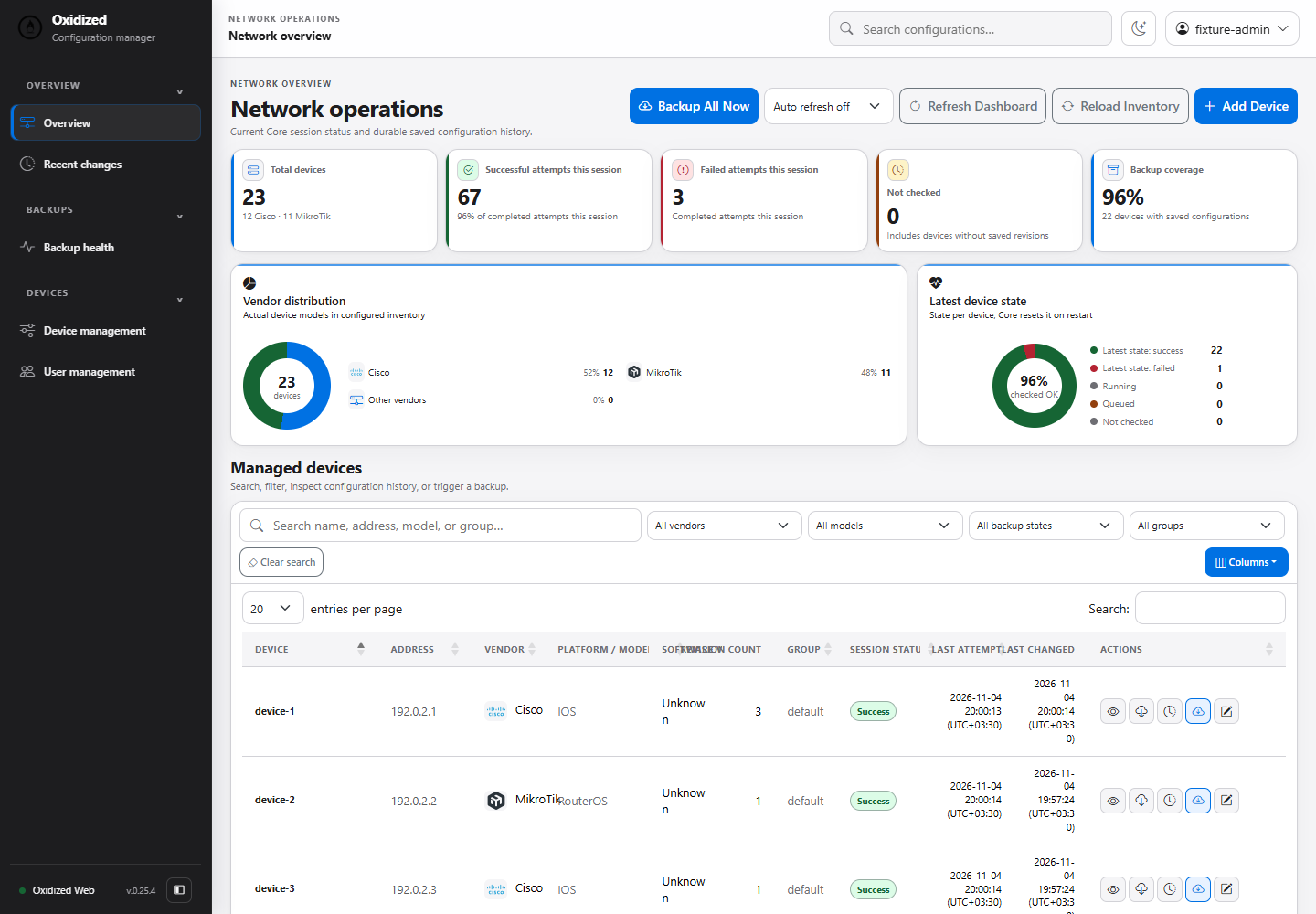
What Oxidized and its Web panel do
We will use two parts of Oxidized. Core connects to the devices and collects their configurations. Web is the panel you open in your browser to see devices, check backup status and compare saved versions.
Different devices use different commands to display their settings. An Oxidized model tells the collector which commands to run for a device type: for example, ios for Cisco IOS or routeros for MikroTik. In this guide, the Web panel runs together with the main application.
Network devices --SSH--> Core models --> Git output
                              ^              |
                              |              v
                        Web extension: Dashboard / History / Diff
These backups help you investigate changes and recover earlier settings, but they may not contain everything needed to restore a device. Passwords may have been removed, and certificates or license files may need separate copies. Test recovery on a similar device before depending on the backup during an outage.
Problems I addressed in the reviewed checkout
When I started working with Oxidized, collecting backups was only part of what I needed. I wanted the panel to make it easy to see which devices had a successful backup, what had changed and who could make changes. Some of the interface and login behavior did not fit those needs, so I examined the open-source code and kept my changes in separate forks.
Interface and timestamps
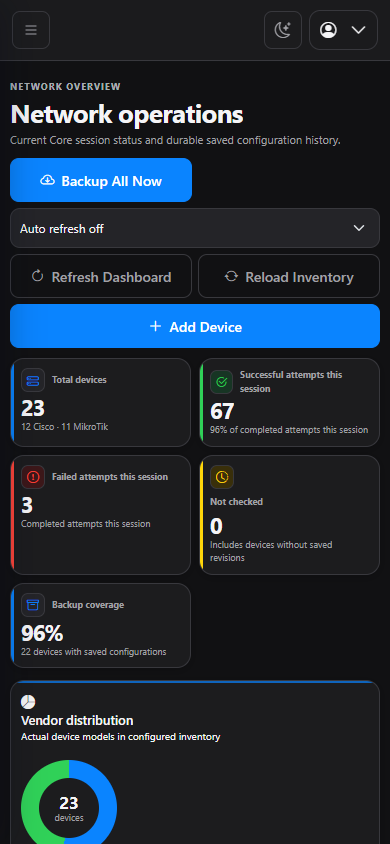
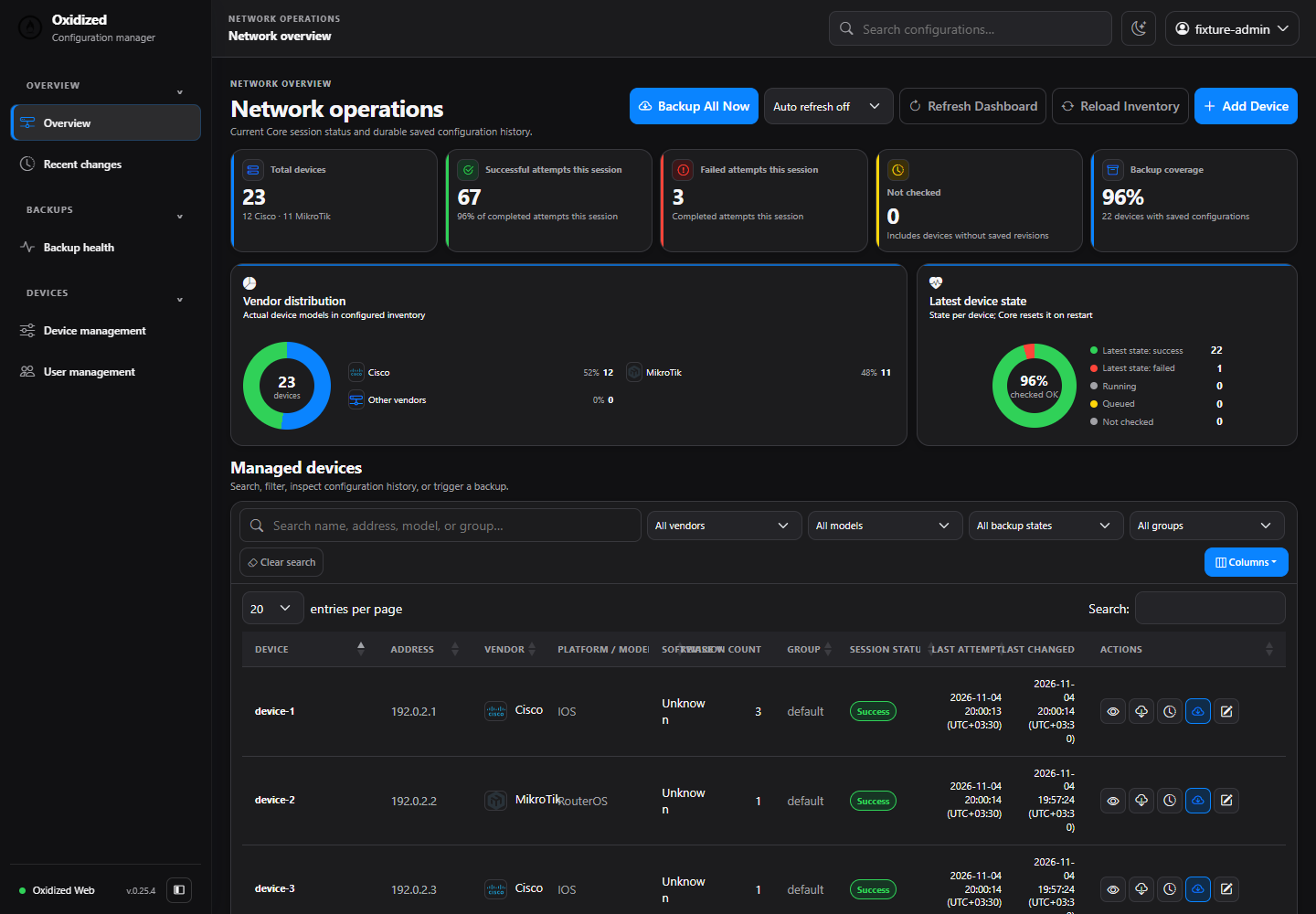
The frontend gained responsive navigation, light/dark themes, inventory filters and sorting, and line-numbered history/diff views. Early fork versions had regressions too: a legacy 30px icon-button width clipped the Backup Now label. An empty timestamp passed through Number became zero and displayed 1970; 0.24.1 validates time on both server and browser. After restart, existing history is distinguished from never having saved a backup.
Login and authentication
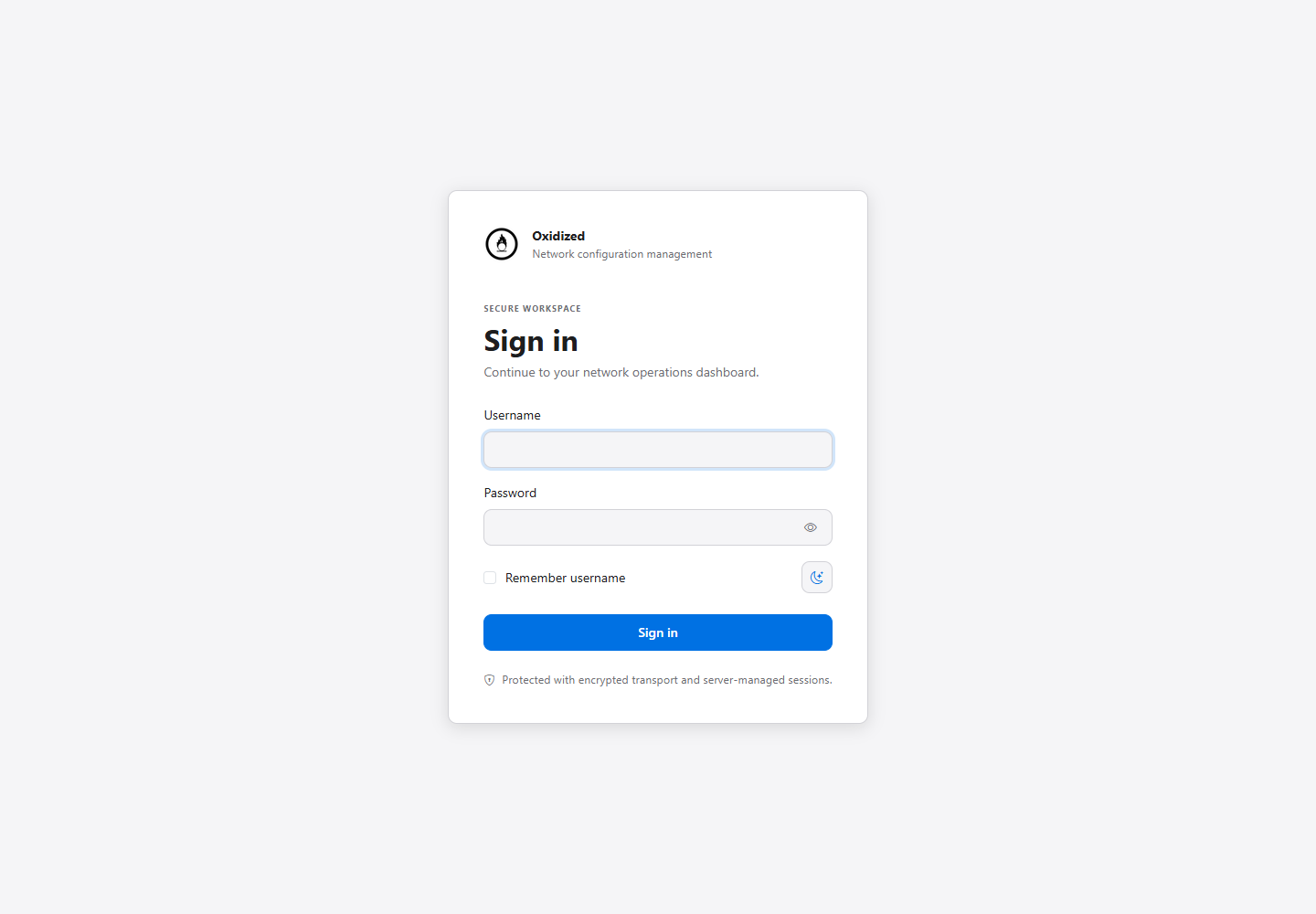
The upstream snapshot did not provide the local accounts and sessions I needed. The fork initially added Basic-auth management, then commit 2180605 in Web 0.22.0 replaced it with SQLite accounts and server-side sessions. OXIDIZED_WEB_ADMIN_PASSWORD is therefore not the current setup method, and Basic Authorization does not grant access. This adds the access model I needed; it does not claim a vulnerability in every upstream deployment.
UserStore hashes passwords with PBKDF2-HMAC-SHA256 and 600,000 iterations. Login rotates sessions; only the session identifier hash is stored. Cookies use HttpOnly, SameSite=Lax and Secure when HTTPS is required. Login throttling, session expiry, CSRF tokens and Origin/Referer checks protect state-changing requests. Backend role checks separate administrators from read-only viewers.
Backend and Core changes
Device Management supports mapped plaintext CSV. An empty form occurred when name/model/ip mappings were missing; the form now explains the missing fields. Commit 3a1bca3 also fixes reading Asetus mappings. Inventory writes use locking and atomic replacement, with rollback if refresh fails. SQL, HTTP/NetBox and encrypted CSV sources are not writable through this manager.
Core load accepts clean_obsolete: false so management reloads preserve Git history without changing the default cleanup behavior. The 0.37.3 manual queue reuses existing workers and concurrency limits, suppresses duplicate active requests and tracks real queued/running/succeeded/failed states. Queue acceptance is not successful collection. Restart loses in-memory tracking and is reported as unavailable rather than false success.
RouterOS 6/7 export headers contain generated timestamps that could create revisions without a configuration change. Core 0.37.2 normalizes that specific header while retaining real firewall, interface and firmware-version changes. Model-to-Git tests cover this behavior; they do not establish which Gem or model a production server actually loaded.
My modified Oxidized-Web for practical use
This fork builds on the original open-source project and its license. My changes focus on access control, operational clarity and trustworthy backup status. The pinned snapshot also contains CSV bulk import, startup backup queueing, encoded history/download parameters and UTF-8 search normalization. Core 0.37.4 fixes clear: true command ordering and several model prompts; these are code changes, not claims of testing every device in an enterprise.
| Area | Reviewed baseline | Pinned fork |
|---|---|---|
| Interface | Classic Haml views | Responsive navigation, themes and numbered diffs |
| Access | No fork-local UserStore | SQLite sessions, roles and CSRF |
| Inventory management | No fork DeviceInventory | Guarded CSV writes and bulk import |
| Core reload | load without the history-preserving option | clean_obsolete: false for management reload |
| Manual backup | No fork tracked-queue API | Bounded Core queue and actual execution state |
| RouterOS | Export timestamp header in reviewed baseline | Normalize export timestamp; preserve real changes |
Reviewed versions and prerequisites
This guide targets Core 0.37.4 at e6901f7f and Web 0.25.4 at 9544882. The fork documents Ubuntu 24.04 with Ruby 3.2. The following procedure is for a fresh Ubuntu 24.04 LTS installation; this editorial review did not execute it on Ubuntu or enterprise devices. The Web version alone is insufficient: bulk import landed after the 0.25.4 release commit, so the commit is pinned too.
Two vCPUs and 4 GiB RAM are a starting estimate. Capacity depends on inventory size, latency, history and AAA limits. Provide TCP/22 from the collector to management interfaces, working DNS, device command authorization and protected storage. Test the selected model against the actual firmware; IOS and RouterOS models are not interchangeable.
The comparison baseline is Web 0.18.1 at commit 83df3153 and Core at 3137b171. Statements about the original version refer to those reviewed snapshots. Defects in early versions of my own changes are identified separately.
Known hosts and historical secrets
In the reviewed Core, secure: true enables Net::SSH’s always host-key verification. Provision the service account’s known hosts with verified keys. Git history might retain old secrets. Restrict repositories/credentials and encrypt off-host copies. Do not expose optional REST/UI without authentication.
Install only a verified device host key
After the existing service account setup and before its first poll, collect candidate keys on a management workstation. Compare the SHA256 fingerprint with the device console or another authenticated inventory. ssh-keyscan alone does not authenticate a host. Do not install the candidate if it differs.
ssh-keyscan -T 5 192.0.2.10 > core-sw01.candidate
ssh-keygen -lf core-sw01.candidate -E sha256
Only after the comparison succeeds, transfer the approved file securely to the collector and run the following collector commands with sudo. Review any existing known_hosts first; the append is for one genuinely new approved host. Secure host-key verification must reject a deliberately mismatched key in staging.
sudo install -d -o oxidized -g oxidized -m 700 /var/lib/oxidized/.ssh
sudo sh -c 'cat core-sw01.candidate >> /var/lib/oxidized/.ssh/known_hosts'
sudo chown oxidized:oxidized /var/lib/oxidized/.ssh/known_hosts
sudo chmod 600 /var/lib/oxidized/.ssh/known_hosts
Install the fork on Ubuntu 24.04 LTS
AjMercury/oxidized-web · AjMercury/oxidized (Core)
The repository recommends building Gems from both forks, Core first. Its upgrade document still names 0.37.3/0.25.1; this procedure uses the same approach with reviewed commits and current artifacts. For an existing installation, stop the service and back up configuration, CSV, SQLite and Git together. The account creation below is for a fresh installation only.
1. Dependencies and source
set -eu
sudo apt-get update
sudo apt-get install -y ruby3.2 ruby3.2-dev ruby-bundler build-essential git openssh-client libsqlite3-dev libssl-dev pkg-config cmake libssh2-1-dev libicu-dev zlib1g-dev libyaml-dev libgpg-error-dev libgpgme-dev
OX_RUBY=/usr/bin/ruby3.2
oxgem() { "$OX_RUBY" -r rubygems/gem_runner -e 'Gem::GemRunner.new.run(ARGV)' -- "$@"; }
oxgem_root() { sudo "$OX_RUBY" -r rubygems/gem_runner -e 'Gem::GemRunner.new.run(ARGV)' -- "$@"; }
OX_BUILD="$(mktemp -d -t oxidized-build.XXXXXX)"
git clone https://github.com/AjMercury/oxidized.git "$OX_BUILD/core"
git clone https://github.com/AjMercury/oxidized-web.git "$OX_BUILD/web"
git -C "$OX_BUILD/core" checkout --detach e6901f7f296b55f4d0f856dc6b5b9135e78c17d7
git -C "$OX_BUILD/web" checkout --detach 9544882f058f9d2218e21f1c50e5a5af0557eeee
(cd "$OX_BUILD/core" && oxgem build oxidized.gemspec)
(cd "$OX_BUILD/web" && oxgem build oxidized-web.gemspec)
oxgem_root install --no-document "$OX_BUILD/core/oxidized-0.37.4.gem"
oxgem_root install --no-document "$OX_BUILD/web/oxidized-web-0.25.4.gem"
sha256sum "$OX_BUILD/core/oxidized-0.37.4.gem" "$OX_BUILD/web/oxidized-web-0.25.4.gem"
oxgem list --local > "$OX_BUILD/gem-manifest.txt"
command -v oxidized
command -v oxidized-web-user
"$OX_RUBY" -e '
require "oxidized"
require "oxidized/web"
{ "oxidized" => "0.37.4", "oxidized-web" => "0.25.4" }.each do |name, expected|
  spec = Gem.loaded_specs.fetch(name)
  abort "Wrong #{name}: expected #{expected}, loaded #{spec.version}" unless spec.version.to_s == expected
  puts "#{name}: #{spec.version} (#{spec.full_gem_path})"
end
'
Run these blocks in the same shell. Installation omits --local so RubyGems can resolve dependencies; local artifact building is not offline installation. Application commits do not lock transitive dependencies. Archive the manifest, Gems and checksums before production. The unit below assumes /usr/local/bin executables; adjust it if command -v reports another path.
2. Service account and configuration
sudo useradd --system --create-home --home-dir /var/lib/oxidized --shell /usr/sbin/nologin oxidized
sudo install -d -o oxidized -g oxidized -m 700 /var/lib/oxidized/.config/oxidized /var/lib/oxidized/.ssh
sudo install -o oxidized -g oxidized -m 600 /dev/null /var/lib/oxidized/.config/oxidized/config
sudoedit /var/lib/oxidized/.config/oxidized/config
Put the following in the configuration file. This example uses the netbackup device account and an SSH key; substitute your authorized account. password: null clears Core’s built-in placeholder, and auth_methods permits only public-key authentication. Web has no default account; step four creates the administrator. Replace the example domain with the actual HTTPS hostname.
---
username: netbackup
password: null
model: ios
interval: 3600
timeout: 20
retries: 2
threads: 5
input:
  default: ssh
  ssh:
    secure: true
output:
  default: git
  git:
    user: Oxidized
    email: oxidized@example.com
    repo: /var/lib/oxidized/configs.git
source:
  default: csv
  csv:
    file: /var/lib/oxidized/.config/oxidized/router.db
    delimiter: !ruby/regexp /:/
    map:
      name: 0
      model: 1
      ip: 2
vars:
  remove_secret: true
  auth_methods: [publickey]
  ssh_keys: /var/lib/oxidized/.ssh/id_rsa
extensions:
  oxidized-web:
    load: true
    listen: 127.0.0.1
    port: 8888
    vhosts: [oxidized.example.com]
3. First device and SSH access
sudo install -o oxidized -g oxidized -m 600 /dev/null /var/lib/oxidized/.config/oxidized/router.db
sudoedit /var/lib/oxidized/.config/oxidized/router.dbcore-sw01.corp.example.com:ios:192.0.2.10Replace this documentation-only hostname, address and model before running. The three-column name/model/ip mapping enables writable Device Management. Follow the Known Hosts section to verify and install the actual host key. Key generation below is interactive. A passphrase requires a secure noninteractive agent arrangement before systemd can use it. Protect an unattended unencrypted key with a restricted device account, management ACLs and file permissions.
sudo -u oxidized ssh-keygen -t rsa -b 3072 -f /var/lib/oxidized/.ssh/id_rsa
sudo cat /var/lib/oxidized/.ssh/id_rsa.pub
# Install this PUBLIC key for the authorized device account using its vendor procedure.
sudo -u oxidized ssh -o StrictHostKeyChecking=yes -o IdentitiesOnly=yes -i /var/lib/oxidized/.ssh/id_rsa netbackup@192.0.2.10
Use the actual IP from that row for the SSH test. Known Hosts must cover the destination Core connects to. Verify model-command authorization in AAA instead of granting full privilege just to clear an error.
4. Bootstrap login
sudo -u oxidized env OXIDIZED_WEB_AUTH_DB=/var/lib/oxidized/.config/oxidized/web-auth.sqlite3 /usr/local/bin/oxidized-web-user bootstrap-admin
sudo install -d -m 700 /etc/oxidized
sudo install -m 600 /dev/null /etc/oxidized/web-auth.env
sudoedit /etc/oxidized/web-auth.envOXIDIZED_WEB_AUTH_DB=/var/lib/oxidized/.config/oxidized/web-auth.sqlite3
OXIDIZED_WEB_AUTH_REQUIRE_HTTPS=true
OXIDIZED_WEB_TRUSTED_PROXIES=127.0.0.1,::1bootstrap-admin prompts for a username and hides the password and confirmation as you type them; the password must contain at least 12 characters. Bootstrap and service use the same SQLite path. Do not repeat bootstrap during an upgrade. Create viewers through User Management; changing a password or disabling an account revokes that user’s sessions.
5. Run Core and Web with systemd
Before the foreground test, provision known hosts for the actual device IP. After provisioning SSH, run the foreground collector below and check a successful collection in its logs, then stop it with Ctrl+C. Direct HTTP is not a valid login test while HTTPS enforcement is enabled.
sudo -u oxidized env HOME=/var/lib/oxidized /usr/local/bin/oxidizedsudoedit /etc/systemd/system/oxidized.service[Unit]
Description=Oxidized Core and Web
After=network-online.target
Wants=network-online.target
[Service]
User=oxidized
Group=oxidized
Environment=HOME=/var/lib/oxidized
EnvironmentFile=/etc/oxidized/web-auth.env
ExecStart=/usr/bin/ruby3.2 /usr/local/bin/oxidized
Restart=on-failure
RestartSec=10
UMask=0077
NoNewPrivileges=true
PrivateTmp=true
[Install]
WantedBy=multi-user.targetsudo systemctl daemon-reload
sudo systemctl enable --now oxidized.service
sudo systemctl is-enabled oxidized.service
sudo systemctl status oxidized.service --no-pager
sudo journalctl -u oxidized.service -n 100 --no-pager6. HTTPS and Web access
Web listens on loopback. If Nginx already has valid TLS, place this location inside its existing listen 443 ssl server and align vhosts with server_name. This is a proxy snippet, not a complete TLS or certificate issuance configuration. Prepare the proxy and certificate before enabling public login.
location / {
    proxy_pass http://127.0.0.1:8888;
    proxy_set_header Host $host;
    proxy_set_header X-Forwarded-Proto $scheme;
    proxy_set_header X-Forwarded-For $remote_addr;
}sudo nginx -t
sudo systemctl reload nginx
curl --fail --silent --show-error https://oxidized.example.com/login > /dev/null
curl --silent --show-error --output /dev/null --write-out '%{http_code}\n' https://oxidized.example.com/nodes.jsonAfter replacing the domain, /login should return 200 and the API without a session should return 401. Open the HTTPS address and sign in with the bootstrapped account. HTTPS enforcement can be disabled for isolated local development; this production-oriented procedure keeps it true. Proxy user-identity headers are not accepted.
7. Backup, history and diff
Check the first device in Device Management or add one with Add Device. For bulk CSV, use the UI template. Select Backup Now and follow queued status through completion; Backup All Now requires an administrator. Open the device history and compare two saved revisions. Unchanged collection creates no revision. Test a real reversible change only in an authorized lab, and inspect the collected output rather than relying on UI status alone.
sudo -u oxidized git --git-dir=/var/lib/oxidized/configs.git ls-tree --name-only HEAD
sudo -u oxidized git --git-dir=/var/lib/oxidized/configs.git log --oneline --all
# Use the exact collected object name from ls-tree:
sudo -u oxidized git --git-dir=/var/lib/oxidized/configs.git log -p -- core-sw01.corp.example.com
Fetch freshness differs from commit age
Measure configuration freshness by each node's last successful fetch, not merely its latest commit. A successful poll creates no new commit when configuration is unchanged. Monitor fetch duration, node failures and time since success; two polling intervals is only an example threshold, and an active systemd unit is insufficient.
Comparing two versions in the panel
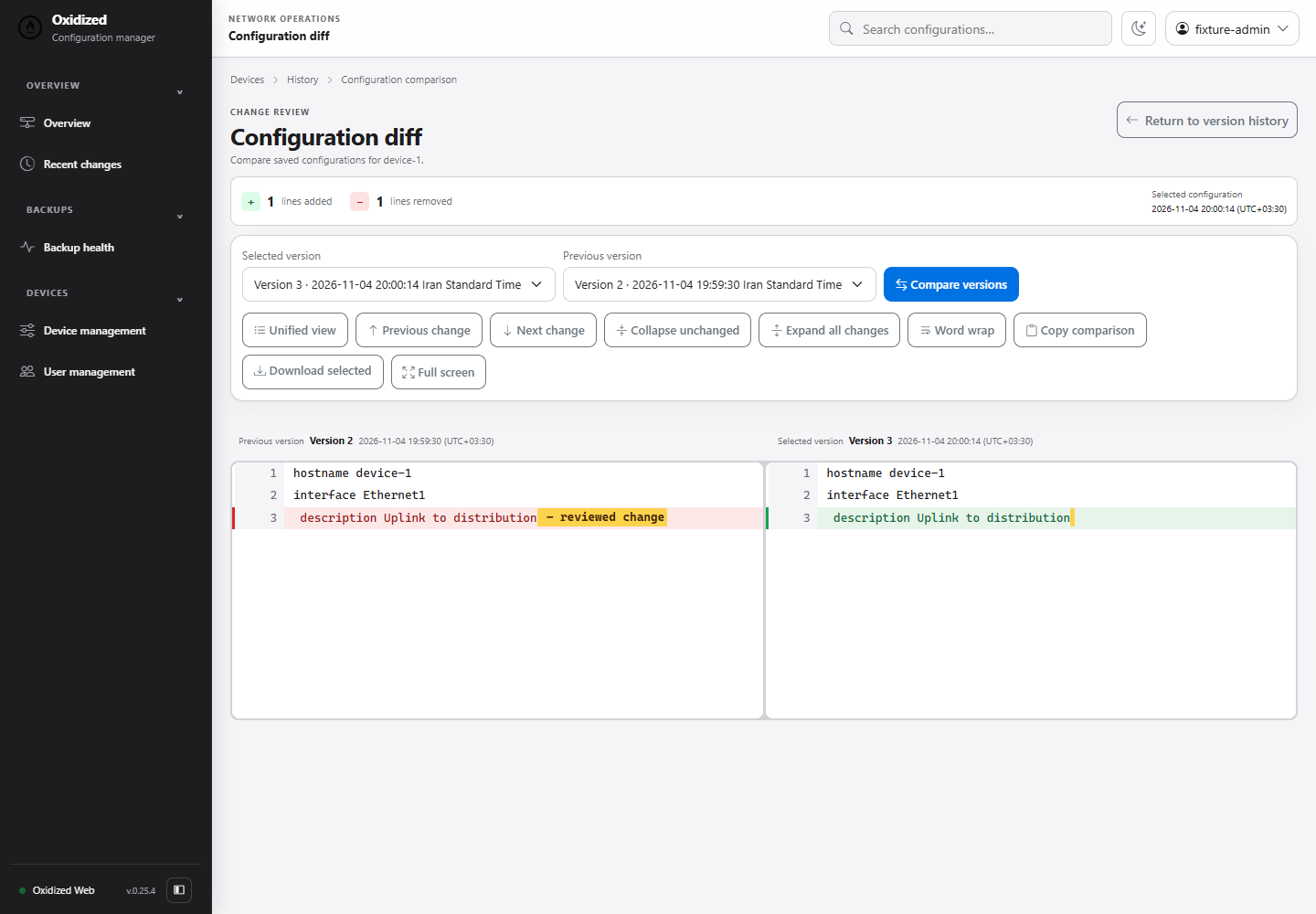
Select two saved revisions from a device’s history to compare them. In this example, one description line changed: red shows the old text and green shows the new text. This lets you focus on the change before reading the entire configuration again.
Failed nodes and incomplete configuration
For Node Failed, trace DNS, SSH, AAA and the model along the collection path. A bare repository has no working-tree files; read its content through git show. Investigate permissions through service ownership and paths. Verify a new host key through the console, and inspect command authorization and parsing for incomplete output.
For HTTPS login errors, inspect the forwarded scheme and trusted proxy address. For 403, inspect role, CSRF and Origin. For read-only forms, inspect the three required mappings and source type. A 1970 date or stale interface can indicate an old Gem or cache; inspect the active version and service path. An accepted queue request is not successful backup, and tracking may be unavailable after restart.
sudo systemctl show oxidized.service --property=ExecStart
sudo journalctl -u oxidized.service -n 100 --no-pager
sudo -u oxidized /usr/bin/ruby3.2 -e 'require "oxidized"; require "oxidized/web"; %w[oxidized oxidized-web].each { |n| s=Gem.loaded_specs.fetch(n); puts "#{n} #{s.version} #{s.full_gem_path}" }'
Restore a commit on matching hardware
Keep repositories, configuration, inventory and credential references off-host. Extract a known commit and review diff, syntax and interfaces on matching hardware. IP/interface changes risk management loss. Git exports do not contain all native device state.
Before adding a new model
Test full output and minimum model privileges on the actual firmware. If NetBox supplies inventory, convert its API response into Oxidized’s source schema. The formats differ.
For an inventory source of truth, review the NetBox installation guide. Related guide
Extract the exact collected object, not a nonexistent working file
sudo -u oxidized git --git-dir=/var/lib/oxidized/configs.git ls-tree --name-only HEAD
# Replace this object path with the exact name printed above.
sudo -u oxidized git --git-dir=/var/lib/oxidized/configs.git show HEAD:core-sw01.corp.example.com
Expect the model’s complete reviewed configuration; path not found means the object name differs or polling has not produced that object. Select an earlier known-good commit by its recorded hash for recovery. Output can contain secrets retained in history. Review commands and hardware/version compatibility offline before applying anything to a device.
In production, separate device credentials from Web accounts. Restrict Git and SQLite to the service owner; sanitizing today’s output does not erase historical secrets. Keep consistent encrypted off-host backups of configuration, inventory, SQLite and every Git output repository. Restrict HTTPS access through management ACLs or VPN, limit outbound SSH and periodically rehearse recovery on matching hardware.
Best Practices
- Version-control configuration and review changes.
- Use least privilege and explicit allow-lists.
- Automate repeatable checks and monitor the expected state.
- Test upgrades and restores before production rollout.
Conclusion
A reliable implementation of Oxidized Backups: My Core and Web Fork on Ubuntu 24.04 is more than a successful first run. Keep the configuration documented, observable, recoverable, and aligned with the team's change-management process.
Frequently Asked Questions
Why is there no config file to cat in the Git repository?
The output can be bare. Use git ls-tree and git show to read its objects.
Does an export fully restore a device?
No. Secrets, certificates, licenses and binary state may need separate backups.
Official Sources
GitHub: AjMercury/oxidized-web · GitHub: AjMercury/oxidized
Upstream Oxidized · Upstream Oxidized-Web · Authentication implementation guide