
Introduction
This guide explains Avaya IP Office Installation and Configuration: Complete Enterprise PBX Deployment Guide in a production-aware way, including the design choices, implementation checks, and operational safeguards that matter for AVAYA environments.
1. Resolve deployment prerequisites before installation
| Item | Required evidence / technical reason |
|---|---|
| Server / appliance | Supported model or signed OVA and selected deployment role; prevents an unsupported platform |
| CPU / RAM / storage | Copy exact values and reservations from the release/profile sizing table; include voicemail and recording growth separately |
| NIC / UPS / PoE | Approved virtual adapters, redundant uplinks where designed, UPS runtime and per-switch PoE budget; phones also need power in an outage |
| IP phones | Model, firmware, protocol and endpoint licence matched to 12.2; test one of every model before mass provisioning |
| Software / tools | Exact build media and checksum; compatible Windows Manager, SSA, Monitor, VM Pro client and supported Windows version from release notes |
| Licences | Virtualized Server Edition entitlement, endpoint types, SIP sessions, voicemail ports and recording/reporting entitlements checked in the order |
| VLAN / addressing | Separate voice, data and management subnets; static PBX address, mask and its own subnet gateway |
| DHCP / DNS / NTP | One voice DHCP authority, model-specific provisioning, internal records and reachable time sources; avoids boot and certificate failures |
| Routing / firewall / QoS | Bidirectional routes, signalling and media ACLs from Port Matrix, trust boundary and WAN admission policy |
| Trunk / DID / dial plan | Provider interop profile, number presentation and emergency routing; prevents unanswered or misidentified calls |
| Codec / DTMF | Agreed codec order, packetisation and RTP telephone-event support; test IVR end to end |
| IVR / voicemail / recording | Prompt owner, service hours, VM Pro capacity, recorder compatibility, storage, retention and access policy |
Record the OVA filename and hash with the exact IP Office and ESXi builds so the deployed combination remains traceable. Keep the guest resource profile, Windows and management-tool builds, and phone/firmware compatibility matrix with that record. The licence host ID and provider acceptance details are also needed; resolve missing dependencies before starting installation. Media downloads and PLDS activation may require a valid contract and authorised partner access. A forum download is not a substitute for official installation media.
2. Choose the architecture before reserving a VM
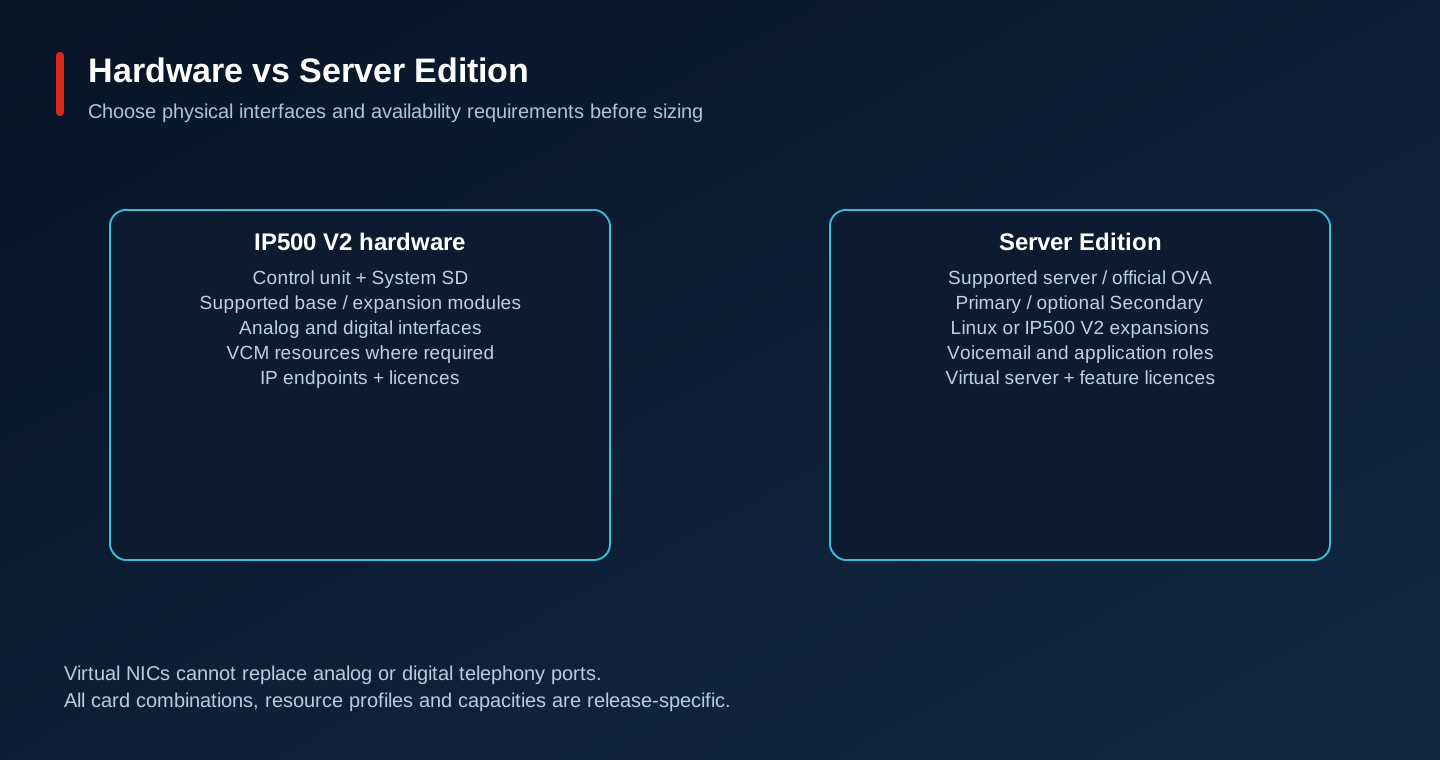
Architecture A uses an IP500 V2 control unit, a supported System SD card and supported base/expansion modules. Inventory analog trunks, analog handsets, digital stations, VCM requirements, IP endpoints and expansion power supplies. Digital phones are not Ethernet devices. An analog port requirement cannot be satisfied by adding a virtual NIC. Confirm control-unit revision, card combinations, release support and licences before buying refurbished hardware.
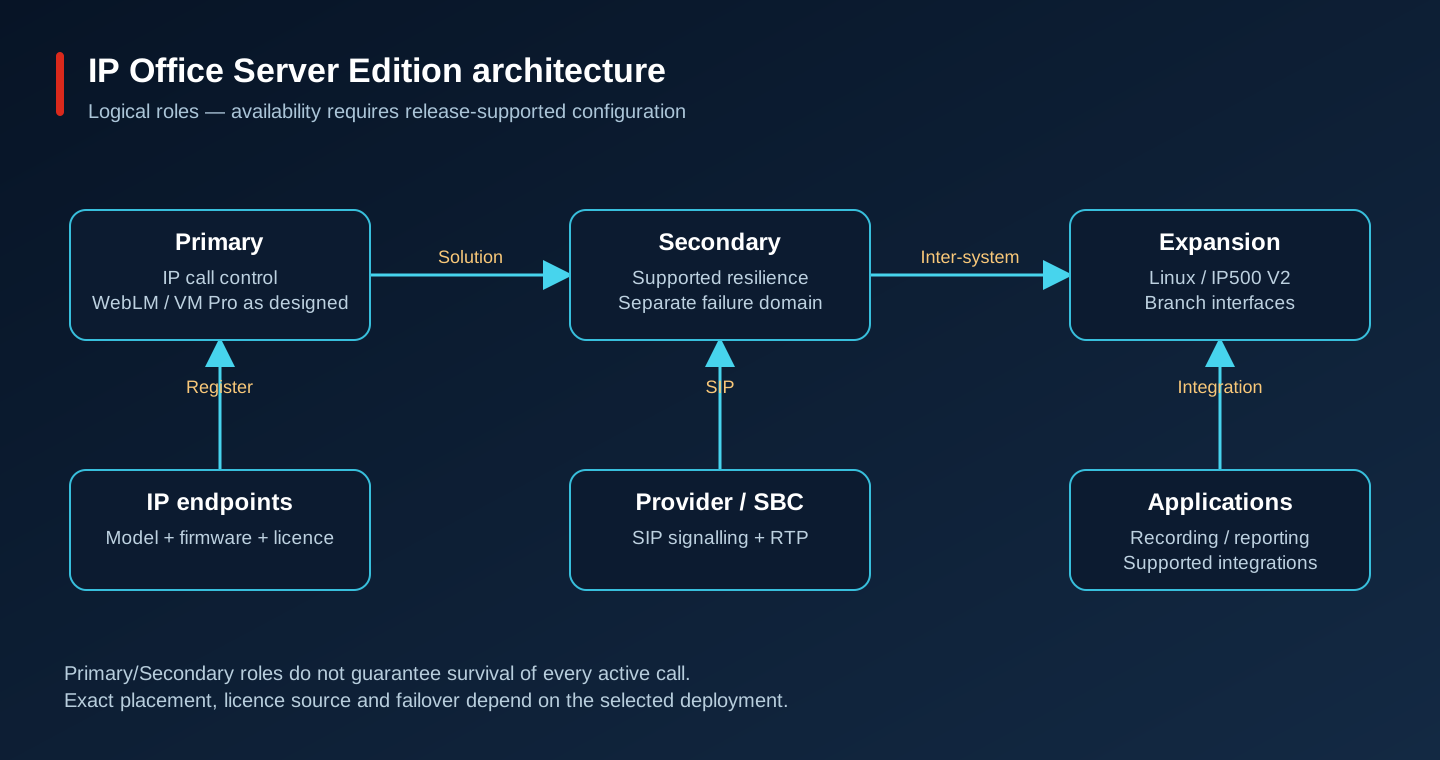
Architecture B is Server Edition: Primary anchors the solution, Secondary can provide supported resilience and additional capacity, and Linux or IP500 V2 expansion systems serve locations and interfaces. An Application Server hosts the applications appropriate to its supported role; it is not another generic call-control node. Resilience depends on endpoint type, configuration and application design. A second powered-on VM alone does not provide it.
Architecture C virtualises the supported Server Edition roles. For this organisation, plan a Primary at headquarters and evaluate a Secondary in an independent failure domain. Use local expansion/PSTN access where branch survival matters. Record the approved OVA profile, virtual hardware, vNIC type/count, CPU and memory reservations, storage performance and host compatibility. Preserve the appliance profile rather than installing a generic Linux guest and adding IP Office packages.
3. Deploy Server Edition in controlled checkpoints
Deploy the official Avaya OVA on VMware. Mounting an ISO in a hand-built VM is not the supported virtual IP Office method; ISO installation belongs to the separate supported physical-server path. Follow the installation screens and instructions for the selected build. The checkpoints below give the sequence for an isolated deployment with valid licences.
01 · Media provenance
With download entitlement ready, obtain the release-specific Avaya OVA and matching management/application packages. Verify published checksums/signatures and keep filenames in the change record. Expect a verified archive; a hash mismatch or missing signature requires a fresh trusted download, not an override.
02 · Release notes
Read the exact maintenance-build notes before opening vCenter. Record fixes, known issues, upgrade restrictions and security updates. Expect a build-specific change plan; if notes refer to another build, resolve that mismatch first.
03 · Compatibility gate
Match the release matrix to ESXi build, vCenter, virtual hardware, phone firmware and application versions. Have the partner confirm any uncertain combination. Expect documented approval for every component; an accessible generic VMware page is not sufficient.
04 · Resources
Reserve the selected profile resources on a host with failure headroom and suitable datastore latency. Record CPU, memory, disk and reservation values from the official table. Expect admission without overcommit violations; if capacity cannot be reserved, resize the infrastructure rather than reducing the appliance below its supported profile.
05 · Network readiness
Prepare the PBX service port group on VLAN 180, routed management access and approved ACLs. Check DNS, NTP and gateway reachability from a temporary test guest in that port group, then remove it. Expect correct tagged uplinks; a reachable ESXi management interface does not prove the guest VLAN works.
06 · Deploy OVA, not ISO
In the supported vSphere client deploy the supplied OVF/OVA template, review its identity, select the approved profile, host and datastore, and map its networks to the intended port groups. Import the Avaya certificate chain if required by the package instructions. Expect a new appliance VM; certificate failures must be resolved with the trusted chain.
07 · First boot
Power on only after checking the OVA network mapping and supported boot settings. Watch the console until the appliance finishes booting. Expect the documented appliance startup interface; repeated boot, missing disk or NIC errors require comparison with the supplied OVA profile, not a guest OS reinstall.
08 · Role and initial configuration
Use the documented Initial Configuration utility for the chosen build and select the Server Edition operating mode and Primary role in the deployment workflow. Initialise Primary before adding Secondary/expansions. Expect a single solution anchor; an incorrectly initialised role should be corrected before users or licences are loaded.
09 · Naming
Assign a unique supported system name and a planned hostname such as ipo-hq.example.internal. Create the corresponding internal DNS records. Expect consistent forward resolution from administration and application hosts; duplicate names or stale records must be fixed before certificates and service links are configured.
10 · Static addressing
Apply 172.16.180.50/24 and gateway 172.16.180.1 to the intended service interface using the appliance configuration workflow. Record NIC/MAC mapping. Expect the management session to reconnect at the new address; use the VM console if changing the address drops the session. Check ARP for duplicate addresses.
11 · DNS
Configure reachable internal resolvers and validate the server hostname and provider names where DNS is part of the trunk design. Expect the correct approved answers; do not replace an unresolved provider FQDN with an arbitrary address from an old capture.
12 · NTP and time zone
Configure internal NTP and the business time zone through supported settings. Verify synchronisation and timestamps in PBX/application events. Expect consistent clocks; drift breaks certificate validation, report correlation and holiday routing. Confirm UDP time traffic and upstream time health when sync fails.
13 · Credentials and trust
Set unique administrative credentials and role-limited service users, then install trusted certificates using the release procedure. Store recovery material in the approved vault. Expect authenticated management without routine shared accounts; investigate certificate name/time/chain errors instead of disabling validation.
14 · Licensing
Activate the purchased PLDS file for the WebLM host ID and upload it to the intended WebLM service. In Manager select License > Remote Server on Primary, use WebLM and its HTTPS URL, then reserve the required feature licences. Expect valid entitlements in the licence table; wrong host ID requires authorised regeneration.
15 · Service verification
Check IP Office, WebLM and Voicemail Pro status in the supported management tools and review SSA alarms before provisioning endpoints. Expect required services available with valid licences; a running VM or successful ping is insufficient. Resolve startup dependency, disk, time and licence faults individually.
16 · Management and baseline
Connect from the approved management workstation to the release-documented Web Manager URL and Manager target. Read the configuration, save an encrypted-access-controlled baseline and record service/firmware versions. Expect a clean baseline before trunk changes; if discovery fails across VLANs, enter the server address explicitly and verify the management ACL.
Avaya: Server Edition deployment and Initial Configuration utility
Avaya: release 12.2 centralized licensing procedure
Independent hardware path: IP500 V2
For an approved IP500 V2 deployment, inventory and label supported cards and expansion modules while powered down; prepare the correct System SD using the release-specific Avaya procedure; connect earth/power, LAN and expansion cabling as documented; initialise the correct operating mode; assign management/network settings; apply licences and firmware; then test analog/digital ports as well as IP registration. Do not remove a live System SD or substitute a consumer card. In a Server Edition solution an IP500 V2 expansion must be commissioned as that supported role, not as an unrelated standalone PBX.
4. Harden before allowing routine external calling
Keep management in VLAN 190 behind VPN/jump access and source ACLs. Use named administrative accounts, minimum roles and strong unique credentials; apply MFA at the remote-access layer where supported. Separate everyday operations from security/licensing administration. Disable unused services through supported settings, replace default credentials and review trusted certificate renewal dates. Do not install unrelated agents or packages inside the appliance without Avaya support.
Restrict trunk signalling to the provider/SBC networks and media to the documented peer ranges. An unrestricted Internet SIP listener invites registration attempts, scanning and toll fraud. Use an SBC when the supported topology requires it; NAT alone is not an authentication boundary. Block unauthorised premium/international destinations, restrict external forwarding and voicemail outcalling, and alert on unusual destination, concurrency, duration and after-hours spend.
Encrypt and restrict configuration backups because they may expose sensitive network and user information. Restrict and expire diagnostic captures. Keep a tested security-update process, subscribe to Avaya advisories and confirm the supported patch path before maintenance. Validate TLS/SRTP on each intended leg and test that a forbidden management source and forbidden call class are actually rejected.
5. The deployment starts with a missed call
A customer calls headquarters, gets transferred twice and hangs up before support answers. The organisation has 100 employees at headquarters, four branches, 80 IP phones, Cisco access switches, MikroTik routers and VMware infrastructure. It needs an operator SIP trunk, a separate voice VLAN, IVR, recording, a support queue, call reports and extension dialling between sites. Buying a PBX does not settle where calls go when a link fails.
Before ordering, settle ten questions: IP Office or Aura; appliance or VMware; licences and phone compatibility; provider handoff; voice VLAN discovery; inbound IVR routing; user/extension identity; and behaviour during Internet, WAN and server failures. This design uses IP Office Server Edition. Each decision below ends with something that can be tested or recorded in the handover.
6. IP Office release and component compatibility
The configuration reference is IP Office 12.2 with perpetual PLDS/WebLM licensing, Server Edition Primary and Voicemail Pro. The public 12.2 Manager documentation provides the field names used here. This is a release-pinned engineering guide, not a claim that every 12.x build, phone or hypervisor is supported today. Select the exact maintenance build with the authorised Avaya partner and retain its release notes, security advisories, lifecycle status and compatibility evidence before installation.
Check the release text when using the virtualization manual: the available guide is in a 12.3 bundle, but its virtual-server page describes R12.1. It establishes the OVA deployment method, not compatibility with a specific ESXi patch or the resource profile for 12.2. Obtain the 12.2 sizing matrix and exact phone/firmware list from the partner before creating the VM; those details determine the supported resources and equipment.
Avaya: IP Office virtual servers — read the release text, not just the bundle URL
7. IP Office and Aura solve different operating problems
IP Office combines call control, users, trunks and routing in a comparatively compact solution. IP500 V2 supplies physical telephony interfaces; Linux-based Server Edition supplies IP call control with optional expansion systems and applications. Capacity is constrained independently by edition, server profile, endpoints, concurrent calls, voicemail ports and trunk licences. Eighty phones is an inventory count, not a concurrency calculation.
Aura is a broader enterprise architecture: Communication Manager supplies telephony features, Session Manager handles SIP session routing and System Manager centralises administration. It suits requirements that justify several separately maintained components and enterprise integrations. Do not apply Aura installation instructions or Session Manager registration steps to this IP Office deployment.
| Criterion | IP Office | Aura |
|---|---|---|
| Deployment complexity | Fewer integrated roles; still requires design | Multiple coordinated services and dependencies |
| Architecture / management | Primary, Secondary, expansions; Manager/Web Manager | CM, SM, SMGR and application-specific tools |
| Licensing | Edition, virtual server, endpoint, sessions, applications | Component and enterprise entitlement planning |
| Scalability | Validate edition and solution limits in the selected release | Broader enterprise scale with corresponding design cost |
| Maintenance / virtualisation | Release-matched OVA and application lifecycle | Separate supported appliance/VM profiles per component |
| Multi-site | Server Edition network and supported resilience | Enterprise SIP topology and branch architectures |
8. Voice network: make the addressing consistent
| Component | Example only |
|---|---|
| Voice VLAN / subnet | 110 / 172.16.110.0/24 |
| Phone gateway | 172.16.110.1 |
| Data VLAN / subnet | 120 / 172.16.120.0/24 |
| PBX service VLAN / subnet | 180 / 172.16.180.0/24 |
| Avaya Primary / gateway | 172.16.180.50 / 172.16.180.1 |
| Management VLAN / subnet | 190 / 172.16.190.0/24 |
| Internal DNS / NTP | 172.16.180.10 / 172.16.180.11 |
| SIP provider | Provider-supplied addresses and media ranges |
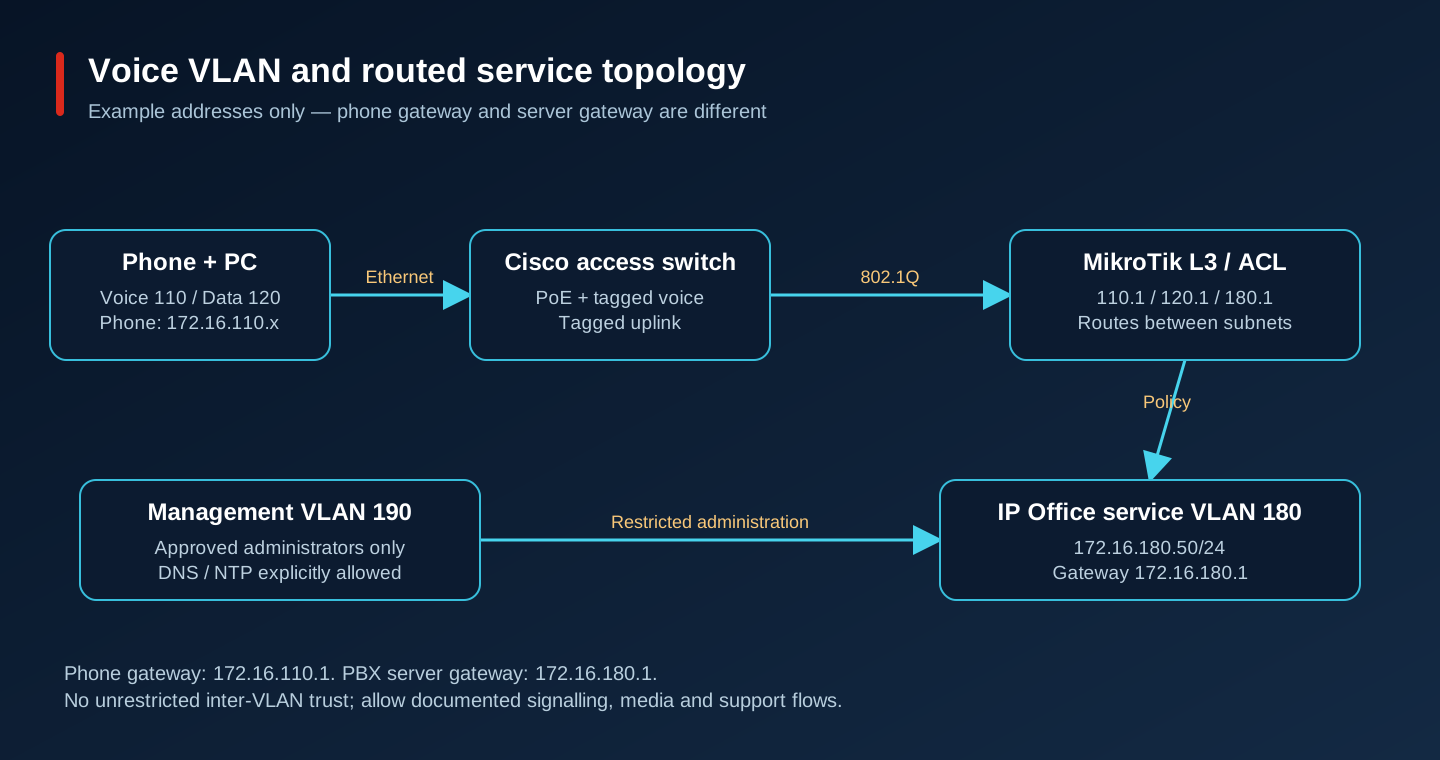
The phone gateway 172.16.110.1 is not the PBX gateway: the server is in subnet 180. Route between them through an ACL-controlled L3 boundary. Do not put 172.16.110.1 into the server default route. Restrict administration from management VLAN 190 and permit voice endpoints only the required provisioning, signalling, media and supporting services. All addresses and VLANs here are examples.
Cisco IOS / IOS XE access switch example
This is a Catalyst-style L2 access-switch baseline, not a universal switch configuration. Gi1/0/1 connects one phone with a PC behind it; Gi1/0/48 is a tagged uplink to the router. The router owns DHCP and gateways. Adapt interface names and validate commands on the actual switch release. Keep the existing native-VLAN agreement on both uplink ends.
configure terminal
vlan 110
 name VOICE
vlan 120
 name DATA
vlan 180
 name PBX-SERVICES
vlan 190
 name MANAGEMENT
lldp run
interface GigabitEthernet1/0/1
 description IP-PHONE-AND-PC
 switchport mode access
 switchport access vlan 120
 switchport voice vlan 110
 power inline auto
 spanning-tree portfast
 spanning-tree bpduguard enable
 lldp transmit
 lldp receive
interface GigabitEthernet1/0/48
 description TAGGED-UPLINK-TO-ROUTER
 switchport mode trunk
 switchport trunk allowed vlan 110,120,180,190
end
show interfaces GigabitEthernet1/0/1 switchport
show interfaces trunk
show power inline
show lldp neighbors detail
Expect untagged PC traffic in VLAN 120, tagged phone traffic in 110, sufficient PoE and all four VLANs on the uplink. LLDP-MED voice discovery depends on phone model and firmware; switchport voice vlan alone cannot guarantee an Avaya phone learns VLAN 110. Verify the received network policy on the phone. Where the model uses DHCP/provisioning VLAN parameters instead, apply its own Avaya guide and test reboot behaviour. Avoid advertising conflicting VLAN settings through two methods.
QoS is deliberately platform-specific. Older Catalyst platforms use mls qos commands; newer IOS XE platforms use their supported policy/Auto QoS model. Do not paste both. Classify approved voice RTP as EF (DSCP 46), protect signalling using the agreed class, police untrusted PC markings and inspect egress queue drops. Trusting every frame on a phone/PC port lets the PC steal voice priority. Confirm the actual policy through show policy-map interface where supported and the platform queue counters.
MikroTik RouterOS 7: routed VLAN example
/interface vlan
add name=voice110 interface=ether2 vlan-id=110
add name=data120 interface=ether2 vlan-id=120
add name=pbx180 interface=ether2 vlan-id=180
add name=mgmt190 interface=ether2 vlan-id=190
/ip address
add address=172.16.110.1/24 interface=voice110
add address=172.16.120.1/24 interface=data120
add address=172.16.180.1/24 interface=pbx180
add address=172.16.190.1/24 interface=mgmt190
/ip pool
add name=voice-pool ranges=172.16.110.20-172.16.110.199
/ip dhcp-server
add name=voice-dhcp interface=voice110 address-pool=voice-pool disabled=no
/ip dhcp-server network
add address=172.16.110.0/24 gateway=172.16.110.1 dns-server=172.16.180.10
/ip dhcp-server lease print detail
/ip route print
/ip firewall service-port print where name=sip
Run this only on a prepared lab router with ether2 dedicated as an unbridged tagged uplink. If ether2 already belongs to a VLAN-filtering bridge, create VLAN interfaces on the bridge and configure its VLAN table/CPU membership instead; stacking this example onto an existing bridge can break isolation. It creates no Internet exposure and no firewall policy. Before using it, add explicit forward/input ACLs to your existing policy, in the correct order, including established/related traffic, management sources and only documented endpoint/PBX/provider flows.
Obtain signalling ports, transport and RTP ranges from both the selected IP Office Port Matrix and the provider. Allow the intersection of required flows in both directions; RTP may come from different provider networks than SIP. Use private routing for internal sites and provider-specific NAT/SBC design for external service. Inspect SDP c= and m= addresses against reachable media paths. A broad UDP allow or a blanket port-forward is not a design.
Inspect the MikroTik SIP helper before changing it. Compare captures before/after NAT and follow the provider/SBC interoperability recommendation. If the helper rewrites SDP incorrectly or conflicts with the SBC, disable it in a controlled test using /ip firewall service-port disable sip, re-establish test sessions and verify inbound, outbound, hold and transfer. Keep a rollback using enable sip. Disabling it is not a substitute for correct routing, NAT bindings and firewall rules.
Measure WAN quality under competing load
Track one-way latency, jitter and packet loss, not just ping averages. A practical planning target is one-way latency below about 150 ms, jitter below about 30 ms and loss well below 1%; these are engineering targets, not Avaya support limits or a guarantee of intelligibility. Burst loss can ruin speech despite a good average. Measure RTP sequence gaps and jitter at the receiving edge and correlate them with interface drops.
For G.711 with 20 ms packetisation, payload is 160 bytes per packet, 50 packets/s. Adding 40 bytes of IPv4/UDP/RTP gives 80 kbit/s per direction before Ethernet, VLAN, VPN and other overhead. Multiply by concurrent calls crossing each WAN link, then add actual encapsulation and headroom. Recording, conferences and transcoding change resource demand. Shape at the real WAN bottleneck, reserve a bounded priority queue and verify DSCP survives VPN encapsulation. Review FastTrack interactions if RouterOS queues are used.
9. Install Manager and control configuration changes
Use the Windows administration package compatible with the PBX build. Check the release notes for the supported Windows OS and prerequisites, verify the installer, install Manager and the included diagnostics, and launch from a secured management workstation. Do not use an old installer simply because discovery still finds the server. Tool compatibility matters when reading and writing new configuration fields.
Open the configuration from the selected system. Use discovery on the local management network or enter its address across routed boundaries. Authenticate using an authorised service user, read the current configuration and immediately save an untouched baseline with server, build and timestamp in the filename. Inspect the target system name before editing; two lab and production systems can have similar addresses.
Create the intended change offline, validate it, then send it back in a maintenance window. Saving a file on Windows is not sending it to IP Office. Review the merge/restart impact before accepting: some changes restart a line or system and drop calls. Re-read the live configuration afterwards and place a test call. Keep before/after files and a rollback decision; avoid two administrators overwriting each other’s stale copies.
Manager is the Windows configuration client with offline file workflows. Web Manager is the browser administration interface; available operations and online/offline editing rules depend on the release. Neither should be exposed directly to the Internet. Use VPN or a controlled jump host, restricted source ACLs, named roles and audit records. Back up security settings and application data through their own supported procedures: a Manager configuration file is not a full appliance backup.
10. Create users, extensions and registrations
| Purpose | Numbers |
|---|---|
| Reception | 100 |
| IT | 110 |
| Sales | 200–219 |
| Support | 300–319 |
| Management | 400–409 |
A User represents the person/service identity, permissions and personal features. An Extension represents the endpoint/port registration and device relationship. Their numbers normally align in this simple deployment, but they are different objects. Hot desking, forwarded users and physical ports make that distinction important. Reserve separate, non-overlapping ranges for groups, service codes and branches before creating users.
First create a restricted User Rights template for ordinary employees: local/national dialling as approved, no international or premium access by default, appropriate voicemail and forwarding rules. In Manager create the Reception user with Name Reception and Extension 100, then create the appropriate SIP extension with Base Extension 100. Assign the intended user/device, set a unique extension authentication credential through the release-specific extension/user security fields and provision that credential securely to the phone. Do not reuse the extension number as its password.
Enable the required SIP registrar service on the intended LAN interface, verify the endpoint licence and apply only the necessary change. On a supported phone configure the PBX registrar address/domain, extension identity and authentication credentials using that model’s provisioning guide. Firmware, protocol personality and certificate trust must match; an arbitrary SIP phone is not automatically supported. H.323 endpoints follow their own configuration path and must not be treated as SIP registrations.
Read the configuration back, confirm extension 100 is registered in SSA, then call 110 in both directions. Test hold, attended transfer, voicemail and an explicitly permitted outbound call. Check that a forbidden destination fails for the intended policy reason. Only after this passes, clone the approved user template for Sales 200–219, Support 300–319 and Management 400–409, keeping authentication unique. Device MAC/serial inventory should map back to the user and switch port.
11. SIP trunk: agree the provider contract first
Request the registrar and proxy/SBC addresses, SIP domain, registration/authentication method, auth ID and realm if used, transport/ports, allowed source IPs, public/private handoff, media subnets and RTP ports, DID list and exact delivered number format. Also obtain codec order, packetisation, DTMF method, concurrent-session limit, caller-ID/PAI rules, emergency-number rules, failover endpoints, TLS certificate requirements and the tested Avaya interoperability profile for this release. A username and password alone are not a complete handoff.
IP authentication authorises calls by the approved signalling source and trunk policy; it may have no REGISTER exchange. Registration-based service uses REGISTER and, commonly, a digest challenge. A 401/407 challenge followed by a successful authenticated transaction can be normal. Neither model removes the need to validate provider source networks and media paths. An OPTIONS response indicates reachability, not successful DID routing or two-way speech.
Configuration sequence in the 12.2 Manager model
Create a SIP Line with a unique Line Number. Set ITSP Domain Name to the provider-approved domain; on SIP Transport set the approved proxy, Layer 4 transport and local interface/topology selection. Configure SIP credentials and registration only when required by the provider profile. On the media settings select only the negotiated codecs, DTMF and security options. Keep the line out of user routing until the configuration has been reviewed.
Avaya 12.2: SIP Line fields and change impact
Add a SIP URI entry under Call Details. In this example set Incoming Group 50 and Outgoing Group 50 and cap sessions at the licensed, contracted concurrency. Choose URI/header population according to the provider profile; do not blindly copy Use Internal Data if it would expose extension numbers as public identities. Create an Incoming Call Route with Line Group ID 50 and the DID exactly as received in the selected SIP header. Outbound short codes/ARS must eventually select Outgoing Group 50.
Avaya 12.2: SIP URI groups and incoming/outgoing matching
For a lab DID, use a documentation-only number such as +982155550100 and replace it with the assigned number before testing. Capture one inbound INVITE and record which number reaches Incoming Number matching; operators may send national, E.164 or shortened digits. Start by routing that exact DID to Reception 100. After a successful two-way call, move it to the IVR. If routing fails, compare the received header and group IDs before widening any match.
Avaya 12.2: SIP Line requirements
TLS protects supported signalling hops; SRTP protects supported media legs. Enable them only with a mutually supported provider/endpoint profile, trusted certificate chain, correct names/time and agreed cipher/security policy. SIP over TLS does not automatically encrypt RTP, and a secure external leg does not prove the internal leg is secure. Where an SBC terminates encryption, document both trust boundaries.
PSTN / SIP Provider
        |
        v
Enterprise Firewall / SBC (where designed)
        |
        v
Avaya IP Office
        |
        v
Incoming Call Route (group + received DID)
        |
        v
IVR / Reception / Hunt Group
        |
        v
User Extension

RTP follows negotiated SDP endpoints; it need not follow every signalling hop.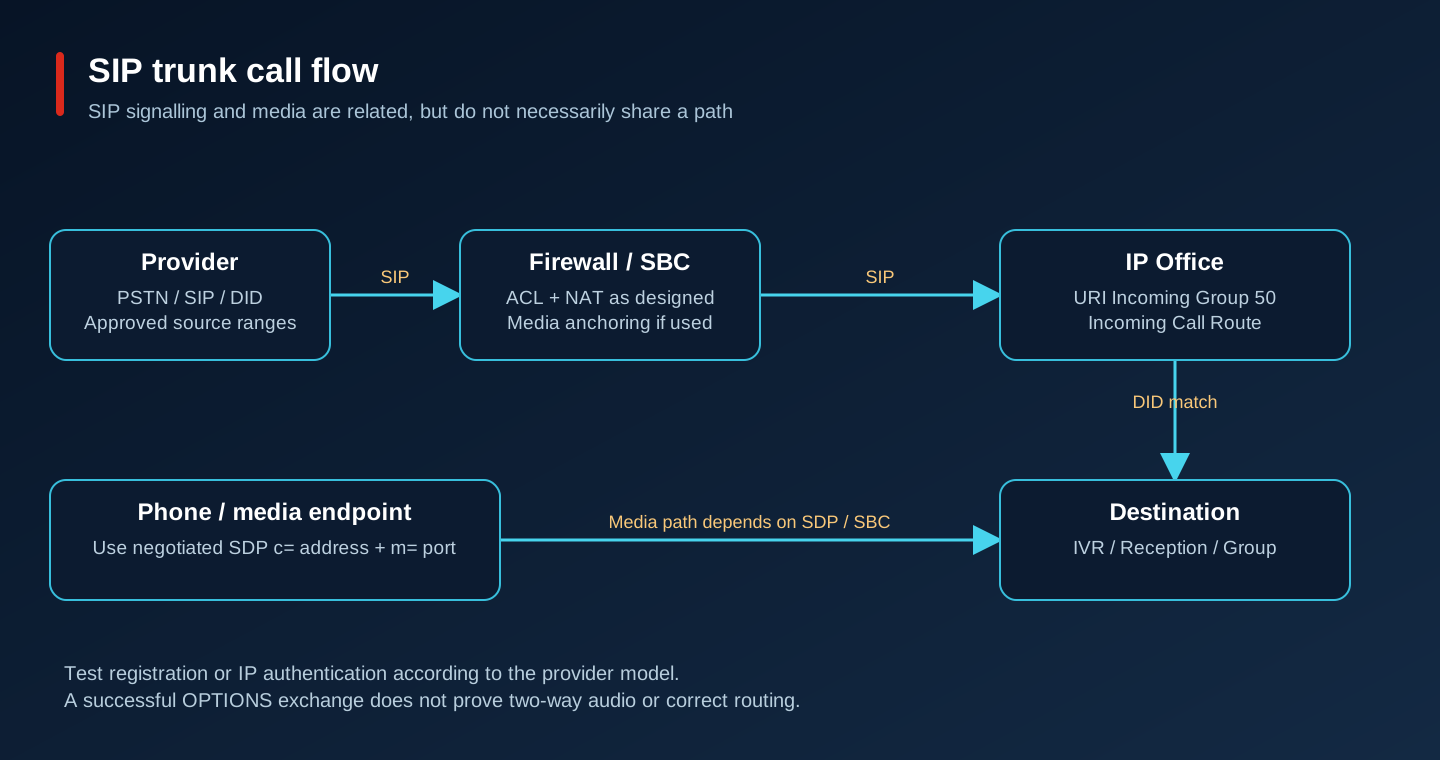
12. Route calls deliberately, including emergencies
Incoming Call Routes match the trunk group and received called/calling information. DID mapping selects a destination. Outbound routing in IP Office is built from short codes and ARS, not a generic route object copied from another PBX. Short codes recognise dialled patterns and ARS selects the allowed line group and fallback policy. Normalise numbers once, document whether an access prefix is stripped, and make overlapping patterns explicit.
| Scenario / call flow | Configuration and acceptance |
|---|---|
| Reception: provider → group 50 → exact main DID → 100 | Incoming Call Route destination 100; test from an external mobile and verify caller ID |
| IVR: provider → main DID → VM:Main → menu | Change only after Reception routing works; test each key, timeout and invalid input |
| Director: provider → assigned direct DID → 400 | Specific DID match, destination 400, then its approved no-answer/voicemail behaviour |
| Outbound: user → short code → ARS → outgoing group 50 → provider | Restrict allowed national patterns; send authorised public CLI, never arbitrary spoofed identities |
| International: ordinary user → restricted rights → reject | Block international/premium patterns, test alternate formats and forwarded-call escape paths |
| Emergency: user/site → explicit emergency pattern → available local provider | Use locally verified numbers, correct site identity/location and agreed provider test procedure |
A minimal laboratory national-call example is Code 9N, Feature Dial, Telephone Number N, Line Group ID 50: the user dials access digit 9 and N is sent to the trunk. It is intentionally too broad for production. In the real configuration, send the approved access pattern to a dedicated ARS entry and permit only the documented destination classes there. Validate digit collection and overlap with internal numbers in Manager. Do not import generic Asterisk dial patterns.
Emergency calls need a separate review with the local operator: do not assume a country’s emergency digits or route them through an IVR, account-code prompt or an international restriction. Verify site-specific presentation and WAN-outage behaviour using the provider-approved test process. Never make an unsolicited live emergency test call. Record which branch still has a usable external path when headquarters is unavailable.
13. Build a Voicemail Pro auto attendant
This path uses Voicemail Pro with the required edition/ports and compatible client. An auto attendant is a call-flow function; do not confuse an Embedded Voicemail menu on an appliance with the VM Pro workflow. Confirm the application is linked to the correct IP Office, its service is available and licensed ports are sufficient before changing inbound routing. Record a clean voice prompt in the audio format accepted by the selected VM Pro build. TTS is optional and may need its own entitlement.
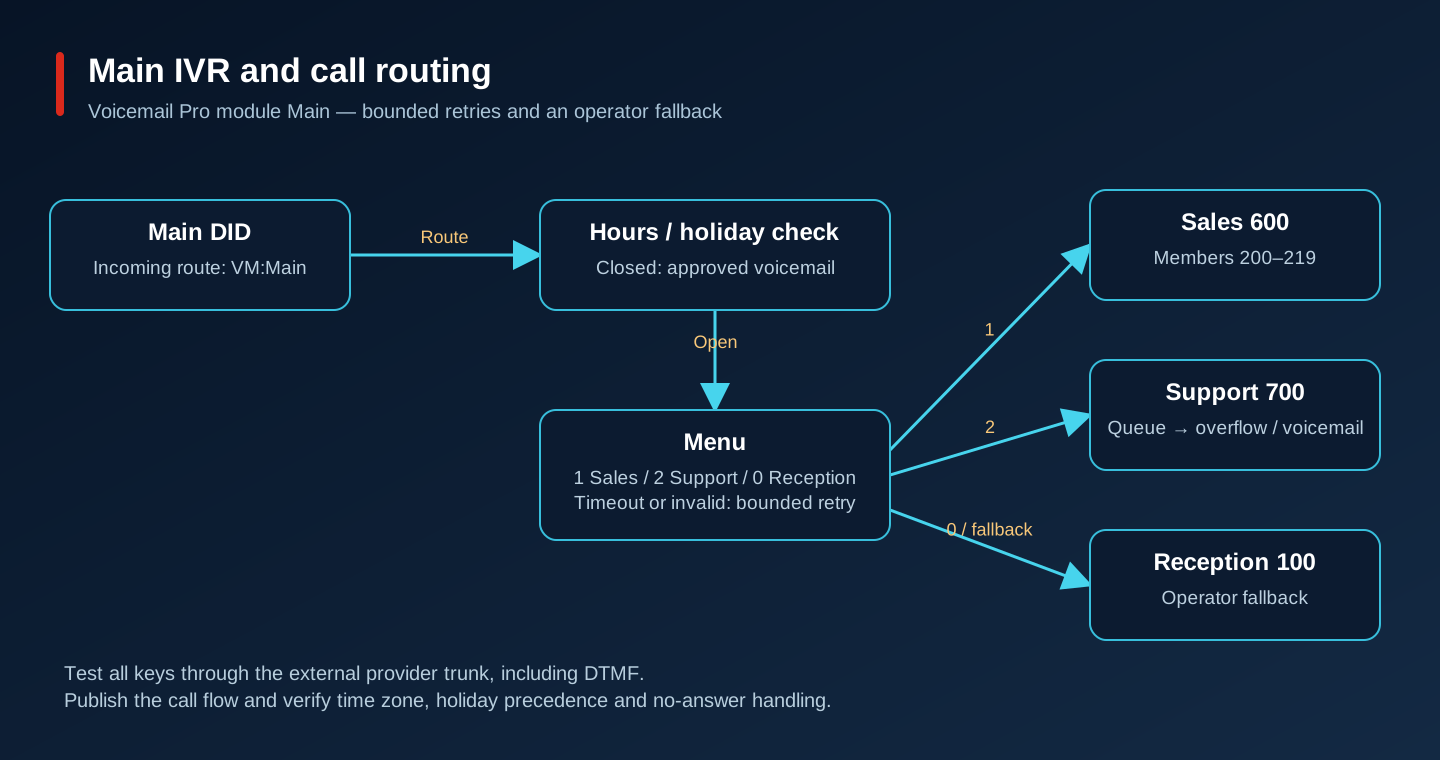
Create a module named Main in the VM Pro client. Connect its Start Point to time/calendar handling and then a Menu action. Put the greeting on the appropriate action’s Entry Prompts rather than on the Start Point. Configure touch-tone exits 1, 2 and 0; connect them to Transfer actions for Sales group 600, Support group 700 and Reception 100. Define those groups first. No branch should terminate in an unconnected action.
Persian prompt: «به شرکت خوش آمدید. برای ارتباط با واحد فروش عدد 1، پشتیبانی عدد 2 و اپراتور عدد صفر را شمارهگیری کنید.» For an English caller: “Welcome. For Sales, press 1. For Support, press 2. To speak to reception, press 0.” Keep the prompt short enough that callers can remember the choices.
Connect timeout to one repeat and then Reception; send invalid input to a short correction prompt and a bounded retry. Implement business hours, after-hours voicemail and holiday overrides with the supported VM Pro condition/calendar actions. Verify time zone and holiday precedence. Save & Make Live in the client, then point the main DID’s Incoming Call Route destination to VM:Main. Test from the provider trunk, not just an internal phone: DTMF can work internally and fail across the trunk.
Avaya 12.2: available Voicemail Pro call-flow actions
14. Support group and queue for ten operators
Create Support hunt group 700 and add users 300–309 as its ten initial members; keep 310–319 reserved for growth. Choose a supported distribution method to match the operating policy, for example longest-idle distribution where available. Verify membership, login/availability, DND and forwarding before blaming the queue. A hunt group is the destination and distribution policy; a queue holds callers waiting for a member. Neither automatically gives skills-based contact-centre analytics.
Enable group queuing and configure supported announcements, ring/no-answer handling and overflow. As a design example, offer an announcement after 20 seconds and overflow at 90 seconds to a staffed backup group or voicemail, but set the actual values with support management. Confirm the selected mechanism supports the requested timed behaviour; use VM Pro logic where group settings alone cannot express it. Define out-of-service and night destinations separately.
Occupy all ten members with controlled lab calls, then call the main DID and choose 2. Expect queue entry, the approved announcement, eventual delivery or overflow, and a traceable record for abandonment. Test an unavailable member and an unanswered ring. Define whether “missed” means abandoned in queue, unanswered at one agent or a final group failure; these are different metrics. SMDR can support call accounting, but queue/agent KPIs require a compatible reporting or contact-centre solution and its licences.
15. Recording is a separate data service
Design recording capture, delivery, indexed storage and playback access separately. For the chosen release evaluate the supported Voicemail Pro/Media Manager path or a certified third-party recording integration with the required entitlements. Do not promise that every Server Edition licence includes unlimited recording or searchable archive. Check simultaneous recording load, voicemail ports, recorder compatibility and the exact Media Manager deployment prerequisites before enabling it.
Enable manual recording only for authorised users/buttons; configure automatic recording by the supported user/group/trunk policy according to the retention scope. Place a call, record it, confirm the file arrives in the supported repository, search and play it as an authorised reviewer, then confirm an ordinary user cannot retrieve it. Repeat for inbound, outbound, transferred and conference scenarios in scope. A visible recording icon does not prove durable storage.
Estimate storage from measured recording bitrate, recorded seconds and retention, then add indexes, replication and recovery headroom. Set capacity alarms before expanding automatic recording. Encrypt backups, restrict export, audit playback and assign responsibility for deletion, legal hold and restore. Obtain legal/privacy approval for notification, consent where required, access and retention in the relevant jurisdictions. Test announcement playback before recording starts.
16. Five sites: headquarters plus four branches
Use one organisation-wide dial plan and a site inventory. Keep the headquarters ranges above; for example reserve 51xx–54xx for the four branches after checking all short-code overlaps. Route sites over private WAN or appropriately secured VPN with known MTU, QoS and symmetric return paths. Configure supported IP Office inter-system lines/Server Edition relationships, directory and routing through the release deployment workflow. A VPN creates reachability; it does not create PBX peering.
A branch with only phones registered to headquarters loses that registration path when WAN fails. Local switched Ethernet and PoE do not supply call control. Supported local expansion/call control and local trunks can keep some branch services usable, but the exact supported phone failover, user resilience, voicemail and licensing behaviour must be designed and tested. Do not promise seamless survival of active calls or recording continuity.
Test four separate failures: public Internet only, inter-site WAN, Primary service and ESXi host. Internal calls can continue during an Internet outage if local call control, DNS/NTP and provisioning remain reachable; provider calls depend on whether its access circuit uses that failed path. VMware HA restarts a VM after host failure and involves an outage; it is not IP Office application resilience. A Secondary helps only the supported, correctly configured services and endpoints.
For each failure, record active-call loss, new-call capability, registration recovery time, emergency path, voicemail availability and failback behaviour per site. Reserve WAN bandwidth per concurrent inter-site media stream, including calls anchored through headquarters. Ensure Secondary does not share the failed host, storage, power and network dependencies you intended to survive. A branch outage test must include an external call from that branch.
17. Backup, monitoring and maintenance that can recover
After each accepted change, save the Manager configuration and use the supported server/application backup workflow for security settings, voicemail configuration/messages/prompts and recorder data/indexes. Record what each backup includes and excludes. Copy it to an access-controlled encrypted off-appliance repository with retention and an independent recovery copy. A VM snapshot is not the only backup and must follow Avaya’s restrictions; do not take live snapshots based on generic VMware habits.
Perform a restore rehearsal in an isolated network with provider access and duplicate endpoint registration blocked. Restore the supported matching build, then configuration, application data and security material in the documented order. Validate licence host binding before changing VM identity; keep entitlement IDs, licence files and partner recovery contacts. A copied licence file may require authorised rehosting and cannot be assumed valid on a replacement VM.
Avaya 12.2: centralized licence host binding
For upgrades, inventory all server roles, phones, VM Pro, management clients, recorder and reporting integrations. Read the exact upgrade notes, take verified backups, stage the approved package, define rollback and outage communication, then test a representative lab before scheduling production. Upgrade components in the documented order. Do not upgrade VMware Tools independently just because vCenter offers a newer generic version.
Monitor service availability, trunk state, endpoint counts, licence alarms, voicemail/recording disk growth, call-session utilisation and call quality. Use SSA/Monitor and application logs for investigation; retain only appropriately protected evidence. Compare daily registration counts with inventory and investigate a gradual rise in failed or short calls before a complete outage. A successful TCP connection to a management page is not a successful telephone call.
Zabbix can receive documented IP Office SNMP alarms/traps through a properly configured SNMP trap receiver and supported MIBs. Avaya documents SNMP management events including voicemail capacity warnings. This does not establish a built-in Zabbix integration, an arbitrary OID for every KPI, or support for installing a Zabbix agent inside IP Office. Confirm enabled SNMP version, destinations and MIB/OID support for the exact build; restrict collector access and test a safe alarm against SSA. Monitor VMware through its separately supported integration and use a licensed reporting/SMDR collector for call records where appropriate.
Avaya: SNMP management console capabilities (general capability, verify exact-build MIB support)
18. Deployment acceptance checklist
For each row record pass/fail, timestamp, tester, evidence location and any agreed exception. Do not mark an unlicensed, untested or unavailable feature as passed. The owner must accept its limitation before operational handover.
| Check | Acceptance evidence |
|---|---|
| Network | Correct VLAN, lease, PoE, subnet gateway, bidirectional routing and explicit ACL counters |
| DNS / NTP | Correct records and synchronised server/application/phone timestamps |
| Licensing | Valid host-bound entitlements for every enabled role and feature |
| SIP Trunk | Inbound/outbound speech, CLI, DTMF, hold, transfer and concurrency |
| Extension registration | Every model reboots and registers with correct unique identity/rights |
| Inbound / outbound | Main/direct DID, permitted classes and forbidden class tests recorded |
| IVR | All choices, timeout, invalid input, hours and holidays verified externally |
| Hunt groups / queue | Ten-agent busy test, overflow, abandonment and report definitions agreed |
| Voicemail | Leave, retrieve, permissions, capacity alarm and restore tested |
| Recording | Notification, stored/retrieved audio, access denial, retention and backup |
| QoS | Load test meets approved measured quality targets and queue drops reviewed |
| Backup / DR | Isolated restore with measured recovery time and licensing recovery path |
| Security | Management source restrictions, roles, trunk ACLs and toll-fraud tests |
| Monitoring | Safe alarm reaches collector; owner and response/runbook defined |
| Failover | Internet, WAN, Primary and host failures measured per site including emergency path |
19. Documentation and related engineering guides
Use deployment, administration, security, phone and Port Matrix documents for the exact release. Public pages may change at the same URL, so save their titles, releases, revision dates and retrieval dates with the project. Validate provider interoperability through the approved profile and call tests in the target environment.
Cisco IOS XE: voice VLAN configuration
Avaya Support — release notes, downloads, compatibility and Port Matrix
Avaya IP Office Knowledge Base
20. Troubleshoot from evidence to a verified repair
Collect timestamp/time zone, calling and called numbers, direction, affected site, endpoint model and a failed call’s identifiers before changing anything. Use SSA for alarms, registrations, trunks and active calls; Manager for the actual configuration; Monitor for a narrowly scoped SIP/system trace; and switch/DHCP counters for access failures. Capture only an authorised test call and protect traces: they can contain numbers, credentials or audio. Change one suspected cause and repeat the same test.
1. Phone does not register
| Stage | Evidence and action |
|---|---|
| Symptoms | Phone has an address but no service; SSA has no expected endpoint registration. |
| Diagnostic steps | Check phone VLAN/address/gateway, registrar/domain, firmware personality and credentials. In Monitor inspect REGISTER, challenge and response. Check endpoint entitlement and TLS name/time/chain if used. |
| Expected results | SIP REGISTER reaches the intended registrar and completes successfully; SSA lists the correct extension. |
| Root-cause candidates | Possible causes: wrong voice VLAN, blocked signalling, mismatched auth ID/secret, unsupported firmware or unavailable licence. Repeated 401 alone does not identify which one. |
| Resolution | Correct the evidenced network/provisioning/authentication fault and re-register one phone. Avoid enabling unrestricted auto-registration as a shortcut. |
| Verification | Reboot that phone, confirm stable registration, dial both directions and verify the assigned user/rights. |
2. One-way audio
| Stage | Evidence and action |
|---|---|
| Symptoms | Call rings and connects; only one party hears speech. |
| Diagnostic steps | Capture SIP/SDP and RTP at PBX-side and firewall-side interfaces; compare c= address, m= port, routing, NAT and provider media ranges. Look for RTP in each direction and ACL drops. |
| Expected results | Both negotiated media endpoints are reachable and packets arrive at each receiver. |
| Root-cause candidates | Common hypotheses: private SDP address advertised externally, missing return route, asymmetric NAT or a blocked media subnet. |
| Resolution | Fix the proven NAT/topology/ACL error or SBC media anchoring. Evaluate helper rewriting with captures, not guesswork. |
| Verification | Repeat inbound/outbound, hold, transfer and inter-site calls with audible speech in both directions. |
3. Outbound call rejected
| Stage | Evidence and action |
|---|---|
| Symptoms | Internal calls work but external calls fail or return a rejection tone. |
| Diagnostic steps | Follow user rights → matching short code → ARS → outgoing group → SIP URI → line. In Monitor inspect whether INVITE leaves and the first final response, including CLI/number format. Check session utilisation in SSA. |
| Expected results | An authorised number selects group 50, emits the expected identity and receives successful call setup. |
| Root-cause candidates | Possible causes: rights restriction, wrong group, malformed digits/CLI, full licensed sessions or provider rejection. A 403 is not proof of a password fault. |
| Resolution | Correct the specific routing/format/capacity issue; ask the provider to correlate its rejection with the captured Call-ID. |
| Verification | Test one permitted call and one prohibited class; confirm actual public CLI and session release after hangup. |
4. Main DID misses the IVR
| Stage | Evidence and action |
|---|---|
| Symptoms | Call reaches the PBX but rings the wrong target or disconnects before the menu. |
| Diagnostic steps | Inspect received DID/header, URI Incoming Group and Incoming Call Route Line Group ID. Verify VM:Main spelling, module publication, VM Pro link/ports and time/holiday branch. |
| Expected results | The exact DID matches one intended route and enters the published module’s correct calendar branch. |
| Root-cause candidates | Likely hypotheses: number-format mismatch, generic route precedence, unpublished module or voicemail unavailable. |
| Resolution | Correct the match or destination and publish the approved call flow; keep an operator fallback during the change. |
| Verification | Call externally and test 1, 2, 0, timeout, invalid key, closed hours and holiday cases. |
5. Call drops after a few seconds
| Stage | Evidence and action |
|---|---|
| Symptoms | Call connects briefly then ends, often at a repeatable interval. |
| Diagnostic steps | Follow INVITE/200 OK/ACK, retransmissions and the first BYE/CANCEL/error. Identify which side ends the call. Inspect session timers, NAT bindings and media inactivity evidence. |
| Expected results | ACK reaches the far endpoint, no unexpected teardown appears and negotiated timers refresh correctly. |
| Root-cause candidates | Missing ACK routing, NAT timeout, session-refresh mismatch or provider media timeout are alternatives, not interchangeable diagnoses. |
| Resolution | Repair the observed SIP path or agreed timer/topology setting. Do not increase every timeout globally. |
| Verification | Hold a call beyond the previous failure interval and through a session refresh; repeat transfer and hold. |
6. Choppy audio
| Stage | Evidence and action |
|---|---|
| Symptoms | Speech has gaps, robotic segments or clipping under load. |
| Diagnostic steps | Use Wireshark RTP analysis for sequence loss/jitter; check switch errors/egress drops, WAN queues and ESXi contention/storage latency. Compare quiet and busy periods. |
| Expected results | Loss/jitter stay within the agreed measured baseline while competing traffic runs. |
| Root-cause candidates | Oversubscribed WAN, incorrect QoS trust, duplex/physical faults or VM scheduling contention can each cause this symptom. |
| Resolution | Repair physical faults, correct the bottleneck shaper/queue and restore supported VM reservations based on evidence. |
| Verification | Run the same call concurrency with competing traffic, inspect drops and listen at both ends. |
7. Trunk unavailable
| Stage | Evidence and action |
|---|---|
| Symptoms | SSA reports line trouble; inbound/outbound calls on the trunk fail. |
| Diagnostic steps | Check provider incident status, routing/DNS, transport/TLS and current line alarms. For registration trunks inspect REGISTER expiry/authentication; for IP-auth trunks inspect reachability/OPTIONS and permitted source IPs. |
| Expected results | Expected provider transaction succeeds for the actual trunk model; licences and session capacity are available. |
| Root-cause candidates | Wrong public source after WAN failover, certificate expiry, provider outage, credentials or firewall change are possible causes. |
| Resolution | Restore the approved transport/source/authentication path and coordinate provider whitelisting where necessary. |
| Verification | Place an inbound and outbound call with media and DTMF; a green line indicator alone is insufficient. |
8. Phone gets no IP address
| Stage | Evidence and action |
|---|---|
| Symptoms | Phone loops at network startup or uses an unintended subnet. |
| Diagnostic steps | Check PoE, link, access/voice VLAN, LLDP policy, trunk allowed VLANs and DHCP logs/leases. Capture DHCP Discover/Offer/Request/ACK and check relay if the server is remote. |
| Expected results | A lease from the intended voice scope includes the right mask, gateway and DNS. |
| Root-cause candidates | Wrong tagging, exhausted pool, missing relay, competing DHCP or inadequate PoE can prevent successful boot. |
| Resolution | Correct the evidenced VLAN/DHCP/power fault and renew one test phone before rebooting the fleet. |
| Verification | Verify lease, learned VLAN, provisioning and registration after a cold boot. |
9. Inter-site call fails
| Stage | Evidence and action |
|---|---|
| Symptoms | Local extensions work but a remote site’s numbers fail or have no media. |
| Diagnostic steps | Check VPN/WAN routes both ways, inter-system line status in SSA, number-plan overlap, ACLs and negotiated RTP endpoints. Check MTU only where captures show fragmentation/large-message failure. |
| Expected results | Remote extension selects the intended system line and has two-way signalling/media. |
| Root-cause candidates | Missing return route, duplicate ranges, down peering or media ACL mismatch are common candidates. |
| Resolution | Repair peering/routing/number translation with the release procedure; avoid NAT between private sites unless explicitly designed. |
| Verification | Call each direction, transfer to a third site and repeat the agreed WAN failover test. |
10. Services missing after restart
| Stage | Evidence and action |
|---|---|
| Symptoms | Some phones or applications remain unavailable after boot. |
| Diagnostic steps | Inspect startup/service alarms, disk space, WebLM reachability, DNS/NTP, certificate validity and phone DHCP/provisioning. Compare running configuration with the last accepted baseline. |
| Expected results | Required services initialise, licences are acquired and phones reconnect without undocumented manual workarounds. |
| Root-cause candidates | Unsaved changes, wrong service dependencies, full storage, inaccessible licensing or stale provisioning can explain partial recovery. |
| Resolution | Restore the correct saved settings/dependencies and free capacity via supported retention procedures; use supported recovery rather than arbitrary Linux package changes. |
| Verification | Repeat a controlled restart and full service/registration/call checklist, recording recovery times. |
A small trace-reading exercise
ILLUSTRATIVE TRACE — fabricated for explanation, not an actual deployment log
10:00:00 INVITE   Call-ID: lab-001  SDP c=IN IP4 172.16.110.100
10:00:01 200 OK   Call-ID: lab-001
10:00:01 ACK      Call-ID: lab-001
10:00:02 RTP      provider -> firewall public address: received
10:00:02 RTP      firewall -> advertised private endpoint: no valid route

Wireshark display filters (adjust to actual capture):
sip
sip.Call-ID == "lab-001"
rtp || rtcp
ip.addr == 172.16.180.50
The example suggests a media reachability error; it does not prove that SIP ALG is responsible. Correlate both capture points and the actual NAT/SBC design. TLS-encrypted signalling will not appear as readable SIP without an authorised decryption workflow; use supported system traces and certificate diagnostics instead. Non-standard RTP ports may need Wireshark Decode As or SDP correlation.
Conclusion
A reliable implementation of Avaya IP Office Installation and Configuration: Complete Enterprise PBX Deployment Guide is more than a successful first run. Keep the configuration documented, observable, recoverable, and aligned with the team's change-management process.
Frequently Asked Questions
Can this procedure be used in production without a maintenance window?
Only when the platform documents a safe reload or the change is isolated and rollback-tested; otherwise schedule a maintenance window.
What should be backed up before making the change?
Back up configuration, credentials held by the service, application data, and the current version of the deployment. Test the restore path.
How do I verify that the change really took effect?
Check the service health endpoint or status, inspect logs and metrics, and run a representative client-side test from the intended network zone.
What is the first check for a timeout or connection refusal?
Check listening ports, routing, firewall policy, DNS resolution, and whether the service is bound to the expected interface.
How should secrets and tokens be handled?
Use a secret manager or protected environment configuration, rotate them after exposure, and never commit them to Git or paste them into tickets.
How can this be automated safely?
Automate idempotent checks first, add dry-run support, require review for destructive operations, and emit logs and exit codes suitable for monitoring.
What should be monitored after deployment?
Monitor availability, error rate, latency, resource saturation, certificate expiry, failed jobs, and configuration drift.
When should I roll back instead of troubleshooting in place?
Rollback when the service is unavailable, data integrity is at risk, or the blast radius is growing faster than you can isolate it. Preserve logs first.