
Introduction and deployment scope
Enterprise Zabbix Monitoring: Server Installation, Linux & Windows Agents, Security Hardening, Backup & Disaster Recovery. This guide follows a fresh dedicated deployment through operational handover, with reusable configuration downloads and explicit staging acceptance requirements.
1. Server preparation and prerequisites
Every example address is RFC 5737 documentation space, not a usable deployment address. Replace networks/domain with approved values. Reserve a static IP or DHCP reservation, forward/reverse DNS, console access and a maintenance window. Keep AppArmor/firewalls enabled. Netplan can disconnect SSH: use netplan try from a console and the existing static-IP guide.
sudo apt update
sudo apt full-upgrade
sudo hostnamectl set-hostname zabbix.example.com
hostnamectl
getent ahostsv4 zabbix.example.com
ip -br address
ip route
sudo apt install -y chrony ufw curl ca-certificates openssl netcat-openbsd
sudo systemctl enable --now chrony
chronyc tracking
chronyc sources -v
timedatectl
test -e /var/run/reboot-required && cat /var/run/reboot-required || true
free -h
df -hT
lsblk -f
sudo aa-status
Expected: DNS reaches the reserved IP, routes reach approved update/DNS/NTP services and chronyc has a synchronized selected source. Configure approved NTP sources in /etc/chrony/chrony.conf, restart and recheck. Reboot in maintenance if needed and repeat health checks; clock errors break certificates, timestamps and escalation timing.
| Port | Source / purpose |
|---|---|
| 22/tcp | Management VPN only; adapt the actual SSH port before UFW. |
| 443/tcp | Operator network to HTTPS frontend; setup HTTP remains loopback-only. |
| 10051/tcp | Approved active agents/proxies to Server; also used by trappers. |
| 10050/tcp | Assigned Server/Proxy to Agent for passive checks. |
| 5432/tcp | PostgreSQL loopback only; no endpoint/public exposure. |
| Egress | Approved DNS/NTP, HTTPS updates/Telegram, SMTP relay and backup transport. |
# Confirm actual SSH port, VPN access and console recovery before enabling UFW.
sudo ufw default deny incoming
sudo ufw default allow outgoing
sudo ufw allow from 192.0.2.0/24 to any port 22 proto tcp
sudo ufw allow from 192.0.2.0/24 to any port 443 proto tcp
sudo ufw allow from 198.51.100.21 to any port 10051 proto tcp
sudo ufw allow from 198.51.100.22 to any port 10051 proto tcp
sudo ufw allow from 203.0.113.20 to any port 10051 proto tcp
sudo ufw enable
sudo ufw status numbered
sudo ss -lntp
Capacity starting point for a modest installation: 4 vCPU, 16 GiB RAM, reliable SSD, measured IOPS and a separately mounted backup volume. This is planning guidance, not a minimum/throughput promise. Measure new values per second, write latency, queue and cache utilization. 3,000 items every 60s give 50 values/s and 129.6 million samples over 30 days. Include indexes, trends, logs, WAL and maintenance headroom; reserve at least 30% free storage. Size /backup for database estimates and retention. Separate the database and adopt physical backups for large installations.
2. Enterprise Zabbix architecture
This runbook builds a dedicated Ubuntu Server 24.04 monitoring server and enrolls Ubuntu and Windows Server 2022/2025 endpoints. Installation, alerts, security, backups and recovery form one operational lifecycle. The central example is one failure domain; a branch proxy buffers WAN interruptions but does not replace server/database high availability.
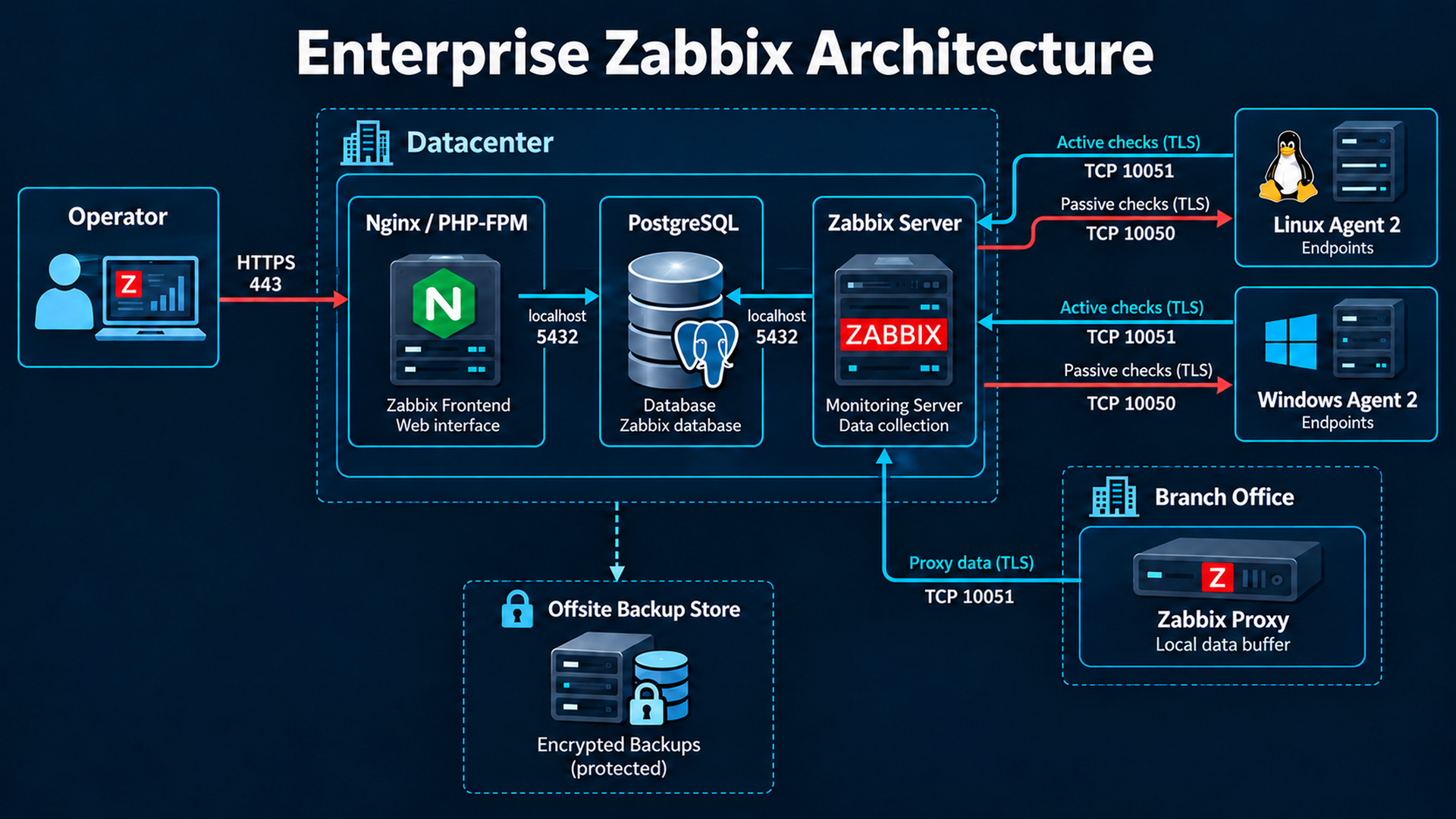
| Component | Responsibility |
|---|---|
| Server | Schedules collection, accepts data, evaluates triggers and executes notification actions. |
| Frontend / Nginx / PHP-FPM | HTTPS UI and JSON-RPC API; PHP accesses PostgreSQL and selected server functions. |
| PostgreSQL | Hosts, users, templates, items, triggers, actions, events, history, trends and audit records. |
| Agent and Agent 2 | Classic agent is a lightweight collector; Agent 2 adds plugins. Use one service for these ports; official OS agent templates support Agent 2. |
| Proxy | Collects and buffers branch data, forwards to Server; does not evaluate central triggers/actions independently. |
An item is a measurement/key such as system.uptime. Templates group reusable items, discovery rules, triggers and graphs. Triggers evaluate stored values; PROBLEM and recovery transitions create events. Problems shows current incidents, Events records transitions, dashboards display health/trends, and actions notify users through media types.
Management VPN 192.0.2.0/24 -> HTTPS 443 -> zabbix.example.com 192.0.2.10
Central: Nginx -> PHP-FPM -> PostgreSQL 127.0.0.1:5432
         Zabbix Server -> PostgreSQL 127.0.0.1:5432
linux-app-01   198.51.100.21 -> TLS 10051 -> Server
windows-app-01 198.51.100.22 -> TLS 10051 -> Server
Server -> TLS 10050 -> agents (optional passive checks)
Branch proxy 203.0.113.20 -> TLS 10051 -> Server
Backup -> encrypted off-site repository 203.0.113.30
Active checks: agent connects to ServerActive TCP/10051, obtains its item list using the exact Hostname and sends values. Passive checks: Server or assigned Proxy connects to agent TCP/10050; Server is the allowed polling-source list. Proxy-assigned hosts must use that proxy in both settings. Neither setting creates a frontend host.
3. Installation: Server, PostgreSQL and the frontend
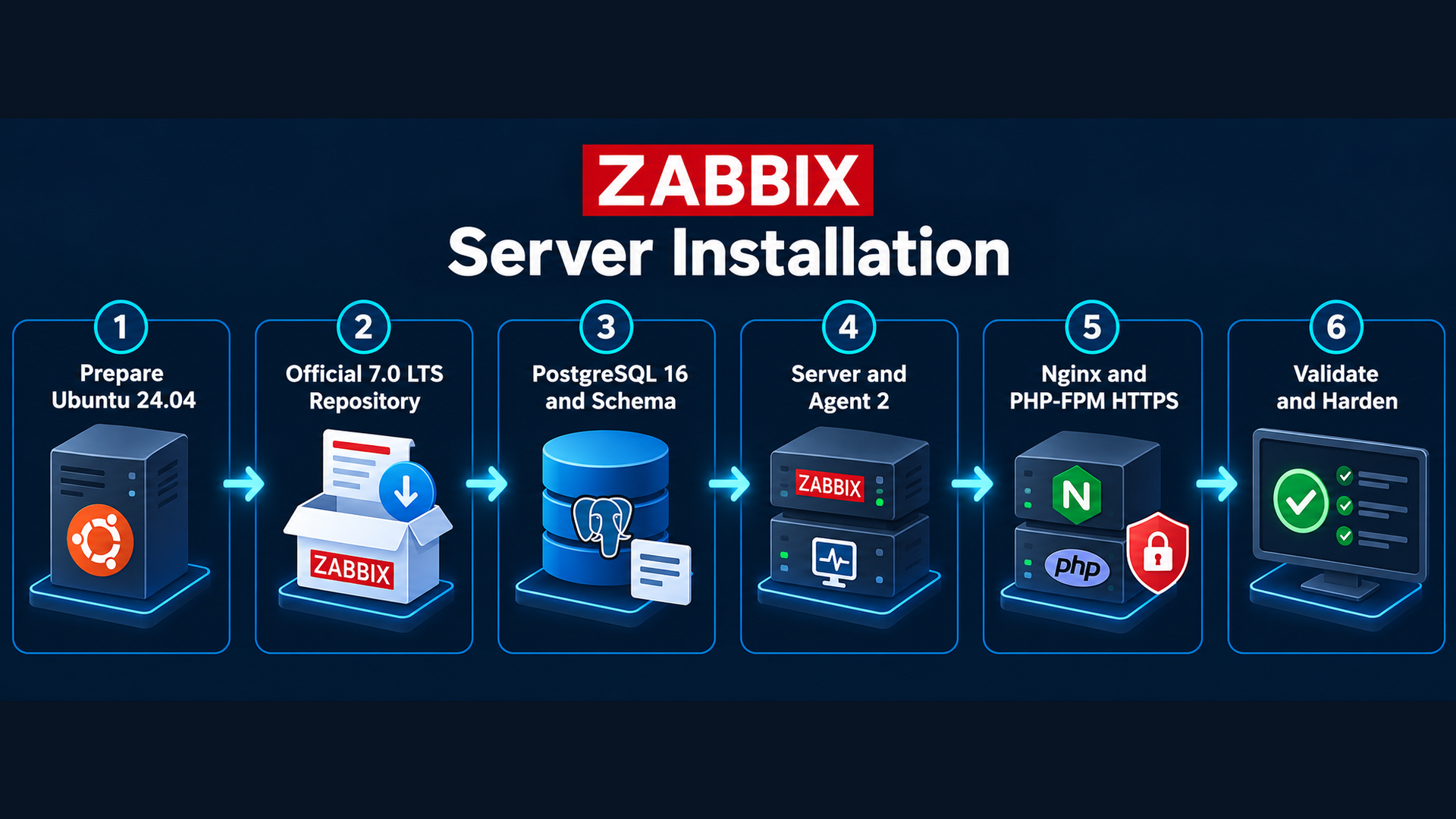
the official lifecycle lists 7.0 as the latest released LTS; the 8.0 release note describes 8.0.0rc1, excluded here. Install the latest stable 7.0 maintenance build from the official repository. PostgreSQL 16, Ubuntu Nginx 1.24 and PHP 8.3 meet 7.0 requirements. Security revisions change: record actual APT candidates/installed versions instead of claiming a fixed revision is current. Keep Server, SQL scripts and Frontend on the same patch.
Official released and planned LTS lifecycle
Release notes: distinguish stable and RC
The official Ubuntu Noble amd64 package index was also checked: Server and Agent 2 latest stable entries are 1:7.0.31-1+ubuntu24.04. Release 7.0.31 was published on 22 September 2026. These are verified review-time values; keep the 7.0 repository branch and recheck candidates before each installation. Ubuntu security revisions for PostgreSQL/Nginx/PHP remain selected by maintained Ubuntu 24.04 repositories.
Verified stable Zabbix 7.0.31 release notes
Official Ubuntu Noble amd64 package index
cd /tmp
curl --fail --location --proto '=https' --tlsv1.2 -O \
  https://repo.zabbix.com/zabbix/7.0/ubuntu/pool/main/z/zabbix-release/zabbix-release_latest_7.0+ubuntu24.04_all.deb
dpkg-deb --info zabbix-release_latest_7.0+ubuntu24.04_all.deb
sudo dpkg -i zabbix-release_latest_7.0+ubuntu24.04_all.deb
sudo apt update
apt-cache policy zabbix-server-pgsql zabbix-agent2 zabbix-frontend-php postgresql-16 nginx php8.3-fpm
# Verify official stable 7.0.x candidates, no beta/RC/devel.
sudo apt install -y postgresql-16 postgresql-client-16 nginx php8.3-fpm \
  php8.3-pgsql php8.3-bcmath php8.3-mbstring php8.3-xml php8.3-gd php8.3-curl \
  zabbix-server-pgsql zabbix-frontend-php zabbix-nginx-conf zabbix-sql-scripts zabbix-agent2 zabbix-get
sudo systemctl stop zabbix-server zabbix-agent2 nginx
sudo systemctl enable --now postgresql
pg_lsclusters
dpkg-query -W zabbix-server-pgsql zabbix-agent2 zabbix-frontend-php postgresql-16 nginx php8.3-fpm
zabbix_server -V
zabbix_agent2 -V
php -v
nginx -v
Verify bootstrap URL against the official selector. HTTPS protects bootstrap transport; APT validates signed repository metadata. Never use trusted=yes or --allow-unauthenticated. Put allowlisted firewall rules in place before package installation because packages can start services; enroll no hosts until TLS is ready.
Official Ubuntu 24.04 PostgreSQL/Nginx selector
Restricted role, authentication and initial schema
sudo -u postgres psql -X -v ON_ERROR_STOP=1 <<'SQL'
SET password_encryption = 'scram-sha-256';
CREATE ROLE zabbix LOGIN NOSUPERUSER NOCREATEDB NOCREATEROLE NOREPLICATION;
SQL
# Interactive prompt: no password in shell history.
sudo -u postgres psql -X -c '\password zabbix'
sudo -u postgres createdb -O zabbix -E UTF8 -T template0 zabbix
sudo -u postgres psql -X -d zabbix -c 'REVOKE ALL ON DATABASE zabbix FROM PUBLIC;'
sudo -u postgres psql -X -d zabbix -c 'REVOKE CREATE ON SCHEMA public FROM PUBLIC;'
sudo -u postgres psql -X -d zabbix -c 'GRANT ALL ON SCHEMA public TO zabbix;'
sudoedit /etc/postgresql/16/main/postgresql.conf
sudoedit /etc/postgresql/16/main/pg_hba.conf# postgresql.conf
listen_addresses = '127.0.0.1'
password_encryption = 'scram-sha-256'
# pg_hba.conf: place before broader host rules; preserve local admin peer access
local all postgres peer
local zabbix zabbix peer
host zabbix zabbix 127.0.0.1/32 scram-sha-256
host all all 0.0.0.0/0 reject
host all all ::/0 rejectsudo pg_ctlcluster 16 main restart
sudo -u postgres psql -X -c "SELECT line_number,error FROM pg_hba_file_rules WHERE error IS NOT NULL;"
sudo -u postgres psql -X -c 'SHOW listen_addresses;'
sudo -u postgres psql -X -c '\du zabbix'
# INITIALIZATION ONLY: NEW EMPTY database, never before a database restore.
set -o pipefail
zcat /usr/share/zabbix-sql-scripts/postgresql/server.sql.gz | sudo -u zabbix psql -X -v ON_ERROR_STOP=1 -d zabbix
sudo -u zabbix psql -X -d zabbix -c 'SELECT mandatory,optional FROM dbversion;'
psql -h 127.0.0.1 -U zabbix -W -d zabbix -c 'SELECT current_user,current_database();'
sudoedit /etc/zabbix/zabbix_server.conf# Merge into package file; avoid duplicate active parameters.
DBHost=127.0.0.1
DBName=zabbix
DBUser=zabbix
# Set the actual DBPassword using sudoedit; never include it in downloads.
ListenIP=127.0.0.1,192.0.2.10
ListenPort=10051
# Preserve package LogFile, PidFile, SocketDir and script paths.Expected: no pg_hba error rows, loopback PostgreSQL, one dbversion row, TCP login as zabbix. Put the real DBPassword in root:zabbix 0640 server configuration. Zabbix owns its schema and needs controlled schema upgrades; PostgreSQL superuser, role creation and unrelated database privileges are unnecessary.
Packaged Nginx/PHP-FPM and protected initial administration
Keep packaged application locations/fastcgi rules. Edit /etc/zabbix/nginx.conf (normally linked in /etc/nginx/conf.d/) to listen 127.0.0.1:8080 and server_name zabbix.example.com. Verify /etc/zabbix/php-fpm.conf is included under /etc/php/8.3/fpm/pool.d/ and its pool user/socket. Nginx must use that actual socket, normally unix:/var/run/php/zabbix.sock. Do not expose the HTTP installer.
sudoedit /etc/zabbix/nginx.conf
sudoedit /etc/zabbix/php-fpm.conf
# Pool: php_value[date.timezone] = Asia/Tehran
# Verify memory_limit >=128M, post_max_size >=16M, max_execution_time >=300,
# max_input_time >=300, upload_max_filesize >=2M.
sudo chown root:zabbix /etc/zabbix/zabbix_server.conf
sudo chmod 0640 /etc/zabbix/zabbix_server.conf
sudo php-fpm8.3 -t
sudo nginx -t
sudo systemctl enable --now php8.3-fpm nginx zabbix-server
sudo systemctl status zabbix-server php8.3-fpm nginx --no-pager
sudo journalctl -u zabbix-server -n 50 --no-pager
sudo tail -n 50 /var/log/zabbix/zabbix_server.log
curl -I -H 'Host: zabbix.example.com' http://127.0.0.1:8080/
# Operator workstation: encrypted tunnel for setup
ssh -L 8080:127.0.0.1:8080 admin@192.0.2.10
Through the SSH tunnel open http://127.0.0.1:8080 in the workstation browser. Complete prerequisite checks, PostgreSQL 127.0.0.1:5432, database/user zabbix and the real password, server name and time zone. Protect /etc/zabbix/web/zabbix.conf.php with root ownership and only the actual PHP pool group read access (0640); remove web-user write after setup. If manually transferred, delete the workstation copy securely.
Expected: services active, local HTTP 200/redirect and Reports → System information says Server running. Use initial case-sensitive Admin / zabbix only over the protected setup channel; immediately change the password, create a named administrator, disable unused guest access and enroll MFA. Apply chapter 6 HTTPS before operator access and remove the bootstrap listener. A login does not prove monitoring: verify item arrival and test notifications.
4. Install Agent 2 on Ubuntu Linux
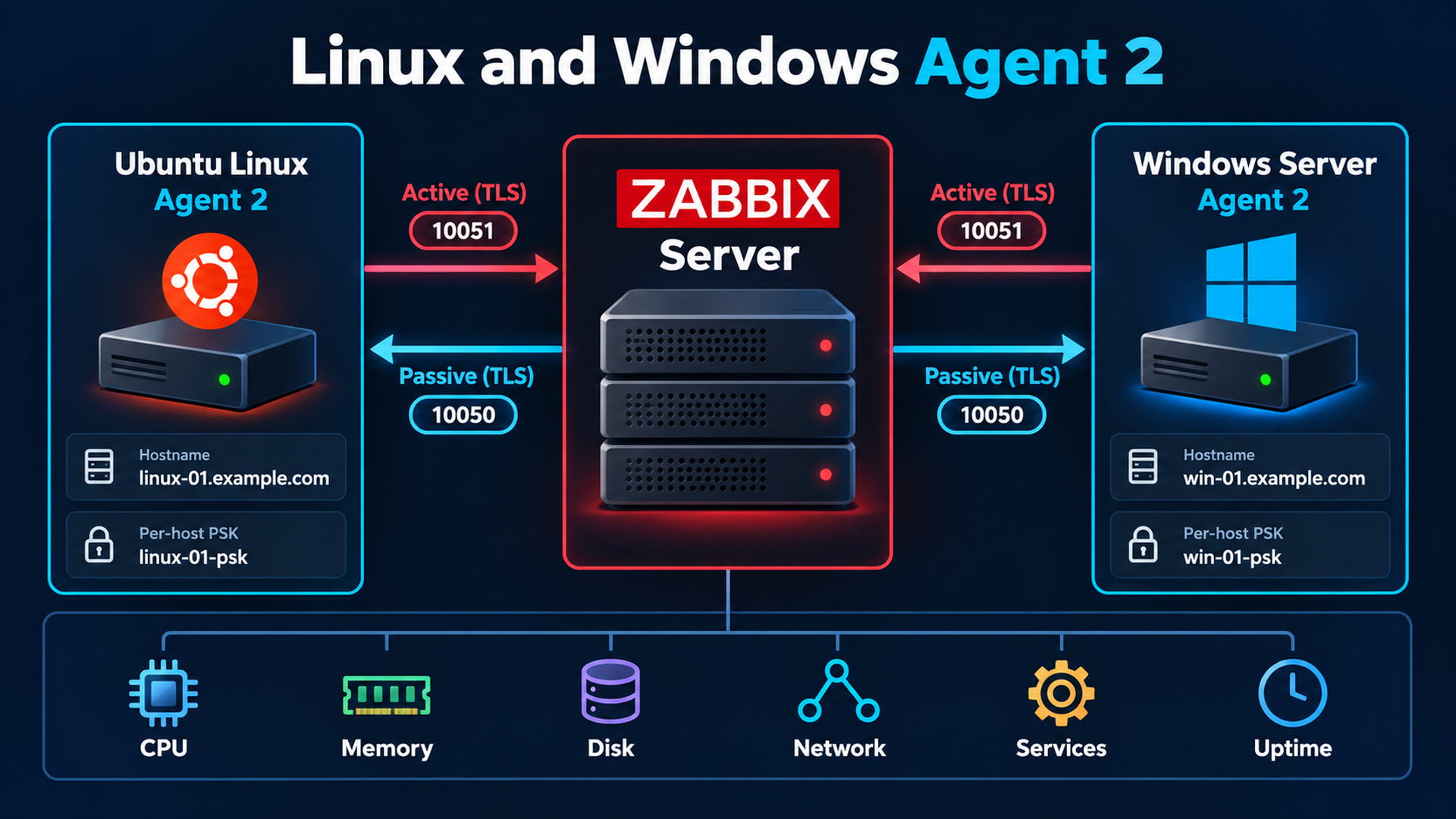
On linux-app-01 add the chapter 3 official 7.0 Ubuntu repository, then install only Agent 2. Server is the passive-source allowlist; ServerActive is the active destination; Hostname must match frontend Host name, not Visible name; ListenPort is 10050. Replace ListenIP with the real interface IP. Agent 2 runs in the foreground under systemd; do not add classic-agent StartAgents or daemonization settings.
sudo apt update
sudo apt install -y zabbix-agent2 openssl
sudo systemctl stop zabbix-agent2
sudo install -d -o root -g zabbix -m 0750 /etc/zabbix/keys
sudo sh -c 'umask 027; openssl rand -hex 32 > /etc/zabbix/keys/agent2.psk'
sudo chown root:zabbix /etc/zabbix/keys/agent2.psk
sudo chmod 0640 /etc/zabbix/keys/agent2.psk
# Adapt the downloaded configuration BEFORE starting the service.
sudo install -o root -g zabbix -m 0640 zabbix-agent2-linux.conf /etc/zabbix/zabbix_agent2.conf
sudoedit /etc/zabbix/zabbix_agent2.conf
sudo ufw allow from 192.0.2.10 to any port 10050 proto tcp
sudo -u zabbix zabbix_agent2 -c /etc/zabbix/zabbix_agent2.conf -t agent.ping
sudo systemctl enable --now zabbix-agent2
sudo systemctl status zabbix-agent2 --no-pager
sudo journalctl -u zabbix-agent2 -n 50 --no-pager
sudo ss -lntp | grep ':10050'
nc -vz 192.0.2.10 10051# Ubuntu 24.04, Zabbix Agent 2 7.0 LTS. Replace documentation IP/name/identity.
LogType=file
LogFile=/var/log/zabbix/zabbix_agent2.log
LogFileSize=10
Server=192.0.2.10
ServerActive=192.0.2.10:10051
Hostname=linux-app-01
ListenIP=198.51.100.21
ListenPort=10050
TLSConnect=psk
TLSAccept=psk
TLSPSKIdentity=linux-app-01-psk
TLSPSKFile=/etc/zabbix/keys/agent2.psk
DenyKey=system.run[*]
UnsafeUserParameters=0
Include=/etc/zabbix/zabbix_agent2.d/*.conf
Include=/etc/zabbix/zabbix_agent2.d/plugins.d/*.conf
# Explicit read-only key for one approved service; no wildcard shell execution.
UserParameter=custom.service.nginx,/usr/bin/systemctl is-active nginx || trueData collection → Hosts → Create host: Host name linux-app-01, group Linux servers, monitored by Server, Agent interface 198.51.100.21:10050. Link Linux by Zabbix agent active for active monitoring or Linux by Zabbix agent for passive monitoring. Agent 2 uses these official templates; do not attach both OS variants because keys overlap. Encryption: PSK for connections to and from host, identity linux-app-01-psk, generated per-host key. Transfer the key securely through the protected UI, never tickets/Git.
| Metric | Keys / validation |
|---|---|
| CPU / load | system.cpu.util[,idle], system.cpu.load[all,avg1]; observe a controlled workload. |
| RAM | vm.memory.size[available], vm.memory.size[total]; available memory includes reclaimable cache. |
| Disk / filesystem | vfs.fs.discovery, vfs.fs.size[/,pused]; review mount discovery and pseudo-filesystem exclusions. |
| Network | net.if.discovery, net.if.in[ens160], net.if.out[ens160]; use actual discovered interface. |
| Uptime / service | system.uptime, custom.service.nginx; custom item configuration in chapter 7. |
sudo -u zabbix zabbix_agent2 -c /etc/zabbix/zabbix_agent2.conf -t 'system.uptime'
sudo -u zabbix zabbix_agent2 -c /etc/zabbix/zabbix_agent2.conf -t 'vfs.fs.size[/,pused]'
sudo -u zabbix zabbix_agent2 -c /etc/zabbix/zabbix_agent2.conf -t 'custom.service.nginx'
# From the authorized Server: provision this per-host PSK copy securely, root-only.
sudo zabbix_get -s 198.51.100.21 -p 10050 -k agent.ping \
  --tls-connect psk --tls-psk-identity linux-app-01-psk --tls-psk-file /root/linux-app-01.psk
Expected: ping=1, uptime positive, filesystem use 0–100 and service active when running. nc proves only TCP, local -t only key evaluation, zabbix_get a passive application/TLS exchange. Monitoring → Latest data must advance after item/configuration intervals for active acceptance; graphs need samples. Passive ZBX interface status is not active health. For active-only mode omit Server (disables Agent 2 passive checks), remove inbound 10050 and use only the active template. Retire the temporary diagnostic key through the secret lifecycle.
5. Install Agent 2 on Windows Server
Use supported x64 Windows Server 2022/2025. Download stable 7.0 Agent 2 amd64 OpenSSL MSI from the official page. Record vendor SHA256, approved patch and verified Authenticode publisher thumbprint. The unattended script requires 7.0.22+ because DONOTSTART was introduced then. A hash obtained from an untrusted source is insufficient; verify the valid Zabbix publisher signature independently.
Official stable Agent 2 MSI download
GUI: verify MSI, run wizard as administrator, accept license and select Agent 2 in default Program Files. Enter server 192.0.2.10, active server 192.0.2.10:10051, exact hostname windows-app-01 and unique TLS PSK identity. Protect key/config ACLs and inspect firewall rules before exposed startup. If GUI starts automatically, block network ingress until complete. For reproducible production use CONF plus DONOTSTART so no PSK value enters MSI properties or verbose logs.
# Windows Server 2022/2025 x64, Agent 2 7.0 LTS; default MSI destination.
LogType=file
LogFile=C:\ProgramData\Zabbix\zabbix_agent2.log
LogFileSize=10
Server=192.0.2.10
ServerActive=192.0.2.10:10051
Hostname=windows-app-01
ListenPort=10050
TLSConnect=psk
TLSAccept=psk
TLSPSKIdentity=windows-app-01-psk
TLSPSKFile=C:\ProgramData\Zabbix\agent2.psk
DenyKey=system.run[*]
UnsafeUserParameters=0
Include=C:\Program Files\Zabbix Agent 2\zabbix_agent2.d\plugins.d\*.conf# Elevated PowerShell; approved values come from the deployment record.
$msi = 'C:\Staging\approved-agent2-7.0-windows-amd64-openssl.msi'
Get-FileHash -LiteralPath $msi -Algorithm SHA256
Get-AuthenticodeSignature -LiteralPath $msi | Format-List Status,SignerCertificate
# Run the script with MsiPath, ExpectedSha256, ApprovedSignerThumbprint,
# ConfigPath, PskSourcePath and ServerAddress parameters.
# Silent MSI step AFTER protected PSK/configuration provisioning:
msiexec.exe /i "C:\Staging\approved-agent2.msi" /qn /norestart CONF="C:\ProgramData\Zabbix\install.conf" DONOTSTART=1 /l*v "C:\ProgramData\Zabbix\install.log"The full script below validates hash/signature/TLS, uses language-independent SYSTEM/Administrators SIDs for ACLs, refuses existing installations, checks MSI codes 0/3010 and service identity, and restricts Defender Firewall to the monitoring server on Domain/Private profiles. Adapt inputs first; it does not fetch MSI or register hosts. A custom service account needs explicit key/config read and log write rights. Code 3010 requires scheduled reboot and startup verification.
#requires -RunAsAdministrator
<# Fresh-install workflow for Windows Server 2022/2025, Agent 2 7.0.22+.
Download the current stable 7.0 x64 OpenSSL MSI from the official site first.
Requires approved SHA256 AND valid Zabbix Authenticode publisher signature.
Never pass PSK values to msiexec arguments or logs. Existing installs are refused.
#>
[CmdletBinding()]
param(
    [Parameter(Mandatory)][string]$MsiPath,
    [Parameter(Mandatory)][ValidatePattern('^[A-Fa-f0-9]{64}$')][string]$ExpectedSha256,
    [Parameter(Mandatory)][string]$ApprovedSignerThumbprint,
    [Parameter(Mandatory)][string]$ConfigPath,
    [Parameter(Mandatory)][string]$PskSourcePath,
    [string]$ServerAddress = '192.0.2.10'
)
Set-StrictMode -Version Latest
$ErrorActionPreference = 'Stop'
if (Get-Service -Name 'Zabbix Agent 2' -ErrorAction SilentlyContinue) { throw 'Existing Agent 2 found; use a reviewed upgrade workflow.' }
if (Get-Service -Name 'Zabbix Agent' -ErrorAction SilentlyContinue) { throw 'Classic agent exists; review port and service migration first.' }
$msi = (Resolve-Path -LiteralPath $MsiPath).Path
$config = (Resolve-Path -LiteralPath $ConfigPath).Path
$pskSource = (Resolve-Path -LiteralPath $PskSourcePath).Path
foreach ($path in @($msi, $config, $pskSource)) {
    if ((Get-Item -LiteralPath $path).Attributes -band [IO.FileAttributes]::ReparsePoint) { throw 'Reparse-point input refused.' }
    if ($path.Contains('"')) { throw 'Invalid path.' }
}
if ((Get-FileHash -LiteralPath $msi -Algorithm SHA256).Hash -ne $ExpectedSha256) { throw 'MSI hash mismatch.' }
$signature = Get-AuthenticodeSignature -LiteralPath $msi
if ($signature.Status -ne 'Valid' -or $signature.SignerCertificate.Thumbprint -ne $ApprovedSignerThumbprint) { throw 'MSI signature/publisher mismatch.' }
$content = Get-Content -LiteralPath $config -Raw
$parsedAddress = $null
if (-not [System.Net.IPAddress]::TryParse($ServerAddress, [ref]$parsedAddress)) { throw 'ServerAddress must be an approved IP address for the firewall allowlist.' }
if ($content -notmatch ('(?m)^Server=' + [regex]::Escape($ServerAddress) + '\r?$')) { throw 'Configuration Server must match the firewall ServerAddress.' }
if ($content -notmatch ('(?m)^ServerActive=' + [regex]::Escape($ServerAddress) + ':10051\r?$')) { throw 'Configuration ServerActive must match the selected monitoring server.' }
foreach ($setting in @('TLSConnect=psk','TLSAccept=psk','TLSPSKFile=C:\ProgramData\Zabbix\agent2.psk','DenyKey=system.run[*]')) {
    if (-not $content.Contains($setting)) { throw "Required configuration missing: $setting" }
}
$psk = (Get-Content -LiteralPath $pskSource -Raw).Trim()
if ($psk -notmatch '^[a-fA-F0-9]{64}$') { throw 'Expected a unique 256-bit hex PSK.' }
$data = 'C:\ProgramData\Zabbix'
if (Test-Path -LiteralPath $data) { throw 'Existing data directory refused; inspect before installation.' }
New-Item -ItemType Directory -Path $data | Out-Null
& icacls.exe $data /inheritance:r /grant:r '*S-1-5-18:(OI)(CI)F' '*S-1-5-32-544:(OI)(CI)F' | Out-Null
if ($LASTEXITCODE -ne 0) { throw 'ACL setup failed.' }
[IO.File]::WriteAllText("$data\agent2.psk", $psk + "`r`n", [Text.Encoding]::ASCII)
$psk = $null
Copy-Item -LiteralPath $config -Destination "$data\install.conf"
$arguments = "/i `"$msi`" /qn /norestart /l*v `"$data\install.log`" CONF=`"$data\install.conf`" DONOTSTART=1"
$process = Start-Process -FilePath msiexec.exe -ArgumentList $arguments -Wait -PassThru -WindowStyle Hidden
if ($process.ExitCode -notin @(0,3010)) { throw "MSI installation failed: $($process.ExitCode)" }
$target = 'C:\Program Files\Zabbix Agent 2\zabbix_agent2.conf'
Copy-Item -LiteralPath "$data\install.conf" -Destination $target -Force
& icacls.exe $target /inheritance:r /grant:r '*S-1-5-18:F' '*S-1-5-32-544:F' | Out-Null
if ($LASTEXITCODE -ne 0) { throw 'Configuration ACL setup failed.' }
$service = Get-CimInstance Win32_Service -Filter "Name='Zabbix Agent 2'"
if ($service.StartName -notin @('LocalSystem','NT AUTHORITY\SYSTEM')) { throw 'Adjust ACLs for the actual service account before startup.' }
New-NetFirewallRule -Name 'Zabbix-Agent2-TLS' -DisplayName 'Zabbix Agent 2 TLS from monitoring server' -Direction Inbound -Action Allow -Protocol TCP -LocalPort 10050 -RemoteAddress $ServerAddress -Profile Domain,Private | Out-Null
# Audit and remove any broad installer-created Agent rule before enabling the service.
Get-NetFirewallRule | Where-Object { $_.DisplayName -like '*Zabbix*' -and $_.Name -ne 'Zabbix-Agent2-TLS' } | Disable-NetFirewallRule
Set-Service -Name 'Zabbix Agent 2' -StartupType Automatic
Start-Service -Name 'Zabbix Agent 2'
Get-Service -Name 'Zabbix Agent 2'
Test-NetConnection -ComputerName $ServerAddress -Port 10051
if ($process.ExitCode -eq 3010) { Write-Warning 'MSI requests a reboot; schedule it and validate service startup afterwards.' }Get-Service -Name 'Zabbix Agent 2'
Get-CimInstance Win32_Service -Filter "Name='Zabbix Agent 2'" | Select-Object Name,State,StartMode,StartName,PathName
Set-Service -Name 'Zabbix Agent 2' -StartupType Automatic
Restart-Service -Name 'Zabbix Agent 2'
Get-NetTCPConnection -LocalPort 10050 -State Listen
Test-NetConnection -ComputerName 192.0.2.10 -Port 10051
Get-NetFirewallRule -Name 'Zabbix-Agent2-TLS' | Get-NetFirewallAddressFilter
Get-Content 'C:\ProgramData\Zabbix\zabbix_agent2.log' -Tail 50
& 'C:\Program Files\Zabbix Agent 2\zabbix_agent2.exe' -c 'C:\Program Files\Zabbix Agent 2\zabbix_agent2.conf' -t agent.ping
& 'C:\Program Files\Zabbix Agent 2\zabbix_agent2.exe' -c 'C:\Program Files\Zabbix Agent 2\zabbix_agent2.conf' -t 'service.info[Spooler,state]'
Get-WinEvent -FilterHashtable @{LogName='System'; Level=2} -MaxEvents 5Register windows-app-01 under Data collection → Hosts, group Windows servers, Server monitoring, Agent interface 198.51.100.22:10050. Link Windows by Zabbix agent active, or Windows by Zabbix agent for passive mode, not both. Encryption in both directions: PSK, windows-app-01-psk, matching unique key. Verify Latest data: CPU utilization, available/total memory, disk capacity, network traffic, service discovery and system.uptime. Filter service discovery to required business services; stopped/trigger-started Windows services are often intentional.
Event Logs require additional active items. Create Zabbix agent (active) item eventlog[System,,"Error|Critical",,,,skip], information type Log, interval 30s. skip avoids old log replay at startup; document this choice. Add application-specific source/event-ID filters and inspect new records in Latest data. Grant only required log-reading privileges, especially for Security logs. Expected diagnostics: running automatic service, TcpTestSucceeded=True, agent.ping=1 and Spooler state=0 when running; network TCP success alone does not prove active delivery.
Official MSI properties and GUI installation
6. Security hardening
HTTPS and certificate lifecycle
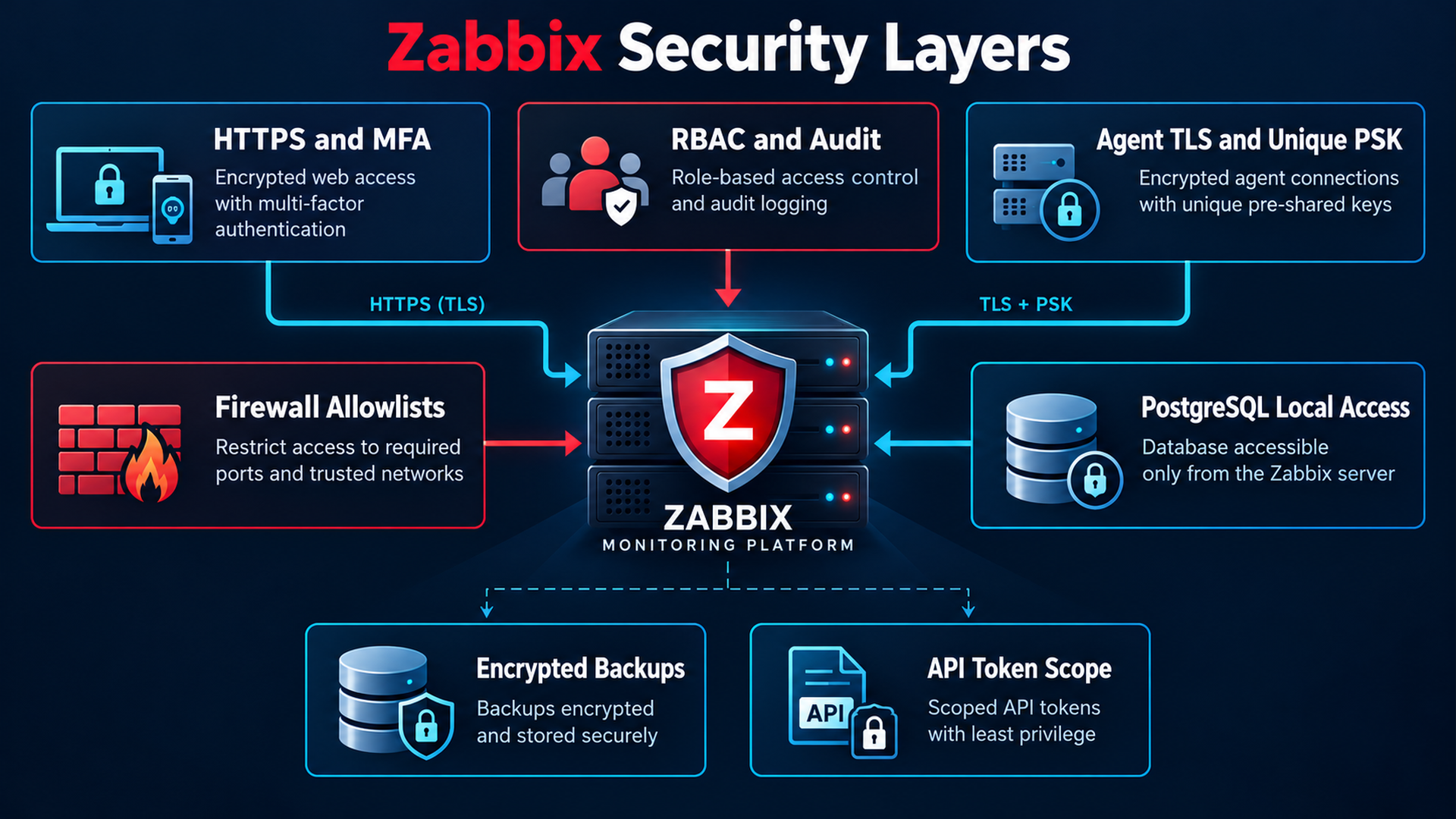
Issue a real FQDN certificate from enterprise CA or supported ACME DNS-01 for private access. Install chain/key below with root 0600 key and 0700 directory; root Nginx master reads it. In the existing packaged Nginx server block replace bootstrap listen/server_name and add directives below; preserve application locations and FastCGI. Do not create competing blocks or generic PHP rules exposing /etc/zabbix.
# Inside existing /etc/zabbix/nginx.conf server block:
listen 192.0.2.10:443 ssl;
server_name zabbix.example.com;
ssl_certificate /etc/ssl/zabbix/fullchain.pem;
ssl_certificate_key /etc/ssl/zabbix/privkey.pem;
ssl_protocols TLSv1.2 TLSv1.3;
ssl_session_cache shared:ZabbixTLS:10m;
ssl_session_timeout 1d;
add_header Strict-Transport-Security "max-age=31536000" always;
add_header X-Content-Type-Options "nosniff" always;
add_header Referrer-Policy "same-origin" always;
# Keep packaged root/index/PHP location/deny rules/fastcgi_pass.
# Enable HSTS only after HTTPS and renewal validation.sudo install -d -o root -g root -m 0700 /etc/ssl/zabbix
# Securely install approved certificate and key before testing Nginx.
sudo chmod 0600 /etc/ssl/zabbix/privkey.pem
sudo chmod 0644 /etc/ssl/zabbix/fullchain.pem
sudo nginx -t
sudo php-fpm8.3 -t
sudo systemctl reload nginx
curl -I --cacert /path/to/enterprise-ca.pem https://zabbix.example.com/
openssl s_client -connect zabbix.example.com:443 -servername zabbix.example.com \
-CAfile /path/to/enterprise-ca.pem -verify_return_error </dev/null
sudo ss -lntp
sudo ufw status numberedExpected: valid config, HTTPS 200/redirect, verified chain/FQDN; never curl -k. Confirm bootstrap 8080 gone and 5432 loopback-only. Schedule CA/ACME renewal, test it, run nginx -t before reload in deploy hook, and alert on expiry/failure. Set HTTPS PHP pool session.cookie_secure=1, session.cookie_httponly=1, session.cookie_samesite=Lax and retest sessions.
Agent authentication and least privilege
Unique random per-host PSK, TLSConnect=psk, TLSAccept=psk and matching frontend directions. Shared fleet keys multiply compromise risk. Certificate alternative uses TLSConnect/TLSAccept=cert, TLSCAFile, TLSCertFile, TLSKeyFile and allowed issuer/subject; configure host UI constraints and renewal/revocation. HTTPS and agent certificates are separate. No unencrypted fallback or bypassed peer verification.
# Replace PSK settings for a reviewed certificate deployment:
TLSConnect=cert
TLSAccept=cert
TLSCAFile=/etc/zabbix/keys/ca.pem
TLSCertFile=/etc/zabbix/keys/agent-chain.pem
TLSKeyFile=/etc/zabbix/keys/agent.key
TLSServerCertIssuer=CN=Monitoring CA,O=Example
TLSServerCertSubject=CN=zabbix.example.com,O=Example- Firewall and Agent Server source allowlists agree; restrict 10051, discovery and auto-registration.
- Linux agent runs as zabbix, DenyKey=system.run[*], UnsafeUserParameters=0 and fixed reviewed commands; no broad sudo/writable scripts.
- PostgreSQL local SCRAM/peer, no trust; remote DB needs verify-full TLS and database-only firewall.
- Config, PSKs, web credentials, scripts and backups have restricted ownership/modes; review AppArmor denials, grant narrowly, never disable profile.
Strong administration, RBAC, MFA, audit and API
Users → User groups controls host-group access; User roles controls UI/API methods. Operators read-only, service owners limited to their hosts, named administrators few. Keep a vaulted emergency account with tested recovery. Zabbix 7.0 supports TOTP and Duo: Users → Authentication → MFA, enroll users and enforce group method after testing recovery/IdP behavior. Limit sessions/remove dormant accounts.
Enable Administration → General → Audit log, review Reports → Audit log, define retention and central protected log forwarding. API: dedicated least-privilege service user, explicit role method allowlist, expiring API token in a secret manager, HTTPS only. Use /api_jsonrpc.php with Authorization: Bearer and JSON-RPC; prove an allowed read and denied write, rotate/revoke and audit. Never hard-code token or use query URLs.
7. Practical monitoring and triggers
Override OS template macros at host level for thresholds; do not edit vendor templates. Put custom service items in a local Enterprise Service Checks template. Under Hosts → Items create exact key, type Zabbix agent (active), correct value type and interval, then wait for samples before triggers. Reuse discovered OS items instead of duplicating keys. The expressions use concrete hosts and require referenced items to exist.
| Item / value / interval | Purpose |
|---|---|
| vfs.fs.size[/,pused] / Float / 60s | Linux capacity; reuse discovered item. |
| vfs.fs.size[C:,pused] / Float / 60s | Windows volume; confirm actual discovery key. |
| custom.service.nginx / Character / 30s | Fixed read-only UserParameter returns active/inactive/failed. |
| service.info[Spooler,state] / Unsigned / 30s | Running=0; select a required service, Spooler is a lab example. |
| agent.ping / Unsigned / 60s | Data absence detects monitoring path loss, not necessarily physical host failure. |
# Data collection -> Hosts -> Triggers
# Linux disk Warning; use separate Recovery expression below.
min(/linux-app-01/vfs.fs.size[/,pused],5m)>80
# Recovery:
max(/linux-app-01/vfs.fs.size[/,pused],5m)<75
# Windows disk High:
min(/windows-app-01/vfs.fs.size[C:,pused],5m)>90
# Linux CPU High (idle percent below 10 for the whole window):
max(/linux-app-01/system.cpu.util[,idle],5m)<10
# Recovery:
min(/linux-app-01/system.cpu.util[,idle],5m)>20
# Memory Average, less than 10% available:
max(/linux-app-01/vm.memory.size[available],5m)/last(/linux-app-01/vm.memory.size[total])<0.10
# Monitoring path unavailable, High:
nodata(/linux-app-01/agent.ping,5m)=1
# Windows service stopped for three samples, Average:
min(/windows-app-01/service.info[Spooler,state],#3)<>0
# Linux service stopped, Average:
last(/linux-app-01/custom.service.nginx)<>"active"
Create a named trigger with severity, expression, service/environment/team tags and operational data. For hysteresis set OK event generation=Recovery expression: the problem expression must become false and recovery condition true. Warning is capacity risk, Average degradation, High required service/monitoring loss, Disaster confirmed critical business outage. Add a higher disk threshold and dependency from the lower alarm. Dashboard: availability/problems, CPU/load, memory, free space, throughput and server queue.
In staging temporarily lower a test threshold or stop only a disposable service; verify PROBLEM, action and recovery and reset the test. Never fill a production disk or stop a business service for a drill. Combine nodata with an independent ICMP/reachability item when distinguishing agent/network failure from a dead server.
8. Alerts and notifications
Trigger transitions create events; actions filter host group, tags and severity then run operations. Notification requires an enabled matching action, recipient with host read permission, enabled media, matching schedule/severity. Alerts → Media types → Email: approved SMTP relay, STARTTLS or SSL/TLS, certificate/hostname verification and dedicated credentials. Test with an approved recipient and verify mailbox delivery, not only SMTP submission.
- Users → named operator → Media: Email, approved address, 1-7,00:00-24:00 and selected severities.
- Alerts → Actions → Trigger actions: environment=production and severity >= Average; step 1 to Operations immediately.
- Default operation step duration 10m; step 2 on-call, step 3 incident lead; add Recovery and acknowledgement Update operations.
- Include event ID, host, severity and authenticated problem URL; exclude credentials and unnecessary event-log details.
Telegram: use the bundled official webhook or import its release/7.0 media type and README. Create the bot with documented BotFather steps, protect token, initiate the chat/add bot to approved group, obtain chat ID per official instructions. Configure documented token parameter and user Send to chat ID; test media then complete trigger action. Approve outbound HTTPS and privacy for external incident data. Do not write undocumented shell integrations or include tokens in URLs/downloads.
Data collection → Maintenance: hosts/tags, period, time zone and with/without data collection. With collection preserves history; without collection needs nodata review. Configure pause operations for suppressed problems. Dependencies make service alarms depend on upstream host/network loss and avoid duplicate pages. Check Reports → Action log for sent/failed details and Problems for suppression, acknowledgement and recovery.
9. Database and configuration backup
PostgreSQL is the core recovery asset: hosts, templates, users/permissions, items, triggers, actions, events, history, trends and audit. Template exports or /etc/zabbix alone cannot restore the system. Back up DB plus configuration as one documented set, record packages/extensions/time zone and secret dependencies. This example uses PostgreSQL 16 without TimescaleDB; extension deployments need their compatible documented procedure.
# Protected mounted /backup volume, on the database host.
sudo install -d -o root -g root -m 0700 /backup/zabbix/manual
sudo bash <<'BASH'
set -Eeuo pipefail
umask 077
stamp=$(date -u +%Y%m%dT%H%M%SZ)
target="/backup/zabbix/manual/$stamp"
mkdir -m 0700 "$target"
runuser -u postgres -- pg_dump -h /var/run/postgresql --role=zabbix \
  -d zabbix -Fc -Z 6 --no-owner --no-acl > "$target/zabbix.dump"
pg_restore --list "$target/zabbix.dump" > "$target/database-toc.txt"
pg_restore --file=/dev/null "$target/zabbix.dump"
cd "$target"
sha256sum zabbix.dump database-toc.txt > SHA256SUMS
sha256sum --check SHA256SUMS
BASH
pg_dump uses a consistent MVCC snapshot during ordinary writes; avoid schema upgrades during the dump. Custom format compresses and supports selective/parallel restore. --no-owner/--no-acl allows a recreated restricted role to own objects. Database dump omits cluster roles and OS config: recreate role and archive configuration separately. --list checks catalog; --file=/dev/null decodes all archive data; SHA256 detects later corruption. Only an isolated real restore proves recoverability.
Local peer authentication through postgres OS user and SET ROLE zabbix avoids database passwords. Remote backup needs a dedicated authorized role, verify-full TLS and protected 0600 PGPASSFILE outside scripts; never PGPASSWORD in units/history/URLs. Archives contain sensitive data and credentials: encrypt local volume and off-site copies, keep recovery keys separately in a vault.
- Archive /etc/zabbix including web credentials/PSKs, /etc/nginx, PHP-FPM and PostgreSQL settings.
- Include TLS chain/keys and renewal hooks, alert/external scripts, custom plugins and their dependencies.
- Example retention: 14 daily local sets; off-site daily/weekly/monthly policy defined separately from compliance/RPO needs.
- Monitor backup age and failure independently of Zabbix; verify archive, off-site retrieval and scheduled restore drills.
Logical vs physical, pgBackRest, WAL and PITR
Logical pg_dump exports objects/data and can move to compatible newer PostgreSQL versions; it cannot recover changes between dumps. Physical backup includes a consistent cluster and required WAL, generally needs the same PostgreSQL major/platform. Plain tar of running PGDATA is not a consistent backup. Large production installations should use pgBackRest full/differential/incremental backups, encrypted remote repositories, continuous WAL archiving and tested PITR; retained base backups need their full WAL chain.
# DESIGN starting point for a separately reviewed pgBackRest deployment:
# /etc/pgbackrest/pgbackrest.conf
[global]
repo1-path=/srv/pgbackrest
repo1-retention-full=2
[zabbix]
pg1-path=/var/lib/postgresql/16/main
# postgresql.conf: archive_mode change requires restart
wal_level = replica
archive_mode = on
archive_command = 'pgbackrest --stanza=zabbix archive-push %p'
# AFTER dedicated repository ownership, remote access and encryption setup:
# sudo -u postgres pgbackrest --stanza=zabbix stanza-create
# sudo -u postgres pgbackrest --stanza=zabbix check
# sudo -u postgres pgbackrest --stanza=zabbix --type=full backup
# sudo -u postgres pgbackrest --stanza=zabbix info
# ISOLATED EMPTY CLUSTER ONLY, destructive physical restore workflow:
# pgbackrest --stanza=zabbix --type=time --target='2026-10-09 01:30:00+00' --target-action=pause restore
Provision and protect the repository first, then follow official remote backup/encryption instructions. Monitor pg_stat_archiver failures and WAL growth. Restore a target timestamp to an isolated cluster, inspect paused recovery, promote after acceptance. WAL archive delay controls achievable RPO; base retrieval/restore and replay determine RTO. Never physical-restore over active production. The pgBackRest example is a separate design, not a substitute for the following logical script.
PostgreSQL pg_dump formats and consistency
10. Automated daily backup
Mount a protected encrypted volume at /backup; the job refuses an absent mount to protect the OS disk. systemd EnvironmentFile supplies plain settings, not executable shell sourcing. The complete script below provides root-only permissions, flock overlap protection, conservative disk validation, compressed dump/config archive, full decoding/checksums, atomic publication, logs and failure codes. Incomplete sets remain for diagnosis and are never counted successful.
#!/usr/bin/env bash
# Ubuntu 24.04 / PostgreSQL 16. Run as root through the supplied systemd unit.
# EnvironmentFile supplies settings; this script never sources executable config.
set -Eeuo pipefail
umask 077
export PATH=/usr/sbin:/usr/bin:/sbin:/bin
BACKUP_ROOT=${BACKUP_ROOT:-/backup/zabbix}
RETENTION_DAYS=${RETENTION_DAYS:-14}
MIN_FREE_MB=${MIN_FREE_MB:-4096}
SPACE_FACTOR=${SPACE_FACTOR:-2}
PGDATABASE=${PGDATABASE:-zabbix}
PGROLE=${PGROLE:-zabbix}
OFFSITE_REQUIRED=${OFFSITE_REQUIRED:-yes}
FAILURE_HOOK=${FAILURE_HOOK:-/usr/local/sbin/zabbix-backup-notify}
stage=''
log_file=''
log() { printf '%s %s\n' "$(date -u +%FT%TZ)" "$*"; }
finish() {
    local rc=$?
    trap - EXIT
    if (( rc != 0 )); then
        log "FAILED exit=$rc; incomplete backups retained for diagnosis; retention skipped"
        if [[ -n "$log_file" && -x "$FAILURE_HOOK" ]]; then
            timeout 30 "$FAILURE_HOOK" "$rc" "$log_file" || log 'Failure notification hook failed'
        fi
    fi
    exit "$rc"
}
trap finish EXIT
[[ $EUID -eq 0 ]] || { log 'Root is required'; exit 77; }
[[ "$BACKUP_ROOT" =~ ^/backup/[a-zA-Z0-9/_-]+$ && "$BACKUP_ROOT" != *'..'* ]] || exit 64
for number in "$RETENTION_DAYS" "$MIN_FREE_MB" "$SPACE_FACTOR"; do
    [[ "$number" =~ ^[1-9][0-9]*$ ]] || exit 64
done
[[ "$PGDATABASE" =~ ^[a-zA-Z0-9_]+$ && "$PGROLE" =~ ^[a-zA-Z0-9_]+$ ]] || exit 64
[[ "$OFFSITE_REQUIRED" == yes || "$OFFSITE_REQUIRED" == no ]] || exit 64
for command in flock runuser pg_dump pg_restore psql tar gzip sha256sum df du find timeout realpath mountpoint; do
    command -v "$command" >/dev/null || { log "Missing command: $command"; exit 69; }
done
install -d -o root -g root -m 0700 /var/lib/zabbix-backup
exec 9>/var/lib/zabbix-backup/backup.lock
flock -n 9 || { log 'Another backup is running'; exit 75; }
# A dedicated mounted backup volume prevents filling the OS root filesystem.
mountpoint -q /backup || { log '/backup must be a mounted backup volume'; exit 73; }
install -d -m 0700 "$BACKUP_ROOT" /var/log/zabbix-backup
[[ "$(realpath -e "$BACKUP_ROOT")" == "$BACKUP_ROOT" ]] || exit 64
[[ "$(stat -c %u "$BACKUP_ROOT")" == 0 && "$(stat -c %a "$BACKUP_ROOT")" == 700 ]] || exit 77
stamp=$(date -u +%Y%m%dT%H%M%SZ)
log_file="/var/log/zabbix-backup/$stamp.log"
exec > >(tee -a "$log_file") 2>&1
log 'Backup started'
if [[ "$OFFSITE_REQUIRED" == yes ]]; then
    command -v restic >/dev/null || exit 69
    : "${RESTIC_REPOSITORY:?Set an encrypted off-site restic repository}"
    : "${RESTIC_PASSWORD_FILE:?Set a protected restic password file}"
    [[ -f "$RESTIC_PASSWORD_FILE" && ! -L "$RESTIC_PASSWORD_FILE" ]] || exit 77
    [[ "$(stat -c %u "$RESTIC_PASSWORD_FILE")" == 0 && "$(stat -c %a "$RESTIC_PASSWORD_FILE")" == 600 ]] || exit 77
fi
# These directories contain secrets. Do not publish this archive or put it in Git.
paths=(etc/zabbix etc/nginx etc/php/8.3/fpm etc/postgresql/16/main etc/ssl/zabbix
       etc/zabbix-backup etc/systemd/system/zabbix-backup.service
       etc/systemd/system/zabbix-backup.timer etc/systemd/system/zabbix-backup-failure.service
       usr/local/sbin/zabbix-backup.sh)
for optional in etc/letsencrypt usr/lib/zabbix/alertscripts usr/lib/zabbix/externalscripts usr/local/lib/zabbix usr/local/sbin/zabbix-backup-notify etc/logrotate.d/zabbix-backup; do
    [[ ! -e "/$optional" ]] || paths+=("$optional")
done
for path in "${paths[@]}"; do [[ -e "/$path" ]] || { log "Missing required path: /$path"; exit 66; }; done
db_bytes=$(runuser -u postgres -- psql -X -At -v ON_ERROR_STOP=1 -d "$PGDATABASE" -c 'SELECT pg_database_size(current_database())')
[[ "$db_bytes" =~ ^[0-9]+$ ]] || exit 65
config_bytes=$(du -scb "${paths[@]/#//}" | tail -n 1 | cut -f 1)
required_mb=$(( (db_bytes * SPACE_FACTOR + config_bytes) / 1048576 + MIN_FREE_MB ))
free_mb=$(df -Pm "$BACKUP_ROOT" | awk 'NR==2 {print $4}')
(( free_mb >= required_mb )) || { log "Insufficient space: free=${free_mb}MiB required=${required_mb}MiB"; exit 73; }
stage=$(mktemp -d "$BACKUP_ROOT/.incomplete-$stamp-XXXXXX")
# The database role owns the schema but has no superuser/createdb/createrole rights.
# pg_dump's MVCC snapshot is consistent while ordinary monitoring writes continue.
runuser -u postgres -- pg_dump -h /var/run/postgresql --role="$PGROLE" \
    -d "$PGDATABASE" --format=custom --compress=6 --no-owner --no-acl > "$stage/zabbix.dump"
# tar exits nonzero if selected files change. Schedule configuration changes separately.
tar --acls --xattrs --numeric-owner -czf "$stage/configuration.tar.gz" -C / "${paths[@]}"
dpkg-query -W -f='${Package}\t${Version}\n' 'zabbix*' 'postgresql*' 'nginx*' 'php8.3*' > "$stage/packages.tsv"
pg_restore --list "$stage/zabbix.dump" > "$stage/database-toc.txt"
# Decode all archive data, not just its table of contents; still not a restore test.
pg_restore --file=/dev/null "$stage/zabbix.dump"
gzip -t "$stage/configuration.tar.gz"
tar -tzf "$stage/configuration.tar.gz" > "$stage/configuration-files.txt"
[[ -s "$stage/zabbix.dump" && -s "$stage/configuration.tar.gz" ]] || exit 65
(
    cd "$stage"
    sha256sum zabbix.dump configuration.tar.gz packages.tsv database-toc.txt configuration-files.txt > SHA256SUMS
    sha256sum --check SHA256SUMS
)
date -u +%FT%TZ > "$stage/VERIFIED"
final="$BACKUP_ROOT/$stamp"
[[ ! -e "$final" ]] || exit 73
mv -- "$stage" "$final"
stage=''
if [[ "$OFFSITE_REQUIRED" == yes ]]; then
    # Configure transport authentication separately (SSH agent or restic credentials).
    # Bounded operation fails the job instead of leaving retention running on timeout.
    timeout 6h restic backup --tag zabbix -- "$final"
    timeout 1h restic check
    date -u +%FT%TZ > "$final/OFFSITE_OK"
fi
date -u +%FT%TZ > "$final/SUCCESS"
# Delete only completed, real timestamp directories AFTER a verified successful backup.
# Exact cutoff uses directory names; altered directory mtimes cannot shorten retention.
cutoff=$(date -u -d "$RETENTION_DAYS days ago" +%Y%m%dT%H%M%SZ)
while IFS= read -r -d '' old; do
    name=${old##*/}
    [[ "$name" =~ ^[0-9]{8}T[0-9]{6}Z$ && "$name" < "$cutoff" ]] || continue
    [[ "$old" != "$final" && -f "$old/SUCCESS" && ! -L "$old" ]] || continue
    [[ "$(realpath -e "$old")" == "$BACKUP_ROOT/$name" ]] || exit 64
    rm -rf --one-file-system -- "$old"
done < <(find "$BACKUP_ROOT" -mindepth 1 -maxdepth 1 -type d -print0)
date -u +%FT%TZ > "$BACKUP_ROOT/last-success.txt"
# Log retention is independent of backup retention and runs only on success.
find /var/log/zabbix-backup -maxdepth 1 -type f -name '*.log' -mtime +90 -delete
log "SUCCESS backup=$final offsite=$OFFSITE_REQUIRED"
Exit codes: 64 bad configuration, 65 invalid data, 66 missing file, 69 dependency, 73 mount/storage, 75 overlap, 77 permissions; native PostgreSQL/tar/restic failures stay nonzero. EXIT trap runs a bounded independent hook; OnFailure also catches startup/time-limit failures. Configure approved SMTP relay or replace hook with approved transport; independent stale-success alerts must detect missed timers/dead hosts because failure email alone cannot.
# Install as /etc/zabbix-backup/backup.env, root:root 0600.
# Plain assignments only; compatible with systemd EnvironmentFile.
BACKUP_ROOT=/backup/zabbix
PGDATABASE=zabbix
PGROLE=zabbix
RETENTION_DAYS=14
MIN_FREE_MB=4096
SPACE_FACTOR=2
OFFSITE_REQUIRED=yes
# Replace with your actual off-site server; RFC 5737 address is documentation only.
RESTIC_REPOSITORY=sftp:backup@203.0.113.30:/srv/restic/zabbix
RESTIC_PASSWORD_FILE=/etc/zabbix-backup/restic-password
FAILURE_HOOK=/usr/local/sbin/zabbix-backup-notify[Unit]
Description=Verified PostgreSQL and Zabbix configuration backup
Wants=network-online.target
After=network-online.target postgresql.service
RequiresMountsFor=/backup
OnFailure=zabbix-backup-failure.service
[Service]
Type=oneshot
User=root
Group=root
UMask=0077
StateDirectory=zabbix-backup
StateDirectoryMode=0700
EnvironmentFile=/etc/zabbix-backup/backup.env
ExecStart=/usr/local/sbin/zabbix-backup.sh
TimeoutStartSec=8h
Nice=10
IOSchedulingClass=best-effort
IOSchedulingPriority=7
NoNewPrivileges=true
PrivateTmp=true
ProtectSystem=strict
ProtectHome=read-only
ReadWritePaths=/backup /var/log/zabbix-backup /var/lib/zabbix-backup /var/cache/restic
ProtectKernelTunables=true
ProtectKernelModules=true
ProtectControlGroups=true
RestrictSUIDSGID=true
LockPersonality=true[Unit]
Description=Daily Zabbix backup at 02:15 UTC
[Timer]
OnCalendar=*-*-* 02:15:00 UTC
RandomizedDelaySec=10m
Persistent=true
Unit=zabbix-backup.service
[Install]
WantedBy=timers.target[Unit]
Description=Notify independent operations channel of Zabbix backup failure
[Service]
Type=oneshot
User=root
UMask=0077
ExecStart=/usr/local/sbin/zabbix-backup-notify 1 journal:zabbix-backup.service
NoNewPrivileges=true
PrivateTmp=true
ProtectSystem=strict
ProtectHome=true#!/usr/bin/env bash
# Requires mailutils and a separately configured authenticated TLS mail relay.
# Must be root-owned 0750; edit the destination before operational acceptance.
set -euo pipefail
umask 077
rc=${1:-1}
reference=${2:-journal:zabbix-backup.service}
command -v mail >/dev/null || { logger -p daemon.err 'Zabbix backup: notification transport unavailable'; exit 69; }
printf 'Zabbix backup failed on %s. Exit: %s. Evidence: %s\nInspect locally; no credentials or logs are attached.\n' \
"$(hostname)" "$rc" "$reference" | mail -s 'Zabbix backup failure' ops@example.comsudo apt install -y restic mailutils
# Mount encrypted /backup through a reviewed fstab entry first.
mountpoint /backup
sudo install -d -m 0700 /backup/zabbix /etc/zabbix-backup
sudo install -d -m 0700 /var/log/zabbix-backup /var/cache/restic
sudo install -o root -g root -m 0750 zabbix-backup.sh /usr/local/sbin/zabbix-backup.sh
sudo install -o root -g root -m 0750 zabbix-backup-notify /usr/local/sbin/zabbix-backup-notify
sudo install -o root -g root -m 0600 zabbix-backup.env /etc/zabbix-backup/backup.env
sudo install -o root -g root -m 0644 zabbix-backup.service zabbix-backup.timer zabbix-backup-failure.service /etc/systemd/system/
sudoedit /etc/zabbix-backup/backup.env
sudoedit /usr/local/sbin/zabbix-backup-notify
# Provision restic-password root:root 0600, SSH key and verified known_hosts.
# Never disable host-key verification; keep recovery keys separately in a vault.
sudo systemctl daemon-reload
sudo systemd-analyze verify /etc/systemd/system/zabbix-backup.service /etc/systemd/system/zabbix-backup.timer /etc/systemd/system/zabbix-backup-failure.service
sudo systemctl start zabbix-backup.service
sudo systemctl show zabbix-backup.service -p Result -p ExecMainStatus
sudo journalctl -u zabbix-backup.service -n 100 --no-pager
sudo cat /backup/zabbix/last-success.txt
sudo systemctl enable --now zabbix-backup.timer
systemctl list-timers --all zabbix-backup.timer# Protected root session; use the SAME non-secret settings as backup.env.
export RESTIC_REPOSITORY='sftp:backup@203.0.113.30:/srv/restic/zabbix'
export RESTIC_PASSWORD_FILE=/etc/zabbix-backup/restic-password
restic init # ONLY for a newly provisioned empty repository, once
restic snapshots
restic check
# Schedule a separate full-data verification:
restic check --read-data
# Separate approved remote retention policy AFTER verified snapshots:
# restic forget --tag zabbix --keep-daily 14 --keep-weekly 8 --keep-monthly 12 --pruneInitialize off-site storage before the first job; interactive shells do not inherit systemd EnvironmentFile. OFFSITE_REQUIRED=yes is the production default: upload/check failure fails the job and prevents retention. no is only for a documented isolated lab or independently verified transfer with its own age/failure monitoring. Local retention deletes only successful timestamp directories older than policy after verified replacement and required off-site success. Logs last 90 days; incomplete sets require reviewed cleanup. Keep remote retention separate and retain immutable/offline copies: writable remote storage alone does not prevent ransomware. A checksum and restic metadata check do not replace full-data verification and restore drills.
11. Restore and disaster recovery
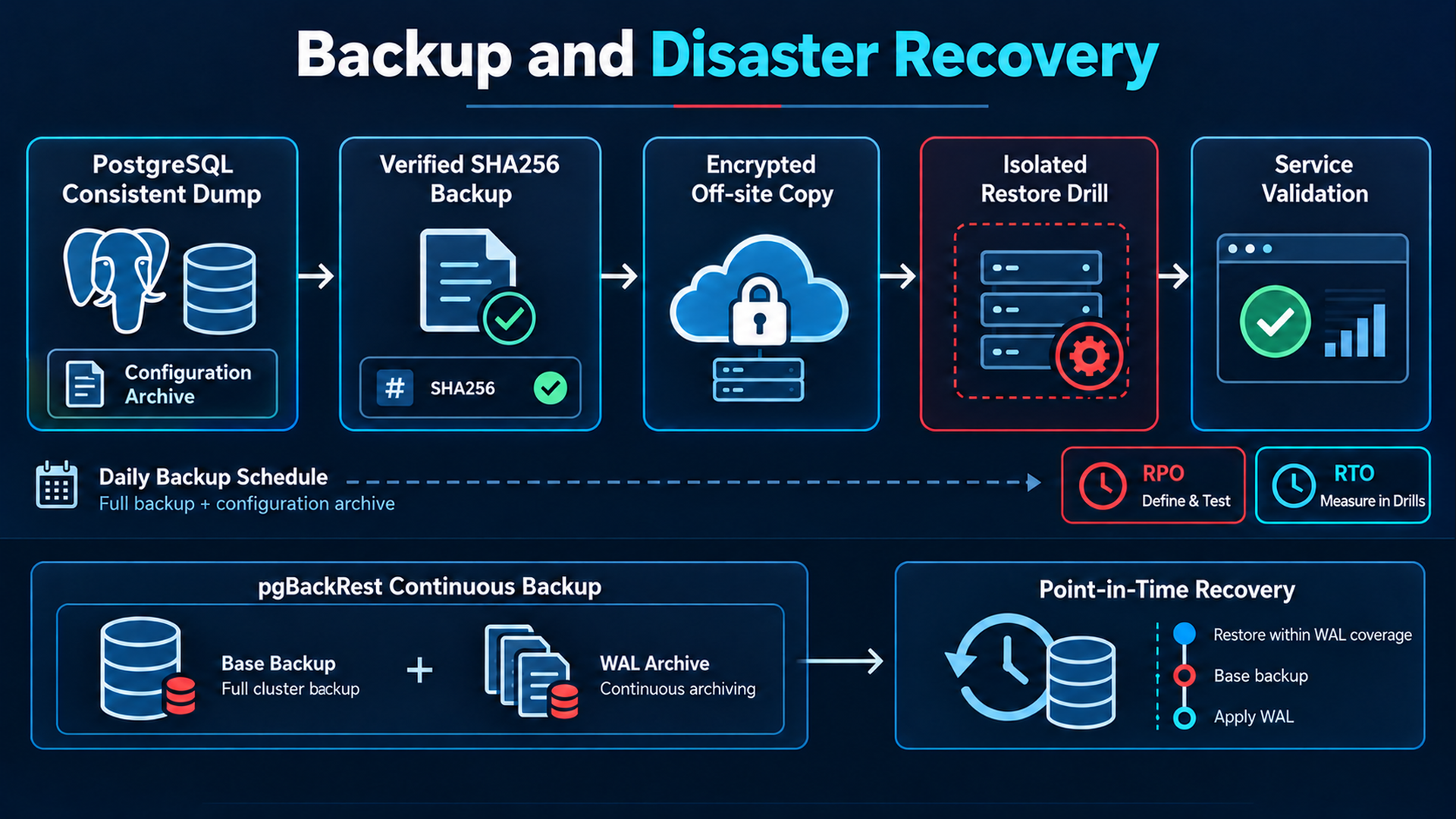
RPO is maximum acceptable lost data/config interval; RTO is maximum acceptable service recovery time. Daily dumps can lose nearly a day plus transfer/scheduling delay; 24-hour RPO is not guaranteed without age monitoring. PITR approaches available WAL archive coverage. Measure retrieval, install, restore, secret recovery and validation for RTO. Plan downtime, communication and a single cutover authority; never run duplicate collecting/alerting servers with the same identity.
1–2. Prepare Ubuntu 24.04 replacement on an isolated recovery VLAN: patches, IP/DNS, NTP, firewall. Block agent/proxy traffic and external SMTP/Telegram, keep backup timer stopped. Install recorded compatible Zabbix 7.0 patch and PostgreSQL 16/PHP/Nginx. Retrieve selected encrypted snapshot into root-only staging, preserve original, verify SHA256 and archive decoding. Never run older Zabbix on a newer schema; startup can irreversibly upgrade schema. For vulnerable recorded packages rehearse a supported patch upgrade on a clone.
# ISOLATED REPLACEMENT ONLY; adapt selected-set to retrieved snapshot.
sudo systemctl stop zabbix-server zabbix-agent2 nginx
sudo systemctl disable --now zabbix-backup.timer 2>/dev/null || true
sudo install -d -m 0700 /restore/zabbix
# With protected repository settings, select reviewed snapshot ID:
# restic restore SELECTED_SNAPSHOT_ID --target /restore/zabbix
sudo bash -c 'cd /restore/zabbix/selected-set && sha256sum --check SHA256SUMS'
sudo pg_restore --list /restore/zabbix/selected-set/zabbix.dump
sudo pg_restore --file=/dev/null /restore/zabbix/selected-set/zabbix.dump
sudo gzip -t /restore/zabbix/selected-set/configuration.tar.gz
sudo tar -tzf /restore/zabbix/selected-set/configuration.tar.gz
# 3. Recreate role only if absent, then new EMPTY recovery database.
sudo -u postgres createuser --no-superuser --no-createdb --no-createrole zabbix
sudo -u postgres psql -X -c '\password zabbix'
sudo -u postgres createdb -O zabbix -E UTF8 -T template0 zabbix_recovery
sudo -u postgres psql -X -d zabbix_recovery -c 'REVOKE ALL ON DATABASE zabbix_recovery FROM PUBLIC;'
sudo -u postgres psql -X -d zabbix_recovery -c 'REVOKE CREATE ON SCHEMA public FROM PUBLIC;'
sudo -u postgres psql -X -d zabbix_recovery -c 'GRANT ALL ON SCHEMA public TO zabbix;'
# Pipe stdin because postgres cannot traverse root-only backup directories.
set -o pipefail
sudo cat /restore/zabbix/selected-set/zabbix.dump | sudo -u postgres pg_restore --exit-on-error --no-owner --no-acl --role=zabbix -d zabbix_recovery
sudo -u postgres psql -X -d zabbix_recovery -c 'SELECT mandatory,optional FROM dbversion;'
sudo -u postgres psql -X -d zabbix_recovery -c 'SELECT count(*) FROM hosts;'
sudo -u postgres psql -X -d zabbix_recovery -c 'SELECT count(*) FROM triggers;'
sudo -u postgres psql -X -d zabbix_recovery -c 'ANALYZE;'
# 4–6. Extract to staging, not directly over /etc.
sudo install -d -m 0700 /restore/configuration
sudo tar --acls --xattrs --numeric-owner -xzf /restore/zabbix/selected-set/configuration.tar.gz -C /restore/configuration
3. Do not import initial server.sql.gz before pg_restore. Use PostgreSQL 16 pg_restore or documented compatible newer tools. 4–6. Review staged /etc/zabbix, Nginx/PHP-FPM, TLS keys/chain, PostgreSQL settings and custom alert/external scripts; install selectively with recorded owner/mode, reconcile account IDs, IPs, certificate names and interpreter dependencies. Never overwrite PGDATA or OS config blindly. The following copies overwrite replacement configuration and are for the reviewed replacement only. Set DBName=zabbix_recovery/reset DBPassword in server and frontend and add its limited SCRAM pg_hba rule for the drill.
# OVERWRITES REPLACEMENT CONFIG: review staged files and destination host first.
sudo cp -a /restore/configuration/etc/zabbix/. /etc/zabbix/
sudo cp -a /restore/configuration/etc/nginx/. /etc/nginx/
sudo cp -a /restore/configuration/etc/php/8.3/fpm/. /etc/php/8.3/fpm/
sudo install -d -m 0700 /etc/ssl/zabbix
sudo cp -a /restore/configuration/etc/ssl/zabbix/. /etc/ssl/zabbix/
sudo chown root:root /etc/ssl/zabbix/privkey.pem
sudo chmod 0600 /etc/ssl/zabbix/privkey.pem
sudo chown root:zabbix /etc/zabbix/zabbix_server.conf
sudo chmod 0640 /etc/zabbix/zabbix_server.conf
# Reconcile PHP pool group before protecting zabbix.conf.php.
# Optional custom scripts, only if they were in the selected set:
for relative in usr/lib/zabbix/alertscripts usr/lib/zabbix/externalscripts usr/local/lib/zabbix; do
  if sudo test -d "/restore/configuration/$relative"; then
    sudo install -d -o root -g zabbix -m 0750 "/$relative"
    sudo cp -a "/restore/configuration/$relative/." "/$relative/"
  fi
done
# Restore /etc/letsencrypt and renewal hooks only if that CA workflow was used.
# Restore backup scripts/units from the set, but keep its timer disabled during drill.
sudoedit /etc/zabbix/zabbix_server.conf
sudoedit /etc/zabbix/web/zabbix.conf.php
sudoedit /etc/zabbix/nginx.conf
sudoedit /etc/postgresql/16/main/pg_hba.conf
# Add BEFORE rejection rules:
# host zabbix_recovery zabbix 127.0.0.1/32 scram-sha-256# 7. Start required services only after configuration review.
sudo pg_ctlcluster 16 main reload
sudo php-fpm8.3 -t
sudo nginx -t
sudo systemctl start php8.3-fpm zabbix-server nginx
sudo systemctl status zabbix-server php8.3-fpm nginx --no-pager
sudo tail -n 100 /var/log/zabbix/zabbix_server.log
curl -I --cacert /path/to/enterprise-ca.pem https://zabbix.example.com/
# Start only disposable lab agents after name/network/TLS validation.8–10. Check System information/schema, counts against recovery record, historical graphs, fresh Linux/Windows lab data, PROBLEM/OK and notification to an isolated test sink. Test RBAC/MFA, HTTPS, scripts, queue, maintenance/dependencies and backup on replacement. Live hosts have stale data while isolated; use cloned lab identities or controlled rerouting, not duplicate collectors. Record restored last sample and elapsed retrieval/start/validation, achieved RPO/RTO. Then approve IP/DNS cutover, alert routes and timer reactivation; preserve rollback source.
Destructive commands — approved replacement cutover only
dropdb permanently deletes the existing monitoring database. Keep it separate from the new-name drill; only execute on a confirmed replacement after verified backup, recorded host identity and explicit operational approval. Never on the live source. --clean or extracting config over /etc also overwrites state and needs review.
# DESTRUCTIVE, intentionally commented: confirmed replacement host only.
sudo systemctl stop nginx zabbix-server
# sudo -u postgres dropdb --if-exists zabbix
# sudo -u postgres createdb -O zabbix -E UTF8 -T template0 zabbix
# Restore the verified dump into this EMPTY DB as above, no initial schema import.12. Production troubleshooting
Symptoms → Root cause → Diagnostic commands → Expected results → Resolution. Expected results describe healthy infrastructure, not runtime results from this website workspace. Diagnose from the assigned Server/Proxy and save evidence before restarting. Never resolve failures by disabling TLS/firewall/AppArmor/authentication.
Server not starting
Symptoms: Failed unit / Server down. Root cause: Config, DB/schema or port conflict.
sudo systemctl status zabbix-server --no-pager
sudo journalctl -u zabbix-server -n 100 --no-pager
sudo tail -n 100 /var/log/zabbix/zabbix_server.log
sudo ss -lntp
Expected results: Running, listener 10051, no fatal DB errors. Resolution: Fix first logged error and compatibility before restart.
Database connection failure
Symptoms: Refused / authentication failed. Root cause: Wrong DBHost/password/HBA or stopped cluster.
pg_lsclusters
pg_isready -h 127.0.0.1
psql -h 127.0.0.1 -U zabbix -W -d zabbix -c 'SELECT 1;'
sudo -u postgres psql -X -c 'SELECT line_number,error FROM pg_hba_file_rules;'
Expected results: Online, accepting, SELECT 1 succeeds. Resolution: Repair protected credentials and ordered SCRAM rules; no trust.
Agent unavailable
Symptoms: Stale OS data / passive red icon. Root cause: Agent stopped, interface/allowlist/TLS wrong.
sudo systemctl status zabbix-agent2 --no-pager
sudo tail -n 50 /var/log/zabbix/zabbix_agent2.log
sudo ufw status numbered
# Windows: Get-Service -Name "Zabbix Agent 2"
Expected results: Running, encrypted passive ping=1, active data advances. Resolution: Repair path/TLS; use active heartbeat for active-only hosts.
Hostname mismatch
Symptoms: Active host not found. Root cause: Hostname differs from technical Host name.
sudo grep '^Hostname=' /etc/zabbix/zabbix_agent2.conf
sudo tail -n 50 /var/log/zabbix/zabbix_agent2.log
Expected results: Exact case-sensitive name and enabled host. Resolution: Align Hostname, not Visible name; restart agent and wait refresh.
Active checks not working
Symptoms: Passive works but active data absent. Root cause: Wrong ServerActive/proxy or template type.
sudo grep -E '^(ServerActive|Hostname|TLSConnect)=' /etc/zabbix/zabbix_agent2.conf
nc -vz 192.0.2.10 10051
sudo tail -n 50 /var/log/zabbix/zabbix_agent2.log
Expected results: Active list/data accepted by assigned destination. Resolution: Fix assigned destination, active item/template and UI encryption.
TCP/10050 problems
Symptoms: Passive timeout/refused. Root cause: Listener or poller allowlist absent.
# On agent:
sudo ss -lntp | grep ':10050'
sudo ufw status numbered
# On assigned Server/Proxy:
nc -vz 198.51.100.21 10050
Expected results: Agent listens; approved source reaches it. Resolution: Correct ListenIP/source rule; not needed in active-only design.
TCP/10051 problems
Symptoms: Active timeout/refused. Root cause: Destination listener, routing or egress.
sudo ss -lntp | grep ':10051'
# From agent:
nc -vz 192.0.2.10 10051
ip route get 192.0.2.10
Expected results: Correct listener and allowed route/TCP. Resolution: Repair real path/NAT source allowlist while retaining TLS.
TLS PSK mismatch
Symptoms: Handshake / unknown identity error. Root cause: Identity/key/direction mismatch or unreadable file.
sudo grep -E '^(TLSConnect|TLSAccept|TLSPSKIdentity|TLSPSKFile)=' /etc/zabbix/zabbix_agent2.conf
sudo -u zabbix test -r /etc/zabbix/keys/agent2.psk
sudo tail -n 50 /var/log/zabbix/zabbix_agent2.log
Expected results: Protected readable key and UI/agent match. Resolution: Securely re-provision per-host key, correct directions, test TLS.
Unsupported items
Symptoms: Not supported item. Root cause: Key/type, permissions, plugin or discovery mismatch.
sudo -u zabbix zabbix_agent2 -c /etc/zabbix/zabbix_agent2.conf -t 'custom.service.nginx'
# Read item error under Hosts -> Items.
Expected results: Typed value, not ZBX_NOTSUPPORTED. Resolution: Fix exact error with release/7.0 keys and minimal access.
No data received
Symptoms: Stale Latest data timestamps. Root cause: Disabled item/host, maintenance, queue/clock.
sudo tail -n 100 /var/log/zabbix/zabbix_server.log
chronyc tracking
# Frontend: host/item status, Maintenance and Administration -> Queue
Expected results: Enabled values advance after interval, bounded queue. Resolution: Restore intended collection, time/interval; investigate DB latency.
Database storage exhaustion
Symptoms: Full disk, insert failures, queue growth. Root cause: History/WAL/log growth or failed archiving.
df -hT
df -i
sudo -u postgres psql -X -d zabbix -c 'SELECT pg_size_pretty(pg_database_size(current_database()));'
sudo -u postgres psql -X -c 'SELECT * FROM pg_stat_archiver;'
Expected results: Free blocks/inodes, healthy WAL archiving. Resolution: Expand safely, repair archiving/retention; never delete WAL/DB files manually.
Backup failure
Symptoms: Failed unit or stale last-success. Root cause: Mount/space, credentials, changed files or off-site failure.
sudo systemctl show zabbix-backup.service -p Result -p ExecMainStatus
sudo journalctl -u zabbix-backup.service -n 100 --no-pager
mountpoint /backup
df -h /backup
systemctl list-timers --all zabbix-backup.timer
Expected results: Result=success, exit 0, fresh SUCCESS and off-site snapshot. Resolution: Fix logged cause, preserve old verified sets, rerun/retrieve and test failure channel.
13. Production checklist
- [ ] Stable supported LTS/packages and advisories recorded; patch owner/window assigned.
- [ ] DNS/static IP, NTP, IOPS/capacity, DB/WAL headroom and encrypted /backup mount validated.
- [ ] Restricted PostgreSQL role, SCRAM/peer and loopback pass positive/negative access tests.
- [ ] Server/frontend/Linux/Windows services survive reboot; logs/permissions match package layout.
- [ ] Correct active/passive templates, hostnames/proxy and fresh CPU/RAM/disk/network/load/uptime data.
- [ ] Required services and Event Logs covered; discovery exclusions/thresholds reviewed.
- [ ] Trigger PROBLEM/OK, severity, hysteresis, maintenance, dependency/escalation tested safely.
- [ ] Email/official Telegram action and recovery delivery verified with permitted test users.
- [ ] HTTPS renewal/chain, unique Agent PSK/cert and narrow firewall pass; no insecure fallback.
- [ ] Named admins, MFA/RBAC/API scope, audit retention, sessions and emergency access tested.
- [ ] Timer, lock, space/integrity checks, failure transport and independent stale-success alerts tested.
- [ ] Encrypted off-site snapshot retrieved; separate vault keys, retention/immutable copies approved.
- [ ] Isolated restore of DB/config/TLS/scripts, hosts/history/triggers/notifications meets measured RPO/RTO.
- [ ] Operations owns dashboards, storage/queue/backup checks, incident/capacity/change/rollback runbooks.
Operational handover and runtime acceptance
This website workspace validates article integration and static syntax. It does not install live Zabbix/PostgreSQL or execute a real backup, Windows MSI, notification or restore. Complete and record the staging acceptance evidence before production rollout. Hand over versions, protected secret paths, diagrams, dashboards, alert ownership, backup retention and measured restore evidence to Operations.
Frequently asked questions
Why 7.0 LTS instead of 8.0 RC?
The verified lifecycle lists 7.0 as the latest released LTS. RC is not production; recheck the stable selector before deployment.
Which templates work with Agent 2?
Official Linux by Zabbix agent and Windows by Zabbix agent templates support Agent 2; choose their active variants for active checks.
Which ports are required?
Active agents connect to Server/Proxy TCP/10051; passive polling reaches agents TCP/10050, with TLS and source allowlists.
Is /etc/zabbix alone a backup?
No. Recover PostgreSQL together with protected configuration, TLS material and custom scripts.
Does the script store DB passwords?
No. Local peer authentication uses postgres OS user and the restricted zabbix role. Off-site credentials are protected separately.
When are old backups deleted?
Only after new archive verification and required off-site success, and only completed sets older than configured retention.
Can a dump provide PITR?
A dump restores its snapshot. PITR requires a physical base backup and complete WAL archive chain.
Do checksums prove recovery?
No. Restore and validate hosts, data, triggers and notifications in isolation; record achieved RPO/RTO.
Official References, downloads and related articles
References are linked in each chapter. Templates contain no real credentials and require approved addressing, secrets and staging validation. Download individual files or the complete package.
Download: Linux Agent 2 configuration
Download: Windows Agent 2 configuration
Download: PowerShell MSI installation
Download: Verified backup Bash script
Download: Backup environment template
Download: Backup systemd service
Download: Failure notification unit
Download: Independent notification hook
Complete configuration and runbook ZIP
Related: Grafana dashboards integrated with Zabbix
Related: Oracle enterprise backup and recovery
Related: Tomcat service security
Related: MongoDB production deployment