1. Introduction: release, edition and scope
Oracle Database is a transactional relational database with SQL, PL/SQL, concurrency control, recovery and enterprise data services. Oracle AI Database 26ai is the current generally available long-term release. The product name 26ai does not mean the internal release number starts with 26: the public base media identifies 23.26.1.0.0. The latest entitled Release Update must be checked in My Oracle Support before deployment; the public RPM filename is not a patch level.
Oracle AI Database 26ai new features and long-term release
Verified Enterprise Linux x86-64 download and checksums
This runbook targets a new single-instance Enterprise Edition deployment on Oracle Linux 9 x86_64 using the official EE RPM. All addresses, names, quotas, times and sizes are examples that must be approved for your environment. Linux commands run on the database host, not on the Windows website workspace. This article validates documentation and executable-file syntax; installation, database startup, RMAN execution, TLS and restores have not been exercised against a real Oracle server here.
| Edition | Use and limits |
|---|---|
| Enterprise Edition | Commercial production edition; options and management packs can require additional licenses. This is the only installation path used below. |
| Free Edition | Separate product/package with limits of 2 CPUs, 2 GB database RAM and 12 GB user data. FREE/FREEPDB1 and Free service commands do not apply to this EE runbook. |
Enterprise workloads include ERP, finance, order processing, mixed analytics and application consolidation; AI Vector Search adds similarity workloads. Choose licensing by the actual deployment and contract, including virtualization and processor or Named User Plus metrics. Do not assume that downloading media grants production rights. Keep an inventory of enabled options; basic RMAN and unified auditing differ from separately licensed Advanced Security, Advanced Compression and Diagnostics/Tuning Packs.
Oracle 26ai licensing: permitted features, options and packs
2. Prerequisites and host diagnostics
Oracle’s server checklist gives a 1 GB RAM installation minimum and recommends 2 GB; Grid Infrastructure requires at least 8 GB. These are installation floors. A practical starting estimate for this guide is 4 vCPUs and 16–32 GiB RAM, then size SGA, PGA, sessions and IOPS by workload testing. For x86_64 use a certified CPU/platform; do not apply Arm requirements to x86_64. Separate database, FRA and backup capacity budgets; never size production from Free Edition limits.
The OL9 support table lists OL9.2 with UEK7 5.15.0-201.135.6.el9uek or RHCK 5.14.0-284.30.1.el9_2 as base minimums. It additionally lists OL9.6 with UEK8 6.12.0-1.23.3.2.el9uek or later starting with RU 23.26.2. Select the exact OS/kernel/RU combination from the current certification matrix. Do not read the new UEK8 row as proof that all earlier certified kernel families are unsupported. Patch OL9 to its current supported release level.
Supported OL9 kernels and required packages
# Database host: root/sudo diagnostics
cat /etc/oracle-release
uname -m
uname -r
lscpu
free -h
swapon --show
df -hT / /opt /tmp
df -i / /opt /tmp
findmnt
hostnamectl
hostname -f
getent ahostsv4 db01.example.com
ip -br address
ip route
timedatectl
chronyc tracking
getenforce
sudo firewall-cmd --get-active-zones
Expected: Oracle Linux 9.x, x86_64, a certified kernel, sufficient available RAM/disk/inodes, stable private IP 10.20.30.10, FQDN db01.example.com resolving to that IP, synchronized time and SELinux Enforcing. Configure DNS forward/reverse records and a static address through your approved network tooling. Replace example.com and all sample subnets. Swap guidance for database-only hosts: 1–2 GB RAM → 1.5× RAM; 2–16 GB → RAM size; above 16 GB → 16 GB. HugePages and SGA sizing require additional workload planning; avoid sustained swapping.
Server configuration, swap and memory planning
| Path | Purpose and example budget |
|---|---|
| /opt/oracle | EE software minimum: 8.3 GB. Oracle recommends about 100 GB with patch headroom; budget inventory and logs too. |
| /oradata | SSD-backed database files; 100 GiB example, sized for growth, redo and temporary work. |
| /fra | Recovery files; 100 GiB example quota with physical capacity above quota and alarms. |
| /backup/oracle | Dedicated backup mount; size retained level 0/1 chains and archived logs plus off-host replication lag. |
Provision and persist approved filesystems before installation; verify mount ownership and boot ordering in /etc/fstab. /backup/oracle is a separate mounted filesystem in the automation below, which refuses to write to an unmounted directory. Do not format an existing device from copied examples. RMAN does not protect Oracle homes, wallets, password files, listener configuration or external-table files: protect those separately with restricted access.
Official software storage and patch-headroom recommendations
CDB and PDB architecture
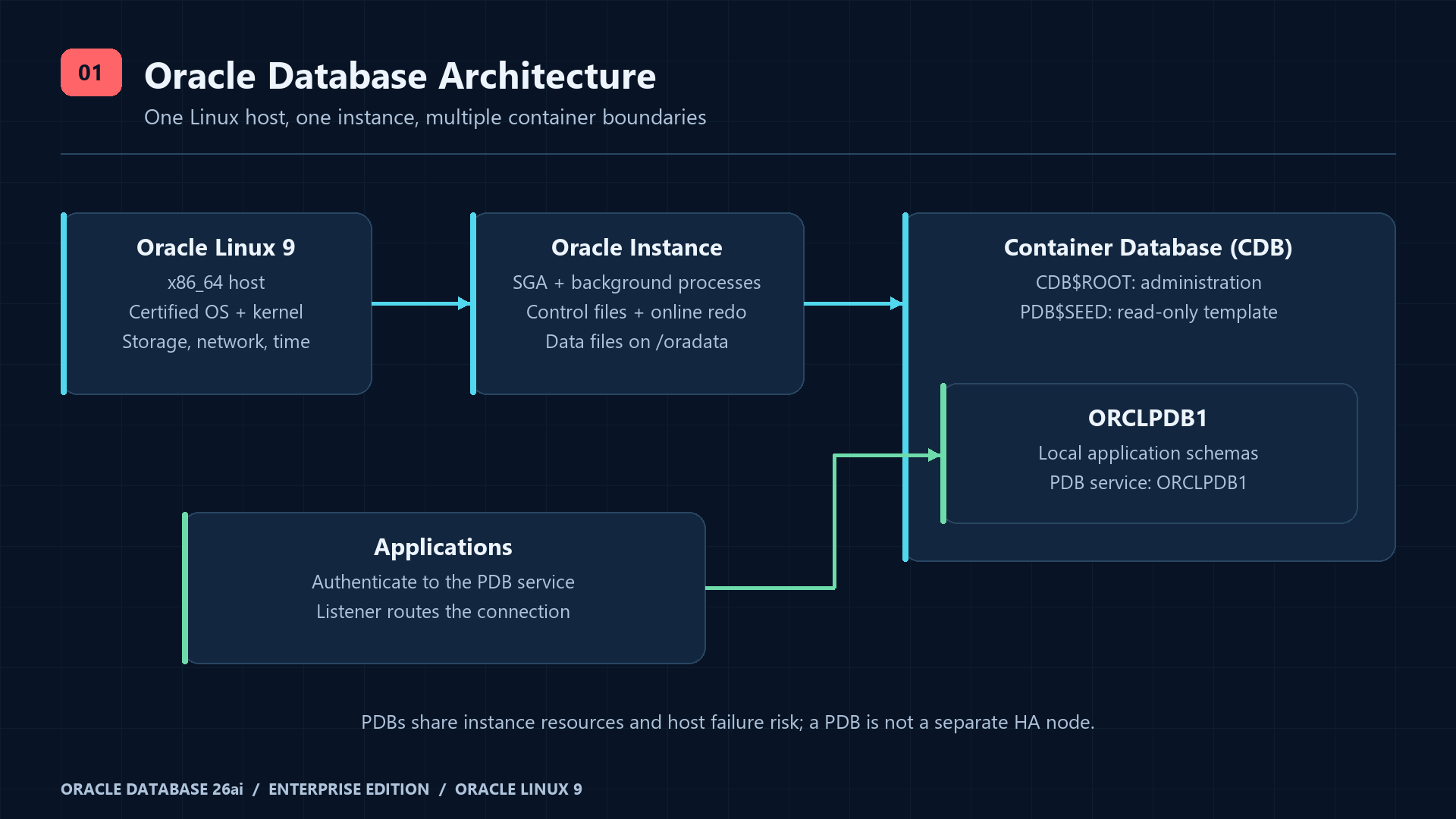
An instance contains the SGA and background processes; the database consists of data files, control files and online redo. A CDB has CDB$ROOT, the read-only PDB$SEED template and application PDBs. ORCLPDB1 holds local application users and schemas. PDBs share the instance and host failure domain: a PDB is not an independent availability node. Applications connect to a PDB service name, not the root SID. DBCA is the creation engine invoked by the RPM configure script.
3. Installation and database configuration
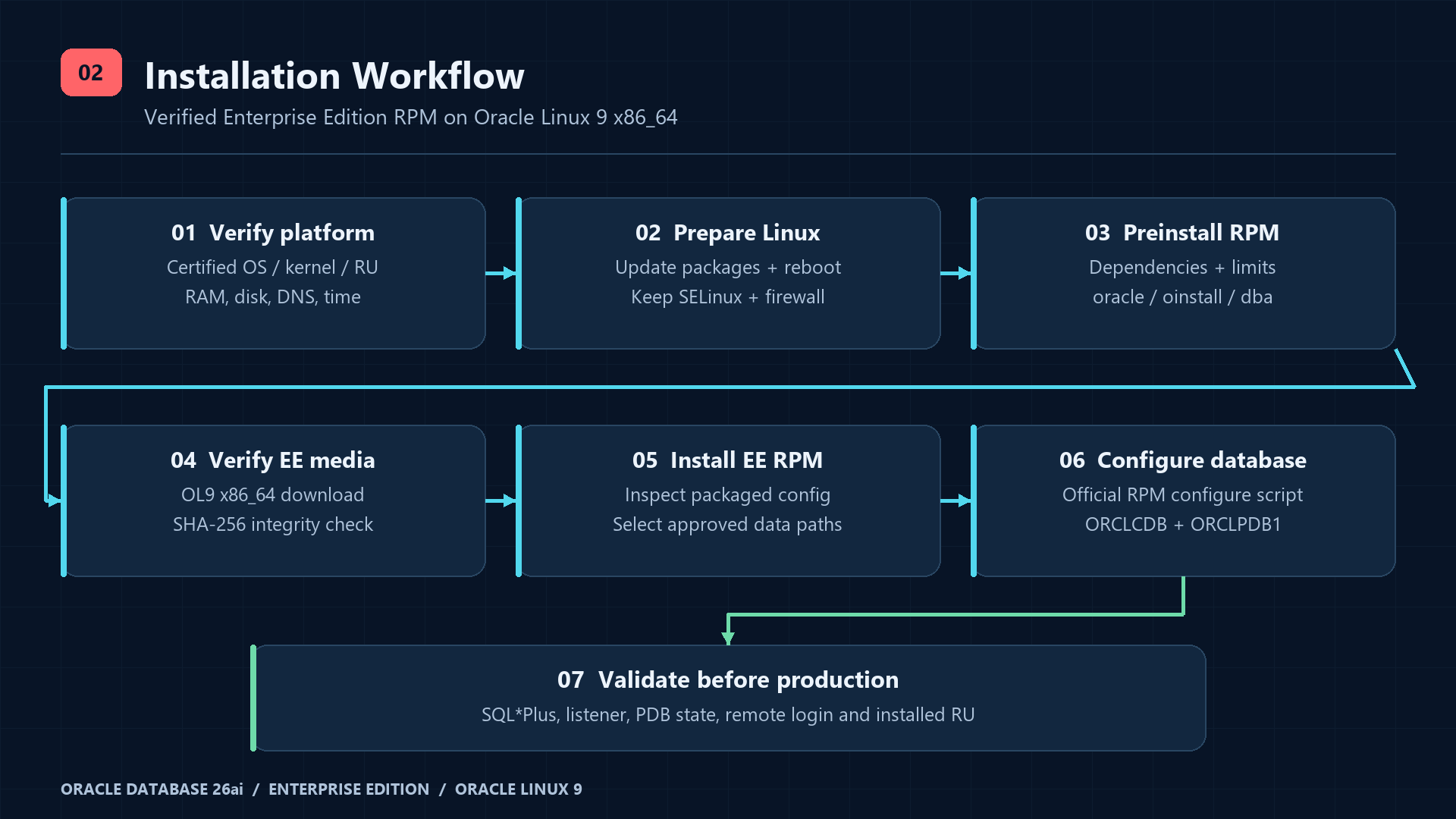
Step 1–3: patch OL9 and use the official dependency RPM
sudo dnf upgrade --refresh -y
# Reboot in an approved maintenance window after kernel updates:
sudo reboot
# Reconnect and verify the running kernel, DNS and time again.
sudo dnf install -y oracle-ai-database-preinstall-26ai
sudo dnf install -y firewalld chrony policycoreutils-python-utils util-linux logrotate
sudo systemctl enable --now firewalld chronyd
rpm -q oracle-ai-database-preinstall-26ai
id oracle
getent group oinstall dba
sudo cat /var/log/oracle-ai-database-preinstall-26ai/results/orakernel.log
sudo grep -RE 'oracle|shm|sem|aio-max-nr|file-max|ip_local_port_range' /etc/sysctl.d /etc/security/limits.d
sysctl kernel.sem kernel.shmmax kernel.shmall fs.aio-max-nr fs.file-max net.ipv4.ip_local_port_range
sudo -iu oracle bash -c 'ulimit -Sn; ulimit -Hn; ulimit -Su; ulimit -Hu'
The preinstallation RPM installs dependencies and configures kernel/limits settings plus oracle, oinstall and dba. Inspect the resulting files and logs instead of pasting arbitrary sysctl values. Expected: the preinstall package is installed, oracle has the installation/DBA groups and limits agree with the vendor checklist. An oracle OSDBA account can administer the entire instance: restrict login, SSH keys and sudo. Create additional OSOPER/OSBACKUPDBA/OSKMDBA groups only as part of a reviewed job-role separation design.
Oracle preinstallation RPM operating-system configuration
Step 4–5: obtain and verify Enterprise Edition media
Use the official downloads page linked above, accept its applicable license and download the OL9 x86_64 Enterprise RPM through your authenticated browser or approved artifact channel into /var/tmp/oracle-media. Do not substitute the Free RPM or an OL8/Arm package. Oracle download authentication and license redirects make a fabricated unattended curl URL unsafe. The commands below verify the exact public OL9 media observed at review time; if the page changes, take both filename and hash from that page again.
sudo install -d -m 0750 /var/tmp/oracle-media
# Place the official downloaded RPM here before continuing.
cd /var/tmp/oracle-media
printf '%s  %s\n' '7405061889cdbf368816be5eea27313cf3be86afc70b85c77ab9a3a0dc216730' 'oracle-ai-database-ee-26ai-1.0-1.el9.x86_64.rpm' | sha256sum --check -
# Expected: oracle-ai-database-ee-26ai-1.0-1.el9.x86_64.rpm: OK
rpm -qpi ./oracle-ai-database-ee-26ai-1.0-1.el9.x86_64.rpm
sudo dnf install -y ./oracle-ai-database-ee-26ai-1.0-1.el9.x86_64.rpm
rpm -q oracle-ai-database-ee-26ai
rpm -ql oracle-ai-database-ee-26ai | grep -E 'init.d|sysconfig|systemd|dbhome'
sudo install -d -o oracle -g oinstall -m 0750 /oradata /fra
sudo install -d -o oracle -g oinstall -m 0700 /backup/oracle
findmnt --target /oradata
findmnt --target /fra
findmnt --mountpoint /backup/oracle
Official EE RPM installation and configure script
Step 6–9: environment, listener, initial CDB and PDB
Inspect /etc/sysconfig/oracledb_ORCLCDB-26ai.conf and the packaged configure script. For this example set the existing ORACLE_DATA_LOCATION field to /oradata and retain listener port 1521. Do not add guessed configuration keys. The official configure command creates ORCLCDB, ORCLPDB1 and the listener using DBCA; do not run it again on an existing production database. Review its status output and credential initialization behavior; immediately rotate the initial administrative credentials through local OS-authenticated SQL*Plus as shown in Section 5. For custom names/templates use the documented DBCA/RPM customization path, not a second configure invocation.
sudo cat /etc/sysconfig/oracledb_ORCLCDB-26ai.conf
sudo vi /etc/sysconfig/oracledb_ORCLCDB-26ai.conf
# New deployment ONLY; creates the database and listener:
sudo /etc/init.d/oracledb_ORCLCDB-26ai configure
sudo -iu oracle
# Add this non-secret environment to oracle's ~/.bash_profile:
export ORACLE_BASE=/opt/oracle
export ORACLE_HOME=/opt/oracle/product/26ai/dbhome_1
export ORACLE_SID=ORCLCDB
export PATH="$ORACLE_HOME/bin:$PATH"
export TNS_ADMIN="$ORACLE_HOME/network/admin"
umask 027
test -x "$ORACLE_HOME/bin/sqlplus"
lsnrctl status LISTENER
lsnrctl services LISTENER
sqlplus / as sysdba-- SQL*Plus as SYSDBA in CDB$ROOT:
SELECT banner_full FROM v$version;
SELECT name, cdb, open_mode, log_mode FROM v$database;
SHOW CON_NAME
SHOW PDBS
ALTER PLUGGABLE DATABASE ORCLPDB1 OPEN;
ALTER PLUGGABLE DATABASE ORCLPDB1 SAVE STATE;
ALTER SYSTEM REGISTER;
SELECT name, network_name, pdb FROM v$services ORDER BY name;
SELECT patch_id, action, status, description FROM dba_registry_sqlpatch ORDER BY action_time;
EXITIf SHOW PDBS already reports READ WRITE, omit the OPEN command; ORA-65019 indicates it is already open. Expected: CDB=YES, root READ WRITE, seed READ ONLY, ORCLPDB1 READ WRITE and the PDB service registered with a READY handler. SAVE STATE preserves this PDB open state for instance restarts. Verify actual network configuration paths with lsnrctl status; read listener.ora rather than overwriting generated settings. Check installed RU with OPatch inventory and DBA_REGISTRY_SQLPATCH before accepting production.
# oracle shell: inventory only, no patch application
"$ORACLE_HOME/OPatch/opatch" lsinventory
cat "$TNS_ADMIN/listener.ora"
Step 10–11: local and remote SQL*Plus validation
After creating the restricted PDB application user in Section 5 and applying the firewall allowlist, run this from an authorized application host with a supported Oracle client. SQL*Plus prompts for its password. The PDB service must match the actual v$services and lsnrctl services output. A successful TCP probe alone does not prove authenticated database connectivity. This initial TCP test is a private-network installation diagnostic; require the encrypted transport described below before production traffic.
# Authorized client, password is prompted:
sqlplus -L app_runtime@//db01.example.com:1521/ORCLPDB1SELECT sys_context('USERENV','CON_NAME') AS pdb,
sys_context('USERENV','SESSION_USER') AS login_user FROM dual;
-- Expected: ORCLPDB1 and APP_RUNTIME
EXIT4. Running Oracle as a service and verifying reboot startup
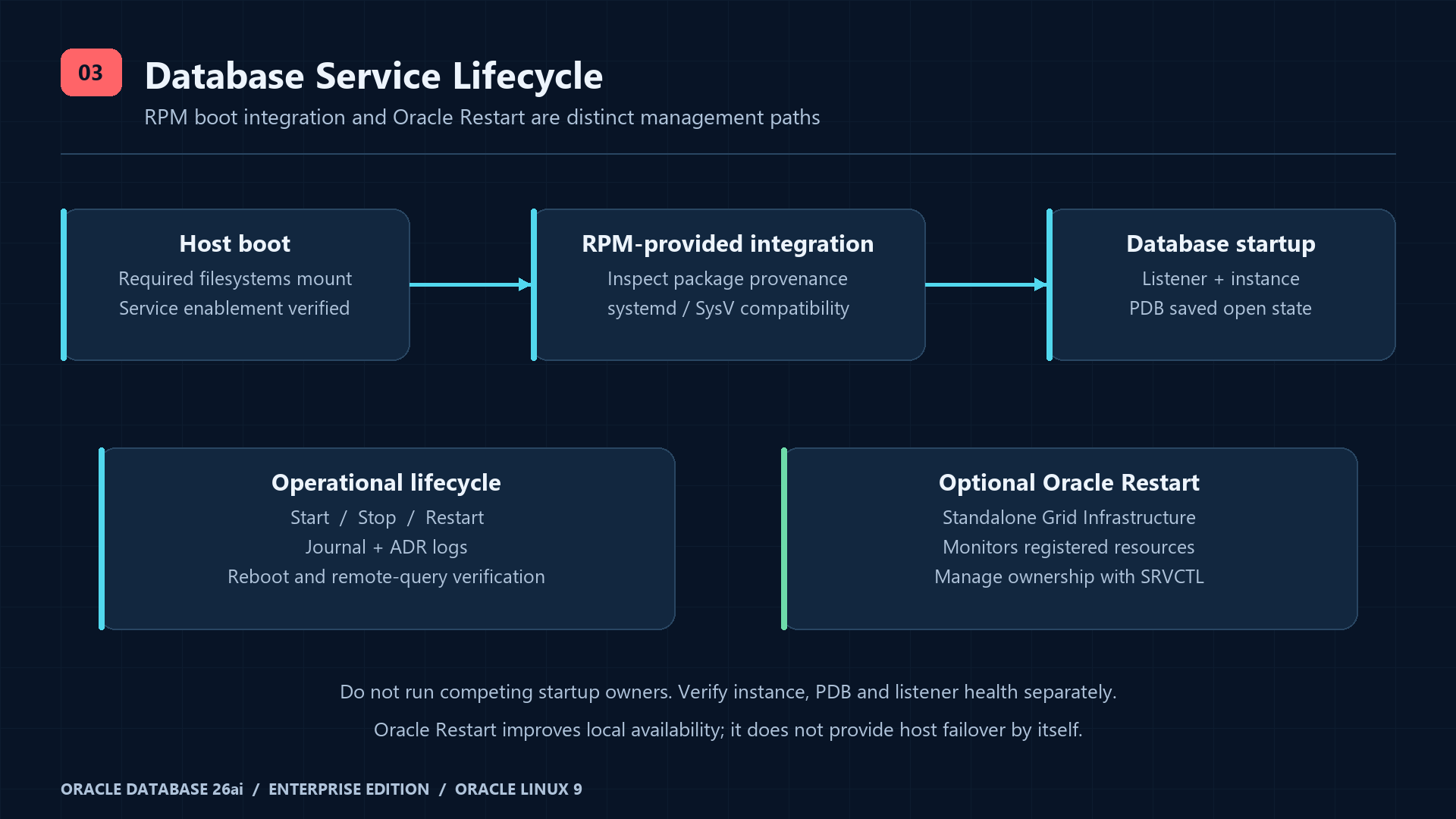
Oracle’s EE guide explicitly supplies /etc/init.d/oracledb_ORCLCDB-26ai. On OL9, systemd may expose it through SysV compatibility; inspect SourcePath/FragmentPath to confirm the loaded service comes from the installed RPM. The .service name below is derived from that documented script, not a custom unit. Never create an invented oracle.service. If this RPM/OS combination has no loaded integration, stop and follow the package documentation or deploy Oracle Restart; do not silently improvise a unit.
# root/sudo; verify the official package owns the script first:
rpm -qf /etc/init.d/oracledb_ORCLCDB-26ai
sudo systemctl daemon-reload
sudo systemctl show oracledb_ORCLCDB-26ai.service -p LoadState -p SourcePath -p FragmentPath
sudo systemctl cat oracledb_ORCLCDB-26ai.service
# Continue only if LoadState=loaded and provenance matches the RPM.
sudo systemctl enable oracledb_ORCLCDB-26ai.service
sudo systemctl is-enabled oracledb_ORCLCDB-26ai.service
sudo systemctl start oracledb_ORCLCDB-26ai.service
sudo systemctl status oracledb_ORCLCDB-26ai.service --no-pager
sudo journalctl -u oracledb_ORCLCDB-26ai.service -b -n 100 --no-pager
# Maintenance window: these commands interrupt all database sessions.
sudo systemctl stop oracledb_ORCLCDB-26ai.service
sudo systemctl start oracledb_ORCLCDB-26ai.service
sudo systemctl restart oracledb_ORCLCDB-26ai.service
For a generated SysV service, systemctl enable delegates to the distribution’s SysV enablement helper; a missing helper or failed enable is not success. Check the installed script’s chkconfig/LSB headers and the distribution compatibility package. When the packaged script and chkconfig support are present, the equivalent legacy enablement is shown below. Do not run both paths blindly. active (exited) can be normal for a wrapper: it does not prove the instance is open or the listener is healthy.
# Conditional SysV compatibility path only:
command -v chkconfig
sudo grep -E 'chkconfig:|BEGIN INIT INFO|Default-Start' /etc/init.d/oracledb_ORCLCDB-26ai
sudo chkconfig --add oracledb_ORCLCDB-26ai
sudo chkconfig oracledb_ORCLCDB-26ai on
sudo chkconfig --list oracledb_ORCLCDB-26ai
# Direct operations provided by the RPM script:
# Inspect its usage/case branches to confirm supported actions:
sudo tail -n 80 /etc/init.d/oracledb_ORCLCDB-26ai
sudo /etc/init.d/oracledb_ORCLCDB-26ai start
sudo /etc/init.d/oracledb_ORCLCDB-26ai stop
OL9 service enablement and boot semantics
OL9 start, stop and status operations
Prove automatic startup after reboot
# Approved maintenance window, console access available:
sudo reboot
# Reconnect after boot:
sudo systemctl status oracledb_ORCLCDB-26ai.service --no-pager
sudo journalctl -u oracledb_ORCLCDB-26ai.service -b --no-pager
sudo -iu oracle
lsnrctl status LISTENER
lsnrctl services LISTENER
sqlplus / as sysdbaSELECT status, database_status FROM v$instance;
SELECT open_mode FROM v$database;
SHOW PDBS
EXITAcceptance requires OPEN / ACTIVE, root READ WRITE, ORCLPDB1 READ WRITE, a READY PDB listener handler and a successful authorized remote query without manual startup. Inspect mount availability if boot succeeds but Oracle does not. Runtime start and boot enablement are separate operations. Recheck after patching, Oracle-home changes and filesystem changes.
Oracle Restart and SRVCTL for stronger local availability
RPM boot scripts provide start/stop hooks; they do not continuously monitor an instance or move it to another host. Oracle Restart is Grid Infrastructure for a standalone server: it monitors registered database, listener, ASM and services and restarts them in dependency order. Install and configure GI using the 26ai gridSetup.sh procedure, then register existing components. Run the following only after Restart owns these resources, with the documented database/grid owner and the correct home binaries. Disable competing RPM autostart when migrating ownership. Restart improves local recovery; surviving host failure requires a separately designed Data Guard/RAC architecture and appropriate licenses.
# Oracle Restart already configured; database unique name verified:
srvctl config database -db ORCLCDB
srvctl enable database -db ORCLCDB
srvctl start database -db ORCLCDB
srvctl status database -db ORCLCDB
srvctl status listener
srvctl stop database -db ORCLCDB -stopoption IMMEDIATE
srvctl start database -db ORCLCDB5. Oracle Database security hardening
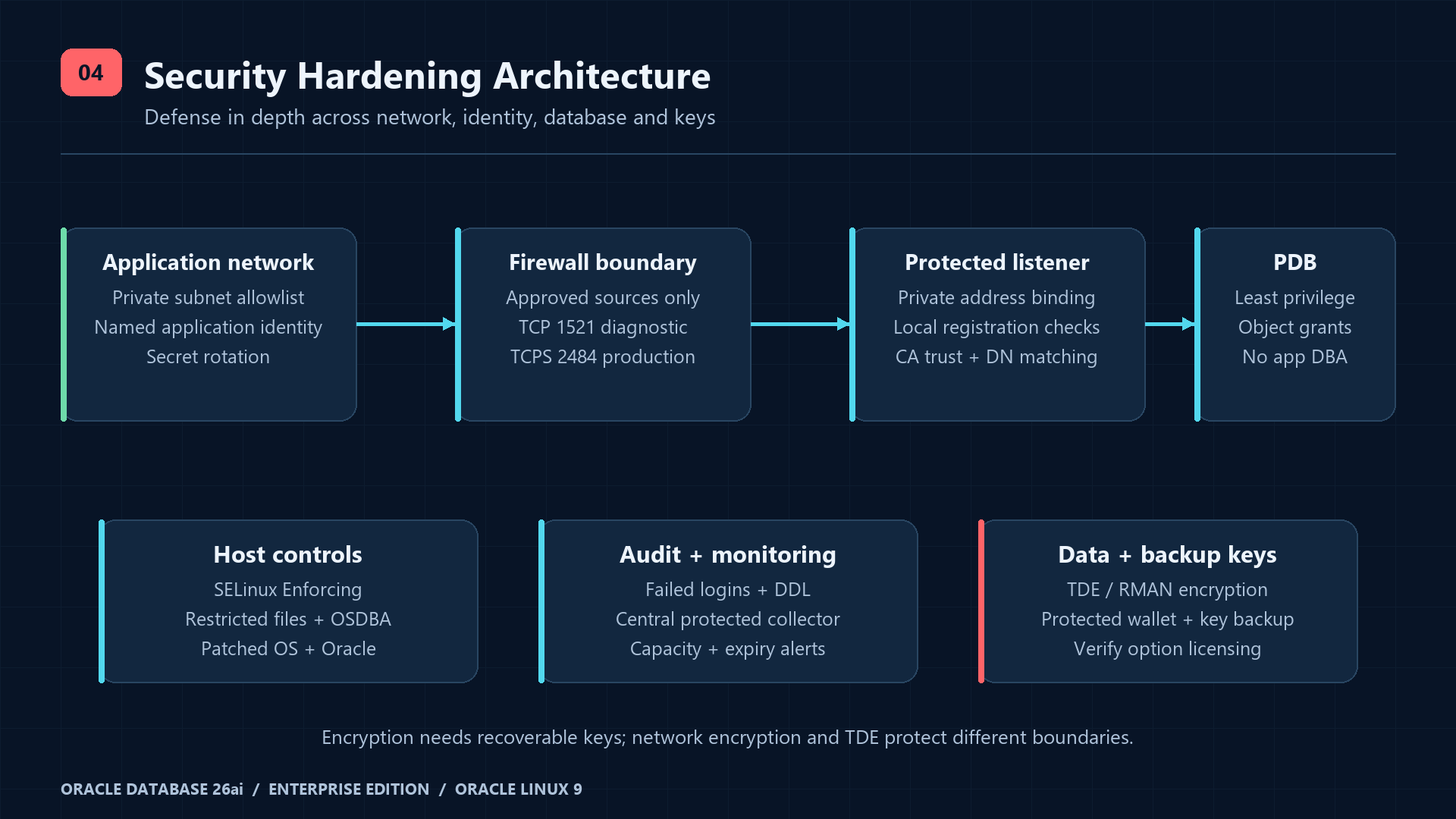
Least privilege, administrative accounts and password policy
Reserve SYS for exceptional instance administration and SYSTEM for controlled administration; applications must never use either. Rotate the initial administrative passwords using SQL*Plus PASSWORD prompts rather than shell arguments, command history or source files. Review remote administrative access, the password file and OSDBA membership. Do not lock SYS or remove OS authentication as a copied recipe: retain audited emergency access. Use named operators, MFA on the management jump host and dedicated application identities.
-- SYSDBA, CDB$ROOT; password prompts do not expose a literal secret:
PASSWORD SYS
PASSWORD SYSTEM
SELECT username, account_status, profile FROM dba_users ORDER BY username;
SELECT username, sysdba, sysoper, sysbackup FROM v$pwfile_users;
ALTER SESSION SET CONTAINER=ORCLPDB1;
-- Verify the shipped password verification function exists before using it:
SELECT object_name, status FROM dba_objects
 WHERE owner='SYS' AND object_name='ORA12C_STRONG_VERIFY_FUNCTION';
CREATE PROFILE aj_app_profile LIMIT
  FAILED_LOGIN_ATTEMPTS 5 PASSWORD_LOCK_TIME 1/24
  PASSWORD_LIFE_TIME 90 PASSWORD_GRACE_TIME 7
  PASSWORD_REUSE_TIME 365 PASSWORD_REUSE_MAX 10
  PASSWORD_VERIFY_FUNCTION ora12c_strong_verify_function;
-- Schema-only identities first; PASSWORD converts the runtime user to password authentication.
CREATE USER app_owner NO AUTHENTICATION
  DEFAULT TABLESPACE USERS QUOTA 500M ON USERS;
CREATE USER app_runtime NO AUTHENTICATION PROFILE aj_app_profile;
PASSWORD app_runtime
CREATE ROLE aj_runtime_role;
GRANT CREATE SESSION TO aj_runtime_role;
GRANT aj_runtime_role TO app_runtime;
-- Object grants only after the application owner has created the approved table:
-- GRANT SELECT, INSERT, UPDATE ON app_owner.orders TO aj_runtime_role;
SELECT username, account_status, authentication_type, profile FROM dba_users
 WHERE username IN ('APP_OWNER','APP_RUNTIME');
-- Incident response / controlled maintenance (interrupts future logins):
ALTER USER app_runtime ACCOUNT LOCK;
-- Only after investigation and any required password rotation:
ALTER USER app_runtime ACCOUNT UNLOCK;
Do not grant DBA, UNLIMITED TABLESPACE or broad ANY privileges to the runtime role. Use a controlled deployment identity to create schema objects; the schema-only owner has no direct login. Review unused users before locking them; Oracle-maintained accounts have dependencies. Password expiry requires a tested rotation workflow for connection pools, not an unattended outage after day 90. Record the profile exceptions explicitly. If the verification function is absent, use the documented Oracle password-profile installation path and review it before creating this profile.
Oracle authentication and password profiles
CREATE USER and schema-only authentication
Firewall and listener boundary
Use a dedicated private database VLAN and allow TCP/1521 only from 10.20.40.0/24 application servers plus any separately approved admin source. The following assumes the database interface is in public; inspect active zones first and substitute the actual zone. An existing broad port/service/rich rule or a trusted zone can bypass this allowlist: review every effective rule, upstream ACL and IPv6 route. Preserve management access when changing firewall policy. Test an authorized and an unauthorized host.
sudo firewall-cmd --get-active-zones
sudo firewall-cmd --zone=public --list-all
# Remove a broad port allowance IF it currently exists:
if sudo firewall-cmd --permanent --zone=public --query-port=1521/tcp; then
  sudo firewall-cmd --permanent --zone=public --remove-port=1521/tcp
fi
sudo firewall-cmd --permanent --zone=public --add-rich-rule='rule family="ipv4" source address="10.20.40.0/24" port port="1521" protocol="tcp" accept'
sudo firewall-cmd --reload
sudo firewall-cmd --zone=public --list-all
sudo ss -ltnp | grep ':1521'
# Oracle shell:
lsnrctl status LISTENER
lsnrctl services LISTENER
Bind the listener to the approved private hostname/IP; retain IPC and dynamic registration as generated. Do not expose the listener admin endpoint remotely. Add the following registration restriction to the existing listener.ora, then reload and register. It limits registration requests to local addresses, not application client logins; client admission remains a firewall/authentication policy. For Restart-managed listeners use GI configuration and SRVCTL rather than editing a conflicting database-home listener.
# Fragment to merge into the EXISTING listener.ora:
VALID_NODE_CHECKING_REGISTRATION_LISTENER=ONlsnrctl reload LISTENER
sqlplus / as sysdbaALTER SYSTEM REGISTER;
EXITListener parameters and registration checks
Oracle Linux firewalld zone configuration
SELinux, ownership and host controls
getenforce
sudo ls -ldZ /opt/oracle /oradata /fra /backup/oracle
sudo restorecon -Rv /opt/oracle /oradata /fra /backup/oracle
sudo ausearch -m AVC,USER_AVC -ts recent
sudo namei -l /backup/oracle
sudo stat -c '%U:%G %a %n' /oradata /fra /backup/oracle
sudo find /oradata /fra /backup/oracle -xdev -type f -perm -0002 -printKeep SELinux Enforcing and firewalld enabled. A custom mount may need persistent file-context mappings and an approved SELinux policy for the actual process domain; restorecon applies configured labels but cannot invent a database policy. Diagnose AVC denials, ownership and mount options; do not automatically pipe denials into audit2allow. Never blanket chmod the Oracle home, because packaged binaries have special permissions. Use 0750 for data directories, 0700 for backup/wallet directories and 0600 for secret files where appropriate; audit existing ACLs and parent traversal.
Oracle Linux SELinux administration
Auditing, encrypted transport and TDE
-- SYSDBA: review root and each application PDB separately.
ALTER SESSION SET CONTAINER=ORCLPDB1;
SELECT policy_name, enabled_option, entity_name FROM audit_unified_enabled_policies;
-- Enable only if not already enabled:
AUDIT POLICY ORA_LOGON_FAILURES;
CREATE AUDIT POLICY aj_account_changes ACTIONS CREATE USER, ALTER USER, DROP USER;
AUDIT POLICY aj_account_changes;
SELECT event_timestamp, dbusername, action_name, return_code
FROM unified_audit_trail
WHERE event_timestamp > SYSTIMESTAMP - INTERVAL '1' DAY
ORDER BY event_timestamp DESC FETCH FIRST 50 ROWS ONLY;Forward audit events to a protected central collector and monitor failed logins, account/privilege changes, unexpected administrative sessions and backup failures. Define audit retention, capacity alerts and DBMS_AUDIT_MGMT archival/purge only after successful export. Do not purge the trail to hide a disk-space problem. Unified auditing is available with EE; separate Audit Vault/Database Firewall products have their own entitlements.
Provisioning and enabling unified audit policies
TLS protects transport and authenticates the server; TDE protects stored database files. For TLS use a CA-issued certificate, private key and chain in a secured Oracle wallet. In 26ai prefer TLS_ parameters; legacy SSL_ names are deprecated. The database server uses WALLET_ROOT and a PDB wallet directory WALLET_ROOT/<PDB GUID>/tls; listener/client WALLET_LOCATION is still applicable. Configure and test both server and listener certificates with DN matching. The fragments below assume the CA wallet has already been provisioned, the actual GUID substituted and the database restarted after setting the static WALLET_ROOT. They are an integration example, not a certificate-issuance script.
-- CDB$ROOT, planned restart required before TLS wallet use:
ALTER SYSTEM SET WALLET_ROOT='/opt/oracle/admin/ORCLCDB/wallet' SCOPE=SPFILE;
SELECT name, RAWTOHEX(guid) AS pdb_guid FROM v$pdbs;
SHOW PARAMETER wallet_root# Merge into existing listener.ora; replace PDB_GUID with the actual GUID.
# Final example: loopback TCP for local registration, TCPS for remote clients.
# During migration, retain the approved private TCP endpoint until clients move to TCPS.
LISTENER =
(DESCRIPTION_LIST =
(DESCRIPTION =
(ADDRESS = (PROTOCOL = IPC)(KEY = EXTPROC1521))
(ADDRESS = (PROTOCOL = TCP)(HOST = 127.0.0.1)(PORT = 1521))
(ADDRESS = (PROTOCOL = TCPS)(HOST = db01.example.com)(PORT = 2484))))
WALLET_LOCATION =
(SOURCE = (METHOD = FILE)
(METHOD_DATA = (DIRECTORY = /opt/oracle/admin/ORCLCDB/wallet/PDB_GUID/tls)))
TLS_CLIENT_AUTHENTICATION = FALSE
VALID_NODE_CHECKING_REGISTRATION_LISTENER = ON
# Server sqlnet.ora, one-way TLS with database password authentication:
TLS_CLIENT_AUTHENTICATION = FALSE
# Client sqlnet.ora, CA trust available and supported client:
TLS_SERVER_DN_MATCH = YES-- CDB$ROOT: pair this with the loopback TCP registration address above.
ALTER SYSTEM SET LOCAL_LISTENER='(ADDRESS=(PROTOCOL=TCP)(HOST=127.0.0.1)(PORT=1521))' SCOPE=BOTH;
ALTER SYSTEM REGISTER;
EXIT# After wallet provisioning, database restart, listener reload and service registration:
sudo firewall-cmd --permanent --zone=public --add-rich-rule='rule family="ipv4" source address="10.20.40.0/24" port port="2484" protocol="tcp" accept'
sudo firewall-cmd --reload
# Authorized client: CA trust and DN matching must be configured first.
sqlplus -L app_runtime@'tcps://db01.example.com:2484/ORCLPDB1'Confirm successful certificate validation and reject a wrong-name or untrusted certificate. Verify the negotiated session network banners with v$session_connect_info. Once all clients use TCPS, remove the 1521 allowlist rule if plaintext remote access is no longer required; retain only the approved local registration arrangement. Do not treat an open 2484 socket as evidence of TLS security. For mTLS, configure client wallets and both endpoints for certificate authentication using the official guide; setting TLS_CLIENT_AUTHENTICATION=FALSE implements one-way TLS, not mTLS.
26ai TLS wallets, TLS_ parameters and DN matching
On-premises EE TDE and RMAN encryption directly to disk require Oracle Advanced Security; advanced RMAN compression algorithms require Advanced Compression, while BASIC compression does not. TLS/native network encryption should not be confused with TDE licensing. Before enabling TDE, design WALLET_ROOT/TDE_CONFIGURATION, master keys for all required containers, key rotation and independent wallet backup. Losing the keys can make otherwise intact encrypted backups unusable. Do not enable licensed options just because a sample command is available.
Transparent Data Encryption and key management
Patch management and security monitoring
# Read-only inventory as oracle:
"$ORACLE_HOME/OPatch/opatch" lsinventory
"$ORACLE_HOME/OPatch/opatch" version
Track Oracle Critical Patch Updates, the entitled Database/GI RU, OPatch prerequisites and OS errata. Read each patch README for shutdown, rolling eligibility, datapatch and rollback instructions. Stage and rehearse the patch, capture a recoverable backup and key copy, then compare binary inventory and DBA_REGISTRY_SQLPATCH after application. This article does not invent a universal opatch apply sequence. Alert on overdue patches, certificate expiry, failed authentication, FRA capacity and unauthorized listener/network changes. Avoid AWR/ASH/ADDM and Tuning Pack workflows unless their licenses are approved.
6. Backup configuration using RMAN
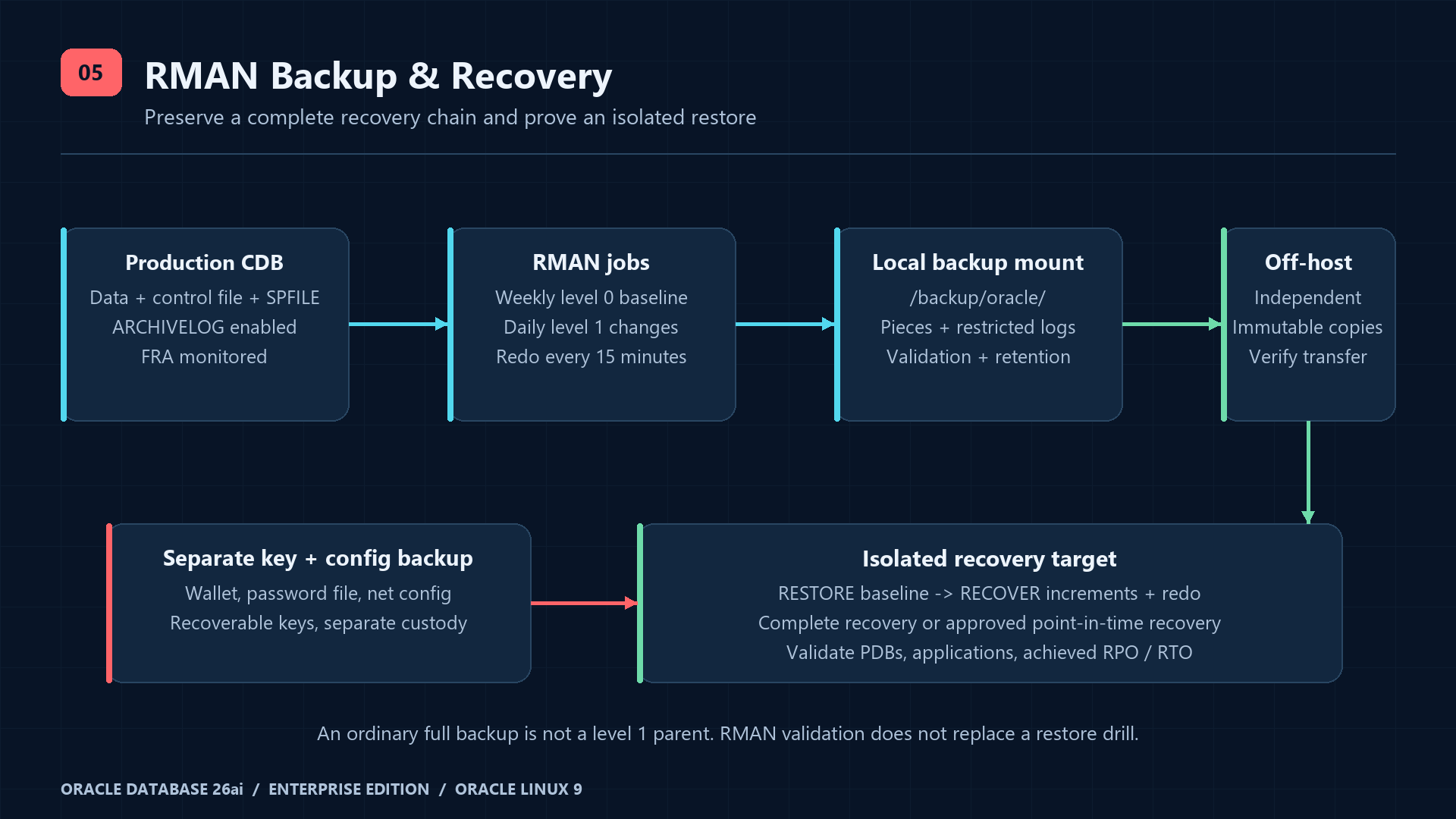
RMAN knows Oracle block structure and records backups in the control file or optional recovery catalog. A backup set consists of one or more backup pieces. A full backup reads the database but is not an incremental parent; a level 0 is the baseline for level 1. A differential level 1 contains changed blocks since the previous level 0 or 1; a cumulative level 1 contains changes since level 0. Use weekly level 0 plus daily differential level 1 here, and archive-log jobs every 15 minutes for an example RPO target. RPO depends on completed off-host transfer; RTO must be measured by restore drills.
RMAN full and incremental backup concepts
ARCHIVELOG and Fast Recovery Area
Run the following as SYSDBA in CDB$ROOT during a planned outage; it closes every PDB. Confirm /fra is mounted, oracle can write and its capacity exceeds the 100G example FRA quota. The quota is not reserved disk space. A full FRA can block redo archiving and stall the database. Set the FRA size before its destination, then enable ARCHIVELOG and take a new level 0 immediately. Existing NOARCHIVELOG backups are not a substitute for the new recoverable baseline.
-- SYSDBA in CDB$ROOT, approved outage:
ALTER SYSTEM SET DB_RECOVERY_FILE_DEST_SIZE=100G SCOPE=BOTH;
ALTER SYSTEM SET DB_RECOVERY_FILE_DEST='/fra' SCOPE=BOTH;
SHUTDOWN IMMEDIATE;
STARTUP MOUNT;
ALTER DATABASE ARCHIVELOG;
ALTER DATABASE OPEN;
ALTER PLUGGABLE DATABASE ORCLPDB1 OPEN;
ALTER PLUGGABLE DATABASE ORCLPDB1 SAVE STATE;
ARCHIVE LOG LIST
ALTER SYSTEM ARCHIVE LOG CURRENT;
SELECT name, log_mode FROM v$database;
SELECT dbid, name, db_unique_name FROM v$database;
-- Example metadata horizon for the 14-day recovery window and weekly baseline:
ALTER SYSTEM SET CONTROL_FILE_RECORD_KEEP_TIME=28 SCOPE=BOTH;
SELECT name, space_limit, space_used, space_reclaimable FROM v$recovery_file_dest;
SELECT dest_id, status, error FROM v$archive_dest_status WHERE status <> 'INACTIVE';
EXIT
Managing ARCHIVELOG mode and redo destinations
Persistent RMAN configuration and explicit backup examples
# Oracle OS account; local OSDBA authentication, no embedded password:
install -d -m 0700 /backup/oracle/pieces /backup/oracle/logs
rman target /CONFIGURE DEFAULT DEVICE TYPE TO DISK;
CONFIGURE DEVICE TYPE DISK PARALLELISM 2 BACKUP TYPE TO BACKUPSET;
CONFIGURE CHANNEL DEVICE TYPE DISK FORMAT '/backup/oracle/pieces/%d_%T_%U.bkp';
CONFIGURE CONTROLFILE AUTOBACKUP ON;
CONFIGURE CONTROLFILE AUTOBACKUP FORMAT FOR DEVICE TYPE DISK TO '/backup/oracle/pieces/%F';
CONFIGURE RETENTION POLICY TO RECOVERY WINDOW OF 14 DAYS;
# Single disk destination baseline; does not prove an off-host copy exists.
CONFIGURE ARCHIVELOG DELETION POLICY TO BACKED UP 2 TIMES TO DISK;
SHOW ALL;
# Ordinary full backup: NOT a level 1 parent.
BACKUP DATABASE PLUS ARCHIVELOG;
# Incremental baseline, usually weekly:
BACKUP INCREMENTAL LEVEL 0 DATABASE PLUS ARCHIVELOG;
# Daily differential incremental:
BACKUP INCREMENTAL LEVEL 1 DATABASE PLUS ARCHIVELOG;
# Alternative cumulative policy; do not add blindly to the schedule:
# BACKUP INCREMENTAL LEVEL 1 CUMULATIVE DATABASE PLUS ARCHIVELOG;
BACKUP ARCHIVELOG ALL NOT BACKED UP 2 TIMES TO DEVICE TYPE DISK;
BACKUP CURRENT CONTROLFILE;
BACKUP SPFILE;
LIST BACKUP SUMMARY;
REPORT OBSOLETE;
RESTORE DATABASE VALIDATE;
# Source block check, distinct from backup-read validation:
BACKUP VALIDATE CHECK LOGICAL DATABASE;
EXIT;Create /backup/oracle/pieces first with mode 0700. PLUS ARCHIVELOG captures redo around the database backup; controlfile autobackup includes SPFILE when the instance uses an SPFILE. Explicit controlfile/SPFILE backups aid inventory but do not replace recording DBID and an independently stored autobackup path. Record SHOW ALL, DBID, database unique name, home/RU, platform, container list and wallet location outside the failed host. Two disk copies in this policy can still be on one disk; they do not meet disaster-recovery requirements.
RMAN configuration, FRA and retention
Controlfile backup metadata retention and recovery catalog
The 14-day recovery window can require a weekly baseline older than 14 days. The example sets CONTROL_FILE_RECORD_KEEP_TIME to 28 days so reusable controlfile records outlive that chain; this parameter is not the backup-file deletion policy and is not an absolute metadata guarantee. Monitor record-overwrite messages and controlfile capacity, and use an independently protected recovery catalog for larger histories. Back up and resynchronize the catalog itself; it is not a substitute for the data backup.
Backing up database, archived redo, control file and SPFILE
Encryption, retention and backup verification
# Licensed Advanced Security plus configured/open keystore required:
CONFIGURE ENCRYPTION ALGORITHM 'AES256';
CONFIGURE ENCRYPTION FOR DATABASE ON;
SHOW ENCRYPTION;
# Transparent encryption needs the same recoverable keys on the restore host.
# This affects NEW backups, not existing unencrypted pieces.
EXIT;
26ai supports AES-XTS for compatible targets (COMPATIBLE ≥ 23.0.0), with AES256 as its new-backup default algorithm; enabling encryption is still a separate choice. Verify supported algorithms in v$rman_encryption_algorithms and keystore readiness in v$encryption_wallet. The automation below defaults to transparent encryption ON and fails if keys are unavailable. If Advanced Security is not licensed, explicitly choose OFF only after approving encrypted underlying storage and secure transfer. Never put backup passwords in scripts, units or cron. Password-mode encryption needs securely supplied session credentials for both backup and recovery; keep the keystore/key backup independent.
26ai RMAN encryption modes and algorithms
Retention is a recovery window, not a simple file-age rule: older level 0 and redo may still be needed to recover within the window. REPORT OBSOLETE is a preview; DELETE OBSOLETE is destructive and must follow verified off-host transfer. CROSSCHECK reconciles catalog records with accessible storage; EXPIRED means unavailable during that check, not old or safely disposable. Never run DELETE EXPIRED when a mount or media manager is temporarily unavailable. FRA can reclaim eligible archived logs under its policy; budget capacity and transfer latency because disk-count policies are not off-host acknowledgments.
# Read-only selection and backup-read checks:
LIST BACKUP SUMMARY;
RESTORE DATABASE PREVIEW;
RESTORE DATABASE VALIDATE;
RESTORE ARCHIVELOG FROM TIME 'SYSDATE-1' VALIDATE;
# After ensuring all configured storage is available:
CROSSCHECK BACKUP;
REPORT OBSOLETE;
# Destructive, separately approved maintenance ONLY:
# DELETE NOPROMPT OBSOLETE;
# Do not use filesystem find -delete on RMAN pieces.
EXIT;7. Automated backup: guarded script, timers and monitoring
The following is a custom backup job, not an Oracle database startup unit. It runs as oracle using local OS authentication, serializes jobs, verifies the dedicated backup mount, checks free space and returns a nonzero exit on RMAN errors. This uses OSDBA authority because that is available in the basic RPM deployment; for separation of duties configure an approved OSBACKUPDBA or secure-wallet SYSBACKUP identity and test it first. The script never stores a database password. Its retention mode is separate and explicitly gated; successful backup is not proof that off-host replication has completed.
#!/usr/bin/env bash
set -Eeuo pipefail
umask 077
export ORACLE_BASE=/opt/oracle
export ORACLE_HOME=/opt/oracle/product/26ai/dbhome_1
export ORACLE_SID=ORCLCDB
export PATH="$ORACLE_HOME/bin:/usr/sbin:/usr/bin:/sbin:/bin"
export TNS_ADMIN="$ORACLE_HOME/network/admin"
export NLS_LANG=AMERICAN_AMERICA.AL32UTF8
base=/backup/oracle
mode=${1:-}
encryption=${RMAN_ENCRYPTION:-ON}
minimum_kib=${MIN_FREE_KIB:-10485760}
allow_cleanup=${ALLOW_CLEANUP:-no}
case "$mode" in level0|level1|archivelog|retention) ;; *) echo 'Usage: oracle-rman-backup.sh level0|level1|archivelog|retention' >&2; exit 64;; esac
case "$encryption" in ON|OFF) ;; *) echo 'RMAN_ENCRYPTION must be ON or OFF' >&2; exit 64;; esac
[[ "$minimum_kib" =~ ^[0-9]+$ ]] || exit 64
[[ $(id -un) == oracle ]] || { echo 'Run as oracle' >&2; exit 77; }
mountpoint -q "$base" || { echo 'Backup mount missing' >&2; exit 73; }
[[ -x "$ORACLE_HOME/bin/rman" && -d "$base/pieces" && -d "$base/logs" ]] || exit 73
exec 9>"$base/.rman.lock"
flock -n 9 || { echo 'Another RMAN job is running' >&2; exit 75; }
available_kib=$(df -Pk "$base" | awk 'NR==2 {print $4}')
[[ "$available_kib" =~ ^[0-9]+$ ]] || exit 73
if [[ "$mode" != retention && "$available_kib" -lt "$minimum_kib" ]]; then
  echo 'Backup free-space threshold failed' >&2; exit 73
fi
if [[ "$mode" == retention && "$allow_cleanup" != yes ]]; then
  echo 'Cleanup requires verified off-host recovery chain and ALLOW_CLEANUP=yes' >&2; exit 78
fi
cmd=$(mktemp "$base/logs/command.XXXXXX")
runlog=$(mktemp "$base/logs/rman.XXXXXX")
trap 'rm -f -- "$cmd" "$runlog"' EXIT
trap 'exit 130' INT
trap 'exit 143' TERM
{
  printf 'SET ECHO OFF;\n'
  if [[ "$mode" != retention ]]; then
    printf 'SET ENCRYPTION %s;\n' "$encryption"
  fi
  case "$mode" in
    level0|level1)
      level=${mode#level}
      printf "BACKUP INCREMENTAL LEVEL %s DATABASE FORMAT '%s/pieces/%%d_%%T_%%U.bkp' TAG 'AJ_L%s' PLUS ARCHIVELOG FORMAT '%s/pieces/%%d_%%T_%%U.arc';\n" "$level" "$base" "$level" "$base"
      printf "BACKUP CURRENT CONTROLFILE FORMAT '%s/pieces/%%d_%%T_%%U.ctl';\n" "$base"
      printf "BACKUP SPFILE FORMAT '%s/pieces/%%d_%%T_%%U.spf';\n" "$base"
      printf "RESTORE DATABASE VALIDATE;\nRESTORE ARCHIVELOG FROM TIME 'SYSDATE-1' VALIDATE;\n"
      ;;
    archivelog)
      printf 'SQL "ALTER SYSTEM ARCHIVE LOG CURRENT";\n'
      printf "BACKUP ARCHIVELOG ALL NOT BACKED UP 2 TIMES TO DEVICE TYPE DISK FORMAT '%s/pieces/%%d_%%T_%%U.arc' TAG 'AJ_ARCH';\n" "$base"
      ;;
    retention)
      printf 'CROSSCHECK BACKUP;\nREPORT OBSOLETE;\nDELETE NOPROMPT OBSOLETE;\n'
      ;;
  esac
  printf 'EXIT;\n'
} >"$cmd"
rc=0
"$ORACLE_HOME/bin/rman" target / cmdfile="$cmd" log="$runlog" || rc=$?
{
  printf '\n===== %s mode=%s rc=%s =====\n' "$(date --iso-8601=seconds)" "$mode" "$rc"
  cat "$runlog"
} >>"$base/logs/backup.log"
# RMAN warnings require attention too; fail conservatively for these diagnostics.
if (( rc != 0 )) || grep -Eq 'RMAN-[0-9]{5}|ORA-[0-9]{5}' "$runlog"; then
  logger -p user.err -t oracle-rman "FAILED mode=$mode sid=$ORACLE_SID rc=$rc" || true
  echo "RMAN job failed; inspect $base/logs/backup.log" >&2
  exit 1
fi
logger -p user.notice -t oracle-rman "SUCCESS mode=$mode sid=$ORACLE_SID" || true
printf 'RMAN job completed: %s\n' "$mode"
Exit codes: 0 completed job; 1 RMAN diagnostic/failure; 64 invalid input; 73 mount/storage failure; 75 overlap; 77 wrong OS user; 78 cleanup guard; 130/143 interrupted. The 10 GiB free-space threshold is only a starting guard: size it to the largest expected level 0 and redo growth. An overlap is reported as a failure so the monitoring owner can decide whether to retry; do not launch competing backups. RESTORE VALIDATE reads chosen backup pieces but is not a restore drill. Daily validation can be expensive; measure its I/O and schedule an explicit alternative validation job if needed.
Install reviewed files and configure scheduling
# From the directory containing the downloaded/reviewed article templates:
sudo install -d -o oracle -g oinstall -m 0700 /backup/oracle/pieces /backup/oracle/logs
sudo install -o root -g root -m 0755 oracle-rman-backup.sh /usr/local/sbin/oracle-rman-backup.sh
sudo bash -n /usr/local/sbin/oracle-rman-backup.sh
sudo install -o root -g root -m 0644 oracle-rman.env /etc/sysconfig/oracle-rman
sudo install -o root -g root -m 0644 'oracle-rman@.service' /etc/systemd/system/
sudo install -o root -g root -m 0644 oracle-rman-daily.timer oracle-rman-weekly.timer oracle-rman-archivelog.timer /etc/systemd/system/
sudo install -o root -g root -m 0644 oracle-rman.logrotate /etc/logrotate.d/oracle-rman
sudo logrotate --debug /etc/logrotate.d/oracle-rman
sudo systemd-analyze verify '/etc/systemd/system/oracle-rman@.service' /etc/systemd/system/oracle-rman-*.timer
sudo systemctl daemon-reload
# First bootstrap a completed level 0 before the regular schedule:
sudo systemctl start oracle-rman@level0.service
sudo systemctl status oracle-rman@level0.service --no-pager
sudo systemctl enable --now oracle-rman-daily.timer oracle-rman-weekly.timer oracle-rman-archivelog.timer
sudo systemctl list-timers 'oracle-rman*'
sudo journalctl -u 'oracle-rman@*' -n 100 --no-pager# Non-secret backup policy; approve licensing and usable keystore first.
RMAN_ENCRYPTION=ON
MIN_FREE_KIB=10485760
ALLOW_CLEANUP=no[Unit]
Description=Custom RMAN backup job (%i), not database startup
RequiresMountsFor=/backup/oracle /oradata /fra
After=local-fs.target
[Service]
Type=oneshot
User=oracle
Group=oinstall
EnvironmentFile=/etc/sysconfig/oracle-rman
ExecStart=/usr/local/sbin/oracle-rman-backup.sh %i
UMask=0077
TimeoutStartSec=12h
Nice=10
StandardOutput=journal
StandardError=journalDaily differential level 1: Monday–Saturday, 02:15
[Unit]
Description=Daily differential level 1: Monday–Saturday, 02:15

[Timer]
OnCalendar=Mon..Sat *-*-* 02:15:00
Persistent=true
AccuracySec=1min
Unit=oracle-rman@level1.service

[Install]
WantedBy=timers.target
Weekly level 0: Sunday, 02:15
[Unit]
Description=Weekly level 0: Sunday, 02:15

[Timer]
OnCalendar=Sun *-*-* 02:15:00
Persistent=true
AccuracySec=1min
Unit=oracle-rman@level0.service

[Install]
WantedBy=timers.target
Archived redo every 15 minutes
[Unit]
Description=Archived redo every 15 minutes

[Timer]
OnCalendar=*-*-* *:00/15:00
Persistent=true
AccuracySec=1min
Unit=oracle-rman@archivelog.service

[Install]
WantedBy=timers.target/backup/oracle/logs/backup.log {
daily
maxsize 100M
rotate 30
compress
delaycompress
missingok
notifempty
su oracle oinstall
create 0600 oracle oinstall
}Calendars use the server’s local timezone, not the website visitor’s timezone; record timedatectl and confirm systemd-analyze calendar output. Persistent=true catches a missed activation when the timer returns, but does not replay every missed interval or guarantee the RPO. Archive timers can overlap a long level 0 and exit 75; alert on prolonged archive gaps and provide a reviewed retry policy. Use one scheduler; do not also enable equivalent cron entries. The 12h timeout and Nice=10 are examples and require measured backup duration. Keep logrotate enabled and forward job status to your monitoring collector.
systemd-analyze calendar 'Mon..Sat *-*-* 02:15:00'
systemd-analyze calendar 'Sun *-*-* 02:15:00'
systemd-analyze calendar '*-*-* *:00/15:00'
systemctl --failed
systemctl show oracle-rman@level0.service oracle-rman@level1.service oracle-rman@archivelog.service -p Result -p ExecMainStatus
journalctl -t oracle-rman --since '24 hours ago' --no-pager
# After verified independent off-host copies and retention review ONLY:
# set ALLOW_CLEANUP=yes in /etc/sysconfig/oracle-rman for this controlled action,
# then restore it to no immediately afterward.
# sudo systemctl start oracle-rman@retention.service
Do not automatically acknowledge off-host transfer with a timestamp file. Use the storage platform’s verified checksum/manifest and durable completion acknowledgment for every piece, needed redo and controlfile/SPFILE; copy wallet/config backups by a separately secured process. Independent off-host or immutable storage must have a different failure and credential domain. A local backup mount or replica cannot survive all host failures, deletions or ransomware. Retention runs only after the recovery chain is verified externally; deletion of archive input is intentionally not in this backup script. Measure FRA growth and adjust the archive deletion policy to actual Data Guard/off-host requirements.
8. Database restore and recovery scenarios
DESTRUCTIVE OPERATIONS: SHUTDOWN interrupts service, RESTORE overwrites database files and OPEN RESETLOGS creates a new incarnation after incomplete/controlfile recovery. Obtain a recovery authorization, isolate application traffic, preserve surviving redo and damaged files, confirm the DBID/incarnation and selected recovery point, and verify compatible Oracle home/RU, storage mappings, backup chain, controlfile/SPFILE and decryption keys. The examples are mutually exclusive scenarios; never execute all of them as a sequential script. Do not restore production onto a running database or connect an isolated clone to production applications.
Scenario 1: full or level 0 restore with current controlfile
# Connect locally on the recovery target as authorized oracle:
rman target /# Outage; current controlfile and SPFILE survive, original paths exist:
SHUTDOWN IMMEDIATE;
STARTUP MOUNT;
RESTORE DATABASE PREVIEW;
RESTORE DATABASE;
RECOVER DATABASE;
# ONLY when complete recovery succeeded using the current controlfile:
ALTER DATABASE OPEN;
EXIT;RMAN selects available full/level 0 backups automatically; use reviewed tags or UNTIL criteria when an older copy must be selected. Complete recovery requires all necessary archived redo and, when applicable, surviving online redo. If RMAN requests missing logs, stop and identify the gap: changing to RESETLOGS is not a repair for an incomplete complete-recovery plan. With a restored backup controlfile or intentional PITR, use the separate RESETLOGS procedure below.
Complete database recovery prerequisites and procedures
Scenario 2: recover through incremental backups
# MOUNTED recovery target; backups copied to the dedicated mount:
CATALOG START WITH '/backup/oracle/pieces/' NOPROMPT;
LIST BACKUP OF DATABASE;
RESTORE DATABASE PREVIEW;
RESTORE DATABASE;
RECOVER DATABASE;
# Current controlfile + complete recovery only:
ALTER DATABASE OPEN;
EXIT;
RECOVER DATABASE applies suitable level 1 backups and then redo; you do not manually concatenate incremental files. A differential chain needs every relevant level 1 since its parent; cumulative backups reduce that dependency but still need a level 0 and redo. CATALOG registers pieces, it does not verify their contents or create missing parents. Keep enough old baseline backups to support the full retention window.
RECOVER and incremental application reference
Scenario 3: restore archived redo and resume media recovery
# MOUNTED recovery target, existing datafiles/controlfile valid:
RUN {
  SET ARCHIVELOG DESTINATION TO '/fra/restored-archivelogs';
  RESTORE ARCHIVELOG FROM SEQUENCE 1200 UNTIL SEQUENCE 1250 THREAD 1;
  RECOVER DATABASE;
}
EXIT;
Sequence 1200–1250 is an environment-specific example: select the actual thread/sequence range from the recovery request and LIST BACKUP OF ARCHIVELOG. Precreate the staging directory with oracle ownership and sufficient free space. Restoring redo stages logs; RECOVER applies them to database files. A missing sequence that is required for the target SCN prevents reaching that point. Never overwrite the only surviving online redo logs.
RESTORE database and archived log selection
Scenario 4: database point-in-time recovery
# DESTRUCTIVE: sample time MUST be replaced by the approved database-local time.
SHUTDOWN IMMEDIATE;
STARTUP MOUNT;
RUN {
  SET UNTIL TIME "TO_DATE('2026-10-08 10:30:00','YYYY-MM-DD HH24:MI:SS')";
  RESTORE DATABASE;
  RECOVER DATABASE;
}
ALTER DATABASE OPEN RESETLOGS;
LIST INCARNATION;
# New baseline after the database/PDB acceptance checks:
BACKUP INCREMENTAL LEVEL 0 DATABASE PLUS ARCHIVELOG;
EXIT;
Choose a point before the destructive transaction, resolve the database-local timezone and preferably approve a precise SCN. SET UNTIL must precede both RESTORE and RECOVER so RMAN selects backups from before the target. PITR discards changes after that point and affects the whole CDB in this example. Preserve incident evidence, record the new incarnation, validate PDB/application consistency and take a new baseline. PDB-only PITR has additional auxiliary/undo requirements and is outside this whole-CDB example.
Database PITR, SET UNTIL and RESETLOGS
Scenario 5: storage failure including lost controlfile and SPFILE
# Recovery host only. Replace this EXAMPLE DBID before use.
SET DBID 1234567890;
STARTUP FORCE NOMOUNT;
RUN {
  SET CONTROLFILE AUTOBACKUP FORMAT FOR DEVICE TYPE DISK TO '/backup/oracle/pieces/%F';
  RESTORE SPFILE FROM AUTOBACKUP;
}
SHUTDOWN IMMEDIATE;
STARTUP NOMOUNT;
RUN {
  SET CONTROLFILE AUTOBACKUP FORMAT FOR DEVICE TYPE DISK TO '/backup/oracle/pieces/%F';
  RESTORE CONTROLFILE FROM AUTOBACKUP;
}
ALTER DATABASE MOUNT;
CATALOG START WITH '/backup/oracle/pieces/' NOPROMPT;
RESTORE DATABASE PREVIEW;
RESTORE DATABASE;
RECOVER DATABASE;
# Backup controlfile recovery requires RESETLOGS after successful recovery.
ALTER DATABASE OPEN RESETLOGS;
EXIT;
This assumes rebuilt original storage paths and accessible autobackups, all required redo and decryption keys. SET DBID is a real saved identifier, not the sample number above. Without an SPFILE, RMAN can bootstrap NOMOUNT with a temporary parameter file for autobackup search; if necessary provide a reviewed minimal PFILE. Restored SPFILE paths and memory settings must fit the recovery host; restore it to a PFILE for editing when they do not. Autobackup search has a finite time range: use MAXDAYS or an explicitly verified piece if needed. Use SET NEWNAME plus SWITCH DATAFILE ALL for changed file paths only after reviewing every CDB/PDB datafile, controlfile, redo and temporary-file mapping.
Advanced recovery, lost files and recovery-host planning
Scenario 6–7: integrity validation and isolated test restore
LIST BACKUP SUMMARY;
RESTORE DATABASE PREVIEW;
RESTORE DATABASE VALIDATE;
RESTORE ARCHIVELOG FROM TIME 'SYSDATE-1' VALIDATE;
EXIT;
Readability checks cannot prove RTO, application consistency or complete disaster recovery. Rebuild an isolated host with the same supported platform and compatible RU, no production DNS/IP/service registration or outbound integrations, its own mounted restore storage and keys copied securely. Use the appropriate lost-file/full/PITR scenario above with reviewed paths; an actual production-ID restore must remain isolated. Before opening a clone, disable scheduler jobs and external integrations using a reviewed recovery parameter/application plan. Test all PDB open states, row-count/business invariants, logins, application smoke queries and encryption-key access. Record restore duration, achieved SCN/time, redo gaps and evidence, then securely retire the test data.
9. Monitoring and troubleshooting
Database, session, tablespace, FRA and backup health
-- Authorized DBA in CDB$ROOT:
SELECT instance_name, status, database_status, startup_time FROM v$instance;
SELECT name, open_mode, log_mode, current_scn FROM v$database;
SELECT name, open_mode, restricted FROM v$pdbs;
SELECT con_id, username, status, COUNT(*) AS sessions FROM v$session
 WHERE type='USER' GROUP BY con_id, username, status ORDER BY con_id, username;
SELECT sid, serial#, con_id, username, event, blocking_session
 FROM v$session WHERE type='USER' AND status='ACTIVE';
SELECT name, space_limit, space_used, space_reclaimable, number_of_files
 FROM v$recovery_file_dest;
SELECT dest_id, status, destination, error FROM v$archive_dest
 WHERE status <> 'INACTIVE';
SELECT session_key, input_type, status, start_time, end_time,
       output_bytes_display, time_taken_display FROM v$rman_backup_job_details
 ORDER BY start_time DESC FETCH FIRST 20 ROWS ONLY;
SELECT name, value FROM v$diag_info;
-- Application PDB space; allocated/max utilization needs growth-budget interpretation:
ALTER SESSION SET CONTAINER=ORCLPDB1;
SELECT tablespace_name, used_percent FROM dba_tablespace_usage_metrics
 ORDER BY used_percent DESC;
SELECT tablespace_name, file_name, bytes, autoextensible, maxbytes
 FROM dba_data_files ORDER BY tablespace_name;
EXIT# Host, listener and boot diagnostics:
df -hT /opt/oracle /oradata /fra /backup/oracle
df -i /opt/oracle /oradata /fra /backup/oracle
findmnt --mountpoint /backup/oracle
free -h
iostat -xz 1 5
lsnrctl status LISTENER
lsnrctl services LISTENER
sudo systemctl status oracledb_ORCLCDB-26ai.service --no-pager
sudo journalctl -u oracledb_ORCLCDB-26ai.service -b -n 100 --no-pager
sudo journalctl -k -b -n 100 --no-pager
adrci exec="show homes"
# Interactive ADRCI: choose the ACTUAL database home returned above.
adrci
# ADRCI prompt examples (substitute the actual home path):
# set homepath diag/rdbms/orclcdb/ORCLCDB
# show alert -tail 100
# exit
sudo ausearch -m AVC,USER_AVC -ts recent
sudo tail -n 100 /backup/oracle/logs/backup.log
sudo journalctl -t oracle-rman --since '24 hours ago' --no-pagerUse v$diag_info to locate the actual ADR directories and alert log; lowercase/uppercase database paths vary by installation. ADRCI also shows listener homes. Monitor tablespace used_percent together with autoextend MAXBYTES and filesystem headroom: a tablespace can appear to have growth capacity while its underlying volume is nearly full. Alert on sustained blocked sessions, active-session spikes, I/O latency, failed jobs, stale last successful backup and off-host acknowledgments. Set thresholds from measured baselines. Use ordinary dictionary/dynamic views here; licensed pack features are not required for these examples.
Audit management and controlled retention
| Error / symptom | Root cause and diagnostics | Corrective action |
|---|---|---|
| ORA-01034 / ORA-27101; failed startup | Wrong SID/home, instance down, missing mount or memory/parameter fault. Check environment, v$instance if reachable, service journal and ADR. | Restore the required mount and correct approved parameters/permissions; restart through the active service owner and verify PDBs. Do not recreate the database. |
| ORA-12541: no listener | Wrong IP/port, listener stopped, routing or firewall rejection. Compare lsnrctl status, ss and client DNS. | Fix the exact endpoint/rule; start the listener through RPM or SRVCTL ownership. Retest from the approved subnet. |
| ORA-12514: service unknown | Wrong PDB service or PDB closed/unregistered. Check SHOW PDBS, v$services and lsnrctl services. | Use the actual PDB service, open/save its state and ALTER SYSTEM REGISTER; check local_listener endpoint if registration still fails. |
| ORA-01017 / ORA-28000 / ORA-28001 | Wrong credential/container, locked or expired account. Check account_status in the correct PDB and audit return codes. | Investigate failed logins, rotate through secure prompts, update the secret manager and unlock only after approval. Do not weaken the profile. |
| ORA-19809 / ORA-00257 | FRA quota/full destination or archive failure. Check v$recovery_file_dest, archive destination ERROR and df. | Restore destination availability, increase approved capacity/quota or use reviewed RMAN cleanup after confirmed backups. Never delete required redo with rm. |
| RMAN-06023 / RMAN-06025 | No usable backup for requested datafile/log or wrong DBID/incarnation/UNTIL; missing copied pieces. | Inspect LIST BACKUP, CATALOG verified transferred pieces and restore preview. Obtain missing chain elements or approve a reachable recovery point. |
| ORA-19504 / ORA-27040; backup write failed | Missing mount, disk/inodes full, denied ownership or SELinux AVC; inspect df, namei and audit log. | Fix storage or scoped ownership/context policy and rerun. The script reports exit 73 for its storage guards; do not chmod 777 or disable SELinux. |
| ORA-28365 / ORA-19913; encryption recovery failed | Closed/unavailable keystore, wrong key history or absent backup encryption credentials. | Restore the securely retained keystore and correct keys, open it with authorized procedures and retry in isolation. Without the required key, recovery is impossible. |
10. Production deployment checklist
- [ ] OS/kernel/RU certification, EE license and option inventory approved; verified RPM hash recorded.
- [ ] CPU/RAM/IOPS, swap, limits and growth headroom measured; all required mounts survive reboot.
- [ ] CDB, PDB, installed binary RU and SQL patch registry match the approved release.
- [ ] Service provenance and enablement verified; reboot proves OPEN database, saved PDB state and remote query.
- [ ] Listener has only approved addresses; application and denied-source connection tests completed.
- [ ] Firewalld and SELinux remain active; ACLs, OSDBA membership and private-file permissions reviewed.
- [ ] Named least-privilege users, password rotation, emergency access and audit forwarding verified.
- [ ] Encrypted transport, CA/DN validation and certificate-expiry alerts tested; licensed TDE/backup keys protected.
- [ ] ARCHIVELOG/FRA, level 0/1 schedule, 15-minute redo jobs and retained recovery chain verified.
- [ ] Backup failures, overlaps, stale success, off-host lag and capacity alerts reach an accountable owner.
- [ ] Independent off-host/immutable pieces, controlfile/SPFILE and key/config backups verified.
- [ ] Backup-read validation and an isolated restore drill establish actual RPO/RTO and application consistency.
- [ ] Retention deletion is gated by verified recovery-chain transfer; no blind file-age cleanup.
- [ ] Database/tablespace/FRA/storage monitoring, incident runbooks and current patch/rollback plans recorded.
Conclusion: acceptance requires recovery evidence
The official EE RPM is only the beginning of a production deployment. Acceptance means a certified and patched platform, proven reboot startup, bounded client access, encrypted transport, complete independent backups and an isolated restore that meets business RPO/RTO. Keep this runbook aligned with the actual home, RU, service owner, licensing and recovery evidence on every change.
Frequently asked questions
Is 26ai the same package as Database Free?
No. This guide installs Enterprise Edition; Free has separate packages, service names and resource limits.
Why does the 26ai download identify 23.26.1?
26ai is the product release name. Its internal version/RU numbering differs; verify the installed binary and SQL patch level.
Does systemctl active prove that Oracle is ready?
No. Verify the instance, PDB state, listener service and a remote authenticated query.
Does Oracle Restart provide host failover?
It monitors and restarts components on a standalone host. Host failover needs a separately designed availability solution.
Can a normal full backup be the level 1 parent?
No. Use an incremental level 0 baseline for the level 1 recovery chain.
Does RMAN validation replace a restore test?
No. It checks selected files and backup readability; only an isolated restore proves the recovery workflow and measured RTO.
Is a local backup disk sufficient?
No. Keep independently protected off-host copies, necessary redo and key/config backups with verified transfer.
Is RMAN disk encryption included in base on-premises EE?
Oracle Advanced Security is required for this deployment. Verify entitlements before enabling encryption.
Official References and reviewed templates
Follow the references beside each procedure, recheck the current MOS certification/RU and patch README, and test every environment-specific configuration before rollout. The downloadable templates contain no real credentials. Their Linux/Oracle runtime remains untested in this Windows repository environment.
Oracle AI Database 26ai new features and long-term release
Verified Enterprise Linux x86-64 download and checksums
Oracle 26ai licensing: permitted features, options and packs
Oracle Database concepts and physical architecture
Oracle multitenant CDB and PDB architecture
Supported OL9 kernels and required packages
Server configuration, swap and memory planning
Official software storage and patch-headroom recommendations
Oracle preinstallation RPM operating-system configuration
Official EE RPM installation and configure script
OL9 service enablement and boot semantics
OL9 start, stop and status operations
Oracle Restart ownership, dependencies and SRVCTL
26ai standalone GI installation with gridSetup.sh
Oracle authentication and password profiles
CREATE USER and schema-only authentication
Listener parameters and registration checks
Oracle Linux firewalld zone configuration
Oracle Linux SELinux administration
Provisioning and enabling unified audit policies
26ai TLS wallets, TLS_ parameters and DN matching
Transparent Data Encryption and key management
Oracle security alerts and Critical Patch Updates
RMAN full and incremental backup concepts
Managing ARCHIVELOG mode and redo destinations
RMAN configuration, FRA and retention
Controlfile backup metadata retention and recovery catalog
Backing up database, archived redo, control file and SPFILE
26ai RMAN encryption modes and algorithms
RMAN validation and its limitations
Complete database recovery prerequisites and procedures
RECOVER and incremental application reference
RESTORE database and archived log selection
Database PITR, SET UNTIL and RESETLOGS
Advanced recovery, lost files and recovery-host planning
Audit management and controlled retention
Oracle database error messages and corrective guidance
Download reviewed template: listener-hardening.ora
Download reviewed template: tls-integration.ora
Download reviewed template: rman-baseline.rman
Download reviewed template: oracle-rman-backup.sh
Download reviewed template: oracle-rman.env
Download reviewed template: oracle-rman@.service
Download reviewed template: oracle-rman-daily.timer
Download reviewed template: oracle-rman-weekly.timer