1. Introduction: where Tomcat belongs
Apache Tomcat is a Java web container: its HTTP connector passes requests to Catalina, which manages applications, servlet lifecycles and sessions inside a JVM. Jasper handles JSP compilation. Tomcat implements selected Jakarta EE web specifications; it is not a complete Jakarta EE platform server with every enterprise API. Applications may bundle additional frameworks and libraries.
| Component | Responsibility |
|---|---|
| Tomcat | Servlets, JSP and Java web applications inside a JVM; also serves HTTP and static files. |
| Apache HTTP Server | General web server with modules, static delivery and reverse proxying; separate product from Tomcat. |
| Nginx | Edge web server and reverse proxy for TLS termination, routing and request controls; does not execute Java servlets. |
Enterprise uses include internal portals, REST services and vendor WAR applications. Verify the vendor support matrix: an application certified for Tomcat 9 cannot be assumed to work on 11. A single-host deployment is a baseline, not high availability. Larger systems use multiple application nodes, a load balancer, external data stores and an explicit session strategy.
Server prerequisites and directory plan
The worked platform is Ubuntu Server 24.04 LTS on a fresh dedicated host, Bash, sudo and systemd. The RHEL-compatible alternatives target a maintained RHEL 9 family host with Java 21 packages available. Do not combine APT and DNF commands. This guide uses the upstream archive, not the distribution Tomcat service; do not run a packaged Tomcat instance on the same port.
- Capacity example: 2–4 vCPU, 4 GiB RAM and SSD storage for a modest application; load-test heap, native memory, threads, disk and response times. These are planning values, not official minimums.
- DNS: replace tomcat.example.com with your real domain. A/AAAA records must reach this proxy; remove unusable AAAA records. Synchronize time and permit controlled DNS, NTP and update/ACME egress.
- Ingress: public HTTPS 443; HTTP 80 for HTTP-01 and redirection; SSH on the actual management port from approved sources. No public 8080, 8009 or 8005.
- Change control: console access, staging tests, backups, a maintenance window and application-owner approval for production changes.
| Path | Ownership and purpose |
|---|---|
| /opt/tomcat/apache-tomcat-11.0.26 | root:tomcat; immutable release binaries. /opt/tomcat/current selects CATALINA_HOME. |
| /var/lib/tomcat | CATALINA_BASE; root-owned parent, conf/bin/lib/webapps protected from the service user. |
| /var/lib/tomcat/{work,temp,data} | tomcat:tomcat; scratch space, JVM temporary files and explicit application state. |
| /var/log/tomcat | tomcat:tomcat; access/application logs. BASE/logs is a symlink here. |
| /etc/tomcat/tomcat.env | root:tomcat 0640; reviewed JVM/service settings, no credentials. |
hostnamectl
cat /etc/os-release
free -h
df -h
timedatectl
systemd --version
sudo ss -lntp
getent hosts tomcat.example.com
Check mount capacity, existing listeners and kernel security policy before installation. A separate runtime volume must be mounted at the documented path before startup. Treat application uploads and heap dumps as sensitive data, with quotas and restricted retention.
2. Architecture and server requirements
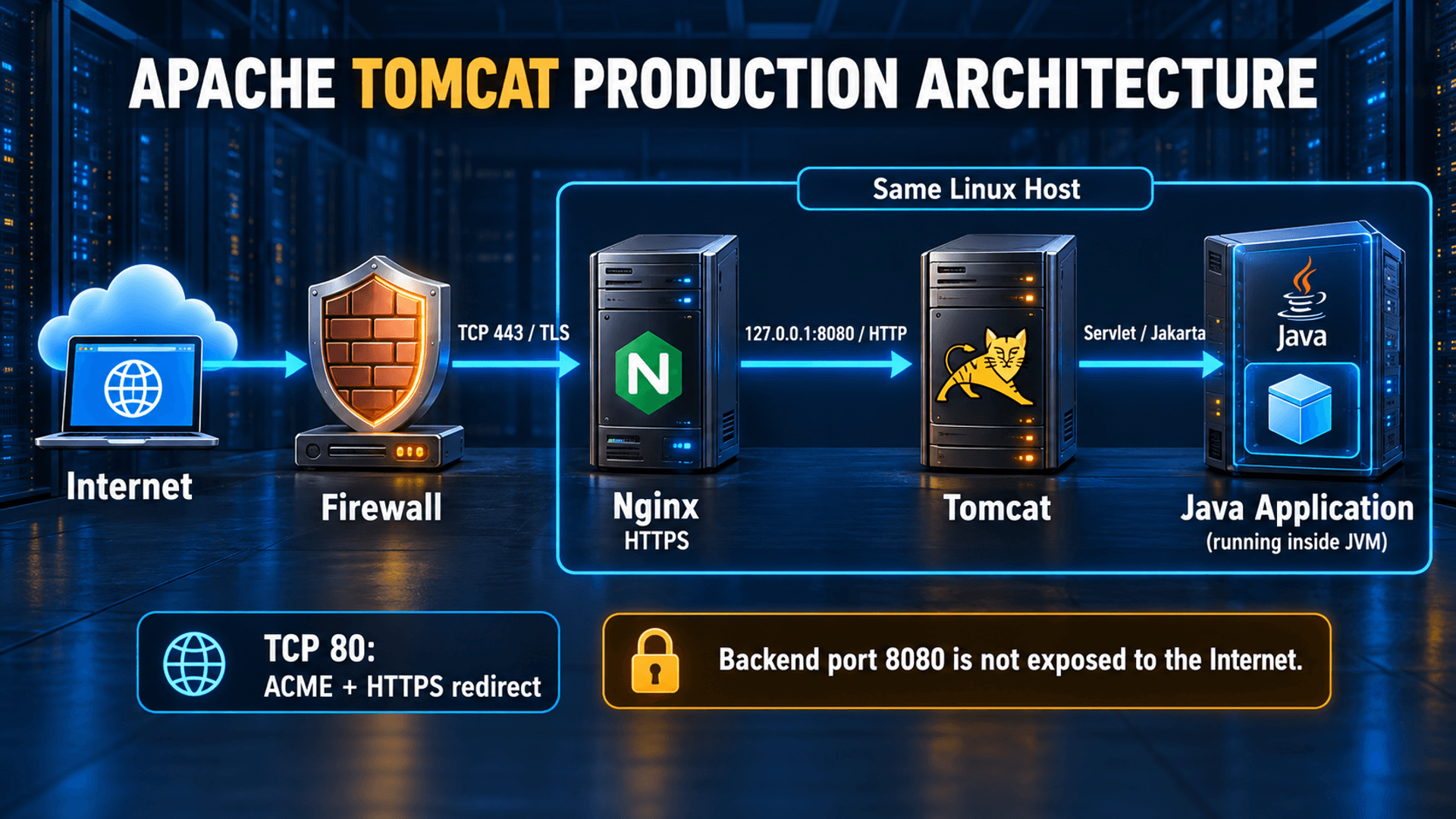
Internet -> Firewall -> Nginx HTTPS :443
                            |
                            v
                 Tomcat 127.0.0.1:8080
                            |
                            v
                   Java application (JVM)
3. Verified stable release and Java compatibility
the official Apache download and version matrix list Tomcat 11.0.26 as the latest stable 11 release. The example pins that version and uses Java 21 LTS from maintained distribution packages. Java 21 is a deliberate compatible choice, not a claim that it is the newest Java feature release. Recheck Apache security advisories and the stable download page before every installation; a pinned example will age.
Official Tomcat 11 stable download and integrity files
Official Java and Servlet compatibility matrix
| Branch | Minimum Java / API | Migration consequence |
|---|---|---|
| 9.0.x | Java 8+; Servlet 4.0 / Java EE 8 | Legacy web APIs use javax.servlet.*. |
| 10.1.x | Java 11+; Servlet 6.0 / Jakarta EE 10 | Jakarta web APIs use jakarta.*; 10.0 is end-of-life. |
| 11.0.x | Java 17+; Servlet 6.1 / Pages 4.0 | Java 21 meets the runtime minimum; test framework and API changes. |
Rebuild Java EE applications and dependencies for Jakarta APIs, then test them; changing an import name or running a migration tool alone does not prove compatibility. Java SE packages such as javax.sql remain javax.*. Check removed APIs and changed defaults in the Tomcat 11 migration guide, and ensure application bytecode is no newer than the chosen JVM. A WAR containing classes compiled for Java 25 will not run on Java 21.
4. Install and verify Java 21
Ubuntu 24.04 LTS
sudo apt update
sudo apt upgrade
sudo apt install -y openjdk-21-jdk-headless ca-certificates curl tar gzip unzip
java -version
javac -version
update-alternatives --list java
sudo update-alternatives --config java
Review package upgrades and any reboot requirement during maintenance. Select the Java 21 alternative if multiple JDKs exist. Install the headless JDK for diagnostic tools and application build compatibility; build release artifacts in CI rather than on the production host.
RHEL 9 family alternative
sudo dnf upgrade
sudo dnf install -y java-21-openjdk-devel ca-certificates curl tar gzip unzip
sudo alternatives --config java
java -version
javac -version
On RHEL, confirm the enabled supported repositories and package candidate for your OS minor release. The generic archive layout below remains the same; firewall, Nginx package configuration and SELinux policies differ.
Resolve JAVA_HOME without assuming CPU architecture
JAVA_INSTALL_HOME="$(dirname "$(dirname "$(readlink -f "$(command -v java)")")")"
printf "JAVA_HOME=%s\n" "$JAVA_INSTALL_HOME"
"$JAVA_INSTALL_HOME/bin/java" -version
"$JAVA_INSTALL_HOME/bin/javac" -version
java -XshowSettings:properties -version 2>&1 | grep -E "java.home|java.version|os.arch"
Expect Java 21 and a real JDK directory, not /usr/bin. Record the resolved path: systemd does not evaluate $(...) in an EnvironmentFile. The service environment below stores that literal path, so later changes to the shell alternative do not silently switch the service JVM.
OpenJDK JDK 21 project reference
Red Hat: supported OpenJDK package installation and alternatives
5. Install Tomcat with protected release directories
The commands in chapters 5–7 provision a new instance. If the user or paths already exist, stop and inspect them; do not overwrite an operational instance. Run each Bash block in order and stop on any error. No service starts until the hardened server.xml and service unit have been installed.
Create the account and separate writable state
sudo groupadd --system tomcat
sudo useradd --system --gid tomcat --home-dir /var/lib/tomcat \
  --no-create-home --shell /usr/sbin/nologin tomcat
sudo install -d -o root -g tomcat -m 0750 /opt/tomcat /var/lib/tomcat
sudo install -d -o root -g tomcat -m 0750 \
  /var/lib/tomcat/bin /var/lib/tomcat/lib /var/lib/tomcat/conf \
  /var/lib/tomcat/conf/Catalina /var/lib/tomcat/conf/Catalina/localhost \
  /var/lib/tomcat/webapps /etc/tomcat
sudo install -d -o tomcat -g tomcat -m 0750 \
  /var/lib/tomcat/work /var/lib/tomcat/temp /var/lib/tomcat/data /var/log/tomcat
sudo ln -s /var/log/tomcat /var/lib/tomcat/logs
getent passwd tomcat
id tomcat
The nologin path above exists on Ubuntu; confirm it on your distribution with command -v nologin and substitute the returned path where needed. Never grant this account sudo. The service can write only runtime state and logs, not bin, lib, conf or webapps. Uploads belong under data or a separately reviewed storage location.
Download and verify the official SHA-512 checksum
set -euo pipefail
TOMCAT_VERSION=11.0.26
TOMCAT_ARCHIVE="apache-tomcat-${TOMCAT_VERSION}.tar.gz"
TOMCAT_DOWNLOAD_DIR="$(mktemp -d)"
cd "$TOMCAT_DOWNLOAD_DIR"
curl --fail --show-error --location --proto '=https' --tlsv1.2 \
  "https://dlcdn.apache.org/tomcat/tomcat-11/v${TOMCAT_VERSION}/bin/${TOMCAT_ARCHIVE}" \
  --output "$TOMCAT_ARCHIVE"
curl --fail --show-error --location --proto '=https' --tlsv1.2 \
  "https://downloads.apache.org/tomcat/tomcat-11/v${TOMCAT_VERSION}/bin/${TOMCAT_ARCHIVE}.sha512" \
  --output "${TOMCAT_ARCHIVE}.sha512"
sha512sum --check "${TOMCAT_ARCHIVE}.sha512"
tar -tzf "$TOMCAT_ARCHIVE" > archive-contents.txt
sed -n '1,10p' archive-contents.txt
sudo test ! -e "/opt/tomcat/apache-tomcat-${TOMCAT_VERSION}"
sudo tar --extract --gzip --file "$TOMCAT_ARCHIVE" --directory /opt/tomcat --no-same-owner
sudo chown -R root:tomcat "/opt/tomcat/apache-tomcat-${TOMCAT_VERSION}"
sudo find "/opt/tomcat/apache-tomcat-${TOMCAT_VERSION}" -type d -exec chmod 0750 {} +
sudo find "/opt/tomcat/apache-tomcat-${TOMCAT_VERSION}" -type f -exec chmod 0640 {} +
sudo find "/opt/tomcat/apache-tomcat-${TOMCAT_VERSION}/bin" -type f -name '*.sh' -exec chmod 0750 {} +
sudo ln -s "/opt/tomcat/apache-tomcat-${TOMCAT_VERSION}" /opt/tomcat/current
sudo cp -a /opt/tomcat/current/conf/. /var/lib/tomcat/conf/
sudo chown -R root:tomcat /var/lib/tomcat/conf
sudo find /var/lib/tomcat/conf -type d -exec chmod 0750 {} +
sudo find /var/lib/tomcat/conf -type f -exec chmod 0640 {} +
Require an OK checksum result before extraction. The checksum is fetched from Apache, not invented or copied into this guide. SHA-512 detects corruption; fetching both files over HTTPS does not provide independent publisher identity verification. Enterprises needing that assurance should also verify the detached .asc signature with a release-manager key whose fingerprint was independently authenticated. A good signature from an unverified key is insufficient.
When Apache rotates this release out of the mirror, select the latest supported stable patch and its official URLs; do not bypass integrity checks or automatically substitute an old archive. The copy into CATALINA_BASE is only for first installation. Future upgrades compare stock configuration changes and preserve reviewed local settings.
CATALINA_HOME, CATALINA_BASE and startup environment
Apache release verification and trusted signatures
Write the resolved service environment
JAVA_INSTALL_HOME="$(dirname "$(dirname "$(readlink -f "$(command -v java)")")")"
sudo tee /etc/tomcat/tomcat.env >/dev/null <<EOF
JAVA_HOME=$JAVA_INSTALL_HOME
CATALINA_HOME=/opt/tomcat/current
CATALINA_BASE=/var/lib/tomcat
CATALINA_TMPDIR=/var/lib/tomcat/temp
CATALINA_OPTS="-Xms512m -Xmx2g -XX:+ExitOnOutOfMemoryError -Djava.awt.headless=true"
EOF
sudo chown root:tomcat /etc/tomcat/tomcat.env
sudo chmod 0640 /etc/tomcat/tomcat.env
sudo -u tomcat env JAVA_HOME="$JAVA_INSTALL_HOME" \
  CATALINA_HOME=/opt/tomcat/current CATALINA_BASE=/var/lib/tomcat \
  /opt/tomcat/current/bin/version.sh
sudo -u tomcat test ! -w /var/lib/tomcat/conf/server.xml
sudo -u tomcat test ! -w /var/lib/tomcat/webapps
sudo -u tomcat test -w /var/lib/tomcat/work
The 2 GiB heap is an initial budget for the 4 GiB example host. Reserve RAM for metaspace, JIT code, thread stacks, direct buffers, Nginx and the OS. ExitOnOutOfMemoryError allows a failed JVM to be restarted; it is not a memory-leak fix. EnvironmentFile is not a shell script. Do not put secrets here or create a conflicting setenv.sh/JRE_HOME override.
6. Run Tomcat as a hardened systemd service
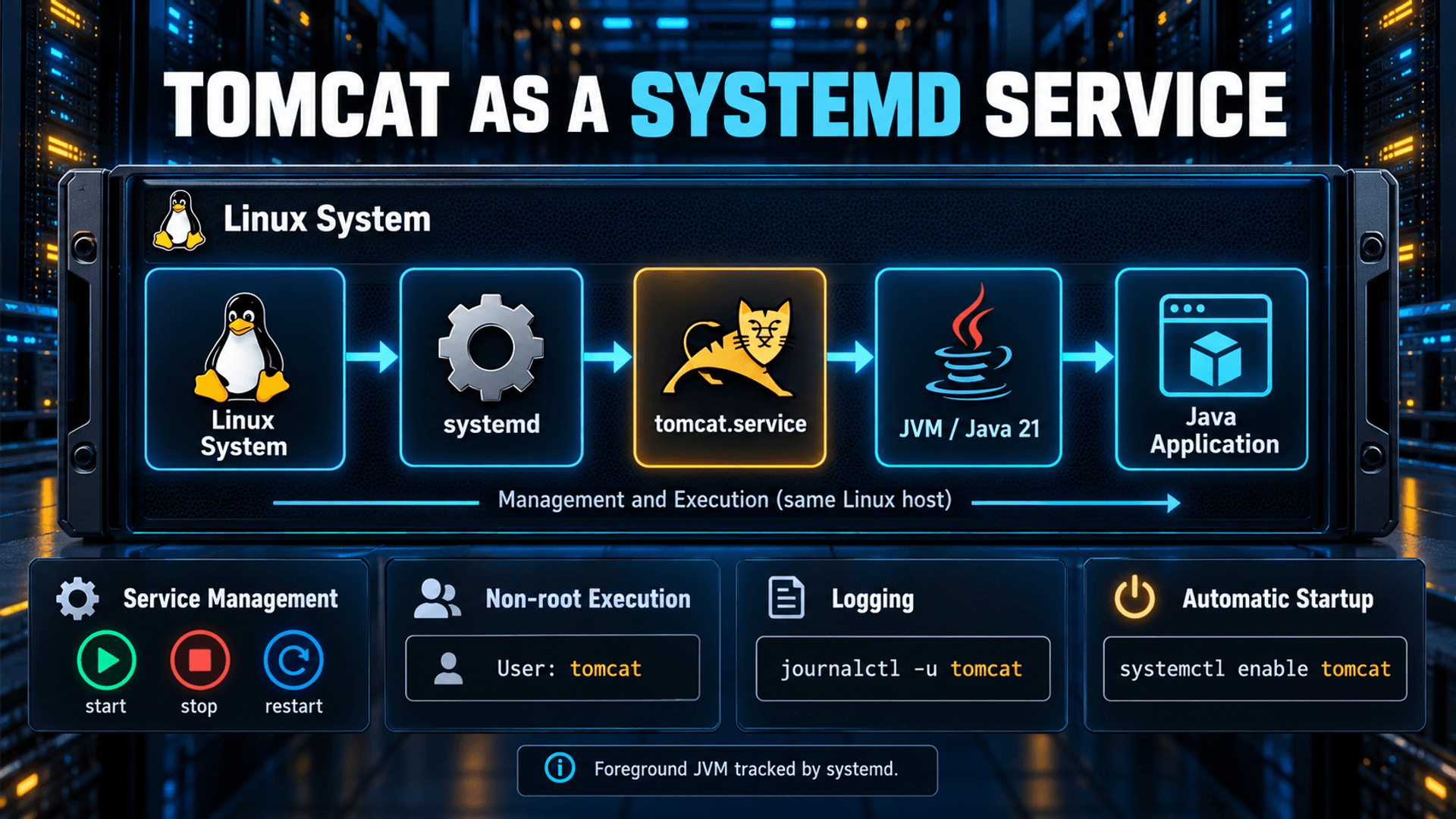
Create /etc/systemd/system/tomcat.service with the complete unit below. catalina.sh run keeps the JVM in the foreground so systemd tracks the real process. No PID file or forking wrapper is needed. systemd sends SIGTERM for stop/restart; the JVM shutdown hook stops Tomcat even with the shutdown TCP port disabled.
sudoedit /etc/systemd/system/tomcat.service[Unit]
Description=Apache Tomcat Java Web Container
Wants=network-online.target
After=network-online.target
RequiresMountsFor=/opt/tomcat /var/lib/tomcat /var/log/tomcat
StartLimitIntervalSec=60
StartLimitBurst=5
[Service]
Type=simple
User=tomcat
Group=tomcat
EnvironmentFile=/etc/tomcat/tomcat.env
WorkingDirectory=/var/lib/tomcat
ExecStart=/opt/tomcat/current/bin/catalina.sh run
Restart=on-failure
RestartSec=5s
SuccessExitStatus=143
TimeoutStopSec=60s
KillSignal=SIGTERM
KillMode=mixed
UMask=0027
LimitNOFILE=16384
NoNewPrivileges=true
PrivateTmp=true
ProtectSystem=strict
ProtectHome=true
ReadWritePaths=/var/lib/tomcat/work /var/lib/tomcat/temp /var/lib/tomcat/data /var/log/tomcat
RestrictSUIDSGID=true
CapabilityBoundingSet=
AmbientCapabilities=
StandardOutput=journal
StandardError=journal
SyslogIdentifier=tomcat
[Install]
WantedBy=multi-user.target- ProtectSystem=strict makes the filesystem read-only in the service namespace; ReadWritePaths reopens only existing runtime directories. File ownership still applies. Application data needs its documented exception, not a writable /opt or conf.
- ProtectHome hides home directories; keep the JDK, certificates and required files out of /home. PrivateTmp isolates /tmp and /var/tmp; CATALINA_TMPDIR remains the explicit JVM temporary path.
- NoNewPrivileges, an empty capability set and RestrictSUIDSGID limit privilege gain. Ports above 1024 do not require bind capabilities. JVM JIT requires executable memory, so MemoryDenyWriteExecute is deliberately omitted.
- LimitNOFILE=16384 is a sample ceiling above the connector connection budget; include database sockets and application files in sizing. Avoid restrictive task/syscall filters without testing native libraries and JVM diagnostics.
- network-online orders startup after the configured wait-online implementation; it does not prove DNS/database readiness. Application connection retries remain necessary. Start limits stop restart storms.
Send container logging to the journal
Replace /var/lib/tomcat/conf/logging.properties on this new instance with the console-only JULI configuration below. Container logs then reach journalctl without duplicate JULI files. AccessLogValve still writes separate access logs; application logging frameworks need their own console or protected file configuration.
sudoedit /var/lib/tomcat/conf/logging.propertieshandlers = java.util.logging.ConsoleHandler
.handlers = java.util.logging.ConsoleHandler
.level = INFO
java.util.logging.ConsoleHandler.level = INFO
java.util.logging.ConsoleHandler.formatter = org.apache.juli.OneLineFormattersudo systemd-analyze verify /etc/systemd/system/tomcat.service
# Install chapter 7 server.xml before starting this new instance.
sudo systemctl daemon-reload
sudo systemctl enable --now tomcat
sudo systemctl status tomcat --no-pager
sudo systemctl restart tomcat
sudo journalctl -u tomcat -n 100 --no-pager
sudo systemd-analyze security tomcat.service
sudo systemctl show tomcat -p User -p Group -p MainPID -p LimitNOFILE -p ReadWritePathsAfter chapter 7 is installed, expect active (running), user tomcat and a 127.0.0.1:8080 listener. Type=simple active status alone is not HTTP readiness. If start limiting is reached, fix the error, run systemctl reset-failed tomcat and start again. Review the security score as a diagnostic, not a certification; JVM-compatible exceptions affect it.
systemd execution, filesystem sandbox and logging options on Ubuntu 24.04
7. Enterprise security hardening
Operating system and deployment boundary
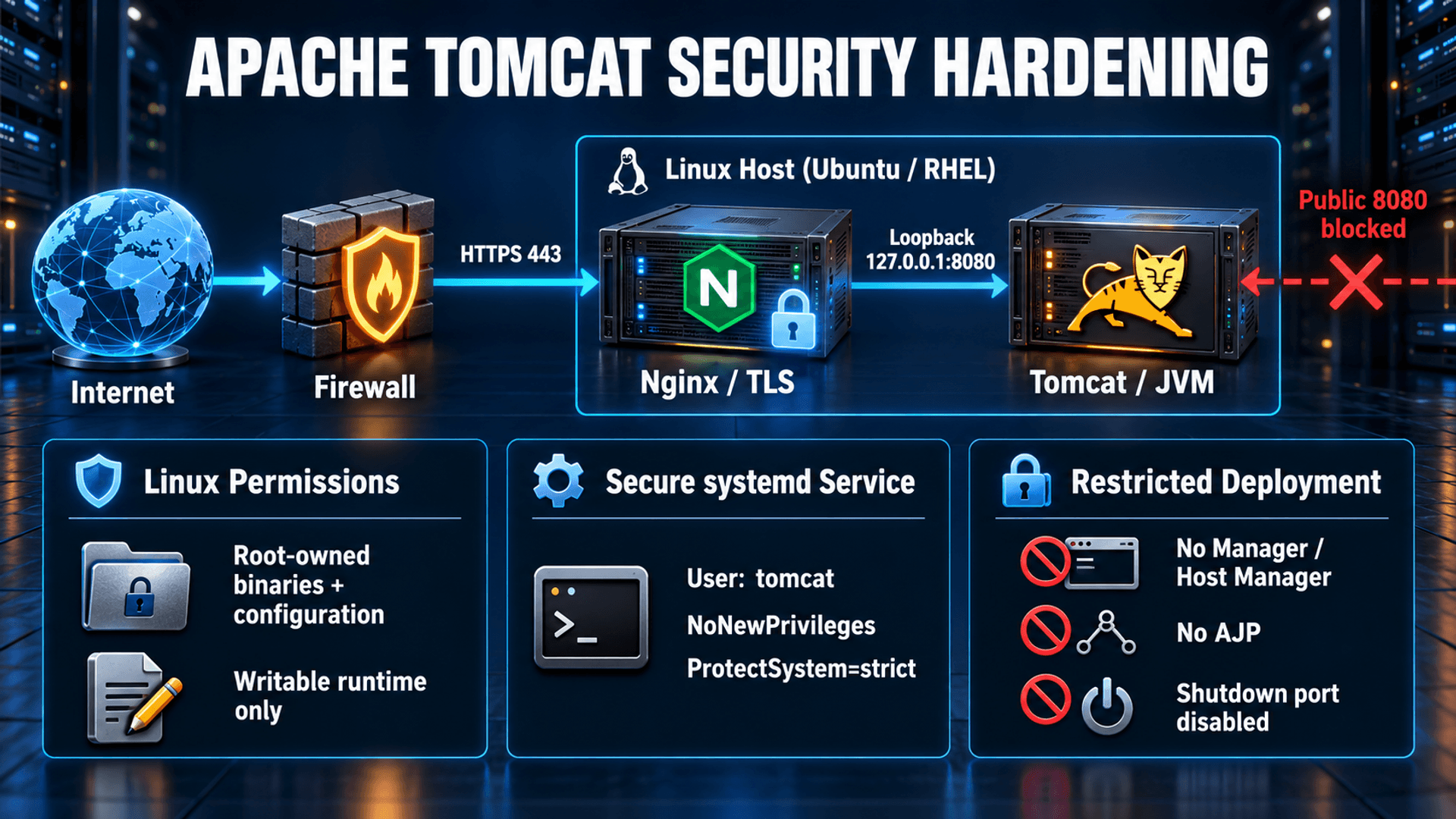
Use one non-root account per trust boundary, controlled sudo for operators, maintained OS/JDK packages and a restricted firewall. Protect both release directories and the current symlink from the Tomcat user. Unix permissions plus the systemd namespace protect configuration; they do not isolate mutually hostile applications within the same JVM. Use separate instances or VMs for separate trust domains. Tomcat 11 has removed Java SecurityManager support; do not apply old catalina.policy or -security instructions.
Do not deploy bundled administrative applications
CATALINA_BASE/webapps was created empty. Do not copy ROOT, docs, examples, manager or host-manager from CATALINA_HOME/webapps into it. The installed binary archive can retain those protected files without publishing them because this Host uses the separate BASE appBase. Audit BASE/conf/Catalina/localhost for descriptors referencing them. For an existing installation, remove approved unused applications and descriptors during a controlled change after backup, rather than deleting every webapp.
sudo ls -la /var/lib/tomcat/webapps /var/lib/tomcat/conf/Catalina/localhost
sudo -u tomcat test ! -w /opt/tomcat/current/bin/catalina.sh
sudo -u tomcat test ! -w /etc/tomcat/tomcat.env
sudo stat -c "%U:%G %a %n" /var/lib/tomcat/conf/server.xml /var/lib/tomcat/webapps /var/log/tomcat
If Manager is explicitly required, use an independent management listener/host on a private network, firewall/VPN allowlists, TLS, named accounts and minimum roles. Restrict manager-script separately from the browser manager-gui role. A loopback-only management valve alone is insufficient when a public local reverse proxy can reach it. This baseline deploys no management apps and also blocks their public paths at Nginx. JMX is not enabled; remote JMX requires authenticated encrypted transport and restricted ports.
Complete hardened server.xml for the local proxy
Write /var/lib/tomcat/conf/server.xml below, replacing the copied default on the new instance. There is one HTTP connector and no AJP connector. port=-1 disables the shutdown listener; use systemctl stop. The fixed public proxy name/scheme/port are appropriate only for this one-domain HTTPS topology.
sudoedit /var/lib/tomcat/conf/server.xml<?xml version="1.0" encoding="UTF-8"?>
<Server port="-1">
<Listener className="org.apache.catalina.core.JreMemoryLeakPreventionListener" />
<Listener className="org.apache.catalina.core.ThreadLocalLeakPreventionListener" />
<Service name="Catalina">
<Connector address="127.0.0.1" port="8080"
protocol="org.apache.coyote.http11.Http11NioProtocol"
connectionTimeout="20000" maxThreads="200"
maxConnections="2048" acceptCount="100"
maxParameterCount="1000" maxPostSize="2097152"
maxHttpRequestHeaderSize="8192"
allowTrace="false" enableLookups="false"
URIEncoding="UTF-8" xpoweredBy="false"
proxyName="tomcat.example.com" proxyPort="443"
scheme="https" secure="true" />
<Engine name="Catalina" defaultHost="localhost">
<Host name="localhost" appBase="webapps"
autoDeploy="false" deployOnStartup="true"
unpackWARs="false" deployXML="false">
<Valve className="org.apache.catalina.valves.RemoteIpValve"
internalProxies="127.0.0.1/32"
remoteIpHeader="X-Forwarded-For"
requestAttributesEnabled="true" />
<Valve className="org.apache.catalina.valves.ErrorReportValve"
showReport="false" showServerInfo="false" />
<Valve className="org.apache.catalina.valves.AccessLogValve"
directory="logs" prefix="access." suffix=".log"
rotatable="true" maxDays="14"
requestAttributesEnabled="true"
pattern="%a %t "%m %U %H" %s %b %D" />
</Host>
</Engine>
</Service>
</Server>RemoteIpValve trusts exactly the loopback peer, using the CIDR syntax documented for 11.0.26. Nginx overwrites X-Forwarded-For with the TCP client address. Scheme and port are fixed on this connector, so forwarded scheme/host/port are not used by this valve. Any local process that can connect to 8080 can still forge that IP header; loopback is a host trust boundary, not process authentication. Do not apply this fixed-HTTPS connector to direct public HTTP traffic.
autoDeploy=false prevents background hot deployment; deployOnStartup=true loads reviewed artifacts on restart. unpackWARs=false permits read-only WAR deployment and can reduce performance; test the application. deployXML=false ignores embedded META-INF/context.xml, so move required context/JNDI settings into a reviewed root-owned descriptor under conf/Catalina/localhost. Applications needing an expanded directory must be extracted by the deployment operator with read-only ownership before startup, not by granting webapps write access.
Thread/connection and request-size settings are starting budgets, not universal capacity values. maxPostSize limits form parameter processing and is not a general upload-size ceiling; enforce multipart limits in application configuration and the Nginx body limit. Access logs omit query strings and credentials but paths can still contain sensitive identifiers. Keep log permissions, rotation, quotas and centralized collection under policy.
Assign controls to the correct layer
- Tomcat: keep DefaultServlet readonly and directory listings disabled in conf/web.xml; leave crossContext, privileged and allowLinking disabled unless explicitly reviewed. ErrorReportValve hides container stack reports/version; omit connector server disclosure and keep xpoweredBy=false.
- Application: authentication/authorization, CSRF, input validation, prepared database queries, secure error pages, session fixation protection and Secure/HttpOnly/SameSite cookie policy. Select SameSite according to SSO flows and test redirects behind HTTPS.
- Nginx: TLS, public Host routing, body/time limits, chosen response headers and management-path restrictions. A WAF/rate limit is a separate tested control; the basic reverse proxy does not provide one automatically.
- OS/network: account privileges, read-only code/configuration, ingress/egress policy, SELinux/AppArmor and protected backups. Hiding a version is defense in depth, not a substitute for patches.
Official Tomcat Security Considerations
HTTP connector options and limits
Host deployment and WAR behavior
Remote IP, error reports and access logging valves
Server shutdown-port configuration
sudo systemctl daemon-reload
sudo systemctl enable --now tomcat
sudo systemctl restart tomcat
sudo systemctl status tomcat --no-pager
sudo journalctl -u tomcat -n 100 --no-pager
sudo ss -lntp | grep -E ":(8080|8005|8009)\b"
curl -I --max-time 10 http://127.0.0.1:8080/
At this point a 404 on / is expected because no ROOT application is deployed. It proves an HTTP response, not application health. Expect only 127.0.0.1:8080 and no 8005/8009 listener. Test manager and host-manager paths again after application deployment and through the public proxy.
8. Nginx reverse proxy and HTTPS
Nginx and Tomcat run on the same host. Before issuing a certificate, open the chapter 9 HTTP/HTTPS rules and point the real domain to the proxy. tomcat.example.com is a documentation domain and cannot be used to obtain your certificate. On separate hosts use a private backend address, exact proxy-source firewall rules and verified TLS/mTLS between hosts where policy requires it; do not expose a plaintext public backend.
Ubuntu installation and HTTP bootstrap
sudo apt install -y nginx certbot
nginx -v
sudo cp -a /etc/nginx "/etc/nginx.before-tomcat.$(date -u +%Y%m%dT%H%M%SZ)"
sudo install -d -o root -g root -m 0755 /var/www/letsencrypt/.well-known/acme-challenge
# Dedicated new host only: remove the reviewed packaged default symlink.
if [ -L /etc/nginx/sites-enabled/default ]; then
  sudo unlink /etc/nginx/sites-enabled/default
fi
sudoedit /etc/nginx/conf.d/tomcat.conf
Install this temporary HTTP configuration first. Do not reference nonexistent certificate files. The snippets are included inside Nginx http context through conf.d/*.conf; confirm the include with nginx -T. On a shared proxy resolve conflicting server names/default listeners without disabling other sites.
server {
    listen 80 default_server;
    listen [::]:80 default_server;
    server_name _;
    server_tokens off;
    return 444;
}
server {
    listen 80;
    listen [::]:80;
    server_name tomcat.example.com;
    server_tokens off;
    location ^~ /.well-known/acme-challenge/ {
        root /var/www/letsencrypt;
        default_type text/plain;
        try_files $uri =404;
    }
    location / { return 404; }
}sudo nginx -t
sudo systemctl enable --now nginx
sudo systemctl reload nginx
sudo certbot certonly --webroot -w /var/www/letsencrypt \
--cert-name tomcat.example.com -d tomcat.example.com
sudo certbot certificatesReplace the domain in every command and configuration. Certbot prompts for account details and agreement as required. Confirm the actual lineage and fullchain.pem/privkey.pem paths with certbot certificates. HTTP-01 requires public port 80 and working DNS for all advertised addresses; use automated DNS-01 if port 80 cannot be exposed. Keep private keys root-restricted and backups encrypted.
Complete final HTTPS configuration
After certificate issuance, replace the bootstrap file with this complete /etc/nginx/conf.d/tomcat.conf. It works with Ubuntu 24.04 Nginx and uses ssl_reject_handshake (Nginx 1.19.4+). TLS ends at Nginx; HTTP over loopback stays on the same host. proxy_pass without a URI preserves /app rather than rewriting its context path.
# Included inside the http context; requires existing certificate files.
log_format tomcat_edge '$remote_addr [$time_local] "$request_method $uri $server_protocol" '
                       'status=$status bytes=$body_bytes_sent rt=$request_time '
                       'upstream=$upstream_addr us=$upstream_status urt=$upstream_response_time';

server {
    listen 80 default_server;
    listen [::]:80 default_server;
    server_name _;
    server_tokens off;
    return 444;
}
server {
    listen 443 ssl default_server;
    listen [::]:443 ssl default_server;
    server_name _;
    ssl_protocols TLSv1.2 TLSv1.3;
    ssl_reject_handshake on;
    return 444;
}
server {
    listen 80;
    listen [::]:80;
    server_name tomcat.example.com;
    server_tokens off;
    location ^~ /.well-known/acme-challenge/ {
        root /var/www/letsencrypt;
        default_type text/plain;
        try_files $uri =404;
    }
    location / { return 301 https://tomcat.example.com$request_uri; }
}
server {
    listen 443 ssl;
    listen [::]:443 ssl;
    server_name tomcat.example.com;
    server_tokens off;
    ssl_certificate /etc/letsencrypt/live/tomcat.example.com/fullchain.pem;
    ssl_certificate_key /etc/letsencrypt/live/tomcat.example.com/privkey.pem;
    ssl_protocols TLSv1.2 TLSv1.3;
    ssl_ciphers HIGH:!aNULL:!MD5;
    ssl_session_cache shared:TomcatTLS:10m;
    ssl_session_timeout 10m;
    ssl_session_tickets off;
    if ($host != tomcat.example.com) { return 421; }
    if ($ssl_server_name != tomcat.example.com) { return 421; }

    client_max_body_size 10m;
    client_body_timeout 30s;
    add_header Strict-Transport-Security "max-age=604800" always;
    add_header X-Content-Type-Options "nosniff" always;
    add_header X-Frame-Options "SAMEORIGIN" always;
    add_header Referrer-Policy "strict-origin-when-cross-origin" always;
    access_log /var/log/nginx/tomcat.access.log tomcat_edge;
    error_log /var/log/nginx/tomcat.error.log warn;

    location ~ ^/(manager|host-manager)(/|$) { return 404; }
    location / {
        proxy_pass http://127.0.0.1:8080;
        proxy_http_version 1.1;
        proxy_set_header Connection "";
        proxy_set_header Host tomcat.example.com;
        proxy_set_header X-Real-IP $remote_addr;
        proxy_set_header X-Forwarded-For $remote_addr;
        proxy_set_header X-Forwarded-Proto $scheme;
        proxy_set_header X-Forwarded-Host tomcat.example.com;
        proxy_set_header X-Forwarded-Port 443;
        proxy_set_header X-Forwarded-By "";
        proxy_set_header Forwarded "";
        proxy_hide_header X-Powered-By;
        proxy_hide_header Strict-Transport-Security;
        proxy_hide_header X-Content-Type-Options;
        proxy_hide_header X-Frame-Options;
        proxy_hide_header Referrer-Policy;
        proxy_connect_timeout 5s;
        proxy_send_timeout 60s;
        proxy_read_timeout 60s;
    }
}
For this direct Internet edge, overwrite forwarded headers rather than append client-supplied X-Forwarded-For. Clear Forwarded so a framework cannot independently trust forged values. If a CDN/load balancer precedes Nginx, restrict origin access to it and configure set_real_ip_from for its exact published ranges with the correct real_ip_header; never trust 0.0.0.0/0. Verify $remote_addr and Tomcat logs using a forged-header test. Do not enable two independent forwarding processors in the application and container.
HSTS starts at seven days here; extend it after successful HTTPS and renewal tests. Do not add includeSubDomains or preload without an organization-wide review. SAMEORIGIN may conflict with cross-site embedding; revise deliberately. Design Content-Security-Policy against the application resources, test report-only first and avoid a copied policy that breaks scripts or SSO. The proxy owns the four configured headers and hides duplicates from upstream. Deprecated X-XSS-Protection is not used.
Timeouts are inactivity intervals for upstream I/O, not a complete end-to-end deadline. Align them with application and database budgets; avoid unbounded request threads. This baseline serves ordinary HTTP applications. WebSocket and SSE endpoints require reviewed Upgrade/Connection handling or buffering/timeouts at their specific locations, rather than enabling arbitrary upgrades globally.
sudo nginx -t
sudo systemctl reload nginx
curl -I http://tomcat.example.com/app/
curl -I https://tomcat.example.com/app/
curl -I https://tomcat.example.com/manager/html
curl -I -H 'X-Forwarded-For: 198.51.100.123' https://tomcat.example.com/app/
openssl s_client -connect tomcat.example.com:443 -servername tomcat.example.com \
  -verify_hostname tomcat.example.com -verify_return_error </dev/null
sudo tail -n 20 /var/log/nginx/tomcat.access.log
sudo tail -n 20 /var/log/tomcat/access.*.log
Run public-domain tests after chapter 10 deployment, preferably from a separate client. Expect HTTP redirection, a valid HTTPS chain, application responses, management 404 and the actual client IP in both logs rather than the forged address. HEAD can return 405 in applications that do not implement it; retry with GET. Do not use curl -k as a TLS acceptance test.
Certificate renewal and reload hook
sudo install -d -m 0755 /etc/letsencrypt/renewal-hooks/deploy
sudo tee /etc/letsencrypt/renewal-hooks/deploy/reload-nginx.sh >/dev/null <<'EOF'
#!/bin/sh
set -eu
/usr/sbin/nginx -t
/usr/bin/systemctl reload nginx
EOF
sudo chown root:root /etc/letsencrypt/renewal-hooks/deploy/reload-nginx.sh
sudo chmod 0750 /etc/letsencrypt/renewal-hooks/deploy/reload-nginx.sh
sudo systemctl enable --now certbot.timer
systemctl list-timers --all | grep certbot
sudo certbot renew --dry-run
# Exercise the deploy hook separately; dry-run does not normally run deploy hooks.
sudo /etc/letsencrypt/renewal-hooks/deploy/reload-nginx.sh
These timer and binary paths match the Ubuntu package method. Verify the actual scheduler on another distribution or installation method; do not create duplicate renewal jobs. Monitor certificate expiry, failed renewals and the reload hook. Preserve the ACME HTTP location during redirection and future edits.
Nginx proxy forwarding, URI and timeout reference
Nginx TLS and default handshake behavior
Nginx response headers and inheritance
9. Firewall: expose only the edge
Apply firewall rules before ACME issuance in chapter 8. Preserve access on the actual SSH port and test a second session before enabling/reloading rules. The commands use SSH 22 as an example. Audit existing allows, rich/direct rules, IPv6, cloud security groups and NAT; adding a deny does not repair every preexisting rule.
Ubuntu UFW
sudo apt install -y ufw
sudo ufw status numbered
sudo ufw allow 22/tcp comment "SSH management - restrict source in production"
sudo ufw allow 80/tcp comment "ACME and HTTPS redirect"
sudo ufw allow 443/tcp comment "Nginx HTTPS"
sudo ufw default deny incoming
sudo ufw default allow outgoing
sudo ufw deny 8080/tcp
sudo ufw deny 8009/tcp
sudo ufw deny 8005/tcp
sudo ufw enable
sudo ufw status verbose
After establishing the real management CIDR, replace the broad SSH allowance with a source-specific rule and verify access before deleting the broad one. Remove any older public 8080 allowance shown by ufw status numbered. UFW normally allows local loopback; the backend remains reachable to local Nginx. The outgoing policy shown is a bootstrap baseline; restrict egress according to application dependencies in enterprise policy.
RHEL-compatible firewalld alternative
sudo dnf install -y firewalld
sudo systemctl enable --now firewalld
sudo firewall-cmd --get-active-zones
# Assumes the public-facing interface is in public; use its actual zone.
sudo firewall-cmd --permanent --zone=public --add-service=ssh
sudo firewall-cmd --permanent --zone=public --add-service=http
sudo firewall-cmd --permanent --zone=public --add-service=https
sudo firewall-cmd --permanent --zone=public --remove-port=8080/tcp
sudo firewall-cmd --permanent --zone=public --remove-port=8009/tcp
sudo firewall-cmd --permanent --zone=public --remove-port=8005/tcp
sudo firewall-cmd --reload
sudo firewall-cmd --zone=public --list-all
sudo firewall-cmd --zone=public --list-rich-rules
An already-absent remove-port may report NOT_ENABLED; inspect the effective result. Confirm the zone target is not ACCEPT and that no service, rich rule or trusted zone exposes the backend. The same-host design does not need an 8080 allow rule at all. Use either UFW or firewalld on a host, not both. On RHEL install Nginx through the supported distribution repository, adapt conf.d inclusion and certificate scheduling, and check SELinux before proxy validation.
sudo ss -lntp | grep -E ":(22|80|443|8080|8005|8009)\b"
# From an independent external client using your real domain:
curl -I --connect-timeout 5 https://tomcat.example.com/
curl -I --connect-timeout 5 http://tomcat.example.com:8080/
The external backend attempt must fail, while HTTPS reaches Nginx. Binding 127.0.0.1 is essential even when a firewall is configured; it also avoids an accidental public IPv6 listener.
10. Deploy a reviewed Java WAR
Build app.war in trusted CI for Java 21 and Jakarta Servlet 6.1-compatible frameworks, scan dependencies, verify the approved artifact digest/signature and transfer it to the operator’s home directory. The following assumes ./app.war is that real approved artifact. No fabricated WAR or fixed example checksum is supplied. The deployment operator uses sudo; Tomcat itself cannot deploy new code.
cd ~
test -f ./app.war
sha256sum ./app.war
unzip -t ./app.war
# Compare the digest above to the independently approved CI release record.
sudo systemctl stop tomcat
sudo install -o root -g tomcat -m 0640 ./app.war /var/lib/tomcat/webapps/app.war
sudo -u tomcat test -r /var/lib/tomcat/webapps/app.war
sudo -u tomcat test ! -w /var/lib/tomcat/webapps/app.war
sudo systemctl start tomcat
sudo journalctl -u tomcat -n 100 --no-pager
curl -I -H 'Host: tomcat.example.com' http://127.0.0.1:8080/app/
curl -I https://tomcat.example.com/app/
app.war maps to /app; ROOT.war maps to /. With autoDeploy=false a running service will not notice a copied WAR until restart. Keep unpackWARs=false for this archive method. If the application requires exploded files, pre-extract the approved WAR to a clean app directory as root, set directories 0750/files 0640 root:tomcat, and deploy that directory without a competing app.war. Validate archives and file paths before privileged extraction. Never store mutable uploads under the deployment tree.
Review startup logs for context errors and test a real application health endpoint plus authenticated user flows, data access and denied authorization. 200 on a static page does not prove database health. If the app has no /app/ index, use its documented route; do not treat every 404 as a failed service. Keep application secrets in an approved secret mechanism outside the WAR, with access restricted to the instance. External root-owned Context descriptors may be used for reviewed resource configuration.
11. Monitoring and troubleshooting
systemctl status tomcat --no-pager
sudo journalctl -u tomcat -n 100 --no-pager
sudo journalctl -u tomcat -f
sudo ss -lntp
curl -I http://127.0.0.1:8080/
sudo systemctl show tomcat -p MainPID -p NRestarts -p MemoryCurrent
free -h
df -h
sudo journalctl -k --since '1 hour ago'
sudo tail -n 50 /var/log/nginx/tomcat.error.log
Alert on failed/restarting services, application health/latency, 5xx rate, JVM heap/GC, native RSS, thread and file-descriptor usage, disk/log growth and TLS expiry. Protect centralized logs and configure durable journal retention according to disk budget; default journal persistence varies by distribution. Do not publish unauthenticated JMX or debug ports. Establish baselines before setting alert thresholds.
Startup failure or restart loop
Symptom: failed status or start-limit-hit. Root cause: invalid XML/JVM option, missing Java path or unreadable unit paths. Diagnose with the commands below. Resolution: correct the first startup exception, verify the resolved JDK and XML, restore a reviewed configuration, then reset the failure and restart; do not merely raise the retry limit.
sudo journalctl -u tomcat -b -n 150 --no-pager
sudo systemd-analyze verify /etc/systemd/system/tomcat.service
sudo systemctl cat tomcat
sudo cat /etc/tomcat/tomcat.env
sudo systemctl reset-failed tomcat
sudo systemctl restart tomcat
Java API or bytecode incompatibility
Symptom: UnsupportedClassVersionError or ClassNotFoundException for javax.servlet. Root cause: artifact compiled for a newer JVM, or Java EE dependencies on a Jakarta container. Diagnose the service JVM path and context startup exception. Resolution: rebuild for the chosen Java release and compatible Jakarta dependencies, or use the vendor-supported container branch; do not add obsolete servlet API JARs into Tomcat lib to mask the mismatch.
java -version
sudo journalctl -u tomcat -b --no-pager | grep -E "UnsupportedClassVersion|ClassNotFound|NoClassDefFound|javax.servlet"
sudo grep JAVA_HOME /etc/tomcat/tomcat.env
Permission denied or read-only filesystem
Symptom: cannot write a log, temp file or upload. Root cause: wrong ownership, a missing parent traversal permission or a path outside ReadWritePaths. Diagnose permissions and the effective unit. Resolution: move mutable data to the documented data/work/temp/log path and grant only required ownership; add a narrow reviewed exception only if necessary. Never use chmod 777 or recursively chown the release to tomcat.
namei -l /var/lib/tomcat/data
sudo -u tomcat test -w /var/lib/tomcat/data
sudo systemctl show tomcat -p ReadWritePaths -p ProtectSystem -p ProtectHome
sudo journalctl -u tomcat -n 100 --no-pager
Port already in use
Symptom: BindException / Address already in use. Root cause: another Tomcat/JVM or service owns 8080. Diagnose the listener PID. Resolution: identify and stop the conflicting instance through its service manager, or intentionally change both connector and proxy upstream; never kill an unidentified process.
sudo ss -lntp "sport = :8080"
systemctl list-units --type=service | grep -i tomcat
ps -eo user,pid,args | grep "[o]rg.apache.catalina.startup.Bootstrap"
HTTP 403 or 404
Symptom: a response arrives but the route is forbidden or absent. Root cause: authorization/valve rules, a missing or failed context, wrong context path, or intentional management blocking. Diagnose direct /app/ versus proxy /app/, deployment logs and application routes. Resolution: correct the route/deployment or legitimate authorization rule; do not enable Manager or disable authentication to solve a 404. Empty / returns 404 by design in this baseline.
curl -i http://127.0.0.1:8080/app/
curl -i https://tomcat.example.com/app/
sudo journalctl -u tomcat -n 150 --no-pager
sudo ls -l /var/lib/tomcat/webapps
Nginx 502 Bad Gateway
Symptom: public 502 while Nginx is running. Root cause: stopped backend, wrong upstream, connection denial or invalid upstream response. Diagnose Nginx error log, direct backend and listeners. Resolution: restore backend health and correct the upstream/mandatory-access policy; increasing proxy_read_timeout does not fix connection refused. A slow upstream normally causes 504 rather than 502.
sudo tail -n 100 /var/log/nginx/tomcat.error.log
curl -v --max-time 10 http://127.0.0.1:8080/app/
sudo ss -lntp "sport = :8080"
sudo nginx -t
Heap exhaustion or kernel OOM kill
Symptom: OutOfMemoryError, long GC pauses or an abruptly killed JVM. Root cause: heap pressure/leak, excessive concurrency, native allocation or host/cgroup memory exhaustion. Diagnose kernel logs, RSS and effective heap. Resolution: fix the workload/leak, bound requests and choose measured heap/native headroom. Increase Xmx only within the host budget. An optional MemoryMax cgroup ceiling must exceed heap plus native memory and be load-tested.
sudo journalctl -k --since '1 hour ago' | grep -Ei 'oom|killed process'
sudo systemctl show tomcat -p MainPID -p MemoryCurrent -p MemoryMax
TOMCAT_PID="$(systemctl show tomcat -p MainPID --value)"
ps -o pid,rss,vsz,nlwp,args -p "$TOMCAT_PID"
# Use the exact JAVA_HOME recorded in tomcat.env for JDK tools.
sudo -u tomcat /usr/bin/jcmd "$TOMCAT_PID" GC.heap_info
On systems where jcmd is not installed as /usr/bin/jcmd, use the resolved JDK bin/jcmd. JVM attach tools can be affected by PrivateTmp and JDK attach paths; a failed attach is not proof that the JVM is unhealthy. Do not remove the sandbox globally for diagnostics. Heap dumps may contain secrets and can exhaust disk: enable -XX:+HeapDumpOnOutOfMemoryError only with a protected HeapDumpPath under data, quotas and a retention plan. Restart after changing CATALINA_OPTS.
SELinux or AppArmor denial
Java 21 jcmd diagnostic commands and attach requirements
Symptom: permission or proxy connection failure despite correct Unix permissions. Root cause: mandatory access policy, a wrong label or an active profile denying the custom layout. Diagnose audit/kernel logs and process context. Resolution: restore correct labels and implement the smallest approved policy adjustment. Keep enforcement enabled; do not generate and install an unreviewed audit2allow policy.
# RHEL family:
getenforce
ps -eZ | grep -E 'nginx|java'
sudo ausearch -m AVC -ts recent
sudo ls -Zd /opt/tomcat /var/lib/tomcat /var/log/tomcat
getsebool httpd_can_network_connect
# Only when the denial and policy review justify outbound proxy connections:
sudo setsebool -P httpd_can_network_connect on

# Ubuntu:
sudo aa-status
sudo journalctl -k --since '1 hour ago' | grep -Ei 'apparmor|DENIED'
The SELinux boolean allows broader outbound HTTP-service connectivity and is not a Tomcat sandbox. Review local policy and network egress controls before enabling it. A custom tar installation must have its actual Java/Tomcat SELinux domain verified; copying files does not create a confined domain automatically. Ubuntu only enforces an AppArmor profile for this process if one is actually loaded and attached.
Red Hat: SELinux proxy connection denials
systemd sandbox setup failure
Symptom: status=226/NAMESPACE, 200/CHDIR or 203/EXEC. Root cause: missing ReadWritePaths/mount directories, blocked home-based dependencies, unavailable namespace support or an invalid executable. Diagnose the service journal and file paths. Resolution: create/mount the intended paths with correct permissions and use the documented non-home executable; adapt only the incompatible directive in a tested host environment. A container with limited namespace support may require a different isolation design.
sudo journalctl -u tomcat -b -n 100 --no-pager
namei -l /opt/tomcat/current/bin/catalina.sh
findmnt -T /var/lib/tomcat
sudo systemctl cat tomcat
sudo systemd-analyze verify /etc/systemd/system/tomcat.service
12. Safe upgrades and rollback
Plan a maintenance window, record the current release/JDK/artifact hashes and test the target patch in staging with the same application and proxy. Read the migration guide, changelog and security advisories; major upgrades require API/framework compatibility checks. Confirm cluster/session serialization compatibility separately if using multiple nodes. Drain traffic and stop the service for the single-host change. A symlink switch is not a zero-downtime deployment.
set -euo pipefail
TOMCAT_PREVIOUS_RELEASE="$(sudo readlink -f /opt/tomcat/current)"
TOMCAT_BACKUP_DIR="/var/backups/tomcat/$(date -u +%Y%m%dT%H%M%SZ)"
sudo install -d -o root -g root -m 0700 "$TOMCAT_BACKUP_DIR"
sudo systemctl stop tomcat
printf '%s\n' "$TOMCAT_PREVIOUS_RELEASE" | sudo tee "$TOMCAT_BACKUP_DIR/previous-release.txt" >/dev/null
sudo cp -a /var/lib/tomcat/conf /var/lib/tomcat/webapps \
  /etc/tomcat /etc/systemd/system/tomcat.service "$TOMCAT_BACKUP_DIR/"
sudo cp -a /etc/nginx "$TOMCAT_BACKUP_DIR/nginx"
sudo tar -czf "$TOMCAT_BACKUP_DIR/application-data.tar.gz" -C /var/lib/tomcat data
sudo chmod -R go-rwx "$TOMCAT_BACKUP_DIR"
sudo ls -la "$TOMCAT_BACKUP_DIR"
Back up external databases/state with their supported consistent backup procedure, and copy encrypted backups off-host with verified restore access. Protect certificates and private keys separately. Configuration/WAR backup does not include a remote database. Application migrations may make rollback incompatible; take a restorable data snapshot and agree on forward recovery versus rollback before changing schemas.
Download, verify and extract the approved new stable archive into a new /opt/tomcat/apache-tomcat-VERSION directory using the chapter 5 release steps only. Do not rerun account creation, BASE configuration copy or current symlink creation. Compare the old stock conf to the new stock conf and merge required changes into a staging copy of your local conf. Preserve the previous config and artifact as one rollback set.
# Set this to the REAL release directory you already verified and installed.
read -r -p 'Verified new Tomcat release directory: ' TOMCAT_NEW_RELEASE
case "$TOMCAT_NEW_RELEASE" in
  /opt/tomcat/apache-tomcat-*) ;;
  *) echo 'Unexpected release path' >&2; exit 1 ;;
esac
sudo test -d "$TOMCAT_NEW_RELEASE"
sudo test -x "$TOMCAT_NEW_RELEASE/bin/catalina.sh"
sudo diff -ru "$TOMCAT_PREVIOUS_RELEASE/conf" "$TOMCAT_NEW_RELEASE/conf" || test "$?" -eq 1
# Complete the reviewed configuration merge BEFORE the switch.
sudo ln -s "$TOMCAT_NEW_RELEASE" /opt/tomcat/current.next
sudo mv -Tf /opt/tomcat/current.next /opt/tomcat/current
# daemon-reload is necessary only if unit/drop-in files changed.
sudo systemctl daemon-reload
sudo systemctl start tomcat
sudo systemctl status tomcat --no-pager
sudo journalctl -u tomcat -n 100 --no-pager
curl -I http://127.0.0.1:8080/app/
curl -I https://tomcat.example.com/app/
The variables in this upgrade sequence belong to the same Bash session; recover the previous path from the backup file if the session is lost. Accept the upgrade only after version, application authorization, HTTPS redirects/cookies, client IP logs, monitoring and actual data flows pass. Retain the previous release until the acceptance window closes.
Rollback when the application/data remain compatible
sudo systemctl stop tomcat
sudo ln -s "$TOMCAT_PREVIOUS_RELEASE" /opt/tomcat/current.rollback
sudo mv -Tf /opt/tomcat/current.rollback /opt/tomcat/current
# Restore the REVIEWED matching old configuration/artifact set when changed.
# Restore external data only through its tested recovery plan, not blind copying.
sudo systemctl start tomcat
sudo journalctl -u tomcat -n 100 --no-pager
curl -I https://tomcat.example.com/app/
If configuration or application artifacts changed, restoring the symlink alone is not sufficient. Restore the matching backup under change control before startup. Do not overwrite the whole CATALINA_BASE with a new distribution or silently roll back a database schema. Re-run external firewall and security checks after either upgrade or rollback.
13. Production security checklist
- [ ] Supported Tomcat patch, maintained Java 21 build and OS security updates are recorded; advisories have an owner and remediation deadline.
- [ ] Non-root account has no sudo; binaries/configuration/deployment are root-owned and runtime writes are limited and tested.
- [ ] systemd start, stop, reboot startup, restart limits and graceful shutdown pass; sandbox exceptions are documented.
- [ ] Only Nginx is publicly reachable on 80/443; SSH is source-restricted; 8080 is loopback-only; AJP and shutdown listeners are absent.
- [ ] TLS chain, hostname, renewal scheduler, reload hook and expiry alert pass; private keys/backups are protected.
- [ ] Forwarded-header spoofing test passes and client IP logging is correct; public management paths and undeployed apps are checked.
- [ ] Application authentication, authorization, CSRF, cookies, error responses and request/upload limits pass; headers/CSP fit the application.
- [ ] JVM/native memory, GC, service restarts, 5xx/latency, disk/log growth and health checks are monitored with actionable alerts.
- [ ] Logs exclude unnecessary secrets, have protected retention/rotation and reach centralized monitoring.
- [ ] WAR provenance and vulnerability scan are approved; secrets/uploads remain outside deployment; operator changes are auditable.
- [ ] Off-host encrypted backups and an isolated restore drill pass; maintenance, data compatibility and rollback are documented.
- [ ] SELinux/AppArmor status and effective process policy are verified; unrelated applications use separate trust boundaries.
Operational acceptance
Hand over the effective unit, directory ownership, approved version/artifact hashes, proxy trust boundary, renewal schedule, dashboards, incident runbooks and tested restore/rollback evidence. This Windows website workspace validates the article integration; the Linux commands and application behavior still require staging execution on your target platform before production acceptance.
Frequently asked questions
Can Tomcat 11 run on Java 21?
Yes. Tomcat 11 requires Java 17 or later. Java 21 meets that requirement; application bytecode and dependencies must also be compatible.
Will a Tomcat 9 WAR run unchanged on 11?
Do not assume it. Java EE web APIs moved from javax.* to jakarta.* and API defaults changed. Rebuild and test the vendor-supported application.
Why keep CATALINA_HOME separate from CATALINA_BASE?
HOME contains release binaries; BASE contains the instance configuration, deployments and runtime paths. Separation supports reviewed upgrades without overwriting production configuration.
Why does the first localhost request return 404?
No ROOT application is installed in the empty protected webapps directory. Deploy the approved application and test its documented context path.
How is Tomcat stopped with shutdown port -1?
systemd sends SIGTERM to the foreground JVM. The JVM shutdown hook performs Tomcat shutdown; shutdown.sh is not the control method for this unit.
Can the service write to webapps?
No. A deployment operator installs reviewed artifacts as root:tomcat. Runtime state belongs in the specifically writable directories.
Is localhost HTTP safe between Nginx and Tomcat?
It stays on the same host and relies on host trust. Separate-host traffic needs a private restricted path and verified encryption where policy requires it.
Should Java SecurityManager be enabled?
No. Tomcat 11 removed support. Use least privilege, systemd restrictions and separate instances/VMs for distinct application trust boundaries.
Official References, templates and related guides
Release and configuration references were checked on 9 October 2026. The Official References are linked beside their relevant chapters. Recheck the live download, vulnerabilities and vendor support before rollout. Templates below contain no real credentials; adapt the domain, resolved JAVA_HOME and measured capacity before installing them on a reviewed staging host.
Download hardened systemd unit
Download local-proxy server.xml
Download console JULI configuration
Download temporary HTTP bootstrap
Download final Nginx HTTPS configuration
Related: Nginx installation and configuration on Ubuntu
Related: Nginx SNI reverse proxy for multiple domains
Related: Linux account and access security