1. Introduction
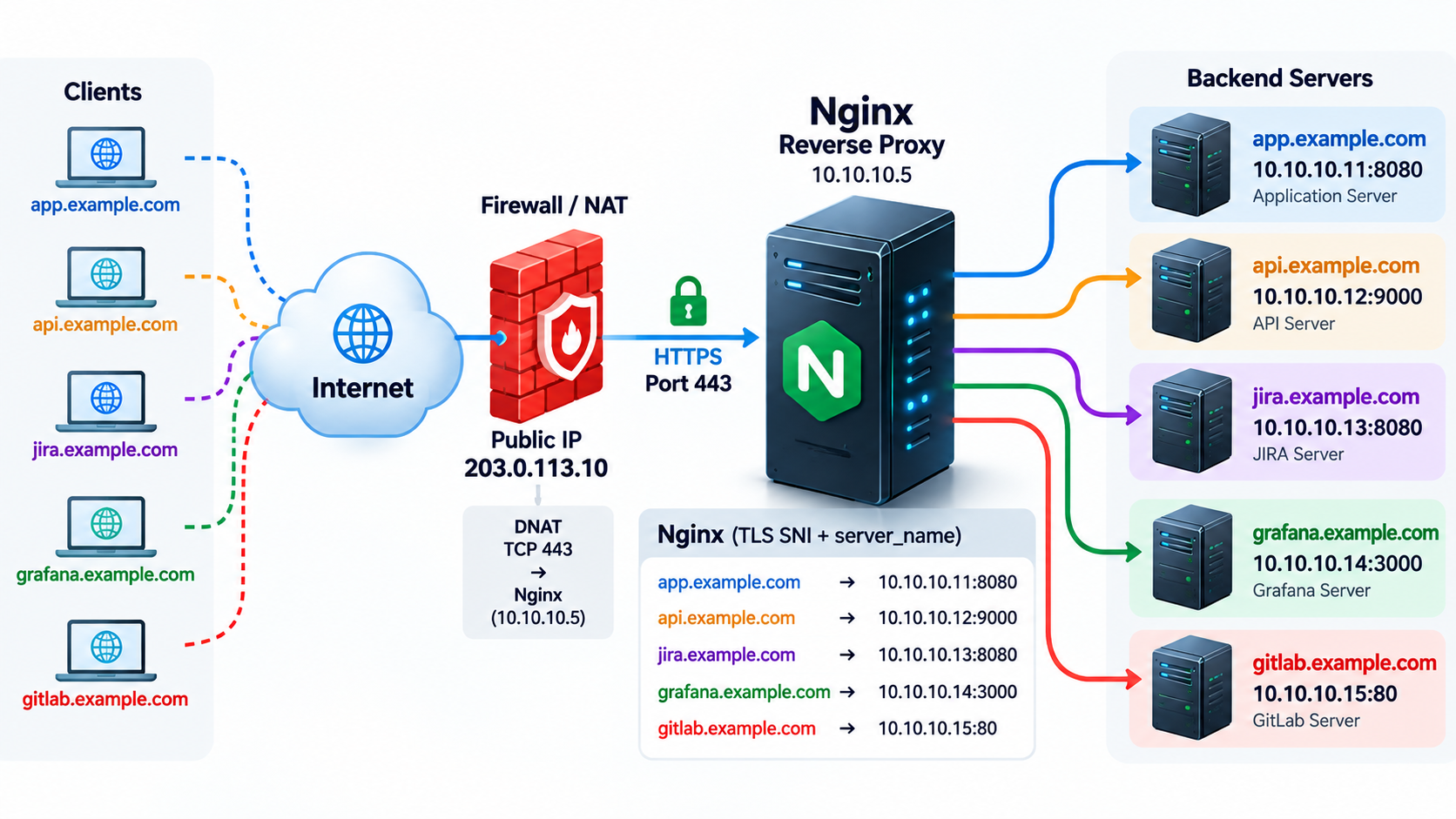
Internet
                            |
                   Public IP: 203.0.113.10
                            |
                         TCP/443
                            |
                    +---------------+
                    |     NGINX     |
                    | Reverse Proxy |
                    +---------------+
                      /   /   |   \   \
                     /   /    |    \   \
                    v   v     v     v   v

app.example.com          -> 10.10.10.11:8080
api.example.com          -> 10.10.10.12:9000
jira.example.com         -> 10.10.10.13:8080
grafana.example.com      -> 10.10.10.14:3000
gitlab.example.com       -> 10.10.10.15:80
One public IP and one TCP listener can publish independent HTTPS services. This design is a Name-Based HTTPS Reverse Proxy, also called TLS SNI-Based Virtual Hosting. Nginx terminates client TLS and opens a separate HTTP connection to the selected private backend.
This runbook targets System Administrators, Network Engineers and DevOps Engineers. The configuration requires Nginx 1.19.4 or later with the HTTP SSL module and OpenSSL 1.1.1 or later; use a currently supported distribution and security-patched packages. All commands below run on Ubuntu/Debian unless marked as backend commands.
203.0.113.10 and 198.51.100.20 are documentation addresses; example.com is reserved for examples. Replace them with a routable public IP and domains you control. A public CA cannot issue these example certificates for you. Production-ready here means a deployable baseline with explicit prerequisites, not a claim that the sample addresses are live.
2. Scenario
app.example.com -> 10.10.10.11:8080
api.example.com -> 10.10.10.12:9000
jira.example.com -> 10.10.10.13:8080
grafana.example.com -> 10.10.10.14:3000
gitlab.example.com -> 10.10.10.15:80
All five A records point to 203.0.113.10. HTTPS service traffic enters on TCP/443; TCP/80 below is an optional redirect and HTTP-01 validation listener, not another HTTPS service port. Different domains such as app.example.net use the same pattern with their own DNS records, server_name and certificate.
3. Architecture
Client
   |
   | TLS SNI: app.example.com
   v
NGINX :443
   |
   | server_name app.example.com
   | HTTP Host: app.example.com
   v
10.10.10.11:8080
DNS locates the proxy IP; it does not select a backend or encode a TCP port. A server block defines a virtual service. server_name matches names, while proxy_pass defines the upstream destination inside a location. DNS, certificate coverage and backend routing are separate settings and all must agree.
The illustrated upstream links are plaintext HTTP. A private VLAN reduces exposure but does not encrypt traffic. Where policy requires encryption inside the network, use HTTPS upstreams with certificate verification, or an authenticated encrypted network transport. TLS passthrough is a different design: this HTTP proxy needs to decrypt requests to inspect HTTP headers.
4. How SNI Works

- The client resolves the name, connects to IP:443 and sends a TLS ClientHello containing SNI, normally the URL hostname.
- Nginx starts in the listener default context. During the handshake SNI can select a named virtual server and its certificate before HTTP exists.
- After TLS completes, Nginx reads the request line and HTTP Host header; HTTP/2 uses :authority. HTTP name selection can change the request server context.
- server_name is configuration, not a network header. proxy_pass forwards the decrypted request to the configured backend.
SNI and Host are client input, not authentication. They need not match. This baseline rejects a missing or different SNI for each named service with HTTP 421; it prevents a connection for one name being reused to reach another tenant. This is a deliberate policy and can limit HTTP/2 connection coalescing if HTTP/2 is enabled later. A Host-only curl request to an IP does not test correct SNI.
Official reference: virtual server selection and server names
5. DNS Configuration
app.example.com    A    203.0.113.10
api.example.com    A    203.0.113.10
jira.example.com    A    203.0.113.10
grafana.example.com    A    203.0.113.10
gitlab.example.com A 203.0.113.10dig app.example.com +short
dig api.example.com +short
nslookup app.example.comExpected dig output for each name is 203.0.113.10; nslookup also prints the resolver and answer labels. Check from the client network and a public resolver when split DNS is used. Remove stale AAAA records unless a working IPv6 path serves the same names. An IPv6 listen directive alone does not create IPv6 connectivity.
203.0.113.106. Nginx Installation
sudo apt update
sudo apt install nginx -y
sudo systemctl enable --now nginx
sudo apt install curl dnsutils netcat-openbsd openssl -y
apt refreshes the package index and installs Nginx plus diagnostic tools. enable --now starts Nginx and enables startup at boot. Package versions depend on your distribution and configured repositories; verify the installed binary rather than assuming apt installs the latest upstream release.
nginx -v
nginx -V
openssl version
certbot --version
systemctl status nginx --no-pager
sudo ss -lntp | grep nginx
Run certbot --version after installing Certbot in section 8. Expect active (running), an Nginx version meeting the prerequisite, SSL module support in -V and initially a port 80 listener. Port 443 appears after certificates and the final configuration are installed. nginx -V writes build information to stderr.
7. Backend Connectivity Check
Run these checks on the Nginx host before writing proxy configuration. A TCP success proves reachability, not application health. curl -I sends HEAD; 405 can mean the application does not implement HEAD. Retry with GET and the public Host expected by that application.
curl -I --connect-timeout 5 --max-time 15 http://10.10.10.11:8080
curl -I --connect-timeout 5 --max-time 15 http://10.10.10.12:9000
curl -I --connect-timeout 5 --max-time 15 http://10.10.10.13:8080
curl -I --connect-timeout 5 --max-time 15 http://10.10.10.14:3000
curl -I --connect-timeout 5 --max-time 15 http://10.10.10.15:80nc -zv 10.10.10.11 8080
nc -zv 10.10.10.12 9000
ip route get 10.10.10.11
curl -v --connect-timeout 5 --max-time 15 -H "Host: app.example.com" http://10.10.10.11:8080/Expected: nc reports succeeded; curl receives an application HTTP response such as 200, 302 or an expected authentication response. ip route get shows the selected interface, gateway when needed and source IP. Record that source IP for backend firewall rules, including any intervening SNAT.
If connectivity fails, investigate routing and return routes, firewall/ACL, nftables or iptables, a stopped backend, a wrong port, application bind address and SELinux policy where enabled. Ubuntu/Debian commonly use AppArmor instead; inspect the active security framework. Do not disable enforcement to hide a denial. This failure precedes Nginx proxy processing.
8. SSL Certificate
sudo apt install certbot python3-certbot-nginx -y
certbot --version
The Nginx plugin is available, but this runbook uses certonly --webroot to keep configuration changes explicit. Use a public CA such as Let’s Encrypt or a commercial provider for public browsers. An Internal Enterprise CA fits managed clients with its root distributed to their trust stores. Protect private keys and give the Nginx master only the access it needs.
Bootstrap first: do not enable a configuration referencing certificate files that do not exist. On a dedicated new proxy, disable the packaged default site after reviewing it, create the webroot, and install this temporary HTTP configuration. On a shared proxy, integrate it with existing listeners instead of disabling active sites. Keep a copy of the current configuration before each change.
sudo cp -a /etc/nginx /etc/nginx.before-sni
sudo mkdir -p /var/www/letsencrypt/.well-known/acme-challenge
sudo unlink /etc/nginx/sites-enabled/default
sudoedit /etc/nginx/conf.d/reverse-proxy.conf
The unlink command assumes the standard packaged default symlink exists; run it only for that reviewed default. Write the following temporary file, test it and reload. DNS must already resolve to this reachable proxy, and public TCP/80 must reach it for HTTP-01.
server {
    listen 80 default_server;
    listen [::]:80 default_server;
    server_name _;
    return 444;
}
server {
    listen 80;
    listen [::]:80;
    server_name app.example.com api.example.com jira.example.com grafana.example.com gitlab.example.com;
    location ^~ /.well-known/acme-challenge/ {
        root /var/www/letsencrypt;
        default_type text/plain;
        try_files $uri =404;
    }
    location / { return 404; }
}sudo nginx -t
sudo systemctl reload nginxsudo certbot certonly --webroot -w /var/www/letsencrypt --cert-name app.example.com -d app.example.com
sudo certbot certonly --webroot -w /var/www/letsencrypt --cert-name api.example.com -d api.example.com
sudo certbot certonly --webroot -w /var/www/letsencrypt --cert-name jira.example.com -d jira.example.com
sudo certbot certonly --webroot -w /var/www/letsencrypt --cert-name grafana.example.com -d grafana.example.com
sudo certbot certonly --webroot -w /var/www/letsencrypt --cert-name gitlab.example.com -d gitlab.example.comEach command requests a separate certificate and interactively asks for account details where necessary. --cert-name fixes the intended lineage name; verify actual paths with certbot certificates, especially if an earlier lineage already exists. For a brand-new issuance, the paths used below follow these names.
sudo certbot certificates/etc/letsencrypt/live/app.example.com/fullchain.pem
/etc/letsencrypt/live/app.example.com/privkey.pem
/etc/letsencrypt/live/api.example.com/fullchain.pem
/etc/letsencrypt/live/api.example.com/privkey.pem
/etc/letsencrypt/live/jira.example.com/fullchain.pem
/etc/letsencrypt/live/jira.example.com/privkey.pem
/etc/letsencrypt/live/grafana.example.com/fullchain.pem
/etc/letsencrypt/live/grafana.example.com/privkey.pem
/etc/letsencrypt/live/gitlab.example.com/fullchain.pem
/etc/letsencrypt/live/gitlab.example.com/privkey.pemThe paths above are expected files, not shell commands. fullchain.pem contains the leaf plus intermediates; privkey.pem is the secret key. Nginx must serve the complete chain in the right order.
A SAN certificate can cover all five exact names, even across different domains, but renewal and compromise affect the shared group. A wildcard such as *.example.com covers one label level, not example.com or x.app.example.com. Add the apex as a separate SAN when needed. Let’s Encrypt wildcard issuance requires DNS-01. Automate it with your DNS provider’s supported Certbot plugin and narrowly scoped credentials; manual DNS renewal needs a documented automation hook.
If only TCP/443 may be exposed, use automated DNS-01 and omit the port 80 listeners. HTTP-01 always validates on port 80. Redirecting it does not eliminate that requirement. This article’s final file intentionally preserves the webroot exception for unattended HTTP-01 renewals.
9. Complete Nginx Configuration
Download the complete reverse-proxy.conf
Download the temporary HTTP bootstrap configuration
After all five certificate/key pairs exist, replace /etc/nginx/conf.d/reverse-proxy.conf with the full file below. Ubuntu/Debian normally include conf.d/*.conf inside http in /etc/nginx/nginx.conf; confirm with nginx -T. Do not wrap this file in another http block. Remove conflicting listeners and duplicate default_server declarations in other included files.
TLS and server_tokens settings are placed in individual servers because distribution nginx.conf files may already define them in http. Repeating a singleton directive in the same context can fail nginx -t. Keep the default TLS server’s protocol/session policy aligned with every named server. The baseline uses listen 443 ssl and does not enable HTTP/2. If adding HTTP/2, http2 on is available since 1.25.1; the older listen ... http2 parameter is deprecated in newer releases. Do not use the removed ssl on directive.
# Included in the http context. Requires Nginx >= 1.19.4.
map $http_upgrade $connection_upgrade {
    default upgrade;
    '' close;
}

log_format sni_proxy '$remote_addr [$time_local] "$request" '
                     'host=$host sni=$ssl_server_name status=$status '
                     'bytes=$body_bytes_sent rt=$request_time '
                     'upstream=$upstream_addr us=$upstream_status '
                     'uct=$upstream_connect_time urt=$upstream_response_time';

server {
    listen 80 default_server;
    listen [::]:80 default_server;
    server_name _;
    server_tokens off;
    return 444;
}

server {
    listen 443 ssl default_server;
    listen [::]:443 ssl default_server;
    server_name _;
    server_tokens off;
    ssl_protocols TLSv1.2 TLSv1.3;
    ssl_ciphers HIGH:!aNULL:!MD5;
    ssl_session_cache shared:SNI_TLS:10m;
    ssl_session_timeout 10m;
    ssl_session_tickets off;
    ssl_reject_handshake on;
    return 444;
}

server {
    listen 80;
    listen [::]:80;
    server_name app.example.com api.example.com jira.example.com
                grafana.example.com gitlab.example.com;
    server_tokens off;

    location ^~ /.well-known/acme-challenge/ {
        root /var/www/letsencrypt;
        default_type text/plain;
        try_files $uri =404;
    }
    location / {
        return 301 https://$host$request_uri;
    }
}

server {
    listen 443 ssl;
    listen [::]:443 ssl;
    server_name app.example.com;
    server_tokens off;
    ssl_protocols TLSv1.2 TLSv1.3;
    ssl_ciphers HIGH:!aNULL:!MD5;
    ssl_session_cache shared:SNI_TLS:10m;
    ssl_session_timeout 10m;
    ssl_session_tickets off;

    ssl_certificate     /etc/letsencrypt/live/app.example.com/fullchain.pem;
    ssl_certificate_key /etc/letsencrypt/live/app.example.com/privkey.pem;

    # Return-only guard: do not route mismatched SNI/HTTP names.
    if ($ssl_server_name != $host) { return 421; }
    if ($host != app.example.com) { return 421; }

    client_max_body_size 100M;
    access_log /var/log/nginx/app.example.com.access.log sni_proxy;
    error_log  /var/log/nginx/app.example.com.error.log warn;

    location / {
        proxy_pass http://10.10.10.11:8080;
        proxy_http_version 1.1;
        proxy_set_header Host $host;
        proxy_set_header X-Real-IP $remote_addr;
        proxy_set_header X-Forwarded-For $proxy_add_x_forwarded_for;
        proxy_set_header X-Forwarded-Proto $scheme;
        proxy_set_header Upgrade $http_upgrade;
        proxy_set_header Connection $connection_upgrade;
        proxy_connect_timeout 10s;
        proxy_send_timeout 60s;
        proxy_read_timeout 60s;
    }
}

server {
    listen 443 ssl;
    listen [::]:443 ssl;
    server_name api.example.com;
    server_tokens off;
    ssl_protocols TLSv1.2 TLSv1.3;
    ssl_ciphers HIGH:!aNULL:!MD5;
    ssl_session_cache shared:SNI_TLS:10m;
    ssl_session_timeout 10m;
    ssl_session_tickets off;

    ssl_certificate     /etc/letsencrypt/live/api.example.com/fullchain.pem;
    ssl_certificate_key /etc/letsencrypt/live/api.example.com/privkey.pem;

    # Return-only guard: do not route mismatched SNI/HTTP names.
    if ($ssl_server_name != $host) { return 421; }
    if ($host != api.example.com) { return 421; }

    client_max_body_size 100M;
    access_log /var/log/nginx/api.example.com.access.log sni_proxy;
    error_log  /var/log/nginx/api.example.com.error.log warn;

    location / {
        proxy_pass http://10.10.10.12:9000;
        proxy_http_version 1.1;
        proxy_set_header Host $host;
        proxy_set_header X-Real-IP $remote_addr;
        proxy_set_header X-Forwarded-For $proxy_add_x_forwarded_for;
        proxy_set_header X-Forwarded-Proto $scheme;
        proxy_set_header Upgrade $http_upgrade;
        proxy_set_header Connection $connection_upgrade;
        proxy_connect_timeout 10s;
        proxy_send_timeout 60s;
        proxy_read_timeout 60s;
    }
}

server {
    listen 443 ssl;
    listen [::]:443 ssl;
    server_name jira.example.com;
    server_tokens off;
    ssl_protocols TLSv1.2 TLSv1.3;
    ssl_ciphers HIGH:!aNULL:!MD5;
    ssl_session_cache shared:SNI_TLS:10m;
    ssl_session_timeout 10m;
    ssl_session_tickets off;

    ssl_certificate     /etc/letsencrypt/live/jira.example.com/fullchain.pem;
    ssl_certificate_key /etc/letsencrypt/live/jira.example.com/privkey.pem;

    # Return-only guard: do not route mismatched SNI/HTTP names.
    if ($ssl_server_name != $host) { return 421; }
    if ($host != jira.example.com) { return 421; }

    client_max_body_size 100M;
    access_log /var/log/nginx/jira.example.com.access.log sni_proxy;
    error_log  /var/log/nginx/jira.example.com.error.log warn;

    location / {
        proxy_pass http://10.10.10.13:8080;
        proxy_http_version 1.1;
        proxy_set_header Host $host;
        proxy_set_header X-Real-IP $remote_addr;
        proxy_set_header X-Forwarded-For $proxy_add_x_forwarded_for;
        proxy_set_header X-Forwarded-Proto $scheme;
        proxy_set_header Upgrade $http_upgrade;
        proxy_set_header Connection $connection_upgrade;
        proxy_connect_timeout 10s;
        proxy_send_timeout 60s;
        proxy_read_timeout 60s;
    }
}

server {
    listen 443 ssl;
    listen [::]:443 ssl;
    server_name grafana.example.com;
    server_tokens off;
    ssl_protocols TLSv1.2 TLSv1.3;
    ssl_ciphers HIGH:!aNULL:!MD5;
    ssl_session_cache shared:SNI_TLS:10m;
    ssl_session_timeout 10m;
    ssl_session_tickets off;

    ssl_certificate     /etc/letsencrypt/live/grafana.example.com/fullchain.pem;
    ssl_certificate_key /etc/letsencrypt/live/grafana.example.com/privkey.pem;

    # Return-only guard: do not route mismatched SNI/HTTP names.
    if ($ssl_server_name != $host) { return 421; }
    if ($host != grafana.example.com) { return 421; }

    client_max_body_size 100M;
    access_log /var/log/nginx/grafana.example.com.access.log sni_proxy;
    error_log  /var/log/nginx/grafana.example.com.error.log warn;

    location / {
        proxy_pass http://10.10.10.14:3000;
        proxy_http_version 1.1;
        proxy_set_header Host $host;
        proxy_set_header X-Real-IP $remote_addr;
        proxy_set_header X-Forwarded-For $proxy_add_x_forwarded_for;
        proxy_set_header X-Forwarded-Proto $scheme;
        proxy_set_header Upgrade $http_upgrade;
        proxy_set_header Connection $connection_upgrade;
        proxy_connect_timeout 10s;
        proxy_send_timeout 60s;
        proxy_read_timeout 60s;
    }
}

server {
    listen 443 ssl;
    listen [::]:443 ssl;
    server_name gitlab.example.com;
    server_tokens off;
    ssl_protocols TLSv1.2 TLSv1.3;
    ssl_ciphers HIGH:!aNULL:!MD5;
    ssl_session_cache shared:SNI_TLS:10m;
    ssl_session_timeout 10m;
    ssl_session_tickets off;

    ssl_certificate     /etc/letsencrypt/live/gitlab.example.com/fullchain.pem;
    ssl_certificate_key /etc/letsencrypt/live/gitlab.example.com/privkey.pem;

    # Return-only guard: do not route mismatched SNI/HTTP names.
    if ($ssl_server_name != $host) { return 421; }
    if ($host != gitlab.example.com) { return 421; }

    client_max_body_size 100M;
    access_log /var/log/nginx/gitlab.example.com.access.log sni_proxy;
    error_log  /var/log/nginx/gitlab.example.com.error.log warn;

    location / {
        proxy_pass http://10.10.10.15:80;
        proxy_http_version 1.1;
        proxy_set_header Host $host;
        proxy_set_header X-Real-IP $remote_addr;
        proxy_set_header X-Forwarded-For $proxy_add_x_forwarded_for;
        proxy_set_header X-Forwarded-Proto $scheme;
        proxy_set_header Upgrade $http_upgrade;
        proxy_set_header Connection $connection_upgrade;
        proxy_connect_timeout 10s;
        proxy_send_timeout 60s;
        proxy_read_timeout 60s;
    }
}
proxy_pass has no URI suffix here, preserving the original request path and query in this simple location. Adding a URI or a trailing slash can change path replacement behavior. Explicit upstream HTTP/1.1 avoids relying on version-specific defaults. Timeout values are examples: read/send timeouts apply between successive I/O operations, not a total 60-second transaction budget.
Configure each application’s public URL as https://its-name.example.com and trust forwarded headers only from the proxy. Jira needs the appropriate proxy/base URL settings; Grafana needs its root_url; GitLab needs external_url and the supported external-proxy/Workhorse setup. Port 80 on 10.10.10.15 must actually expose the GitLab HTTP entry point. Wrong application settings cause redirect loops, insecure cookies, CSRF failures or incorrect absolute links even when proxy routing works.
10. HTTP to HTTPS Redirect
The final file redirects ordinary requests and keeps ACME challenges reachable. If certificates use DNS-01 or another issuance method that does not need HTTP-01, replace only the named port 80 block with this simpler version. Do not add a second copy of it.
server {
    listen 80;
    listen [::]:80;
    server_name app.example.com api.example.com jira.example.com grafana.example.com gitlab.example.com;
    return 301 https://$host$request_uri;
}
A server-level return executes before a location-based webroot handler, so do not use this replacement for the webroot workflow. 301 is conventional for browser navigation; clients may rewrite POST to GET. Configure API clients to start with HTTPS, or deliberately select 308 when preserving the method is required.
11. Default Server Security
default_server belongs to an address/port listener. server_name _ is only a conventional unmatched name, not a catch-all mechanism. The explicit HTTP default returns Nginx’s nonstandard 444, closing the connection without an HTTP response. Unknown HTTPS SNI or no SNI is rejected in the TLS handshake by ssl_reject_handshake on. This modern default needs no dummy certificate, as documented by Nginx.
return 444 in the HTTPS default also handles a request whose HTTP name selects that default after a valid named handshake. The return-only guards in every service cover unknown Host fallback and known-name mismatches. Test both paths; SNI selection alone is not an HTTP authorization boundary.
ssl_reject_handshake appeared in 1.19.4. On an older binary, upgrade to a supported release, or replace only the HTTPS default with the following certificate-bearing fallback. The referenced app certificate must already exist. Unknown clients receive that certificate before closure and can see it; return 444 alone cannot reject an earlier TLS handshake.
server {
    listen 443 ssl default_server;
    listen [::]:443 ssl default_server;
    server_name _;
    ssl_protocols TLSv1.2 TLSv1.3;
    ssl_certificate /etc/letsencrypt/live/app.example.com/fullchain.pem;
    ssl_certificate_key /etc/letsencrypt/live/app.example.com/privkey.pem;
    return 444;
}12. WebSocket Support and Upload Size
map $http_upgrade $connection_upgrade {
    default upgrade;
    '' close;
}

# Inside the existing proxy location:
proxy_http_version 1.1;
proxy_set_header Upgrade $http_upgrade;
proxy_set_header Connection $connection_upgrade;
These directives are already in the full file. map belongs in http, while the headers belong in the proxy location. Upgrade and Connection are hop-by-hop headers and must be forwarded explicitly. Grafana Live, GitLab features, web applications and real-time services may need this. Expect 101 Switching Protocols for an accepted HTTP/1.1 upgrade, not for every ordinary request.
An idle upstream WebSocket can close after proxy_read_timeout. Prefer application ping frames, or increase timeout only for the real-time endpoint after measuring its needs. Do not globally stretch timeouts to conceal a slow backend.
client_max_body_size 100M;100M is an example per-service limit already set in each server. Choose smaller limits for APIs that only accept small JSON and larger reviewed limits for GitLab artifacts when required. Oversize requests receive 413. Align application limits, request buffering, temporary-disk capacity and upload duration. An unlimited or huge limit without a business need increases resource-exhaustion risk.
13. Logging
access_log /var/log/nginx/app.example.com.access.log sni_proxy;
error_log /var/log/nginx/app.example.com.error.log warn;
access_log /var/log/nginx/api.example.com.access.log sni_proxy;
error_log /var/log/nginx/api.example.com.error.log warn;
access_log /var/log/nginx/jira.example.com.access.log sni_proxy;
error_log /var/log/nginx/jira.example.com.error.log warn;
access_log /var/log/nginx/grafana.example.com.access.log sni_proxy;
error_log /var/log/nginx/grafana.example.com.error.log warn;
access_log /var/log/nginx/gitlab.example.com.access.log sni_proxy;
error_log /var/log/nginx/gitlab.example.com.error.log warn;
Separate virtual-host logs isolate incidents and feed SIEM pipelines. The custom format records Host, SNI, upstream address/status and connect/response timing. A slow request can then be correlated with its exact backend. Handshake failures can appear in the global error log before a named request log exists.
Protect log permissions, rotate logs, verify collection and set retention. The request field contains the URL and query, so avoid credentials in URLs and redact sensitive application data in the logging pipeline. Monitor 5xx rates, upstream latency, TLS failures, certificate expiry, disk space and worker/resource pressure.
14. Security Hardening
- Expose TCP/443 and only expose TCP/80 when redirect/HTTP-01 is required. Keep SSH and management access on approved VPN or management networks.
- Keep backends off the Internet. Permit only the proxy’s actual source IP to the required backend ports through the inter-VLAN firewall.
- Disable old TLS; apply the same explicit policy to the default and named TLS servers. Restrict key access and monitor renewal failure as well as expiry.
- server_tokens off reduces version disclosure; it does not remove every server identifier or replace security updates.
- Restrict Jira, Grafana and GitLab administration through VPN, identity-aware access or carefully tested allow/deny rules; add MFA and application authorization.
server_tokens off;

# Example inside a management-only location/server after reviewing source IPs:
allow 10.10.99.0/24;
deny all;
Apply headers against application requirements. A restrictive CSP or frame policy can break embeds and sign-in flows. Enable HSTS only after stable HTTPS rollout and recovery planning. Start with a short max-age, then increase deliberately. includeSubDomains covers every subordinate name; preload requires a separate long-term commitment. Do not copy those options blindly. Consider add_header inheritance in your installed Nginx version and headers already emitted by the application.
# Optional trial in a reviewed HTTPS server, after HTTPS is stable:
add_header Strict-Transport-Security "max-age=300" always;

# Optional http-context rate-limit zone, not enabled by the main file:
limit_req_zone $binary_remote_addr zone=api_per_ip:10m rate=10r/s;

# In the existing API location if this policy fits actual traffic:
limit_req zone=api_per_ip burst=20 nodelay;
limit_req_status 429;
Rate limits need load testing: shared NAT clients use one apparent IP and may be penalized together. Start with dry-run observation on versions supporting limit_req_dry_run (1.17.1+), then enforce appropriate endpoint limits. These optional examples are additions in their specified contexts, not a standalone configuration.
The baseline appends X-Forwarded-For as requested, so an incoming header may contain spoofed entries. Applications must trust only known proxies and parse from the trusted end of the chain. At a direct Internet edge, replacing X-Forwarded-For with $remote_addr is a simpler policy. If a load balancer precedes Nginx, configure real_ip only for its exact trusted ranges; never trust arbitrary sources.
15. Testing Configuration and Renewal
sudo nginx -tnginx: the configuration file /etc/nginx/nginx.conf syntax is ok
nginx: configuration file /etc/nginx/nginx.conf test is successfulnginx -t checks syntax and referenced files, including certificate/key access. It does not prove a backend is healthy. If it fails, fix the reported file and line before reloading. A missing certificate is an issuance/path problem, not a reason to remove TLS security.
sudo systemctl reload nginx
systemctl status nginx --no-pager
sudo ss -lntp | grep ":443"
sudo journalctl -u nginx --since "10 minutes ago" --no-pager
Expected: active (running) and listening on 0.0.0.0:443 and [::]:443 where IPv6 is enabled. Reload starts workers using the new configuration while old workers drain existing connections. It is usually preferable to restart, which interrupts the service. Long-lived connections can keep old workers alive; check reload logs and drain behavior during changes.
sudo install -d -m 0755 /etc/letsencrypt/renewal-hooks/deploy
sudo tee /etc/letsencrypt/renewal-hooks/deploy/reload-nginx >/dev/null <<'SH'
#!/bin/sh
set -eu
/usr/sbin/nginx -t
/usr/bin/systemctl reload nginx
SH
sudo chmod 0750 /etc/letsencrypt/renewal-hooks/deploy/reload-nginx
sudo certbot renew --dry-run
sudo certbot renew --dry-run --run-deploy-hooks
systemctl list-timers --all | grep -i certbot
The deploy hook tests and reloads Nginx after a successful renewal so new connections see the renewed certificate. Verify executable paths on the target host. renew --dry-run uses the staging CA; --run-deploy-hooks exercises deploy hooks on Certbot versions supporting it. Check certbot renew --help all if unavailable and execute the hook separately. Expect simulated renewals to succeed, then verify the scheduler installed by your package; some installations use cron instead of a systemd timer.
Keep an external certificate-expiry alert and an alert for failed renewals. A timer existing is not proof of successful issuance, reload or external reachability. For rollback, restore the reviewed previous file, run nginx -t, reload and repeat external tests; retain a recovery path independent of this proxy.
16. curl --resolve: Test Before DNS Cutover
curl -vk \
+  --resolve app.example.com:443:203.0.113.10 \
+  https://app.example.com/
--resolve overrides the connection address while preserving the URL hostname for SNI and Host. It is useful for migration, pre-production testing, cutover and testing before DNS changes. -v prints diagnostics; -k disables certificate verification and is only a diagnostic option. This command cannot prove certificate trust.
curl -v --resolve app.example.com:443:203.0.113.10 https://app.example.com/
curl --resolve app.example.com:443:203.0.113.10 -I https://app.example.com/
curl --resolve api.example.com:443:203.0.113.10 -I https://api.example.com/
curl --resolve jira.example.com:443:203.0.113.10 -I https://jira.example.com/
curl --resolve grafana.example.com:443:203.0.113.10 -I https://grafana.example.com/
curl --resolve gitlab.example.com:443:203.0.113.10 -I https://gitlab.example.com/
For release acceptance, omit -k and expect certificate verification to pass plus the application’s expected status/content. Use --cacert /path/to/enterprise-root.pem for an approved internal CA. Follow redirects only after inspecting Location: an absolute redirect to another hostname needs its own --resolve entry. For HEAD-incompatible services use GET. Confirm routing from per-host upstream logs, not just five identical login pages.
curl -I --resolve app.example.com:80:203.0.113.10 http://app.example.com/
curl -v --resolve unknown.example.com:80:203.0.113.10 http://unknown.example.com/
curl -v --resolve unknown.example.com:443:203.0.113.10 https://unknown.example.com/
curl -v --resolve app.example.com:443:203.0.113.10 https://app.example.com/ -H 'Host: api.example.com'
curl -v --resolve app.example.com:443:203.0.113.10 https://app.example.com/ -H 'Host: unknown.example.com'
Expected in order: 301 with Location https://app.example.com/; empty reply/closed connection for unknown HTTP; TLS handshake failure for unknown HTTPS SNI; 421 for app SNI with api Host; closure or 421 for an unknown Host after app TLS, never backend content. Test the actual client’s HTTP protocol because the exact failure text varies.
17. openssl s_client: SNI and Certificate Verification
openssl s_client -connect 203.0.113.10:443 -servername app.example.com
openssl s_client -connect 203.0.113.10:443 -servername api.example.com
-connect selects the address and -servername sends SNI. Inspect the presented certificate and chain for each name. Setting SNI alone is not hostname verification; use the strict command below and verify the SAN, dates and chain. s_client may continue after verification errors unless -verify_return_error is supplied.
openssl s_client -connect 203.0.113.10:443 \
  -servername app.example.com -verify_hostname app.example.com \
  -verify_return_error -CApath /etc/ssl/certs </dev/null

openssl s_client -connect 203.0.113.10:443 -servername app.example.com </dev/null 2>/dev/null \
  | openssl x509 -noout -subject -issuer -dates -ext subjectAltName

openssl s_client -connect 203.0.113.10:443 -noservername </dev/null
With a publicly trusted certificate and the system CA store installed, expect Verify return code: 0 (ok), a SAN covering app.example.com and valid dates. Repeat strict verification for all five names. For a private CA use its trusted -CAfile. The last command should fail the handshake because this baseline rejects clients without SNI.
18. Troubleshooting
| Error | Likely root cause | Diagnostic |
|---|---|---|
| 502 Bad Gateway | Backend down, refused connection, invalid upstream response or wrong protocol | curl / nc / error log |
| 504 Gateway Timeout | Upstream connect/read timeout; application or dependency latency | upstream timing / proxy_read_timeout / backend logs |
| Wrong Website | Wrong server_name, duplicate block, default fallback or wrong app public URL | nginx -T / Host / upstream logs |
| SSL Certificate Wrong | Incorrect SNI, certificate path, listener or unreloaded renewal | openssl s_client / certbot certificates |
| Connection Refused | No listener, backend stopped or active firewall reject | nc / ss / firewall rules |
| Connection Timeout | Silent firewall drop, route failure or asymmetric return path | nc / ip route get / firewall counters |
| DNS Wrong | Incorrect A/AAAA, stale cache or split-DNS mismatch | dig / nslookup |
| WebSocket Fail | Missing Upgrade headers, origin/auth failure or idle timeout | Browser DevTools / 101 / logs |
| 413 Request Entity Too Large | Proxy or application body-size limit | client_max_body_size / app limits |
| Redirect Loop / CSRF | Wrong forwarded scheme or untrusted proxy/public URL settings | Location / cookies / application logs |
| 421 Misdirected Request | SNI and HTTP host differ under the explicit strict policy | curl --resolve / Host / SNI log |
| ACME Renewal Failed | Port 80 blocked, changed DNS, missing webroot exception or DNS credentials | certbot renew --dry-run / ACME logs |
curl -v http://10.10.10.11:8080
nc -zv 10.10.10.11 8080
ip route get 10.10.10.11
sudo tail -f /var/log/nginx/error.log /var/log/nginx/app.example.com.error.log
For 502 start from the Nginx host: verify TCP, HTTP protocol and expected Host, then correlate the upstream address with the per-host error log. The global error log alone may miss errors assigned to a named server. connect() failed (111: Connection refused) suggests no accepting listener or a reject; upstream timed out points to a connect/read stage. Do not increase timeouts until the failing stage and application dependency are known.
sudo nginx -T
sudo ss -lntp | grep ":443"

# Run on the app backend, not the proxy:
sudo ss -lntp | grep ":8080"
nginx -T prints the effective configuration expanded across includes, plus a test. It is more useful than reading just one file when finding duplicate names, a packaged default site or inheritance. It prints configuration on disk, not proof that current workers loaded it: confirm the last reload succeeded. Its output may contain credentials in configured headers; redact it before sharing.
A backend bound only to 127.0.0.1:8080 is unreachable from a separate proxy server. Bind it to the intended private interface, or an appropriately firewalled wildcard listener, and recheck. Do not solve this by exposing the backend publicly. A refused connection and a timeout have different meanings; compare source/destination captures and firewall counters when ambiguous.
19. Root Cause Analysis

DNS Resolution
     |
     v
TCP/443 Reachable?
     |
     v
TLS Handshake OK?
     |
     v
Correct SNI Certificate?
     |
     v
Correct Nginx server_name?
     |
     v
Backend Reachable?
     |
     v
Backend Application Healthy?
     |
     v
Proxy Headers Correct?
     |
     v
Application Response
At the first failing gate, stop and gather evidence. DNS: compare A and AAAA from the client. TCP: test from outside and inspect listener/firewall/DNAT. TLS: separate protocol negotiation from hostname/chain verification. Routing: compare SNI, Host and upstream log. Backend: run nc and curl from the proxy. Application: inspect health endpoints and dependency logs. Headers: validate public URL, scheme, client-IP trust, origin and cookies.
Incident record example: app returns 502, app error log shows refused 10.10.10.11:8080, nc from proxy fails, backend ss shows 127.0.0.1:8080. Root cause is incorrect bind address after an application update. Correct the private-interface binding, confirm the firewall source allow, retest from the proxy and external client, then document the change and add a remote health check.
20. Why NAT Alone Is Not Enough
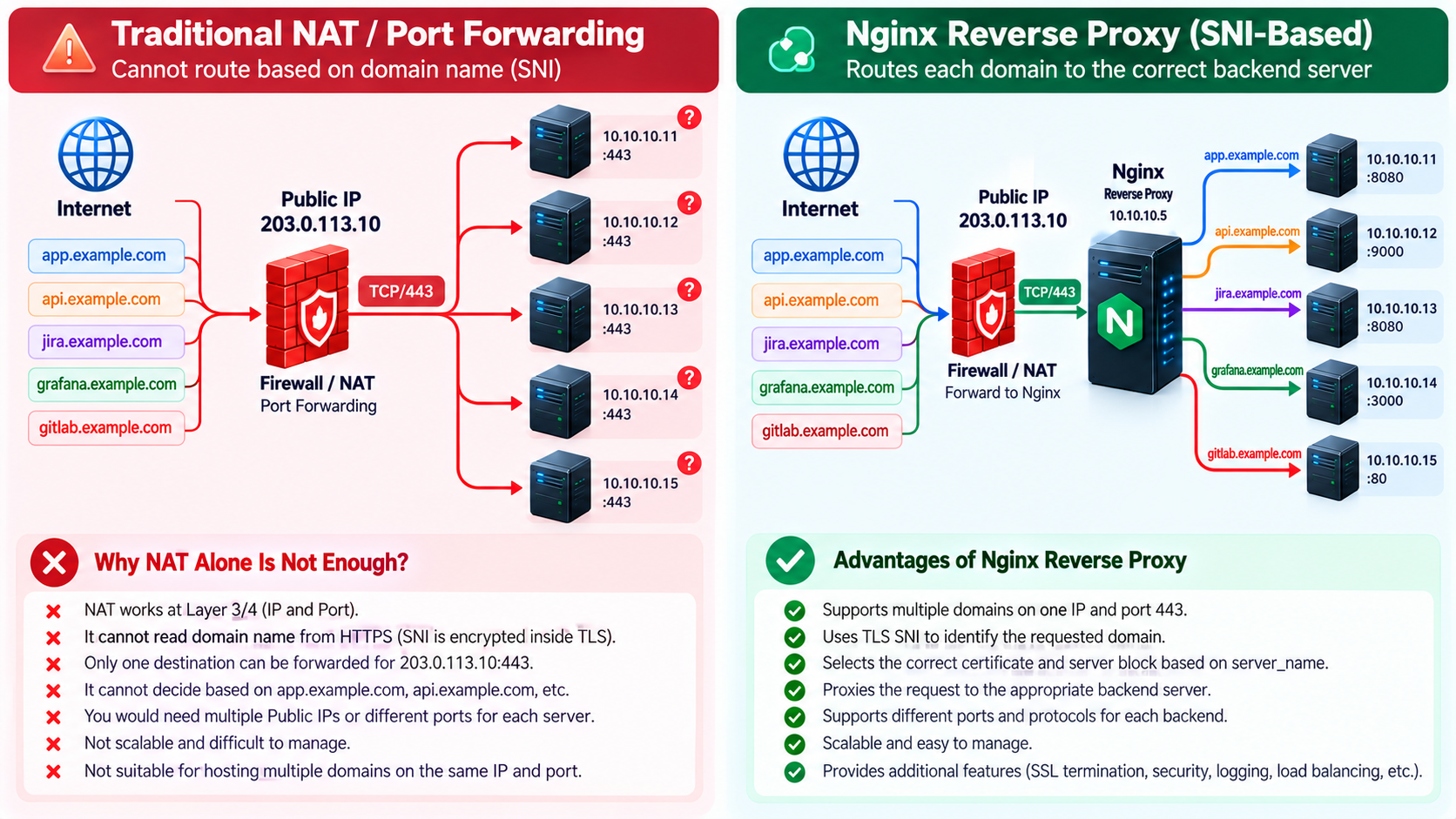
203.0.113.10:443
    cannot select by domain using ordinary dst-nat:
    app.example.com -> 10.10.10.11:443
    api.example.com -> 10.10.10.12:443
    jira.example.com -> 10.10.10.13:443

Internet
   |
   v
Firewall / NAT
   |
   | TCP 443
   v
Nginx
   |
   +--> Backend A
   +--> Backend B
   +--> Backend C
Ordinary NAT operates on Layer 3/4 addresses and ports. The packets for these services share one destination IP and TCP port; a standard dst-nat rule cannot use the URL hostname to choose different backends. Multiple competing DNAT rules do not create name-based HTTPS hosting. Translate TCP/443 to Nginx, then let its TLS/HTTP processing select the certificate and request server. A specialized SNI-aware TCP proxy is another product/design, not ordinary NAT.
21. Enterprise Architecture Example
Internet
   |
   v
Public IP: 198.51.100.20:443
   |
Nginx Reverse Proxy
   |
Private Server VLAN
   +-- gitlab.company.com  -> 172.16.20.10:80
   +-- grafana.company.com -> 172.16.20.20:3000
   +-- zabbix.company.com  -> 172.16.20.30:8080
   +-- jira.company.com    -> 172.16.20.40:8080
   +-- api.company.com     -> 172.16.20.50:9000
All five company A records point to 198.51.100.20. In this variant the public IP is on the reverse-proxy ingress only; backend servers live in a private VLAN with no public IP or independent Internet publishing rule. Give each name an exact server block, appropriate certificate and its stated upstream. Separate management access from public application access.
If the perimeter firewall owns the public IP instead, use this alternate ingress topology. The private proxy is 10.10.10.5. Backend addresses below intentionally use the separate 10.10.20.0/24 VLAN; they are a different firewall example, not changes to the main scenario.
Internet
   |
   v
Firewall
Public IP: 203.0.113.10
   |
   | DNAT TCP/443
   v
NGINX
10.10.10.5
   +--> 10.10.20.11:8080
   +--> 10.10.20.12:9000
   +--> 10.10.20.13:8080
Permit Internet-to-proxy TCP/443 in the firewall forward policy as well as DNAT. Add TCP/80 only for the chosen redirect/ACME workflow. Permit proxy 10.10.10.5 to exactly the backend ports above and established return traffic; deny other sources. Backend firewalls should accept the actual proxy source IP seen after routing/SNAT. Verify return routing and use split DNS or a deliberately configured hairpin path for internal clients.
22. Security Recommendations and Operational Limits
- Maintain a reviewed change plan, previous configuration, independent console access and a DNS TTL/cutover plan. Test each hostname and backend before and after cutover.
- Use supported OS/Nginx/OpenSSL versions and patch them. Do not assume a syntactically valid configuration proves compliance with your organization’s cipher policy.
- Use upstream TLS with peer and hostname verification where required. HTTPS on the client side does not encrypt the private HTTP hops shown here.
- Plan capacity for concurrent connections, long-lived WebSockets, upload temporary files, bandwidth and backend limits. One proxy and one backend per service are single points of failure.
- For high availability, two proxies can share one public virtual IP using an appropriate failover or load-balancing design. Synchronize configuration and certificates securely and test failover; a single public IP does not require a single physical proxy.
- GitLab web traffic and HTTPS Git can use this listener. Git over SSH, mail, arbitrary TCP services and GitLab registry/Pages hostnames need their own protocol, name, certificate and port planning.
Prerequisites
Configuration and Validation
23. Conclusion
DNS sends every name to one ingress. SNI chooses TLS identity during the handshake. HTTP name processing selects the request context, and proxy_pass forwards to the service backend. The production baseline includes an explicit default, name guards, renewable certificates, WebSocket headers, bounded uploads and per-host diagnostics. Release it only after validating all five routes, certificate trust, renewal and the firewall path.
Frequently Asked Questions
Does DNS select the backend?
No. DNS returns the ingress IP; Nginx selects the request server and its proxy_pass destination.
Are SNI and Host interchangeable?
No. SNI is TLS handshake input; Host is HTTP request input. They can differ, which this configuration rejects.
Is port 80 mandatory?
Not for HTTPS routing. It is required for HTTP-01 and optional for redirects; automated DNS-01 permits a 443-only ingress.
Can I issue certificates for these exact example addresses?
No. Replace documentation IPs and reserved example domains with your own real reachable infrastructure.
Does a 200 response prove the correct backend?
No. Verify service-specific content and the per-host log upstream address, as multiple services can return similar pages.
Does curl -k validate TLS trust?
No. It disables certificate verification. Repeat without -k and verify hostname and chain before release.
Will a renewal automatically update active Nginx workers?
Not with certonly alone. Use a deploy hook that tests and reloads Nginx, then monitor the certificate served externally.
Can ordinary NAT distinguish these domains?
No. Ordinary L3/L4 DNAT sees the shared destination IP and port. Forward to Nginx for TLS/HTTP name processing.
Official References
Syntax and behavior checked against official documentation on 7 October 2026. Distribution packages can differ from upstream releases; validate the target binary and ACME client before deployment. The Linux deployment commands are for the target host, not commands executed against this Windows website workspace.
Nginx SSL module and version requirements
Nginx core module and body-size limits
RFC 5737: documentation IPv4 ranges