Introduction: verified versions and deployment scope
Reviewed on 7 October 2026: Redis Open Source 8.10.2 is the latest stable release verified on the official release page, published on 17 September 2026. This guide uses the 8.10 command reference and the tagged 8.10.2 redis.conf. Always recheck the latest security patch and release notes before deployment; do not confuse Redis Open Source with Redis Software or Redis Cloud product versions.
Redis Open Source version lifecycle
The worked hosts use Ubuntu Server 24.04 LTS, which remains supported. Ubuntu 26.04 LTS is the latest LTS at review time. On a newer LTS verify repository support, codename, package candidate, service unit and paths before applying this runbook. A distribution package may be older than the current upstream stable release. All Linux commands target your Redis hosts; they have been checked against documentation, not executed on a live Redis production deployment in this Windows website workspace.
Prerequisites and deployment scenario
Application Servers: 10.10.30.21, 10.10.30.22
             |
             v
Redis Primary: 10.10.20.10:6379
             |
             | Asynchronous Replication
             v
Redis Replica: 10.10.20.11:6379

Optional Replica-02: 10.10.20.12:6379
Management jump host: 10.10.40.10
Prometheus host: 10.10.40.20
Prerequisites: static private addresses, reliable DNS/time sync, SSH or console access, a dedicated Redis service account, measured RAM/SSD capacity and an approved maintenance window. Both nodes should start with the same Redis patch version and compatible modules. Change the sample IPs to your network; the additional addresses above make firewall examples concrete.
1. What is Redis?
Redis is an in-memory data structure server commonly used as a key-value database and cache. Strings, hashes, lists, sets, sorted sets and streams support richer access patterns than a plain string cache. Persistence can retain data across restarts, but durability depends on the configured write and synchronization policy.
- Cache: store recomputable results with TTL to reduce database and API work.
- Session store: share login and application session state across application servers.
- Message broker and Pub/Sub: fast live fan-out; Pub/Sub is at-most-once and does not replay messages to disconnected subscribers.
- Queue: lists or Streams with consumer groups; design acknowledgment, retry, dead-letter handling and idempotency explicitly.
- Rate limiting: counters with bounded windows or scripts that atomically update counters and expiration.
- Distributed lock: an expiring key with a unique ownership token, verified release and fencing where required; a naive lock is not safe across asynchronous failover.
RAM access avoids many disk reads, compact data structures reduce overhead, and Redis processes common commands with an efficient event loop. Many simple operations are O(1). This does not mean every command is fast or that Redis has no I/O threads: large collections, expensive scripts, persistence, network round trips and memory pressure still influence latency. Relational databases also cache in RAM; Redis gains speed for a different workload and access model, not for every possible query.
2. Redis in enterprise architecture

User -> Load Balancer -> Application Servers
                              |          |
                              v          v
                         Redis Cache   Database
                              |
                              v
                         Redis Replica
Applications talk to both Redis and the durable database. In cache-aside, read Redis first; on a miss query the database and fill Redis with a TTL. Redis is not a mandatory network hop between the application and database. Plan cache invalidation after writes, TTL jitter, protection against cache stampedes and a bounded fallback when Redis is unavailable.
- Application, Laravel and API cache: separate prefixes and TTLs for each application; verify client username and TLS support.
- Authentication/session storage: use the primary when freshness is required; define the effect of session loss on login.
- Queues and microservices: use a separate non-evicting instance for durable jobs, explicit consumer retry policies and idempotent processing.
- Rate limits: use atomic operations and decide whether Redis failure should allow requests or reject them.
Logical databases and key prefixes help organize keys but do not isolate RAM, eviction, CPU or availability. A shared cache instance should not evict critical session, queue or lock keys. Scale the workload and choose a separate deployment where those requirements differ.
3. Install Redis on Ubuntu
Run these commands on both nodes. A simple distribution installation is shown first as an alternative, not as a promise to install the latest upstream Redis. For the stable version used by this guide choose the official Redis APT repository and inspect the candidate before accepting it.
Distribution repository alternative
sudo apt update
apt-cache policy redis-server
sudo apt install redis-server
redis-server --version
Official Redis APT repository
sudo apt-get update
sudo apt-get install -y lsb-release curl gpg ca-certificates openssl
curl -fsSL https://packages.redis.io/gpg | sudo gpg --dearmor -o /usr/share/keyrings/redis-archive-keyring.gpg
sudo chmod 644 /usr/share/keyrings/redis-archive-keyring.gpg
echo "deb [signed-by=/usr/share/keyrings/redis-archive-keyring.gpg] https://packages.redis.io/deb $(lsb_release -cs) main" | sudo tee /etc/apt/sources.list.d/redis.list
sudo apt-get update
apt-cache policy redis redis-server redis-tools
apt-cache madison redis-server
sudo apt-get install redis
sudo systemctl enable --now redis-server
redis-server --version
redis-cli --version
dpkg-query -W redis redis-server redis-tools
systemctl status redis-server --no-pager
Expected: v=8.10.2 in redis-server --version and active (running) for the service, when that patch is offered by the official repository. INFO server separately reports redis_version:8.10.2. Package strings include an epoch and distribution suffix; do not invent a universal 8.10.2 package string. If the candidate is older, stop and check repository support instead of labelling it current. The GPG command assumes the keyring does not exist; on reruns compare and replace the keyring deliberately. Use signed-by rather than deprecated apt-key.
Record the exact package versions from the first node and use the same approved versions on the replica. Test client/module compatibility in staging and roll out security patches through change management. Do not permanently hold packages without a patching process. Keep Redis bound to loopback until ACL and firewall deployment is complete.
4. Check the Redis service
systemctl status redis-server --no-pager
sudo systemctl show redis-server -p User -p Group -p Type -p ExecStart
sudo ss -lntp | grep ':6379'
redis-cli -h 127.0.0.1 -p 6379 ping
sudo journalctl -u redis-server -n 100 --no-pageractive (running)
LISTEN ... 127.0.0.1:6379 ... redis-server
PONGPONG without credentials is an initial local check only. After hardening it should return NOAUTH; use a named user with --askpass to obtain PONG. ss verifies the socket but not authentication or replication. Check that the actual listener never includes a public interface. ExecStart reveals command-line overrides and the configuration file really loaded by the service.
redis-cli -h 127.0.0.1 -p 6379 --user admin --askpass PING5. Configuration layout and backup
APT installations normally use /etc/redis/redis.conf. Verify this with systemctl cat and dpkg -L. Redis 8.10 uses redis.conf; the separate redis-full.conf used in older 8.x distributions is not the default model here. Preserve package module paths and service settings. Apply the operational baseline as a final include rather than replacing the entire package configuration.
systemctl cat redis-server
dpkg -L redis-server | grep -E 'redis.conf|systemd'
sudo cp -a /etc/redis/redis.conf "/etc/redis/redis.conf.backup.$(date -u +%Y%m%dT%H%M%SZ)"
sudo install -d -o redis -g redis -m 750 /var/lib/redis /var/log/redis
sudo install -o root -g redis -m 640 /dev/null /etc/redis/production.conf
sudoedit /etc/redis/production.conf
sudoedit /etc/redis/redis.conf
In redis.conf add the line below once, at the end. First create users.acl in section 8; remove any active inline user definitions and legacy requirepass setting to use one ACL source. Backup existing ACL/configuration files before changing an established deployment. These samples are for a new deployment; switching an existing RDB-only instance to AOF needs a live migration procedure.
include /etc/redis/production.conf6. Configure the Redis primary
Write this fragment to /etc/redis/production.conf on 10.10.20.10. The example assumes a dedicated 8 GiB host and an initial 4 GiB dataset limit; measure copy-on-write, modules and replication overhead before using that capacity in production. noeviction is the baseline for data that must not be silently removed; section 18 gives the separate cache profile.
# Final include for a NEW dedicated Redis deployment; preserve package redis.conf.
bind 127.0.0.1 10.10.20.10
protected-mode yes
port 6379
timeout 0
tcp-keepalive 300
daemonize no
supervised auto
loglevel notice
logfile /var/log/redis/redis-server.log
dir /var/lib/redis
aclfile /etc/redis/users.acl
save ""
save 900 1
save 300 10
save 60 10000
dbfilename dump.rdb
rdbcompression yes
rdbchecksum yes
stop-writes-on-bgsave-error yes
appendonly yes
appendfilename "appendonly.aof"
appenddirname "appendonlydir"
appendfsync everysec
aof-use-rdb-preamble yes
auto-aof-rewrite-percentage 100
auto-aof-rewrite-min-size 64mb
maxmemory 4gb
maxmemory-policy noeviction
replica-read-only yes
replica-serve-stale-data no
repl-backlog-size 64mb
slowlog-log-slower-than 10000
slowlog-max-len 128
latency-monitor-threshold 100| Directive | Purpose |
|---|---|
| bind | Listen only on loopback and the explicit private address. |
| protected-mode | Keep the misuse guard enabled; still enforce ACL and firewall. |
| port | TCP 6379 in this private-network baseline; TLS can replace it. |
| timeout | 0 preserves idle pools; choose finite client timeouts in the application. |
| tcp-keepalive | 300 seconds detects dead peers; align with network idle limits. |
| daemonize / supervised | Run in foreground; auto detects systemd notification environment. |
| loglevel / logfile | notice logs into a Redis-writable file; check package log rotation. |
| dir | Writable persistent data directory; monitor disk space and permissions. |
A Type=notify systemd unit may pass --supervised systemd itself; retain that package contract. supervised no fits some Type=simple units. Inspect the actual unit instead of forcing daemonize yes or changing its type. A logging profile with logfile "" uses stdout and usually the journal; select one supported log path and verify it.
7. Security hardening and network segmentation
Never publish Redis directly on the internet, even with a password. Place it in a private server VLAN/subnet; deny ingress at host firewall and upstream security groups. Allow only the application servers and replication peers to reach the data service. Management and monitoring require explicit narrowly scoped exceptions, preferably local agents or a controlled jump host. protected-mode is a safety guard, not a firewall or encryption layer.
Primary firewall example
sudo apt-get install ufw
sudo ufw default deny incoming
sudo ufw default allow outgoing
sudo ufw allow from 10.10.40.10 to any port 22 proto tcp
sudo ufw allow from 10.10.30.21 to 10.10.20.10 port 6379 proto tcp
sudo ufw allow from 10.10.30.22 to 10.10.20.10 port 6379 proto tcp
sudo ufw allow from 10.10.20.11 to 10.10.20.10 port 6379 proto tcp
sudo ufw enable
sudo ufw status numbered
Before ufw enable, add the rule for your real current SSH source and ensure independent console access. Review existing broad 6379 or subnet allow rules; adding a narrow rule does not remove them. Apply a separate policy on 10.10.20.11: allow SSH from the jump host, optional application reads, and future Redis peers if HA is configured. With normal outgoing allow, the replica initiates the connection to the primary; the primary does not initiate a new replication connection to the replica.
- Run as the packaged redis user, never root; restrict configuration and credential files to root/redis and keep service/data directories separate.
- Grant application commands and key/channel prefixes explicitly. Deny FLUSHALL, FLUSHDB, CONFIG, MODULE and administrative scripting unless the role truly needs them.
- Command renaming is deprecated for hardening; use ACL denial. Renaming replication/control commands can break Sentinel and operational tooling.
- Rotate secrets through a secret manager, separate application/admin/replication roles, restrict SSH and test denied requests.
TLS profile for sensitive networks
The baseline TCP connection is unencrypted, including AUTH. For sensitive data or untrusted transport, replace the plaintext listener with TLS on both nodes. Provision CA-signed certificates with correct DNS/IP SANs, Redis-readable private keys and client certificates for each authorized client and replica. The following is an alternative overlay, not an additional plaintext listener.
port 0
tls-port 6379
tls-cert-file /etc/redis/tls/redis.crt
tls-key-file /etc/redis/tls/redis.key
tls-ca-cert-file /etc/redis/tls/ca.crt
tls-auth-clients yes
tls-replication yesredis-cli --tls -h 10.10.20.10 -p 6379 --cacert /etc/redis/tls/ca.crt --cert /etc/redis/tls/client.crt --key /etc/redis/tls/client.key --user admin --askpass PINGtls-replication yes must be ready on every promotion candidate, including the current primary. Server identity and certificate chain must be verified by application clients; never make insecure certificate skipping the deployment default. TLS does not replace ACL or segmentation. Verify TLS support in the installed package and test certificate renewal and rotation.
8. Authentication using Redis ACL
Use named ACL users. requirepass remains supported as a compatibility setting for the default user; it is not the recommended multi-user design and is not claimed to be removed. This guide disables default, supplies a separate administrator, narrowly permits cache/session operations, and gives the replica only PING, REPLCONF and PSYNC. ACL is built in; “ACL enabled” means that effective users and permission rules have been deployed and verified.
On a new node, run the Bash script below BEFORE restarting with the include from section 6. Enter four independent strong secrets already stored in your secret manager; enter the same replication secret on both nodes. At least 32 random bytes encoded as hex is a practical choice. This script rejects weak or non-hex inputs, writes hashes rather than plaintext into users.acl and prints no secrets. It intentionally refuses to overwrite an existing ACL file.
#!/usr/bin/env bash
set -euo pipefail
umask 077
if sudo test -e /etc/redis/users.acl; then
  echo "Existing ACL file: back up and review it before editing." >&2
  exit 1
fi
acl_tmp=$(mktemp)
trap 'rm -f "$acl_tmp"; unset acl_secret' EXIT
printf 'user default off resetpass resetkeys resetchannels -@all\n' > "$acl_tmp"
for acl_user in admin app repl monitor; do
  read -r -s -p "${acl_user} secret (64+ hex characters): " acl_secret
  printf '\n'
  [[ "$acl_secret" =~ ^[a-fA-F0-9]{64,}$ ]] || { echo "Invalid secret" >&2; exit 1; }
  acl_hash=$(printf '%s' "$acl_secret" | sha256sum | cut -d ' ' -f1)
  case "$acl_user" in
    admin) acl_rules='~* resetchannels +@all' ;;
    app) acl_rules='~cache:* ~session:* resetchannels -@all +ping +hello +select +client|setname +client|setinfo +acl|whoami +get +set +mget +mset +del +unlink +exists +expire +pexpire +ttl +pttl +incr +incrby +decr +decrby' ;;
    repl) acl_rules='resetkeys resetchannels -@all +ping +replconf +psync' ;;
    monitor) acl_rules='resetkeys resetchannels -@all +ping +info +role +slowlog|get +latency|latest +acl|whoami' ;;
  esac
  printf 'user %s on #%s %s\n' "$acl_user" "$acl_hash" "$acl_rules" >> "$acl_tmp"
  unset acl_secret acl_hash
done
sudo install -o root -g redis -m 640 "$acl_tmp" /etc/redis/users.acl
echo "ACL file installed; secrets remain in your secret manager."
The administrator role is deliberately privileged and reserved for operations over a restricted management path. No application receives +@all. The app role above fits basic string cache/session operations, not every Laravel queue driver or Lua lock implementation: build separate worker roles from actual commands and key prefixes, using ACL DRYRUN and staging traffic. Do not grant broad channel access on Sentinel-managed nodes.
sudo systemctl restart redis-server
systemctl is-active redis-server
redis-cli --user admin --askpass PING
redis-cli --user admin --askpass ACL LIST
redis-cli --user admin --askpass ACL WHOAMI
redis-cli --user admin --askpass ACL DRYRUN app SET cache:probe ok
redis-cli --user admin --askpass ACL DRYRUN app FLUSHALL
redis-cli --user app --askpass ACL WHOAMI
redis-cli PINGactive
PONG
ACL LIST: user default off ...; named users with #<sha256> hashes
ACL WHOAMI (admin): admin
ACL DRYRUN app SET cache:probe ok: OK
ACL DRYRUN app FLUSHALL: permission denied (wording may vary)
ACL WHOAMI (app): app
Unauthenticated PING: NOAUTH Authentication required.ACL LIST returns rules and password hashes, so limit it to administrators and do not publish its output. WHOAMI shows the effective connection user. --askpass avoids putting passwords into command arguments and shell history. Runtime ACL SETUSER changes must be persisted separately: CONFIG REWRITE does not save an external ACL file. Here the file is managed by root; edit it securely and use authenticated ACL LOAD, or restart. ACL SAVE requires a Redis-writable ACL path and directory and should not be assumed to work with this root-owned deployment.
ACL rules, external files and replication permissions
9. Persistence: RDB and AOF
RDB: point-in-time snapshots
RDB stores a compact snapshot. It suits scheduled backups and fast loading, with possible loss of all changes since the last successful snapshot. save 900 1 means a snapshot condition of at least one change in 900 seconds; it is not an unconditional timer. BGSAVE forks a child, so reserve CPU, disk bandwidth and memory for copy-on-write. Avoid synchronous SAVE on a busy service.
redis-cli --user admin --askpass BGSAVE
redis-cli --user admin --askpass INFO persistence
redis-cli --user admin --askpass LASTSAVErdb_bgsave_in_progress:0
rdb_last_bgsave_status:ok
rdb_last_save_time:<unix_timestamp>These expected fields describe a completed save; immediately after BGSAVE the in-progress flag may be 1. Verify a newer successful save time, rather than copying an old dump.rdb immediately after the command.
BGSAVE background snapshot command
AOF: append-only persistence
AOF records write operations for recovery. appendfsync everysec is a common latency/durability compromise: a crash can normally lose roughly the latest second, and OS/storage stalls can widen the practical loss window. always requests fsync for every write batch at a latency cost; no leaves flush timing to the OS. Evaluate the storage guarantees rather than assuming any policy is zero-loss.
Current Redis uses a multipart AOF: a base file, incremental files and a manifest under appenddirname. With aof-use-rdb-preamble yes, the base can be RDB-encoded; this is not the same as a separately scheduled dump.rdb. BGREWRITEAOF compacts the history and also needs capacity. Copying only a legacy appendonly.aof filename is not a complete current AOF backup.
redis-cli --user admin --askpass INFO persistence
redis-cli --user admin --askpass BGREWRITEAOF
redis-cli --user admin --askpass INFO persistenceaof_enabled:1
aof_rewrite_in_progress:0
aof_last_bgrewrite_status:ok
aof_last_write_status:ok| Feature | RDB | AOF |
|---|---|---|
| Performance | Low steady write overhead; fork spikes | Depends on fsync and rewrite load |
| Recovery | Last successful snapshot | Replay base and incremental history |
| File size | Usually smaller/compact | Often larger; rewrite compacts it |
| Durability | Loss since latest snapshot | Better write durability, policy-dependent |
| Production usage | Yes, if snapshot RPO is acceptable | Yes, if write durability is needed |
Combine RDB + AOF when you want periodic portable snapshots plus better write recovery. With both enabled Redis normally loads AOF at startup because it is more complete. This does not remove backup/restore testing. For a recomputable cache, persistence can be intentionally disabled if restart warming and database load are acceptable; for sessions or jobs choose an explicit RPO/RTO.
Enable AOF safely on an existing RDB-only instance
Back up first. Enable AOF at runtime, wait for a successful initial rewrite and healthy AOF status, then persist appendonly yes in the managed configuration. Do not first restart an existing dataset with a newly enabled empty AOF directory: startup can select an empty AOF and lose the intended RDB recovery path. Treat disabling or switching persistence as a migration.
redis-cli --user admin --askpass CONFIG SET appendonly yes
redis-cli --user admin --askpass INFO persistence
Official RDB, multipart AOF, recovery and live AOF migration
10. Configure the Redis replica
On 10.10.20.11 install the same packages, deploy its own ACL users, protect its network path and apply the baseline below as the final include. Replication transfers datasets, not ACL/configuration files: provision those independently. Use the repl account on the primary and its matching secret in masterauth. All copies of production.conf containing masterauth must be root/redis readable only.
# Final include for a NEW dedicated Redis deployment; preserve package redis.conf.
bind 127.0.0.1 10.10.20.11
protected-mode yes
port 6379
timeout 0
tcp-keepalive 300
daemonize no
supervised auto
loglevel notice
logfile /var/log/redis/redis-server.log
dir /var/lib/redis
aclfile /etc/redis/users.acl
save ""
save 900 1
save 300 10
save 60 10000
dbfilename dump.rdb
rdbcompression yes
rdbchecksum yes
stop-writes-on-bgsave-error yes
appendonly yes
appendfilename "appendonly.aof"
appenddirname "appendonlydir"
appendfsync everysec
aof-use-rdb-preamble yes
auto-aof-rewrite-percentage 100
auto-aof-rewrite-min-size 64mb
maxmemory 4gb
maxmemory-policy noeviction
replica-read-only yes
replica-serve-stale-data no
repl-backlog-size 64mb
slowlog-log-slower-than 10000
slowlog-max-len 128
latency-monitor-threshold 100
replicaof 10.10.20.10 6379
masteruser repl
masterauth "REPLACE_WITH_REPLICATION_SECRET"
replica-priority 100
REPLACE_WITH_REPLICATION_SECRET is a mandatory secret-manager substitution, not a working example password. The ACL file stores a hash, while masterauth needs the actual secret to send AUTH to the primary. Remove the marker before starting; never put real secrets into public article downloads. This is the persistent configuration. On a new replica initial full synchronization replaces its previous dataset, so do not point a node with valuable independent data at a primary without a backup and migration plan.
sudo chown root:redis /etc/redis/production.conf /etc/redis/users.acl
sudo chmod 640 /etc/redis/production.conf /etc/redis/users.acl
sudo systemctl restart redis-server
redis-cli --user admin --askpass INFO replication
sudo journalctl -u redis-server -n 100 --no-pager
For a runtime topology change, with authentication already configured, the current command is REPLICAOF. It does not automatically persist the change. Manage the file explicitly; CONFIG REWRITE requires write access and a policy for included files. Do not use the deprecated SLAVEOF command in operator runbooks.
redis-cli --user admin --askpass REPLICAOF 10.10.20.10 6379Partial synchronization can catch up from the primary backlog after a short outage; a longer outage or missing history triggers a full sync. Size repl-backlog-size from measured replication bytes/sec multiplied by the tolerated disconnect period, with headroom. The 64 MiB example is only a starting point. Full synchronization and persistence both consume memory and I/O.
11. Verify replication status
On the replica
redis-cli -h 127.0.0.1 --user monitor --askpass INFO replicationrole:slave
master_host:10.10.20.10
master_port:6379
master_link_status:up
master_last_io_seconds_ago:0
master_sync_in_progress:0
slave_read_only:1Redis 8.10 retains legacy names such as role:slave and slave0 in INFO for compatibility; these output fields are not a recommendation to use deprecated configuration syntax. master_last_io_seconds_ago varies with heartbeat timing. Require an up link, completed sync and stable catch-up. An up link alone does not prove every write is current.
On the primary
redis-cli -h 127.0.0.1 --user monitor --askpass INFO replicationrole:master
connected_slaves:1
slave0:ip=10.10.20.11,port=6379,state=online,offset=<bytes>,lag=<seconds>
master_repl_offset:<bytes>
repl_backlog_active:1Expect connected_slaves:1 for the two-node scenario, or 2 when Replica-02 is added. lag is the age of acknowledgments, not a precise measurement of application read freshness. Compare the primary offset with each replica offset over time; growing byte differences indicate catch-up pressure. Fields and ordering can vary, so monitoring should parse names, not line positions.
12. Practical replication test
Use an administrator for the requested company key because the app role can access only cache:* and session:*. Open an authenticated interactive connection on the primary; SET and WAIT must run on that SAME connection. WAIT checks acknowledgments for preceding writes from that client, not unrelated CLI connections.
redis-cli -h 127.0.0.1 -p 6379 --user admin --askpassSET company "MEET AJ"
WAIT 1 5000OK
(integer) 1Then on the replica open an administrator connection locally and read the replicated key. If WAIT returned 0, investigate before treating the test as passed; a timeout does not roll back the SET.
redis-cli -h 127.0.0.1 -p 6379 --user admin --askpassGET company"MEET AJ"Verify read-only behavior on the replica with a harmless probe; the expected result is READONLY. Clean up the company test on the primary after checking it. In a production application test use a dedicated expiring key under an allowed prefix, not an unbounded permanent probe.
SET cache:replica-write-probe "blocked" EX 60READONLY You can't write against a read only replica.redis-cli --user admin --askpass DEL company13. Read from replicas
Replicas copy the primary dataset and are read-only by default. Applications can explicitly route suitable reads to them for scaling; Redis does not automatically split application reads between standalone replicas. Standalone replicas accept reads without the Cluster-specific READONLY command. Use a client/router that knows the topology and sends every write to the current primary.
Replication is asynchronous: a replica can return old data, including immediately after a successful SET on the primary. Read sessions, authorization state, locks and rate-limit decisions from the primary unless your consistency design explicitly permits stale data. WAIT improves acknowledgment confidence but does not make arbitrary replica reads linearizable or enforce durable disk flushes.
This baseline sets replica-serve-stale-data no so data reads fail while the primary link is down or synchronization is incomplete; it does not eliminate lag on an up link. The default yes serves possibly stale data during outages. Choose availability versus freshness explicitly and alert on disconnected or lagging replicas. Adding replicas increases primary network and replication overhead; it does not shard memory or scale primary writes.
14. Redis replication architecture

Applications
                      |
                      v
                 Redis Primary
              10.10.20.10:6379
                      |
           +----------+----------+
           |                     |
           v                     v
       Replica-01             Replica-02
   10.10.20.11:6379       10.10.20.12:6379
For Replica-02 repeat the replica procedure using its own bind address 10.10.20.12, add an explicit allow rule on the primary and keep replicaof pointed at 10.10.20.10. Distribute credentials independently and verify both connections. This architecture holds a full dataset copy on every Redis node; it is not a three-way partition of the dataset.
15. Replication alone is not high availability
If the primary fails, a standalone replica does not automatically become the new primary and the application endpoint does not automatically move. Manual promotion without fencing the old primary risks two writable primaries during a partition. Automatic process restart is also not failover. Never let a persistence-disabled primary restart empty and re-synchronize surviving replicas from an empty dataset.
An acknowledged primary write may not have reached the replica chosen for failover. WAIT can reduce that window; WAITAOF can wait for AOF fsync acknowledgments on selected participants when supported and configured. Neither substitutes for a backup or turns this asynchronous architecture into a universally lossless consensus system. Select RPO/RTO from business requirements and test crash, host failure and network partition recovery.
16. Redis Sentinel high availability
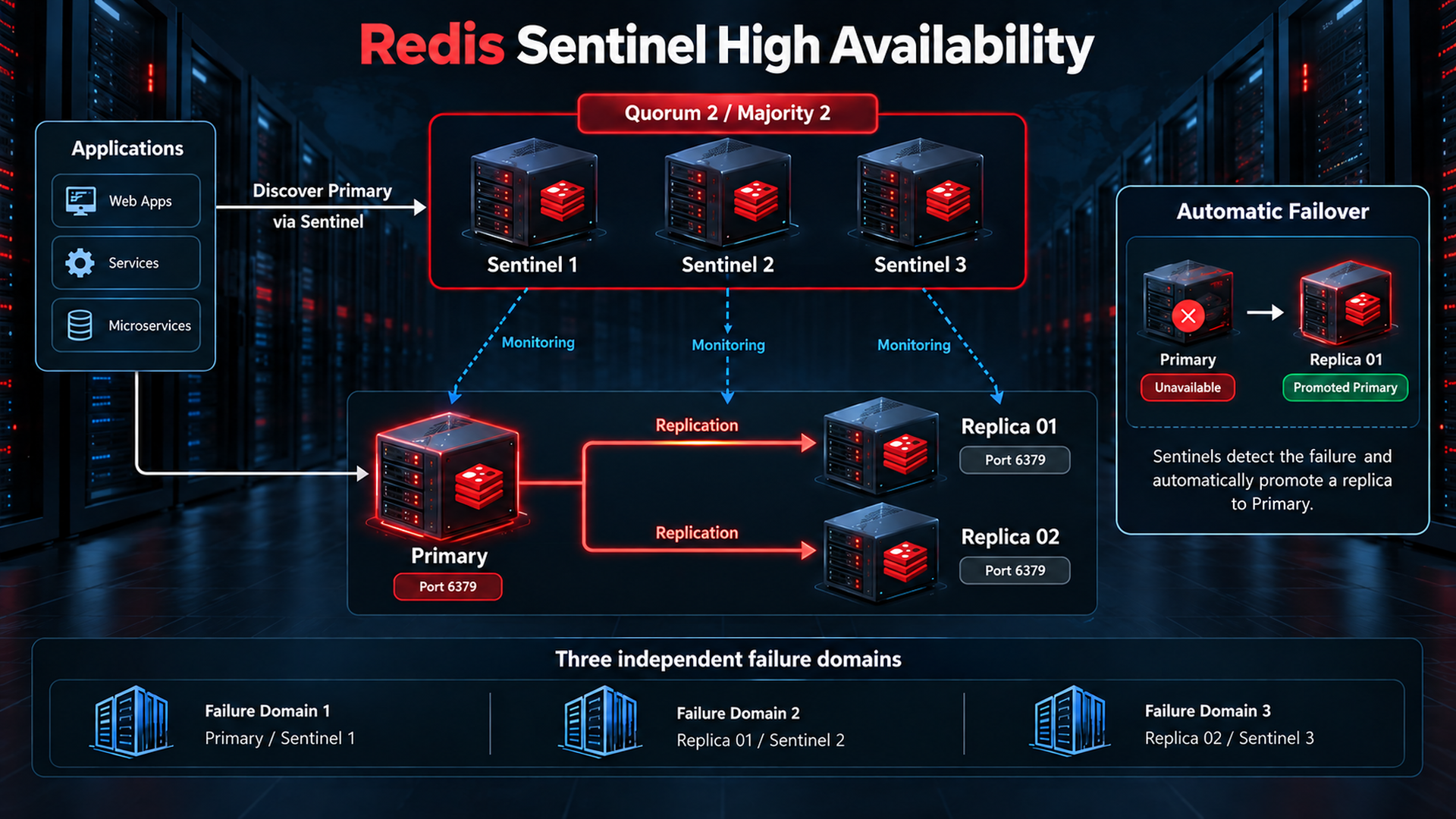
Application -- discovery --> Sentinel 1 / Sentinel 2 / Sentinel 3
     |
     +---- data connection --> Current Primary
                                  |
                              +---+---+
                              |       |
Replica 1 Replica 2- Monitoring: check Redis instance health and topology.
- Failure detection: separate subjective down observations from quorum-backed objective down.
- Automatic failover: coordinate promotion of a suitable replica and reconfigure the other nodes.
- Primary discovery: tell a Sentinel-aware client the current primary address.
Use at least three Sentinels in independent failure domains. A practical production topology is one primary, two replicas and three Sentinels; Sentinels can share the Redis hosts if those hosts occupy independent failure domains. For three Sentinels, quorum 2 detects objective failure; a majority of the total Sentinel set is also needed to authorize a failover. Quorum and election majority are different conditions. Running three processes on one host does not satisfy host-failure resilience.
Sentinel is a control plane, not a data proxy. Application traffic connects directly to the discovered primary. Use a Sentinel-aware client, multiple discovery endpoints, bounded retries and separate Sentinel/data-plane credentials. Every potential primary must have the application, replication and Sentinel users, matching replication credentials, persistence and memory settings. Ensure masteruser/masterauth also exist on the original primary before HA cutover so it can later become a replica.
Sentinel configuration example and security prerequisites
# Template fragment: merge into each node-specific Sentinel configuration.
# Replace the auth-pass marker using your secret manager.
port 26379
sentinel monitor redis-prod 10.10.20.10 6379 2
sentinel auth-user redis-prod sentinel-control
sentinel auth-pass redis-prod "REPLACE_WITH_SENTINEL_CONTROL_SECRET"
sentinel down-after-milliseconds redis-prod 5000
sentinel failover-timeout redis-prod 60000
sentinel parallel-syncs redis-prod 1
The fragment is not a complete hardened Sentinel deployment. Set a node-specific private bind and firewall on TCP/26379; secure the Sentinel endpoints and peer authentication with ACL as documented, provision sentinel-control on every Redis node, and use a Redis-writable Sentinel configuration directory because Sentinel rewrites topology. Permit Sentinel control traffic to all promotion candidates and peer communication among the three Sentinels. The 5-second failure threshold is an example: tune it for real network/CPU pauses and test false-positive failovers.
Grant sentinel-control only the documented control operations and channel &__sentinel__:hello. The official Sentinel ACL currently includes +slaveof for its internal compatibility command and may need +replicaof for tooling; this is an explicit compatibility exception, not operator use of deprecated SLAVEOF. Application users must not publish to the reserved __sentinel__: channels. Keep Sentinel topology changes compatible with your configuration manager; a static file deploy must not restore the old primary after failover.
# After provisioning a Sentinel observer user with these subcommands:
redis-cli -h 127.0.0.1 -p 26379 --user sentinel-observer --askpass SENTINEL CKQUORUM redis-prod
redis-cli -h 127.0.0.1 -p 26379 --user sentinel-observer --askpass SENTINEL GET-MASTER-ADDR-BY-NAME redis-prod
redis-cli -h 127.0.0.1 -p 26379 --user sentinel-observer --askpass SENTINEL REPLICAS redis-prod
Acceptance: CKQUORUM confirms enough Sentinels and a majority; discovery returns the current host and port. In staging, stop the primary under a reviewed failure test, verify replica promotion, application reconnection, surviving replication and the old primary returning as a replica. Test a network partition and measure lost writes and recovery time. Restrict writes with min-replicas-to-write/min-replicas-max-lag if the availability tradeoff is acceptable; those limits reduce risk but do not create strong consistency.
Official Sentinel deployment, quorum, ACL and failover requirements
17. Replication vs Sentinel vs Redis Cluster
| Architecture | Replication | Automatic failover | Sharding |
|---|---|---|---|
| Replication | Yes | No | No |
| Sentinel | Yes | Yes | No |
| Redis Cluster | Yes, with replicas | Yes, with eligible replicas and quorum | Yes |
Replication copies data. Sentinel adds monitoring/discovery/failover around a non-sharded primary-replica group. Redis Cluster distributes keys over 16,384 hash slots and uses its own failover protocol; it does not require Sentinel for Cluster failover. A common production starting topology is three primaries and one replica per primary, six nodes, placed so a primary and its replica do not share a failure domain.
Cluster needs a Cluster-aware client and changes multi-key operations: related keys often need hash tags to share a slot. It supports database 0 only. Plan migration, resharding and access to both client and cluster-bus ports. The default bus port is the data port + 10000, so 6379 normally implies 16379. ACL on the client port does not authenticate the bus. Redis 8.10.2 specifically documents tls-cluster and cluster-bus-port-protected-mode; secure and segment that bus, and test certificates and client redirection.
18. Memory management and eviction policy
maxmemory limits memory considered by eviction, not the entire process RSS or a hard host RAM cap. Replication/AOF buffers, allocator fragmentation, modules, OS needs and copy-on-write during fork require additional headroom. An 8 GiB host with maxmemory 4gb is an initial example, not a universal 50% sizing rule. Measure peak RSS and copy-on-write under a realistic rewrite/full-sync load, and alert before swap or the OOM killer becomes the limiting mechanism.
| Policy | Behavior and use |
|---|---|
| noeviction | Reject memory-growing writes at the limit; preserves keys for sessions/jobs but requires handling OOM errors. |
| allkeys-lru | Evict approximately least recently used keys from all keys; a good general cache starting point. |
| allkeys-lfu | Evict approximately least frequently used keys; test for a stable hot working set. |
| volatile-lru | Apply LRU only to keys with TTL; without eligible keys behaves like noeviction. |
| volatile-ttl | Evict eligible TTL keys with shortest remaining time; useful when TTL encodes value. |
Practical cache-only profile
maxmemory 4gb
maxmemory-policy allkeys-lru
For a cache-only instance start with allkeys-lru, explicit TTLs and protection against stampedes; compare hit rate, evictions and database fallback load before trying LFU. TTL controls freshness while eviction controls capacity. Do not share this profile with job/lock/session keys that must survive memory pressure. Changing the policy requires no application data reset but can immediately affect which keys are evicted.
Replicas normally ignore maxmemory while replicating and apply primary-driven evictions; capacity must fit the full replicated dataset and its buffers. Keep an appropriate maxmemory/policy on replicas for possible promotion. Setting replica-ignore-maxmemory no changes that behavior and is not a general fix for undersized replicas.
Current eviction policies and memory accounting
Linux memory and service prerequisites
sysctl vm.overcommit_memory net.core.somaxconn
systemctl show redis-server -p LimitNOFILE
cat /sys/kernel/mm/transparent_hugepage/enabled
# On a dedicated Redis host, persist the official overcommit recommendation:
printf 'vm.overcommit_memory = 1
' | sudo tee /etc/sysctl.d/99-redis.conf
sudo sysctl -p /etc/sysctl.d/99-redis.conf
Redis recommends vm.overcommit_memory=1 to reduce fork failures; it changes the host policy, so coordinate it on shared hosts. Redis 8.10.2 defaults disable-thp yes to disable problematic THP use for the Redis process when needed; verify the running configuration and latency instead of blindly copying a legacy global THP script. Inspect service file limits and listen backlog against the measured client load. Provision swap according to your host policy as a capacity emergency mechanism, but treat actual Redis swapping as an urgent latency incident, not normal operating headroom.
19. Monitoring and operational metrics
redis-cli --user monitor --askpass INFO
redis-cli --user monitor --askpass INFO memory
redis-cli --user monitor --askpass INFO stats
redis-cli --user monitor --askpass INFO clients
redis-cli --user monitor --askpass INFO replication
redis-cli --user monitor --askpass INFO persistence
redis-cli --user monitor --askpass SLOWLOG GET 10
redis-cli --user monitor --askpass LATENCY LATEST| Metric | Fields or measurement | Operational interpretation |
|---|---|---|
| Memory | used_memory, used_memory_rss, maxmemory, mem_not_counted_for_evict | Compare dataset, actual RSS and excluded buffers. |
| Clients | connected_clients, blocked_clients, rejected_connections | Unexpected growth suggests pool leaks or limits. |
| Cache hit / miss | keyspace_hits, keyspace_misses | Use interval deltas/rates, not only lifetime ratios. |
| Evictions / expiration | evicted_keys, expired_keys | Distinguish capacity removal from intended TTL expiry. |
| Commands/sec | instantaneous_ops_per_sec, total_commands_processed | Correlate load changes with latency and CPU. |
| Replication | master_link_status, connected_slaves, offsets, lag | Check link state, replica count and growing offset gaps. |
| Persistence | rdb_last_bgsave_status, aof_last_write_status, aof_last_bgrewrite_status | Any failure needs disk/permission/memory investigation. |
| CPU / host pressure | INFO cpu; host CPU, swap, disk latency | Use OS monitoring alongside Redis statistics. |
| Network | total_net_input_bytes, total_net_output_bytes | Use rates and compare replication throughput. |
| Latency | SLOWLOG, LATENCY LATEST, application p95/p99 | Measure client round trips and command execution separately. |
Hit Rate  = delta(keyspace_hits) / (delta(keyspace_hits) + delta(keyspace_misses)) * 100
Miss Rate = 100 - Hit Rate
# If no lookups occurred, the ratio is undefined: report no traffic.
# Counter deltas must account for process restarts and counter resets.
SLOWLOG records command execution time in microseconds and excludes client/network I/O; an empty log does not prove good user latency. This baseline logs executions slower than 10,000 microseconds and keeps 128 entries. latency-monitor-threshold 100 tracks latency events above 100 milliseconds. Slow log arguments can contain sensitive data: restrict access and retention. Avoid routinely running MONITOR or KEYS on busy production instances.
20. Prometheus, Grafana and alerting

The image shows illustrative dashboard values, not measurements from this deployment. A local Redis Exporter reads each node, Prometheus scrapes its private /metrics endpoint, Grafana queries Prometheus, and alert rules send notifications through Alertmanager. The arrows illustrate metric flow; Prometheus pulls metrics rather than receiving an unsolicited push. Redis Exporter is a third-party component; verify compatibility and pin its tested release independently of Redis.
Use a dedicated exporter ACL account matched to the selected exporter version and enabled collectors; the diagnostic monitor user above is intentionally too narrow for every exporter collector. Avoid granting key scans, GET or EVAL when not needed. Inspect the upstream ACL example, remove unnecessary collectors/permissions, check ACL LOG and scrape errors in staging, and verify redis_up = 1. Store credentials in an owner-readable file or secret mount; never embed them in public Prometheus YAML or process arguments.
Prometheus scrape configuration
# Merge with the existing Prometheus configuration.
scrape_configs:
  - job_name: redis
    scrape_interval: 15s
    scrape_timeout: 10s
    static_configs:
      - targets: ['10.10.20.10:9121']
        labels:
          redis_group: redis-prod
          node: redis-01
      - targets: ['10.10.20.11:9121']
        labels:
          redis_group: redis-prod
          node: redis-02
Run one exporter per node, bound to its private interface or through an authenticated collector. Permit TCP/9121 only from Prometheus 10.10.40.20; do not expose arbitrary /scrape targets or metrics to the internet. In sensitive networks use authenticated HTTPS for scraping too. Label physical nodes, not permanent primary/replica roles, because roles change during failover. Validate the merged configuration with promtool check config before reloading.
# Run on each Redis node, with its own destination IP:
sudo ufw allow from 10.10.40.20 to 10.10.20.10 port 9121 proto tcp
# Run on the Prometheus host:
promtool check config /etc/prometheus/prometheus.yml
curl -fsS http://10.10.20.10:9121/metrics | grep '^redis_up'
curl -fsS http://10.10.20.11:9121/metrics | grep '^redis_up'
Dashboard metrics and example PromQL
- Availability: redis_up and Prometheus up; exporter process up does not prove Redis is reachable.
- Memory/client/load: redis_memory_used_bytes, redis_memory_max_bytes, redis_connected_clients, redis_commands_processed_total.
- Cache: redis_keyspace_hits_total, redis_keyspace_misses_total and redis_evicted_keys_total.
- Replication/persistence: current role, connected replica count, link state, offset gap, snapshot age and last persistence error.
- Host and application: CPU, network rates, disk latency/free space, swap, p95/p99 application latency and timeout rate.
# Commands per second (per scraped instance)
rate(redis_commands_processed_total{job="redis"}[5m])

# Cache hit percentage; no lookups produce no meaningful ratio
100 * rate(redis_keyspace_hits_total{job="redis"}[5m]) /
(rate(redis_keyspace_hits_total{job="redis"}[5m]) + rate(redis_keyspace_misses_total{job="redis"}[5m]))

# Evictions per second
rate(redis_evicted_keys_total{job="redis"}[5m])

# Redis connectivity alert condition
redis_up{job="redis"} == 0
Confirm the metric names, units and labels at /metrics for the pinned exporter. Alert on Redis unreachable, missing scrape targets, disconnected replicas, increasing offset gaps, low quorum, persistence errors, stale backups and sustained memory/latency pressure. Start with a 2-minute connectivity alert and memory warning around 80% as examples, then tune against actual SLOs; critical persistence failures need immediate investigation. Route and test notifications with an owner and response runbook, not just a dashboard.
21. Backup and restore
Replication is not backup. Accidental deletion, an application bug and malicious writes can propagate to every replica. Keep dated recoverable backups outside the Redis failure domain, encrypted with restricted access and retention suitable for your RPO. A backup replica can reduce primary load, but must have a current completed sync before snapshotting.
Redis Primary -> Redis Replica -> Completed RDB / Consistent AOF Backup
                                         |
                                         v
                         Encrypted Remote Backup Storage
                                         |
                                         v
                            Isolated Restore Test
Example: export a fresh RDB from the replica
On the replica, ensure the link is up and full sync is finished. The admin-authenticated redis-cli --rdb command receives an RDB through the replication protocol and exits after transfer; account for its snapshot/full-sync load. Create a root-only local backup directory and run from an operator shell with restrictive umask. Under TLS add the certificate flags shown earlier.
redis-cli --user monitor --askpass INFO replication
sudo install -d -o root -g root -m 700 /var/backups/redis
umask 077
backup_stamp=$(date -u +%Y%m%dT%H%M%SZ)
backup_file="/var/backups/redis/replica-${backup_stamp}.rdb"
sudo install -o root -g root -m 600 /dev/null "$backup_file"
sudo redis-cli -h 127.0.0.1 -p 6379 --user admin --askpass --rdb "$backup_file"
sudo chmod 600 "$backup_file"
sudo redis-check-rdb "$backup_file"
sudo sha256sum "$backup_file"
Expected: a completed transfer and a successful redis-check-rdb validation; the checksum detects later corruption but does not prove recovery completeness. Copy the artifact to your approved encrypted remote backup system and verify the uploaded checksum. This local example alone is not an off-host backup. Automate with a secret mount/service identity rather than interactive --askpass and retain backup logs without credentials.
Consistent AOF backups and restore acceptance
A current AOF backup must contain the manifest plus every referenced base/incremental file. A naive live copy can miss files during rewrite or capture inconsistent state. Use a coordinated backup procedure that prevents rewrite/file-set changes, or an atomic filesystem/storage snapshot with the documented Redis consistency procedure. A cleanly stopped dedicated backup replica can also provide a consistent file set; plan its resync and production availability impact.
- Restore to a fresh isolated host with the same approved Redis/module versions; verify backup checksum and configuration compatibility.
- For an RDB-only restore, load the restored dump.rdb with appendonly no initially; a pre-existing AOF must not override it. Enable AOF later using the live procedure in section 9.
- For AOF restore, restore the complete manifest/file set under appenddirname and correct ownership; validate with the version-matched redis-check-aof tooling.
- Keep applications disconnected until key samples, TTLs, counts, loading logs and business invariants pass. Never run repair --fix on the only backup copy.
- Measure actual restore time, potential data loss, remote backup age and encryption-key availability. Preserve a verified pre-change backup for rollback.
22. Production troubleshooting runbook
Run host commands locally on the affected node; data commands use the named user shown. With TLS add the verified CA/client flags to every redis-cli command. Preserve logs and current configuration before applying a repair. The outputs below are representative success/failure indicators, not guaranteed verbatim across packaging variations.
Redis service down
Root cause: invalid directive or ACL file, unreadable files, a missing bind address, a port conflict, disk errors or the OOM killer. Diagnostic commands:
systemctl status redis-server --no-pager
sudo journalctl -u redis-server -n 150 --no-pager
sudo tail -n 100 /var/log/redis/redis-server.log
sudo journalctl -k -n 150 --no-pager
sudo -u redis test -r /etc/redis/users.acl
df -h /var/lib/redis
ip -br address
Expected: a failing service shows failed/inactive and a specific log cause; after repair expect active (running), PONG and healthy persistence/replication. Resolution: correct the offending directive or ACL, restore intended ownership or the missing private IP, resolve the conflict or capacity issue, then restart in the maintenance plan. Do not repeatedly restart without reading the Redis log or run it as root to bypass permissions.
Port 6379 not listening or remote connection refused
sudo ss -lntp | grep ':6379'
systemctl cat redis-server
ip -br address
sudo ufw status numbered
# From an authorized application host:
redis-cli -h 10.10.20.10 -p 6379 --user app --askpass PING
Root cause: service down, bind only to loopback, wrong config/port, missing IP, routing/ACL firewall block, or plaintext client against a TLS-only listener. Expected: LISTEN on 127.0.0.1 and 10.10.20.10 for the primary, and PONG from the permitted client. A timeout often indicates dropped traffic; refusal often means no listener or active reject. Resolution: compare ExecStart with edited paths, correct private binding, approve the exact source rule and test the proper TLS mode; never “fix” it with bind 0.0.0.0 plus a public allow rule.
Authentication or ACL errors
NOAUTH Authentication required.
WRONGPASS invalid username-password pair or user is disabled.
NOPERM ...redis-cli --user admin --askpass ACL WHOAMI
redis-cli --user admin --askpass ACL GETUSER app
redis-cli --user admin --askpass ACL LOG 10
redis-cli --user admin --askpass ACL DRYRUN app GET cache:probeRoot cause: absent AUTH, wrong username/rotated secret, disabled user, denied command/key/channel or an unsaved ACL change. Expected: WHOAMI identifies admin, allowed DRYRUN returns OK, rejected activity is visible in ACL LOG. Resolution: update the client username/secret, compare effective ACL with the managed file and grant only the missing required operation. NOAUTH, WRONGPASS and NOPERM are different faults; do not set default on nopass to silence them.
Replica disconnected or synchronization stuck
redis-cli --user monitor --askpass INFO replication
sudo journalctl -u redis-server -n 150 --no-pager
sudo tail -n 100 /var/log/redis/redis-server.log
redis-cli --user admin --askpass CONFIG GET replicaof masteruser
df -h /var/lib/redis
Root cause: routing/firewall, wrong masterauth/masteruser, missing PSYNC/REPLCONF permissions, TLS/CA mismatch, insufficient backlog, RAM or disk. Expected: master_link_status:up, master_sync_in_progress:0 and low/stable master_last_io_seconds_ago after completion; the primary should show the replica online. Resolution: read both sides’ logs, fix the specific credential/network/certificate/space fault, then wait for complete sync and compare offsets. Repeated full sync suggests insufficient backlog or ongoing outages. replica-serve-stale-data no can produce MASTERDOWN until the link recovers; do not force writes on the replica.
Memory full or OOM errors
redis-cli --user monitor --askpass INFO memory
redis-cli --user monitor --askpass INFO stats
redis-cli --user admin --askpass CONFIG GET maxmemory maxmemory-policy
free -h
sudo journalctl -k -n 100 --no-pager
Root cause: dataset growth, missing TTLs, noeviction rejecting growing writes, volatile policy with no TTL candidates, fragmentation/fork headroom or an undersized replica. Expected failure: OOM command not allowed when used memory > maxmemory, or kernel OOM evidence; after repair expect stable headroom and successful required writes. Resolution: identify growth with bounded key sampling, remove only approved obsolete keys using UNLINK, add TTLs, tune a cache-only policy or add measured capacity. Never FLUSHALL as routine capacity treatment or raise maxmemory beyond host safety.
Slow Redis or timeouts
redis-cli --user monitor --askpass SLOWLOG GET 20
redis-cli --user monitor --askpass LATENCY LATEST
redis-cli --user monitor --askpass INFO commandstats
redis-cli --user monitor --askpass INFO clients
redis-cli --user monitor --askpass INFO persistence
# From an authorized client; stop with Ctrl+C after a short sample:
redis-cli -h 10.10.20.10 --user app --askpass --latency
Root cause: large/expensive commands or scripts, hot keys, CPU saturation, swapping, fork/rewrite stalls, slow storage, network delay or connection churn. Expected: SLOWLOG may reveal high command execution microseconds, latency events reveal server pauses, while --latency samples PING round trips. An empty SLOWLOG with slow PING points toward transport/host/client causes too. Resolution: use bounded operations/SCAN instead of KEYS, smaller values, connection pools and batching/pipelining with bounded batch size; fix memory/disk/network pressure and compare p95/p99 before/after.
Persistence failure or MISCONF
redis-cli --user monitor --askpass INFO persistence
df -h /var/lib/redis
df -i /var/lib/redis
sudo -u redis test -w /var/lib/redis
sudo tail -n 100 /var/log/redis/redis-server.log
Root cause: full disk/inodes, read-only mount, permissions, I/O error or failed fork. Expected failure: rdb_last_bgsave_status:err or aof_last_write_status:err; success returns ok and a newer save time. Resolution: fix storage/permissions and confirm a completed snapshot/rewrite. Do not simply disable stop-writes-on-bgsave-error or repair the only AOF copy; preserve artifacts and verify restoration first.
23. Production acceptance checklist
- [ ] Redis is on a private segmented network.
- [ ] TCP/6379 is closed to the internet and unauthorized subnets.
- [ ] Named ACL users are deployed; default is disabled and denied operations are tested.
- [ ] Strong authentication, secret storage and rotation are configured.
- [ ] TLS and certificate verification are tested wherever policy requires encryption.
- [ ] RDB/AOF policies and persistence error handling match the required RPO.
- [ ] maxmemory, fork/buffer headroom and replica capacity are measured.
- [ ] Eviction policy is explicit; critical jobs/sessions are isolated from evicting cache.
- [ ] Replica is active and initial synchronization is complete.
- [ ] Replication status, offsets and a write/read test pass.
- [ ] Dated remote backup exists and an isolated restore has passed.
- [ ] Monitoring covers both Redis nodes and the hosts.
- [ ] Alerts reach an owner and have a tested operational runbook.
- [ ] Firewall rules and service-account file permissions are verified.
- [ ] Configuration and ACL backups are secured before changes.
- [ ] Latest stable patch, Ubuntu LTS compatibility and client/module support are rechecked.
- [ ] HA needs are satisfied by tested Sentinel/Cluster; replication alone is not labelled HA.
- [ ] Maintenance, failover, rollback and recovery procedures are recorded.
Conclusion: release acceptance
Release acceptance is evidence-based: record the installed version, approved listeners, authenticated and denied access, completed sync, persistence health, a verified remote backup and recovery time. A syntax-correct configuration without these checks is not enough to declare a production deployment complete.
The deployment starts with a private primary and replica, named ACL accounts, verified persistence and bounded memory. Sentinel adds discovery and automatic failover; Cluster adds sharding. Keep cache eviction separate from critical sessions/jobs, treat replication as asynchronous, and prove recovery from independent backups. Recheck the current stable Redis patch and supported Ubuntu LTS on every rollout.
Frequently asked questions
Does apt install redis-server install the newest Redis?
Not necessarily. The distribution repository may lag upstream. Use the official Redis repository, inspect apt-cache policy and verify redis-server --version.
Is requirepass removed?
No. It remains a compatibility setting for the default ACL user. Named ACL users with least privilege are preferred for this production design.
Does replication provide automatic failover?
Standalone replication does not. Use Sentinel or Redis Cluster with an appropriate topology and compatible client.
Can a replica serve stale reads?
Yes. Replication is asynchronous. Read critical freshness-sensitive data from the primary and monitor offsets and link health.
Does WAIT guarantee that a write is on disk?
No. WAIT checks replication acknowledgments for earlier writes on the same client connection. WAITAOF addresses configured AOF flush acknowledgments.
Which policy is a good starting point for a cache?
allkeys-lru with an explicit maxmemory and application TTLs. Separate critical session, queue and lock workloads from an evicting cache.
Is a replica a backup?
No. Deletions and bad writes replicate too. Keep dated remote backups and regularly prove recovery on an isolated host.
How many Sentinels are required for a resilient deployment?
At least three in independent failure domains. With three Sentinels, quorum 2 is typical, and failover also requires an election majority.
Official References and deployment templates
The article cites official Redis documentation beside the relevant sections. Stable patch verified against the official repository on 7 October 2026; recheck versions before every release. Downloadable fragments contain no real secrets. Copy them into a reviewed staging deployment, substitute the mandatory secret markers, preserve packaged module paths and validate the actual target service before production.
Redis Open Source 8.10 release notes
Redis operating system and administration guidance
Replica baseline fragment: secret substitution required
Sentinel monitoring template; not a complete Sentinel deployment