A deployment runbook for SysAdmins, DevOps, Backend and Infrastructure Engineers. Reviewed on 7 October 2026. The official current stable branch is 9.0; its release notes list 9.0.2 as released and 9.0.3 as upcoming. Install the latest signed patch actually available in your selected official repository; an upcoming release is not an installation target.
MongoDB 9.0 patch release notes
| Target platform | Community branch in this guide | Package defaults |
|---|---|---|
| Ubuntu 22.04 / 24.04 x86_64 | 9.0 | mongodb; /var/lib/mongodb |
| Debian 12 x86_64 | 8.0: 9.x is not supported on Debian 12 | mongodb; /var/lib/mongodb |
| RHEL / Rocky / AlmaLinux 8 or 9 x86_64 | 9.0 | mongod; /var/lib/mongo |
Official Community platform support matrix
Use a fresh supported server, sudo privileges and Bash. Bash blocks run on Linux; JavaScript blocks run inside mongosh. Values in angle brackets are placeholders, never literal credentials: <HOSTNAME>, <MONGODB-IP>, <ADMIN-USER>, <APP-USER>, <STRONG-PASSWORD>, <REPLICA-NAME>. The concrete names mongoAdmin, appuser, appdb and rs0 below are replaceable examples. All sample IPs are private network addresses and must match your own network.
Choose one path: sections 5–14 build and secure a standalone instance; sections 15–16 provision a fresh three-node replica set. Do not blindly apply the fresh-cluster procedure to existing data. A production design also needs measured capacity, recovery objectives, change control and a successful restore drill.
1. What Is MongoDB?
MongoDB is a document-oriented NoSQL database. A database groups collections; each collection stores documents encoded as BSON, a binary format with richer types than JSON. A replica set maintains copies for availability; sharding partitions data across shards for horizontal scale. This guide deploys a replica set, not a sharded cluster.
SQL systems commonly use tables, rows and joins; MongoDB encourages document models shaped around application access patterns. Flexible documents still need validation and indexes. MongoDB supports transactions, but multi-document transactions do not replace sound modeling and are not available on a standalone deployment.
2. Architecture Overview

Application
     |
MongoDB Client / Driver
     |
MongoDB Server :27017
     |
Database
 +-- Collections
     +-- Documents

Production:
Application
     |
Replica-aware MongoDB Driver / Connection Pool
     |
Replica Set: rs0
 +-----------+-----------+-----------+
 | Primary   | Secondary | Secondary |
 +-----------+-----------+-----------+
The driver discovers all members and routes operations according to read preference and topology. A generic HTTP or round-robin load balancer is not needed in front of a replica set and can hide its topology. Writes normally go to the primary; secondaries replicate and can serve explicitly selected reads, with consistency tradeoffs.
3. Server Requirements
| Resource | Planning baseline |
|---|---|
| CPU | 64-bit supported microarchitecture; AVX on x86_64. A starting budget of 4–8 vCPU per node is a sizing example, not an official minimum. |
| RAM | Start capacity testing around 16–32 GiB per node for a modest dedicated service; size for the working set, indexes and filesystem cache. |
| Disk and filesystem | Enterprise SSD/NVMe; XFS is recommended for WiredTiger. Reserve space for indexes, journal, oplog, growth and restore staging. |
| Network and DNS | Private low-latency network; stable resolvable node names; all advertised members reachable by drivers. |
| Time | Use chrony or the distribution time service; verify actual synchronization, not only service enablement. |
| Swap | Avoid sustained swapping. Evaluate swappiness and OOM behavior with the platform and workload; do not switch swap off on a pressured live host. |
Keep data on reliable dedicated block storage: /var/lib/mongodb on Ubuntu/Debian, /var/lib/mongo on RPM installations. Logs normally use /var/log/mongodb. A separate mount at the existing dbPath avoids accidental path changes. Mount it before initial startup and add a systemd RequiresMountsFor dependency so a missing volume cannot silently create a new database on the root disk. Never format a disk containing data.
Official production hardware, storage and platform notes
Service limits and mount dependency
sudo systemctl edit mongod
# Add the following drop-in; use /var/lib/mongo on RPM systems.[Unit]
RequiresMountsFor=/var/lib/mongodb
[Service]
LimitNOFILE=64000
LimitNPROC=64000sudo systemctl daemon-reload
sudo systemctl show mongod -p LimitNOFILE -p LimitNPROC
ulimit -nA shell ulimit affects that shell, not an already running systemd service. Confirm the effective limits after restart. For 8.0+ x86_64/ARM64, follow the current TCMalloc guidance: enable THP with the documented defrag settings; the old blanket advice to disable THP is version-dependent. Check the official kernel compatibility notes before changing kernels.
4. Pre-Installation Checks
hostnamectl
cat /etc/os-release
uname -r
free -h
df -h
lsblk
ip addr
timedatectl
lscpu
findmnt -T /var/lib
swapon --show
getent hosts mongo01 mongo02 mongo03
Check the OS ID/version and architecture against the matrix; verify CPU features and the distribution kernel. Inspect available RAM and swap activity, disk capacity, filesystem and persistent mounts. Confirm the private interface and route, unique hostnames, consistent DNS resolution on clients and nodes, and synchronized clocks. These checks establish capacity and reachability; they do not prove database health.
5. Install MongoDB on Ubuntu 22.04 / 24.04
This fresh-install path uses Community 9.0 and the official repo.mongodb.org repository. Inspect existing MongoDB packages and sources first; do not mix Ubuntu mongodb, Community mongodb-org and Enterprise packages. If GPG verification or repository access fails, fix the cause rather than disabling signature checks.
sudo apt update
sudo apt install -y gnupg curl ca-certificates
curl -fsSL https://pgp.mongodb.com/server-9.asc -o /tmp/mongodb-server-9.asc
sudo gpg --batch --yes --dearmor \
  -o /usr/share/keyrings/mongodb-server-9.gpg /tmp/mongodb-server-9.asc
sudo chmod 644 /usr/share/keyrings/mongodb-server-9.gpg
Ubuntu 24.04: select Noble
echo 'deb [arch=amd64,arm64 signed-by=/usr/share/keyrings/mongodb-server-9.gpg] https://repo.mongodb.org/apt/ubuntu noble/mongodb-org/9.0 multiverse' \
  | sudo tee /etc/apt/sources.list.d/mongodb-org-9.0.list
Ubuntu 22.04: select Jammy instead
echo 'deb [arch=amd64,arm64 signed-by=/usr/share/keyrings/mongodb-server-9.gpg] https://repo.mongodb.org/apt/ubuntu jammy/mongodb-org/9.0 multiverse' \
  | sudo tee /etc/apt/sources.list.d/mongodb-org-9.0.list
Run only the repository block matching your OS. The local keyring filename is chosen consistently here as server-9.gpg; both signed-by and the imported file must agree.
sudo apt update
apt-cache policy mongodb-org mongodb-org-server
sudo apt install -y mongodb-org
sudo systemctl enable --now mongod
sudo systemctl status mongod --no-pager
mongod --version
mongosh --version
mongosh --host 127.0.0.1 --port 270176. Install MongoDB on Debian 12
Debian 12 Bookworm uses the supported Community 8.0 branch. Do not point Bookworm at a Trixie/9.0 repository: 9.x lists Debian 13, not Debian 12. An OS upgrade and a database upgrade are separate controlled changes. This installs the latest available 8.0 patch, not the globally newest major version.
sudo apt update
sudo apt install -y gnupg curl ca-certificates
curl -fsSL https://pgp.mongodb.com/server-8.0.asc -o /tmp/mongodb-server-8.0.asc
sudo gpg --batch --yes --dearmor \
  -o /usr/share/keyrings/mongodb-server-8.0.gpg /tmp/mongodb-server-8.0.asc
sudo chmod 644 /usr/share/keyrings/mongodb-server-8.0.gpg
echo 'deb [arch=amd64 signed-by=/usr/share/keyrings/mongodb-server-8.0.gpg] https://repo.mongodb.org/apt/debian bookworm/mongodb-org/8.0 main' \
  | sudo tee /etc/apt/sources.list.d/mongodb-org-8.0.list
sudo apt update
apt-cache policy mongodb-org mongodb-org-server
sudo apt install -y mongodb-org
sudo systemctl enable --now mongod
sudo systemctl status mongod --no-pager
mongod --version
mongosh7. Install on RHEL / Rocky / AlmaLinux
The following is for x86_64 RHEL-compatible major version 9 and Community 9.0. For major version 8, change only redhat/9 to redhat/8 in baseurl. Use the exact supported OS major and architecture; do not paste an RPM repository into an APT host. Keep gpgcheck=1.
sudo tee /etc/yum.repos.d/mongodb-org.repo >/dev/null <<'EOF'
[mongodb-org-9.0]
name=MongoDB Community Repository
baseurl=https://repo.mongodb.org/yum/redhat/9/mongodb-org/9.0/x86_64/
gpgcheck=1
enabled=1
gpgkey=https://pgp.mongodb.com/server-9.asc
EOF
sudo dnf makecache
sudo dnf --showduplicates list mongodb-org
sudo dnf install -y mongodb-org
sudo systemctl enable --now mongod
sudo systemctl status mongod --no-pager
mongod --version
mongosh
RPM packages run as mongod and default to /var/lib/mongo. Keep SELinux enforcing and use MongoDB’s documented SELinux policy; changed data/log paths or ports can require updated labels and policy rules. Diagnose denials before changing permissions. Do not use setenforce 0 as a production fix.
getenforce
sudo ausearch -m AVC -ts recent
sudo ls -Zd /var/lib/mongo /var/log/mongodb8. MongoDB Configuration
Edit /etc/mongod.conf using YAML spaces, never tabs. Back up the current file and merge each later fragment into its existing top-level block; duplicate net or security keys are invalid practice. This is a localhost-only bootstrap configuration for Ubuntu/Debian. On RPM systems keep dbPath: /var/lib/mongo and preserve package-required process settings.
sudo cp -a /etc/mongod.conf /etc/mongod.conf.before-hardening
sudoedit /etc/mongod.confstorage:
dbPath: /var/lib/mongodb
systemLog:
destination: file
logAppend: true
path: /var/log/mongodb/mongod.log
net:
port: 27017
bindIp: 127.0.0.1
processManagement:
timeZoneInfo: /usr/share/zoneinfo| Parameter | Purpose |
|---|---|
| storage.dbPath | Location of database files; changing it does not migrate data. |
| systemLog.destination / path | Write logs to the named file. |
| systemLog.logAppend | Append after restart instead of replacing the existing log. |
| net.port / bindIp | TCP listener and local server interfaces, not allowed client addresses. |
| processManagement.timeZoneInfo | Timezone database used by timezone-aware operations. |
| security / replication / net.tls | Access control, cluster membership and transport encryption added below. |
WiredTiger is the default storage engine. Avoid obsolete journal.enabled tuning and arbitrary cacheSizeGB values. Keep memory available for the OS and filesystem cache; inspect effective configuration with getCmdLineOpts using an authorized administrative session. Restart for startup-file changes, then inspect logs immediately.
9. Secure Remote Access
net:
  port: 27017
  bindIp: 127.0.0.1,10.10.10.20
10.10.10.20 must be an address assigned to this server. bindIp chooses listening interfaces; the firewall restricts client sources. Prepare authentication, TLS and firewall rules before enabling the private listener in sections 10–14. Use a VPN or management network for administration and remove public NAT/port-forwarding rules.
Security warning: 0.0.0.0 listens on every IPv4 interface, potentially including a public NIC. It is not the default in this guide. An exceptional use requires explicit network isolation, authenticated TLS and verified deny-by-default rules for IPv4 and IPv6; binding alone never authorizes a client.
10. MongoDB Authentication
For the standalone bootstrap only, keep bindIp at 127.0.0.1 while authorization is still off. Connect locally and create the first administrator. passwordPrompt() asks for <STRONG-PASSWORD> without putting it in command history; a literal pwd: "<STRONG-PASSWORD>" illustrates a placeholder but is not suitable for secret handling.
mongosh --host 127.0.0.1 --port 27017use admin
db.createUser({
user: "mongoAdmin",
pwd: passwordPrompt(),
roles: [
{ role: "userAdminAnyDatabase", db: "admin" },
{ role: "dbAdminAnyDatabase", db: "admin" },
{ role: "readWriteAnyDatabase", db: "admin" }
]
})These broad roles are for trusted administration only. userAdminAnyDatabase can grant powerful roles and is effectively an escalation capability; this combination is not identical to root and does not include every cluster operation or backup/restore privilege. Never use this account in applications. Create a separate operational user with clusterAdmin for replica management; clusterMonitor for monitoring; backup and restore for their respective tasks.
security:
authorization: enabledsudo systemctl restart mongod
sudo systemctl status mongod --no-pager
mongosh --host 127.0.0.1 -u mongoAdmin -p --authenticationDatabase adminuse admin
db.runCommand({ connectionStatus: 1 })
db.getSiblingDB("appdb").getCollectionNames()Verify that a new unauthenticated session cannot list appdb collections. ping is only a liveness check and can succeed without database authorization. After TLS is enabled use the TLS connection commands in section 14.
11. Dedicated Application User
In the authenticated administrator shell, create a user in appdb. This user authenticates against appdb and only reads/writes that database. Use separate identities for applications, environments and scheduled jobs. A read-only service should receive read, not readWrite.
use appdb
db.createUser({
  user: "appuser",
  pwd: passwordPrompt(),
  roles: [{ role: "readWrite", db: "appdb" }]
})mongosh --host 127.0.0.1 --username appuser --password \
--authenticationDatabase appdb appdbTest the application’s required operations and confirm privileged administration is denied. Least privilege includes database roles, network access and OS access. Rotate credentials through the secret store and update applications without recording passwords in source code.
12. Firewall Hardening
Allow 27017/TCP only from approved application/management hosts and the replica members. A CIDR is an example; /32 source rules are preferable when host addresses are fixed. An allow rule does not cancel an existing public allow-all rule: audit the complete ruleset and the cloud security group. Keep SSH access and console recovery available before enabling a firewall.
Ubuntu UFW
sudo ufw allow OpenSSH
sudo ufw default deny incoming
sudo ufw allow from 10.10.10.0/24 to any port 27017 proto tcp
# On replica nodes, also allow ONLY the three peer addresses:
sudo ufw allow from 10.10.20.11 to any port 27017 proto tcp
sudo ufw allow from 10.10.20.12 to any port 27017 proto tcp
sudo ufw allow from 10.10.20.13 to any port 27017 proto tcp
sudo ufw enable
sudo ufw status verbose
RHEL family firewalld
sudo systemctl enable --now firewalld
sudo firewall-cmd --get-active-zones
# Example assumes the interface is in public; select its actual zone.
sudo firewall-cmd --permanent --zone=public --add-service=ssh
sudo firewall-cmd --permanent --zone=public \
  --add-rich-rule='rule family="ipv4" source address="10.10.10.0/24" port protocol="tcp" port="27017" accept'
for peer in 10.10.20.11 10.10.20.12 10.10.20.13; do
  sudo firewall-cmd --permanent --zone=public \
    --add-rich-rule="rule family=\"ipv4\" source address=\"$peer/32\" port protocol=\"tcp\" port=\"27017\" accept"
done
sudo firewall-cmd --reload
sudo firewall-cmd --zone=public --list-all
Confirm the zone target is not ACCEPT and that no broad mongodb service/27017 port rule, trusted-zone assignment, external NAT or IPv6 rule bypasses the restriction. Debian may use nftables instead; implement the equivalent source allowlist in the firewall already managed on that host, rather than mixing firewall managers.
13. MongoDB Security Hardening
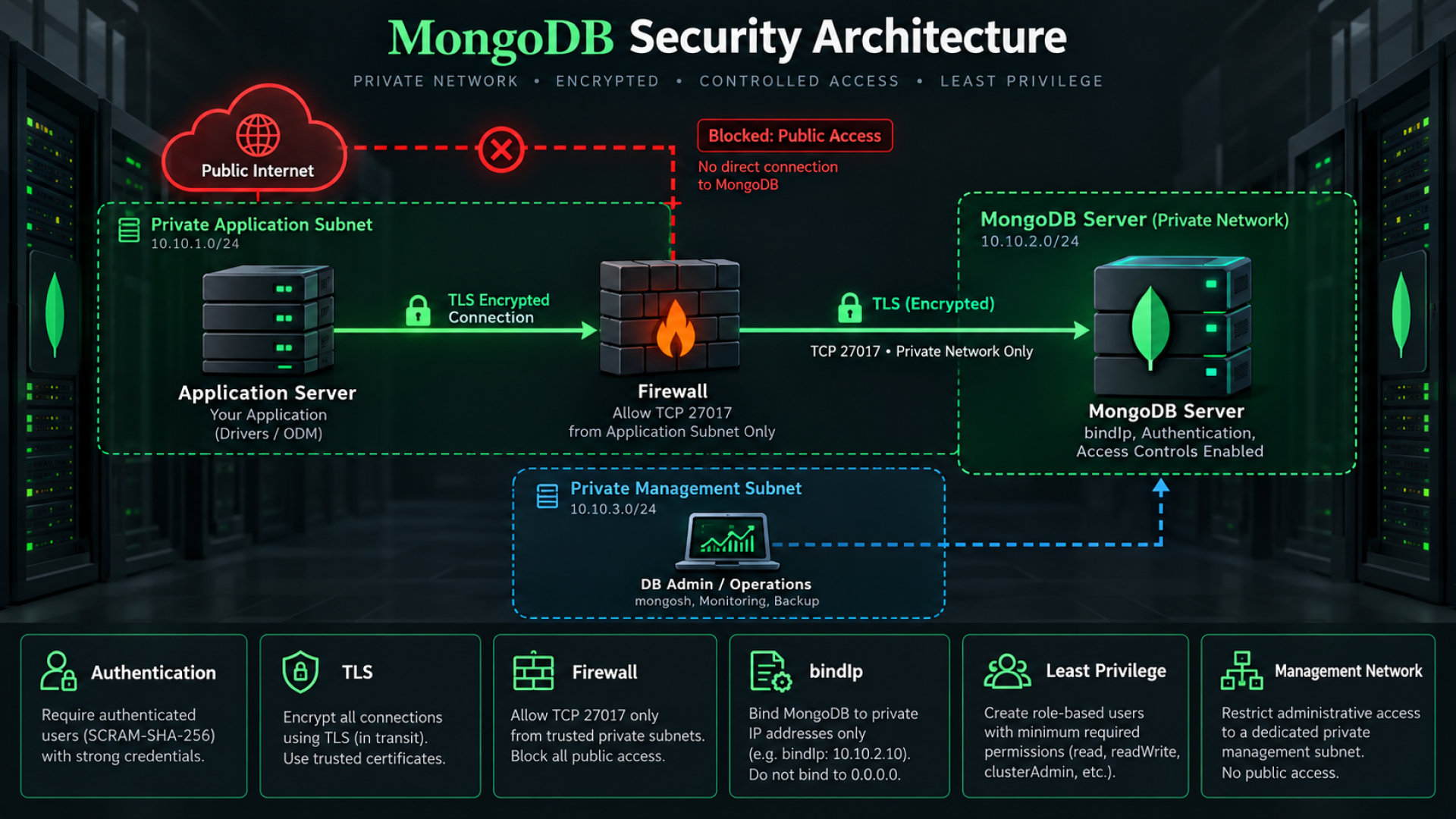
Enforce authentication and least privilege, private network isolation, source-restricted firewall rules, restricted bindIp and TLS. Remove public DNS/NAT exposure. Use long unique secrets and dedicated application users. Patch the OS and signed database packages under change control. Keep administrative access on the management network and restrict host login permissions.
ls -ld /var/lib/mongodb
ls -ld /var/log/mongodb
ps aux | grep '[m]ongod'
sudo systemctl show mongod -p User -p Group
# RPM installations:
ls -ld /var/lib/mongo
sudo stat -c '%U:%G %a %n' /etc/mongod.conf /etc/mongodb/*.pem
mongod must run as its package service user, not root. Data/log directories must be writable by that user and inaccessible to unrelated accounts; private keys and keyfiles must be owner-readable only. Do not repair errors with chmod 777 or an indiscriminate recursive chown. Validate each path, its parent traversal permissions, AppArmor/SELinux policy and the service user.
MongoDB Community does not provide the Enterprise native database audit facility; enabling an Enterprise-only auditLog setting is not a Community solution. Design OS audit, controlled administrative access, application audit events and protected centralized logs around your requirements. Ordinary mongod logs are not a complete compliance audit trail. Redact and restrict logs because queries can contain sensitive values.
14. TLS Encryption
Issue a certificate from an internal or trusted CA for each server. mongodb.pem contains that server’s certificate chain and private key; ca.pem contains CA certificates only. SANs must match the DNS names or IPs used by clients and peers; include localhost/127.0.0.1 only if you will use those names for verified local bootstrap. Never reuse the same private key across nodes.
# Set mongodb on Ubuntu/Debian; set mongod on RPM systems.
MONGO_SERVICE_USER=mongodb
sudo install -d -m 750 -o "$MONGO_SERVICE_USER" -g "$MONGO_SERVICE_USER" /etc/mongodb
# Provision the CA-issued files securely before running these commands.
sudo chown "$MONGO_SERVICE_USER:$MONGO_SERVICE_USER" /etc/mongodb/mongodb.pem
sudo chmod 400 /etc/mongodb/mongodb.pem
sudo chown root:"$MONGO_SERVICE_USER" /etc/mongodb/ca.pem
sudo chmod 640 /etc/mongodb/ca.pemnet:
port: 27017
bindIp: 127.0.0.1,10.10.10.20
tls:
mode: requireTLS
certificateKeyFile: /etc/mongodb/mongodb.pem
CAFile: /etc/mongodb/ca.pem
allowConnectionsWithoutCertificates: true
security:
authorization: enabledThis TLS+SCRAM profile allows clients without a client certificate while still requiring encrypted transport, a valid server certificate and database credentials. With CAFile, client certificates are otherwise required by default; omit allowConnectionsWithoutCertificates or set false when you deliberately require mutual TLS, and provision a client PEM. A presented invalid certificate is still rejected. Do not enable allowInvalidCertificates or allowInvalidHostnames.
sudo systemctl restart mongod
sudo journalctl -u mongod -n 50 --no-pager
mongosh --host '<HOSTNAME>' --port 27017 --tls \
  --tlsCAFile /etc/mongodb/ca.pem \
  -u mongoAdmin -p --authenticationDatabase admin
Confirm trusted CA, hostname matching, expiry and that plaintext connections are rejected. Coordinate certificate renewal before expiry. Internal replica TLS must also work in both directions; when a member certificate serves as both server and client, its extended key usage must support serverAuth and clientAuth.
15. Production Replica Set
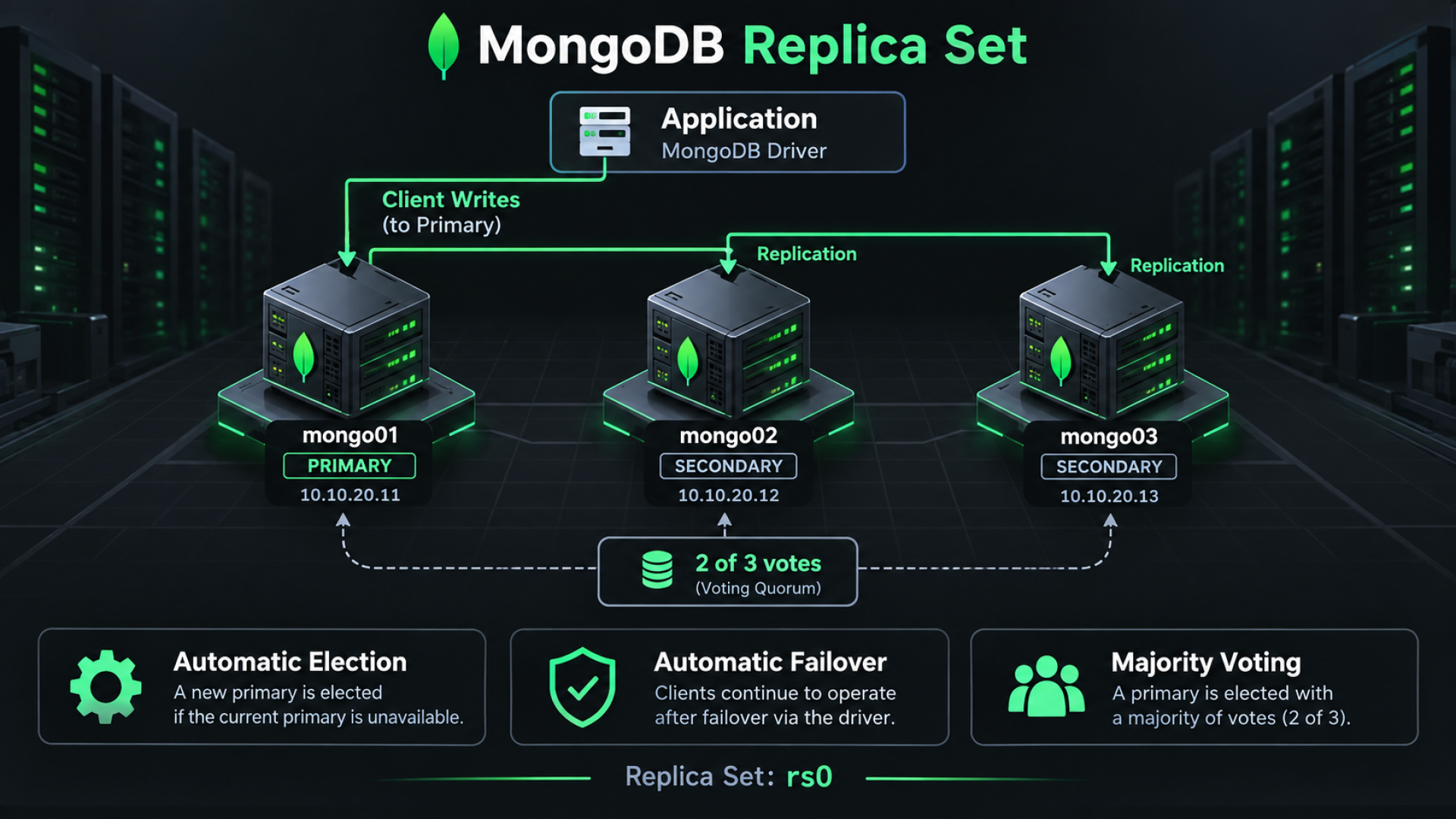
mongo01 - 10.10.20.11
mongo02 - 10.10.20.12
mongo03 - 10.10.20.13
Replica Set: rs0
Use three data-bearing voting members in independent failure domains with matching server versions. Use stable DNS names; mongo01/mongo02/mongo03 are short-name examples, and FQDNs are preferable in a real PKI. DNS must resolve from every member and application host and match certificate SANs. Do not configure member host fields as bare IP addresses.
Fresh-cluster order: install on all nodes, stop mongod, prepare mounts and TLS certificates, configure the peer/application firewall rules, distribute the single shared keyfile from section 16, then configure and start every member. Never temporarily expose an unauthenticated replica listener. Existing standalone conversion requires backup, a separate migration plan and authenticating with existing users; the localhost exception is unavailable if users already exist.
sudo systemctl stop mongod
getent hosts mongo01 mongo02 mongo03
After preparing section 16, merge the following on every node. Substitute that node’s private IP: .11, .12 or .13. Use /var/lib/mongo on RPM installations. This is the complete TLS+SCRAM/keyfile teaching profile, with access control enabled from first cluster startup.
storage:
  dbPath: /var/lib/mongodb
systemLog:
  destination: file
  logAppend: true
  path: /var/log/mongodb/mongod.log
net:
  port: 27017
  bindIp: 127.0.0.1,10.10.20.11
  tls:
    mode: requireTLS
    certificateKeyFile: /etc/mongodb/mongodb.pem
    CAFile: /etc/mongodb/ca.pem
    allowConnectionsWithoutCertificates: true
security:
  keyFile: /etc/mongodb/keyfile
  authorization: enabled
replication:
  replSetName: rs0
processManagement:
timeZoneInfo: /usr/share/zoneinfo# Run on each node after certificates and shared keyfile exist.
sudo systemctl restart mongod
sudo systemctl enable mongod
sudo systemctl status mongod --no-pager
# Run locally on mongo01; the certificate must cover 127.0.0.1.
mongosh 'mongodb://127.0.0.1:27017/?directConnection=true' \
--tls --tlsCAFile /etc/mongodb/ca.pemFor a fresh cluster with no users, the localhost exception allows initial configuration over loopback. Run rs.initiate once, on mongo01 only. Authentication being enabled does not require disabling it for bootstrap.
rs.initiate({
  _id: "rs0",
  members: [
    { _id: 0, host: "mongo01:27017" },
    { _id: 1, host: "mongo02:27017" },
    { _id: 2, host: "mongo03:27017" }
  ]
})
rs.status()
db.hello().isWritablePrimary
Wait for election. If mongo01 is not primary, connect locally on the elected primary using the same loopback TLS method. Create mongoAdmin there with the userAdminAnyDatabase role and the administrator example from section 10, then reconnect with credentials. The exception closes after the first user. Create appuser on the primary once; users replicate, so do not create them separately on every secondary.
Dedicated cluster operations account
use admin
db.createUser({
  user: "mongoOps",
  pwd: passwordPrompt(),
  roles: [{ role: "clusterAdmin", db: "admin" }]
})mongosh 'mongodb://mongo01:27017,mongo02:27017,mongo03:27017/admin?replicaSet=rs0' \
--tls --tlsCAFile /etc/mongodb/ca.pem \
--username mongoOps --password --authenticationDatabase adminrs.status()
rs.conf()
db.hello()
rs.printSecondaryReplicationInfo()The primary accepts writes; secondaries asynchronously apply its oplog. A three-voter set needs two votes to elect a primary, and an eligible up-to-date secondary can take over. Losing two members normally removes write availability. Failover includes an election interval and connection recovery: test application retry behavior rather than assuming zero downtime. mongo01 is the illustrated primary, not permanently fixed as primary.
Use explicit majority write concern for writes that require majority acknowledgment and appropriate read concern for consistent reads. Retryable writes help selected operations; application idempotency and transaction handling remain necessary. Size the oplog retention window longer than planned outages and peak lag. Replication copies accidental deletes too; it is not backup.
Official secure replica-set bootstrap and localhost exception
16. Replica Set Internal Authentication
Internal authentication verifies member identity; client authorization is a separate layer. Prepare this section before starting the cluster in section 15. The requested keyfile example is supported, but current MongoDB guidance recommends X.509 membership authentication for production and keyfiles for development/testing. Treat keyfile+TLS as a constrained baseline requiring a documented security decision, not the strongest production profile.
Keyfile example: generate once
# Generate ONCE on mongo01. Use mongod for RPM installations.
MONGO_SERVICE_USER=mongodb
sudo install -d -m 750 -o "$MONGO_SERVICE_USER" -g "$MONGO_SERVICE_USER" /etc/mongodb
sudo sh -c 'umask 077; openssl rand -base64 756 > /etc/mongodb/keyfile'
sudo chmod 400 /etc/mongodb/keyfile
sudo chown "$MONGO_SERVICE_USER:$MONGO_SERVICE_USER" /etc/mongodb/keyfile
Deliver exactly this file to /etc/mongodb/keyfile on mongo02 and mongo03 through your authenticated encrypted configuration/secret distribution channel. Apply owner mongodb:mongodb on Debian/Ubuntu or mongod:mongod on RPM, mode 400, on every member. Do not generate a new random key independently on each node and do not publish key bytes or hashes. Ensure the parent directory is traversable by the service user and SELinux permits reads.
security:
  keyFile: /etc/mongodb/keyfile
  authorization: enabled
replication:
  replSetName: rs0
A keyfile enables membership authentication and access control but does not encrypt the wire: retain requireTLS. Plan key rotation with overlapping accepted keys and the official rolling procedure so peers continue to share a key. Store the keyfile outside Git and database backups in an access-controlled secret system.
Recommended production alternative: X.509 members
security:
  authorization: enabled
  clusterAuthMode: x509
net:
  port: 27017
  bindIp: 127.0.0.1,10.10.20.11
  tls:
    mode: requireTLS
    certificateKeyFile: /etc/mongodb/mongodb.pem
    clusterFile: /etc/mongodb/member.pem
    CAFile: /etc/mongodb/ca.pem
    allowConnectionsWithoutCertificates: true
replication:
  replSetName: rs0
For a new cluster, choose this alternative instead of keyFile on every member and use the same first-user bootstrap sequence. member.pem is a unique CA-issued member certificate plus key with clientAuth usage; the server certificate needs serverAuth. Membership O/OU/DC attributes must match across member certificates and differ from client identities. SANs must match advertised names. This still permits SCRAM application users over TLS; use dedicated X.509 client identities and mutual TLS if required by policy. Provision and validate the PKI before deployment.
17. MongoDB Connection Strings and Secrets
Standalone URI
mongodb://appuser:<STRONG-PASSWORD>@10.10.10.20:27017/appdb?authSource=appdb&tls=trueReplica-set URI
mongodb://appuser:<STRONG-PASSWORD>@mongo01:27017,mongo02:27017,mongo03:27017/appdb?replicaSet=rs0&authSource=appdb&tls=true&retryWrites=true&w=majorityThese URI templates are not literal executable passwords. Percent-encode reserved characters in username/password components, or provide credentials separately through driver options. appuser was created in appdb, so authSource=appdb; administrators created in admin use authSource=admin. Configure the driver’s trusted CA file separately and verify server names; tls=true does not install your internal CA.
Keep real credentials out of Git, logs, shell history and process arguments. Use a vault or CI/CD secret store; environment variables are convenient but visible to privileged processes and can leak in diagnostics. Kubernetes Secrets need RBAC and encryption at rest: base64 encoding is not encryption. Set bounded connection pools, timeouts and retry policies, then test topology discovery and failover from the application network.
18. Backup and Tested Recovery
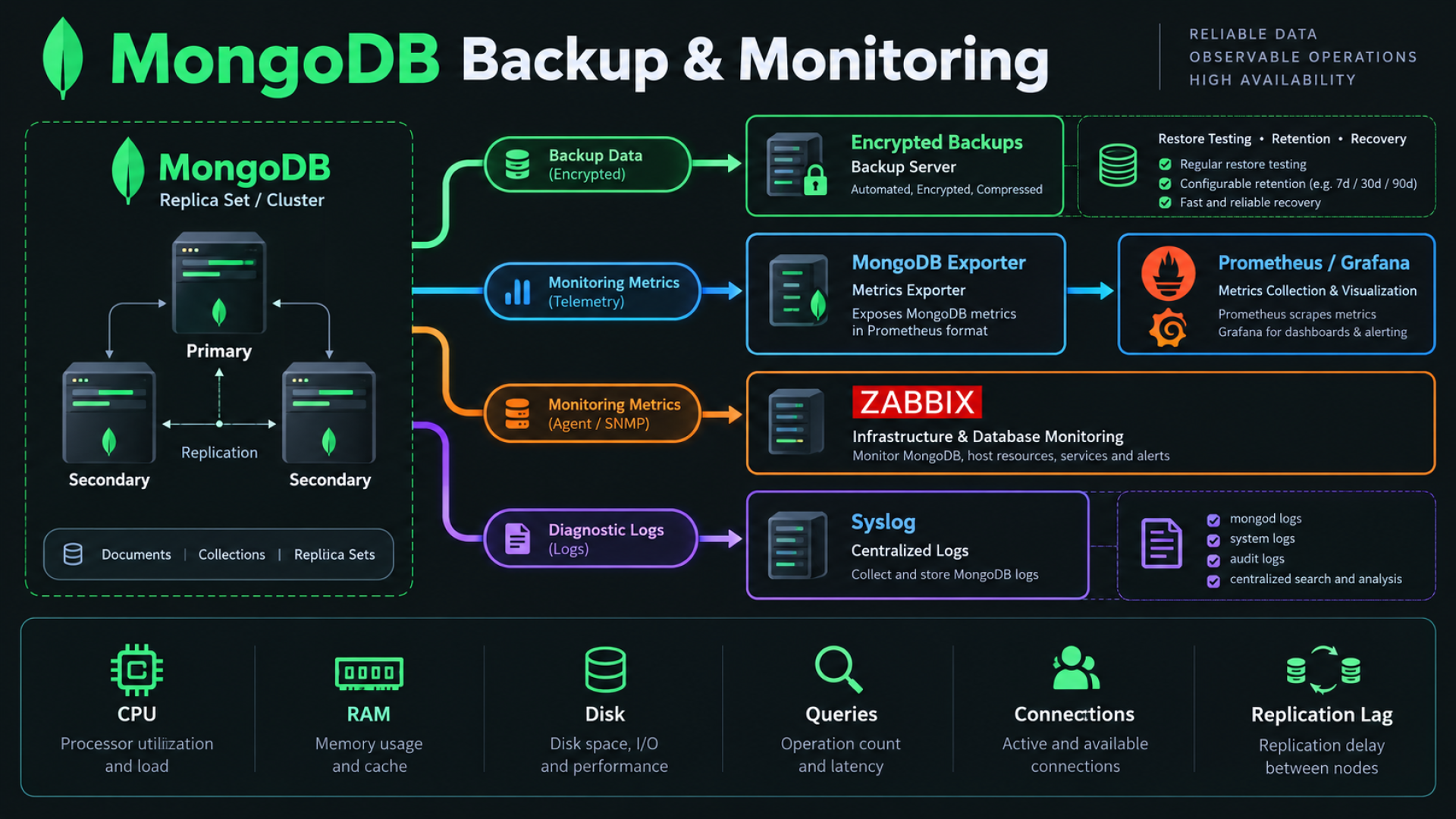
Define RPO (acceptable data loss), RTO (recovery time), retention and off-site/immutable copies. Encrypt backup data, restrict access and keep an independent copy outside the MongoDB server’s failure domain. Record tool/server versions and test restores regularly. mongodump and mongorestore belong to MongoDB Database Tools, which have their own version numbering; check their compatibility with your server before scheduling jobs.
mongodump --version
mongorestore --version
Dedicated backup and restore identities
use admin
db.createUser({
  user: "mongoBackup",
  pwd: passwordPrompt(),
  roles: [{ role: "backup", db: "admin" }]
})
db.createUser({
  user: "mongoRestore",
  pwd: passwordPrompt(),
  roles: [{ role: "restore", db: "admin" }]
})
Create the restore identity on the isolated restore target, not automatically on every production cluster. The broad mongoAdmin roles shown earlier do not substitute for the backup/restore roles. Omitting password flags below prompts interactively; scheduled jobs must read a mode-600 Tools --config file provisioned by the secret system, never a password embedded in --uri.
Small database logical backup
umask 077
BACKUP_DIR="/backup/mongodb/$(date +%F)/$(date +%H%M%S)"
mkdir -p "$BACKUP_DIR"
mongodump \
  --host '<HOSTNAME>' --port 27017 \
  --username mongoBackup --authenticationDatabase admin \
  --tls --tlsCAFile /etc/mongodb/ca.pem \
  --db appdb --out "$BACKUP_DIR"
The backup job OS account must own /backup/mongodb or have explicit write permission. This per-database dump is not an atomic point-in-time image while writes continue: quiesce application writes if cross-collection consistency is required. A successful process exit is necessary but not sufficient: check output, free capacity, restore results and business invariants.
Restore appdb into an isolated target
mongorestore \
  --host '<HOSTNAME>' --port 27017 \
  --username mongoRestore --authenticationDatabase admin \
  --tls --tlsCAFile /etc/mongodb/ca.pem \
  --nsInclude='appdb.*' \
  '/backup/mongodb/<DATE>/<TIME>'
Here <HOSTNAME> is the isolated restore host. The example does not drop existing collections: restoring over live data can produce duplicate keys or merge unintended records. Use a clean target and validate indexes, counts and application reads. --drop is destructive and belongs only in an explicitly planned replacement restore.
Replica-set full dump with oplog capture
umask 077
mongodump \
  --host 'rs0/mongo01:27017,mongo02:27017,mongo03:27017' \
  --username mongoBackup --authenticationDatabase admin \
  --tls --tlsCAFile /etc/mongodb/ca.pem \
  --oplog --gzip --archive="/backup/mongodb/rs0-$(date +%F-%H%M%S).archive.gz"
Use --oplog with a full replica-set dump, not --db or filtered collection dumps. Ensure the oplog window covers the entire dump and avoid schema changes/renames during capture. --oplogReplay on restore replays captured operations; it cannot be combined with namespace filtering and requires privileges beyond the built-in restore role. Provision the documented custom replay privileges on the isolated recovery system only.
# Run only on an isolated clean recovery target with approved replay privileges.
mongorestore \
  --host '<HOSTNAME>' --port 27017 \
  --username '<ADMIN-USER>' --authenticationDatabase admin \
  --tls --tlsCAFile /etc/mongodb/ca.pem \
  --gzip --archive='/backup/mongodb/<ARCHIVE>.archive.gz' --oplogReplay
Large databases need a measured replica/snapshot strategy with atomic data+journal snapshots, consistent topology and an oplog/PITR plan when required. A raw copy of a live dbPath is not a consistent backup. Replicas, snapshots on the same failing storage and backup files without a tested recovery procedure do not meet a recovery objective.
Official mongodump options and consistency limitations
19. Performance Checks
# Install the distribution sysstat package for iostat.
# Ubuntu/Debian: sudo apt install -y sysstat
# RHEL family: sudo dnf install -y sysstat
iostat -xz 1
vmstat 1
free -h
df -h
df -i// Run with a monitoring identity; replace users with your collection.
db.serverStatus()
use appdb
db.stats()
db.users.stats()
// Preferred collection statistics for new automation:
db.users.aggregate([{ $collStats: { storageStats: {} } }])Use real collection names: db.collection.stats() is a template, not a scan of all collections. The collStats command behind that helper is deprecated; prefer $collStats for new integrations. serverStatus requires suitable privileges such as clusterMonitor, so application credentials are not appropriate for full-server diagnostics.
| Signal | Interpretation and action |
|---|---|
| Working set / RAM | Frequent data and indexes should fit the usable cache budget; correlate eviction, disk reads and latency before enlarging cache. |
| Disk IOPS / latency | Read await, queue depth and throughput under peak load; %util alone is insufficient for NVMe/RAID. |
| Indexes / slow queries | Inspect execution plans, scanned/returned ratio and p95/p99 latency; avoid adding indexes blindly. |
| Connections | Track current, available and churn; reuse bounded driver pools rather than opening a connection per request. |
| Replication capacity | Check lag and oplog window during peak writes and backups; secondaries need comparable CPU and storage. |
20. Indexing and Query Plans
use appdb
db.users.createIndex({ email: 1 })
db.users.getIndexes()
db.users.find({ email: "user@example.com" }).explain("executionStats")
Inspect nReturned, totalDocsExamined, totalKeysExamined and winningPlan. A selective email lookup should examine a small number of keys/documents. IXSCAN indicates index use; COLLSCAN means a collection scan. A broad query on a tiny collection may legitimately scan, but repeated selective scans on a large production collection can exhaust I/O and CPU.
Design compound indexes around filters and sort order; validate with representative data. If email must be unique, clean existing duplicates before creating a unique index. Each index consumes RAM/disk and adds write cost. Build indexes under change control and watch capacity and replication lag; do not describe every scan as an incident.
21. Logging and Slow Queries
sudo tail -f /var/log/mongodb/mongod.log
sudo journalctl -u mongod --no-pager
sudo journalctl -u mongod -n 100 --no-pager
MongoDB writes structured diagnostic logs. Look for YAML parse failures, missing dbPath, permission denied, Address already in use, bad keyfile ownership, TLS handshake/certificate failures, WiredTiger errors and authentication failures. The first startup error usually explains subsequent service restarts; preserve logs before remediation.
operationProfiling:
  mode: off
  slowOpThresholdMs: 100
  slowOpSampleRate: 0.1
This example keeps the database profiler off and configures sampled slow diagnostic logging. Treat 100 ms and 10% as starting points tied to your SLO, not universal values. Profiling all operations can increase load and capture sensitive query data. Centralize logs with bounded retention and alerts for failed authentication, storage errors and elections.
Configure rotation before disk exhaustion. With systemLog.logRotate: reopen, use an external rename/create policy that preserves the service owner, then request logRotate (or the documented SIGUSR1). Do not combine incompatible rename/reopen policies or assume copytruncate is safe. Test rotation and retention on a staging node.
22. Monitoring and Alerting
use admin
db.createUser({
  user: "mongoMonitor",
  pwd: passwordPrompt(),
  roles: [{ role: "clusterMonitor", db: "admin" }]
})
Use a MongoDB Exporter compatible with your server, Prometheus for collection and Grafana for dashboards; Zabbix can independently monitor MongoDB and host health. These are external monitoring integrations, not bundled MongoDB Community components. Some exporter collectors need extra read privileges: enable only required collectors and grant narrowly scoped roles after reviewing the exact exporter documentation. Keep exporter endpoints and their secrets private.
| Metric / event | Alert intent |
|---|---|
| Connections / operations | Pool saturation, connection churn and abnormal throughput versus baseline. |
| Query latency | Sustained p95/p99 SLO breaches; separate reads/writes and timeouts. |
| Replication lag / oplog window | Lag approaching recovery budget or oplog retention; failed sync. |
| Disk / inodes / I/O latency | Capacity and growth forecasts, queue delays and full-volume risk. |
| Memory / page faults / swap | Correlate OS major faults and swap with cache eviction and disk reads; minor faults alone are not an incident. |
| Replica status / primary elections | No primary, unavailable member, repeated elections or unexpected topology changes. |
| Backup / certificates / logs | Stale backup, failed restore drill, expiry approaching and security/storage log events. |
Collect per-member metrics and OS telemetry; monitoring only the primary hides a failed secondary. Define actionable thresholds, owners and runbooks. Test an alert and notification path, then test loss of a node in staging and verify the application recovers and the new primary is detected.
23. Troubleshooting
sudo systemctl status mongod --no-pager
sudo journalctl -u mongod -n 100 --no-pager
sudo ss -lntp | grep 27017
ps aux | grep '[m]ongod'
df -h
df -i
free -h| Problem | Cause | Diagnostic | Fix |
|---|---|---|---|
| mongod does not start | YAML error, unsupported CPU/kernel, missing dbPath | journalctl; mongod --version; lscpu | Fix the first logged error; use supported packages/kernel and mounted storage. |
| Permission denied | Wrong service owner, PEM/key mode, SELinux/AppArmor denial | stat; namei -l; ausearch -m AVC | Repair exact owner/path/label and parent traversal permissions. |
| Port 27017 unavailable | Another listener or source/zone mismatch | ss -lntp; firewall rules; private route | Resolve the listener conflict or fix the restricted allowlist. |
| Authentication failed | Wrong secret, user database or authSource | connectionStatus after valid login; userAdmin usersInfo | Use appdb for appuser, admin for admins; rotate through authorized admin. |
| Connection refused / TLS failure | Stopped service, wrong bindIp, hostname/CA mismatch | systemctl; ss; getent hosts; TLS client logs | Restore listener and DNS; install trusted CA and matching certificate. |
| Secondary not syncing | Peer unreachable, key/certificate mismatch, lag past oplog | rs.status(); peer logs; disk/lag metrics | Fix connectivity/identity/capacity; perform planned initial resync if history is lost. |
| Replica set has no primary | Lost voting majority, partition or ineligible members | rs.status(); rs.conf(); peer DNS/firewall | Recover majority and eligible members; avoid forced reconfig as a routine fix. |
| Disk full | Data/oplog/log growth, dump on data disk, inode exhaustion | df -h; df -i; log/backup sizes | Expand storage or safely expire approved old backups/logs; never delete WiredTiger files. |
| High CPU | Scans, costly aggregation, connection churn or index build | top; explain; slow logs; connections | Tune the query/index/pool and validate under representative load. |
| High disk I/O | Working set exceeds cache, slow storage, backup/resync contention | iostat -xz; vmstat; cache/lag/latency metrics | Reduce unnecessary scans, isolate backup load and provision measured RAM/IOPS. |
Do not use mongod --repair, forced replica reconfiguration, deletion of data files or turning off authorization as generic repairs. Preserve evidence and the latest recoverable backup. A member that fell behind the oplog may need a planned resync; verify a healthy source and capacity first.
24. Verification Checklist
systemctl is-active mongod
sudo ss -lntp | grep 27017
# Bare mongosh is only for the initial non-TLS localhost bootstrap.
# For the secured deployment use:
mongosh --host '<HOSTNAME>' --port 27017 --tls \
  --tlsCAFile /etc/mongodb/ca.pem \
--username appuser --password --authenticationDatabase appdb appdbdb.runCommand({ ping: 1 })
db.runCommand({ connectionStatus: 1 })
db.getCollectionNames()Expect active, listeners only on approved interfaces, ping ok:1 and authenticatedUsers containing appuser in appdb. Test from an allowed application host and confirm a disallowed host cannot connect. Verify unauthenticated collection access and plaintext connections fail. For replicas connect as mongoOps and inspect rs.status(): one primary, two healthy secondaries and acceptable lag.
// Authenticated mongoOps replica session:
rs.status()
rs.printSecondaryReplicationInfo()
Run a controlled failover drill in staging, exercise real application reads/writes with majority acknowledgment, verify alert delivery and restore a backup into a clean isolated target. These tests establish behavior beyond process liveness. Installation/configuration syntax was reviewed against documentation; the Linux deployment commands must still be executed and validated on your target servers.
25. Production Checklist
Record evidence, an owner and a review date for each item before go-live. The empty status cells are intentional: reading this article does not make a deployment pass its checks.
| Item | Status |
|---|---|
| Authentication Enabled | |
| Dedicated App User | |
| Port 27017 Restricted | |
| bindIp Restricted | |
| TLS Enabled | |
| Replica Set Enabled | |
| Backup Configured | |
| Monitoring Enabled | |
| Log Monitoring Enabled | |
| Disk Capacity Checked | |
| NTP Enabled | |
| Firewall Enabled | |
| Strong Passwords | |
| Secrets Outside Source Code | |
| Restore Drill Passed / RPO / RTO Defined | |
| Internal Authentication / Certificate Renewal | |
| Failure Domains / Majority / Oplog Window | |
| Service Limits / SELinux / Storage Mounts |
Operational Handover
Hand over the node inventory, effective configuration, DNS/PKI dependencies, secret owners, alert runbooks, backup retention and tested restore/failover procedures. Freeze the selected repository branch, review release notes before upgrades and maintain a rollback/recovery plan. A secure deployment is an ongoing operational responsibility.
Frequently Asked Questions
Can I install MongoDB 9.0 on Debian 12 with these commands?
No. The official matrix lists Debian 12 for 8.x and Debian 13 for 9.x. Use the 8.0 Bookworm repository in this guide or plan a supported OS upgrade.
Does bindIp restrict which clients can connect?
No. It selects local listening interfaces. Firewall source rules restrict client addresses.
Is a replica set a backup?
No. It replicates writes, including accidental deletion. Keep independent backups and validate restores.
Do I need a load balancer in front of a replica set?
Normally no. A replica-aware driver discovers members and selects the appropriate server.
Does a keyfile encrypt replication traffic?
No. It authenticates members. TLS encrypts traffic; current official guidance recommends X.509 membership authentication for production.
Can mongoAdmin perform every operational task with the three example roles?
No. Those roles are broad but do not include all cluster, backup and restore operations. Use dedicated operational roles.
Should I disable THP for MongoDB 8.0 and 9.0?
For supported x86_64/ARM64, follow the newer TCMalloc guidance to enable THP with its documented settings. Older-version recommendations differ.
Is a successful ping enough to approve production?
No. Verify authorization, network restrictions, TLS, replica health, application behavior, alerts and an isolated restore drill.
Official References
Reviewed on 7 October 2026 using MongoDB documentation and the distribution manuals below. Current Linux installation instructions use a distribution selector; select the matching distribution and package method. The 9.0 Community repository definitions were additionally checked in MongoDB’s official documentation source. The signing-key URL responded successfully; repository metadata requests from this authoring network returned HTTP 403, so live package availability must be verified with apt-cache policy or dnf on the deployment network.
9.0 release notes and known issues
Community 8.0 Debian 12 installation