1. An Internet edge is a routing and security boundary
An Internet-facing router must keep forwarding while rejecting attempts to manage it, impersonate a neighbor or exhaust its CPU. A working default route proves little about security. An exposed VTY, an unrestricted BGP import policy or a mistaken WAN ACL can turn one device into a failure point for the whole enterprise.
This guide separates administrative access, routing/control packets and forwarded traffic. It addresses unauthorized administration, route manipulation, source spoofing, routing adjacency attacks and denial of service. Firewall policy still decides which application sessions may cross the perimeter. Router ACLs reduce exposure but do not automatically provide stateful inspection or replace an enterprise firewall.
Reference scenario: Cisco ISR 4331, autonomous IOS XE Dublin 17.12.6, IPv4 global routing table and three routed GigabitEthernet interfaces. This is a documentation-reviewed deployment template, not a claim of hardware testing or a recommendation to install an arbitrary 17.12 build. Check the exact PID, licensed features, maintenance release, Cisco Software Checker and support lifecycle before approving a change.
ISR 4000, ASR 1000 and Catalyst 8000 share many IOS XE CLI concepts, but differ in interface naming, crypto capabilities, forwarding hardware, punt policers, VRFs and feature availability. ASR ESP/QFP and Catalyst 8000 platform counters must be checked separately from IOSd CPU. Existing platform policing is not replaced casually. Classic IOS, IOS XR and controller-managed IOS XE SD-WAN use different capabilities and operating models; do not apply this autonomous configuration through a controller template unchanged.
| Dimension | Catalyst switch | Enterprise edge router |
|---|---|---|
| Primary attack surface | Endpoint ports, trunks, VLANs | WAN packets, routing peers and public infrastructure |
| WAN exposure | Usually behind a perimeter firewall | Direct ISP adjacency and unsolicited Internet traffic |
| Management plane | AAA, SSH, management VLAN/VRF | Same access controls plus WAN infrastructure filtering |
| Control plane | STP, ARP, routing and platform CPU policy | BGP/OSPF, exceptions and measured CoPP |
| Data plane | Segmentation, port and SVI policy | Transit ACL, source validation, firewall handoff |
| Routing security | Internal adjacency and redistribution controls | ISP import/export contracts and resource limits |
| Layer 2 security | DHCP snooping, DAI, STP guards | Relevant only to bridged/switch modules; not routed WAN equivalents |
| Typical risks | Rogue DHCP, loops, VLAN abuse | Route leaks, public management, CPU floods, policy outages |
Use the Cisco Catalyst Layer 2 / Layer 3 switch hardening guide for the downstream campus.
2. Topology, addresses and trust boundaries
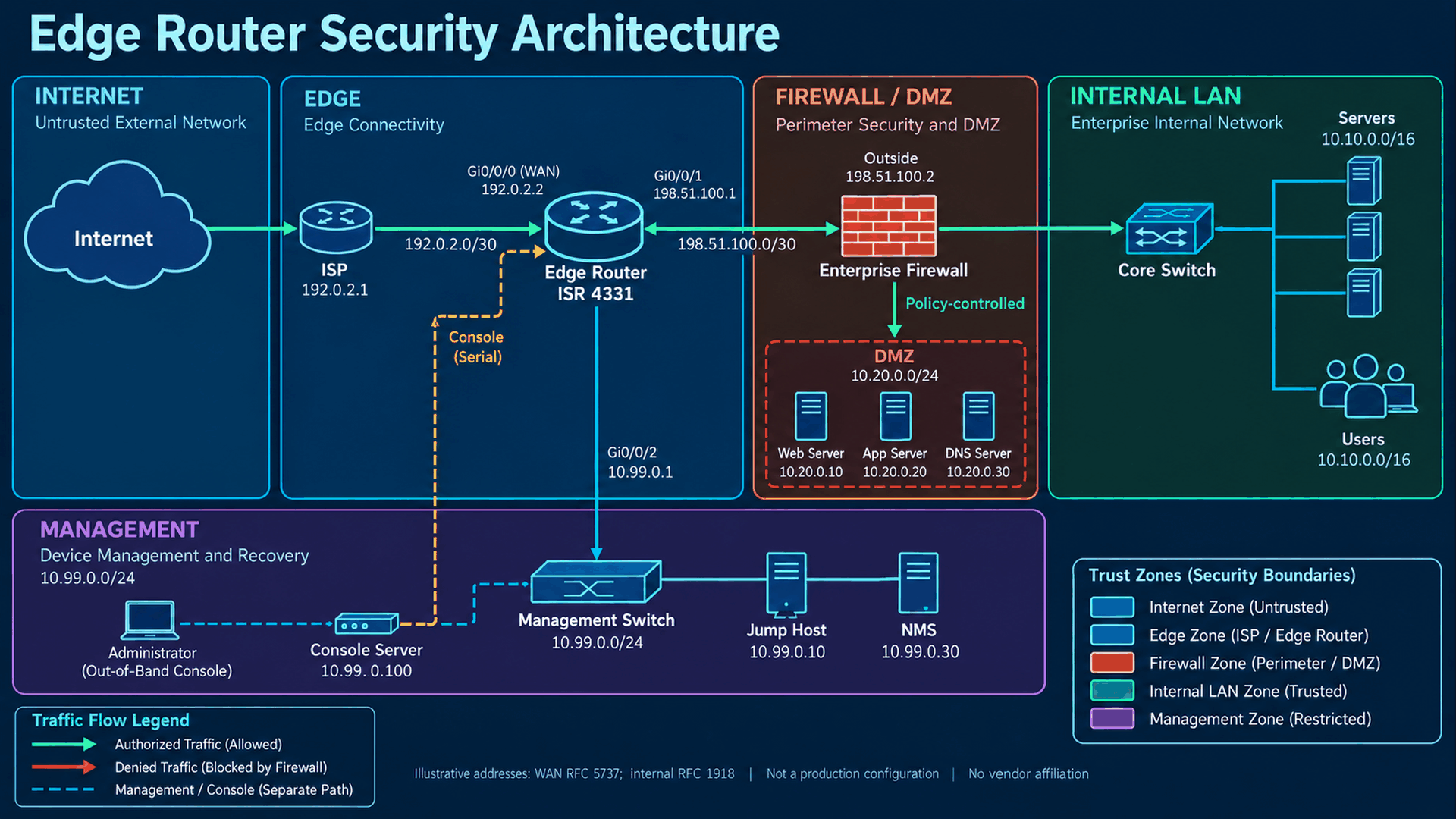
INTERNET -> ISP AS64500 192.0.2.1/30
                    |
             Gi0/0/0 192.0.2.2/30
              ISR4331 AS64510
          Gi0/0/1 198.51.100.1/30
                    |
     Firewall 198.51.100.2/30 (OSPF area 0)
          |                        |
     Core -> Users / Servers   DMZ 10.20.0.0/24
          10.10.0.0/16

ISR Gi0/0/2 10.99.0.1/24 -> isolated management switch
  Jump host .10 | TACACS+ .20/.21 | NMS .30
  Syslog .40 | NTP .50 | backup repository .60
Independent console server -> ISR console (out-of-band recovery)
All addresses and AS numbers are illustrative: 192.0.2.0/24 and 198.51.100.0/24 are documentation ranges, AS64500/64510 are private-use ASNs, and internal/DMZ/management networks use RFC1918 space. Documentation ranges are not Internet-routable; substitute ISP-assigned addresses and the agreed ASNs in deployment. They are deliberately allowed in this isolated example rather than mistakenly denied as bogons.
The edge accepts only a default route from one directly connected ISP and advertises no prefixes. The firewall performs Internet PAT on 198.51.100.2 and advertises 10.10.0.0/16 and 10.20.0.0/24 to the edge through authenticated OSPF. The ISP must route the illustrative 198.51.100.0/30 to 192.0.2.2. The edge injects a default into OSPF only while a default exists. Management 10.99.0.0/24 is not redistributed, NATed or advertised. No direct internal LAN link bypasses the firewall.
Internet is untrusted; the ISP address is trusted only for the contracted BGP session. The firewall outside link is an infrastructure boundary, not a trusted user segment. DMZ services remain isolated from internal servers. The management switch is physically separate and has no user uplink, but the example uses the router global table for readable CLI. It is not cryptographic isolation: upstream management filtering and an independent console path remain necessary. A production dedicated management port in Mgmt-intf VRF needs VRF routes and VRF-aware AAA, SNMP, NTP and logging syntax.
3. Baseline audit and change prerequisites
show version
show inventory
show running-config
show startup-config
show ip interface brief
show interfaces
show ip route
show ip protocols
show access-lists
show users
show logging
show processes cpu sorted
show memory statistics| Command | Purpose and expected observation |
|---|---|
| show version | Identify exact image, maintenance build, uptime and boot mode; compare with PSIRT and support policy. |
| show inventory | Record PID, serial, installed modules and interface inventory. |
| show running-config | Inventory effective AAA, ACL attachments, NAT, VPN, services and routing; handle output as a secret. |
| show startup-config | Compare saved boot configuration with running; identify unsaved changes before rollback. |
| show ip interface brief | Map real interface names, addresses and up/up state; do not infer WAN from port number. |
| show interfaces | Record speed, MTU, errors, drops and load; distinguish physical faults from policy loss. |
| show ip route | Record default and return paths, OSPF routes and unexpected routes to management. |
| show ip protocols | Inspect routing processes, passive interfaces, redistribution and filters. |
| show access-lists | Record ACE order and hit counts before modifying a referenced ACL. |
| show users | List active console/VTY sessions and actual translated jump-host source. |
| show logging | Establish recent authentication, link and routing failures and collector settings. |
| show processes cpu sorted | Capture short and long CPU baselines and busy IOSd processes. |
| show memory statistics | Record free/used pools; watch sustained depletion, not one isolated sample. |
Pre-change checklist: exact IOS XE build and hardware support checked; active BGP/OSPF/BFD and routing contracts recorded; ACLs and NAT order understood; IPsec/IKE/GRE dependencies inventoried; WAN MTU and interface roles confirmed; jump-host and AAA source/return paths tested; SNMP, syslog, NetFlow and NTP baselines saved; encrypted external backup verified; console credentials and rollback procedure tested; change window and acceptance owner assigned.
show ip interface GigabitEthernet0/0/0
show ip bgp summary
show ip ospf neighbor
show ip nat statistics
show ip nat translations
show crypto session
show policy-map control-plane
show platform hardware qfp active datapath utilization
The last command is a QFP platform diagnostic, not a universal IOS command. Use the matching platform command reference. Review VPN selectors and NAT exemptions before touching ACLs; the complete scenario below deliberately has no VPN or edge NAT. Never erase an existing control-plane policy to make an example fit.
4. Identity, local recovery accounts and stored secrets
Router identity and password hashing
Purpose: Make audit events attributable and keep one vaulted emergency administrator.
Security Risk: Shared privileged accounts and offline cracking of configuration backups.
Configuration: global configuration mode unless a submode or EXEC command is identified. Angle-bracket values are placeholders, never literal commands.
hostname EDGE-ISR4331
ip domain name example.net
username breakglass privilege 15 algorithm-type scrypt secret <LOCAL_ADMIN_SECRET>
enable algorithm-type scrypt secret <ENABLE_SECRET>
Explanation: Type 9 uses scrypt; Type 8 uses PBKDF2-SHA-256. These are one-way password verifiers. Type 5 MD5 is legacy and Type 7 is reversible obfuscation. The algorithm-type form takes plaintext and generates the hash; secret 9 expects an existing encoded hash. Privilege 15 is full administration, not least privilege. Use centralized command policy for routine operators.
Verification: show running-config | include ^hostname|^ip domain|^username|^enable secret ; show privilege in a fresh local session. Restrict the displayed hashes.
Expected Result: Unique hostname, Type 9 stored secrets and a working privileged recovery account.
Troubleshooting: If hashing syntax is rejected, confirm image capability and use supported Type 8 rather than silently reverting to Type 7. A wrong domain/key workflow can change SSH fingerprints.
Rollback: Restore the previous hostname/domain and known-good hash through console. Keep at least one tested account while replacing another; never delete the last recovery user.
Shared protocol secrets are different: TACACS+, RADIUS and routing authentication need usable key material. A Type 8/9 login hash cannot substitute for a protocol shared key. Where supported, Type 6 AES protects recoverable shared secrets at rest and needs its master-key recovery procedure; it does not encrypt every protocol on the wire. Treat key 0 placeholders here as provisioning inputs and protect the resulting configuration. service password-encryption alone provides no meaningful secrecy.
5. AAA migration without losing recovery access
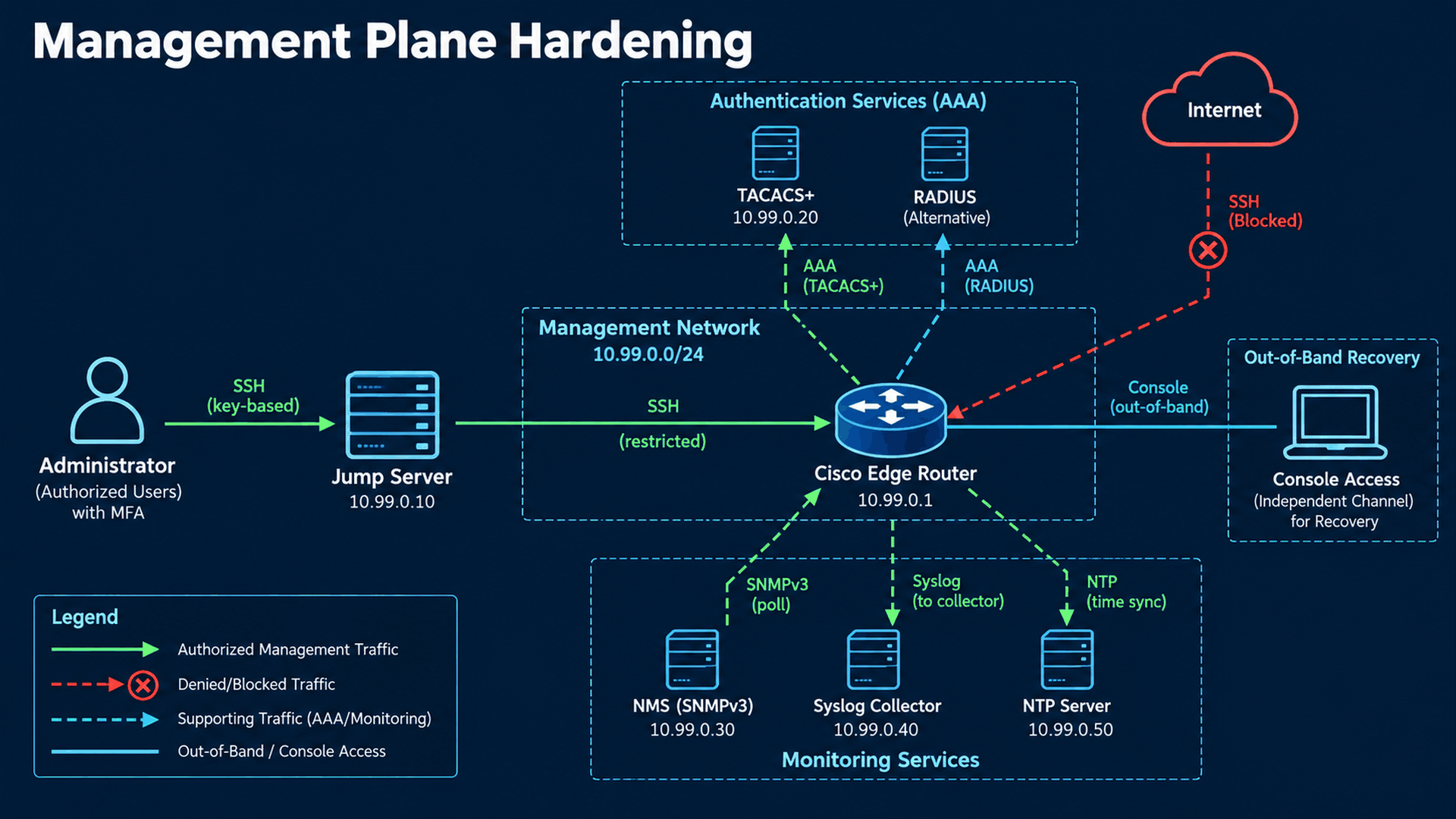
Stage 1: local AAA and console recovery
Purpose: Prove local login before enabling a remote dependency.
Security Risk: An untested AAA method list can lock out every administrator.
Configuration: global configuration mode unless a submode or EXEC command is identified. Angle-bracket values are placeholders, never literal commands.
aaa new-model
aaa authentication login default local
aaa authorization exec default local
aaa authentication login LOCAL local
aaa authorization exec LOCAL local
line console 0
 login authentication LOCAL
 exec-timeout 10 0
 logging synchronous
exit
line vty 0 4
 login authentication LOCAL
 authorization exec LOCAL
exit
line vty 5 15
 login authentication LOCAL
 authorization exec LOCAL
exit
Explanation: Named LOCAL login/exec lists are attached explicitly. The default lists stay local in this baseline. Console login uses LOCAL and console authorization is not enabled. Authentication answers who you are; exec authorization decides whether a shell opens; command authorization is a separate decision.
Verification: Open a second local session; run show privilege and show users; verify console login after disconnecting a test console session under supervision.
Expected Result: Both console and VTY grant the intended local privilege.
Troubleshooting: Authentication may succeed while exec authorization denies a shell. Inspect method-list attachment and the user privilege, not just the password.
Rollback: Reattach the previous named lists from console. Removing aaa new-model broadly can change line behavior; use a targeted restoration.
Stage 2: TACACS+ authentication and accounting
Purpose: Use individual identities, server-side shell privileges and command records.
Security Risk: Local-only accounts leave weak offboarding and fragmented audit trails.
Configuration: global configuration mode unless a submode or EXEC command is identified. Angle-bracket values are placeholders, never literal commands.
tacacs server TAC1
 address ipv4 10.99.0.20
 key 0 <TACACS_SHARED_SECRET_1>
 timeout 5
exit
tacacs server TAC2
 address ipv4 10.99.0.21
 key 0 <TACACS_SHARED_SECRET_2>
 timeout 5
exit
aaa group server tacacs+ EDGE-TACACS
 server name TAC1
 server name TAC2
exit
ip tacacs source-interface GigabitEthernet0/0/2
aaa authentication login CENTRAL group EDGE-TACACS local
aaa authorization exec CENTRAL group EDGE-TACACS local
aaa accounting exec CENTRAL start-stop group EDGE-TACACS
aaa accounting commands 15 CENTRAL start-stop group EDGE-TACACS
line vty 0 4
 login authentication CENTRAL
 authorization exec CENTRAL
 accounting exec CENTRAL
 accounting commands 15 CENTRAL
exit
line vty 5 15
 login authentication CENTRAL
 authorization exec CENTRAL
 accounting exec CENTRAL
 accounting commands 15 CENTRAL
exit
Explanation: Two servers use TCP/49 and Gi0/0/2 as the source. group EDGE-TACACS local falls back on server error/unavailability, not a deliberate reject. The server must recognize 10.99.0.1 and return shell privilege 15 for approved administrators. Accounting start-stop records exec sessions and privilege-15 commands; it does not itself forbid commands. Classic TACACS+ is not modern TLS encryption; isolate or tunnel the transport.
Verification: show aaa servers; show tacacs; show users; fresh SSH login and server audit logs. Then simulate both servers unavailable in a controlled window and test breakglass.
Expected Result: Remote identity works, records arrive centrally, outage permits local recovery, and explicit server reject stays rejected.
Troubleshooting: Timeouts indicate route, source, TCP/49 or server registration errors; immediate rejects indicate shared-key/user policy issues. Inspect server events before enabling short-lived debug aaa authentication; stop with undebug all and protect captured credentials.
Rollback: On every VTY range restore login authentication LOCAL and authorization exec LOCAL; remove accounting exec CENTRAL and accounting commands 15 CENTRAL from the lines. Keep remote server definitions for investigation.
Migration order matters: keep the console and an existing session open; build server records and source routing; attach CENTRAL to one verified VTY range; open new sessions until both configured ranges have been exercised; verify server accounting; only then enable command authorization. A successful test aaa authentication alone does not prove exec or command authorization. Test a rejected user as well as a permitted administrator.
Optional stage 3: command authorization
Purpose: Constrain routine administrators to approved commands.
Security Risk: A valid account can still perform destructive commands.
Configuration: global configuration mode unless a submode or EXEC command is identified. Angle-bracket values are placeholders, never literal commands.
aaa authorization commands 15 CENTRAL group EDGE-TACACS local
line vty 0 4
 authorization commands 15 CENTRAL
exit
line vty 5 15
 authorization commands 15 CENTRAL
exit
Explanation: The example adds privilege-15 command authorization to both VTY ranges. Policy must include the commands required to inspect and roll back the change. It is not a complete role design for every privilege level: add reviewed levels 0/1 and configuration-command authorization only after testing those flows. Local outage fallback grants the local account its configured privilege.
Verification: Run one allowed show command and one deliberately denied harmless command in a test account; inspect TACACS+ authorization logs.
Expected Result: Server decisions are enforced, console recovery remains usable.
Troubleshooting: If login works but commands fail, inspect authorization rules and command arguments returned to the server.
Rollback: From console issue no authorization commands 15 CENTRAL under both VTY ranges and restore the prior policy.
Alternative: RADIUS device login
Purpose: Support an enterprise whose identity service uses RADIUS.
Security Risk: Mismatched NAS records, UDP reachability or privilege attributes can deny access.
Configuration: global configuration mode unless a submode or EXEC command is identified. Angle-bracket values are placeholders, never literal commands.
radius server RAD1
 address ipv4 10.99.0.22 auth-port 1812 acct-port 1813
 key 0 <RADIUS_SHARED_SECRET>
exit
aaa group server radius EDGE-RADIUS
 server name RAD1
exit
ip radius source-interface GigabitEthernet0/0/2
aaa authentication login RAD group EDGE-RADIUS local
aaa authorization exec RAD group EDGE-RADIUS local
aaa accounting exec RAD start-stop group EDGE-RADIUS
Explanation: This separate option uses UDP/1812 authentication and UDP/1813 accounting; attach RAD instead of CENTRAL to VTY login and exec lists after testing. Return the appropriate Cisco shell privilege attribute. RADIUS device login is not equivalent to TACACS+ per-command authorization/accounting. Traditional RADIUS does not encrypt the entire packet; do not assume RadSec is available on this release.
Verification: show aaa servers; fresh RAD-attached SSH session and RADIUS accept/reject/accounting logs.
Expected Result: Only approved users receive the intended privilege and outage fallback works.
Troubleshooting: Inspect UDP ACLs, shared key, NAS source and vendor-specific attributes; success without privilege is not a password failure.
Rollback: Restore LOCAL or the previously tested CENTRAL list; remove RAD accounting attachments if added.
| Technology | Strength | Limitation / use |
|---|---|---|
| Local AAA | Independent recovery and simple deployment | Per-device lifecycle, no central command trail; emergency access |
| TACACS+ | Separate authentication, authorization and command accounting | Server policy and network dependency; protect classic transport; device administration |
| RADIUS | Broad identity integration and session accounting | Different authorization model; traditional UDP transport; login/access services |
6. SSH access restrictions and service reduction
SSHv2 and VTY source policy
Purpose: Allow administrative sessions only from the jump host.
Security Risk: Telnet exposes sessions; an Internet-reachable SSH daemon attracts guessing and exploit attempts.
Configuration: global configuration mode unless a submode or EXEC command is identified. Angle-bracket values are placeholders, never literal commands.
! Generate only on initial provisioning; global configuration mode
crypto key generate rsa general-keys modulus 3072
ip ssh version 2
ip ssh time-out 60
ip ssh authentication-retries 3
ip ssh server algorithm encryption aes256-ctr aes128-ctr
ip access-list standard MGMT-SSH
 permit host 10.99.0.10
 deny any log
exit
line vty 0 4
 transport input ssh
 exec-timeout 10 0
 access-class MGMT-SSH in
exit
line vty 5 15
 transport input ssh
 exec-timeout 10 0
 access-class MGMT-SSH in
exit
Explanation: The standard ACL matches source 10.99.0.10, not the destination interface. transport input ssh excludes Telnet on all covered lines. The WAN infrastructure ACL independently denies SSH to router addresses. RSA 3072 is an example supported key size; retain existing acceptable host keys instead of regenerating during routine hardening.
Verification: show ip ssh; show ssh; show access-lists MGMT-SSH. From .10 open ssh to 10.99.0.1; from .11 confirm denial; from an external test source attempt SSH to 192.0.2.2 and confirm WAN deny counters. Confirm TCP/23 fails.
Expected Result: SSHv2, approved source success, denied source failure and no Telnet.
Troubleshooting: A translated jump source, missing VTY range, AAA shell rejection or cipher mismatch can fail a new session; distinguish TCP timeout from authentication denial with client verbose logs.
Rollback: Use console to restore the previous access-class or permit the verified jump source. Keep SSH-only transport; restore approved algorithms if a cipher change caused failure. Never fix access by permitting the entire Internet.
Algorithm policy: inspect show ip ssh and ip ssh server algorithm ? on the exact image. Prefer supported AES-CTR/GCM ciphers and SHA-2 MAC/key-exchange choices under the organization policy; test automation clients before restricting the list. Do not infer algorithms from RSA key length, and do not copy a Catalyst cipher list into an ISR without parser validation. Public-key login requires a separate ip ssh pubkey-chain identity design and coordination with AAA. Login retries/time-out govern authentication, not idle session duration. The template explicitly selects AES256-CTR/AES128-CTR and retains release MAC/KEX defaults pending review. IOS XE 17.10 and later changed several defaults; verify SHA-2 encrypt-then-MAC negotiation in the client instead of re-enabling legacy algorithms to fix a failed login.
Disable unused services and untrusted discovery
Purpose: Reduce exposed daemons and information disclosure.
Security Risk: Unused WebUI, legacy services or discovery frames add avoidable attack surface.
Configuration: global configuration mode unless a submode or EXEC command is identified. Angle-bracket values are placeholders, never literal commands.
no ip http server
no ip http secure-server
no ip source-route
interface GigabitEthernet0/0/0
 no cdp enable
 no lldp transmit
 no lldp receive
exit
Explanation: HTTP/HTTPS are disabled only because this scenario uses neither WebUI nor RESTCONF. CDP/LLDP are disabled on WAN, not automatically on every trusted link. Source routing is disabled globally. Shut only inventoried unused interfaces. Older PAD, BOOTP and small-server controls may be absent or default-disabled; audit operational state instead of forcing obsolete commands.
Verification: show ip http server status; show cdp interface; show lldp interface; show ip interface brief; test inventory/automation jobs.
Expected Result: No web management listener or discovery advertisement on WAN; required automation still works.
Troubleshooting: RESTCONF depends on HTTPS; DHCP relay depends on service dhcp; global discovery removal may hide topology. NETCONF/SSH and guest-shell have separate dependencies.
Rollback: Re-enable only the previously documented service or discovery on its required trusted interface; restore access restrictions before activating web management.
7. SNMPv3 and management-plane boundaries
Read-only SNMPv3 authPriv
Purpose: Expose required metrics to Zabbix without public communities or write access.
Security Risk: SNMPv1/v2c communities have no packet confidentiality and can expose or alter configuration.
Configuration: global configuration mode unless a submode or EXEC command is identified. Angle-bracket values are placeholders, never literal commands.
ip access-list standard MGMT-SNMP
 permit host 10.99.0.30
 deny any
exit
snmp-server view EDGE-READ mib-2 included
snmp-server view EDGE-READ 1.3.6.1.4.1.9 included
snmp-server group NMS v3 priv read EDGE-READ access MGMT-SNMP
snmp-server user zabbix NMS v3 auth sha <SNMP_AUTH_SECRET> priv aes 128 <SNMP_PRIV_SECRET>
Explanation: The NMS source ACL is independent from the SSH ACL. The view exposes mib-2 and Cisco enterprise metrics, while the group has no write view. auth sha here means SHA-1 HMAC, not SHA-256; AES128 privacy is selected for interoperability. SHA-2 SNMP support varies by image and NMS. If policy rejects SHA-1, choose and validate a mutually supported SHA-2 syntax instead of labeling this example SHA-2 compliant.
Verification: show snmp user; show snmp group; show access-lists MGMT-SNMP. Perform an authPriv GET from .30 and a denied test from .31. Compare sysUpTime/interface OIDs with CLI values.
Expected Result: Approved NMS reads metrics; wrong source, wrong secrets or lower security level fail.
Troubleshooting: SNMPv3 users may not appear as ordinary running-config password lines. Engine-ID changes can invalidate localized credentials; preserve engine identity and re-provision users after deliberate changes.
Rollback: Restore the previous tested v3 user/group/view and source ACL. Remove the new user with no snmp-server user zabbix NMS v3 if abandoning it. Do not re-enable public v2c as a shortcut.
During migration, inventory and remove each old snmp-server community only after v3 polling succeeds. Limit the view further to the OIDs actually used by the chosen Zabbix template; a broad Cisco subtree may expose operational data. Configure the Zabbix host interface as 10.99.0.1, version 3, security name zabbix, authPriv, SHA1 and AES128 matching this example, with separate secret macros stored securely. The proxy IP, rather than the Zabbix server IP, must be permitted when a proxy performs polling.
| Control | What it actually restricts |
|---|---|
| Management ACL | Approved sources for a specific service; enforcement depends on its attachment |
| VTY access-class | Remote terminal sessions; does not cover SNMP, NTP or HTTPS |
| Management Plane Protection | Supported management protocol ingress interfaces; not a user identity policy |
| Out-of-band management | Independent physical/routing recovery path; still requires authentication and ACLs |
Optional MPP on a supporting platform
Purpose: Accept supported management protocols only through the management ingress.
Security Risk: A source ACL alone may allow a spoofed management address on an unintended interface.
Configuration: global configuration mode unless a submode or EXEC command is identified. Angle-bracket values are placeholders, never literal commands.
! Optional only; do not paste when unsupported
control-plane host
 management-interface GigabitEthernet0/0/2 allow ssh snmp
exit
Explanation: This is platform-dependent guidance, excluded from the primary ISR template. Confirm control-plane host and management-interface support on the exact platform; IOS XE command-family documentation does not certify every ISR/ASR/C8000 SKU. If unavailable, enforce interface infrastructure ACLs, VTY/SNMP source ACLs and management segmentation.
Verification: show management-interface where supported; test SSH/SNMP through management and through an unapproved ingress.
Expected Result: Only registered management ingress accepts covered protocols.
Troubleshooting: An in-band jump path or VPN may enter another interface; adding MPP before path discovery can lock it out.
Rollback: Remove the added management-interface entry using its supported no form from console; restore the original MPP list, then retest.
8. Control-plane policing and packet punts
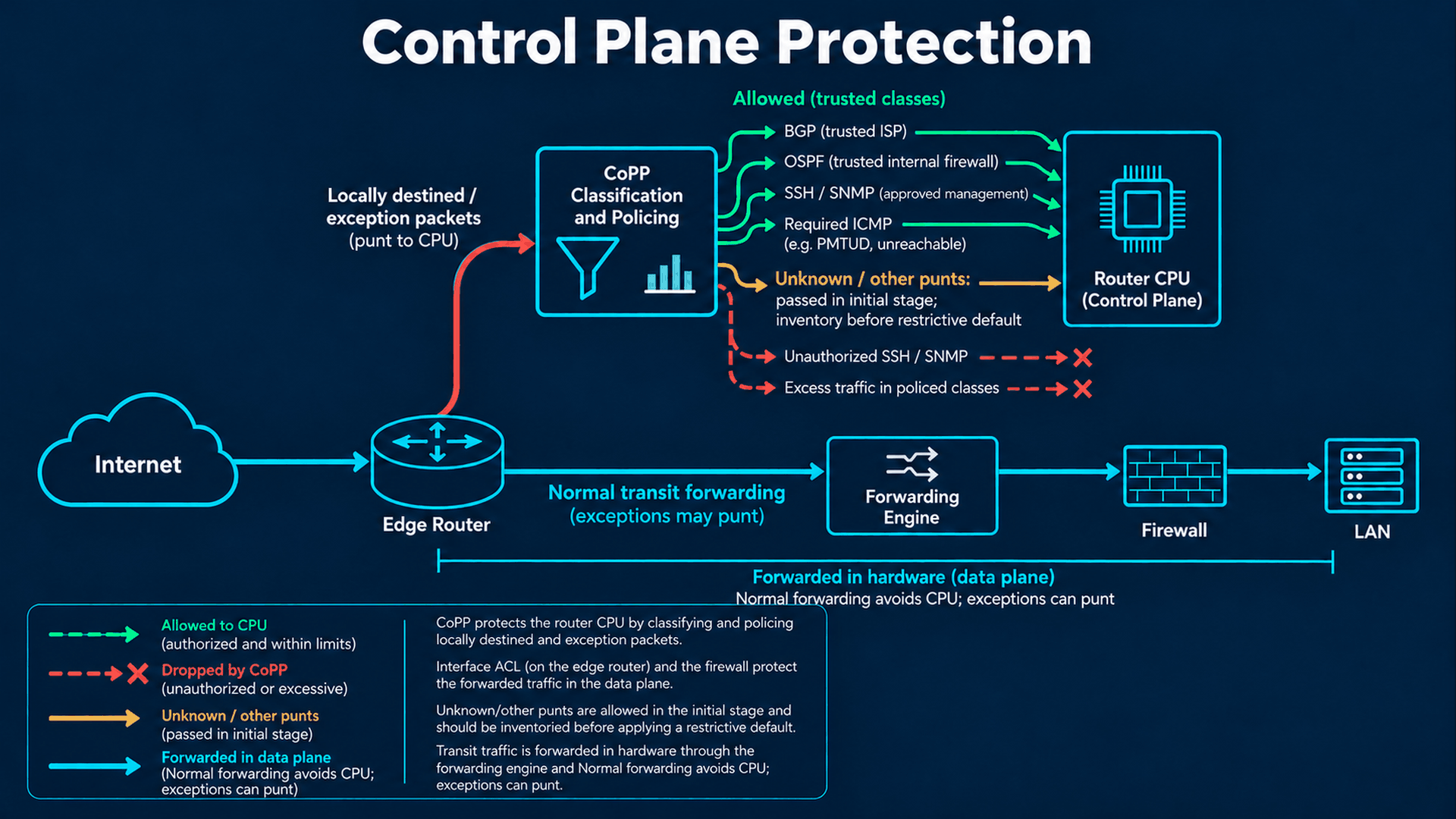
CEF/QFP normally forwards transit packets without an IOSd process handling each packet. Packets to a router address, routing hellos and some exceptions are punted toward CPU resources. TTL expiry, unresolved adjacency, IP options and features such as tunneling can change that path. A transit flood can still stress hardware or bandwidth even when CoPP counters stay flat. CoPP is a CPU admission policy, not a WAN capacity upgrade.
Measured CoPP classes, with a staged default class
Purpose: Protect known routing/management classes from excessive CPU-bound traffic.
Security Risk: A flood of punt packets can starve routing timers and administrative access.
Configuration: global configuration mode unless a submode or EXEC command is identified. Angle-bracket values are placeholders, never literal commands.
ip access-list extended CP-BGP
 permit tcp host 192.0.2.1 host 192.0.2.2 eq bgp
 permit tcp host 192.0.2.1 eq bgp host 192.0.2.2
exit
ip access-list extended CP-OSPF
 permit ospf host 198.51.100.2 host 198.51.100.1
 permit ospf host 198.51.100.2 host 224.0.0.5
 permit ospf host 198.51.100.2 host 224.0.0.6
exit
ip access-list extended CP-MGMT
 permit tcp host 10.99.0.10 host 10.99.0.1 eq 22
 permit udp host 10.99.0.30 host 10.99.0.1 eq snmp
 permit tcp host 10.99.0.20 eq tacacs host 10.99.0.1
 permit tcp host 10.99.0.21 eq tacacs host 10.99.0.1
 permit udp host 10.99.0.50 eq ntp host 10.99.0.1
exit
ip access-list extended CP-ICMP
 permit icmp any any unreachable
 permit icmp any any time-exceeded
 permit icmp any any echo-reply
 permit icmp host 192.0.2.1 host 192.0.2.2 echo
 permit icmp host 10.99.0.10 host 10.99.0.1 echo
exit
ip access-list extended CP-UNTRUSTED
 permit tcp any any eq 22
 permit tcp any any eq 23
 permit udp any any eq snmp
exit
class-map match-all CP-BGP
 match access-group name CP-BGP
exit
class-map match-all CP-OSPF
 match access-group name CP-OSPF
exit
class-map match-all CP-MGMT
 match access-group name CP-MGMT
exit
class-map match-all CP-ICMP
 match access-group name CP-ICMP
exit
class-map match-all CP-UNTRUSTED
 match access-group name CP-UNTRUSTED
exit
policy-map EDGE-COPP
 class CP-BGP
  police 2000000 62500 conform-action transmit exceed-action drop
 class CP-OSPF
  police 256000 8000 conform-action transmit exceed-action drop
 class CP-MGMT
  police 1000000 31250 conform-action transmit exceed-action drop
 class CP-ICMP
  police 128000 4000 conform-action transmit exceed-action drop
 class CP-UNTRUSTED
  police 8000 conform-action drop exceed-action drop
exit
control-plane
 service-policy input EDGE-COPP
exit
Explanation: MQC ACL permits classify packets; ACL denies here do not act as interface drops. Class order matters: trusted BGP, OSPF and management are evaluated before unauthorized service traffic. Both TCP directions are matched for BGP because either peer may initiate. OSPF includes the peer unicast address and 224.0.0.5/.6. class-default is deliberately unpoliced at the first stage so ARP, DHCP, IPsec, BFD or IPv6 are not silently broken. Inventory and classify those exceptions before designing a restrictive default.
Verification: show policy-map control-plane; show processes cpu sorted; show ip bgp summary; show ip ospf neighbor; fresh SSH and SNMP polls under a controlled burst. Read offered packets/bytes and conform/exceed deltas over a measured interval.
Expected Result: Legitimate classes conform during convergence; deliberate unauthorized SSH/SNMP attempts increment CP-UNTRUSTED drops. Unknown class traffic is visible but still passed in this stage.
Troubleshooting: Trusted-class drops with neighbor resets indicate insufficient rate/burst or wrong classification. Zero counters may indicate hardware pre-drops or a different punt path, not an inactive attack. Check platform punt statistics and the previous policy before changing limits.
Rollback: From console detach only the new service-policy input EDGE-COPP and immediately restore any previous policy. Record counters before detaching; removing it leaves CPU protection weaker until the corrected policy is restored.
Rate derivation, not a production measurement: suppose a lab replay measured peak BGP 1 Mbit/s, OSPF 128 kbit/s, management 500 kbit/s and required ICMP 64 kbit/s during convergence. The example doubles those peaks and budgets 250 ms of tokens: burst bytes = CIR × 0.25 / 8. That yields 62,500 / 8,000 / 31,250 / 4,000 bytes. These are hypothetical sizing inputs, not ISR throughput claims. Replace them with repeated normal, failure and reconvergence measurements, approved headroom and hardware-supported granularity. A full Internet table, many peers or bulk SCP needs a different budget. CP-UNTRUSTED has drop actions for both conform and exceed, so its 8 kbit/s value is not a permitted service rate.
First use an unattached candidate policy and compare match ACLs with actual packet paths. In a controlled staging policy, transmit exceeds temporarily if necessary to measure demand; this provides no excess-rate protection. Attach dropping actions only with console access and recovery tests. Existing platform policers may act before this MQC policy; show processes cpu sorted reports IOSd activity and is not sufficient alone for Linux/QFP health.
9. BGP peer, prefix and resource controls
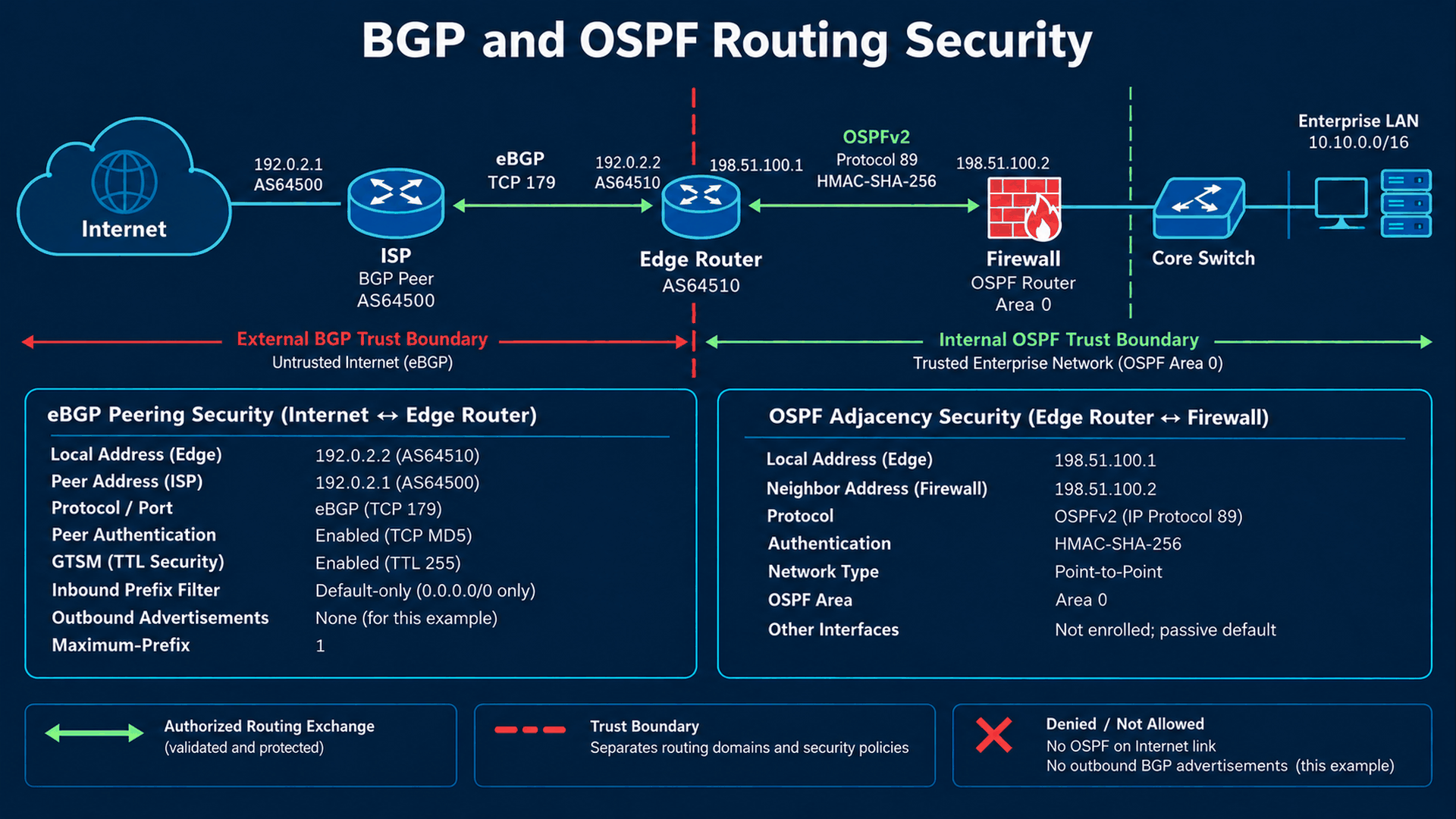
Default-only eBGP to one ISP
Purpose: Accept exactly the contracted default and advertise nothing from this non-originating edge.
Security Risk: Unexpected routes can redirect traffic, consume memory or leak internal prefixes.
Configuration: global configuration mode unless a submode or EXEC command is identified. Angle-bracket values are placeholders, never literal commands.
ip prefix-list ISP-DEFAULT seq 10 permit 0.0.0.0/0
ip prefix-list OUT-NONE seq 10 deny 0.0.0.0/0 le 32
ip as-path access-list 10 permit ^64500(_64500)*$
route-map ISP-IN permit 10
 match ip address prefix-list ISP-DEFAULT
 match as-path 10
exit
router bgp 64510
 bgp router-id 10.99.0.1
 bgp log-neighbor-changes
 no bgp default ipv4-unicast
 neighbor 192.0.2.1 remote-as 64500
 neighbor 192.0.2.1 description ISP-DEFAULT-ONLY
 neighbor 192.0.2.1 password 0 <BGP_SHARED_SECRET>
 neighbor 192.0.2.1 ttl-security hops 1
 address-family ipv4 unicast
  neighbor 192.0.2.1 activate
  neighbor 192.0.2.1 route-map ISP-IN in
  neighbor 192.0.2.1 prefix-list OUT-NONE out
  neighbor 192.0.2.1 maximum-prefix 1 90
 exit-address-family
exit
Explanation: The inbound prefix list permits only 0.0.0.0/0 because no le/ge is present. AS-PATH permits a direct ISP path with optional self-prepends; a default from another origin is denied. OUT-NONE explicitly denies everything and the process has no network or redistribution statements. maximum-prefix 1 is consistent with one accepted route; 90 is the warning percentage. Default-only filtering is not a substitute for session/update-rate protection.
Verification: show ip bgp summary; show ip bgp neighbors 192.0.2.1; show ip bgp 0.0.0.0; show ip bgp neighbors 192.0.2.1 advertised-routes; show ip route 0.0.0.0.
Expected Result: Established, one accepted prefix, default installed with next hop 192.0.2.1, zero advertised routes.
Troubleshooting: Idle/Active points to TCP reachability, remote AS, key or TTL mismatch. Established with zero prefixes suggests import policy or ISP advertisement. A prefix-limit shutdown needs investigation before clearing the peer. Prefer soft inbound route refresh for policy changes when negotiated; do not enable memory-heavy soft-reconfiguration inbound just for convenience.
Rollback: Restore the previous lists/route map and coordinate key/GTSM changes with the ISP. Keep a validated fallback route plan; do not remove filters wholesale or install an undocumented permanent static default to mask a failure.
Neighbor password uses TCP MD5 authentication in this example; it is neither route-origin validation nor payload encryption. Coordinate secret rotation and confirm the peer mechanism. GTSM expects high TTL from a nearby peer and is not used together with ebgp-multihop; a tunneled or multi-hop peer needs a reviewed hop budget. The WAN ACL permits TCP/179 only for the exact peer in both source/destination-port forms, and CoPP separately limits that trusted flow.
For a customer-owned public prefix, replace OUT-NONE with an exact allocation allowlist and originate only reviewed prefixes backed by the correct RIB route. Do not redistribute an entire IGP into BGP. For full-route import, build a maintained bogon/unallocated-prefix policy, reject your own and inappropriate more-specific routes, size maximum-prefix from the expected table plus justified growth, and monitor churn. Do not use the default-only maximum of one for a full table. Private/documentation exceptions belong only to this lab.
RPKI origin validation, where licensed and supported, checks a prefix and origin ASN against validated ROAs from a protected RTR cache. It does not prove the whole AS path or stop every route leak. Track Valid, Invalid and NotFound separately; review failure behavior before rejecting Invalid. A default-only edge usually delegates Internet origin-validation work to the provider. Verify the exact IOS XE platform/cache transport and route-map match syntax before adding this optional feature; no unsupported RPKI block is included in the baseline.
10. OSPF adjacency protection and routing attack checks
Authenticated point-to-point OSPF to the firewall
Purpose: Learn only the required internal routes over a controlled infrastructure link.
Security Risk: An untrusted OSPF neighbor can inject LSAs and influence reachability.
Configuration: global configuration mode unless a submode or EXEC command is identified. Angle-bracket values are placeholders, never literal commands.
key chain OSPF-KEYS
 key 1
  key-string <OSPF_SHARED_SECRET>
  cryptographic-algorithm hmac-sha-256
 exit
exit
router ospf 10
 router-id 10.99.0.1
 passive-interface default
 no passive-interface GigabitEthernet0/0/1
 default-information originate
exit
interface GigabitEthernet0/0/1
 ip ospf 10 area 0
 ip ospf network point-to-point
 ip ospf authentication key-chain OSPF-KEYS
exit
Explanation: HMAC-SHA-256 key-chain authentication is configured on the sole active interface. Configure the same area, network type, key ID, algorithm and key on the firewall. Passive-interface default suppresses adjacency elsewhere; passive does not mean a configured prefix cannot be advertised. Only Gi0/0/1 is enrolled. default-information originate advertises a default only when the RIB has one; always is intentionally absent. No BGP-to-OSPF redistribution is present.
Verification: show ip ospf interface GigabitEthernet0/0/1; show ip ospf neighbor; show ip ospf database; show ip route ospf. show key chain exposes key material: inspect privately.
Expected Result: Exactly the firewall neighbor is FULL; intended 10.10.0.0/16 and 10.20.0.0/24 routes appear; the firewall learns the conditional default.
Troubleshooting: No neighbor: protocol89/multicast, key validity or passive errors. EXSTART/EXCHANGE: MTU, duplicate router ID or network type. Do not reflexively enable mtu-ignore; repair actual MTU design.
Rollback: Restore the previous key chain/authentication on both peers in a coordinated window; an unmatched one-sided rollback breaks adjacency. Restore previous passive/interface enrollment if changed.
OSPF is a shared link-state database, not a BGP-style per-neighbor prefix import channel. An inbound distribute-list may prevent local RIB installation without stopping LSA flooding. Inter-area filtering at ABRs and external-route policy at redistribution boundaries have different scope. To constrain an untrusted partner to a few prefixes, choose a suitable routing boundary instead of claiming an ordinary OSPF prefix list sanitizes all LSAs.
Route injection and leaks are operationally detectable: baseline expected peers, origins, prefix counts and next hops; alert on an unexpected default, new adjacency or export count. Compare show ip bgp neighbors 192.0.2.1 advertised-routes and OSPF database with the change record before accepting a policy. An authenticated peer can still announce a bad route, and a correct route can still cross a misconfigured firewall policy. During incident response, isolate the offending advertisement with a narrow filter, preserve logs and coordinate with the peer before a disruptive reset.
| Protocol | Mechanisms | Operational limitation |
|---|---|---|
| BGP | Exact peers, MD5, GTSM, prefix/AS path policies, maximum-prefix, optional RPKI | Authentication is not origin validation; filters must match provider contract; GTSM requires coordinated topology |
| OSPFv2 | HMAC key chain, passive default, dedicated link, controlled redistribution | Shared LSDB; local RIB filtering does not necessarily stop flooding; keys/MTU/area must agree |
11. WAN hardening and infrastructure ACLs
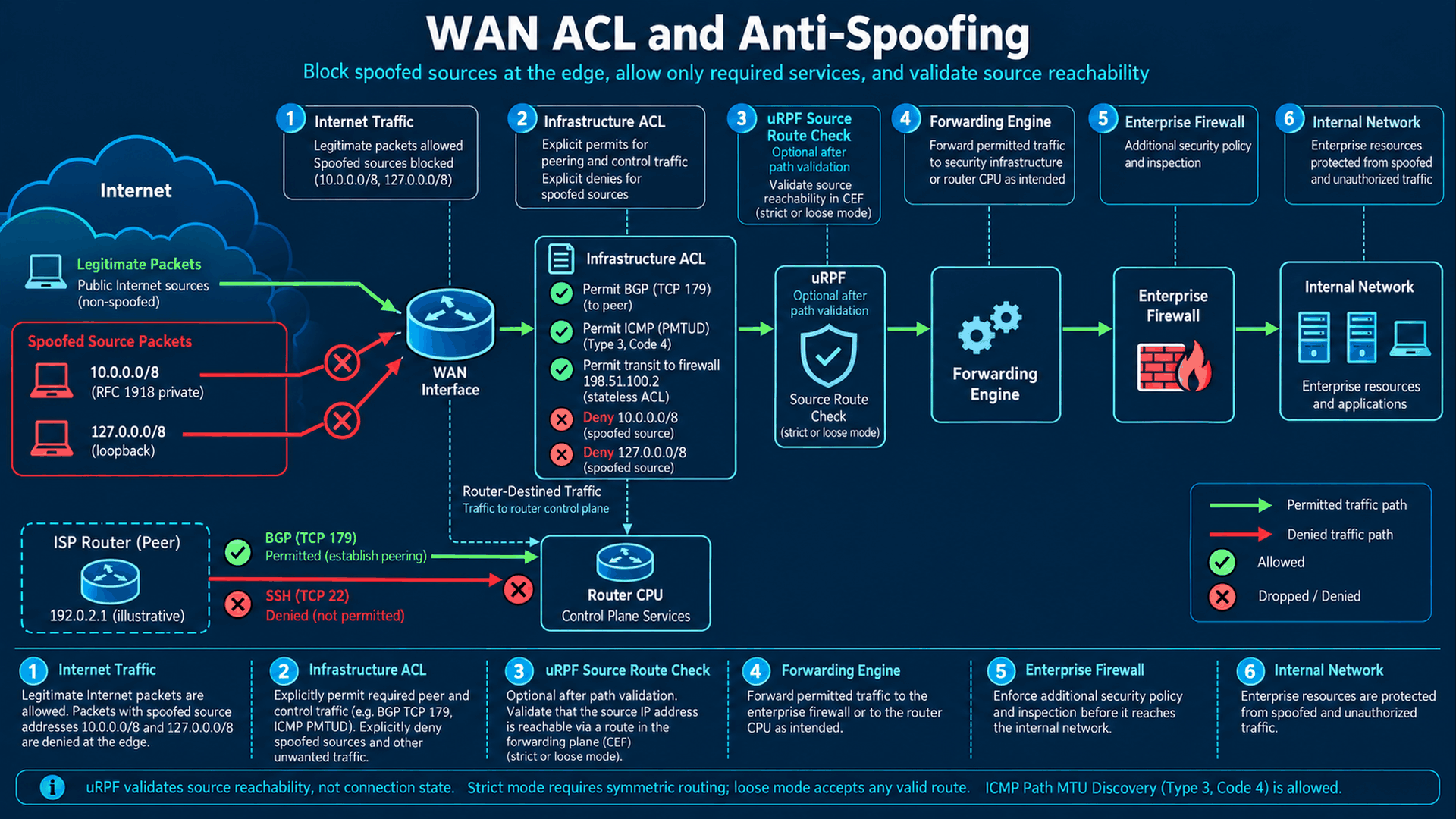
Routed WAN, firewall transit and management interfaces
Purpose: Make interface roles explicit and disable unnecessary IPv4 assistance on point-to-point links.
Security Risk: Redirects, directed broadcasts and proxy ARP can enable traffic manipulation or unintended reachability.
Configuration: global configuration mode unless a submode or EXEC command is identified. Angle-bracket values are placeholders, never literal commands.
interface GigabitEthernet0/0/0
 description ISP-WAN
 ip address 192.0.2.2 255.255.255.252
 no ip redirects
 no ip proxy-arp
 no ip directed-broadcast
 no shutdown
exit
interface GigabitEthernet0/0/1
 description FIREWALL-OUTSIDE-OSPF
 ip address 198.51.100.1 255.255.255.252
 no ip redirects
 no ip proxy-arp
 no ip directed-broadcast
 no shutdown
exit
interface GigabitEthernet0/0/2
 description ISOLATED-MANAGEMENT
 ip address 10.99.0.1 255.255.255.0
 no ip redirects
 no ip proxy-arp
 no ip directed-broadcast
 no shutdown
exit
Explanation: no ip redirects stops sending redirects, not all ICMP. no ip directed-broadcast prevents subnet broadcast forwarding. no ip proxy-arp prevents replying on behalf of other hosts; confirm the ISP/firewall does not depend on it. Keep ICMP unreachables for PMTUD. MTU is intentionally not forced; inherit the validated carrier design.
Verification: show ip interface for each interface; show interfaces; ping ISP using source 192.0.2.2; verify firewall ARP and management access.
Expected Result: Three up/up routed ports, correct connected routes and no redirects/proxy ARP; packets requiring fragmentation receive appropriate errors.
Troubleshooting: Reachability loss after no ip proxy-arp often exposes an incorrect mask or host gateway. Fix that design rather than enabling proxy ARP everywhere.
Rollback: Restore the recorded per-interface setting if a confirmed dependency requires it; do not change addressing remotely without console and peer coordination.
A standard ACL matches IPv4 sources. An extended ACL can match protocol, addresses and ports. Infrastructure ACL is a design role: allow necessary traffic to router/infrastructure addresses and deny other direct access. Transit ACL regulates forwarded traffic. A management ACL is attached to a service or line. These labels do not describe separate magical ACL engines; direction, interface, address family and packet-processing order decide what is enforced.
WAN ingress policy for this firewall-owned NAT scenario
Purpose: Drop obvious spoofed sources and unsolicited router access while preserving firewall transit.
Security Risk: Source spoofing hides attacks; an overbroad permit exposes router services, while an overbroad deny breaks BGP and PMTUD.
Configuration: global configuration mode unless a submode or EXEC command is identified. Angle-bracket values are placeholders, never literal commands.
ip access-list extended WAN-IN
 10 deny ip 10.0.0.0 0.255.255.255 any
 20 deny ip 172.16.0.0 0.15.255.255 any
 30 deny ip 192.168.0.0 0.0.255.255 any
 40 deny ip 127.0.0.0 0.255.255.255 any
 50 deny ip 169.254.0.0 0.0.255.255 any
 60 deny ip 0.0.0.0 0.255.255.255 any
 70 deny ip 224.0.0.0 15.255.255.255 any
 80 deny ip 240.0.0.0 15.255.255.255 any
 90 deny ip host 192.0.2.2 any
 100 deny ip 198.51.100.0 0.0.0.3 any
 110 permit tcp host 192.0.2.1 host 192.0.2.2 eq bgp
 120 permit tcp host 192.0.2.1 eq bgp host 192.0.2.2
 130 permit icmp any host 192.0.2.2 unreachable
 140 permit icmp any host 192.0.2.2 time-exceeded
 150 permit icmp any host 192.0.2.2 echo-reply
 160 permit icmp host 192.0.2.1 host 192.0.2.2 echo
 170 deny ip any host 192.0.2.2 log
 180 deny ip any host 198.51.100.1
 190 deny ip any 10.0.0.0 0.255.255.255
 200 deny ip any 172.16.0.0 0.15.255.255
 210 deny ip any 192.168.0.0 0.0.255.255
 220 permit ip any host 198.51.100.2
 230 deny ip any any
exit
interface GigabitEthernet0/0/0
 ip access-group WAN-IN in
exit
Explanation: Source exclusions come first, then exact BGP and required ICMP to the WAN address, then a deny to that router address. Other router/local and private destinations are denied before explicit transit to the firewall PAT address. The final permit for 198.51.100.2 permits all IP toward the downstream firewall; that firewall is responsible for session and public-service decisions. No established keyword is presented as stateful inspection.
Verification: show ip interface GigabitEthernet0/0/0; show access-lists WAN-IN; verify BGP, large HTTPS downloads, DNS and firewall session return traffic; run controlled external SSH and spoofed-source tests in an isolated lab.
Expected Result: Exact ISP session survives, router SSH is denied, PMTUD works and legitimate return packets reach the firewall.
Troubleshooting: Compare hit-count deltas at the first matching ACE. If the firewall sees no packets, inspect the edge ACL and ISP route; if it sees packets but no session matches, troubleshoot firewall/NAT separately. ACL logging is sampled/aggregated, can consume CPU and is not a full packet capture.
Rollback: Via console replace the attachment with the previous reviewed WAN ACL; use no ip access-group WAN-IN in only as a short supervised emergency step. Restore protection before leaving the change window.
This source list is a baseline, not a complete continuously maintained bogon feed. In a real public-address deployment, add applicable special-use/unallocated ranges and the organization’s own externally impossible source prefixes after validating ISP services. Do not deny documentation ranges in this lab. VPN endpoints would need peer-scoped IKE UDP/500, NAT-T UDP/4500, ESP or other tunnel permissions before router-address denies; those are absent because this topology has no VPN. Fragment policies require separate analysis because noninitial fragments lack transport ports; do not copy a blanket fragment deny without testing application behavior.
PMTUD depends on IPv4 ICMP destination-unreachable/fragmentation-needed reaching the sender. ICMP time-exceeded supports diagnostics. Denying all ICMP can create a connection that handshakes but stalls on large payloads. Router-originated probes, forwarding-generated errors and incoming transit errors are different paths; validate all with the intended WAN MTU and tunnel overhead. The ACL allows transit ICMP to the firewall address as part of its IP permit; CoPP applies only when a packet actually goes to the CPU.
Protect management from the downstream transit
Purpose: Keep the dedicated management network unreachable from the firewall transit and prevent forged management sources there.
Security Risk: A physically separate management switch alone does not prevent global-table routing into its subnet.
Configuration: global configuration mode unless a submode or EXEC command is identified. Angle-bracket values are placeholders, never literal commands.
ip access-list extended LAN-INFRA
 deny ip 10.99.0.0 0.0.0.255 any
 deny ip host 192.0.2.2 any
 deny ip host 198.51.100.1 any
 deny ip any 10.99.0.0 0.0.0.255
 permit ospf host 198.51.100.2 host 198.51.100.1
 permit ospf host 198.51.100.2 host 224.0.0.5
 permit ospf host 198.51.100.2 host 224.0.0.6
 permit icmp host 198.51.100.2 host 198.51.100.1
 deny ip any host 198.51.100.1
 deny ip any host 192.0.2.2
 permit ip any any
exit
interface GigabitEthernet0/0/1
 ip access-group LAN-INFRA in
exit
Explanation: This ingress iACL blocks management sources and destinations on Gi0/0/1, permits OSPF only from the firewall, and prevents direct administration of other router addresses from that link. Ordinary firewall forwarding remains permitted; the firewall must still reject spoofed users/DMZ sources and enforce its own zone policy. No IP packet ACL here claims to filter ARP.
Verification: show access-lists LAN-INFRA; show ip ospf neighbor; attempt access to 10.99.0.1 from an internal test host and compare deny counters; retest Internet forwarding.
Expected Result: OSPF and firewall transit work while downstream traffic cannot route into management.
Troubleshooting: A legitimate automation system reached through the firewall will be blocked; move it to the approved management path or redesign a narrowly scoped exception after review.
Rollback: Restore the previous Gi0/0/1 ACL attachment from console; do not leave the management path reachable as the permanent workaround.
12. uRPF and asymmetric routing
| Mode | Source test | Suitable use | Failure mode |
|---|---|---|---|
| Strict: reachable-via rx | Best reverse CEF path must use ingress; supported equal-cost behavior is platform dependent | Symmetric single-homed access or a tightly controlled downstream edge | Valid asymmetric packets can fail |
| Loose: reachable-via any | A usable source route exists through any interface | Multihoming/asymmetry with a meaningful source-routing table | Spoofed sources with valid routes still pass |
| allow-default modifier | Allows a default route to satisfy the check | Reviewed default-only design | Loose + default often accepts almost every routable source |
Optional source validation after path testing
Purpose: Reject sources inconsistent with the routing design.
Security Risk: Spoofed addresses defeat simplistic source attribution.
Configuration: global configuration mode unless a submode or EXEC command is identified. Angle-bracket values are placeholders, never literal commands.
! Optional; excluded from the complete baseline until symmetry is proven
interface GigabitEthernet0/0/0
 ip verify unicast source reachable-via rx allow-default
exit
! Alternative for a suitable table: ip verify unicast source reachable-via any
! Do not apply strict and loose modes simultaneously.
Explanation: uRPF performs a CEF reverse lookup; it is not stateful and does not authenticate a host. This separate strict example allows the default because the WAN receives only a default. Validate discard-route and equal-cost behavior on the image. Loose any without allow-default on this default-only router would reject ordinary Internet sources with no specific route. Loose any allow-default provides little extra protection; explicit source ACLs remain important.
Verification: show ip cef <TEST_SOURCE>; show ip interface GigabitEthernet0/0/0; controlled packets from both uplinks in a multihomed lab; observe platform-supported RPF drop counters.
Expected Result: Valid symmetric sources pass and a source whose reverse route points elsewhere fails.
Troubleshooting: A policy-based route, second ISP, tunnel or temporary reconvergence may invalidate strict assumptions. Examine the reverse CEF path, not only a ping.
Rollback: Remove the exact ip verify unicast source reachable-via rx allow-default setting from console or restore the previously tested mode; retain the WAN anti-spoofing ACL.
13. NAT exposure and packet-processing order
Static NAT provides a stable address mapping, dynamic NAT draws from a pool, and PAT multiplexes sessions by transport identifiers. Port forwarding creates a deliberate public service entry. None defines the intended security policy by itself. An unexpected static mapping can expose a service even when users think address translation hides it. Document every mapping, owner, allowed sources and expiration; a firewall or reviewed transit policy must still decide whether the session is allowed.
Alternative edge PAT design, not the primary topology
Purpose: Explain router PAT only for an alternative private downstream transit.
Security Risk: Copying edge PAT into the firewall-PAT scenario creates conflicting translation and ACL assumptions.
Configuration: global configuration mode unless a submode or EXEC command is identified. Angle-bracket values are placeholders, never literal commands.
! Alternative design only, incomplete without its companion policy redesign
ip access-list standard NAT-SOURCES
 permit 10.10.0.0 0.0.255.255
exit
interface GigabitEthernet0/0/1
 ip address 10.255.0.1 255.255.255.252
 ip nat inside
exit
interface GigabitEthernet0/0/0
 ip nat outside
exit
ip nat inside source list NAT-SOURCES interface GigabitEthernet0/0/0 overload
Explanation: This optional block changes the downstream to 10.255.0.1/30 and translates only 10.10.0.0/16 through the WAN address. NAT-SOURCES selects translation candidates; it is not a packet-filter permit policy. It requires a redesigned WAN transit ACL, stateful firewall/ZBF policy, OSPF addressing/key changes and routes. Do not combine it with the complete configuration. For ordinary inside/outside IPv4 NAT, an inbound outside interface ACL generally sees the public destination before translation; verify actual feature ordering for the selected image.
Verification: show ip nat translations; show ip nat statistics; show ip route; compare pre/post-NAT packet captures with firewall session logs and ACL counters.
Expected Result: Only intended sources get dynamic PAT; no public port forward is created.
Troubleshooting: No translation: source-selection, inside/outside or route error. Translation exists but no reply: ISP path, outside ACL, session policy or upstream route. Avoid clearing every translation on a busy router.
Rollback: Remove the added overload rule and interface NAT roles in a planned window; restore the previous addresses/routing/ACL design. Existing sessions may reset; preserve the original firewall NAT deployment.
14. IPv6 requires an independent security design
Optional dual-stack WAN and management ACLs
Purpose: Prevent unreviewed IPv6 from bypassing an otherwise hardened IPv4 perimeter.
Security Risk: IPv4 ACLs, source checks and CoPP match lists do not automatically protect IPv6 listeners or peers.
Configuration: global configuration mode unless a submode or EXEC command is identified. Angle-bracket values are placeholders, never literal commands.
! Optional illustration; do not enable before IPv6 CoPP/routing/firewall review
ipv6 access-list V6-MGMT
 permit ipv6 host 2001:db8:99::10 any
 deny ipv6 any any
exit
ipv6 access-list V6-WAN-IN
 permit icmp any any nd-ns
 permit icmp any any nd-na
 permit icmp any any destination-unreachable
 permit icmp any any packet-too-big
 permit icmp any any time-exceeded
 permit icmp any any parameter-problem
 permit tcp host 2001:db8:0::1 host 2001:db8:0::2 eq bgp
 permit tcp host 2001:db8:0::1 eq bgp host 2001:db8:0::2
 deny ipv6 any host 2001:db8:0::2
 deny ipv6 any host 2001:db8:100::1
 deny ipv6 any 2001:db8:99::/64
 permit ipv6 any host 2001:db8:100::2
 deny ipv6 any any
exit
interface GigabitEthernet0/0/0
 ipv6 traffic-filter V6-WAN-IN in
exit
line vty 0 4
 ipv6 access-class V6-MGMT in
exit
line vty 5 15
 ipv6 access-class V6-MGMT in
exit
Explanation: Documentation-only 2001:db8::/32 examples use WAN ::1 ISP/::2 edge, firewall transit 2001:db8:100::/64 and management 2001:db8:99::/64. The ACL explicitly permits required ND and ICMPv6 errors before router/service denies. Hop-limit 255 and on-link source rules improve ND filtering where supported; RA/SLAAC dependencies differ from a static routed WAN. ipv6 traffic-filter is an interface control and ipv6 access-class restricts VTY. This is an optional design sketch, not the complete IPv6 peer/firewall configuration.
Verification: show ipv6 interface; show ipv6 neighbors; show ipv6 route; show ipv6 access-list; permitted/denied IPv6 SSH tests and large-payload PMTUD tests.
Expected Result: ND, packet-too-big and contracted IPv6 traffic work; Internet SSH cannot bypass IPv4 restrictions.
Troubleshooting: Missing packet-too-big causes IPv6 black holes; missing ND breaks even a correct static route. An IPv6 packet landing in unpoliced CoPP class-default remains a CPU risk; add tested IPv6 MQC classification/platform protection before dual-stack activation.
Rollback: Restore previous IPv6 traffic-filter/access-class and routes. If IPv6 was introduced only by this change, remove its interface activation and peer/address-family changes together after checking management dependencies.
Before enabling IPv6, audit all global and link-local listeners, tunnel interfaces, router advertisements, default routes and firewall rules. Do not remove ICMPv6 broadly: neighbor discovery and packet-too-big are fundamental. BGP IPv6 needs its own address-family import/export policy and maximum-prefix; OSPFv3 authentication differs from OSPFv2 and must use a supported authentication-trailer/IPsec design. uRPF has separate IPv6 syntax and the same asymmetry risk. If IPv6 is intentionally unused, verify it is not enabled on interfaces or tunnels rather than assuming no global IPv6 routing means no link-local exposure.
15. Choose the control that matches the packet path
| Mechanism | Protection scope / strength | Limitation / typical use |
|---|---|---|
| Interface ACL | Stateless ingress/egress matching at an interface | Ordering and NAT visibility matter; perimeter/transit restrictions |
| Infrastructure ACL | Explicit direct-infrastructure permits and denies | Does not measure CPU load or track sessions; protect router addresses |
| CoPP | Classified CPU-bound traffic policing | Does not protect link capacity; bad budgets break protocols |
| Management Plane Protection | Supported management protocol ingress selection | Platform dependent; does not authenticate users; complement AAA |
| Zone-Based Firewall | Supported zone/session inspection and explicit zone-pair policy | Feature/licensing/resource and self-zone policy review; router firewall role when designed |
| uRPF | Source-route plausibility in CEF | Asymmetry/default limitations; source anti-spoofing, not identity or state |
A ZBF migration can alter traffic between zones and the self zone. Build zone-pair policies for all required directions before assigning interfaces to zones; verify VPN and management behavior on the exact platform. This article keeps the dedicated firewall as the stateful boundary and does not silently add a competing ZBF configuration.
16. Logging, time, metrics and flow visibility
Central syslog, NTP and configuration audit
Purpose: Correlate access, configuration and routing events with reliable time.
Security Risk: A compromised device can erase local logs; inaccurate time undermines incident reconstruction.
Configuration: global configuration mode unless a submode or EXEC command is identified. Angle-bracket values are placeholders, never literal commands.
service timestamps debug datetime msec show-timezone
service timestamps log datetime msec show-timezone
clock timezone UTC 0 0
logging buffered 65536 informational
no logging console
logging source-interface GigabitEthernet0/0/2
logging host 10.99.0.40 transport udp port 514
logging trap informational
login on-failure log
login on-success log
ip access-list standard NTP-PEERS
 permit host 10.99.0.50
exit
ip access-list standard NTP-NOCLIENTS
 deny any
exit
ntp source GigabitEthernet0/0/2
ntp server 10.99.0.50 prefer
ntp access-group peer NTP-PEERS
ntp access-group serve-only NTP-NOCLIENTS
archive
 log config
  logging enable
  logging size 200
  notify syslog contenttype plaintext
  hidekeys
 exit
exit
Explanation: Syslog uses the management source and UDP/514 over the isolated segment in this baseline; UDP delivery and confidentiality are not guaranteed. Use supported secure transport or an IPsec-protected path when required. Informational severity includes levels 0 through 6. archive log config records CLI changes and hidekeys reduces secret disclosure, but does not make every log harmless. NTP server access is restricted with peer/serve-only lists so the edge is not a public time service.
Verification: show logging; show archive log config all; show ntp associations; show ntp status. Generate one harmless approved description change and verify collector source, timestamp and user.
Expected Result: Logs arrive from 10.99.0.1, NTP synchronizes to .50 and configuration changes are attributable.
Troubleshooting: No syslog: examine source/route, collector UDP listener and severity filter. NTP unsynchronized: inspect reach register, offset, stratum and server ACL, not just UDP reachability. If adopting authenticated NTP, verify matching supported algorithms and keys; legacy MD5 examples are not modern cryptographic assurance.
Rollback: Restore prior logging/NTP targets and ACLs after retaining evidence. Disable only the new archive notification if it creates unacceptable volume; keep external audit collection.
NTP in the complete baseline is source-restricted but unauthenticated; accept that only if the management-network threat model permits it. Otherwise deploy a supported authenticated time design and coordinate it with the server. Do not assume NTS support from a desktop NTP client applies to IOS XE. For time-sensitive key rotation, validate both peers’ clocks before using OSPF key lifetimes.
Optional Flexible NetFlow export
Purpose: Observe conversation patterns and sudden changes in WAN traffic.
Security Risk: ACL counters cannot explain every source/destination conversation or scanning pattern.
Configuration: global configuration mode unless a submode or EXEC command is identified. Angle-bracket values are placeholders, never literal commands.
flow record EDGE-RECORD
 match ipv4 source address
 match ipv4 destination address
 match ipv4 protocol
 match transport source-port
 match transport destination-port
 match interface input
 collect counter bytes long
 collect counter packets long
exit
flow exporter EDGE-EXPORT
 destination 10.99.0.30
 source GigabitEthernet0/0/2
 transport udp 2055
 export-protocol netflow-v9
exit
flow monitor EDGE-FLOW
 record EDGE-RECORD
 exporter EDGE-EXPORT
 cache timeout active 60
exit
interface GigabitEthernet0/0/0
 ip flow monitor EDGE-FLOW input
exit
Explanation: The record captures IPv4 flow keys and counters; the exporter sends NetFlow v9 to the management collector. The monitor attaches only to WAN input in this example. NetFlow is telemetry, not enforcement. Hardware/feature support, cache sizing, sampling and exporter reachability must be checked on the actual ISR/ASR/C8000. TCP flag collection improves analysis where supported.
Verification: show flow monitor EDGE-FLOW cache; show flow exporter EDGE-EXPORT statistics; compare decoded records at the collector with a controlled transfer.
Expected Result: Flow records arrive with source .1 and meaningful input-interface/byte counters.
Troubleshooting: Empty cache can mean wrong direction, unsupported record fields or no matching traffic; growing exporter failures suggest route/listener issues. Benchmark added resource use before enabling both directions.
Rollback: Detach ip flow monitor EDGE-FLOW input from WAN first; remove unused monitor/exporter/record only afterward.
Zabbix polls SNMPv3 for CPU, memory, interface utilization/errors/discards and device availability. Use validated Cisco MIB OIDs/templates for the actual PID; do not guess OIDs for CoPP or QFP. Collect unavailable counters with approved CLI/API automation and least-privilege credentials. Grafana can read Zabbix through a compatible Zabbix data-source plugin, or display metrics collected by an SNMP exporter in Prometheus. A syslog pipeline can feed Loki through a supported receiver/agent, while NetFlow needs its own decoder/collector and storage before visualization. Grafana is not the SNMP or NetFlow collector itself.
| Signal | Actionable alert |
|---|---|
| BGP / OSPF | Unexpected peer/state change, missing default, prefix-count/export deviation; correlate with maintenance |
| CPU / memory | Sustained deviation from baseline, memory depletion or QFP pressure; include busy process/punt evidence |
| ACL / CoPP | Sharp deny growth, drops in a trusted class or unexplained default-class traffic; use counter deltas |
| Interface | Link down, rising CRC/errors/discards or saturation; distinguish physical from policy faults |
| AAA / configuration | Repeated failed login, unexpected successful admin login, AAA outage or unapproved config change |
| Telemetry / time | Missing polls/log heartbeat, exporter failure or NTP loss; detect monitoring blind spots |
17. Backup protection and production rollback
Verified archives and encrypted external backups
Purpose: Retain distinct running/startup baselines and a recoverable external copy.
Security Risk: A local-only copy is lost with the router; a readable external configuration can reveal protocol keys and topology.
Configuration: global configuration mode unless a submode or EXEC command is identified. Angle-bracket values are placeholders, never literal commands.
! EXEC, before any hardening change
dir bootflash:
copy running-config bootflash:pre-hardening-running.cfg
copy startup-config bootflash:pre-hardening-startup.cfg
copy bootflash:pre-hardening-running.cfg scp://backupuser@10.99.0.60/edge/pre-hardening-running.cfg
! Global configuration, after validating space and repository access
archive
 path bootflash:edge-archive
 maximum 10
 write-memory
exit
! EXEC: create an archive now
archive config
show archive
Explanation: EXEC copies preserve pre-change files without overwriting startup. Verify bootflash filesystem and free space first. The archive path is local and bounded; external SCP uses a management repository whose SSH identity is verified. Repository encryption, access control, immutable retention and restore tests remain necessary. Enabling ip scp server enable is not required simply to push a client copy and unnecessarily exposes a server.
Verification: dir bootflash:; show archive; verify filesystem-supported checksum and external transfer checksum/byte count; perform a private restore in a spare lab device with the matching image.
Expected Result: Two distinguishable baselines and an externally retrievable backup with documented provenance and access policy.
Troubleshooting: SCP can fail on route/source or host-key/algorithm mismatch. Do not embed repository passwords in URLs or logs. An archive that exists but cannot be parsed is not a verified rollback file.
Rollback: Restore previous archive path/retention if storage pressure appears; preserve known-good baselines and external backups before deleting local files.
Configuration replace with a tested revert timer
Purpose: Recover the intended whole configuration rather than merge an incomplete inverse.
Security Risk: copy old-file running-config merges; new ACL attachments or AAA commands may remain.
Configuration: global configuration mode unless a submode or EXEC command is identified. Angle-bracket values are placeholders, never literal commands.
! EXEC in a controlled replacement transaction
configure replace bootflash:pre-hardening-running.cfg time 5
! Verify new SSH, AAA, routing, WAN traffic and telemetry before confirmation
configure confirm
! Save only after the change is accepted
copy running-config startup-config
Explanation: Use a complete saved configuration with configure replace. The example time 5 requires configure confirm within five minutes or reverts to the configuration present before replacement. That timer protects the replacement transaction, not every arbitrary edit made earlier. A previously tested configuration-revert workflow may be appropriate for interactive changes; verify exact image behavior. Configuration replacement does not downgrade IOS XE, reconstruct lost keys or guarantee all dynamic state/session continuity.
Verification: In a console-controlled lab, replace with a harmless candidate, let the timer expire, and confirm the old state returns. Repeat and issue configure confirm after acceptance; examine show archive and full running-config differences.
Expected Result: Both timed reversion and explicit confirmation work on this image before production use.
Troubleshooting: Rejected or partial commands, missing files, storage pressure or unsupported replace semantics can undermine rollback. Do not use force merely to bypass uncertainty. A reboot fallback requires an explicitly verified startup file and boot environment and interrupts service.
Rollback: If a candidate fails, let the tested timer revert or restore the known-good file from console; inspect the actual resulting configuration and routes before saving.
Production sequence: schedule a staffed window; verify console reachability and external backup; apply identity/AAA, then service and management restrictions, then routing policy, then WAN ACL, then measured CoPP. Test a fresh session and traffic after each stage. Keep exact inverse commands or a tested replacement file available. Save only accepted state, then watch neighbor stability, CPU, drop deltas and telemetry through a representative traffic cycle. Do not overwrite startup with a failed candidate. no service password-recovery is deliberately absent: on some platforms recovery then requires configuration erasure and a tested physical-security procedure.
18. Complete reference deployment configuration
This configuration joins the reviewed baseline blocks for the single-ISP/firewall-PAT scenario. Gi0/0/1 is the LAN-facing firewall transit, not an unprotected user LAN. The firewall needs matching OSPF authentication, the two internal prefixes, conditional default consumption and PAT/session rules. The ISP needs the routed firewall outside block, matching BGP authentication/GTSM and a default advertisement. Replace every placeholder offline; verify parser acceptance against the exact maintenance image before a supervised lab test. RSA key generation is initial provisioning only. No numeric example is a hardware performance guarantee.
Reference template and acceptance contract
Purpose: Provide one coherent configuration with no edge NAT, no IPv6 activation and no conflicting routing defaults.
Security Risk: A mechanically pasted config can change interfaces, keys and live peer sessions.
Configuration: global configuration mode unless a submode or EXEC command is identified. Angle-bracket values are placeholders, never literal commands.
! ISR4331 autonomous IOS XE 17.12.6 - REVIEWED TEMPLATE, NOT HARDWARE TESTED
! Replace all angle-bracket secrets; size CoPP from measurements.
! Initial provisioning, global configuration mode
hostname EDGE-ISR4331
ip domain name example.net
username breakglass privilege 15 algorithm-type scrypt secret <LOCAL_ADMIN_SECRET>
enable algorithm-type scrypt secret <ENABLE_SECRET>
!
interface GigabitEthernet0/0/0
 description ISP-WAN
 ip address 192.0.2.2 255.255.255.252
 no ip redirects
 no ip proxy-arp
 no ip directed-broadcast
 no shutdown
exit
interface GigabitEthernet0/0/1
 description FIREWALL-OUTSIDE-OSPF
 ip address 198.51.100.1 255.255.255.252
 no ip redirects
 no ip proxy-arp
 no ip directed-broadcast
 no shutdown
exit
interface GigabitEthernet0/0/2
 description ISOLATED-MANAGEMENT
 ip address 10.99.0.1 255.255.255.0
 no ip redirects
 no ip proxy-arp
 no ip directed-broadcast
 no shutdown
exit
!
aaa new-model
aaa authentication login default local
aaa authorization exec default local
aaa authentication login LOCAL local
aaa authorization exec LOCAL local
line console 0
 login authentication LOCAL
 exec-timeout 10 0
 logging synchronous
exit
line vty 0 4
 login authentication LOCAL
 authorization exec LOCAL
exit
line vty 5 15
 login authentication LOCAL
 authorization exec LOCAL
exit
!
tacacs server TAC1
 address ipv4 10.99.0.20
 key 0 <TACACS_SHARED_SECRET_1>
 timeout 5
exit
tacacs server TAC2
 address ipv4 10.99.0.21
 key 0 <TACACS_SHARED_SECRET_2>
 timeout 5
exit
aaa group server tacacs+ EDGE-TACACS
 server name TAC1
 server name TAC2
exit
ip tacacs source-interface GigabitEthernet0/0/2
aaa authentication login CENTRAL group EDGE-TACACS local
aaa authorization exec CENTRAL group EDGE-TACACS local
aaa accounting exec CENTRAL start-stop group EDGE-TACACS
aaa accounting commands 15 CENTRAL start-stop group EDGE-TACACS
line vty 0 4
 login authentication CENTRAL
 authorization exec CENTRAL
 accounting exec CENTRAL
 accounting commands 15 CENTRAL
exit
line vty 5 15
 login authentication CENTRAL
 authorization exec CENTRAL
 accounting exec CENTRAL
 accounting commands 15 CENTRAL
exit
!
! Generate only on initial provisioning; global configuration mode
crypto key generate rsa general-keys modulus 3072
ip ssh version 2
ip ssh time-out 60
ip ssh authentication-retries 3
ip ssh server algorithm encryption aes256-ctr aes128-ctr
ip access-list standard MGMT-SSH
 permit host 10.99.0.10
 deny any log
exit
line vty 0 4
 transport input ssh
 exec-timeout 10 0
 access-class MGMT-SSH in
exit
line vty 5 15
 transport input ssh
 exec-timeout 10 0
 access-class MGMT-SSH in
exit
!
no ip http server
no ip http secure-server
no ip source-route
interface GigabitEthernet0/0/0
 no cdp enable
 no lldp transmit
 no lldp receive
exit
!
ip access-list standard MGMT-SNMP
 permit host 10.99.0.30
 deny any
exit
snmp-server view EDGE-READ mib-2 included
snmp-server view EDGE-READ 1.3.6.1.4.1.9 included
snmp-server group NMS v3 priv read EDGE-READ access MGMT-SNMP
snmp-server user zabbix NMS v3 auth sha <SNMP_AUTH_SECRET> priv aes 128 <SNMP_PRIV_SECRET>
!
ip prefix-list ISP-DEFAULT seq 10 permit 0.0.0.0/0
ip prefix-list OUT-NONE seq 10 deny 0.0.0.0/0 le 32
ip as-path access-list 10 permit ^64500(_64500)*$
route-map ISP-IN permit 10
 match ip address prefix-list ISP-DEFAULT
 match as-path 10
exit
router bgp 64510
 bgp router-id 10.99.0.1
 bgp log-neighbor-changes
 no bgp default ipv4-unicast
 neighbor 192.0.2.1 remote-as 64500
 neighbor 192.0.2.1 description ISP-DEFAULT-ONLY
 neighbor 192.0.2.1 password 0 <BGP_SHARED_SECRET>
 neighbor 192.0.2.1 ttl-security hops 1
 address-family ipv4 unicast
  neighbor 192.0.2.1 activate
  neighbor 192.0.2.1 route-map ISP-IN in
  neighbor 192.0.2.1 prefix-list OUT-NONE out
  neighbor 192.0.2.1 maximum-prefix 1 90
 exit-address-family
exit
!
key chain OSPF-KEYS
 key 1
  key-string <OSPF_SHARED_SECRET>
  cryptographic-algorithm hmac-sha-256
 exit
exit
router ospf 10
 router-id 10.99.0.1
 passive-interface default
 no passive-interface GigabitEthernet0/0/1
 default-information originate
exit
interface GigabitEthernet0/0/1
 ip ospf 10 area 0
 ip ospf network point-to-point
 ip ospf authentication key-chain OSPF-KEYS
exit
!
ip access-list extended WAN-IN
 10 deny ip 10.0.0.0 0.255.255.255 any
 20 deny ip 172.16.0.0 0.15.255.255 any
 30 deny ip 192.168.0.0 0.0.255.255 any
 40 deny ip 127.0.0.0 0.255.255.255 any
 50 deny ip 169.254.0.0 0.0.255.255 any
 60 deny ip 0.0.0.0 0.255.255.255 any
 70 deny ip 224.0.0.0 15.255.255.255 any
 80 deny ip 240.0.0.0 15.255.255.255 any
 90 deny ip host 192.0.2.2 any
 100 deny ip 198.51.100.0 0.0.0.3 any
 110 permit tcp host 192.0.2.1 host 192.0.2.2 eq bgp
 120 permit tcp host 192.0.2.1 eq bgp host 192.0.2.2
 130 permit icmp any host 192.0.2.2 unreachable
 140 permit icmp any host 192.0.2.2 time-exceeded
 150 permit icmp any host 192.0.2.2 echo-reply
 160 permit icmp host 192.0.2.1 host 192.0.2.2 echo
 170 deny ip any host 192.0.2.2 log
 180 deny ip any host 198.51.100.1
 190 deny ip any 10.0.0.0 0.255.255.255
 200 deny ip any 172.16.0.0 0.15.255.255
 210 deny ip any 192.168.0.0 0.0.255.255
 220 permit ip any host 198.51.100.2
 230 deny ip any any
exit
interface GigabitEthernet0/0/0
 ip access-group WAN-IN in
exit
!
ip access-list extended LAN-INFRA
 deny ip 10.99.0.0 0.0.0.255 any
 deny ip host 192.0.2.2 any
 deny ip host 198.51.100.1 any
 deny ip any 10.99.0.0 0.0.0.255
 permit ospf host 198.51.100.2 host 198.51.100.1
 permit ospf host 198.51.100.2 host 224.0.0.5
 permit ospf host 198.51.100.2 host 224.0.0.6
 permit icmp host 198.51.100.2 host 198.51.100.1
 deny ip any host 198.51.100.1
 deny ip any host 192.0.2.2
 permit ip any any
exit
interface GigabitEthernet0/0/1
 ip access-group LAN-INFRA in
exit
!
service timestamps debug datetime msec show-timezone
service timestamps log datetime msec show-timezone
clock timezone UTC 0 0
logging buffered 65536 informational
no logging console
logging source-interface GigabitEthernet0/0/2
logging host 10.99.0.40 transport udp port 514
logging trap informational
login on-failure log
login on-success log
ip access-list standard NTP-PEERS
 permit host 10.99.0.50
exit
ip access-list standard NTP-NOCLIENTS
 deny any
exit
ntp source GigabitEthernet0/0/2
ntp server 10.99.0.50 prefer
ntp access-group peer NTP-PEERS
ntp access-group serve-only NTP-NOCLIENTS
archive
 log config
  logging enable
  logging size 200
  notify syslog contenttype plaintext
  hidekeys
 exit
exit
!
ip access-list extended CP-BGP
 permit tcp host 192.0.2.1 host 192.0.2.2 eq bgp
 permit tcp host 192.0.2.1 eq bgp host 192.0.2.2
exit
ip access-list extended CP-OSPF
 permit ospf host 198.51.100.2 host 198.51.100.1
 permit ospf host 198.51.100.2 host 224.0.0.5
 permit ospf host 198.51.100.2 host 224.0.0.6
exit
ip access-list extended CP-MGMT
 permit tcp host 10.99.0.10 host 10.99.0.1 eq 22
 permit udp host 10.99.0.30 host 10.99.0.1 eq snmp
 permit tcp host 10.99.0.20 eq tacacs host 10.99.0.1
 permit tcp host 10.99.0.21 eq tacacs host 10.99.0.1
 permit udp host 10.99.0.50 eq ntp host 10.99.0.1
exit
ip access-list extended CP-ICMP
 permit icmp any any unreachable
 permit icmp any any time-exceeded
 permit icmp any any echo-reply
 permit icmp host 192.0.2.1 host 192.0.2.2 echo
 permit icmp host 10.99.0.10 host 10.99.0.1 echo
exit
ip access-list extended CP-UNTRUSTED
 permit tcp any any eq 22
 permit tcp any any eq 23
 permit udp any any eq snmp
exit
class-map match-all CP-BGP
 match access-group name CP-BGP
exit
class-map match-all CP-OSPF
 match access-group name CP-OSPF
exit
class-map match-all CP-MGMT
 match access-group name CP-MGMT
exit
class-map match-all CP-ICMP
 match access-group name CP-ICMP
exit
class-map match-all CP-UNTRUSTED
 match access-group name CP-UNTRUSTED
exit
policy-map EDGE-COPP
 class CP-BGP
  police 2000000 62500 conform-action transmit exceed-action drop
 class CP-OSPF
  police 256000 8000 conform-action transmit exceed-action drop
 class CP-MGMT
  police 1000000 31250 conform-action transmit exceed-action drop
 class CP-ICMP
  police 128000 4000 conform-action transmit exceed-action drop
 class CP-UNTRUSTED
  police 8000 conform-action drop exceed-action drop
exit
control-plane
 service-policy input EDGE-COPP
exit
!
archive
 path bootflash:edge-archive
 maximum 10
 write-memory
exit
! Do not save until acceptance checks succeed.
Explanation: CENTRAL handles VTY login, exec authorization and accounting; LOCAL handles console. Command authorization, RADIUS, MPP, uRPF, NetFlow, edge NAT and dual-stack are optional separate changes. CoPP class-default is initially open; strict unknown-punt protection requires the subsequent traffic inventory. NTP is source-restricted, SNMP uses SHA-1/AES128, and classic TACACS+ transport is isolated. These are explicit limitations to resolve under the deployment policy.
Verification: Use the acceptance matrix in the next section and compare running/startup differences. Validate router, ISP and firewall together.
Expected Result: Only the jump host administers; AAA and telemetry work; one BGP default and one OSPF neighbor remain stable; firewall transit and PMTUD succeed.
Troubleshooting: If a block is rejected, stop that stage and consult the model/release reference; do not substitute switch/XR/SD-WAN syntax.
Rollback: Use the pre-tested per-stage inverse or configuration replace from console; verify routing, access and external monitoring before resuming.
19. Security acceptance and negative tests
| Test | Evidence and expected outcome |
|---|---|
| Allowed / denied admin | SSH .10 succeeds, .11 fails; external TCP22/23 denied; show users and ACE counters agree |
| AAA error / rejection | Both servers unreachable invokes breakglass; explicit reject never invokes fallback; server audit records match user/session |
| BGP contract | Established; accepted prefix count 1; default in RIB; advertised-routes empty |
| OSPF contract | One FULL firewall neighbor, expected internal routes and conditional default behavior on withdrawal |
| Data path / PMTUD | DNS, HTTPS and large payload work through firewall; known blocked service fails; ICMP error survives |
| CoPP headroom | No unexplained trusted drops during convergence; rejected service counters rise; CPU/punt state captured |
| Monitoring / recovery | SNMPv3 reads, v2c removed, syslog event arrives, NTP locks and timed restore has been rehearsed |
show ip ssh
show users
show aaa servers
show access-lists WAN-IN
show policy-map control-plane
show processes cpu sorted
show memory statistics
show ip bgp summary
show ip bgp neighbors 192.0.2.1 advertised-routes
show ip ospf neighbor
show ip route
show logging
show snmp user
show ntp associations
show archive
Document observations instead of inventing output screenshots. Perform spoofed-source, flood and peer-withdrawal tests in a controlled lab; production negative tests should be narrowly authorized and rate bounded. Counter increases prove a rule matched, not that every path is secure. Repeat the checks from both management and application viewpoints and record the final accepted configuration hash.
20. Ten operational failure scenarios
1. SSH stopped after ACL attachment
Symptoms: New sessions time out while an old session may remain.
Possible root causes: Wrong jump-host source after NAT, wrong wildcard, unprotected/incorrect VTY range or WAN/router deny matching before a needed permit.
Diagnostic commands:
show users
show access-lists MGMT-SSH
show ip interface GigabitEthernet0/0/0
show running-config | section line vty
show ip ssh
Expected observations: Denied ACE grows for the actual source; no SSH negotiation indicates path filtering; a password prompt followed by reject points to AAA instead.
Corrective actions: Use console to permit the verified jump source or restore the previous attachment; test a new connection before saving.
Prevention: Capture source IP from show users before change and retain independent console.
2. AAA login fails
Symptoms: Password is rejected or login succeeds but no shell opens.
Possible root causes: Wrong shared key/user policy, absent exec shell profile, wrong named method list or deliberate reject mistaken for fallback.
Diagnostic commands:
show aaa servers
show tacacs
show running-config | section aaa
show running-config | section line vty
Expected observations: Immediate rejects appear in server audit; timeouts count as errors; exec rejection is a separate authorization record.
Corrective actions: Correct NAS key and shell privilege/policy; restore LOCAL on VTY from console while diagnosing; never append none as a broad bypass.
Prevention: Test permitted login, rejected login and exec authorization separately.
3. TACACS+ is unreachable
Symptoms: Login stalls before local fallback; accounting records stop.
Possible root causes: Management link down, source interface/VRF mismatch, TCP49 blocked or server listening/firewall failure.
Diagnostic commands:
show ip route 10.99.0.20
ping 10.99.0.20 source 10.99.0.1
show interfaces GigabitEthernet0/0/2
show aaa servers
show tacacs
Expected observations: Connected route and ARP should exist; server captures should show SYN from 10.99.0.1. Successful ICMP alone does not prove TCP49.
Corrective actions: Restore management path/listener and authorized TCP49 policy; use vaulted console/local access during the outage.
Prevention: Use redundant tested servers and alert on server-error and accounting gaps.
4. BGP stays Idle or Active
Symptoms: No default route and repeated session attempts.
Possible root causes: WAN/ARP failure, TCP179 denied, remote-AS mismatch, MD5 mismatch, GTSM mismatch or maximum-prefix shutdown.
Diagnostic commands:
show ip bgp summary
show ip bgp neighbors 192.0.2.1
show ip route 192.0.2.1
show arp
show access-lists WAN-IN
show logging
Expected observations: Peer must be connected; TCP denial counters or key/TTL errors identify session failure. Established with zero routes is a different import-policy issue.
Corrective actions: Restore exact peer permits and coordinate AS/key/TTL settings; investigate prefix-limit cause before resetting only this peer in a window.
Prevention: Agree peer contract and stage both sides; monitor prefix-limit warnings.
5. OSPF adjacency does not reach FULL
Symptoms: No neighbor or repeated EXSTART/EXCHANGE.
Possible root causes: Passive interface, protocol89 blocked, area/key/algorithm/network-type mismatch, MTU mismatch or duplicate router ID.
Diagnostic commands:
show ip ospf interface GigabitEthernet0/0/1
show ip ospf neighbor
show interfaces GigabitEthernet0/0/1
show policy-map control-plane
show logging
Expected observations: Hello failure points to key/area/filter; exchange failure often shows MTU or identity mismatch. On point-to-point the sole peer should be FULL.
Corrective actions: Correct both sides and restore valid matching authentication; investigate trusted CoPP drops; fix MTU rather than suppressing the check blindly.
Prevention: Record area/type/MTU/key contract and rotate keys with overlap/lifetime testing.
6. CoPP drops legitimate traffic
Symptoms: Routing flaps, slow SSH or missed polls during bursts.
Possible root causes: Wrong match/ordering, rates derived from idle traffic, too-small bursts, bulk transfer or platform pre-policer.
Diagnostic commands:
show policy-map control-plane
show processes cpu sorted
show ip bgp summary
show ip ospf neighbor
show platform hardware qfp active datapath utilization
Expected observations: Trusted exceed drops rise at the same time as failure; platform utilization/counters distinguish IOSd CPU from forwarding load.
Corrective actions: From console restore previous policy or raise only the evidenced class budget under a staged test; do not globally remove CPU protection as the permanent fix.
Prevention: Measure reconvergence peaks and automation workloads, then review headroom.
7. Internet stops after WAN ACL
Symptoms: BGP may work but DNS, web return traffic or large transfers fail.
Possible root causes: Transit denied, incorrect public firewall address/ISP route, NAT-order assumption or required ICMP blocked.
Diagnostic commands:
show access-lists WAN-IN
show ip route
show ip interface GigabitEthernet0/0/0
show ip bgp summary
show interfaces GigabitEthernet0/0/1
Expected observations: First-matching deny increases; firewall outside capture sees no return or missing ICMP. Edge has no NAT translations by design.
Corrective actions: Restore the reviewed WAN attachment, correct explicit transit permits and test PMTUD plus firewall session/NAT policy.
Prevention: Build a source/destination/service matrix from actual flows before attachment.
8. Strict uRPF breaks asymmetric paths
Symptoms: One ISP path works; the other receives packets that disappear.
Possible root causes: Best reverse route differs from ingress; default handling, PBR or ECMP assumptions wrong.
Diagnostic commands:
show ip cef <SOURCE_IP>
show ip route <SOURCE_IP>
show ip interface GigabitEthernet0/0/0
Expected observations: Source has a valid route but its best CEF path uses another ingress; RPF failures correlate.
Corrective actions: Remove strict mode or select a reviewed loose mode/source ACL design; do not create misleading routes merely to satisfy RPF.
Prevention: Test failover and reconvergence paths before source validation.
9. SNMPv3 monitoring stops
Symptoms: Zabbix reports unsupported items or authentication/time-window errors.
Possible root causes: Proxy source not allowed, wrong security name/level, SHA/AES mismatch, view exclusion or engine-ID/user reset.
Diagnostic commands:
show snmp user
show snmp group
show access-lists MGMT-SNMP
show policy-map control-plane
Expected observations: ACL hit distinguishes arrival; server/user authPriv settings must match; successful sysUpTime with missing Cisco OIDs points to view/template.
Corrective actions: Permit only actual poller, correct secrets/algorithms/view and re-provision localized users if engine changed; preserve v3.
Prevention: Store secure macros, preserve engine identity and test representative template OIDs.
10. Syslog never reaches collector
Symptoms: Local buffer contains events but centralized search is empty.
Possible root causes: Wrong source/VRF, UDP514 firewall/listener, collector ingest/filter or severity exclusion.
Diagnostic commands:
show logging
show ip route 10.99.0.40
ping 10.99.0.40 source 10.99.0.1
show interfaces GigabitEthernet0/0/2
Expected observations: Local logging host/level/source must match collector; packet capture differentiates network loss from parser/index failure. UDP offers no delivery acknowledgement.
Corrective actions: Restore listener/routing/filter and generate a harmless event; confirm arrival and timestamp before closing incident.
Prevention: Alert on collector ingest silence and preserve local buffer with bounded retention.
21. Operational maintenance after the change
Hardening remains an operating practice: review PSIRT advisories against actual software, track hardware/software support, reconcile configured peers and exported prefixes with ownership records, retire stale administrators and service secrets, and rehearse recovery after significant image changes. Monitor baselines over business peaks and planned failures. Rate limits and exact source lists age as automation, VPN and monitoring paths change; update them through the same acceptance tests, not an emergency permit-any rule.
22. What an accepted edge configuration proves
A successful change leaves the expected routing paths intact, restricts administrative access, preserves required ICMP and telemetry, and demonstrates a usable recovery path. Record those observations alongside the configuration. The next engineer should be able to explain why each permit exists and how to remove the change safely.
23. Frequently asked questions
Does NAT make the edge a firewall?
No. Address translation and session security policy serve different purposes; review public mappings and firewall rules independently.
Can strict uRPF be enabled on every WAN?
No. Validate asymmetry, default-route treatment, ECMP and failure paths before applying source validation.
Do IPv4 ACLs protect IPv6 SSH?
No. IPv6 interface, VTY, control-plane and routing policies need their own review and tests.
Does local AAA fallback override a server rejection?
A local method after the server group normally follows server errors/unavailability, not a deliberate authentication reject. Test both outcomes.
Were these commands executed on an ISR?
No hardware or IOS XE emulator was available. Examples were reviewed against Cisco documentation; exact-image parser and operational tests remain deployment acceptance requirements.
24. Official references and deployment downloads
Documentation IOS XE 17.x command-family guides explain syntax but do not certify every PID/image combination. The ISR 4000 release notes anchor the reference family; Cisco Software Checker and PSIRT determine applicable fixes. Historical hardening guidance is useful context, while current platform/release references govern deployment. No vendor sample output is presented as a local test result.
Cisco Principles of Secure Operations
ISR 4000 command-reference catalog — select the installed release
IOS XE SSHv2 command and key workflow
IOS XE SSH algorithm capability and release defaults
IPv4 ACL creation, ordering and attachment
IPv6 ACL syntax and ICMPv6 handling
Flexible NetFlow IPv4 records and monitors
NTP access restrictions and synchronization
Cisco IOS XE Software Hardening Guide — plane model and operational checklist
Cisco hardening and secure operations — cross-release context, not platform certification
ISR 4000 IOS XE 17.12 release notes — platform and release constraints
IOS XE 17 Security and VPN Configuration Guide
IOS XE AAA authentication and method lists
IOS XE 17 SNMP configuration and algorithm syntax
Cisco secure SNMP configuration
IOS XE control-plane policing — MQC and restrictions
IOS XE Management Plane Protection — feature-dependent
BGP neighbor options, GTSM and resource limits
IOS XE 17 routing policies, BGP filtering and RPKI chapters
OSPFv2 HMAC cryptographic authentication
Unicast RPF strict-mode prerequisites and behavior
Configuration replace and rollback semantics
Cisco PSIRT security advisories