Architecture and deployment contract
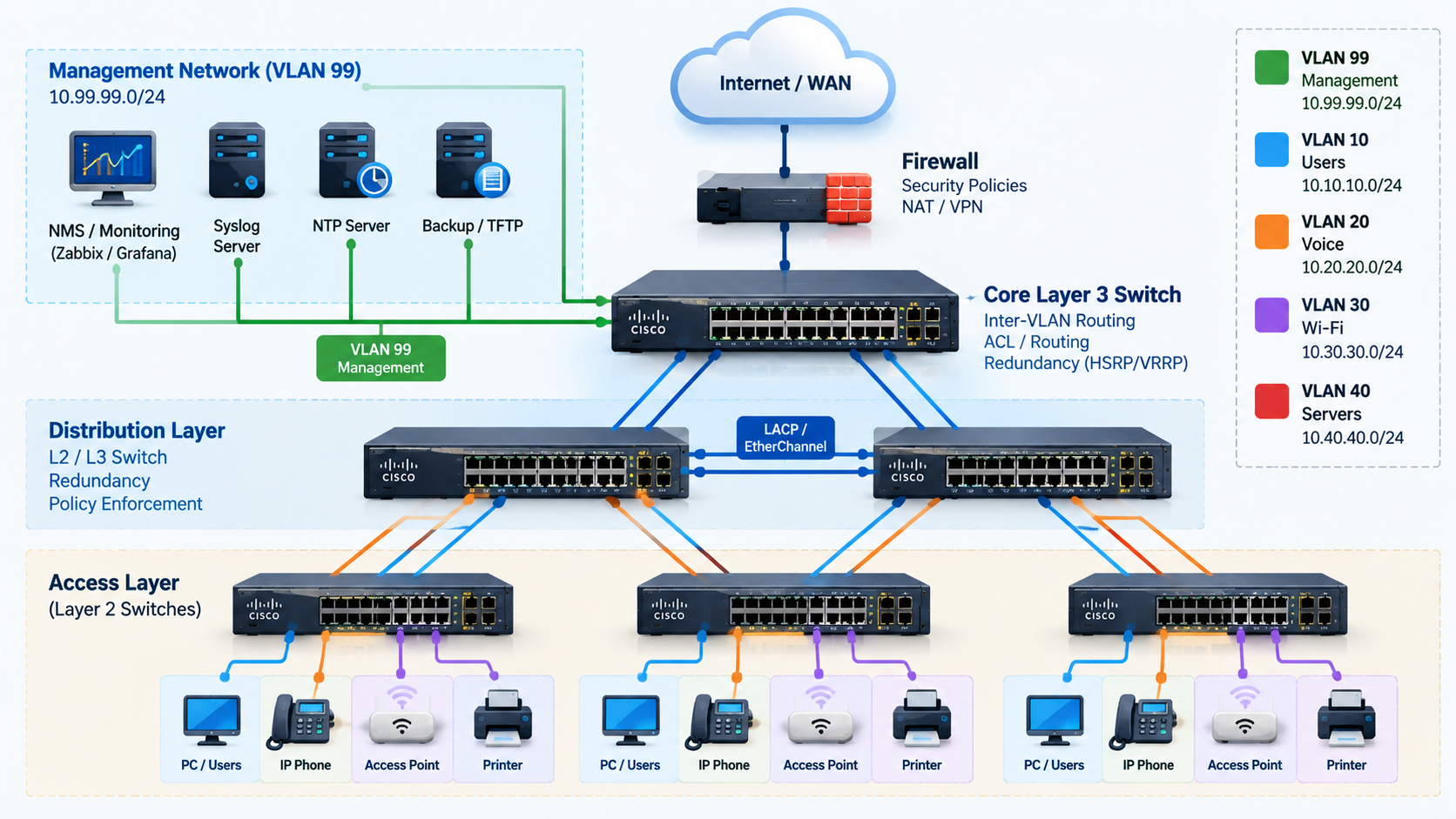
This runbook is for Network Administrators, Network Engineers and Infrastructure Engineers operating Cisco Catalyst Layer 2 and Layer 3 switches with Cisco IOS or IOS XE. Management Plane protects administrative access and telemetry; Control Plane protects STP, routing adjacencies and CPU resources; Data Plane / Layer 2 Security protects endpoint traffic and trust boundaries.
Internet / WAN
      |
Firewall
      |
Core / L3 Switch
      |
Distribution
      |
Access L2 Switches
      |
Users / Phones / AP / Printers

VLAN 99 - Management
NMS / Zabbix / Syslog / NTP
The firewall is only an architectural boundary; this article configures Catalyst switches exclusively. VLAN 99 is a separate management broadcast domain, not an authorization mechanism. Restrict its routing and physical access. Examples use RFC1918 networks: users 10.10.10.0/24, management 10.99.99.0/24, transit 10.255.255.0/30. These are invented examples, not organization addresses.
The baseline assumes IPv4, a global routing table, classic interface syntax and a tested Rapid-PVST design. Dedicated management ports in a VRF need VRF-specific routes and service syntax. Licenses, ASIC resources, interface types, VTY counts, crypto policies and release behavior differ; validate each block with CLI help and the matching command reference. Verify command availability for your Catalyst platform and IOS/IOS XE release before deployment.
Production-ready means a reviewed deployment template, not blind paste. Preserve existing configuration, use console/out-of-band access, stage changes on one port/VLAN, test a new SSH session, and save only after validation. These IPv4 controls do not secure IPv6: separately assess IPv6 management ACLs, RA Guard and DHCPv6 Guard on supported Catalyst releases.
1. Pre-Hardening Checks
show version
show inventory
show running-config
show vlan brief
show interfaces status
show interfaces trunk
show spanning-tree
show ip interface brief
show ip route
show users
show logging| Command | Check before change |
|---|---|
| show version | Image, release, uptime and capabilities |
| show inventory | PID, modules and stack members |
| show running-config | AAA, ACLs, services and existing dependencies |
| show vlan brief | User, voice, management and unused VLANs |
| show interfaces status | Port roles, speed and err-disabled ports |
| show interfaces trunk | Allowed/native VLANs and uplinks |
| show spanning-tree | Root, blocked ports and STP mode |
| show ip interface brief | SVI addresses and up/up state |
| show ip route | L3 routes and default route; limited on L2 |
| show users | Active sessions and their source addresses |
| show logging | Existing faults and security events |
Back up running and startup configurations to an approved encrypted repository before changes. A local flash copy is convenient but does not protect against device loss. Do not overwrite a known-good startup configuration just to take a backup. Record VLAN/port maps, root placement, DHCP paths, static hosts, phone/AP behavior and telemetry baselines.
copy running-config flash:pre-hardening-running.cfg
copy startup-config flash:pre-hardening-startup.cfg
Confirm the filesystem name and available space; protect and retire backups because they can contain secrets. Prepare the exact inverse commands or a platform-tested configuration restore procedure; merging a backup does not necessarily remove newly added commands. Verify command availability for your Catalyst platform and IOS/IOS XE release before deployment.
2. Common Hardening Baseline: Identity and AAA
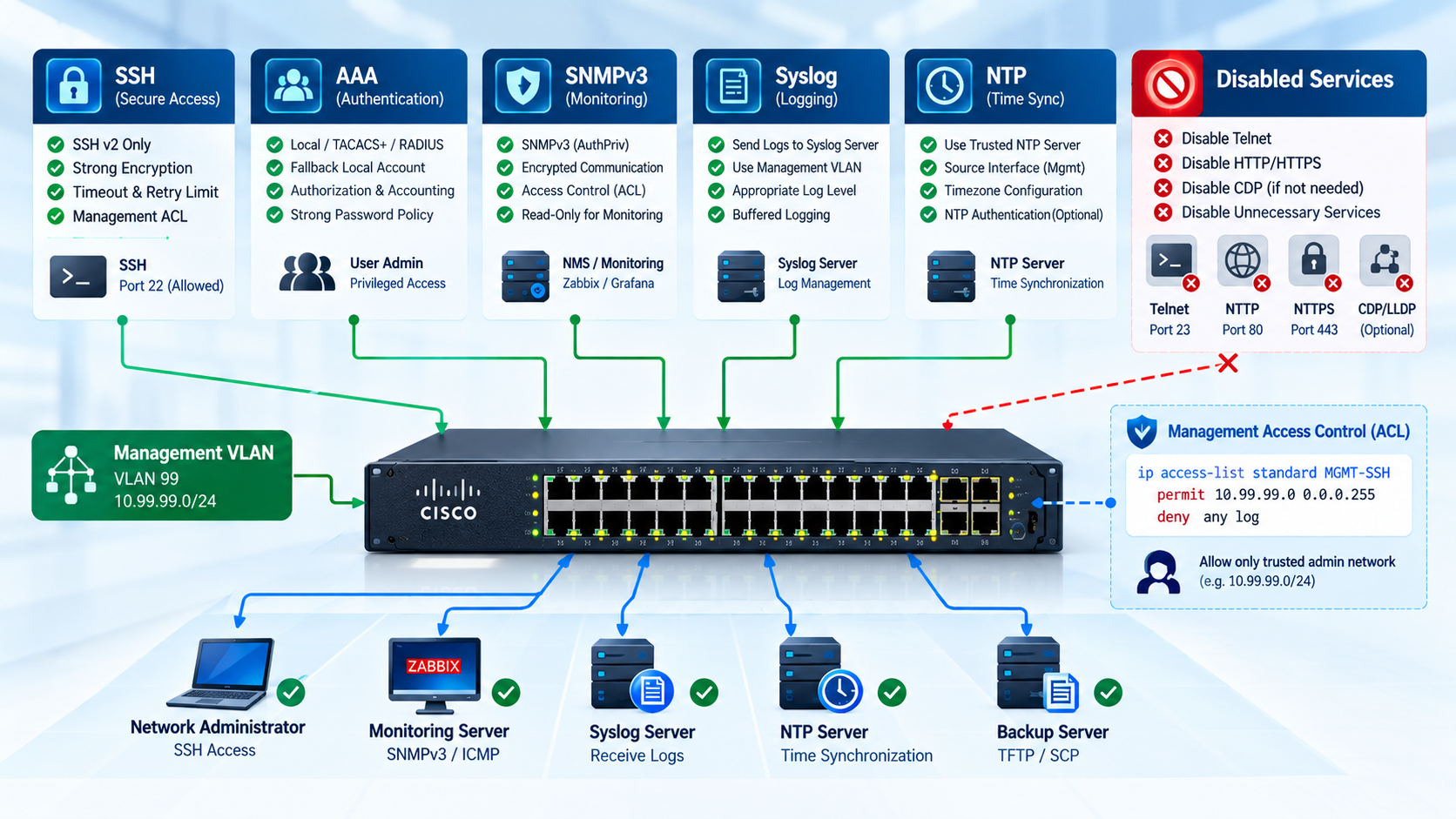
Goal: Identify the switch and authenticate every administrator.
Security risk: Shared passwords and anonymous privileged access prevent accountability.
Configuration — global configuration mode unless an interface or line context is shown.
hostname <HOSTNAME>
no ip domain-lookup
ip domain-name <DOMAIN.LOCAL>
username <ADMIN> privilege 15 secret <STRONG-PASSWORD>
aaa new-model
aaa authentication login default local
aaa authorization exec default local
Operation: hostname and domain identify the device; no ip domain-lookup prevents unintended DNS lookups. AAA uses the local user database for login and exec authorization.
Verification: Open a second SSH session and confirm the expected privilege with show privilege; inspect show running-config and show users.
Production: Create and test the emergency local account before enabling AAA. Enterprise environments should use TACACS+ or RADIUS with centralized policy and accounting; keep the local account in a vault and test fallback during server outage. A local method after a server group normally runs on server error/unavailability, not a deliberate authentication rejection.
! Prefer Type 9 if supported; use instead of the generic username above
username <ADMIN> privilege 15 algorithm-type scrypt secret <STRONG-PASSWORD>
! Type 8 alternative: choose one algorithm, not both
! username <ADMIN> privilege 15 algorithm-type sha256 secret <STRONG-PASSWORD>
Type 8 is PBKDF2-SHA-256; Type 9 uses scrypt. Never put plaintext after secret 8 or secret 9: those forms expect an encoded hash. The generic secret command may produce a weaker type on old IOS; inspect the stored type. service password-encryption Type 7 is reversible and is not a substitute. Verify command availability for your Catalyst platform and IOS/IOS XE release before deployment.
3. SSH Hardening
Goal: Permit SSHv2 administration from approved source networks only.
Security risk: Telnet exposes credentials; an unrestricted VTY permits remote guessing.
Configuration — global configuration mode unless an interface or line context is shown.
crypto key generate rsa modulus 2048
ip ssh version 2
ip ssh time-out 60
ip ssh authentication-retries 3
ip access-list standard MGMT-SSH
 permit <ADMIN-SUBNET> <WILDCARD>
 deny any log
exit
line vty 0 15
 login authentication default
 transport input ssh
 exec-timeout 10 0
 access-class MGMT-SSH in
exit
line console 0
 login authentication default
 exec-timeout 10 0
 logging synchronous
exit
Operation: transport input ssh excludes Telnet on the covered VTY lines. The access-class checks the actual source IP seen by the switch; exec-timeout closes idle sessions. Console logging synchronous improves usability, not security.
Verification: show ip ssh must report version 2. Test SSH from permitted and denied hosts and confirm Telnet fails; inspect all VTY ranges.
Production: Keep the current session and console open while testing a fresh login. Add jump-host/NAT sources before applying the ACL. Do not regenerate working RSA keys without scheduling host-key changes. A 2048-bit key is the example minimum; use the approved supported key size and SSH algorithms.
Some switches expose only VTY 0–4, others more than 15. Apply policy to every existing VTY. RSA generation and SSH cipher/MAC controls vary by crypto image and release; modern policy may need additional algorithm restrictions. Verify command availability for your Catalyst platform and IOS/IOS XE release before deployment.
4. Disable Unnecessary Services
Goal: Reduce unused management and packet-processing exposure.
Security risk: Unused HTTP interfaces and legacy functions add attack surface.
Configuration — global configuration mode unless an interface or line context is shown.
no ip http server
no ip http secure-server
no service pad
no ip source-route
Operation: The first two commands disable HTTP and HTTPS management servers. no service pad disables legacy X.25 PAD; no ip source-route rejects IPv4 source-route processing.
Verification: Inspect show running-config and, if supported, show ip http server status. Verify the switch no longer accepts web-management connections.
Production: Disabling HTTPS can interrupt WebUI and HTTP-based automation such as RESTCONF. Inventory those dependencies first. Missing no commands in show running-config can indicate defaults; verify operational state.
PAD is a legacy/obsolete feature, unavailable or deprecated in some Catalyst images. Source-route and HTTP commands also require matching platform documentation; do not assume every old IOS knob exists in current IOS XE. Verify command availability for your Catalyst platform and IOS/IOS XE release before deployment.
5. Layer 2 Switch Hardening

Goal: Provide a management endpoint without inter-VLAN routing on the access switch.
Security risk: Accidental routing changes the security boundary; an unreachable SVI prevents management.
Configuration — global configuration mode unless an interface or line context is shown.
vlan <MGMT-VLAN>
 name MANAGEMENT
exit
interface Vlan<MGMT-VLAN>
 ip address <MGMT-IP> <MASK>
 no shutdown
exit
no ip routing
ip default-gateway <GATEWAY>
Operation: The SVI terminates management traffic. ip default-gateway serves locally originated off-subnet traffic while routing is disabled.
Verification: show ip interface brief should show management up/up; test same-subnet and routed administrator access.
Production: The VLAN must exist and normally have an active forwarding member/trunk. no ip routing belongs only to the L2 role. The complete standalone access template is in section 22.
6. DHCP Snooping
Goal: Accept DHCP server messages only across the approved boundary.
Security risk: A rogue server can assign a malicious gateway or DNS server.
Configuration — global configuration mode unless an interface or line context is shown.
ip dhcp snooping
ip dhcp snooping vlan <USER-VLANS>
no ip dhcp snooping information option
interface <UPLINK>
 ip dhcp snooping trust
exit
interface range <ACCESS-PORTS>
 ip dhcp snooping limit rate <RATE>
exit
Operation: Untrusted endpoint ports cannot originate accepted server replies. Snooping builds IP/MAC/VLAN/port lease bindings for downstream controls. trust applies to ingress, not a port label.
Verification: show ip dhcp snooping: correct VLANs and only approved trusted interfaces; show ip dhcp snooping binding: leases for DHCP endpoints after renew.
Production: Never trust an endpoint port merely to fix DHCP. Choose rate from boot storms, phone+PC and downstream fan-out; a low limit can err-disable a port. Disabling Option 82 is a compatibility choice here, not a universal security requirement; preserve it where relay/server policy relies on it.
Validate rate units and EtherChannel behavior. Plan supported DHCP snooping database persistence and reload/stack failover recovery before DAI/IPSG; dynamic bindings may be lost on reload. Verify database agent status and test renew before enforcing dependent filters. Verify command availability for your Catalyst platform and IOS/IOS XE release before deployment.
7. Dynamic ARP Inspection
Goal: Validate ARP on user-facing VLANs.
Security risk: ARP spoofing redirects or intercepts local traffic.
Configuration — global configuration mode unless an interface or line context is shown.
ip arp inspection vlan <USER-VLANS>
interface <UPLINK>
 ip arp inspection trust
exit
Operation: Untrusted ingress ARP is checked against DHCP snooping bindings or configured ARP ACLs. Trusted ingress bypasses inspection; select that boundary separately from DHCP trust.
Verification: show ip arp inspection and show ip arp inspection interfaces: enabled VLANs, trust and rates; test ARP and inspect drop counters.
Production: Static hosts require explicit allowances before enabling DAI. Do not trust every inter-switch link: a downstream switch may carry attackers. ARP bursts and aggregated links require measured limits and error-disable monitoring.
arp access-list STATIC-HOSTS
 permit ip host 10.10.10.50 mac host 0011.2233.4455
exit
ip arp inspection filter STATIC-HOSTS vlan 10
The ARP ACL above is illustrative: replace the IP/MAC with inventory. Without the static keyword, unmatched ARP can fall back to DHCP bindings; with static, unmatched hosts are denied rather than checked against bindings. Explicit deny entries also override bindings. Test mixed static/DHCP populations. Verify command availability for your Catalyst platform and IOS/IOS XE release before deployment.
8. IP Source Guard
Goal: Bind endpoint IPv4 source addresses to access ports.
Security risk: Source spoofing bypasses address-based policy.
Configuration — global configuration mode unless an interface or line context is shown.
interface range <ACCESS-PORTS>
 ip verify source
exit
Operation: This IP-only example programs source filters from DHCP snooping or manual bindings on suitable Layer 2 switchports; it is not a routed-SVI ACL.
Verification: show ip verify source and show ip dhcp snooping binding: the expected IP/VLAN/interface appears; verify legitimate traffic and controlled spoofed traffic in a lab.
Production: Do not enable this block on static servers, printers, AP uplinks or infrastructure ports without a supported binding design. An empty table can block legitimate IP traffic.
ip source binding <STATIC-MAC> vlan <STATIC-VLAN> <STATIC-IP> interface <STATIC-PORT>Static binding and device-tracking-based IPSG are platform-specific alternatives; static ARP allowances alone do not automatically provide an IPSG binding. Check TCAM capacity and voice/data behavior. Verify command availability for your Catalyst platform and IOS/IOS XE release before deployment.
9. STP Hardening
Goal: Preserve the intended root and block accidental edge switches.
Security risk: Unexpected BPDUs or missing BPDUs can create topology changes and loops.
Configuration — global configuration mode unless an interface or line context is shown.
spanning-tree mode rapid-pvst
spanning-tree portfast bpduguard default
interface range <ACCESS-PORTS>
 spanning-tree portfast
 spanning-tree bpduguard enable
exit
! Only on a reviewed downstream boundary
! interface <ROOT-GUARD-PORT>
!  spanning-tree guard root
Operation: Global BPDU Guard protects operational PortFast ports; explicit interface BPDU Guard rejects any received BPDU on that edge port. Root Guard blocks superior BPDUs on reviewed designated boundaries.
Verification: show spanning-tree and show spanning-tree inconsistentports: expected root and no unexplained inconsistent ports; inspect err-disabled interfaces for BPDU Guard.
Production: Changing STP mode is a topology change; preserve MST where designed. Never enable PortFast/BPDU Guard blindly on switch uplinks. Place root priorities deliberately on the core/distribution. Root Guard is not an all-trunk default.
| Guard | Placement / trigger | Result / recovery |
|---|---|---|
| BPDU Guard | Endpoint edge; any BPDU | Err-disable; investigate then recover |
| Root Guard | Designated downstream boundary; superior BPDU | Root-inconsistent; automatic recovery after superior BPDUs stop |
| Loop Guard | Non-edge root/alternate ports; expected BPDUs disappear | Loop-inconsistent; recovery when BPDUs resume |
Loop Guard uses spanning-tree guard loop on selected ports; Root Guard and Loop Guard must not be combined on the same interface. PortFast edge syntax varies by release; match the existing STP design. Verify command availability for your Catalyst platform and IOS/IOS XE release before deployment.
10. Port Security
Goal: Limit learned endpoint MAC identities on selected access ports.
Security risk: Uncontrolled MAC learning permits unauthorized attachment and table pressure.
Configuration — global configuration mode unless an interface or line context is shown.
interface range <ACCESS-PORTS>
 switchport mode access
 switchport port-security
 switchport port-security maximum 3
 switchport port-security violation restrict
 switchport port-security mac-address sticky
exit
Operation: Sticky MACs are learned into running configuration. They persist after reboot only when saved. This limits attachment, but MAC addresses can be spoofed; it is not user authentication.
Verification: show port-security and show port-security interface <INTERFACE>: expected maximum, secure MACs and violation count.
Production: Maximum 3 is an example, not a phone policy. Count phone, attached PC and voice/data VLAN learning; test boot and replacement. APs, hypervisors, downstream switches, EtherChannels and 802.1X/MAB designs require separate support/design review. Remove stale sticky entries through a controlled replacement process.
| Mode | Effect |
|---|---|
| Protect | Drops violating traffic without normal violation notifications |
| Restrict | Drops violating traffic; increments counters and generates notifications |
| Shutdown | Err-disables the port; restore only after investigating |
Port Security support and interactions differ across Catalyst interface types, authentication modes and software releases. Verify command availability for your Catalyst platform and IOS/IOS XE release before deployment.
11. Storm Control
Goal: Contain broadcast and multicast storms at the edge.
Security risk: A loop or faulty endpoint can exhaust link and switch resources.
Configuration — global configuration mode unless an interface or line context is shown.
interface range <ACCESS-PORTS>
 storm-control broadcast level 1.00 0.50
 storm-control multicast level 2.00 1.00
 storm-control action trap
exit
Operation: The sample uses rising/falling percentages of interface bandwidth: 1%/0.5% broadcast and 2%/1% multicast. Suppression drops the affected traffic; action trap adds notification, not trap-only monitoring.
Verification: show storm-control, counters and receiver telemetry should agree with measured traffic. Confirm the release-specific SNMP storm trap enablement and delivery.
Production: Fixed thresholds are not suitable for every port. Baseline multicast video, discovery, backups and phone boots; start with a small pilot. Percentage on a 10G link permits much more traffic than on 1G.
Supported traffic types, pps/bps units and EtherChannel measurement vary by platform. Verify storm-control action and trap behavior before relying on alerts. Verify command availability for your Catalyst platform and IOS/IOS XE release before deployment.
12. Trunk Hardening
Goal: Make VLAN transport explicit between switches.
Security risk: DTP negotiation, excess allowed VLANs and native mismatches expand exposure.
Configuration — global configuration mode unless an interface or line context is shown.
interface <UPLINK>
 switchport mode trunk
 switchport trunk native vlan <NATIVE-VLAN>
 switchport trunk allowed vlan <VLAN-LIST>
 switchport nonegotiate
exit
Operation: Static trunk plus nonegotiate suppresses DTP. The allowed list limits data VLAN transport; match the native VLAN on both ends.
Verification: show interfaces trunk: static trunk, matching native and only intended allowed/active/forwarding VLANs.
Production: Use an unused native VLAN such as 998 with no SVI or endpoint ports, separate from management and parking VLAN 999. Exclude VLAN 1 and unnecessary VLANs from user transport, and do not use VLAN 1 for management. Removing VLAN 1 from an allowed list does not necessarily stop all control protocols. Audit the trunk peer before changing the list because the command replaces the existing list.
Native VLAN tagging, DTP and trunk encapsulation options vary. Fixed 802.1Q Catalyst platforms do not need switchport trunk encapsulation dot1q. Native tagging changes require matching peer behavior and a planned migration. Verify command availability for your Catalyst platform and IOS/IOS XE release before deployment.
13. Unused Ports
Goal: Park and administratively disable unused switchports.
Security risk: An unused live port permits unauthorized attachment.
Configuration — global configuration mode unless an interface or line context is shown.
vlan 999
 name UNUSED-PORTS
exit
interface range <UNUSED-PORTS>
 switchport mode access
 switchport access vlan 999
 shutdown
exit
Operation: VLAN 999 has no SVI or routed access; shutdown is the actual port-disabling control.
Verification: show interfaces status: unused ports disabled; show vlan brief: parking membership matches inventory.
Production: Do not include uplinks, stack links, APs, phones or reserve infrastructure interfaces in this range. Remove parking VLAN from trunk allowed lists.
14. Layer 3 Switch Hardening

Goal: Route deliberately and separate user and management policy.
Security risk: Incorrect routing or SVI behavior bypasses segmentation and interrupts services.
Configuration — global configuration mode unless an interface or line context is shown.
ip routing
interface Vlan<MGMT-VLAN>
 ip address <MGMT-IP> <MASK>
 no shutdown
exit
interface Vlan10
 description USERS-GATEWAY
 ip address 10.10.10.1 255.255.255.0
 no ip redirects
 no ip proxy-arp
 no shutdown
exit
Operation: ip routing enables inter-VLAN forwarding. no ip redirects stops sending ICMP redirects; no ip proxy-arp stops answering ARP on behalf of other addresses on that SVI. Neither replaces an ACL.
Verification: show ip route should show connected SVIs and a valid default or intended dynamic routes; inspect show ip interface Vlan10 for redirects/proxy ARP state.
Production: Check dependencies on redirects and proxy ARP before disabling them. Use an explicit route or a designed dynamic protocol, not ip default-gateway, when routing is active. The standalone section 22 example uses a routed /30 uplink and static default route.
Routing license, SVI count and routed-port support differ between Catalyst models; a Layer 2-only image cannot implement this template. Verify command availability for your Catalyst platform and IOS/IOS XE release before deployment.
15. Layer 3 ACL Hardening
Goal: Block users from the management subnet while preserving approved dependencies.
Security risk: User-originated lateral access can compromise switches and monitoring systems.
Configuration — global configuration mode unless an interface or line context is shown.
ip access-list extended USERS-TO-MGMT
 remark Approved shared infrastructure exceptions
 permit udp 10.10.10.0 0.0.0.255 host 10.99.99.10 eq domain
 permit tcp 10.10.10.0 0.0.0.255 host 10.99.99.10 eq domain
 permit udp 10.10.10.0 0.0.0.255 host 10.99.99.20 eq ntp
 deny ip 10.10.10.0 0.0.0.255 10.99.99.0 0.0.0.255
 permit ip any any
exit
interface Vlan10
 ip access-group USERS-TO-MGMT in
exit
Operation: Ingress on Vlan10 filters packets arriving from Users 10.10.10.0/24 toward routed destinations. DNS 10.99.99.10 and NTP 10.99.99.20 are explicit illustrative exceptions; the final permit preserves other IPv4 traffic and prevents an accidental implicit-deny outage.
Verification: show access-lists and show ip interface Vlan10 must show placement and matching counters. Test DNS over UDP/TCP, NTP, normal business traffic, denied management SSH and permitted admin SSH from a separate subnet.
Production: Inventory DHCP relay/server, directory, monitoring probes and application flows before deployment; add narrow exceptions above the deny or place shared services outside management. This ACL is stateless: it also blocks user replies to management-initiated sessions unless explicitly permitted. It does not filter same-VLAN bridging, IPv6, or substitute for VTY/SNMP ACLs. Do not apply it to the management SVI blindly.
Lockout risk: apply from console or a separate approved administrator path. Test ACL order and actual source addresses, retain the previous policy, and use an exact rollback such as removing the new ip access-group before restoring the previous ACL.
16. Routing Protocol Security — OSPF
Goal: Form routing adjacencies only on intended transit interfaces.
Security risk: An unintended neighbor can inject routes or disturb convergence.
Configuration — global configuration mode unless an interface or line context is shown.
router ospf <PROCESS-ID>
 passive-interface default
 no passive-interface <OSPF-TRANSIT>
exit
Operation: Passive interfaces do not send OSPF hellos or form neighbors; advertise only reviewed prefixes using the existing interface/area design. Configure supported authentication consistently at both ends and restrict OSPF protocol 89 at appropriate routed boundaries.
Verification: show ip ospf neighbor: only approved peers; show ip ospf interface and show ip protocols: correct passive interfaces and authentication; show ip route ospf: intended routes.
Production: Apply only when dynamic routing is already part of the design. Prefer supported cryptographic authentication and coordinated key rollover. Route filtering must match OSPF behavior: an inbound distribute-list affects local route installation and does not generally suppress LSA flooding. Use supported ABR/ASBR policies for the appropriate LSA type.
OSPFv2 and OSPFv3 authentication syntax, SHA/HMAC support and licenses vary. Do not copy an OSPFv3 authentication trailer example into OSPFv2. No universal authentication stanza is included in the static-routing final template. Verify command availability for your Catalyst platform and IOS/IOS XE release before deployment.
Control-plane protection: review the platform’s existing system CoPP/CPP policy with show policy-map control-plane where supported. Baseline CPU, punt drops and protocol counters before adjusting policing; preserve STP, DHCP, ARP, routing and management requirements. Do not replace a Catalyst system policy with a generic policy from another platform.
17. NTP Hardening
Goal: Keep reliable timestamps from approved time servers.
Security risk: Incorrect time breaks event correlation and authentication troubleshooting.
Configuration — global configuration mode unless an interface or line context is shown.
clock timezone <TZ-NAME> <OFFSET>
ntp source Vlan<MGMT-VLAN>
ntp server <NTP-IP> prefer
Operation: ntp source fixes the source interface. prefer favors a configured server among acceptable sources; it does not authenticate it. Timezone changes display, not NTP UTC synchronization.
Verification: show clock and show ntp associations: correct time and a selected synchronized peer; also inspect show ntp status where supported.
Production: Provide redundant approved sources and restrict NTP exposure through supported NTP ACLs and upstream policy. For Iran, a display example is clock timezone IRST 3 30. Replace OFFSET with hours and optional minutes.
! Optional legacy symmetric authentication; server must use the same key
ntp authenticate
ntp authentication-key <KEY-ID> md5 <NTP-SHARED-KEY>
ntp trusted-key <KEY-ID>
ntp server <NTP-IP> key <KEY-ID> prefer
The MD5 syntax above is a legacy compatibility example, not a claim of modern cryptographic strength. Use stronger supported authentication if both ends implement it; protect keys and test matching server behavior. Authentication algorithms, access-group syntax and VRF support vary. Verify command availability for your Catalyst platform and IOS/IOS XE release before deployment.
18. Syslog
Goal: Export actionable events with stable identity and timestamps.
Security risk: Without centralized logs, security incidents and port faults are missed.
Configuration — global configuration mode unless an interface or line context is shown.
service timestamps log datetime msec localtime show-timezone
logging host <SYSLOG-IP>
logging source-interface Vlan<MGMT-VLAN>
logging trap warnings
logging buffered 16384 informational
Operation: warnings exports severity 0–4; informational in the 16384-byte ring buffer keeps 0–6 locally. Lower severity numbers are more urgent. The source SVI must be reachable.
Verification: show logging and collector search: expected source, timestamps and a known test event; watch dropped messages and buffer rollover.
Production: Warning-only remote logging can omit severity-5 login, link or configuration events. Use notifications or informational centrally when those are required, with capacity and retention planning. Default UDP syslog is not encrypted or delivery-guaranteed; select supported secure transport when required. Avoid continuous debugging and high-volume ACL logging.
19. SNMP — AuthPriv First
Goal: Provide authenticated, encrypted and source-restricted read-only monitoring.
Security risk: Communities and unauthenticated SNMP expose data and credentials.
Configuration — global configuration mode unless an interface or line context is shown.
ip access-list standard SNMP-ACL
 permit host <MONITORING-IP>
 deny any log
exit
snmp-server view NMS-READ iso included
snmp-server group NMS-GROUP v3 priv read NMS-READ access SNMP-ACL
snmp-server user <SNMP-USER> NMS-GROUP v3 auth sha <SNMP-AUTH-PASSWORD> priv aes 128 <SNMP-PRIV-PASSWORD>
Operation: v3 priv requires authentication and encryption; the group has a read view and no write view. SNMP-ACL restricts polling sources. The broad iso view is a working baseline; narrow it to required OIDs after testing.
Verification: show snmp, show snmp group and show snmp user; poll from the approved NMS with authPriv and verify an unauthorized source fails. SNMPv3 user secrets may not appear in running-config.
Production: Use separate vault-managed auth/privacy passwords. The sha keyword in this compatibility example is SHA-1, not SHA-256; prefer SHA-2 where switch and NMS support it. Remove existing v1/v2c communities after migration. Traps require separate destination/notification enablement and must be tested; polling alone does not guarantee storm alerts.
SHA-2 keywords, AES variants, SNMP ACL types, engine-ID behavior and notification syntax vary. Changing engine ID can require user recreation. Verify command availability for your Catalyst platform and IOS/IOS XE release before deployment.
Legacy only: SNMPv2c below is unencrypted. Keep it only for a documented migration exception; never add it alongside v3 merely for convenience. Primary recommendation: SNMPv3 + Authentication + Encryption + ACL.
ip access-list standard SNMP-ACL
 permit host <MONITORING-IP>
 deny any log
exit
snmp-server community <COMMUNITY> RO SNMP-ACL
20. Login Attack Protection
Goal: Throttle repeated failed remote logins.
Security risk: Password guessing consumes resources and threatens admin accounts.
Configuration — global configuration mode unless an interface or line context is shown.
login block-for 120 attempts 5 within 60Operation: Five failed attempts within 60 seconds trigger a 120-second quiet period for remote login access. This is device-wide protection, not simply a per-user lockout.
Verification: show login should report configured thresholds and quiet-mode status. Test failures in a maintenance window using console recovery.
Production: An attacker can deliberately trigger quiet mode. Consider a narrowly scoped login quiet-mode access-class <BREAKGLASS-ACL> if supported and approved; never exempt a broad user subnet.
Login enhancement support and interaction with AAA differ; inspect show login on the actual image. Verify command availability for your Catalyst platform and IOS/IOS XE release before deployment.
21. Verification and Acceptance
show running-config
show users
show ip ssh
show login
show access-lists
show spanning-tree
show spanning-tree inconsistentports
show port-security
show port-security interface <INTERFACE>
show ip dhcp snooping
show ip dhcp snooping binding
show ip arp inspection
show ip arp inspection interfaces
show logging
show clock
show ntp associations
show snmp
show ip interface brief
show ip route| Group | Expected result |
|---|---|
| Management / AAA / SSH / ACL | Fresh approved SSH login succeeds; denied source/Telnet fails; privilege and counters match |
| STP / Port Security | Planned root, no unexpected inconsistent/err-disabled ports, correct learned MACs |
| DHCP / DAI / IPSG | DHCP renew succeeds, bindings match inventory, only selected ingress trusted, static hosts work |
| Telemetry | Collector receives chosen severities; NTP selected peer; authorized authPriv polling succeeds |
| SVI / Routing | Management up/up; L3 connected/default routes and service exceptions valid; L2 management gateway reachable |
Command output alone is insufficient: test permitted and denied traffic, DHCP renewal, phone reboot, static printer access, NMS polling, failover and reload binding recovery. Use show ip verify source and show storm-control where supported. Save with copy running-config startup-config only after acceptance and capture a post-change backup. Retain an operational rollback procedure.
22. Final Independent Configurations
Each file includes its own management baseline; no earlier block must be pasted to complete it. Replace every placeholder. The L2 role has an upstream trunk; the L3 role has a routed uplink to the upstream boundary and a downstream trunk to inspected access switches. ACCESS-PORTS means reviewed DHCP endpoint ports only. Static devices, AP trunks and infrastructure ports require their own profiles. USER-VLANS must include all intended DHCP user/voice VLANs, and each VLAN must be created; VLAN10 is the shown data example.
| Placeholder | Meaning / example |
|---|---|
| <HOSTNAME> / <SWITCH-NAME> | Unique switch identity |
| <MGMT-VLAN> / <MGMT-IP> / <MASK> | 99; L2 10.99.99.2 or L3 10.99.99.1; 255.255.255.0 |
| <ADMIN-SUBNET> / <WILDCARD> | Approved admin sources, e.g. 10.99.99.128 / 0.0.0.31; not all management by default |
| <SYSLOG-IP> / <NTP-IP> / <MONITORING-IP> | Example: 10.99.99.30 / 10.99.99.20 / 10.99.99.40 |
| <UPLINK> / <DOWNLINK-TRUNK> | Reviewed physical interface or supported port-channel; ranges must not overlap |
| <ACCESS-PORTS> / <UNUSED-PORTS> | Disjoint tested interface ranges |
| <USER-VLANS> / <VLAN-LIST> | 10 (plus reviewed voice VLANs); 10,99 and required VLANs only |
| <GATEWAY> | L2 management gateway: 10.99.99.1 |
| <TRANSIT-IP> / <TRANSIT-MASK> / <UPSTREAM-NEXT-HOP> | 10.255.255.2 / 255.255.255.252 / 10.255.255.1 |
| <RATE> / <ARP-RATE> | Measured DHCP/ARP packets per second, not universal defaults |
| <BCAST-RISE> / <BCAST-FALL> / <MCAST-RISE> / <MCAST-FALL> | Measured percentages; earlier 1/0.5 and 2/1 are illustrative |
| <ADMIN> / <STRONG-PASSWORD> / <DOMAIN.LOCAL> | Vault-managed credentials and organization domain |
| <SNMP-USER> / <SNMP-AUTH-PASSWORD> / <SNMP-PRIV-PASSWORD> | NMS account and two independent secrets |
| <TZ-NAME> / <OFFSET> | Display timezone; IRST / 3 30 is an example |
Template prerequisites: Type 9, VTY 0–15 and feature syntax must be supported. DHCP service or relay is existing infrastructure, not created here; verify the full request/reply path on the L3 platform. The downstream L3 trunk stays DHCP-untrusted because servers are local/upstream, but DAI-trusted only when downstream enforcement is verified. Aggregation switches do not necessarily learn bindings for all remote endpoints. Change these boundaries to match the real topology. The L3 edge Port Security block is optional; remove it if no directly connected endpoint ports exist.
The final templates are complete role-specific baselines, not replacements for live routing, voice, authentication, CoPP or DHCP infrastructure configuration. Merge deliberately. Root Guard and Loop Guard are excluded until port roles are reviewed; authenticated NTP and centralized AAA use the separately reviewed deployment choices above. Verify command availability for your Catalyst platform and IOS/IOS XE release before deployment.
Cisco Layer 2 Access Switch Hardened Configuration
! Cisco Layer 2 Access Switch Hardened Configuration
! Replace placeholders; apply in reviewed stages, not as a blind paste.
configure terminal
vlan 10
 name USERS
exit
vlan <MGMT-VLAN>
 name MANAGEMENT
exit
vlan 998
 name UNUSED-NATIVE
exit
vlan 999
 name UNUSED-PORTS
exit
hostname <HOSTNAME>
no ip domain-lookup
ip domain-name <DOMAIN.LOCAL>
username <ADMIN> privilege 15 algorithm-type scrypt secret <STRONG-PASSWORD>
aaa new-model
aaa authentication login default local
aaa authorization exec default local
no ip http server
no ip http secure-server
no service pad
no ip source-route
login block-for 120 attempts 5 within 60
crypto key generate rsa modulus 2048
ip ssh version 2
ip ssh time-out 60
ip ssh authentication-retries 3
ip access-list standard MGMT-SSH
 permit <ADMIN-SUBNET> <WILDCARD>
 deny any log
exit
line vty 0 15
 login authentication default
 transport input ssh
 exec-timeout 10 0
 access-class MGMT-SSH in
exit
line console 0
 login authentication default
 exec-timeout 10 0
 logging synchronous
exit
clock timezone <TZ-NAME> <OFFSET>
ntp source Vlan<MGMT-VLAN>
ntp server <NTP-IP> prefer
service timestamps log datetime msec localtime show-timezone
logging host <SYSLOG-IP>
logging source-interface Vlan<MGMT-VLAN>
logging trap warnings
logging buffered 16384 informational
ip access-list standard SNMP-ACL
 permit host <MONITORING-IP>
 deny any log
exit
snmp-server view NMS-READ iso included
snmp-server group NMS-GROUP v3 priv read NMS-READ access SNMP-ACL
snmp-server user <SNMP-USER> NMS-GROUP v3 auth sha <SNMP-AUTH-PASSWORD> priv aes 128 <SNMP-PRIV-PASSWORD>
no ip routing
ip default-gateway <GATEWAY>
interface Vlan<MGMT-VLAN>
 description MANAGEMENT
 ip address <MGMT-IP> <MASK>
 no shutdown
exit
spanning-tree mode rapid-pvst
spanning-tree portfast bpduguard default
ip dhcp snooping
ip dhcp snooping vlan <USER-VLANS>
no ip dhcp snooping information option
ip arp inspection vlan <USER-VLANS>
interface <UPLINK>
 description TRUSTED-UPSTREAM-TO-CORE
 switchport mode trunk
 switchport trunk native vlan 998
 switchport trunk allowed vlan <VLAN-LIST>
 switchport nonegotiate
 ip dhcp snooping trust
 ip arp inspection trust
 no shutdown
exit
interface range <ACCESS-PORTS>
 description REVIEWED-DHCP-ENDPOINTS
 switchport mode access
 switchport access vlan 10
 switchport nonegotiate
 spanning-tree portfast
 spanning-tree bpduguard enable
 ip dhcp snooping limit rate <RATE>
 ip arp inspection limit rate <ARP-RATE>
 ip verify source
 switchport port-security
 switchport port-security maximum 3
 switchport port-security violation restrict
 switchport port-security mac-address sticky
 storm-control broadcast level <BCAST-RISE> <BCAST-FALL>
 storm-control multicast level <MCAST-RISE> <MCAST-FALL>
 storm-control action trap
 no shutdown
exit
interface range <UNUSED-PORTS>
 switchport mode access
 switchport access vlan 999
 shutdown
exit
end
! Validate, then separately run: copy running-config startup-config
Cisco Layer 3 Switch Hardened Configuration
! Cisco Layer 3 Switch Hardened Configuration
! Routed upstream; inspected access switches on downstream trunk.
! Ensure DHCP service/relay and upstream return routes already exist.
configure terminal
vlan 10
 name USERS
exit
vlan <MGMT-VLAN>
 name MANAGEMENT
exit
vlan 998
 name UNUSED-NATIVE
exit
vlan 999
 name UNUSED-PORTS
exit
hostname <HOSTNAME>
no ip domain-lookup
ip domain-name <DOMAIN.LOCAL>
username <ADMIN> privilege 15 algorithm-type scrypt secret <STRONG-PASSWORD>
aaa new-model
aaa authentication login default local
aaa authorization exec default local
no ip http server
no ip http secure-server
no service pad
no ip source-route
login block-for 120 attempts 5 within 60
crypto key generate rsa modulus 2048
ip ssh version 2
ip ssh time-out 60
ip ssh authentication-retries 3
ip access-list standard MGMT-SSH
 permit <ADMIN-SUBNET> <WILDCARD>
 deny any log
exit
line vty 0 15
 login authentication default
 transport input ssh
 exec-timeout 10 0
 access-class MGMT-SSH in
exit
line console 0
 login authentication default
 exec-timeout 10 0
 logging synchronous
exit
clock timezone <TZ-NAME> <OFFSET>
ntp source Vlan<MGMT-VLAN>
ntp server <NTP-IP> prefer
service timestamps log datetime msec localtime show-timezone
logging host <SYSLOG-IP>
logging source-interface Vlan<MGMT-VLAN>
logging trap warnings
logging buffered 16384 informational
ip access-list standard SNMP-ACL
 permit host <MONITORING-IP>
 deny any log
exit
snmp-server view NMS-READ iso included
snmp-server group NMS-GROUP v3 priv read NMS-READ access SNMP-ACL
snmp-server user <SNMP-USER> NMS-GROUP v3 auth sha <SNMP-AUTH-PASSWORD> priv aes 128 <SNMP-PRIV-PASSWORD>
ip routing
interface Vlan<MGMT-VLAN>
 description MANAGEMENT
 ip address <MGMT-IP> <MASK>
 no ip redirects
 no ip proxy-arp
 no shutdown
exit
interface Vlan10
 description USERS-GATEWAY
 ip address 10.10.10.1 255.255.255.0
 no ip redirects
 no ip proxy-arp
 no shutdown
exit
interface <UPLINK>
 description ROUTED-UPSTREAM
 no switchport
 ip address <TRANSIT-IP> <TRANSIT-MASK>
 no ip redirects
 no ip proxy-arp
 no shutdown
exit
ip route 0.0.0.0 0.0.0.0 <UPSTREAM-NEXT-HOP>
ip access-list extended USERS-TO-MGMT
 remark Approved shared infrastructure exceptions
 permit udp 10.10.10.0 0.0.0.255 host 10.99.99.10 eq domain
 permit tcp 10.10.10.0 0.0.0.255 host 10.99.99.10 eq domain
 permit udp 10.10.10.0 0.0.0.255 host 10.99.99.20 eq ntp
 deny ip 10.10.10.0 0.0.0.255 10.99.99.0 0.0.0.255
 permit ip any any
exit
interface Vlan10
 ip access-group USERS-TO-MGMT in
exit
spanning-tree mode rapid-pvst
spanning-tree portfast bpduguard default
ip dhcp snooping
ip dhcp snooping vlan <USER-VLANS>
no ip dhcp snooping information option
ip arp inspection vlan <USER-VLANS>
interface <DOWNLINK-TRUNK>
 description TO-INSPECTED-ACCESS-SWITCH
 switchport mode trunk
 switchport trunk native vlan 998
 switchport trunk allowed vlan <VLAN-LIST>
 switchport nonegotiate
 ! DHCP replies originate locally/upstream: this downstream ingress is untrusted.
 ! ARP trust only because downstream Catalyst enforces DAI on every endpoint port.
 ip arp inspection trust
 no shutdown
exit
interface range <ACCESS-PORTS>
 description REVIEWED-DHCP-ENDPOINTS
 switchport mode access
 switchport access vlan 10
 switchport nonegotiate
 spanning-tree portfast
 spanning-tree bpduguard enable
 ip dhcp snooping limit rate <RATE>
 ip arp inspection limit rate <ARP-RATE>
 ip verify source
 switchport port-security
 switchport port-security maximum 3
 switchport port-security violation restrict
 switchport port-security mac-address sticky
 storm-control broadcast level <BCAST-RISE> <BCAST-FALL>
 storm-control multicast level <MCAST-RISE> <MCAST-FALL>
 storm-control action trap
 no shutdown
exit
interface range <UNUSED-PORTS>
 switchport mode access
 switchport access vlan 999
 shutdown
exit
end
! Validate, then separately run: copy running-config startup-config23. Important Warnings
SSH lockout: keep console/OOB access and a tested local account; validate a fresh session before closing the current one.
DHCP trust: trusting an access endpoint allows rogue server replies. Trust only approved ingress from legitimate server paths.
DAI and static hosts: install reviewed ARP ACLs before enforcement; otherwise legitimate ARP may be dropped.
IPSG and static hosts: DHCP bindings may be absent; use supported manual bindings or a reviewed static-host design.
Phone plus PC: maximum MAC and voice/data behavior must be tested; a generic maximum can reject a legitimate phone or replacement device.
BPDU Guard on uplinks: received BPDUs can err-disable the link and isolate the switch. Use only on intended endpoint edges.
Root Guard on the wrong link: a legitimate upstream root can become root-inconsistent and disconnect service.
Management ACL: wrong wildcard, NAT source or ordering can deny every administrator. Check actual source and every VTY range.
no ip routing on an L3 switch disables routed forwarding and can stop inter-VLAN service immediately. Never use the L2 template on the L3 role.
24. Final Hardening Checklist
Mark Status only after verification. L3 checks for Layer 2 protections refer to Layer 2 switchports/VLANs present on that L3 Catalyst, not routed interfaces; pure transit cores may not need those controls locally.
| Security Control | L2 | L3 | Status |
|---|---|---|---|
| AAA | ✓ | ✓ | |
| SSHv2 | ✓ | ✓ | |
| Management ACL | ✓ | ✓ | |
| SNMPv3 | ✓ | ✓ | |
| Syslog | ✓ | ✓ | |
| NTP | ✓ | ✓ | |
| DHCP Snooping | ✓ | ✓ | |
| DAI | ✓ | ✓ | |
| IP Source Guard | ✓ | Optional | |
| BPDU Guard | ✓ | ✓ | |
| Port Security | ✓ | Optional | |
| Storm Control | ✓ | ✓ | |
| Routing Hardening | N/A | ✓ | |
| SVI ACL | N/A | ✓ |
Introduction
Configuration and Validation
Troubleshooting
| Symptom | Cause / Check | Resolution |
|---|---|---|
| Service does not start | Check service status, logs, ports, permissions, and configuration syntax. | Fix the reported dependency or syntax error, then restart and verify health checks. |
| Clients cannot connect | Validate DNS, routing, firewall policy, TLS, and listening address from both endpoints. | Allow only the required source and destination, reload safely, and retest with a controlled client. |
| Change caused an outage | Compare the change with the last known-good version and inspect audit and application logs. | Rollback the smallest possible change, restore service, then document the root cause and prevention. |
Conclusion
Frequently Asked Questions
Can this procedure be used in production without a maintenance window?
Only when the platform documents a safe reload or the change is isolated and rollback-tested; otherwise schedule a maintenance window.
What should be backed up before making the change?
Back up configuration, credentials held by the service, application data, and the current version of the deployment. Test the restore path.
How do I verify that the change really took effect?
Check the service health endpoint or status, inspect logs and metrics, and run a representative client-side test from the intended network zone.
What is the first check for a timeout or connection refusal?
Check listening ports, routing, firewall policy, DNS resolution, and whether the service is bound to the expected interface.
How should secrets and tokens be handled?
Use a secret manager or protected environment configuration, rotate them after exposure, and never commit them to Git or paste them into tickets.
How can this be automated safely?
Automate idempotent checks first, add dry-run support, require review for destructive operations, and emit logs and exit codes suitable for monitoring.
What should be monitored after deployment?
Monitor availability, error rate, latency, resource saturation, certificate expiry, failed jobs, and configuration drift.
When should I roll back instead of troubleshooting in place?
Rollback when the service is unavailable, data integrity is at risk, or the blast radius is growing faster than you can isolate it. Preserve logs first.
Official Cisco References
Reviewed on 2026-10-07. References describe particular Catalyst releases or software families; consult the matching guide, release notes and security advisories for the deployed PID/image. Examples are editorially reviewed against Cisco documentation; they have not been executed on your switches.
Cisco IOS XE Software Hardening Guide
Cisco IOS device hardening guidance
Catalyst 9300 security command reference: passwords, AAA and controls
Catalyst 9300: DHCP and snooping
Catalyst 9300: Dynamic ARP Inspection
Catalyst 9300: IP Source Guard
Catalyst: troubleshooting DAI and IPSG
Catalyst 9300: PortFast, BPDU Guard, Root Guard and Loop Guard
Catalyst 9300: Port Security and Storm Control commands
Catalyst 9300: SNMP groups, views and users
Catalyst 9300: system management, NTP and logging
Catalyst 9300: IP routing and authentication variants
Catalyst 9300: VLAN trunks and DTP