
When several teams depend on the same file share, a single disk failure or an unnoticed permissions change can interrupt work across the organization. TrueNAS combines ZFS storage with file and block services; this guide follows the design through pool creation, access control, monitoring, snapshots, replication and a restore plan. It is written for infrastructure and systems teams planning a lab or production NAS.
The examples use Linux-based TrueNAS and the 25.04 interface. Check the documentation for your installed release if menu labels differ, and rehearse storage changes on a test system before applying them to live data.
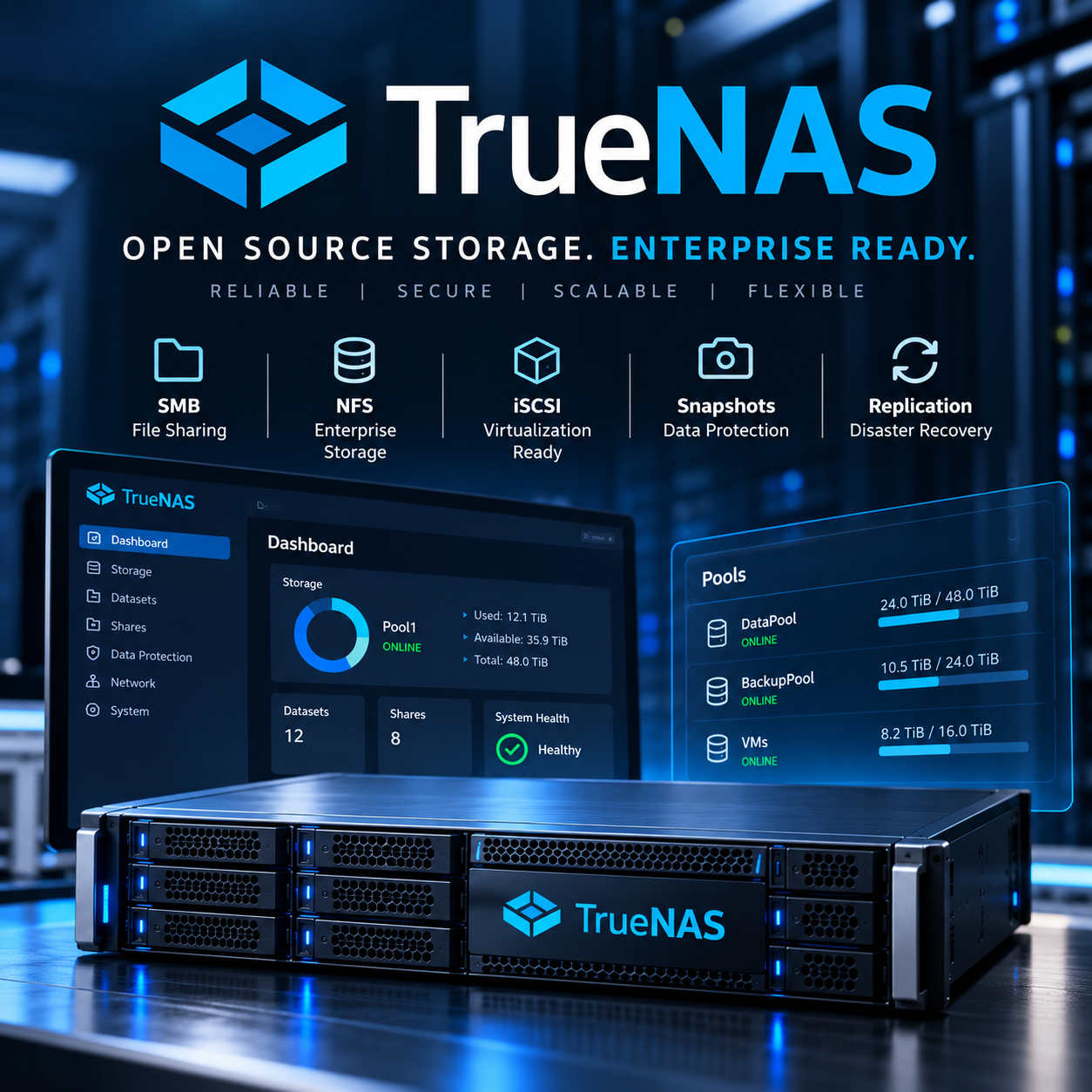
Figure 1 — TrueNAS as central storage for file sharing, virtualization, backup and replication.
Operational warning: RAID and snapshots alone are not backups. For production data, combine the 3-2-1 rule, off-site copies and remote replication.
Introduction
TrueNAS combines ZFS with SMB, NFS, iSCSI, snapshots, replication, ACLs, monitoring and alerts in one management interface. This guide uses those capabilities across storage setup and operation. Serving files is one stage; the design must also address data integrity, redundancy, visibility and recovery.
Start with the pool layout and recovery requirements, then work through installation and service checks. A home lab can use simpler hardware, while a production system needs planned disk replacement, monitored capacity and a demonstrated restore.
1. What is TrueNAS?
TrueNAS is a specialized operating system for NAS and storage servers. Current editions use ZFS/OpenZFS as the main pool-management and data-protection layer, with file and block services managed through the web UI.
For production, consider bare-metal installation on server hardware, ECC RAM, mirrored boot SSDs, a suitable HBA, a UPS, separate networks and recoverable backups.
2. What is NAS, and what problem does TrueNAS solve?
NAS serves files to users and hosts through protocols such as SMB and NFS. TrueNAS also provides block storage through iSCSI; architecturally, that use belongs to SAN. A general file server typically needs separate RAID, backup, snapshot and monitoring tools and processes.
TrueNAS integrates these capabilities but does not replace backup architecture, disaster recovery or a qualified team.
3. Enterprise uses for TrueNAS
- File server: departmental files, project shares and home directories through SMB.
- Central storage: independent datasets for teams, services and different security levels.
- Backup repository: a destination for software such as Veeam or native operating-system backup tools.
- VMware/Hyper-V storage: NFS or iSCSI on a separate storage VLAN.
- SMB: suitable for Windows with local or Active Directory authentication.
- NFS: suitable for Linux, Unix and VMware.
- iSCSI: ZVOL-based block storage for virtualization and block workloads.
- Snapshot: quick file or dataset recovery to a point in time.
- Replication: transfer ZFS snapshots to a second TrueNAS server in a separate site or rack.
4. TrueNAS advantages over a general file server
| Feature | TrueNAS | Windows File Server | Synology/QNAP |
|---|---|---|---|
| Deployment model | Bare metal or appliance; VMs for testing with support limitations reviewed | Usually VM or bare metal | Integrated appliance |
| File Protocol | SMB, NFS, iSCSI | SMB, NFS through roles/features | SMB, NFS, iSCSI |
| File Integrity | Checksums and self-healing with ZFS | Depends on the filesystem/storage | Depends on the platform and filesystem |
| Snapshot/Replication | Native with ZFS | Requires suitable tools and storage | Usually simpler and vendor-specific |
| Hardware flexibility | High | High | Limited to the appliance |
| Management | Detailed control for technical teams | Familiar to Microsoft teams | Simpler for small teams |
| Complexity | Higher; requires ZFS knowledge | Moderate | Lower for common scenarios |
| Cost | Suitable for self-build; evaluate edition and support separately | Licensing and CAL/software costs | Appliance and support costs |
| Best use | Engineered storage with detailed control | Central domain/file services | Small to medium enterprise SMB |
5. Minimum and recommended production hardware
Official starting minimum
- x86_64-compatible CPU
- At least 8 GB RAM
- Boot SSD of at least 20 GB according to the 25.04 installation guide; keep boot disks separate from pool disks
- At least two similar disks for a pool
Production recommendation
- 32–64 GB or more ECC RAM, sized for disk count and workload
- Two mirrored boot SSDs
- HBA in IT/HBA mode without hardware RAID hiding the disks
- Tested and burned-in NAS/enterprise disks
- 10 GbE for VMs, iSCSI and heavy backups
- Redundant PSUs and power paths, UPS and IPMI/BMC
- Hot-swap bays and enough capacity for rebuilds and growth
Home lab versus production
In a home lab, start learning with 8–16 GB RAM, one boot SSD and 1 GbE networking. In production, design for downtime, RPO/RTO, monitoring, disk replacement and real restores. Use USB flash for temporary installation media rather than a permanent production boot device.
6. ZFS architecture and key concepts
Pool and VDEV
Understand the pool-to-vdev relationship before creating storage. A pool provides the main storage space and consists of one or more vdevs. The vdev type determines usable capacity, performance and fault tolerance. Fundamental layout changes are difficult after creation, so calculate workload needs and future growth before selecting Create.
Dataset and ZVOL
A dataset is an independent filesystem with its own ACLs, quota, compression and snapshots. A ZVOL is a virtual block device, commonly used for iSCSI and some VMs.
Suggested structure:
tank/
├── shares/finance
├── shares/hr
├── shares/projects
├── backups
├── vmstore
└── replication
Mirror and RAIDZ1/2/3
- Mirror: similar to RAID1; suitable for IOPS- and latency-sensitive workloads such as VMs and databases.
- RAIDZ1: tolerates one disk failure; use cautiously with large disks and important data.
- RAIDZ2: tolerates two disk failures; a balanced option for enterprise file servers.
- RAIDZ3: tolerates three disk failures; suitable for large or archival pools with long rebuilds.
ARC, compression, scrub and snapshots
ARC is the main ZFS cache in RAM. Compression such as lz4 is usually a suitable choice. Scrubs check checksums and repair errors when redundancy exists. A snapshot is a point-in-time copy, but it remains on the same pool and is not an independent backup.
Do not enable deduplication without RAM calculations and real testing; its memory requirements can be substantial.
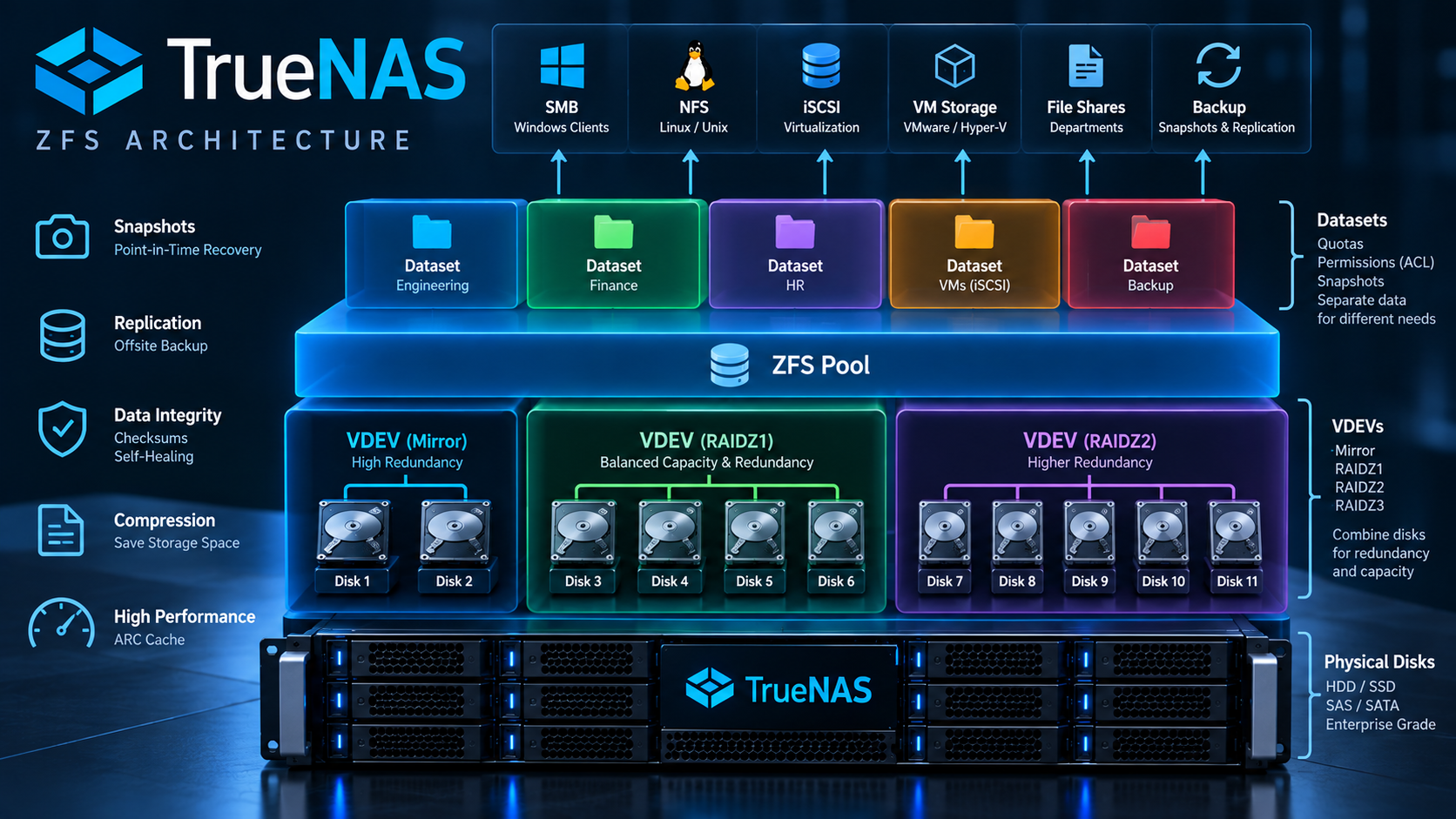
Figure 2 — Pools, VDEVs, datasets, ZVOLs and ZFS protection features.
7. Enterprise network design
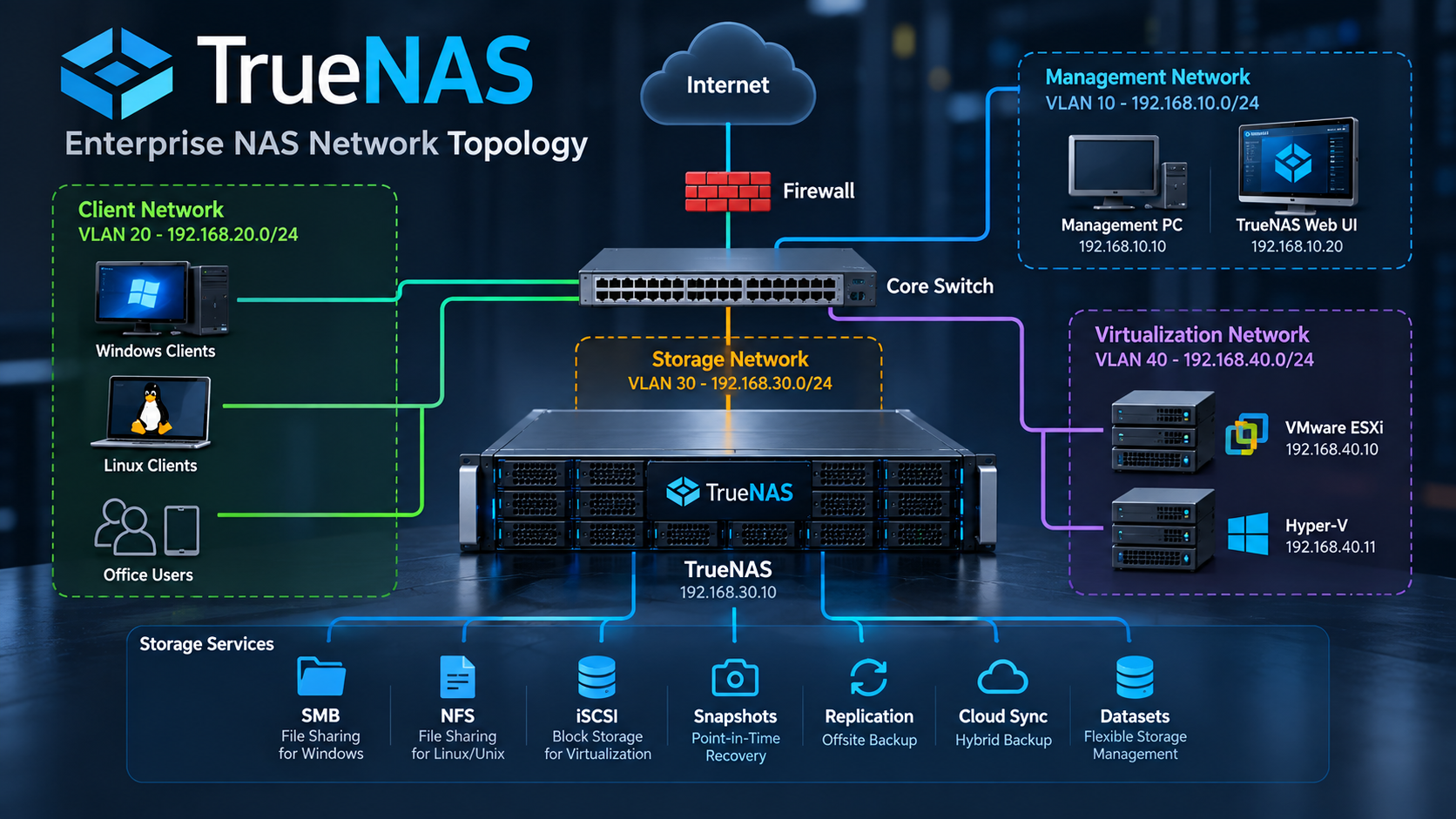
Figure 3 — Separate management, user/LAN, storage and backup/replication networks.
Internet → Firewall → Core Switch
                         ├── Management VLAN 10.10.10.0/24
                         ├── User/LAN VLAN 10.10.20.0/24
                         ├── Storage VLAN 10.10.30.0/24
                         └── Backup VLAN 10.10.40.0/24
Place the web UI only on the management VLAN. Use the LAN for SMB, the storage VLAN for NFS/iSCSI, and a backup VLAN or dedicated link for replication. Do not route the storage VLAN to the Internet.
8. Download the ISO and create bootable USB media
- Download the ISO only from the official TrueNAS page.
- Verify its checksum or signature.
- Create installation USB media with Rufus or Etcher.
- Use GPT/UEFI for modern systems.
- Remove the USB after installation.
Installation USB media differs from the permanent boot device; a production boot device should preferably be a quality internal SSD or M.2 drive.
9. Install TrueNAS on bare metal
- Boot from USB and select Install/Upgrade.
- Select the boot SSD; never select data disks.
- If you have two SSDs, select both for the boot pool.
- Confirm the disk-erasure warning.
- Set the administrator password.
- Select UEFI and complete installation.
- After restart, remove the USB.
- Open the IP address shown in the console in a browser:
https://<TRUENAS-IP>
Official paths: Storage → Pools, Datasets and System Settings.
10. Configure static IP, DNS, gateway and NTP
GUI path:
Network → Interfaces
Example:
IPv4: 10.10.10.20/24
Gateway: 10.10.10.1
DNS: 10.10.10.10, 10.10.10.11
Hostname: truenas01.example.local
Configure NTP with the organization's internal server through System Settings → Services → NTP. Correct DNS and NTP are essential for Active Directory, TLS and replication.
11. Create a storage pool
For a file server with four 8 TB disks:
Storage → Pools → Create Pool
Pool: tank
Layout: RAIDZ2
Compression: lz4
Do not select boot disks. For transaction-heavy VMs, two mirror VDEVs usually provide better latency and IOPS than RAIDZ. Compare capacity, data type and rebuild time before creation.
12. Create datasets
Datasets → Add Dataset
Select the SMB preset for SMB, and Generic for NFS and iSCSI. Compression=lz4 and Deduplication=Off are suitable starting points. Keep Sync at its production default for critical data; do not disable it without testing.
Give every share an independent child dataset; do not share the root or pool-level dataset.
13. Create users and groups
Credentials → Local Users
Credentials → Local Groups
Create groups such as finance-rw, finance-ro and it-admins, and assign permissions to groups. In a domain-based organization:
Credentials → Directory Services → Active Directory
Before joining, test DNS, NTP, FQDN and access to the domain controller.
14. Security Hardening
- Do not publish the web UI on the Internet; use only a management VLAN, VPN or bastion.
- Use HTTPS and a valid organizational certificate.
- Apply least privilege and group-based ACLs.
- Keep administrator accounts separate from user accounts.
- Enable MFA if supported by the release and authentication method.
- Restrict SMB/NFS/iSCSI to appropriate subnets.
- Separate management, storage and backup VLANs.
- For ransomware recovery, retain snapshots, remote replication and offline copies.
- Do not enable unused services.
15. Configure SMB for Windows
Create a dataset:
Name: projects
Preset: SMB
Then:
Shares → Windows Shares (SMB) → Add
Path: /mnt/tank/shares/projects
Name: Projects
Start SMB through System Settings → Services → SMB and enable Start Automatically if needed. Configure ACLs by group through Datasets → Edit Permissions.

Figure 4 — Create a dataset, ACLs and an SMB share for Windows users.
16. Map a network drive in Windows
In File Explorer, select Map Network Drive under This PC and enter:
\\truenas01.example.local\Projects
With PowerShell:
New-PSDrive -Name P -PSProvider FileSystem `
  -Root "\\truenas01.example.local\Projects" -Persist
Do not store credentials in public scripts.
17. Configure NFS for Linux and VMware
Create a dataset with the Generic preset, then:
Shares → Unix Shares (NFS) → Add
Path: /mnt/tank/vmware_nfs
Authorized Networks: 10.10.30.0/24
On Linux:
sudo mkdir -p /mnt/truenas
sudo mount -t nfs truenas01:/mnt/tank/vmware_nfs /mnt/truenas
showmount -e truenas01
In VMware, use Add Datastore → NFS and allow only authorized hosts on the storage VLAN.
18. iSCSI for virtualization
With iSCSI, the host receives block storage rather than a file share. The portal specifies the connection address and port, and the initiator is the requesting software or device on the host. The target is the logical destination; the extent identifies its backing storage, and an association connects that extent to the target so the host can access it. The following steps assemble this chain.
- Create a ZVOL: Datasets → Add Zvol.
- Open Shares → Block Shares (iSCSI).
- Define the portal and initiator.
- Create the target and extent.
- Associate them.
Run iSCSI on a storage VLAN with 10 GbE or faster, controlled latency and multipath if needed. Do not allocate more ZVOL space than the pool can actually provide.
19. Automated snapshots
Data Protection → Periodic Snapshot Tasks → Add
Retention example:
Hourly: 24 hours
Daily: 30 days
Weekly: 12 weeks
Monthly: 12 months
Snapshots support quick recovery; when the primary pool is lost, snapshots on that pool are lost too.
20. ZFS replication to a second TrueNAS server
Before defining replication, prepare the second TrueNAS system, sufficient destination capacity and the required SSH credential. Then apply the following settings with the destination and transfer path established:
Data Protection → Replication Tasks → Add
Source: tank/shares
Destination: truenas02/tank-replica/shares
Recursive: Enabled
Schedule: every 30 minutes
Transport: SSH
Place the destination at a second site or at least a separate rack/room, and test restores regularly. For a concrete exercise, put a file with known contents and recorded ACLs in a test dataset and wait for its snapshot to replicate. Use a supported procedure to recover the destination copy into a separate path or dataset, compare its contents and permissions with the record, test authorized and unauthorized user access, and record recovery time. Do not overwrite the original data for this exercise. Replication without suitable retention can also propagate logical errors or malicious deletion; manage destination snapshots.

Figure 5 — Local snapshots versus replication and off-site copies.
21. Configuration backup
System Settings → General → Manage Configuration → Download File
Encrypt the configuration file and retain copies in secure management storage, a second site and storage outside TrueNAS. This file supports configuration recovery. Maintain pool data backups separately because a configuration backup does not contain that data.
22. Practical example for a medium-sized company
For 80 users, 10 VMs and about 30 TB of data:
TrueNAS-01: 8×12 TB, RAIDZ2, 64 GB ECC, 2×10 GbE, Boot SSD Mirror
TrueNAS-02: 8×12 TB, RAIDZ2, 64 GB ECC, second site
Datasets:
tank/shares/finance
tank/shares/hr
tank/shares/projects
tank/backups
tank/vmware_nfs
tank/replication
A useful starting design uses SMB on the user VLAN, NFS/iSCSI on the storage VLAN, hourly and daily snapshots, replication to a second site every 30 minutes, and a weekly off-site copy. Calculate final capacity using actual data, annual growth, retention and rebuild space.
23. SMART and scrub
SMART:
Storage → Disks → S.M.A.R.T. Tests
Short: daily or weekly
Long: monthly
Scrub:
Data Protection → Scrub Tasks → Add
Pool: tank
Schedule: monthly
Run long tests during quiet hours and send alerts to email or monitoring.
24. Monitoring and alerting
Use these paths:
Dashboard
System Settings → Alerts
Reporting
Enable alerts for degraded pools, disk failures, SMART, low space, scrub errors, replication failures, temperature, certificate expiry, DNS/NTP and service outages. Test email alerts with organizational SMTP and add SNMP, syslog, Prometheus or Grafana if needed.
25. Initial troubleshooting and diagnostic commands
zpool status
zpool list
zfs list
zfs list -o name,used,avail,refer,mountpoint
lsblk
ip addr
ip route
ping <gateway>
dig truenas01.example.local
showmount -e <truenas-ip>
On Windows:
Test-NetConnection truenas01 -Port 445
First check the dashboard, pool, SMART, free space, DNS, NTP, VLANs, firewall, ACLs, services and latest snapshots/replication. Do not run modifying ZFS commands without a runbook and authorization.
26. Common mistakes
- RAID provides tolerance for some disk failures, but it does not create an independent recovery copy for file deletion, ransomware, fire or complete system failure. Evaluate the backup design separately from disk redundancy.
- A snapshot is not a backup. It resides on the same pool.
- Do not choose RAIDZ for every workload. VMs and databases often need mirror VDEVs.
- Do not use USB as a permanent production boot disk.
- Do not underestimate RAM requirements. ARC, SMB, VMs, iSCSI and deduplication need memory.
- Do not share the root dataset. Create independent child datasets.
- Do not enable deduplication without calculations and tests.
- Replication without restore tests is insufficient. Backups must be recoverable.
27. Final production deployment checklist
- ECC RAM, mirrored boot SSDs, HBA, UPS and IPMI are ready.
- Disks have passed burn-in and SMART tests.
- Management, user, storage and backup VLANs are separate.
- DNS, FQDN, gateway and NTP are correct.
- Pool layout matches the workload and rebuild window.
- Compression is enabled and deduplication was chosen deliberately.
- The root dataset is not shared and independent datasets exist.
- ACLs and groups have been tested.
- SMB/NFS/iSCSI are accessible only to authorized clients.
- Snapshot schedules and retention are documented.
- Remote replication to a second destination is enabled.
- Off-site and offline backups exist.
- Configuration backups are encrypted and stored off the device.
- SMART, scrub, alerting and monitoring are enabled.
- Restore and disaster recovery have been tested in practice.
- RPO, RTO, disk-replacement runbooks and escalation procedures are documented.
When is TrueNAS a suitable choice, and when is it not?
TrueNAS is a suitable choice when you need control of storage, ZFS capabilities, snapshots and replication, SMB/NFS/iSCSI services, and hardware flexibility with manageable costs. Realizing those benefits requires storage, networking and recovery skills. Match the final decision to both the workload and the team's ability to operate it.
It is unsuitable when no team can manage ZFS, only mismatched disks without backups are available, an appliance is expected to require no design, the web UI would be Internet-facing, or very high availability is needed without HA and a second site. A supported appliance, managed storage or a vendor-based solution may be more appropriate.
TrueNAS frequently asked questions
Do RAIDZ and snapshots replace backups?
No. RAIDZ tolerates disk failures and snapshots return data to a point in time. Total pool failure, malicious deletion and site incidents require independent off-site copies.
What is the difference between a dataset and a ZVOL?
A dataset is a filesystem with independent quotas, ACLs and snapshots, used for SMB or NFS shares. A ZVOL is a block device, typically used behind an iSCSI extent.
Are mirrors or RAIDZ2 better for virtual machines?
The choice depends on IOPS, latency, capacity and workload. Mirror VDEVs usually suit random VM workloads; RAIDZ2 provides capacity and tolerance of two disk failures per VDEV. Test the final choice with a real workload.
Why should boot disks be separate from pool disks?
TrueNAS installation erases the selected disk. Separating boot and data reduces selection mistakes and role conflicts. Verify the destination disk model and serial number before installation.
How do we restrict SMB access?
Create a separate dataset, assign ACLs to required groups and restrict network access to the service. Test read, write and deletion using both authorized and unauthorized users.
Does deduplication always save more space?
No. Results depend on actual duplicate data and system resources. Memory and performance costs can exceed savings. Do not enable it without measurements and tests.
Is successful replication sufficient to prove recoverability?
No. Check the job and destination snapshots, then actually restore a file or dataset. Retain destination retention settings and encryption keys separately from the primary server.
What should we do when a pool becomes degraded?
Check the dashboard and zpool status, identify the failed disk by serial number, and confirm backup health. Replace it through a supported TrueNAS UI procedure and monitor resilver progress.