
1. Start with the job, not the product
Two application servers are ready, but every request still reaches one machine. You put a proxy in front of them, and suddenly another question appears: HAProxy or Nginx? Both can distribute HTTP traffic. The useful question is what else this entry point needs to do.
For a website that also needs static files and a response cache, Nginx is a natural starting point. For a dedicated traffic gateway with detailed backend health checks, HAProxy is often a good fit. These are design choices, not a universal ranking. This comparison uses HAProxy Community and Nginx Open Source as its baseline and calls out commercial features separately.
2. Choose for the deployment you have
| Scenario | Starting choice | Reason |
|---|---|---|
| A small website with assets and one app | Nginx | One familiar web entry point |
| Several APIs, detailed active readiness checks | HAProxy | Dedicated routing and health control |
| Existing Nginx that already meets requirements | Keep Nginx | Migration needs a measurable benefit |
| Large web tier with local asset serving | HAProxy plus Nginx when justified | Separate balancing from web serving |
| UDP service | Evaluate Nginx stream and protocol needs | Do not apply an HTTP/TCP design blindly |
The combined architecture is useful when responsibilities and ownership are clear. For a small site it may only add another process, another certificate boundary and another log to investigate. Use a second layer to solve an actual operational need, not just because a diagram looks more professional.
3. Before changing the entry point
Write down the listener ports, backend addresses, health endpoint and installed editions. Keep the current configuration and a working administrative path to the proxy. For the lab, confirm that both application nodes are reachable directly from the proxy before debugging balancing rules.
4. Where each tool sits
A reverse proxy accepts a client request and forwards it to an upstream service. A load balancer chooses between multiple upstreams. One process can do both. At layer 7 it can inspect HTTP hosts and paths; at layer 4 it forwards a connection without treating its payload as HTTP.
HAProxy is built around proxying and load balancing. Nginx combines a web server with reverse proxying and load balancing. Its stream module can handle TCP and UDP, but module availability depends on the installed build. HAProxy supports TCP and HTTP proxying; do not generalize that into support for every UDP service.
Clients -> HAProxy -> application servers
Clients -> Nginx   -> static files / cache / application servers
Clients -> HAProxy -> Nginx on each web node -> application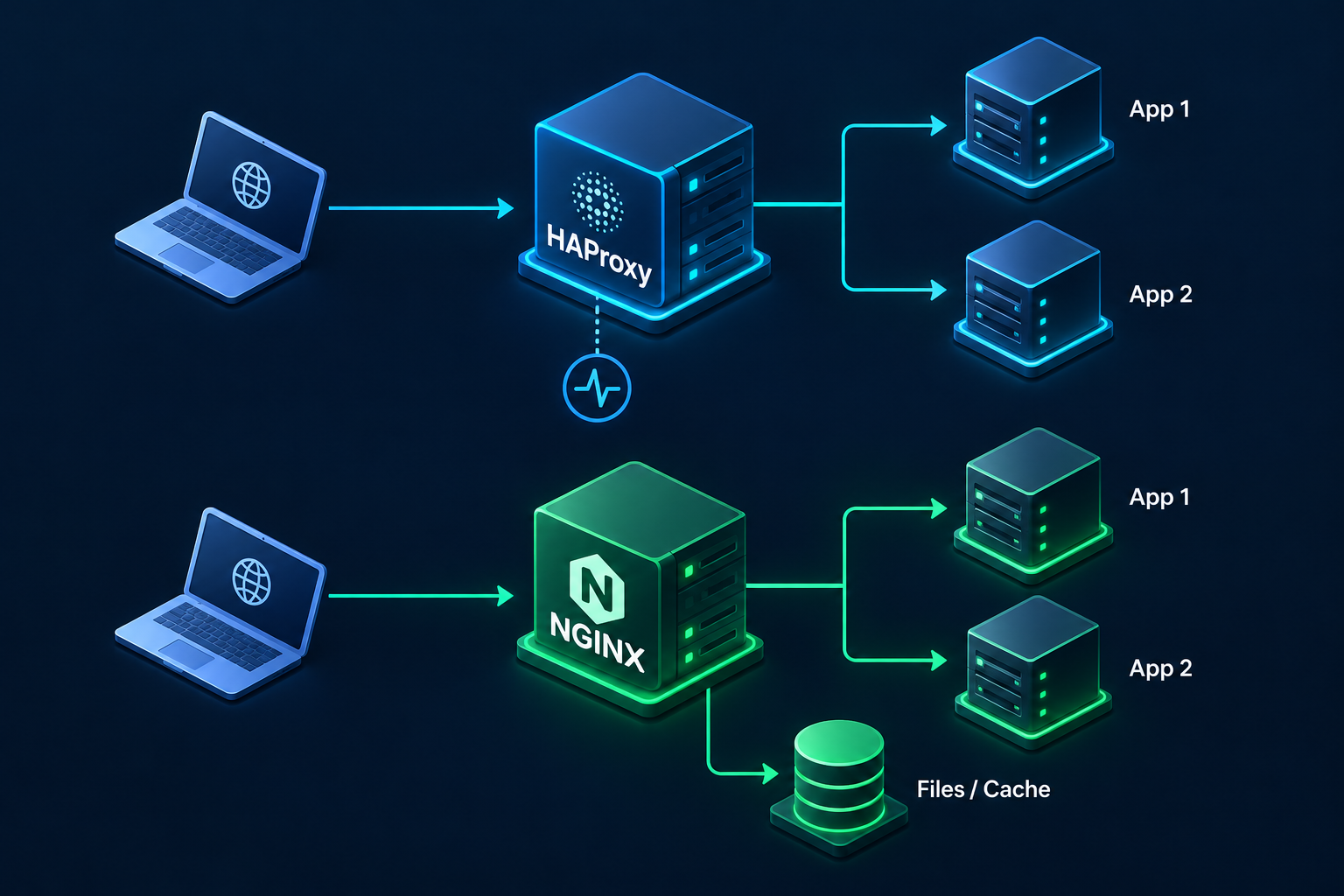
5. A small, comparable lab
Use one proxy VM and two application nodes on a private network: 10.10.10.11:8080 and 10.10.10.12:8080. Both nodes should return their own identifier on / and HTTP 200 on /healthz when ready. These examples listen on port 8080 without TLS for an isolated lab. Replace addresses and host names; do not expose this lab listener directly to the internet.
The HAProxy file below is a minimal complete configuration. Round robin is deliberately used so repeated requests make the distribution easy to observe. The health probe explicitly sends the Host header, which matters when the application uses virtual hosts.
global
    log stdout format raw local0

defaults
    log global
    mode http
    option httplog
    timeout connect 5s
    timeout client 30s
    timeout server 30s

frontend lab_http
    bind :8080
    http-request set-header X-Forwarded-For %[src]
    http-request set-header X-Forwarded-Proto http
    default_backend app_nodes

backend app_nodes
    balance roundrobin
    option httpchk
    http-check send meth GET uri /healthz ver HTTP/1.1 hdr Host app.example.test
    http-check expect status 200
    default-server inter 3s fall 3 rise 2
    server app1 10.10.10.11:8080 check
    server app2 10.10.10.12:8080 check
The Nginx example is also a complete lab file, not a fragment to paste inside another http block. Its passive checks mark a node unavailable after two qualifying failures within ten seconds. With a single upstream server, max_fails and fail_timeout do not provide the same removal behavior. HTTP 500 responses are not automatically qualifying failures in this configuration.
worker_processes auto;
error_log logs/error.log;
pid logs/nginx.pid;

events { worker_connections 1024; }

http {
    upstream app_nodes {
        server 10.10.10.11:8080 max_fails=2 fail_timeout=10s;
        server 10.10.10.12:8080 max_fails=2 fail_timeout=10s;
    }

    server {
        listen 8080;
        server_name app.example.test;

        location / {
            proxy_pass http://app_nodes;
            proxy_http_version 1.1;
            proxy_set_header Connection "";
            proxy_set_header Host $host;
            proxy_set_header X-Forwarded-For $remote_addr;
            proxy_set_header X-Forwarded-Proto $scheme;
            proxy_connect_timeout 5s;
            proxy_read_timeout 30s;
            proxy_send_timeout 30s;
            proxy_next_upstream error timeout;
        }
    }
}
Both configurations overwrite the client address header because the lab proxy is the first entry point. If a trusted CDN or another proxy is in front, configure trusted address handling deliberately. Otherwise you either lose the original address or allow a visitor to invent it. The Nginx read timeout is an interval between reads, not a total request deadline.
haproxy -c -f /etc/haproxy/haproxy.cfg
nginx -t -c /etc/nginx/nginx.conf
# After validation, reload the service you changed:
sudo systemctl reload haproxy
# OR
sudo systemctl reload nginx

for i in $(seq 1 8); do
  curl --fail --silent --show-error -H "Host: app.example.test" http://PROXY_IP:8080/
  printf "\n"
done
Test the products separately, or give them different listener ports. Stop app1 in the lab and repeat requests. HAProxy should react to failed probes; Nginx needs live traffic to observe qualifying failures. Start the node again and check recovery. Keep a copy of the previous configuration so you can validate and reload it if the new routing fails.
6. Protect the proxy boundary
Allow application ports only from the intended proxy network. Keep management and statistics endpoints private. At a public HTTPS entry point, configure certificates and trusted client-address handling explicitly. Log enough to follow a failed request, while avoiding credentials and sensitive response bodies in logs.
7. The comparison that changes a decision
| Requirement | HAProxy Community | Nginx Open Source |
|---|---|---|
| HTTP reverse proxy | Yes | Yes |
| TCP balancing | TCP mode | stream module |
| Static files | Not a general-purpose file server | Built-in web serving |
| Response cache | A limited in-memory HTTP cache | Proxy cache with disk storage |
| Active checks | Built-in TCP and HTTP checks | Official HTTP health_check module is commercial |
| Passive checks | Can observe backend errors when configured | max_fails and fail_timeout |
| Session affinity | Cookies and stick tables | IP/hash routing; feature scope depends on edition |
| Routing rules | ACLs, maps and backend selection | server, location and upstream |
| TLS | Termination or TCP passthrough | Termination or stream passthrough |
Nginx Plus adds commercial capabilities, including the official active HTTP health-check module. HAProxy Enterprise is also a separate commercial product. Compare the editions you will actually deploy. In particular, saying that HAProxy has no cache or that Nginx cannot balance TCP would give the wrong picture.
8. A running process is not necessarily a healthy service
An application can accept a TCP connection while returning HTTP 500 because its database is unreachable. A TCP probe sees the open port; an HTTP readiness endpoint can expose whether the application is ready to serve requests. Keep that endpoint cheap and define which dependencies really make this node unusable.
An active check probes backends periodically, even without visitors. A passive check learns from real requests. HAProxy can probe an HTTP endpoint with option httpchk and check. In stock Nginx Open Source, passive checks use upstream failures; adding the commercial health_check directive will not turn an open-source installation into Plus.
Removing a failed node protects new requests; it does not guarantee that in-flight requests survive. Retries are a separate decision. Retrying a payment or an order without an idempotency design can duplicate an operation.
9. Caching, TLS and sessions
Nginx can serve assets from disk and cache selected upstream responses. HAProxy has a limited in-memory HTTP cache, but that does not make it a replacement for a general file-serving web server. Never enable broad caching on authenticated pages, baskets or user-specific API responses without defining safe cache keys and bypass rules.
Both can terminate TLS. In passthrough mode the backend handles certificates and the proxy cannot inspect encrypted HTTP paths. If the proxy terminates TLS and then uses HTTPS upstream, also configure backend certificate verification. Encryption without verification leaves the identity of the upstream unchecked.
Sticky routing can help an older application whose sessions live in one process. It also makes distribution less flexible, and node failure can still lose those sessions. A shared session store usually makes scaling easier. Do not assume that least connections measures CPU load or guarantees equal response times.
10. When a configuration works but requests fail
| Symptom | Check first |
|---|---|
| 502 / backend connection failure | Listening address, firewall, backend logs and routing |
| 504 / timeout | Upstream latency and timeout semantics |
| HAProxy marks a live app down | Probe path, Host, expected status and dependencies |
| Nginx does not remove a node returning 500 | Which errors count under proxy_next_upstream |
| Login disappears between requests | Shared sessions or deliberate session affinity |
| Wrong client address | Trusted proxy chain and overwritten headers |
A successful syntax check proves that the parser accepts the file. It does not prove that the backend is reachable or the application behaves correctly. Check a normal request, an authenticated flow and a failed-node scenario before accepting a change.
11. Which one is faster? Measure the path
There is no responsible fixed speed ratio between these tools. TLS work, payload size, connections, logging and the application can all change the result. An empty response benchmark and a slow database-backed API are different workloads. Run both on the same resources and with equivalent TLS, logging and routing settings.
Record throughput, p95/p99 latency, error rate, CPU, memory and backend recovery time. Include long-lived connections if your application uses them. A throughput win is not useful if errors increase or failure recovery is too slow. A single proxy also remains a single point of failure; redundant proxies need their own tested failover mechanism.
12. Before accepting the change
Check configuration syntax, request routing and both backend identities. Then test removal and recovery of a failed node, an authenticated session and the client address seen by the application. Choose timeouts from application behavior and verify the previous configuration can be reloaded. This gives the team a concrete acceptance test for either product.
13. A practical decision
Start with Nginx when the entry point is mainly a web server and reverse proxy. Start with HAProxy when the job is a dedicated balancing layer with precise backend checks. Keep the existing tool if it meets the requirement. The better choice is the one your team can configure, observe and recover under real failure.
14. Frequently asked questions
Can Nginx replace HAProxy? For many HTTP proxy and balancing deployments, yes. First verify the required health checks, protocol and edition. Can HAProxy replace Nginx? It can take over proxying, but static file serving may still need a web server.
Does installing either product make the service highly available? No. Healthy backends, session design, redundant entry points and a tested failover path all matter. Can they share a server? Yes, but they cannot both bind the same address and port, and that server still has its own failure risk.
15. Official References and lab downloads
Technical references checked on 14 October 2026. The examples target established HAProxy 3.2 syntax and Nginx Open Source directives. They are lab configurations; validate against your installed version before use.
HAProxy configuration, checks and cache
Commercial active HTTP health checks
Nginx proxy cache, headers and timeouts