


The event exists. Can the operations team find it?
An authentication failure on a Windows server, an SSH attempt on Ubuntu and a firewall deny can describe the same incident. If their clocks, host names and retention policies differ, collecting them in one interface will not automatically make the sequence reliable. Start a Splunk deployment by defining which events must survive an outage, who may search them and how quickly an investigator must receive an answer.
This guide uses Splunk Enterprise and Universal Forwarder 10.2.9, build 41bebfa38eb4, on Ubuntu Server 24.04 LTS amd64. These packages are listed by the official download catalog; the 10.2 support line runs to January 2028 under the published policy. This is a reproducible supported baseline, not a claim that it is the newest release. Check current security advisories and add-on compatibility before adopting it. Configuration and commands have been checked against documentation; no deployment or load test on an actual Splunk environment is claimed.
Separate the data path from the control plane
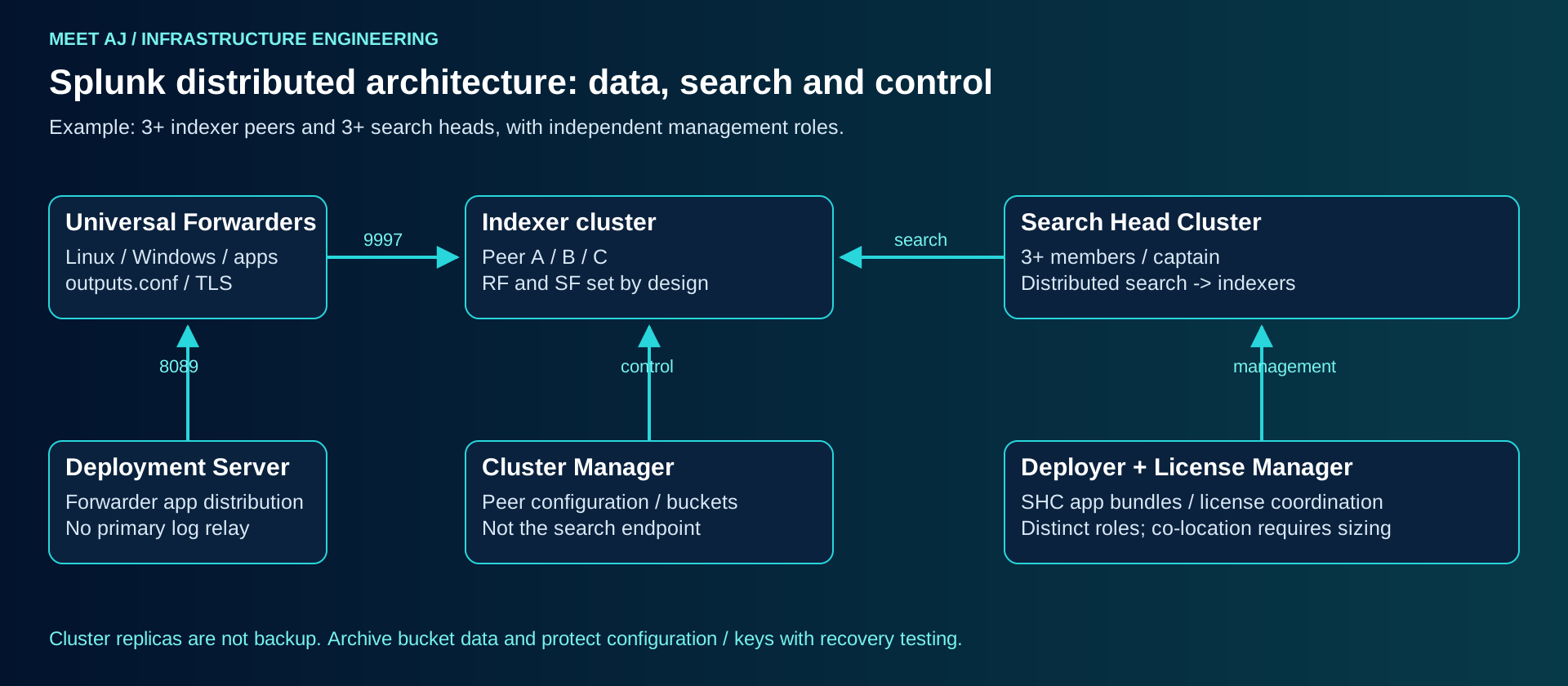
Splunk Enterprise is the software used for an Indexer, Search Head, Heavy Forwarder and several management roles. An Indexer parses incoming streams, creates searchable buckets and executes its part of distributed searches. A Search Head accepts SPL, distributes work and merges results. A Universal Forwarder is a smaller collection agent; it monitors files and supported operating-system inputs without providing the complete indexing and search engine. A Heavy Forwarder is justified when a supported input, routing or index-time transformation requires the full processing pipeline. It should not become a compulsory extra hop for every source.
Deployment Server distributes deployment apps to selected forwarders through server classes. It does not balance ingestion or manage index replication. Cluster Manager coordinates Indexer peers and searchable bucket copies. License Manager tracks entitlements and usage reported by license peers; the role does not add disk capacity. Monitoring Console exposes operational health. A Search Head Cluster also needs a deployer for app distribution: that deployer and Deployment Server have different jobs.
Splunk Enterprise is not Splunk Cloud Platform, whose infrastructure is operated as a service. Enterprise Security is a separately licensed security solution with its own compatibility and sizing requirements. Installing Enterprise does not install ES, correlation content or a working SOC process. The operational searches in this guide work without claiming ES functionality.
Choose the smallest topology that meets recovery requirements
| Model | Components and boundary |
|---|---|
| Lab | One Enterprise instance and one UF; disposable data, no availability promise. |
| Small production | A standalone Enterprise instance, TLS forwarders, external backups and monitoring. A server failure interrupts both ingestion and search. |
| Distributed | Separate Search Head and Indexers; Deployment Server when configuration distribution justifies it. Multiple independent Indexers do not replicate data. |
| Enterprise HA | Indexer Cluster with a manager; at least three peers for RF=3. Search Head Cluster: at least three members, deployer and access load balancer. Separate failure domains and recovery procedures. |
The installation below builds a secured standalone receiver, suitable for a pilot and for small production only where its recovery time is accepted. The cluster chapter shows the separate expansion procedure. Three VMs on the same ESXi host and datastore do not provide host or storage fault tolerance. With branches, place a disk-buffered syslog collector near devices, preserve timestamps and calculate how much backlog can accumulate during a WAN outage.
Prepare the operating system and the storage path
The selected release supports Ubuntu 24.04 and 22.04 x86-64, alongside the distributions in its support matrix. Use Ubuntu 24.04 here throughout; the Enterprise server is not an ARM installation. Match CPU instruction-set requirements, including KV Store requirements, to the VM CPU presented by the hypervisor. A small lab can begin with 4 vCPU and 8 GB RAM, but that is not the vendor production reference. The published standalone production reference lists 12 physical cores or 24 vCPU and 12 GB RAM; search concurrency and ES can require substantially more. Reserve resources rather than treating an overcommitted vCPU as a physical core.
10.2 supported operating systems and platform requirements
Splunk reference hardware: production baselines by role
Provide persistent DNS names, forward and reverse lookup where required, synchronised UTC time, low-latency storage and a dedicated mounted filesystem for indexed data. Hot/Warm search traffic needs measured IOPS and latency under concurrent read/write load; a large but slow NAS is not a sizing solution. XFS or ext4 on appropriately protected local/block storage is a practical starting point, subject to the filesystem support matrix. Use encryption at rest and monitor free space, inodes and storage latency. Mounts must exist before Splunk starts.
| Port | Allowed path |
|---|---|
| 8000/TCP | HTTPS Splunk Web after configuration; user/VPN networks only. |
| 8089/TCP | TLS management API: administration, deployment clients and relevant Splunk peers only. |
| 9997/TCP | TLS S2S receiver configured here; forwarder networks only. Not enabled automatically. |
| 9887/TCP | Example Indexer replication port; explicitly configured and restricted between peers. |
| 8191/TCP | KV Store communication where the selected topology requires it; never a public client port. |
| 8065/TCP | Example Search Head replication port chosen during SHC setup, between members only. |
| 6514/TCP or approved syslog port | Device to syslog collector with TLS where supported; UDP 514 requires a protected segment and accepts possible loss. |
hostnamectl
getent hosts splunk01.example.net
timedatectl status
lsblk -f
df -hT /opt /srv/splunk
df -i /srv/splunk
ss -lnt
sudo apt-get update
sudo apt-get install -y ca-certificates curl openssl acl sysstat rsyslog
These are inspections, not sample successful output. Confirm that time synchronisation is active, the intended data mount has the expected filesystem and the required ports are not already occupied. Replace the example.net names, networks and all uppercase placeholders before execution. Do not open 8089 or enable a firewall remotely until the management access rule is preserved.
Install verified media and initialise an administrator interactively
Obtain the Linux amd64 tar package and its SHA512 file from the official Enterprise catalog using an authorised account. The catalog provides the exact download command; do not reconstruct a URL from a guessed build. Save the package under the filename below. Download the checksum separately through the authenticated vendor site and verify its filename. A checksum retrieved from an untrusted mirror does not establish package authenticity.
Official Enterprise packages, exact build names and SHA512 files
cd /var/tmp
sha512sum -c splunk-10.2.9-41bebfa38eb4-linux-amd64.tgz.sha512
# Continue only after the matching file reports OK.
sudo groupadd --system splunk
sudo useradd --system --gid splunk --home-dir /opt/splunk --shell /bin/bash splunk
sudo tar -xzf splunk-10.2.9-41bebfa38eb4-linux-amd64.tgz -C /opt
sudo chown -R splunk:splunk /opt/splunk
sudo install -d -o splunk -g splunk -m 0750 /srv/splunk/hotwarm /srv/splunk/cold /srv/splunk/thawed
sudo -u splunk /opt/splunk/bin/splunk start --accept-license
Use this account-creation block on a fresh host only; if the account already exists, inspect it rather than creating a second identity. The initial start asks for the administrator name and password interactively. Enter a unique password from the approved vault; do not put -auth user:password in a shell command, seed a shared password in Git or store it in command history. At this point 8000 must still be restricted by the network firewall; configure HTTPS before using Web over the network.
sudo -u splunk /opt/splunk/bin/splunk stop
sudo /opt/splunk/bin/splunk enable boot-start -systemd-managed 1 -user splunk -group splunk
sudo systemctl daemon-reload
systemctl list-unit-files '*splunk*' '*Splunk*'
sudo systemctl cat Splunkd.service
A fresh tar installation normally creates Splunkd.service; inspect the actual generated name and use it in subsequent commands if different. Add service limits with a systemd drop-in instead of editing the generated unit. For example, set LimitNOFILE=65536 and LimitNPROC=16000 under [Service], reload systemd and check effective values with systemctl show. These are explicit starting settings, not proof of sizing. Apply the release-specific Linux tuning guidance for THP and memory; do not copy an old blanket kernel tuning script into a new release.
sudo systemctl edit Splunkd.service
# Enter the following drop-in, then save:
# [Service]
# LimitNOFILE=65536
# LimitNPROC=16000
sudo systemctl daemon-reload
sudo systemctl show Splunkd.service -p User -p Group -p LimitNOFILE -p LimitNPROC
Vendor systemd boot-start procedure; inspect generated unit names
Establish trust before enabling the receiver
Request certificates from the organisation PKI: serverAuth for each Splunk DNS name and clientAuth for each forwarder where mutual TLS is required. The server SAN must contain the exact DNS name used by clients. Keep CA private keys outside Splunk. In this example PKI supplies leaf.pem, issuer-chain.pem and the matching server.key. The combined receiver PEM contains the server certificate, private key and issuer chain; the separate ca-chain.pem contains trusted issuing/root CA certificates. The unencrypted service key is protected by filesystem ownership, restricted backup and disk encryption; an encrypted key requires a protected sslPassword workflow instead.
sudo install -d -o splunk -g splunk -m 0700 /opt/splunk/etc/auth/enterprise
sudo install -o splunk -g splunk -m 0600 server.key /opt/splunk/etc/auth/enterprise/server.key
sudo install -o splunk -g splunk -m 0640 leaf.pem /opt/splunk/etc/auth/enterprise/web-chain.pem
sudo sh -c 'cat issuer-chain.pem >> /opt/splunk/etc/auth/enterprise/web-chain.pem'
sudo sh -c 'cat leaf.pem server.key issuer-chain.pem > /opt/splunk/etc/auth/enterprise/server.pem'
sudo chown splunk:splunk /opt/splunk/etc/auth/enterprise/server.pem
sudo chmod 0600 /opt/splunk/etc/auth/enterprise/server.pem
sudo install -o splunk -g splunk -m 0640 ca-chain.pem /opt/splunk/etc/auth/enterprise/ca-chain.pem
openssl x509 -in leaf.pem -noout -subject -issuer -dates -ext subjectAltName
sudo install -d -o splunk -g splunk -m 0750 /opt/splunk/etc/apps/meetaj_receiver/local
Write the following files in the indicated application directory with ownership splunk:splunk and mode 0640. Never edit etc/system/default. This receiving example requires client certificates from the approved CA; a forwarder without one must be rejected. A dedicated issuing CA for forwarders is preferable to trusting every workstation certificate in a broad enterprise root.
meetaj_receiver/local/server.conf
[sslConfig]
sslRootCAPath = /opt/splunk/etc/auth/enterprise/ca-chain.pem
serverCert = /opt/splunk/etc/auth/enterprise/server.pem
sslVersions = tls1.2
sslVerifyServerCert = true
sslVerifyServerName = true
meetaj_receiver/local/inputs.conf
[splunktcp-ssl:9997]
disabled = 0

[SSL]
serverCert = /opt/splunk/etc/auth/enterprise/server.pem
requireClientCert = true
sslVersions = tls1.2
meetaj_receiver/local/web.conf
[settings]
enableSplunkWebSSL = true
httpport = 8000
privKeyPath = /opt/splunk/etc/auth/enterprise/server.key
serverCert = /opt/splunk/etc/auth/enterprise/web-chain.pem
TLS 1.2 is an explicit baseline in these S2S examples, not a statement that TLS 1.3 is unsupported. Enabling 1.3 requires its documented cipher/group settings and a full peer compatibility check. Securing 9997 does not secure Web, 8089, KV Store or cluster replication by implication. Each has its own configuration and acceptance test. Trust validation on outbound management calls can expose peers still using default certificates; replace those before adding them.
sudo -u splunk /opt/splunk/bin/splunk btool check
sudo -u splunk /opt/splunk/bin/splunk btool inputs list --debug
sudo -u splunk /opt/splunk/bin/splunk btool server list sslConfig --debug
sudo systemctl start Splunkd.service
sudo systemctl status Splunkd.service --no-pager
openssl s_client -connect splunk01.example.net:8000 -servername splunk01.example.net -CAfile ca-chain.pem -verify_hostname splunk01.example.net -verify_return_error </dev/null
curl --cacert ca-chain.pem -I https://splunk01.example.net:8000
btool check should complete without configuration errors; --debug shows which file supplies each effective setting. The TLS probe must validate the chain and hostname; an HTTP redirect to login is acceptable. Test 9997 again using an approved client certificate and key, and verify that a client without a certificate is refused. Only then allow approved forwarder subnets to 9997 and approved users to 8000.
Create an index before directing forwarders to it
An Index is a storage and access-control boundary; sourcetype describes the event format, host the event origin and source the file/input identity. Avoid an index per server. Separate data when access, retention or operational ownership differs. Start with infra for the pilot; create a separately governed security index when its access and retention policy are ready. The following standalone example retains data for up to 30 days and caps this index at about 2 TiB. That size is an example capacity guard, not a guarantee of 30 days.
meetaj_receiver/local/indexes.conf — standalone only
[infra]
homePath = /srv/splunk/hotwarm/infra/db
coldPath = /srv/splunk/cold/infra/colddb
thawedPath = /srv/splunk/thawed/infra/thaweddb
frozenTimePeriodInSecs = 2592000
maxTotalDataSizeMB = 2097152
Hot buckets accept writes. A rolled Hot bucket becomes Warm and remains searchable; Cold is also searchable but can use another storage path. Frozen is deleted by default, not automatically archived. Set a reviewed coldToFrozenDir or coldToFrozenScript only after proving archive success, capacity and restore procedures. Thawed holds restored archived data and requires its own cleanup policy. Age-based retirement evaluates bucket event times, while size limits may retire data earlier. Bad future timestamps and wide bucket time ranges can distort apparent retention.
sudo -u splunk /opt/splunk/bin/splunk btool indexes list infra --debug
sudo systemctl restart Splunkd.serviceAdd one Ubuntu forwarder, then Windows
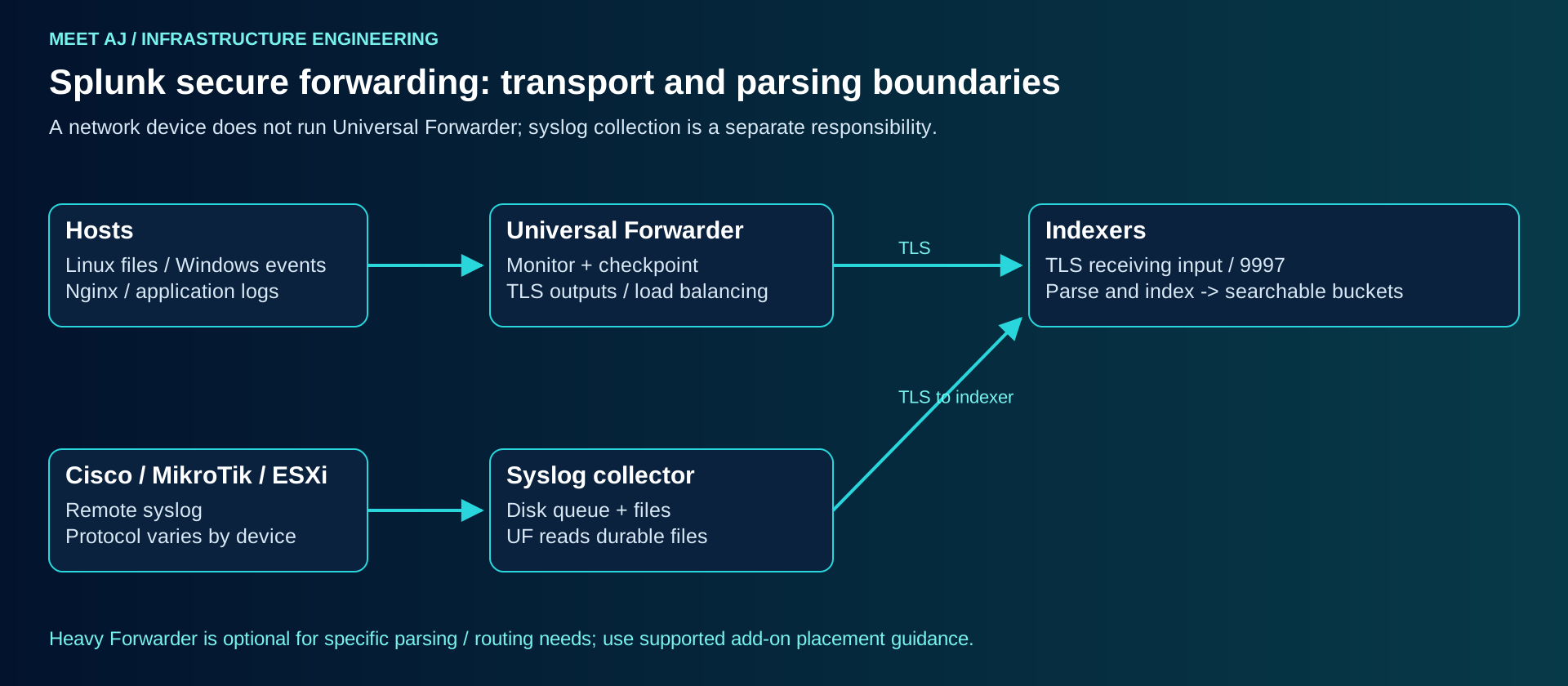
On a separate Ubuntu host, obtain the 10.2.9 amd64 UF tar package and SHA512 from the official UF catalog. Verify before extracting. A non-root splunkfwd account gets read access to the specific logs it needs; do not make it root to avoid fixing ACLs. Install the System/Unix add-on only after checking its exact version compatibility, input defaults and required privileges.
Official Universal Forwarder packages and checksums
cd /var/tmp
sha512sum -c splunkforwarder-10.2.9-41bebfa38eb4-linux-amd64.tgz.sha512
sudo groupadd --system splunkfwd
sudo useradd --system --gid splunkfwd --home-dir /opt/splunkforwarder --shell /bin/bash splunkfwd
sudo tar -xzf splunkforwarder-10.2.9-41bebfa38eb4-linux-amd64.tgz -C /opt
sudo chown -R splunkfwd:splunkfwd /opt/splunkforwarder
sudo install -d -o splunkfwd -g splunkfwd -m 0750 /opt/splunkforwarder/etc/apps/meetaj_forwarding/local
sudo install -d -o splunkfwd -g splunkfwd -m 0700 /opt/splunkforwarder/etc/auth/enterprise
sudo -u splunkfwd /opt/splunkforwarder/bin/splunk start --accept-license
sudo -u splunkfwd /opt/splunkforwarder/bin/splunk stop
Initialise the UF local administrator interactively too. Install its unique combined client.pem and the trusted ca-chain.pem in etc/auth/enterprise, owned by splunkfwd, with the private-key PEM at 0600. The sample output has one standalone receiver. For two independent receivers or clustered peers, add both DNS:9997 targets; enable hostname checks and provision a matching SAN on each receiver.
UF meetaj_forwarding/local/server.conf
[sslConfig]
sslRootCAPath = /opt/splunkforwarder/etc/auth/enterprise/ca-chain.pem
sslVerifyServerCert = true
sslVerifyServerName = true
UF meetaj_forwarding/local/outputs.conf
[tcpout]
defaultGroup = enterprise_indexers

[tcpout:enterprise_indexers]
server = splunk01.example.net:9997
useACK = true
clientCert = /opt/splunkforwarder/etc/auth/enterprise/client.pem
sslVerifyServerCert = true
sslVerifyServerName = true
sslVersions = tls1.2
UF meetaj_forwarding/local/inputs.conf
[monitor:///var/log/auth.log]
disabled = 0
index = infra
sourcetype = linux_secure

[monitor:///var/log/nginx/access.log]
disabled = 0
index = infra
sourcetype = nginx:access
Confirm that auth.log exists: Ubuntu installations using only journald need a supported journal collection path or rsyslog persistence configured first. nginx:access requires matching add-on knowledge or your own props/transforms definitions on the correct parsing/search tiers; setting a name does not install a parser. Add ACLs to existing log files and configure default ACL or logrotate create rules on the precise directories so rotated files remain readable. Verify with sudo -u splunkfwd test -r FILE. Do not grant access to all of /var/log unnecessarily.
sudo -u splunkfwd test -r /var/log/auth.log
sudo -u splunkfwd /opt/splunkforwarder/bin/splunk btool check
sudo /opt/splunkforwarder/bin/splunk enable boot-start -systemd-managed 1 -user splunkfwd -group splunkfwd
systemctl list-unit-files '*splunk*' '*Splunk*'
# Use the generated UF unit name reported above:
sudo systemctl start SplunkForwarder.service
sudo -u splunkfwd /opt/splunkforwarder/bin/splunk list forward-server
logger -p auth.notice 'MEETAJ_SPLUNK_ACCEPTANCE ubuntu-forwarder'
UF unit names depend on package and installation history. Replace SplunkForwarder.service if the generated name differs. list forward-server should list the intended endpoint as active; that alone does not prove delivery. Search for the acceptance marker in infra and compare host, source, sourcetype and event time. useACK adds indexer acknowledgement and can cause retransmission after interruptions; design duplicate handling and source retention rather than promising exactly-once delivery or unlimited offline buffering.
10.2 outputs.conf: ACK, target lists and TLS hostname verification
Windows Server: use the supported MSI and a least-privilege service identity
Download the Windows x64 10.2.9 MSI and checksum from the same official catalog. In elevated PowerShell inspect Authenticode and the SHA512 hash, then launch the interactive MSI. Select the virtual service account where its permissions meet the input requirements and set the local admin password through the installer. Do not use a domain administrator account. Reading Security events requires the appropriate Windows privileges; the installer documents the virtual account privileges, including SeBackupPrivilege. Validate them with the security team instead of assuming an account is harmless because it is called virtual.
$msi = Get-Item 'C:\Install\splunkforwarder-10.2.9-41bebfa38eb4-windows-x64.msi'
Get-AuthenticodeSignature -FilePath $msi.FullName | Format-List Status,SignerCertificate
Get-FileHash -Path $msi.FullName -Algorithm SHA512
# Compare the hash with the vendor SHA512 file before proceeding.
Start-Process msiexec.exe -ArgumentList @('/i', $msi.FullName) -Wait
Get-Service SplunkForwarder
Copy the forwarding app to C:\Program Files\SplunkUniversalForwarder\etc\apps\meetaj_forwarding\local. Adapt certificate paths in server.conf and outputs.conf to Windows, keep the same CA and hostname verification settings, and restrict private-key ACLs to the service identity and administrators. Add the following inputs.conf only after infra exists and Security auditing is enabled by policy. Event 4625 cannot be collected if Windows never records it.
[WinEventLog://Security]
disabled = 0
index = infra
renderXml = true

[WinEventLog://System]
disabled = 0
index = infra
renderXml = true

[WinEventLog://Application]
disabled = 0
index = infra
renderXml = true& 'C:\Program Files\SplunkUniversalForwarder\bin\splunk.exe' btool inputs list --debug
Restart-Service SplunkForwarder
& 'C:\Program Files\SplunkUniversalForwarder\bin\splunk.exe' list forward-server
Test-NetConnection splunk01.example.net -Port 9997Windows UF installer and virtual account privileges; verify against selected MSI
Onboard each source with an explicit parsing contract
| Source | Collection and limitation |
|---|---|
| Linux syslog | UF monitors persisted files; Unix/Linux add-on provides supported knowledge and optional scripts. Journald-only hosts need a deliberate collection method. |
| Windows | UF Event Log inputs plus Splunk Add-on for Microsoft Windows. Install input and search-time components on the documented tiers; verify XML/event field extraction. |
| Nginx | UF monitors access/error files; match the exact log_format to a compatible add-on or reviewed sourcetype. Multiline errors require testing. |
| Cisco | Syslog collector with durable queue, then UF file monitoring or a supported SC4S path. Select the IOS/ASA/other product add-on, not a universal Cisco parser. |
| MikroTik | RouterOS remote logging to the collector; preserve original host/time. Community add-ons need separate compatibility/security review; custom field extraction may be necessary. |
| VMware | ESXi remote syslog is log collection; vCenter inventory/performance API collection needs the compatible VMware add-on, supported collector and credentials. Do not install UF on ESXi as if it were Ubuntu. |
| SQL Server | Windows Application logs and permitted SQL ERRORLOG/audit output can be collected. DB Connect queries require a compatible JDBC driver, runtime and least-privilege database account; they are not transaction-log capture. |
| Application logs | UF files or authenticated HEC over HTTPS. Define JSON timestamps, event boundaries and secret redaction. HEC must be configured and scoped; a plaintext generic TCP input is not a substitute. |
Keep a durable syslog collector independent from Indexer restarts. Split device files by trusted sender metadata, not by an attacker-controlled payload field. Retain local files long enough to cover outages and monitor queue drops. A UDP packet reaching the collector is not an acknowledged event. Verify each source using a known benign event, raw content, timezone, line breaking and extracted fields before enabling broad searches. Add-ons have separate publishers and support matrices; do not install an unreviewed Splunkbase package on every role.
Splunkbase: inspect publisher, release compatibility and installation tiers
RouterOS transport has an important format dependency: current MikroTik documentation states that TCP/TLS remote logging works with CEF, while syslog format still uses UDP even when another transport is selected. Confirm the exact RouterOS build and collector parser before choosing CEF. For ESXi, configure remote syslog through the supported host settings and verify the outbound firewall, DNS and UTC timestamp parsing; do not change the hypervisor merely to imitate a Linux file collector.
RouterOS logging formats and transport limitations
Broadcom: ESXi remote syslog configuration
SQL Server add-on collection paths: DB Connect, Windows performance and files
Search the event you actually collect
The searches below use the infra index created above and bounded time ranges. Field names depend on the add-on and input mode; validate them in a sample event. Raw-text searches demonstrate troubleshooting but are not complete detection rules. For an ES deployment, validate CIM mapping and data-model acceleration separately. Do not rename raw fields blindly to satisfy a dashboard.
Failed SSH authentication
index=infra sourcetype=linux_secure earliest=-15m latest=now "Failed password"
| rex "from (?<src_ip>\S+) port"
| stats count min(_time) as first_seen max(_time) as last_seen by host src_ip
| convert ctime(first_seen) ctime(last_seen)
| sort - count
This extracts the source address from the familiar OpenSSH message and counts failures per destination host/source pair. Public-key failures and PAM variations need additional patterns; this search must not be described as all failed SSH authentication.
Windows authentication failures
Microsoft: audit policy and authentication event coverage
index=infra earliest=-30m latest=now (sourcetype=WinEventLog:Security OR sourcetype=XmlWinEventLog:Security) EventCode=4625
| stats count values(Logon_Type) as logon_types by host Account_Name Source_Network_Address
| sort - count
EventCode and extracted account/address fields require the compatible Windows add-on; XML field names can differ. Inspect the selected event first. Domain Kerberos failures may also require 4771/4768 collection on domain controllers, rather than treating 4625 as the complete authentication picture.
Firewall denies and device errors
index=infra sourcetype=network:syslog earliest=-15m latest=now ("Deny" OR "denied" OR "DROP")
| stats count by host
| sort - count

index=infra sourcetype=network:syslog earliest=-1h latest=now ("LINK-3-UPDOWN" OR "ERR" OR "critical")
| table _time host _raw
| sort - _time
network:syslog is an example custom sourcetype, not an automatically available add-on. Replace it with the one actually assigned. For production reports prefer the vendor parser and validated action/severity fields: the word deny inside a configuration change is not necessarily a dropped packet.
Application exceptions and unusual authentication
index=infra sourcetype=app:json earliest=-30m latest=now
| spath
| search level=ERROR
| stats count values(exception.type) as exceptions by service.name host

index=infra earliest=-15m latest=now EventCode=4625
| stats count dc(Account_Name) as distinct_accounts values(Account_Name) as accounts by Source_Network_Address
| where count>=20 AND distinct_accounts>=5
| sort - count
The JSON example assumes those keys exist; define app:json parsing and event boundaries before use. The second search is an illustrative password-spraying signal. Service-account misconfiguration, shared gateways and field extraction errors can trigger it. Document exclusions, investigation steps and a responsible owner; a threshold is not evidence of compromise.
Build a dashboard around operational questions
In Search & Reporting, save a bounded search with a clear owner and app scope. Add panels for events per host, ingest delay, authentication failures and device error rate. In Dashboard Studio use a time-range input shared by panels; label whether each chart uses event time or indexing time. A source that produces no events must appear in a separate missing-source panel, otherwise a quiet dashboard can hide a broken collector.
index=infra earliest=-1h latest=now
| eval lag_seconds=_indextime-_time
| stats count perc95(lag_seconds) as p95_delay max(_time) as latest_event by host
| eval seconds_since_latest=now()-latest_event
| sort - p95_delay
A useful pilot alert runs every five minutes, searches the last ten minutes and uses an intentional overlap to tolerate delay. Trigger on a validated result count or threshold, throttle by the investigation key and send only the fields needed by the receiver. Choose a scheduled owner account with the required index access and no unnecessary administration rights. Test delivery, deduplication and ownership after an account is disabled. Restrict webhook URLs and protect tokens; alert actions can send sensitive log data outside the platform.
Restrict the platform as well as its inputs
Connect the supported enterprise authentication method, map groups to roles and keep a vaulted local break-glass administrator. Operators should search only approved indexes; an index wildcard can accidentally expose security data added later. Separate input management, app installation, scheduled-search ownership and security investigation privileges. Review imported apps as executable code: scripted inputs, alert actions and custom search commands run with platform privileges.
Audit administrative actions and searches using _audit and monitor platform faults using _internal with access controls. Audit retention and off-platform copies need their own policy. Restrict 8089 to management and required peers, remove unused inputs, rotate HEC/API credentials and review certificate expiry ahead of maintenance windows. Splunk obfuscation using splunk.secret is not a substitute for a vault: protect that file and encrypted configuration backups together. Avoid displaying btool output containing secrets in a public ticket.
Scale indexing and search independently
For a single-site example with three Indexer peers, RF=3 stores three raw-data copies and SF=2 keeps two searchable copies. SF must not exceed RF. Allow capacity for one peer outage, rebuilding copies and ongoing ingestion; a cluster that fits only when every node is available cannot maintain its design after failure. The Cluster Manager is a management role, not a fourth searchable data replica. Independent fault domains and a manager recovery or supported redundancy plan remain necessary.
Build the manager and peers as secured Enterprise hosts first. Enable clustering on the manager with mode=manager, replication_factor=3 and search_factor=2 in [clustering] of server.conf. On each peer use mode=peer, manager_uri=https://cm01.example.net:8089 and its configured replication listener. Provision a unique strong shared pass4SymmKey for this cluster through protected configuration management on all participants; do not place a literal cluster secret in a tutorial command or Git. Then restart according to the vendor procedure and verify the cluster before sending production data.
Peer replication listener — complete its TLS and cluster settings before use
[replication_port-ssl://9887]
serverCert = /opt/splunk/etc/auth/enterprise/server.pem
requireClientCert = true
sslVersions = tls1.2
The replication listener uses the CA configured in [sslConfig]/sslRootCAPath, not an sslRootCAPath setting inside its own stanza. Peer certificates must support both their server and client TLS roles; restrict accepted peer identities using the documented name constraints and network ACLs. Do not reuse a serverAuth-only certificate as a client certificate.
This fragment configures only the encrypted replication listener; it is not a complete cluster configuration. Use the selected release server.conf reference for all replication certificate validation settings, and test peer identity constraints. Push clustered indexes from the manager bundle in etc/manager-apps, including repFactor=auto for the managed index; do not independently edit peer indexes or reuse the standalone app unchanged. Validate and apply the bundle from the manager, then verify searchable and replication factors. Add the Search Head as a cluster-aware search component using the documented manager association; a list of static peers does not replace cluster coordination.
sudo -u splunk /opt/splunk/bin/splunk validate cluster-bundle
sudo -u splunk /opt/splunk/bin/splunk apply cluster-bundle
sudo -u splunk /opt/splunk/bin/splunk show cluster-status --verbose
These commands run on the Cluster Manager and may prompt for an authorised administrator. validate must pass before apply. Expected cluster evidence is all intended peers up, RF/SF met and all data searchable; record actual output rather than using a stock success transcript. For peers advertise reachable DNS names with certificates matching those names, and restrict management and replication to approved networks.
A Search Head Cluster requires at least three compatible members, a deployer, certificates, shared cluster secret and a client load balancer. Initialise each member with its unique management URI, the common deployer URI, the chosen replication port and the protected secret; bootstrap a captain once using the complete member list. Distribute apps from the deployer, not Deployment Server. Validate captain election, scheduled searches, KV Store and a member-loss exercise. This is a separate implementation project, not a feature enabled by cloning one Search Head VM.
For Deployment Server, create a reviewed deployment app under etc/deployment-apps, define targeted server classes in serverclass.conf and point pilot clients to its TLS-protected 8089 endpoint in deploymentclient.conf. Trust the management CA through client server.conf. Start with one client class and verify the delivered app hash and effective btool settings before expanding. Keep the deployment client configuration outside an app that could accidentally uninstall itself, and do not distribute the same private key to the fleet.
10.2 server.conf: clustering and encrypted replication listeners
SHC topology and minimum members; consult the selected release before implementation
Replication is not a recoverable backup
Indexer clustering copies data, including unwanted deletion and some operational mistakes; it does not preserve an independent historical recovery point. Back up app/configuration sources, certificates and keys under appropriate encryption, splunk.secret, deployment bundles and the supported KV Store backup. Warm and Cold buckets can be copied through a consistent backup process. Do not simply copy actively written Hot buckets and claim a valid backup. Use the documented snapshot/consistency procedure or planned service stop; frequent forced Hot rolling can create small buckets and damage search efficiency.
Keep backup outside the cluster fault domain with immutability where required. Define RPO separately for indexed events, configuration and knowledge objects. In an isolated recovery environment, restore one index and prove event count, time coverage, permissions and representative searches; restore KV Store using its matching procedure. A multisite cluster can improve site resilience but needs site-specific RF/SF, bandwidth and locality design. It is neither an automatic geographic backup nor protection from a compromised administrator.
Model 100 GB/day with storage and search workload
Assume a hypothetical organisation ingests 100 decimal GB/day, needs 30 days searchable and has measured a combined rawdata-plus-index footprint of 0.60 times input in its pilot. A standalone copy requires 100 × 30 × 0.60 = 1,800 GB. Reserving 30% free space gives 1,800 ÷ 0.70 ≈ 2,572 GB, before OS, internal indexes, acceleration, summaries, growth and backups. The 0.60 coefficient is an assumption to replace with measurement, not a guaranteed compression ratio.
For RF=3/SF=2, a better model splits rawdata and searchable index components. If the measured footprint is 0.20 rawdata and 0.40 searchable structures per input GB, then 100 × 30 × (0.20 × 3 + 0.40 × 2) = 4,200 GB across the peer set. With 30% free space that is about 6,000 GB, still excluding rebuild headroom, acceleration and backup. Real copy placement and nonsearchable copies differ, so validate against the vendor sizing method and measured buckets. Multiplying the entire standalone disk figure by RF can be a conservative shortcut, but hides what SF changes.
Average throughput is only about 1.16 MB/s at 100 GB/day; a burst after WAN recovery and dozens of concurrent searches can dominate CPU and disk load. Measure p95 ingestion, event size, parsing cost, search concurrency and retention per index. Under ingest pricing the entitlement is measured against the contract ingestion metric, not compressed disk size. Workload pricing is also offered for Enterprise; do not import Cloud SVC assumptions into an on-premises quote. ES, support and other solutions need their own entitlement check. Obtain a written quote and licence interpretation for the actual product, region and contract; no public per-GB price is assumed here.
Troubleshoot with evidence from both ends
Commands below are diagnostics, and the described results are acceptance criteria rather than captured output. Keep the affected host, UTC interval and source filename fixed while investigating. Configuration files shown by btool --debug can include sensitive values; redact before sharing. Restart only the component whose effective configuration changed and preserve the input checkpoint. Deleting fishbucket is not a generic missing-log fix: it can reingest old data and consume licence.
1. Forwarder cannot connect
getent hosts splunk01.example.net
sudo -u splunkfwd /opt/splunkforwarder/bin/splunk list forward-server
sudo -u splunkfwd /opt/splunkforwarder/bin/splunk btool outputs list --debug
openssl s_client -connect splunk01.example.net:9997 -servername splunk01.example.net -CAfile ca-chain.pem -cert client-leaf.pem -key client.key -verify_hostname splunk01.example.net -verify_return_error </dev/null
sudo tail -n 100 /opt/splunkforwarder/var/log/splunk/splunkd.log
Symptom: inactive endpoint or no new events. DNS must resolve the intended receiver and TLS must validate chain/name and accept the client. A timeout points to route, ACL or absent listener; certificate alerts point to trust, name, expiry or client EKU. Check ss -lntp on the receiver and the effective inputs.conf. Fix the specific path/certificate issue, restart the forwarder if settings changed, then verify an acceptance event in the intended index.
2. Connected, but a file is missing
sudo -u splunkfwd test -r /var/log/auth.log
sudo -u splunkfwd /opt/splunkforwarder/bin/splunk btool inputs list --debug
sudo -u splunk /opt/splunk/bin/splunk btool indexes list infra --debug
sudo tail -n 100 /opt/splunkforwarder/var/log/splunk/splunkd.log
Expected: the file is readable, its monitor stanza is enabled, infra exists and there are no permission or rejected-index messages. Wrong glob, rotation ACL, disabled input, wrong index and event timestamp are distinct causes. Correct the input or ACL; search a wider time window and inspect _indextime before assuming data loss. Append a unique benign marker and verify its host/source and arrival once; avoid resetting checkpoints merely to produce more events.
3. Indexing delay grows
index=_internal source=*metrics.log group=queue earliest=-30m
| stats max(current_size) as max_queue max(max_size) as queue_limit by host name

index=infra earliest=-1h
| eval lag=_indextime-_time
| timechart span=5m perc95(lag) by host
Symptoms: recent source events arrive late and queues stay near their limits. Confirm field availability for your metrics format, inspect Monitoring Console indexing performance and measure iostat -xz 1 on Indexers. Saturated storage, expensive parsing, downstream blockage and clock skew require different fixes. Reduce unnecessary parsing, repair the storage bottleneck or add measured indexing capacity; do not hide delay by changing event timestamps. Verify that backlog declines and new-event p95 latency returns to its target while ingestion continues.
4. License warning
index=_internal source=*license_usage.log type=Usage earliest=-24h
| stats sum(b) as bytes by idx st
| eval GB=round(bytes/1000000000,2)
| sort - GB
Expected: the ingest-based usage report identifies the indexes/sourcetypes contributing bytes. Workload contracts need the appropriate entitlement dashboards instead. A repeated source, verbose debug mode, replay or expired/unreachable License Manager can explain warnings. Inspect Settings > Licensing and the actual contract; fix duplication or manager connectivity, or arrange the required capacity. Do not delete indexed buckets to try to erase already measured ingestion. Verify subsequent reporting periods and alert on the licensed metric.
5. Searches become slow
index=_internal sourcetype=scheduler earliest=-1h
| stats count by status savedsearch_name
| sort - count

| rest /services/search/jobs
| table sid runDuration dispatchState scanCount eventCount
Expected: scheduled searches complete within their window and interactive jobs do not accumulate. REST job visibility depends on the role; this is an administrator diagnostic, not a public dashboard. Use Job Inspector to distinguish scan cost, remote peer delay and command cost. Bound index/time first, replace unnecessary transactions or joins with suitable stats patterns, stagger schedules and examine data-model acceleration workload. Verify the same representative query against the same interval before and after remediation; adding a Search Head does not fix slow Indexer storage.
6. Indexer storage is full or unavailable
df -hT /srv/splunk
df -i /srv/splunk
findmnt /srv/splunk
iostat -xz 1 5
sudo -u splunk /opt/splunk/bin/splunk btool indexes list --debug
sudo tail -n 150 /opt/splunk/var/log/splunk/splunkd.log
Symptoms include paused indexing, minimum-free-space warnings, write failures or severe latency. The intended mount must exist, be writable by splunk and retain planned headroom. A missing mount can silently direct writes to the OS disk; a size-retention limit can remove data before its desired age. Restore the mount/permissions or add supported capacity, and adjust retention only with data-owner approval. Never remove bucket directories manually to make df look healthy. Verify the index remains searchable and ingestion resumes without new storage errors.
7. Certificate errors after renewal
openssl x509 -in leaf.pem -noout -dates -issuer -subject -ext subjectAltName
openssl verify -CAfile root-ca.pem -untrusted issuer-chain.pem leaf.pem
sudo -u splunkfwd /opt/splunkforwarder/bin/splunk btool server list sslConfig --debug
sudo -u splunkfwd /opt/splunkforwarder/bin/splunk btool outputs list --debug
Expected: valid dates, the correct SAN, a complete chain and the intended trust bundle in effective configuration. Renewal can change the issuing CA, omit an intermediate or introduce an unreadable key. Compare public keys of certificate and private key locally without sharing private material. Correct the chain, path, permissions or trust bundle, restart the affected service and repeat the authenticated TLS probe plus event-delivery test. Disabling verification is not a renewal procedure.
8. Cluster is not meeting RF/SF
sudo -u splunk /opt/splunk/bin/splunk show cluster-status --verbose
sudo -u splunk /opt/splunk/bin/splunk show shcluster-status
sudo journalctl -u Splunkd.service --since '-30 min' --no-pager
Run cluster-status on the Manager and shcluster-status only on an SHC member. Expected: intended peers/members up, factors met, searchable data and a healthy captain. Missing peers, replication ACLs, insufficient disk, inconsistent shared secrets, bundle failure or time skew leave different evidence. Repair connectivity/certificates/capacity, validate bundle deployment and follow the documented peer recovery procedure. Do not reduce RF/SF simply to turn the dashboard green. Verify factor recovery, representative searches, scheduled jobs and the ability to lose the planned failure domain.
Acceptance, upgrade and rollback
| Gate | Evidence before acceptance |
|---|---|
| Security | HTTPS and mTLS verified with hostname checks; rejected unauthorised client; RBAC and audit tested; key access/expiry ownership recorded. |
| Data quality | One known event per source has the correct host, timestamp, sourcetype and extracted fields; collector and rotation survive restart. |
| Retention | Index limits match approved days and volume; Frozen deletion/archive explicitly accepted; oldest searchable time measured. |
| Recovery | External backup restored in isolation; RPO/RTO measured; credentials and KV Store recovery included; replica not counted as backup. |
| Operations | Missing-source, queue, disk, latency, certificate, licence and cluster alerts delivered to a named owner; capacity trend reviewed. |
| Upgrade | Release notes, security advisories, forwarder/add-on/ES compatibility, KV Store requirements and supported rolling order reviewed in staging. |
Before an upgrade, preserve verified media, configuration and a consistent data/KV Store recovery point. Use the release-specific order for manager, peers, Search Heads, deployer and forwarders; mixed-version operation is a temporary supported transition, not a permanent architecture. Rollback is not installing an older package over a migrated data directory. If a direct downgrade is unsupported, restore the matched pre-upgrade backup on compatible hosts and account for events collected since the recovery point. Rehearse this path before approving the maintenance window.
Frequently asked operational questions
Does installing Splunk Enterprise provide Enterprise Security?
No. ES is a separate licensed solution with its own compatibility, data onboarding and operational requirements.
Is a three-peer cluster also a backup?
No. Replication supports availability; independent backups and a demonstrated restore preserve recoverable historical states.
Does a 30-day retention value guarantee thirty days?
No. Size limits, bucket timestamps and available storage also affect retirement. Measure the oldest searchable event and monitor capacity.
Vendor references and validation boundary
Use the linked versioned specifications when adapting configuration. Windows installation and SHC references available during review included newer manual branches; the operating-system, S2S, index and clustering syntax baseline remains the linked 10.2 reference and the selected installation media. A document match is not execution evidence. Run the pilot acceptance tests and restore exercise on the exact target build before production use.