
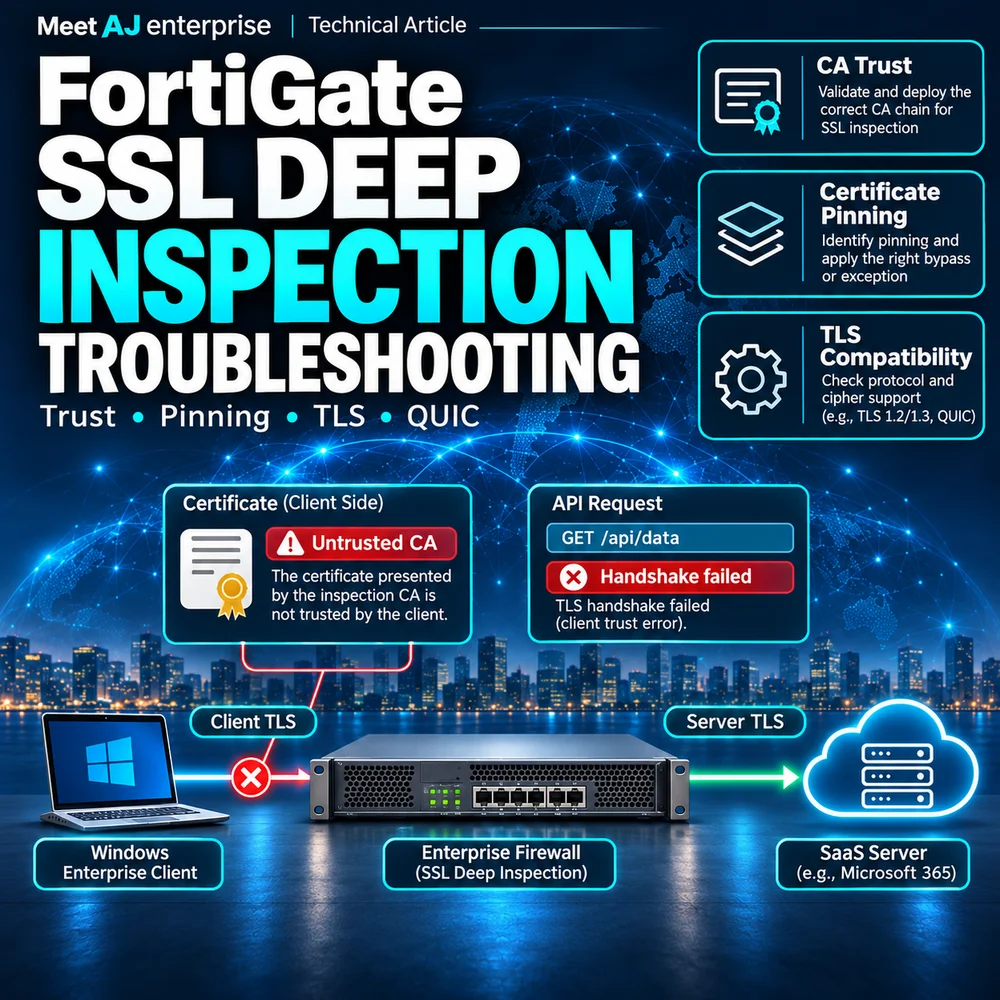
The policy still allows HTTPS. Payroll login has stopped working.
Consider an organisation running FortiGate, Active Directory, Windows 10/11 clients and Windows Server on VMware. Separate VLANs serve users, servers and management. Internal web applications share the working day with Internet SaaS and endpoint security agents. The network team enables SSL Deep Inspection on the user Internet policy. A few browsers now report certificate errors, an accounting client cannot reach its API, and another service times out. Some users notice nothing. The firewall rule still permits the connection and ordinary Internet access works.
Reachability has survived, but the TLS path or a control inspecting decrypted content has changed. Record one affected client, VLAN, application version, exact hostname, local/UTC timestamp and policy ID before changing anything else. An internal application is directly affected only if its traffic crosses the changed policy; enabling Internet inspection does not inspect same-VLAN traffic. Its login can still fail if an external identity provider or licensing API is affected.
What changed between the client and the server?
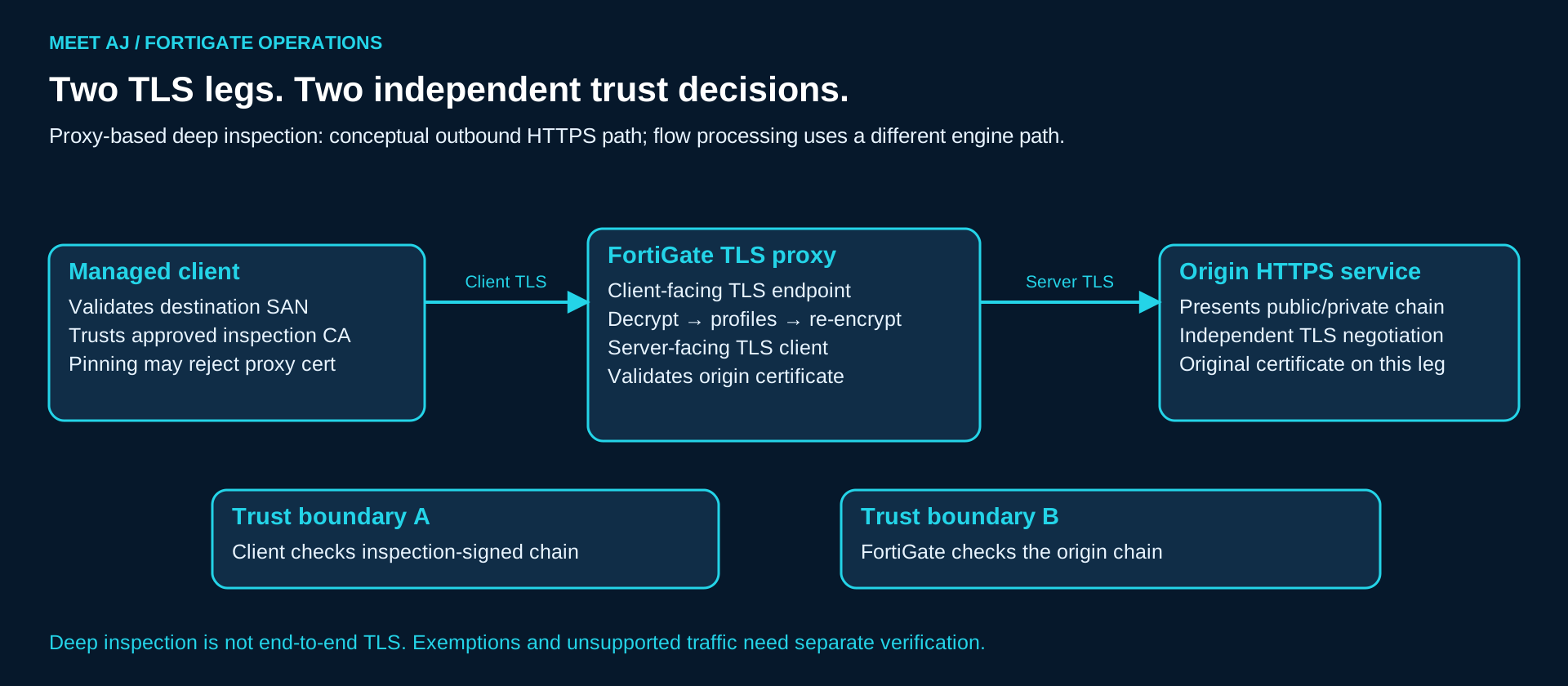
Certificate Inspection examines available certificate/handshake information rather than decrypting application payloads. Deep Inspection decrypts eligible traffic, passes the plaintext through the attached security profiles and re-encrypts it. With proxy-based inspection, FortiGate acts as a TLS proxy: it manages a client-side TLS connection and a separate server-side TLS connection. The certificate presented to the client represents the destination and is signed by the inspection CA configured in the profile. The client must build a valid chain to a trusted issuer. FortiGate separately validates the origin server according to the profile. Trusting the inspection CA does not make an expired or untrusted origin certificate valid.
Flow-based inspection also decrypts inspected TLS; it is not merely certificate inspection. Its stream-oriented IPS engine path differs from proxy content processing. Do not assume WAD diagnostics, protocol port mapping or version-control knobs apply identically. The 7.2.11 deep-inspection guide explicitly limits protocol port mapping to proxy mode and states that SSL version control is not supported in flow mode. A successful browser handshake proves neither that the application uses the same trust store nor that both TLS legs negotiated the same version or cipher.
Fortinet 7.2.11: deep inspection, CA trust and mode-specific limits
Establish a controlled comparison before chasing TLS
get system status
show firewall policy <POLICY_ID>
show firewall ssl-ssh-profile "<PROFILE_NAME>"
Replace every angle-bracket placeholder before execution, in the correct VDOM. Record the exact FortiOS build, model, inspection mode, SSL profile, attached AV/IPS/Web Filter/Application Control and the matched policy. Use a fresh application connection from a managed pilot client. Compare it with a time-limited, approved destination-specific certificate-inspection path while keeping routing, DNS, source and other controls stable. A different VLAN or mobile hotspot is useful context but is not an isolated A/B test. Existing pooled sessions, IPv6 and explicit proxies can invalidate the comparison.
Expected evidence is a matching policy ID and a changed issuer on inspected, non-exempt traffic. If the issuer remains the public CA, first investigate exemptions, a different policy, QUIC, a proxy or another egress path. Do not troubleshoot CA deployment for a session that never reached the intended inspection profile. Show commands are read-only but expose internal configuration: retain their output in the incident record with restricted access.
1. NET::ERR_CERT_AUTHORITY_INVALID: which CA is missing?
Symptoms and possible causes
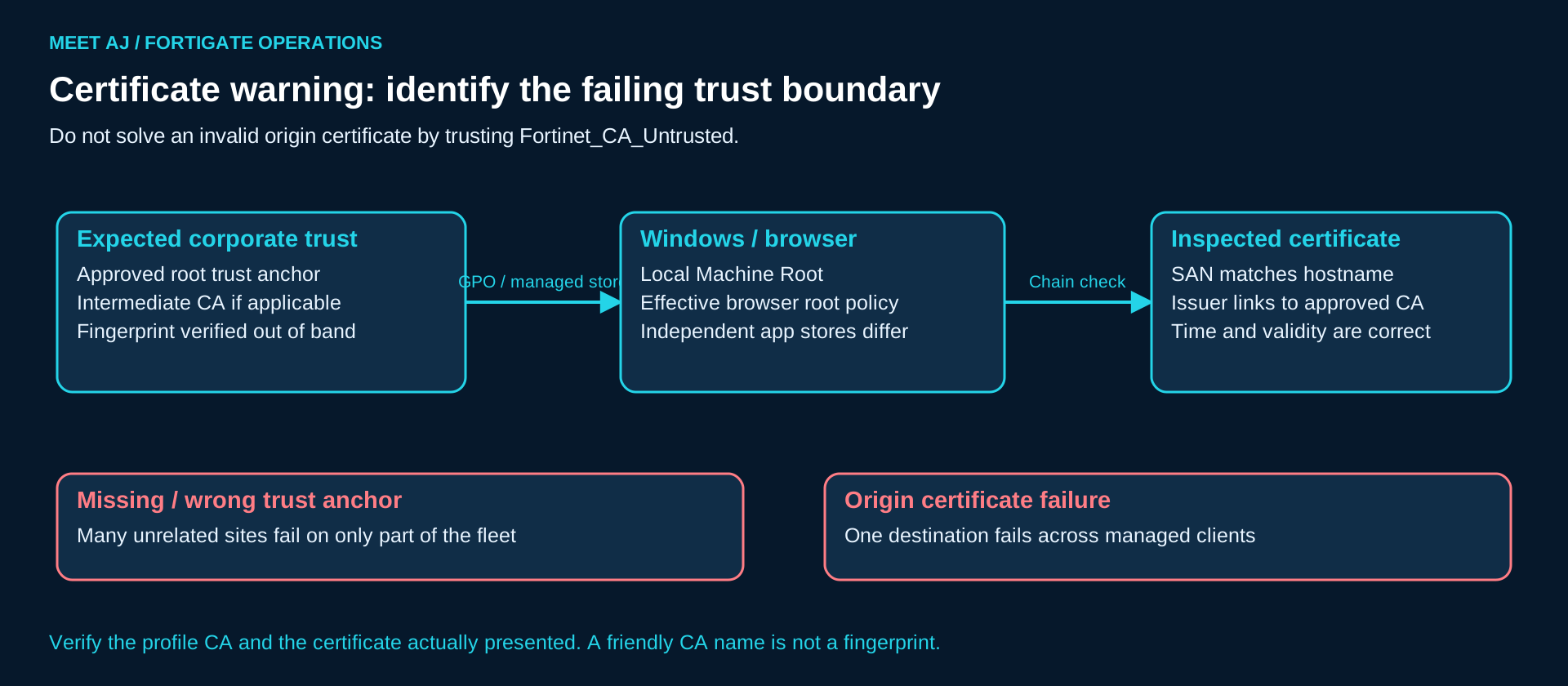
A certificate warning appearing across unrelated HTTPS sites on only one OU points towards CA distribution. A warning on one hostname across all managed machines instead suggests the origin chain, name, validity period or the profile’s untrusted-certificate action. Compare the actual issuer and SHA-256 fingerprint, not just a friendly CA name. A replacement firewall or a regenerated CA can reuse the name with a different key. Incorrect time can also invalidate an otherwise correct chain.
Diagnostic commands and expected results
gpresult /r /scope computer
gpresult /h C:\Windows\Temp\ssl-inspection-gpo.html
certutil -store Root
certutil -user -store Root
Run computer-scope gpresult in an elevated shell. The approved CA distribution GPO should appear under Applied Group Policy Objects; absence or a denied policy leads to OU placement, security filtering, replication and domain connectivity checks. The HTML report offers more detail than /r. certutil -store Root lists Local Machine roots; the -user variant lists a different store. Locate the intended CA and verify validity and its fingerprint against a trusted export from the actual inspection profile. Presence alone does not prove that a Java runtime or an embedded library uses this store. These commands are read-only apart from writing the report; the report includes domain and user information.
openssl s_client -connect example.com:443 -servername example.com -showcerts -verify_return_error -verify_hostname example.com -CAfile approved-inspection-chain.pemReplace example.com with the affected hostname. Run from the same network path; OpenSSL does not automatically inherit a browser PAC file. For an explicit HTTP CONNECT proxy use its supported -proxy host:port option and the approved authentication method. The chain and issuer should reflect the inspection CA only when this connection is actually inspected. Successful verification should end with Verify return code: 0 (ok); an issuer error may reflect OpenSSL’s CA bundle rather than Windows trust. -showcerts displays certificates supplied by the peer, not a proof of trust. Supplying a CAfile validates this test’s explicit trust bundle; it does not validate GPO deployment. A zero return code without -verify_hostname is not sufficient evidence of hostname validation.
Root cause, resolution and verification
If the observed inspection issuer is absent only from failing machines, correct CA deployment. After security approval, export only the public CA certificate from the configured profile and verify its fingerprint out of band. In Group Policy Management, edit a dedicated GPO linked to the managed computer OU: Computer Configuration → Policies → Windows Settings → Security Settings → Public Key Policies → Trusted Root Certification Authorities → Import. Use the approved root trust anchor; distribute subordinate CA certificates to Intermediate Certification Authorities as appropriate. Never distribute private keys. Scope the GPO to managed corporate endpoints. Installing an interception CA grants broad trust and must not become a blanket instruction for visitors or personal devices.
On a pilot endpoint apply the approved computer-policy refresh, recheck gpresult and certutil, then open a new browser and application session. Verify the issuer, SAN, validity and the real login/API operation. If the issuer is Fortinet_CA_Untrusted, stop: do not trust that CA to hide an origin validation problem. Repair the origin chain or approved server-trust configuration. Browser-managed root policies vary by browser release and enterprise settings; inspect effective policy rather than assuming every browser follows Windows identically.
For intermittent failures, separate machine trust from user trust and check whether the failing process is a Windows service. A successful interactive browser test may use a user root that the service never sees. Record the account and store alongside the fingerprint. If a GPO refresh temporarily changes behaviour, capture the policy-processing timestamp and CryptoAPI/application evidence before repeating it. Repeatedly importing the same root obscures the sequence and can leave redundant trust anchors; remove only confirmed project-added duplicates through the approved certificate-management process.
2. The CA is trusted, but the application rejects the certificate
Symptoms → possible causes
A mobile agent or desktop API client still fails after the correct root is trusted. Pinning is plausible, but so are a private trust store, mutual TLS and an unsupported handshake. Certificate pinning compares a certificate identity or hash; public-key pinning commonly checks a public-key/SPKI hash. A re-signed certificate can pass normal chain validation and still fail the pin. Adding another trusted root cannot make the replacement certificate or key equal the expected one.
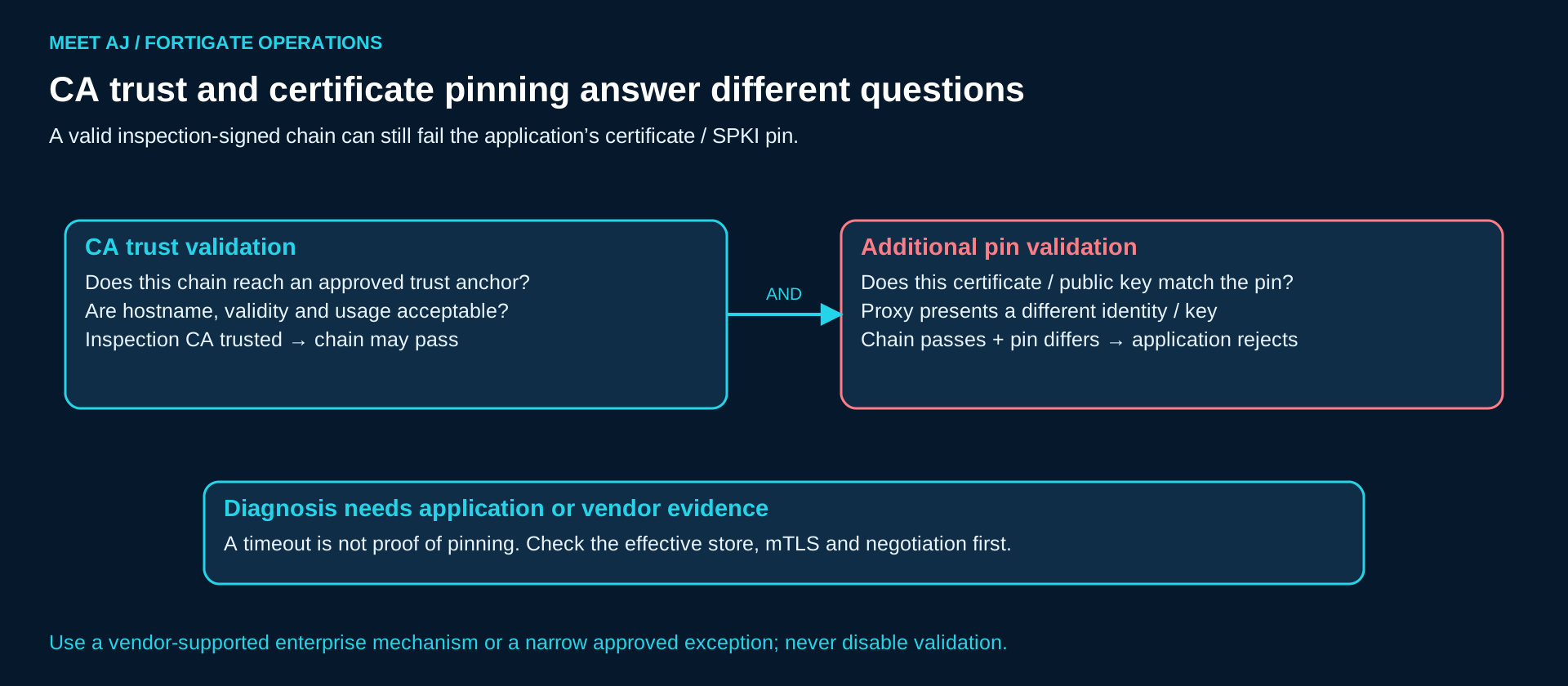
Diagnostics → expected results
Use the same-path OpenSSL chain test above, application diagnostic logs and a narrowly scoped inspected/non-decrypted comparison. A vendor message explicitly reporting a pin mismatch, with ordinary chain validation succeeding and the observed public key changing only under inspection, is strong pinning evidence. An unknown_ca or PKIX path error points first to trust. A protocol_version, no shared cipher or negotiation failure before certificate validation points towards compatibility. Generic connection reset or timeout identifies none of these. Pinning can be enforced during the handshake, so failure before HTTP alone is not proof of a cipher issue. Confirm the vendor’s supported inspection policy and endpoint list.
Root cause → resolution → verification
When vendor evidence confirms pinning and there is no supported enterprise inspection mechanism, request a controlled exception for the necessary service and source group. Do not remove pins or patch validation callbacks. Preserve certificate inspection where supported, destination restrictions, application identification, endpoint controls and connection logging. Repeat authentication, token refresh, update checks and API requests; watch for subsidiary domains that were absent from a simple home-page test. The exception is justified by an evidenced compatibility constraint, not merely by “works when security is off”.
A client-certificate request is another reason not to label every inspected failure as pinning. In mutual TLS, the service authenticates the client as well as the client authenticating the service. Splitting TLS can affect that exchange, and behaviour depends on the supported inspection mechanism and profile action. Capture whether a client certificate was requested and consult the vendor design. Do not export an employee’s private key to the firewall as a trial fix. An approved narrowly scoped bypass may be appropriate, but its evidence and security trade-off are different from pinning.
3. Browser works; the Java client does not
Symptoms and likely causes
An inventory application bundles its own JRE. Edge opens the SaaS dashboard, but the application logs SSLHandshakeException with PKIX path building failed when sending inventory. The Windows machine root is correct. That is a realistic private-store failure: the runtime may use a bundled cacerts or a javax.net.ssl.trustStore override. A service account may also have different proxy settings from the interactive user. Browser success says little about that process. For .NET, check the actual runtime, OS trust and any custom validation handler; embedded OpenSSL/NSS libraries can have their own bundles.
Diagnostic commands and interpretation
"<APP_JAVA_HOME>/bin/java" -version
"<APP_JAVA_HOME>/bin/keytool" -list -v -keystore "<ACTUAL_TRUSTSTORE>"
"<APP_JAVA_HOME>/bin/java" -Djavax.net.debug=ssl,handshake,trustmanager -jar inventory-client.jar
These are command templates for a shell with the application’s paths substituted; use the supported service-launch configuration rather than starting a second production worker. keytool should show the intended trusted certificate fingerprint in the store the process actually opens. Let it prompt for the password; do not place secrets in command history. For a short pilot run, JSSE diagnostics can reveal the selected trust store, issuer chain and validation failure. They do not diagnose a non-JSSE TLS library and may disclose hostnames and certificate details. Bound the run, restrict the log and remove diagnostic flags afterwards.
Root cause, supported repair and verification
A missing approved anchor in the effective JRE store explains this scenario only when the failing chain matches the inspected connection. Use the vendor-supported trust-store extension or managed custom store, backed up first. Do not edit every JRE on the host and assume the application will find it. An application update may replace a bundled store, so make certificate management part of its upgrade procedure. If the chain already validates, return to pinning, mTLS, proxy authentication and TLS negotiation evidence. Never install a trust-all manager or disable .NET certificate validation.
Restart only the affected pilot process if it caches trust, then verify an actual inventory upload under the normal service account. Confirm the inspection issuer is still present and that the repaired request appears in the expected policy logs. A successful request made by a different Java executable is not verification of the failing runtime. If endpoint security also performs TLS interception, compare the issuer presented to this process and coordinate the two products’ supported configuration.
Compare the exact failing API hostname, not only the dashboard URL. The desktop client may call api.vendor.example, an update host and an identity host while the browser test touched only the portal. Record DNS answers and proxy selection from the application context. If the API chain differs, repairing the portal trust proves little. A useful closure record names the executable path, service account, effective store, certificate fingerprint and tested operation; that is enough for the next application upgrade to repeat the check without rediscovering the runtime.
4. TLS 1.3 failures need a build-specific diagnosis
Symptoms → possible causes
A SaaS endpoint fails only under inspection after a browser update, while the same hostname still works with another client. FortiGate does support TLS 1.3; the 7.2.6 guide documents flow-based deep inspection, and the 7.4.8 HTTP/2 proxy guide documents TLS 1.2/1.3 with ALPN. Neither statement promises every key-exchange group, signature algorithm or future ClientHello extension on every engine build. Cipher overlap, unsupported algorithms, server chain, ALPN, mTLS, ECH and inspection-engine defects remain candidates. Do not apply SSL-VPN cipher settings to an outbound inspection incident.
Commands → expected results → root cause
openssl s_client -connect example.com:443 -servername example.com -tls1_2 -verify_hostname example.com -verify_return_error -CAfile approved-inspection-chain.pem
openssl s_client -connect example.com:443 -servername example.com -tls1_3 -verify_hostname example.com -verify_return_error -CAfile approved-inspection-chain.pem
Repeat on the controlled reference path with its appropriate public trust bundle, not the inspection-only bundle. Record protocol, cipher, certificate verification and the first alert for each run. TLS 1.2 passing and TLS 1.3 failing narrows the investigation but does not prove a FortiOS defect; the origin must support the forced version, and OpenSSL may not reproduce a browser’s hybrid key exchange or ECH. Compare client and server-side captures and the exact SSL log reason. Capture the FortiOS build and IPS engine version from status/support information, then check that release’s Known Issues and Resolved Issues with Fortinet support.
Resolution and verification
Choose a vendor-confirmed engine/firmware fix through the normal upgrade test process, or a temporary destination-specific exception if the risk owner approves it. A forced TLS 1.2 test is diagnostic, not a recommendation to downgrade the organisation. Verify the original browser and application, both TLS legs, normal security profiles and negotiated algorithms after the repair. Record exact tested builds; 7.4.8 here is a documentation baseline, not a claim that it is the currently recommended production release.
Fortinet 7.2.6: TLS 1.3, including flow-based deep inspection
Fortinet 7.4.8: proxy HTTP/2, TLS and ALPN
If TCP itself does not complete, do not infer an unsupported TLS algorithm from a missing ServerHello. Check routing, NAT, return path and packet loss first. Conversely, a reset immediately after certificate presentation merits trust or application-validation evidence before a routing change. Record which peer sent the first observable failure, while remembering that the proxy has two peers and encrypted alerts may conceal the semantic cause. Escalation should include a minimal reproduction, exact build and engine, profile excerpt and bounded captures, with tokens and confidential payloads removed.
5. Is the browser using UDP/443 instead of TCP/443?
Symptoms and version-dependent causes
Browser behaviour differs from curl or the desktop client, or inspection visibility changes after an upgrade. HTTP/3 runs over QUIC on UDP, commonly UDP/443, and integrates TLS 1.3. HTTP/1.1 and HTTP/2 HTTPS commonly use TLS over TCP. A TCP-only capture can therefore miss the browser’s working or failing path. UDP/443 alone is a clue, not positive application identification.
| Documentation branch | Operational distinction |
|---|---|
| 7.2.x | Do not transplant the 7.4.1 proxy HTTP/3 feature into 7.2. Check the deployed patch and Application Control behaviour; TCP TLS 1.3 support is a separate capability. |
| 7.4.1 / 7.4.2+ | 7.4.1 adds proxy-mode HTTP/3/QUIC inspection. Fortinet documents changed QUIC handling from 7.4.2, including flow policies with an SSL profile; inspect the effective quic setting rather than assuming older bypass behaviour. |
| 7.6.2 documentation | The Inspecting HTTP3 traffic page explicitly documents flow-mode HTTP/3 inspection. This is not evidence that every 7.6 patch and hardware model has identical support. |
Diagnostics and expected evidence
diagnose sniffer packet any 'host <CLIENT_IP> and udp port 443' 4 20 aOpen one fresh browser request and correlate UDP packets with browser developer tools showing h3 and Application Control identification of QUIC. Inspect the SSL profile’s HTTPS quic action using show full-configuration when defaults are omitted; valid options depend on the build and inspection mode. In a pilot, an approved narrow QUIC restriction can test fallback. Many browsers retry TCP if HTTP/2 or HTTP/1.1 is offered, but a QUIC-only application, failed alternate path or implementation-specific retry may simply time out.
Root cause, resolution and verification
A confirmed protocol-path mismatch calls for a supported QUIC inspection configuration or an explicitly designed, scoped restriction through Application Control and the applicable profile settings. Do not assume blocking UDP automatically produces inspected TCP. Verify a fresh TCP session, its re-signed certificate, expected policy and application success; check that UDP is treated as intended. Where HTTP/3 is retained, verify actual inspection and logging on that path. Preserve the prior QUIC action for rollback.
Fortinet: proxy HTTP/3 and QUIC enhancement in 7.4.1
Fortinet Community: QUIC handling changes from 7.4.2
Fortinet 7.6.2: inspecting HTTP/3 traffic in flow mode
Account for connection reuse when validating a QUIC change. A browser can keep an existing HTTP/3 connection or cached alternative-service information, while a command-line tool opens a new TCP connection. Use a fresh controlled browser session and observe its transport rather than assuming a reload switched protocols. If UDP disappears but the user still waits, capture the attempted TCP connection and its timing. That distinguishes retry delay from a blocked TCP path or a later certificate failure and prevents an unnecessary organisation-wide UDP ban.
6. Users report slowness after inspection
Symptoms and competing explanations
Small downloads work but login storms or many short API connections produce latency. Deep inspection adds cryptographic and scanning work; new TLS handshakes and concurrent sessions matter as well as megabits per second. Firewall Throughput is not SSL Inspection Throughput. Vendor numbers use defined ciphers, traffic mixes, packet sizes and enabled profiles; use the exact model datasheet and size for the actual AV/IPS mix and peak TLS connection rate. Hardware acceleration is model, algorithm and path dependent; NPU forwarding offload is not proof that all SSL/content processing is accelerated.
Commands, expected measurements and root cause
get system performance status
diagnose sys top
Sample performance status before and during a reproducible slowdown: CPU states, memory, sessions, setup rate and traffic trend are useful context. In top, watch processes over several samples; use p for CPU, m for memory and q to exit. WAD pressure is relevant to proxy processing and IPS engine pressure to flow inspection, but process load alone is not causation. Correlate the same time window with latency, retransmissions, upstream loss, DNS, endpoint load and profile logs. High CPU from another task or normal short bursts does not establish an inspection bottleneck.
Resolution and verification
If the measured ceiling follows inspected load in the pilot, reduce the rollout scope while reviewing model capacity, supported acceleration, profile costs and confirmed software defects. Do not kill WAD/IPS or globally disable offload as a first response. Mode changes can change security behaviour and available features; test them as a separate change. Certain 2 GB hardware models lose proxy-related features in newer releases, including the 7.4.4 transition documented by Fortinet; use the exact release model list, not RAM alone, to decide suitability. A larger VM allocation is not automatically equivalent to another hardware model.
Verification needs the same peak workload, not a quiet-hour speed test: compare p95 login/API latency, error rate, session setup, CPU and memory with the baseline. Check conserve-mode events and confirm security profiles remain active. Define the acceptable thresholds before expansion; a service restored by reducing the pilot does not prove the final organisation-wide capacity is sufficient.
Fortinet 7.4.8: interpreting CPU and process utilisation
Fortinet 7.6.0 resolved issues: 2 GB proxy transition and WAD issues
Measure the user transaction in parts when possible: DNS lookup, TCP establishment, TLS negotiation and time to the first application response. Slow TLS setup under high connection churn is a different bottleneck from a fast handshake followed by a slow report query. Monitor the active HA member and the relevant VDOM, and compare with the same member’s earlier baseline. Do not average a busy forwarding node with an idle peer and call the cluster healthy. Preserve the measurements before reducing pilot load so the capacity decision remains reviewable.
7. An exception for one service must stay an exception
Symptoms, evidence and root cause
An engineer fixes one pinned client by swapping the whole user policy to no-inspection. The application recovers, but every destination loses decryption coverage. That is an oversized workaround. Before approving an exemption, retain the failed inspected test, successful controlled reference test, vendor constraint and ownership. Verify that a Web Filter, IPS or AV block is not being mistaken for a TLS problem: completed TLS followed by a block log needs that profile’s rule or classification investigated. A traffic log saying accept does not prove the security profiles allowed the application transaction.
Diagnostics and supported scope
show firewall ssl-ssh-profile "<PROFILE_NAME>"
show full-configuration firewall ssl-ssh-profile "<PROFILE_NAME>"
Inspect caname, HTTPS status, certificate actions, quic and ssl-exempt entries alongside the matched policy’s logging and security profiles. The full form exposes defaults and more sensitive configuration. In the 7.4.4 CLI reference, ssl-exempt supports type address and an address-object reference. A reviewed pattern is a dedicated FQDN object for the approved API, referenced from a cloned SSL profile’s exemption list, applied only to the intended source group. Use the GUI or that exact build’s CLI reference to generate the change; do not paste a wildcard policy from another release.
Resolution, trade-off and verification
DNS-backed FQDN objects can match resolved IPs; shared CDN addresses may widen the practical scope. Hostname/SNI-based options depend on profile type, ECH visibility and version. Application identification may occur after initial TLS decisions, so an application label is not automatically a reliable pre-handshake exemption selector. Validate the chosen matching mechanism with both the approved hostname and a negative-control destination on the same hosting infrastructure. Avoid whole cloud-provider ranges, broad web categories and unrestricted *.vendor.com unless their necessity and exposure are explicitly accepted.
Record owner, source group, destination/dependencies, evidence, approving risk owner, ticket, expiry and review date. Enable exemption logging where supported and retain traffic/Application Control logs; encrypted payload scanning is unavailable for the exempt session, so do not claim AV/IPS still sees its plaintext. Verify the target works, neighbouring destinations remain inspected, an unmanaged source does not inherit the exception and the logs identify use. Review at each application/firmware change and at a defined interval; remove expired exceptions after retesting.
Fortinet 7.4.4 CLI: SSL profile actions and ssl-exempt selectors
Exemption verification also needs a withdrawal test in the pilot: remove the temporary exception, confirm the original failure returns under the same controlled conditions, then restore only the approved entry. If it does not return, another change or an application update may have removed the original need. Do not retain the bypass just because it was once useful. Schedule the withdrawal test with the service owner and avoid interrupting live business transactions. Keep the approved profile revision and the exact exception identifier so removal cannot accidentally alter unrelated entries.
A bounded FortiGate diagnostic console run
The following command families use the 7.4.x administration and CLI syntax. Confirm command help on the installed build and the active VDOM; some appliance families differ. Coordinate debugging with other administrators because reset can stop their diagnostic session. These snippets do not clear active sessions or change forwarding configuration. Run only the relevant block rather than pasting the whole page as a script.
Performance: status and top
get system performance status
diagnose sys top
Use status for an inexpensive utilisation/session snapshot during the affected interval; expect CPU/memory and session/traffic statistics, not a per-host TLS verdict. Use top for live process attribution, then q to leave. Both are observational, but continuous terminal output and repeated sampling still consume resources. A single sample cannot establish saturation or latency. Keep timestamps and compare multiple bounded samples with the measured application response.
Session filters: identify policy, NAT and transport
diagnose sys session filter clear
diagnose sys session filter src <CLIENT_IP>
diagnose sys session list
diagnose sys session filter clear
The first clear removes old display filters, src selects the original client, list prints matching sessions and the final clear removes your filter. It does not clear connections. Expect protocol, tuples/NAT, policy_id, byte counters and offload-related fields. These distinguish a wrong policy, UDP path or one-way exchange; they do not prove certificate trust. Use a destination/port filter from command help if the client is busy. Unfiltered listing can be large and exposes session details. Never confuse filter clear with diagnose sys session clear, which terminates matching sessions and is deliberately absent here.
Debug flow: routing and policy, with explicit cleanup
diagnose debug reset
diagnose debug flow filter clear
diagnose debug flow filter addr <CLIENT_IP>
diagnose debug flow trace start 100
diagnose debug enable
Start immediately before one fresh failing request. reset resets debug state, filter clear removes stale flow filters, addr limits either endpoint, trace start bounds the trace to 100 packets and enable starts console output. Expect routing, policy-match, session and drop-reason messages if the packets traverse the CPU-visible path. An accepted flow with a later application failure is entirely possible. Existing or NPU-offloaded sessions may yield little evidence. Do not disable global fastpath to make a trace appear; use a supported scoped method with a change plan if offload investigation is necessary.
diagnose debug flow trace stop
diagnose debug disable
diagnose debug reset
diagnose debug flow filter clear
Stop the trace, disable output, reset debug state and clear the filter even after an interrupted test. The packet limit is not a substitute for cleanup. Debug can consume CPU and create substantial logs, including forwarding to FortiAnalyzer/FortiCloud. Keep a second admin session available for cleanup. Flow debugging is not a complete TLS analyser: correlate SSL/certificate and security-profile logs, application logs and captures. Scope any WAD or IPS-engine debug with Fortinet support because verbose engine debugging can be expensive and version-specific.
Packet capture: transport evidence without pretending to decrypt TLS
diagnose sniffer packet any 'host <CLIENT_IP> and port 443' 4 20 aThe filter includes TCP and UDP 443; verbosity 4 shows interfaces and packet headers, 20 bounds packet count and a uses absolute UTC timestamps. Expect SYN/ACK, reset or UDP exchanges rather than readable HTTPS payload. With any, a packet can appear on multiple interfaces; NAT and separate proxy legs mean the client-IP filter may not capture the server-side leg. For that leg use the verified origin IP and interface in a separately bounded capture. Twenty packets may miss the failure, and an idle capture can wait indefinitely; stop with Ctrl+C. Offload can hide traffic.
This CLI text is not a full PCAP with decrypted TLS alerts. Use an authorised packet-capture workflow if Wireshark analysis is needed. Many TLS 1.3 handshake messages and alerts are encrypted, so even a PCAP may not expose the reason without permitted endpoint diagnostics. Captures contain internal addressing and sometimes sensitive metadata; restrict access and retention. Correlate both legs by timestamp, destination and policy rather than assuming the same five-tuple survives the proxy.
Configuration and log correlation
show firewall ssl-ssh-profile
show firewall policy <POLICY_ID>
Run when the matched profile is uncertain or its action contradicts the symptom. Expect configured profiles and policy references; show usually omits defaults. Inspect a specific profile/full configuration when needed and redact before sharing. These commands are read-only, but a large dump is unnecessary. In Log & Report correlate Forward Traffic, SSL/certificate events and Web Filter/AV/IPS/Application Control by source, destination, policy, session and timestamp; labels vary by version and logging configuration. A missing SSL log is not evidence of successful inspection when SSL event logging was disabled.
Fortinet 7.4.8: debug flow, offload visibility and log-volume cautions
Decision tree: narrow the cause before changing the profile
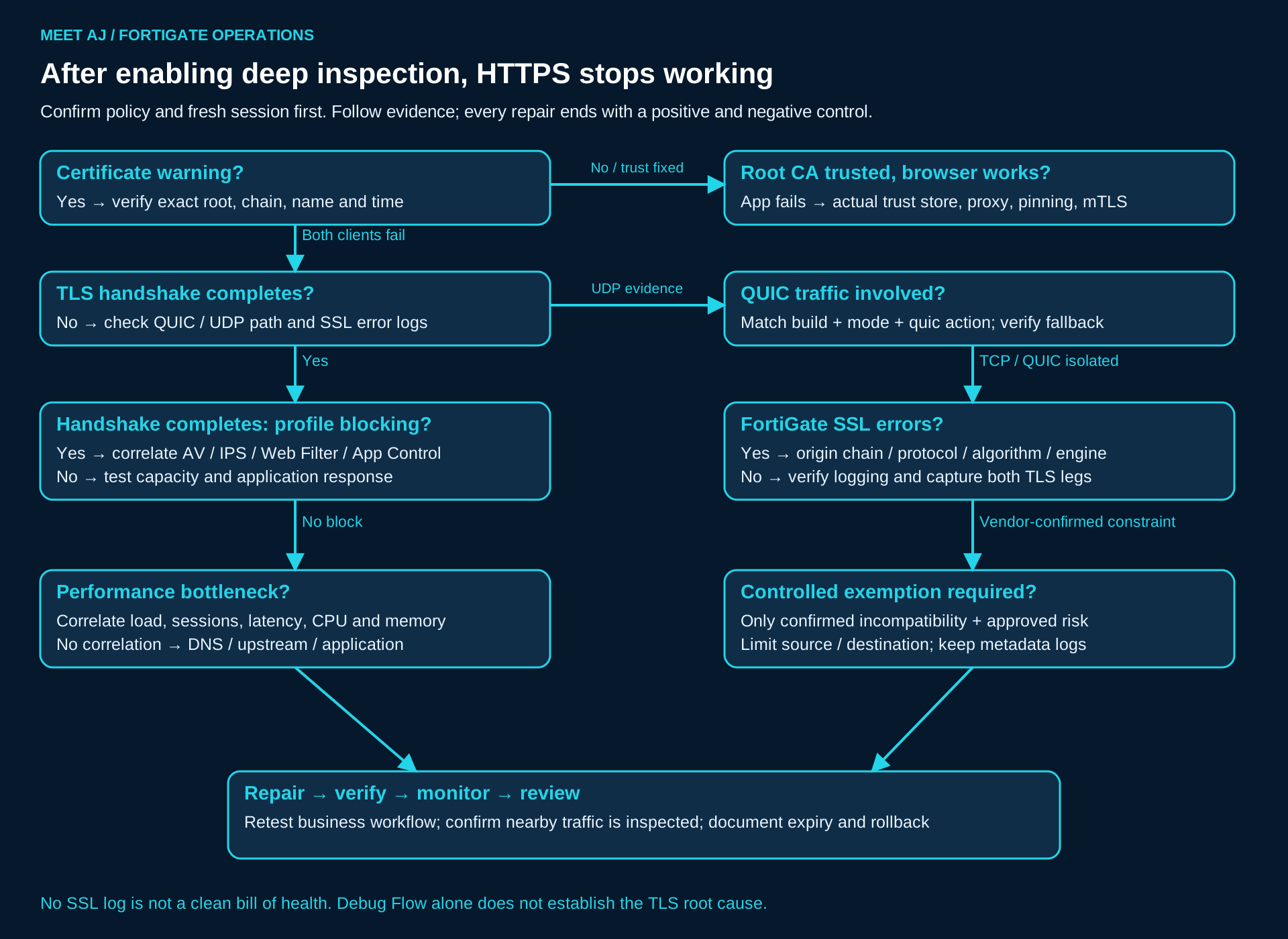
Start with the matched policy and a reproducible request. Certificate warning? Verify the exact root and chain first. Root trusted but only the application fails? Inspect its effective store, proxy and vendor pinning/mTLS requirements. Browser and application both fail? Determine whether the TLS handshake completes, and check UDP/QUIC before relying on a TCP trace. Handshake failure with SSL errors leads to origin trust, version/algorithm and build-specific investigation. No relevant log means verify logging and capture visibility, not “no problem”.
If TLS completes, check Security Profile Blocking before capacity. If no profile blocks the request, correlate latency and resource measurements with load; then investigate DNS, upstream reachability and application response. An exception is the last branch for a confirmed inspection incompatibility with approved risk, not the default exit from every timeout. After any repair, retest the target and a negative control while confirming inspection remains active elsewhere.
Roll out by evidence, with a rollback boundary
Phase 1 — Assessment
Inventory the FortiOS build, hardware model, licensed/supported functions, measured SSL capacity, policy order, VLAN paths, proxy/PAC, endpoint security and critical application dependencies. Include Windows services, Java agents, SaaS login redirects and unmanaged devices. Record baseline success and p95 latency for representative business operations. Set acceptance and stop thresholds with service owners; do not discover the payroll API during the company-wide cutover.
Phase 2 — CA deployment
Approve the inspection PKI design, protect its signing key and distribute only the required public trust chain to managed endpoints. Validate GPO on representative OUs, browsers, service accounts and application stores before enabling decryption. Plan CA expiry and rotation; installing an arbitrary firewall root is a trust decision, not a cosmetic fix for browser warnings.
Phase 3 — Pilot
Clone the relevant SSL profile and scope the change to a small managed source group and approved destinations/policy. Include users from different OUs and VLANs plus one representative API/desktop workflow. Document policy precedence and keep unrelated security controls. Run login, upload, token renewal and application update tests through fresh sessions.
Phase 4 — Monitoring
Watch SSL/certificate errors, application failures, Security Profile actions, CPU, memory, session setup rate and user reports in the same time window. Define who triages each signal and how a user report is tied to a hostname and timestamp. A quiet dashboard without the necessary logs is not acceptance evidence.
Phase 5 — Gradual rollout
Expand one cohort at a time after its observation window meets the agreed thresholds. Reassess peak capacity and business workflows at each stage. Maintain a reviewed exception register; do not let temporary per-application bypasses silently become a permanent organisation-wide profile.
Phase 6 — Rollback
Before the first pilot, save a protected configuration backup and record the exact previous policy/profile bindings, source scope, logging and QUIC actions. Define triggers such as critical login failure or sustained threshold violation, an authorised operator and a deadline. Roll back only the affected policy’s project changes to its recorded previous values, including QUIC changes; retain unrelated AV/IPS, routing and access controls. Validate new sessions, application recovery and logging. Do not clear every session to accelerate a test. Reassess CA retention separately: remove only project-added trust when approved and after checking dependencies, because premature CA removal can create another outage.
Questions that often delay the incident
Does installing the CA fix pinning?
No. A trusted chain can still fail a certificate or public-key pin. Confirm the application’s validation evidence before requesting a narrow exception.
Does an accepted flow prove TLS succeeded?
No. Debug Flow primarily explains routing, sessions and policy decisions. Correlate SSL, application and security-profile evidence.
Must QUIC always be blocked?
No. Inspection depends on the exact FortiOS build and mode. A scoped fallback test must verify both application recovery and actual TCP inspection.
Can the whole policy be rolled back?
Restore the recorded values of this project’s affected bindings and actions. Preserve unrelated security controls and verify fresh business transactions.
Documentation boundaries and related runbooks
For operational commands, consult the FortiOS 7.4.8 administration documentation and the 7.4.4 SSL profile CLI reference. The relevant 7.2 and 7.6 pages are linked beside version differences. Before a production change, validate syntax with device command help and review the exact build’s release notes. Verify HTTP/3 capabilities separately for the installed model and patch.
Fortinet 7.4.8: certificate probe failure and its flow-mode conditions
Fortinet: sniffer verbosity, packet limits and UTC timestamps
Microsoft: distribute public certificates through Group Policy
Oracle: JSSE trust managers and bounded TLS diagnostics
Related: distinguish SD-WAN path failures from TLS inspection failures
Related: routing evidence and enterprise path troubleshooting
Related: correlate service symptoms with infrastructure monitoring