Introduction
This guide explains MikroTik GRE, EoIP and IPIP: Setup and Choosing a Tunnel in a production-aware way, including the design choices, implementation checks, and operational safeguards that matter for MikroTik environments.
Prerequisites
Use a supported release, a tested backup, administrative access, a maintenance window when required, and a rollback plan. Validate DNS, time synchronization, firewall rules, storage, and monitoring before implementation.
Architecture and Core Concepts
Understand the data flow, trust boundaries, dependencies, and the expected state before changing a live environment. Separate control-plane configuration from data-plane traffic and document every external dependency.
Configuration and Validation
Apply the smallest configuration that satisfies the requirement. Keep environment-specific values in a secret-managed configuration, validate syntax before reload, and verify the result from both the service and client perspectives.
Which one should I use?
Start with the job: route between separate networks, or extend the same Ethernet network? These interfaces are built into RouterOS 7; no extra installation is needed. Open New Terminal in WinBox to enter the commands.
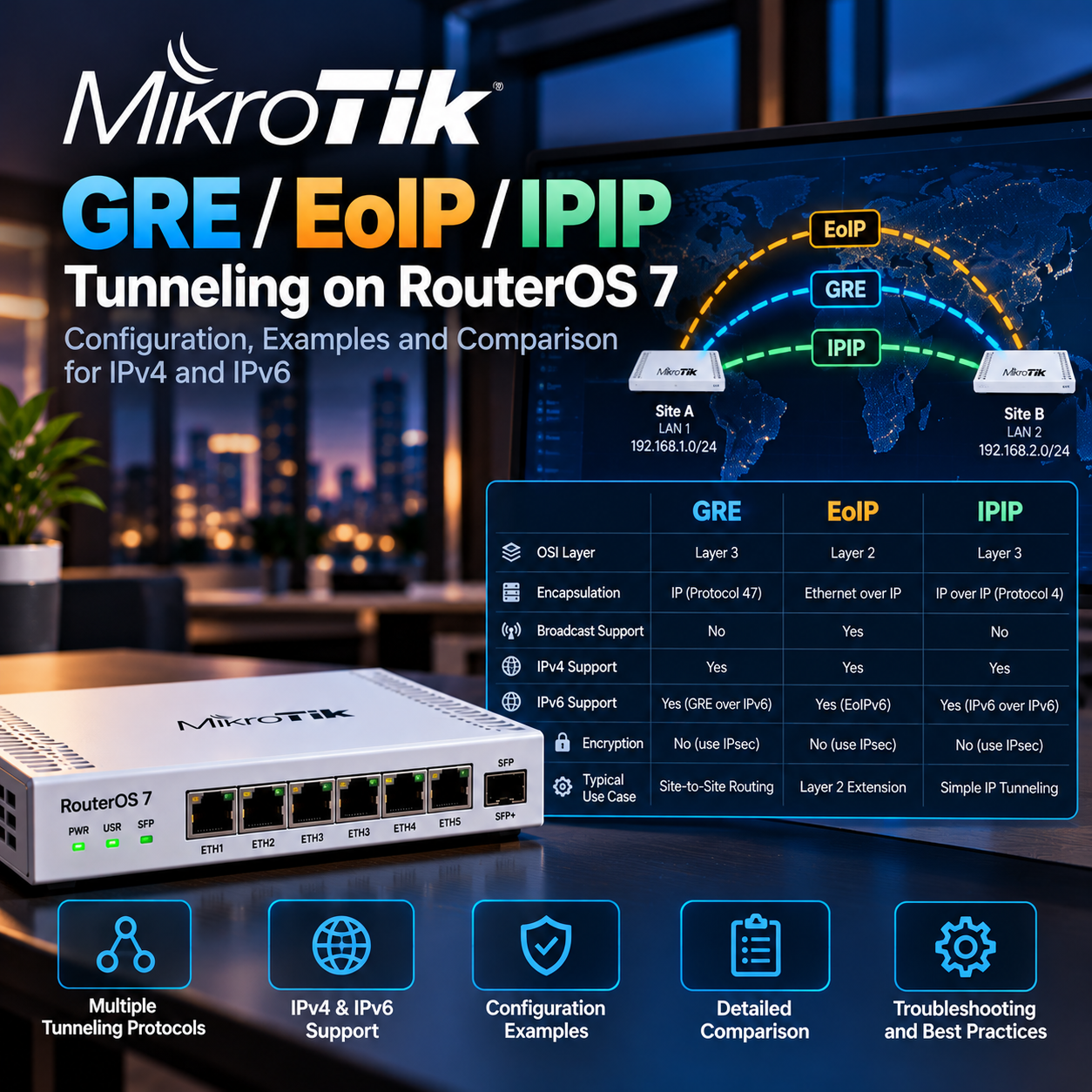
GRE carries routed IPv4 and IPv6 traffic and is a useful choice for mixed IP networks or compatible equipment from different vendors.
IPIP is a simple IPv4-in-IPv4 routed tunnel. Use it for straightforward IPv4 connectivity when both endpoints support it.
EoIP transports Ethernet frames. Use it between MikroTik routers when you need a shared Layer 2 segment, broadcasts or VLAN frames; it is not interchangeable with standard GRE.
IPv4 and IPv6: outside versus inside
The endpoint addresses describe the transport network, not necessarily the payload. gre uses IPv4 endpoints and can carry IPv4 or IPv6; gre6 uses IPv6 endpoints and can also carry both. eoip and eoipv6 carry Ethernet over their respective endpoint families. ipip is IPv4 over IPv4; ipipv6 carries IPv4 or IPv6 over IPv6. IPv6 over IPv4 uses /interface 6to4, which is outside this guide.
Choose ONE example per lab. A and B must already reach each other over the chosen transport. Example endpoints are documentation addresses: A=192.0.2.10 and B=198.51.100.20, or A=2001:db8:1::10 and B=2001:db8:2::20. Replace them with real addresses assigned to your routers. Existing LANs are A=192.168.10.0/24 and B=192.168.20.0/24, with each MikroTik as its LAN gateway.
Export the current configuration and enable Safe Mode with Ctrl+X before changes. Direct tunnels need reachable endpoints; CGNAT or upstream NAT may prevent them from working without additional planning.
/export file=before-tunnelsSet up gre
Router A:
/interface gre add name=gre-site local-address=192.0.2.10 remote-address=198.51.100.20 mtu=1400
/ip address add address=10.255.0.1/30 interface=gre-site
/ip route add dst-address=192.168.20.0/24 gateway=10.255.0.2
Router B:
/interface gre add name=gre-site local-address=198.51.100.20 remote-address=192.0.2.10 mtu=1400
/ip address add address=10.255.0.2/30 interface=gre-site
/ip route add dst-address=192.168.10.0/24 gateway=10.255.0.1
Ping the peer tunnel address from A. Then test a host in the remote LAN. RouterOS retains these settings across reboot.
/ping 10.255.0.2 count=5Set up ipip
Router A:
/interface ipip add name=ipip-site local-address=192.0.2.10 remote-address=198.51.100.20 mtu=1400
/ip address add address=10.255.0.1/30 interface=ipip-site
/ip route add dst-address=192.168.20.0/24 gateway=10.255.0.2
Router B:
/interface ipip add name=ipip-site local-address=198.51.100.20 remote-address=192.0.2.10 mtu=1400
/ip address add address=10.255.0.2/30 interface=ipip-site
/ip route add dst-address=192.168.10.0/24 gateway=10.255.0.1
Ping the peer tunnel address from A. Then test a host in the remote LAN. RouterOS retains these settings across reboot.
/ping 10.255.0.2 count=5Set up gre6
Router A:
/interface gre6 add name=gre6-site local-address=2001:db8:1::10 remote-address=2001:db8:2::20 mtu=1400
/ip address add address=10.255.0.1/30 interface=gre6-site
/ip route add dst-address=192.168.20.0/24 gateway=10.255.0.2
Router B:
/interface gre6 add name=gre6-site local-address=2001:db8:2::20 remote-address=2001:db8:1::10 mtu=1400
/ip address add address=10.255.0.2/30 interface=gre6-site
/ip route add dst-address=192.168.10.0/24 gateway=10.255.0.1
Ping the peer tunnel address from A. Then test a host in the remote LAN. RouterOS retains these settings across reboot.
/ping 10.255.0.2 count=5Set up ipipv6
Router A:
/interface ipipv6 add name=ipipv6-site local-address=2001:db8:1::10 remote-address=2001:db8:2::20 mtu=1400
/ip address add address=10.255.0.1/30 interface=ipipv6-site
/ip route add dst-address=192.168.20.0/24 gateway=10.255.0.2
Router B:
/interface ipipv6 add name=ipipv6-site local-address=2001:db8:2::20 remote-address=2001:db8:1::10 mtu=1400
/ip address add address=10.255.0.2/30 interface=ipipv6-site
/ip route add dst-address=192.168.10.0/24 gateway=10.255.0.1
Ping the peer tunnel address from A. Then test a host in the remote LAN. RouterOS retains these settings across reboot.
/ping 10.255.0.2 count=5Carry IPv6 inside the routed tunnel
On gre-site, gre6-site or ipipv6-site, add these addresses and routes. Replace gre6-site below with your selected interface. These ULA prefixes are lab networks; real LANs must already have IPv6 addressing and use their MikroTik as gateway. Do not apply this to ordinary ipip.
# Router A
/ipv6 address add address=fd42:100::1/64 interface=gre6-site advertise=no
/ipv6 route add dst-address=fd42:20::/64 gateway=fd42:100::2
# Router B
/ipv6 address add address=fd42:100::2/64 interface=gre6-site advertise=no
/ipv6 route add dst-address=fd42:10::/64 gateway=fd42:100::1
# Test from A
/ping fd42:100::2 count=5
EoIP over IPv4 or IPv6
Use a dedicated spare ether5 on each router, connected only to a lab device. It must not belong to another bridge and must not be your management or WAN port. Both lab devices use the same subnet, for example 192.168.50.10/24 and 192.168.50.20/24. Keep only one DHCP server in the shared segment.
# Router A
/interface eoip add name=eoip-site local-address=192.0.2.10 remote-address=198.51.100.20 tunnel-id=100
# Router B
/interface eoip add name=eoip-site local-address=198.51.100.20 remote-address=192.0.2.10 tunnel-id=100
For IPv6 transport, use these INSTEAD of the previous two creation commands:
# Router A
/interface eoipv6 add name=eoip-site local-address=2001:db8:1::10 remote-address=2001:db8:2::20 tunnel-id=100
# Router B
/interface eoipv6 add name=eoip-site local-address=2001:db8:2::20 remote-address=2001:db8:1::10 tunnel-id=100
Then run the following on BOTH routers. Matching tunnel-id identifies the link; unique interface MAC addresses and RSTP help the bridge behave correctly. Test between the two lab devices. IPv4 and IPv6 Ethernet traffic can both cross the bridge.
/interface bridge add name=br-eoip protocol-mode=rstp
/interface bridge port add bridge=br-eoip interface=ether5
/interface bridge port add bridge=br-eoip interface=eoip-site
Firewall, NAT and security
None of these plain tunnels encrypts traffic. For sensitive internet traffic, use a properly configured IPsec protection or a secure transport such as WireGuard. A tunnel-id is not a password.
For IPv4 transport, allow IP protocol 47 (GRE and EoIP) or 4 (IPIP) in input, only from the peer address. These are protocol numbers, not TCP/UDP ports. For IPv6 transport, gre6 uses GRE (47); ipipv6 requires the relevant IPv4/IPv6 encapsulation protocols (4/41), and eoipv6 uses EtherIP (97). Restrict to the peer and selected tunnel. Keep IPv6 ICMP, including Packet Too Big, working.
Example for GRE over IPv4 on A; on B change the source to A. Move the accept rule above the applicable input drop using WinBox. Do not disable the firewall.
/ip firewall filter add chain=input action=accept protocol=gre src-address=198.51.100.20 comment="GRE from site B"For routed examples, permit the intended LAN-to-LAN traffic in forward in both directions, for each IP family. Avoid source NAT between sites. If a broad masquerade rule also matches tunnel traffic, add narrowly scoped LAN-to-LAN srcnat accept rules before it. A masquerade limited to the WAN normally does not need an exception for the tunnel interface.
If it does not work
Check endpoint reachability first, then peer addresses, firewall counters and routes. A running flag alone does not prove end-to-end connectivity. If the tunnel peer replies but a LAN host does not, check the host firewall, its gateway, the return route and forward rules.
/interface print detail
/ip route print
/ipv6 route print
/ip firewall filter print stats
/ipv6 firewall filter print stats
Small packets may work while large transfers fail. The routed examples start at MTU 1400, not a universal optimum; measure the real path and keep IPv6 MTU at least 1280. EoIP adds Ethernet overhead; full 1500-byte frames need additional transport capacity or fragmentation handling. Do not blindly force MTU 1500 on a 1500-byte path, especially over IPv6.
For ordinary access between two offices, start with routing: IPIP for IPv4 only, GRE for a more flexible IP tunnel. Use EoIP when extending Layer 2 is an actual requirement. Commands were checked against official documentation, not executed on live routers.
Troubleshooting
| Symptom | Cause / Check | Resolution |
|---|---|---|
| Service does not start | Check service status, logs, ports, permissions, and configuration syntax. | Fix the reported dependency or syntax error, then restart and verify health checks. |
| Clients cannot connect | Validate DNS, routing, firewall policy, TLS, and listening address from both endpoints. | Allow only the required source and destination, reload safely, and retest with a controlled client. |
| Change caused an outage | Compare the change with the last known-good version and inspect audit and application logs. | Rollback the smallest possible change, restore service, then document the root cause and prevention. |
Best Practices
- Version-control configuration and review changes.
- Use least privilege and explicit allow-lists.
- Automate repeatable checks and monitor the expected state.
- Test upgrades and restores before production rollout.
Conclusion
A reliable implementation of MikroTik GRE, EoIP and IPIP: Setup and Choosing a Tunnel is more than a successful first run. Keep the configuration documented, observable, recoverable, and aligned with the team's change-management process.
Frequently Asked Questions
Can this procedure be used in production without a maintenance window?
Only when the platform documents a safe reload or the change is isolated and rollback-tested; otherwise schedule a maintenance window.
What should be backed up before making the change?
Back up configuration, credentials held by the service, application data, and the current version of the deployment. Test the restore path.
How do I verify that the change really took effect?
Check the service health endpoint or status, inspect logs and metrics, and run a representative client-side test from the intended network zone.
What is the first check for a timeout or connection refusal?
Check listening ports, routing, firewall policy, DNS resolution, and whether the service is bound to the expected interface.
How should secrets and tokens be handled?
Use a secret manager or protected environment configuration, rotate them after exposure, and never commit them to Git or paste them into tickets.
How can this be automated safely?
Automate idempotent checks first, add dry-run support, require review for destructive operations, and emit logs and exit codes suitable for monitoring.
What should be monitored after deployment?
Monitor availability, error rate, latency, resource saturation, certificate expiry, failed jobs, and configuration drift.
When should I roll back instead of troubleshooting in place?
Rollback when the service is unavailable, data integrity is at risk, or the blast radius is growing faster than you can isolate it. Preserve logs first.