
1. An urgent incident outside the office
When I design remote administration as an Infrastructure & DevOps Engineer, I start with a practical conflict: management panels should be hidden from the Internet, but I need a controlled way in during an incident. Imagine I am away and need Winbox, an ESXi status page, vCenter, a Zabbix alert or SSH to Linux. Editing firewall rules manually for every visit is not an operating model I want to depend on.
In this enterprise scenario, MikroTik RouterOS, Cisco switches, VMware ESXi/vCenter, Windows Server, Linux servers, Zabbix, Grafana, NetBox and other panels live on an isolated management network. WAN policy is default deny and no management panel is published. I use knocking only for temporary VPN admission; device login remains separate. This is a reproducible design, not a claim of a customer deployment or a measured lab result.
2. What the knocks authorise
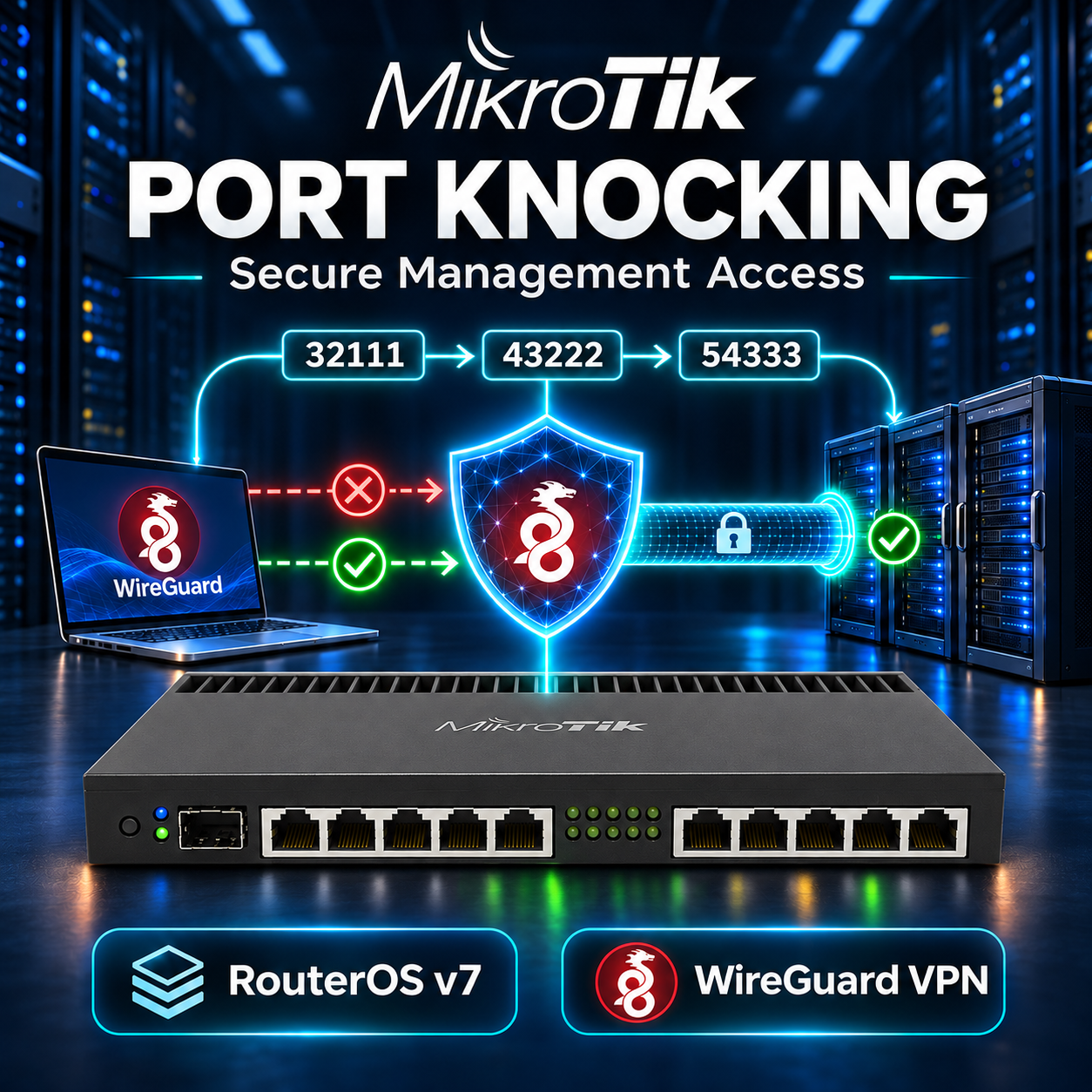
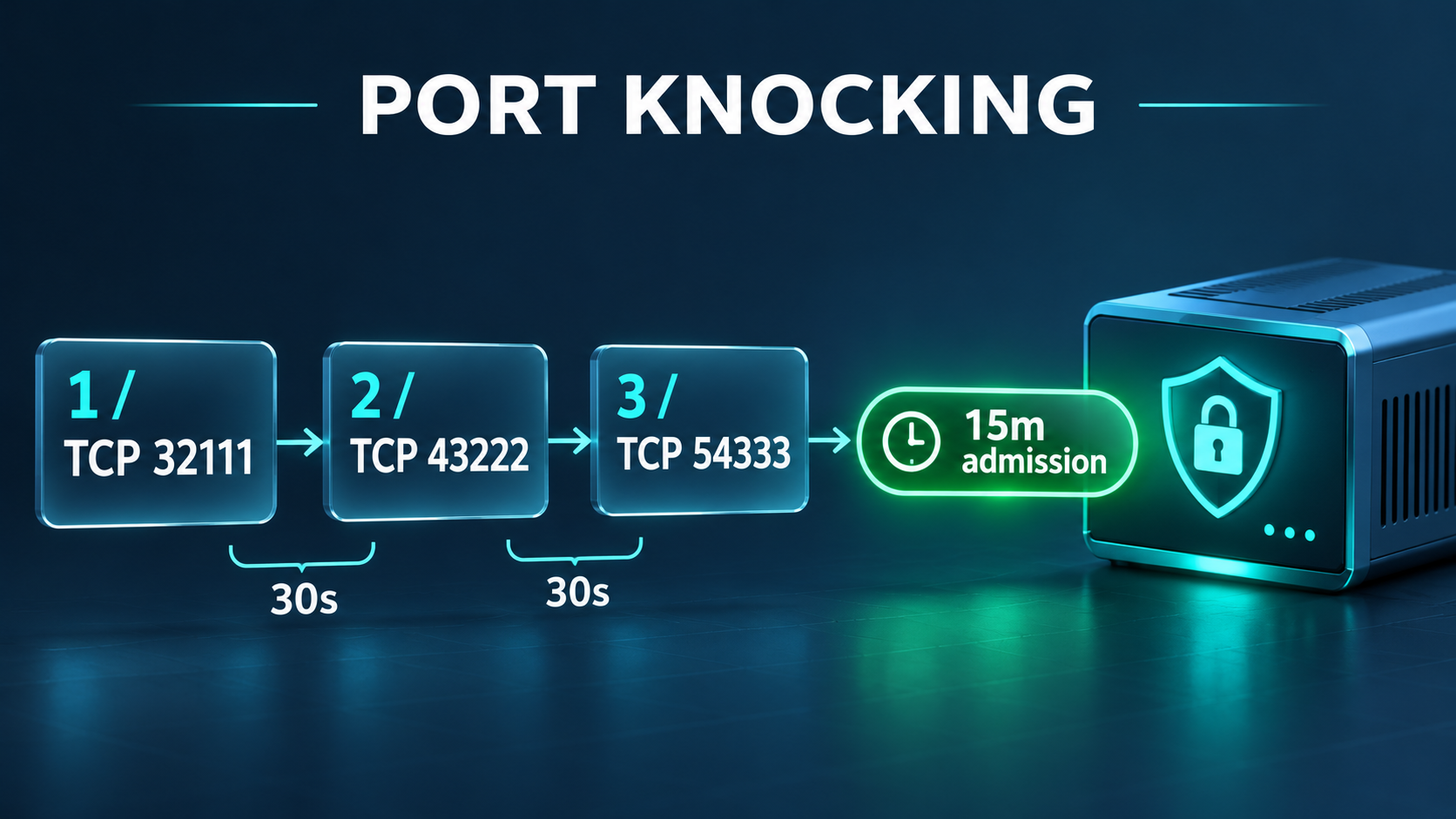
A TCP SYN to 32111 records its public source in knock_stage_1 for 30 seconds. A SYN to 43222 while that entry exists records knock_stage_2 for another 30 seconds. A SYN to 54333 while stage 2 exists adds the source to knock_authorized for 15 minutes. These ports are examples and can be changed; no TCP service listens on them. The filter records the packet, then drops it.
Remote public IP
 -> TCP 32111 -> knock_stage_1 (30s)
 -> TCP 43222 -> knock_stage_2 (30s after stage 2)
 -> TCP 54333 -> knock_authorized (15m)
 -> UDP 51820 -> valid WireGuard key -> encrypted tunnel -> exact ACL
The timeout is per stage, not one 30-second window for the whole sequence. This simple design recognises an ordered subsequence: wrong or unrelated knocks do not reset prior stages. It is not a strict state machine; a scan can eventually hit the required order. Repeated valid knocks can renew authorisation. Test wrong-order cases from clean state and observe the actual remaining timeout on your RouterOS build.
Knocks change an IP-based condition, not a service state. They do not open management ports, authenticate a person, encrypt traffic or enable a disabled Winbox/SSH service. Fifteen minutes is the address-list lifetime; it does not inherently terminate established sessions. Knowing the sequence must never grant unrestricted internal access.
3. Two architectures and a production choice
Architecture A is direct access after knocking, useful only for understanding or a tightly scoped exception. Traffic destined to the router uses input; traffic passing through it to ESXi uses forward. dstnat translates a public destination to an internal host. A source address list is a match condition, not authentication. Connection tracking remembers flows and the NAT decision made on their first packet.
A conceptual exception could map public TCP 10443 only to 172.16.99.11:443. Both its DST-NAT rule and its new-connection forward allow must require knock_authorized, WAN ingress, the exact host and translated service. Preserve established replies and default deny. This is not the production recommendation; no general accept of the entire LAN is appropriate. Do not install this alternative alongside the VPN lab.
Architecture B is the recommendation here: successful knocks temporarily admit WireGuard UDP 51820, a configured peer proves possession of its private key, then encrypted traffic faces a separate least-privilege management ACL. WireGuard authenticates keys, not human identity or MFA. Target application authentication remains mandatory.
Remote Administrator -> Internet -> MikroTik WAN (ether1 / WAN)
 -> Port Knocking -> Dynamic Address List -> Temporary Authorization
 -> WireGuard -> Encrypted Tunnel -> Management VLAN 99
     +-- MikroTik 172.16.99.1:22,8291
     +-- Cisco switch 172.16.99.2:22
     +-- VMware ESXi 172.16.99.11:443
     +-- VMware vCenter 172.16.99.12:443
     +-- Zabbix 172.16.99.20:443
     +-- NetBox 172.16.99.21:443
     +-- Linux 172.16.99.30:22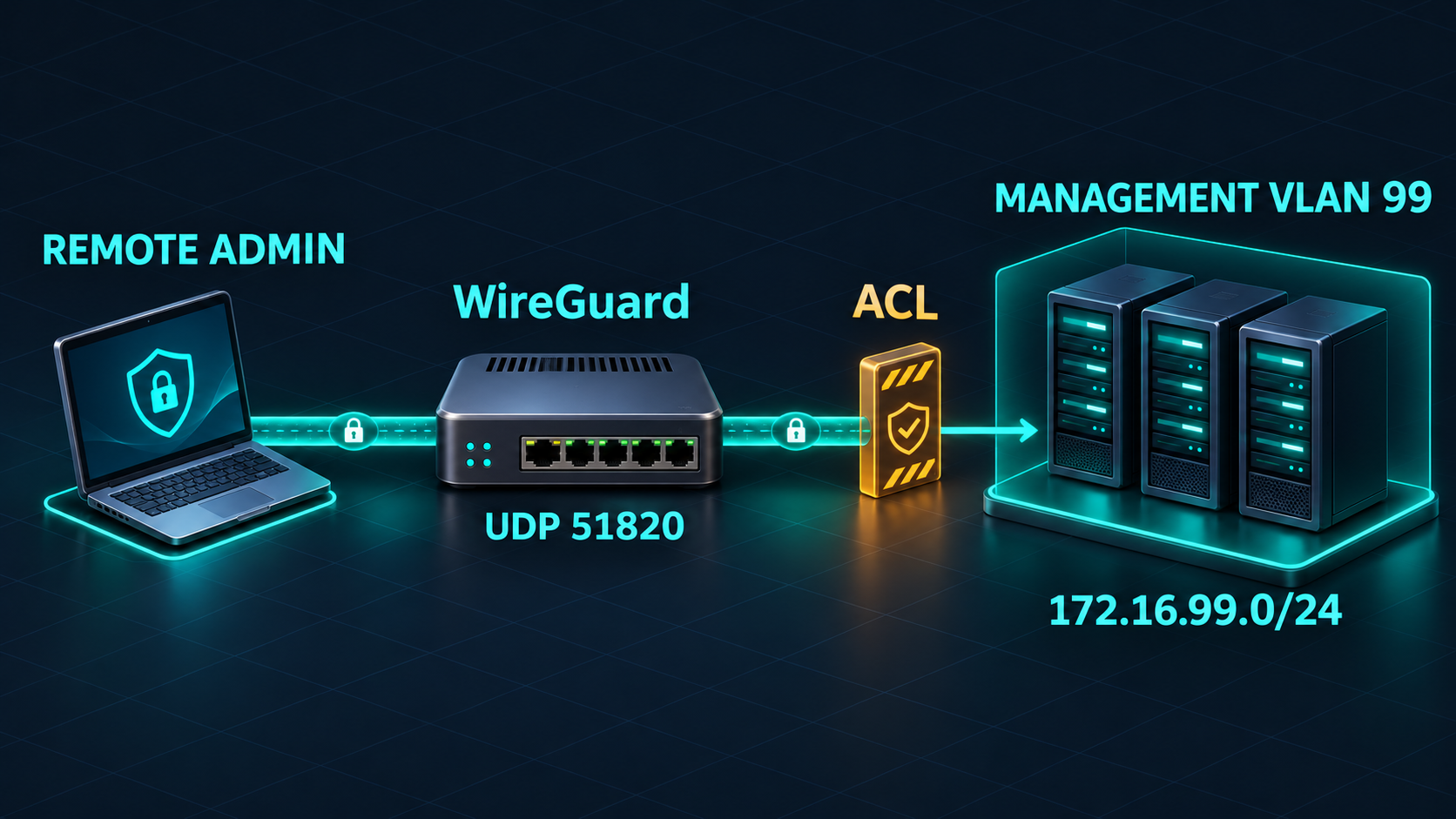
4. Lab prerequisites and inbound reachability
RouterOS: v7 (record exact supported patched release)
WAN interface: ether1; interface list: WAN
Existing Management VLAN: 99, interface vlan99
Existing management gateway: 172.16.99.1/24
Management subnet: 172.16.99.0/24
WireGuard: wg-management, 10.77.99.1/24, UDP 51820
Remote peer: 10.77.99.2/32
Knocks: TCP 32111 -> 43222 -> 54333
Stage timeout: 30s each; authorised timeout: 15m
Public endpoint: vpn.example.com (replace with reachable IPv4)
Use CHR or a lab router with console access and a management host. VLAN 99, bridge VLAN filtering, switch trunks and 172.16.99.1/24 must already work: this guide does not rebuild a production bridge. Hosts use 172.16.99.1 as gateway, or their real gateway must route 10.77.99.0/24 back through this router. Avoid overlaps with the remote LAN. Architecture B needs no management DST-NAT or masquerade.
Default deny still lets a packet arrive and be inspected before drop. If an upstream modem performs NAT, forward only the three knock TCP ports and UDP 51820 to MikroTik, never the management panels. ISP CGNAT or missing inbound routing requires a public address, a reachable outbound VPN hub/relay or an access connector. DDNS cannot bypass CGNAT. This lab and its client scripts use IPv4.
5. Inspect current configuration
/system resource print
/system package print
/interface print
/interface list print
/interface list member print
/interface vlan print detail
/ip address print
/ip route print detail
/ip firewall filter print detail
/ip firewall nat print detail
/ip firewall raw print detail
/ip firewall mangle print detail
/ip firewall address-list print
/ip service print
/ipv6 firewall filter print detail
Record the exact version, actual WAN ingress (PPPoE/LTE may not be ether1), WAN membership, return routes and port forwards. Ensure knock ports are not real services or DST-NAT targets. RAW drops, NOTRACK, scanner blacklists and earlier accepts can defeat the design. Locate established/related accepts, final WAN drop, forward FastTrack and broad LAN accepts. Appending rules does not put them before an existing deny. Output policy must allow VPN replies.
6. Backup, Safe Mode and recovery
/export file=before-pk-management
/system backup save name=before-pk-management password="REPLACE_WITH_UNIQUE_BACKUP_PASSWORD"
Replace the password locally and download both files to protected storage. Text export omits sensitive values by default and is not complete secret recovery. Binary backup contains sensitive configuration and needs compatible hardware/version for restoration. Record original service and firewall values. Preserve console/OOB or a separate trusted LAN path; this new VPN cannot be your only recovery route.
Press Ctrl+X in the RouterOS terminal and confirm Safe Mode before editing. Make small batches because its history is finite. Losing the owning session rolls back tracked changes after detection; Ctrl+D explicitly undoes them. After validation Ctrl+X exits Safe Mode and commits them. Keep a maintenance window and an OOB operator available; normal terminal closure is not a commit procedure.
7. Create WireGuard and one peer
/interface wireguard add name=wg-management listen-port=51820 mtu=1420 comment="PK-MGMT: VPN interface"
/ip address add address=10.77.99.1/24 interface=wg-management comment="PK-MGMT: VPN gateway"
:put [/interface wireguard get [find where name="wg-management"] public-key]
/interface wireguard peers add interface=wg-management public-key="REPLACE_WITH_CLIENT_PUBLIC_KEY" allowed-address=10.77.99.2/32 comment="PK-MGMT: administrator laptop"
Run add commands once on a router without these objects. RouterOS generates its key pair. Create an empty tunnel in the official client to generate its keys locally. Only the client public key goes into the router peer; the router public key goes to the client. Router peer allowed-address is the client /32, not the management subnet: it selects the peer and restricts inner source addresses. Assign a separate key and /32 per device; never publish private keys.
8. Build the knock chain
Create this inactive custom chain before attaching it to input. Every stage is WAN-only TCP SYN in state new. Stage 1 has no list prerequisite, stage 2 requires stage 1, and stage 3 requires stage 2. The list-add action is passthrough: a final drop records the attempt without accepting a connection. Different destination ports prevent one packet matching all three stages.
/ip firewall filter
add chain=pk-knock in-interface-list=WAN protocol=tcp tcp-flags=syn,!ack connection-state=new dst-port=32111 action=add-src-to-address-list address-list=knock_stage_1 address-list-timeout=30s comment="PK-MGMT: stage 1 for 30s"
add chain=pk-knock in-interface-list=WAN protocol=tcp tcp-flags=syn,!ack connection-state=new dst-port=43222 src-address-list=knock_stage_1 action=add-src-to-address-list address-list=knock_stage_2 address-list-timeout=30s comment="PK-MGMT: stage 2 for 30s"
add chain=pk-knock in-interface-list=WAN protocol=tcp tcp-flags=syn,!ack connection-state=new dst-port=54333 src-address-list=knock_stage_2 action=add-src-to-address-list address-list=knock_authorized address-list-timeout=15m comment="PK-MGMT: authorise source for 15m"
add chain=pk-knock action=drop comment="PK-MGMT: drop all knock packets"
Lists appear dynamically when matched, marked D with a remaining timeout; do not prepopulate a permanent authorised entry. Timed entries live in RAM and disappear on reboot. Adding a source to a list accepts nothing until a separate firewall rule consumes that condition.
9. Restrict WireGuard before existing accepts
Place a narrow WAN gate before established/related accepts. It owns only the knock ports and UDP 51820 and returns everything else to the existing default-deny firewall. This also avoids an unauthorised but already tracked UDP attempt bypassing a new-only rule. Create the jump disabled, move it to the top, then enable it after its target chain is complete.
/ip firewall filter
add chain=pk-wan connection-state=invalid action=drop comment="PK-MGMT: invalid WAN"
add chain=pk-wan protocol=tcp dst-port=32111,43222,54333 action=jump jump-target=pk-knock comment="PK-MGMT: inspect knocks"
add chain=pk-wan protocol=udp dst-port=51820 src-address-list=knock_authorized connection-state=new,established action=accept comment="PK-MGMT: admitted WireGuard only"
add chain=pk-wan protocol=udp dst-port=51820 action=drop comment="PK-MGMT: deny unauthorised WireGuard"
add chain=pk-wan action=return comment="PK-MGMT: retain existing WAN policy"
add chain=input in-interface-list=WAN action=jump jump-target=pk-wan disabled=yes comment="PK-MGMT: WAN gate"
move [find where comment="PK-MGMT: WAN gate"] 0
enable [find where comment="PK-MGMT: WAN gate"]
There is no source-list accept for all RouterOS services. The drop concerns UDP 51820 only. This lab deliberately checks authorised membership on every matching outer UDP packet, including established ones, so expiry blocks transport even while conntrack remembers it. A common new-only rule below established accept would allow existing UDP to continue. Neither policy logs out applications or deletes peer keys; another successful knock can restore transport.
10. Enforce the management ACL
A handshake does not grant LAN access. Input permits only router Winbox/SSH at 172.16.99.1. Forward permits HTTPS to named panels and SSH to named hosts inside 172.16.99.0/24. Windows RDP and Grafana remain denied until a reviewed exact-service rule is added. Never put wg-management into a trusted LAN interface list.
/ip firewall address-list
add list=pk_https_targets address=172.16.99.11 comment="PK-MGMT: ESXi HTTPS"
add list=pk_https_targets address=172.16.99.12 comment="PK-MGMT: vCenter HTTPS"
add list=pk_https_targets address=172.16.99.20 comment="PK-MGMT: Zabbix HTTPS"
add list=pk_https_targets address=172.16.99.21 comment="PK-MGMT: NetBox HTTPS"
add list=pk_ssh_targets address=172.16.99.2 comment="PK-MGMT: Cisco SSH"
add list=pk_ssh_targets address=172.16.99.30 comment="PK-MGMT: Linux SSH"
/ip firewall filter
add chain=pk-router connection-state=invalid action=drop comment="PK-MGMT: invalid inner input"
add chain=pk-router src-address=10.77.99.2 dst-address=172.16.99.1 protocol=tcp dst-port=22,8291 connection-state=new,established action=accept comment="PK-MGMT: router management only"
add chain=pk-router action=drop comment="PK-MGMT: deny other router access"
add chain=pk-forward connection-state=invalid action=drop comment="PK-MGMT: invalid inner forward"
add chain=pk-forward src-address=10.77.99.2 dst-address=172.16.99.0/24 dst-address-list=pk_https_targets protocol=tcp dst-port=443 connection-state=new,established action=accept comment="PK-MGMT: named HTTPS panels"
add chain=pk-forward src-address=10.77.99.2 dst-address=172.16.99.0/24 dst-address-list=pk_ssh_targets protocol=tcp dst-port=22 connection-state=new,established action=accept comment="PK-MGMT: named SSH targets"
add chain=pk-forward action=drop comment="PK-MGMT: deny other tunnel forwarding"
add chain=input in-interface=wg-management action=jump jump-target=pk-router disabled=yes comment="PK-MGMT: inner input gate"
add chain=forward in-interface=wg-management action=jump jump-target=pk-forward disabled=yes comment="PK-MGMT: inner forward gate"
add chain=forward out-interface=wg-management dst-address=10.77.99.2 connection-state=established,related action=accept disabled=yes comment="PK-MGMT: tracked replies without FastTrack"
move [find where comment="PK-MGMT: inner input gate"] 0
move [find where comment="PK-MGMT: inner forward gate"] 0
move [find where comment="PK-MGMT: tracked replies without FastTrack"] 0
enable [find where comment="PK-MGMT: inner input gate"]
enable [find where comment="PK-MGMT: inner forward gate"]
enable [find where comment="PK-MGMT: tracked replies without FastTrack"]
These rules precede FastTrack in both directions: inbound uses the custom chain; replies match the exact peer established/related accept. Old fasttracked flows may keep bypassing until expired or selectively removed, so test fresh flows. Custom-chain final drops prevent later broad LAN accepts from opening other destinations. The reply rule does not allow LAN-initiated new connections to the peer. Preserve invalid drops and default deny elsewhere.
IP Services must also permit 10.77.99.2/32 alongside existing trusted LAN ranges for Winbox/SSH. Read and merge current restrictions instead of overwriting them. A disabled service needs a separate intentional enable action. Host firewalls must permit the exact service from 10.77.99.2. Verify the return route, not broad source NAT. MTU 1420 is a starting point; if large HTTPS responses stall, examine PMTU/ICMP policy and a smaller tunnel MTU.
/ip firewall filter print detail where comment~"PK-MGMT:"
/ip firewall filter print stats where comment~"PK-MGMT:"
/ip firewall address-list print detail where list~"knock_"
/ip service print detail
11. Client WireGuard configuration
[Interface]
PrivateKey = REPLACE_WITH_LOCAL_CLIENT_PRIVATE_KEY
Address = 10.77.99.2/32

[Peer]
PublicKey = REPLACE_WITH_ROUTER_PUBLIC_KEY
Endpoint = vpn.example.com:51820
AllowedIPs = 172.16.99.0/24
PersistentKeepalive = 25
Keep the completed file private. AllowedIPs installs a split route to the /24, not a server ACL; the firewall remains narrower. DNS is omitted: use management IPs or explicitly allow a named internal resolver. Router tunnel address 10.77.99.1 is not a test target in this client route: use 172.16.99.1 for management. Disable VPN autostart until the before-knock test is complete.
12. Windows 10/11: tools and PowerShell
Install Ncat from the official Nmap Windows package; Nping in that distribution is another packet-generation option. Avoid unmaintained binary mirrors. Open PowerShell in its installation directory or add it to PATH. Run three separate Ncat attempts in order, with a brief delay. No MikroTik login is needed. A timeout or refusal is expected; only router-side evidence proves admission.
ncat.exe -4 -z -w 1s vpn.example.com 32111
Start-Sleep -Milliseconds 250
ncat.exe -4 -z -w 1s vpn.example.com 43222
Start-Sleep -Milliseconds 250
ncat.exe -4 -z -w 1s vpn.example.com 54333
Save this alternative as Knock-Management.ps1. It supports Windows PowerShell 5.1 and PowerShell 7, resolves one IPv4 once, creates one socket per stage and disposes it before continuing. Destination avoids the reserved $Host variable. Timeout is below the stage window; no credentials are stored. Local results do not claim successful authorisation.
[CmdletBinding()]
param(
    [Parameter(Mandatory=$true)][string]$Destination,
    [ValidateNotNullOrEmpty()][int[]]$Ports = @(32111,43222,54333),
    [ValidateRange(100,3000)][int]$TimeoutMs = 1000,
    [ValidateRange(100,1000)][int]$DelayMs = 250
)
$ErrorActionPreference = 'Stop'
try {
    foreach ($Port in $Ports) {
        if ($Port -lt 1 -or $Port -gt 65535) { throw "Invalid port: $Port" }
    }
    $TargetIp = [System.Net.Dns]::GetHostAddresses($Destination) |
        Where-Object { $_.AddressFamily -eq [System.Net.Sockets.AddressFamily]::InterNetwork } |
        Select-Object -First 1
    if ($null -eq $TargetIp) { throw 'No IPv4 address found.' }
    Write-Host "Target IPv4: $TargetIp"
    for ($Index=0; $Index -lt $Ports.Count; $Index++) {
        $Client = [System.Net.Sockets.TcpClient]::new([System.Net.Sockets.AddressFamily]::InterNetwork)
        $WaitHandle = $null
        try {
            $Attempt = $Client.BeginConnect($TargetIp, $Ports[$Index], $null, $null)
            $WaitHandle = $Attempt.AsyncWaitHandle
            if ($WaitHandle.WaitOne($TimeoutMs)) {
                $Client.EndConnect($Attempt)
                Write-Host "Stage $($Index+1): TCP connected; admission still unverified."
            } else {
                Write-Host "Stage $($Index+1): local timeout; SYN may have reached router."
            }
        } catch {
            Write-Warning "Stage $($Index+1): $($_.Exception.GetBaseException().Message); admission unknown."
        } finally {
            $Client.Close()
            if ($null -ne $WaitHandle) { $WaitHandle.Close() }
        }
        if ($Index -lt $Ports.Count-1) { Start-Sleep -Milliseconds $DelayMs }
    }
    Write-Host 'Sequence attempted. Check router address list, then activate WireGuard and verify handshake.'
} catch {
    Write-Error "Cannot run sequence: $($_.Exception.Message)"
    exit 1
}.Knock-Management.ps1 -Destination vpn.example.com -TimeoutMs 1000 -DelayMs 250
# After importing and activating the completed WireGuard tunnel:
Test-NetConnection 172.16.99.30 -Port 22
ssh admin@172.16.99.30After knocking, import your local config into the official WireGuard Windows client and click Activate. Check latest handshake and receive counters, then test a permitted service. Successful TCP connection to a knock port is unexpected under our drop policy: investigate a listener, upstream NAT or wrong rule order. Neither connected nor failed TCP proves a list entry.
13. Linux: ordered attempts, then VPN
Install netcat-openbsd and wireguard-tools on Debian/Ubuntu. A SYN can update the list before drop, so no reply is required. The script uses nc -4 -z -w 1, tolerates its nonzero exit code and resolves one IPv4 for all attempts. Do not use a parallel scan.
sudo apt update
sudo apt install netcat-openbsd wireguard-tools#!/usr/bin/env bash
set -u
set -o pipefail
if [[ $# -ne 1 ]]; then echo "Usage: $0 public-ip-or-fqdn" >&2; exit 2; fi
for tool in nc getent awk; do
command -v "$tool" >/dev/null || { echo "Missing: $tool" >&2; exit 1; }
done
target=$(getent ahostsv4 "$1" | awk '!found {ip=$1; found=1} END {if(found) print ip}')
[[ -n "$target" ]] || { echo 'No IPv4 address found' >&2; exit 1; }
echo "Target IPv4: $target"
for port in 32111 43222 54333; do
if nc -4 -z -v -w 1 "$target" "$port"; then
echo "$port: TCP connected; router authorisation unknown"
else
echo "$port: timeout/refusal/local error; knock may have arrived"
fi
sleep 0.25
done
echo 'Sequence attempted; verify address list and WireGuard handshake.'chmod 700 knock-management.sh
./knock-management.sh vpn.example.com
# Store the completed private client config first:
sudo chmod 600 /etc/wireguard/wg-management.conf
sudo wg-quick up wg-management
sudo wg show wg-management latest-handshakes
ip route get 172.16.99.30
ssh admin@172.16.99.30
# After maintenance:
sudo wg-quick down wg-managementFor Nmap use separate single-port TCP connect scans, not one multi-port scan. Timing/retries differ from nc; keep each attempt within the stage deadline and verify packet evidence. The nc script remains the simpler primary method.
nmap -sT -Pn -n -p 32111 --max-retries 0 --host-timeout 3s vpn.example.com
sleep 0.25
nmap -sT -Pn -n -p 43222 --max-retries 0 --host-timeout 3s vpn.example.com
sleep 0.25
nmap -sT -Pn -n -p 54333 --max-retries 0 --host-timeout 3s vpn.example.com
14. Acceptance tests and troubleshooting
No RouterOS VM or physical router was available for this article. These are acceptance criteria, not recorded passing results. Use a genuinely external source and record its observed public IPv4, exact release, timestamps, counter deltas, D flags/timeouts and latest handshake. Each test includes its diagnostic commands below its description.
Test 1 — before knocking
Stop VPN and senders, clear only the test source from the three lists, then attempt a fresh tunnel. Expected: unauthorised-drop counter rises, no new handshake. Failure: fresh handshake works. Root causes: gate below accept, wrong WAN list, IPv6 bypass or stale entry. Resolution: fix order/membership, clear test source and repeat; a historical timestamp is not new success.
/ip firewall filter print stats where chain="pk-wan"
/ip firewall address-list print detail where list="knock_authorized"
/interface wireguard peers print detail
Test 2 — wrong order and timeout
From clean state send 54333,43222,32111. Expected: only stage 1 may exist, no authorisation. Failure: authorised entry appears. Root causes: stale stage 2, shared NAT, concurrent sender or wrong conditions. Resolution: stop other senders, wait for both stage windows or remove only the test source and repeat. Also send 32111, wait over 30 seconds, then 43222: stage 2 must not appear.
/ip firewall address-list print detail where list~"knock_"
/ip firewall filter print stats where chain="pk-knock"
Test 3 — correct sequence
Send 32111,43222,54333 within the stage windows. Expected: D entry in knock_authorized with about 15m remaining and increasing stage counters. Failure: only stage 1 or no entry. Root causes: upstream filter, missing TCP forwards, RAW/scan blacklist, wrong ingress or timing. Resolution: capture each port and fix the first processing point whose counter does not increase.
/ip firewall filter print stats where chain="pk-knock"
/ip firewall address-list print detail where list="knock_authorized"
Test 4 — VPN handshake
Activate VPN after knocking. Expected: recent last-handshake and rx/tx growth. Failure: admission counter rises but no handshake. Root causes: wrong keys/endpoint, different public egress for knocks and VPN, output filtering, clock issues or asymmetric multi-WAN. Resolution: compare public keys locally and trace UDP both ways; never share private keys.
/interface wireguard peers print detail
/ip firewall filter print stats where chain="pk-wan"
/ip firewall connection print detail where protocol=udp
Test 5 — allowed and denied management
Test HTTPS 172.16.99.11:443 and SSH 172.16.99.30:22, then denied 172.16.99.30:3389 and an unrelated LAN host. Expected: only declared services work and deny counters rise. Failure: all fail despite handshake, or extra targets work. Root causes: host firewall/return route, client AllowedIPs, gate ordering or old FastTrack. Resolution: correct route/ACL, selectively remove identified lab flows and test fresh connections.
/ip firewall filter print stats where chain="pk-forward"
/ip firewall filter print stats where chain="pk-router"
/ip route print detail
/ip firewall connection print
Test 6 — expiry and existing flows
Stop senders, keep SSH active and wait 15 minutes. Expected: authorised entry disappears; this all-packet gate drops outer UDP, existing transport stalls and a fresh tunnel fails until re-knocked. A new-only gate below established accept could preserve existing UDP. Failure: this lab still transports after expiry. Root causes: bypass, IPv6, another entry/source or renewal. Resolution: inspect ingress/counters/conntrack and eliminate the bypass. Last-handshake may retain history; application sessions are not necessarily destroyed.
/ip firewall address-list print detail where list="knock_authorized"
/ip firewall filter print stats where chain="pk-wan"
/ip firewall connection print
/interface wireguard peers print detail
Test 7 — firewall and packet evidence
Compare counters around one attempt. Expected path: WAN gate -> authorised UDP -> inner ACL -> tracked reply accept. Failure: capture sees ingress but filter counters do not move. Root causes: RAW drop, DST-NAT moving traffic into forward, wrong WAN membership or L3 hardware offload policy. Resolution: inspect earlier stages and interface/bridge policy. Torch/sniffer can change FastTrack behaviour; repeat acceptance with captures stopped.
/ip firewall filter print stats
/ip firewall raw print stats
/ip firewall nat print stats
/ip firewall address-list print detail
/ip firewall connection print
/interface wireguard peers print detail
/log print
/tool torch interface=ether1 ip-protocol=tcp port=32111
/tool sniffer quick interface=ether1 ip-protocol=udp port=51820
Run Torch/sniffer separately and stop with Ctrl+C. Limit captures to the known public source and short windows. Redact endpoint details before sharing peer/connection output. Logs are silent by default; temporarily log authorisation only and turn it off afterwards. Logging every SYN can overload the router.
/ip firewall filter set [find where comment="PK-MGMT: authorise source for 15m"] log=yes log-prefix="PK-AUTH "
/log print where message~"PK-AUTH"
/ip firewall filter set [find where comment="PK-MGMT: authorise source for 15m"] log=no
15. Revoke and roll back safely
Stop the client VPN and senders before removing only its observed public test source from these lists. Replace the documentation IP below. Never clear all conntrack or all lists in production. Removing an entry does not erase keys or application sessions.
/ip firewall address-list remove [find where list="knock_stage_1" and address="198.51.100.25"]
/ip firewall address-list remove [find where list="knock_stage_2" and address="198.51.100.25"]
/ip firewall address-list remove [find where list="knock_authorized" and address="198.51.100.25"]
For immediate revocation disable the named peer from OOB. Inspect conntrack, identify exact outer UDP and inner management flows and remove only their displayed IDs if necessary; terminate sessions on target hosts. For rollback disable the peer/interface first. Review old broad WireGuard accepts before removing gate drops. These commands assume all PK-MGMT objects belong to this lab and the chain names were previously unused.
/interface wireguard peers disable [find where comment="PK-MGMT: administrator laptop"]
/interface wireguard disable [find where name="wg-management"]
/ip firewall filter remove [find where comment~"^PK-MGMT:"]
/ip firewall address-list remove [find where list="knock_stage_1"]
/ip firewall address-list remove [find where list="knock_stage_2"]
/ip firewall address-list remove [find where list="knock_authorized"]
/ip firewall address-list remove [find where comment~"^PK-MGMT:"]
/interface wireguard peers remove [find where comment="PK-MGMT: administrator laptop"]
/ip address remove [find where comment="PK-MGMT: VPN gateway"]
/interface wireguard remove [find where name="wg-management"]
Restore any separately changed IP Service restrictions from the change record, verify original default deny and LAN access, then leave Safe Mode after recovery is confirmed. Binary restore is a maintenance last resort: /system backup load name=before-pk-management.backup, entering its password locally. Expect reboot and full replacement, including unrelated later changes. Do not blindly import an export over existing objects: add commands can duplicate them.
16. Security boundaries that remain
Port scanning and brute force: three fixed ports have no cryptographic secret exchange. A scan can discover or accidentally hit the ordered subsequence; short time windows do not make it strong authentication. Replay attacks: an observer can repeat captured knocks because there is no nonce or challenge. Changing ports cannot replace VPN keys, authentication or incident response.
IP spoofing: SYN-based recording does not require a completed TCP handshake, so forged sources can populate lists without receiving replies. That does not supply a valid WireGuard key, but can cause noise or admission for someone else. Use appropriate upstream anti-spoofing and WAN source validation; strict reverse-path filtering can break asymmetric multi-WAN. An IP address is not a person.
Source IP sharing and CGNAT: everyone behind a public NAT shares admission, though each still needs a peer key. Corporate proxies or mobile networks may send knocks and UDP from different public IPs. Dynamic public IP and roaming require a new knock from the new source. Peer endpoint roaming does not bypass this firewall gate. DDNS on the organisation side must resolve to the currently reachable address.
Firewall rule ordering, connection tracking and FastTrack must be checked together. Gates precede bypass accepts; NAT decisions persist per flow and old fasttracked connections may bypass new ACLs. Avoid NOTRACK here, retest after upgrades and routing changes, and keep the management VLAN isolated from user/server VLANs with separate ACLs. Knocking does not protect lateral traffic entering by another path.
IPv6 firewall: /ip firewall is IPv4 only. A global IPv6 address or AAAA record must not bypass policy. Keep equivalent IPv6 input/forward default deny and deliberately deny direct IPv6 WireGuard/management exposure until a separate IPv6 admission design is tested. Preserve necessary ICMPv6 and neighbour discovery; do not copy IPv4 drops blindly.
Rate limiting and logging: use measured per-source controls and upstream protection to bound SYN load and address-list growth. A global accept limit alone can starve legitimate users during floods; excess packets need an explicit drop. Tune above legitimate retransmissions, especially behind shared NAT. Scanner-block rules must deliberately let this workflow reach its chain. Monitor successful admission rates, unusual sources, CPU/memory, failed handshakes and key inventory. Forward selected events to protected central logs with retention limits.
Multi-WAN: knocks and UDP must reach the same router with the same client public source. Replies need the correct egress and policy table; PCC/ECMP and asymmetric routes can break the handshake. Use reviewed connection/routing marks or a dedicated management endpoint and test failover. Do not paste single-WAN output marking into an existing PBR policy.
17. When is port knocking the wrong choice?
For a stable administrator fleet, an always-available WireGuard endpoint with strong peer lifecycle controls is often simpler: no knock timing or shared-IP admission dependency, but the VPN listener remains reachable and device-key revocation still needs management. Knocking is optional defence in depth, not an enterprise requirement.
A bastion can centralise administration with MFA and session audit, but becomes a critical patching and availability boundary and must have least-privilege reachability. Zero Trust Access evaluates identity, device posture and per-application permissions, often using outbound connectors behind CGNAT. It adds provider/identity dependencies, cost and protocol constraints. Prefer those when named-user auditing, MFA, contractors, roaming and policy scale dominate. Retain independent emergency access in every model.
18. Technical FAQ
Does timeout mean a knock failed?
No. A SYN can update the list before being dropped. Verify router counters and dynamic list entries, not the TCP result.
Does expiry terminate every session?
Not inherently. Conntrack/established accepts can preserve transport. This lab checks all outer UDP before those accepts, but does not delete peer keys or application sessions.
Does it replace VPN or MFA?
No. It grants source-IP admission. WireGuard supplies encryption and peer-key authentication; human identity/MFA and target logins remain separate.
Can it enable disabled Winbox or bypass ISP CGNAT?
No. A running service and inbound path are prerequisites. Use a reachable outbound VPN hub or access connector where inbound reachability is unavailable.
Why not allow the whole management subnet?
A compromised laptop would gain excessive reach. Narrow the client /24 route with exact destination/service ACLs on router and hosts.
Was RouterOS runtime tested?
No. Commands were checked against official documentation; execute the acceptance matrix on your exact RouterOS release before production.
19. Official sources and related articles
The linked help.mikrotik.com documentation carries a frozen-site notice and points to the new official manual. Commands use documented RouterOS v7 filter/list and WireGuard interface/peer features. The scoped VPN architecture and ACL are this article’s design choices, not a verbatim vendor recipe; exact release behaviour still needs the lab.
RouterOS Safe Mode and configuration management
Current official RouterOS manual
Related: MikroTik firewall hardening
20. Downloads and deployment checklist
Before production verify OOB recovery, backups, WAN ingress, default deny, stage order/timeouts, key ownership, exact ACLs, return routes, IPv6, both FastTrack directions, expiry and a rehearsed rollback. Keep the exact reviewed configuration in the change record. The .rsc downloads are ordered components, not a complete router provisioning script. Read prerequisites and never import rollback during setup.