
1. The ERP is containerised. Who recovers it at 02:00?
The ERP frontend runs on one Linux VM, its Java API on another, and Redis sits beside an internal reporting service. A Jenkins job builds images and someone runs Compose after each release. Then a host fails during payroll processing. The image still exists in the registry, but nobody has agreed where the API should restart, whether its uploaded files follow it, or how Nginx learns the new destination. The build pipeline has done its job. The runtime architecture has an unanswered question.
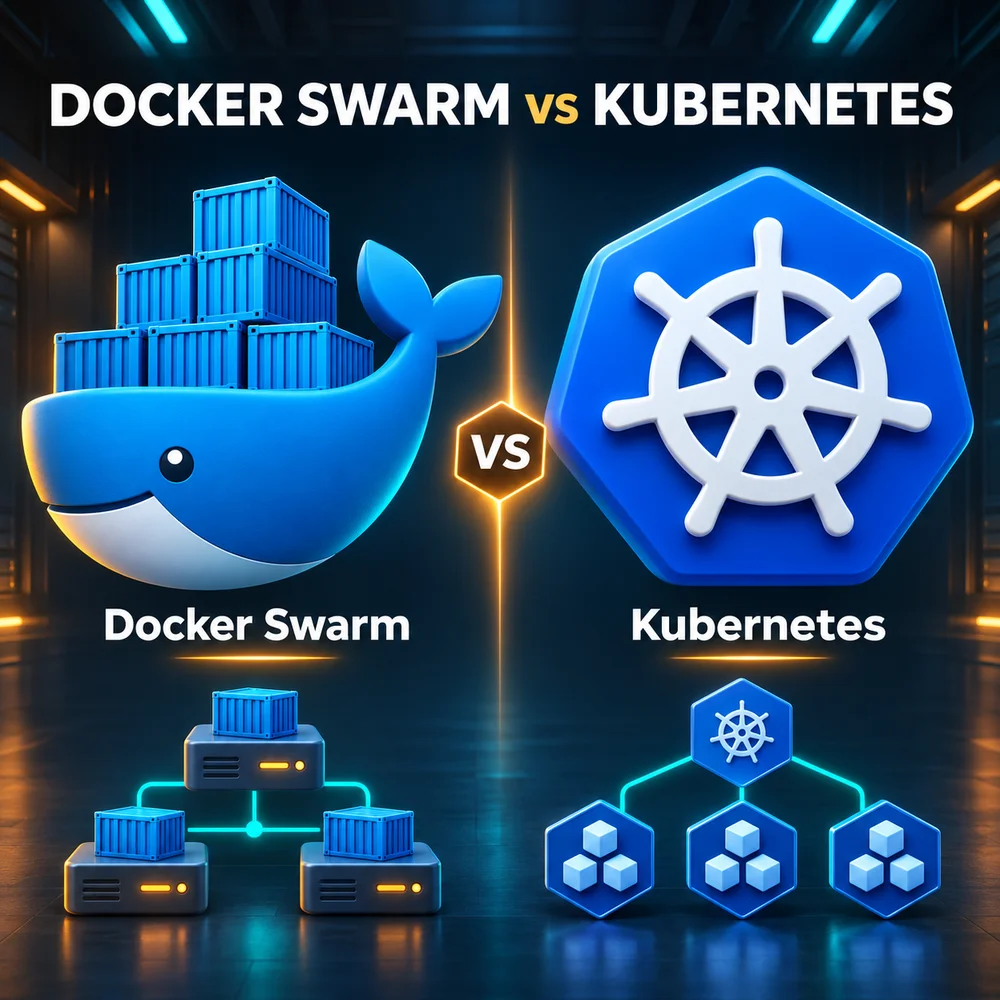
This is the useful starting point for choosing an orchestrator. First write down the acceptable interruption, data-loss tolerance, traffic pattern, release frequency and who is on call. Swarm offers an integrated cluster model with relatively few moving parts. Kubernetes offers a richer API and ecosystem for teams building a platform. Neither repairs a shared storage outage or makes a non-reentrant ERP safe to run in three copies. The examples below are engineering scenarios, not claims about the author’s personal deployments.
2. Engine, Compose, Swarm and Kubernetes solve different layers
| Tool | Responsibility | ERP example |
|---|---|---|
| Docker Engine | Build/run containers on a host through its daemon/API | Start a Java API container |
| Docker Compose | Describe a multi-container app; ordinary compose up targets one Engine, not a multi-node scheduler | Bring up API, Redis and frontend on one VM |
| Docker Swarm mode | Engine-integrated desired-state orchestration across hosts | Maintain three API tasks across eligible nodes |
| Kubernetes | API-driven orchestration using CRI-compatible runtimes | Deployment controls API Pods; runtime starts containers |
An image is a versioned filesystem/configuration template. A container is an isolated running instance with an ephemeral writable layer; it shares the host kernel rather than carrying a full guest OS like a VM. A volume persists data outside that layer. A network supplies connectivity and naming boundaries. Replacing a container discards its writable layer, so storing customer uploads there is a design error. Persisting data still does not create a backup.
Compose and Swarm can use YAML that looks similar, but docker stack deploy consumes a legacy Compose v3-oriented format and does not implement every modern Compose feature. Build images before deployment; a stack deployment is not an image build. Kubernetes does not require Docker Engine on its nodes: kubelet talks through CRI to runtimes such as containerd or CRI-O. Docker-built OCI images can run there. Removing dockershim did not make those images unusable.
3. Swarm architecture: a service is a promise, a task is an attempt
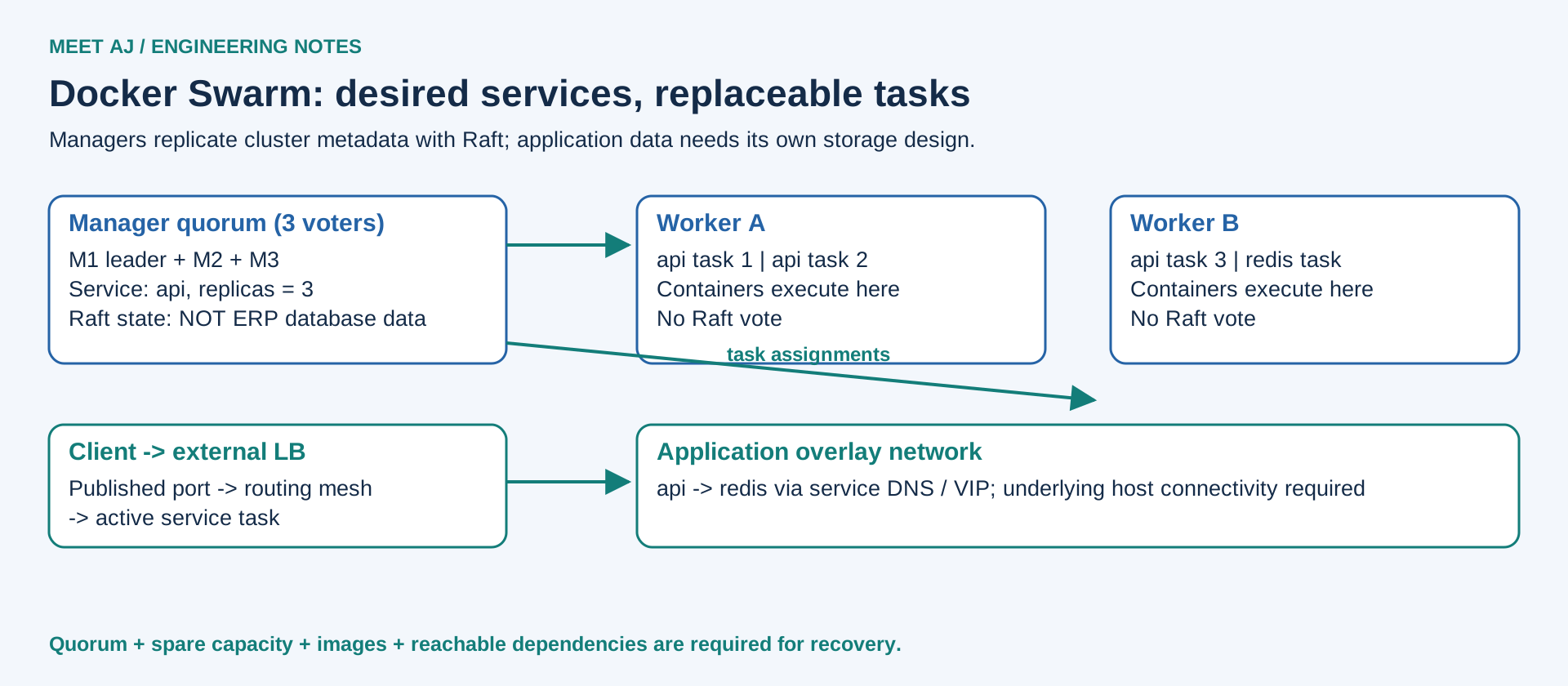
| Concept | What it solves and an example |
|---|---|
| Manager Node | Accepts changes, stores cluster state and schedules work; manager-01 accepts an API scale request. Managers can also run workloads unless drained. |
| Worker Node | Runs assigned tasks; worker-02 starts an API container but does not vote in Raft. |
| Raft / Cluster State | Managers agree on service specifications, membership and secrets; changing replicas from 2 to 3 needs a majority. Application database rows are not this state. |
| Service / Task / Replica | Service describes desired API image and count; each task is one scheduled container attempt. Three replicas mean three desired tasks; a failed task is replaced, not moved with its memory. |
| Global Service | Run one task on every eligible node, such as a log collector; constraints can exclude managers. |
| Overlay Network | Connect API and Redis across hosts using a logical network; underlying MTU/firewall still matter. |
| Routing Mesh | A published port on any reachable node forwards to a service task; an external LB must stop sending traffic to dead nodes. |
| Service Discovery | Service DNS and default VIP hide task churn; API uses redis rather than a container IP. DNSRR is an alternative endpoint mode. |
| Docker Secrets / Configs | Mount an authorised database password as a secret; mount nginx.conf as a config. Configs are not a confidential secret store. |
| Rolling Update / Rollback | Replace API tasks in batches and revert the previous service specification on failure; neither operation reverts a SQL schema migration. |
| Placement Constraints | Require node.labels.zone==a or node.role==worker; hard constraints can leave tasks Pending. Spread preferences are best effort. |
| Resource Limits / Reservations | Reserve scheduling capacity and cap API CPU/RAM; spare physical capacity is still needed after a host fails. |
| Node Drain | Evacuate Swarm service tasks before patching worker-01; standalone containers are not evacuated by this setting. |
Take three Ubuntu hosts: one manager and two workers, with three API replicas. A worker loss eventually causes replacement tasks on eligible surviving nodes if the manager is available, the registry is reachable and enough reserved resources remain. This does not guarantee one replica per node; constraints and max replicas per node change the placement outcome. A local volume on the lost worker does not follow a task. With the manager down, existing containers can keep running but control and rescheduling are unavailable.
For manager HA use an odd voting set, commonly three or five, placed across independent failure domains. Quorum is floor(N/2)+1: three managers tolerate one loss; five tolerate two. Two managers tolerate no loss of quorum. Extra workers do not add votes. Losing quorum blocks changes and recovery scheduling even if old tasks serve traffic. Back up the manager state using Docker’s documented stopped-manager procedure and retain the unlock key when autolock is enabled; practise an isolated restore.
4. Kubernetes architecture: reconciliation through an API
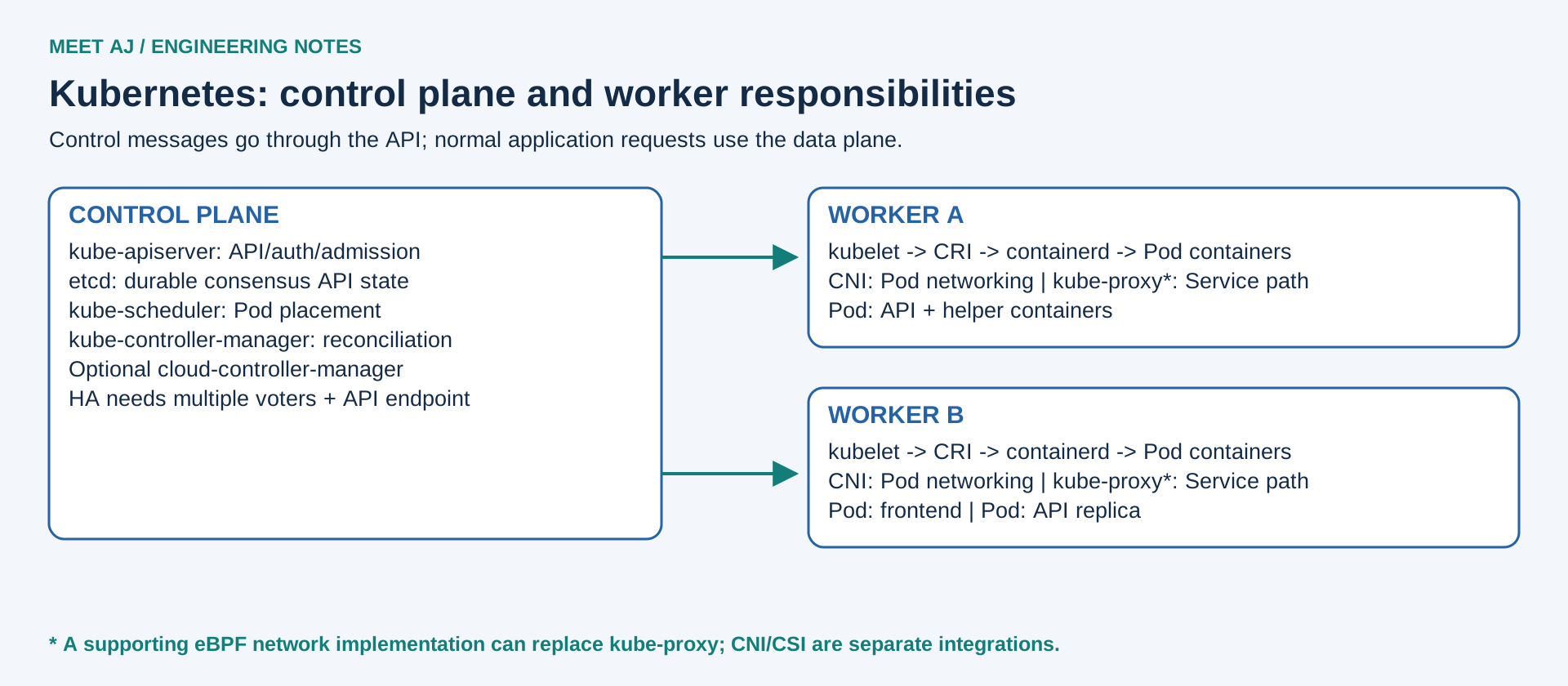
The API is the coordination boundary. kubectl submits a Deployment; controllers observe desired state and create dependent objects, the scheduler assigns unscheduled Pods, and kubelet asks the runtime to start containers. Application traffic does not normally pass through the API server. A busy API or unavailable etcd can interrupt orchestration while already-running Pods continue serving, subject to their dependencies.
| Component | Operational responsibility |
|---|---|
| kube-apiserver | Authenticates, authorises and admits API changes; a CI identity submits a release here. |
| etcd | Consensus-backed API state store; needs quorum, low-latency durable disks and tested snapshots. It is not the ERP database. |
| kube-scheduler | Chooses a node from requests, taints, affinity and constraints; it does not create additional physical capacity. |
| kube-controller-manager | Runs reconciliation loops such as Deployment/ReplicaSet and node controllers; repairs object state over time. |
| cloud-controller-manager | Optional provider integration for infrastructure operations; do not assume one exists on bare metal. |
| kubelet / Runtime | kubelet observes assigned Pods and probes; containerd or CRI-O manages their containers using CRI. |
| CNI / kube-proxy | A CNI implementation supplies Pod networking; kube-proxy commonly implements Service forwarding. An eBPF implementation may replace that data path. |
| Object | Problem it solves in an organisation |
|---|---|
| Pod | Smallest scheduling unit; colocates an API container and a tightly coupled helper with shared network/volumes. |
| Deployment / ReplicaSet | Deployment manages stateless API versions and rollouts; ReplicaSet maintains the current replica count. Operate through the Deployment. |
| DaemonSet | Runs a node agent on eligible nodes, such as telemetry collection. |
| StatefulSet | Stable identities, ordering and volume claims for stateful members; it does not implement database replication or backup. |
| Job / CronJob | Run an import to completion or schedule a nightly report; make jobs idempotent and choose a concurrency policy. |
| Service | Stable access to selected ready endpoints despite Pod replacement; backend callers use a service DNS name. |
| ConfigMap / Secret | Separate nonconfidential settings and sensitive values from images; applications must reload or restart when appropriate. |
| Namespace | Organises team/environment resources; combine with RBAC, quotas and network controls for isolation. |
| PV / PVC / StorageClass | PV describes storage, PVC requests it, StorageClass selects a provisioning policy; a compatible CSI/storage system must supply the volume. |
| Ingress / Gateway API | Describe external routing. Ingress needs a controller; Gateway API needs CRDs and a conformant implementation. Neither alone creates an external appliance. |
| NetworkPolicy | Express allowed Pod traffic; enforcement needs a supporting network implementation. Start with default deny and explicit DNS/dependency access. |
| ServiceAccount / RBAC | A workload identity and permission rules: a release agent can patch its team Deployments without reading every namespace’s Secrets. |
5. Compare the platform you will actually operate
Native means part of the platform API/Engine, not necessarily enabled or sufficient by default. Add-on means a separately installed implementation. External means your team supplies an independent service or process. The distinction matters when estimating upgrades, ownership and incident response. Swarm mode remains documented in Docker Engine; this guide does not treat it as obsolete or incapable of production use.
| Feature | Docker Swarm | Kubernetes |
|---|---|---|
| Architecture | Engine-integrated managers/workers | API, controllers, etcd, pluggable data plane |
| Installation | Few integrated components | Bootstrap plus CNI; storage/edge integrations |
| Learning Curve | Smaller object model | Broader object and operational model |
| Cluster Management | Docker CLI / service specifications | Declarative API, controllers and tooling |
| High Availability | Manager quorum plus workload/dependency design | Control plane/etcd HA plus workload/dependency design |
| Scaling | Native manual replica count | Native replica count and HPA API |
| Auto Scaling | External automation; not native HPA | HPA controller; metrics adapters/server add-ons; node scaling separate |
| Networking | Integrated overlay / service DNS | CNI implementation required |
| Load Balancing | Routing mesh / VIP; edge LB external | Service forwarding; external LB/controller integration |
| Service Discovery | Embedded service DNS / VIP or DNSRR | Service objects; cluster DNS commonly CoreDNS add-on |
| Storage | Node volumes/binds; shared storage or plugins external | PV/PVC API; CSI/provisioner/storage implementation |
| Security | Node mTLS, secrets, coarse administration boundary | RBAC, admission APIs, workload identity; policy configuration required |
| Secrets Management | Native encrypted Raft secrets; manual/external rotation | Native Secret API; configure encryption at rest or external KMS |
| Rolling Updates | Native service update policy | Native Deployment strategy |
| Rollback | Previous service specification | Deployment revision history; retained revisions needed |
| Scheduling | Constraints, reservations, spread preferences | Requests, taints, affinity, topology spread |
| Monitoring | CLI stats; Prometheus/Grafana external | API/events; metrics and dashboards add-ons |
| Logging | Engine drivers and external aggregation | Node/container logs and external aggregation |
| CI/CD Integration | Pipeline calls service/stack deploy | Pipeline submits manifests or GitOps change |
| GitOps | Possible with external/custom reconciliation | Argo CD / Flux add-ons; not core Kubernetes |
| Multi-Tenancy | No native namespace/RBAC equivalent in Engine Swarm | Namespaces + RBAC + quotas + network/admission controls |
| Resource Management | Reservations and limits | Requests/limits, LimitRange, ResourceQuota |
| Cloud Integration | Host provisioning/LB/storage supplied separately | Provider controllers/CSI and managed offerings |
| On-Premises | Straightforward on Linux hosts; dependency HA still external | Runs on VM/bare metal; edge/storage design required |
| Operational Complexity | Fewer parts, more custom work for advanced requirements | More components and policy/upgrade coordination |
| Maintenance Cost | Often lower for modest scope; measure actual custom tooling | Platform staffing, add-on lifecycle and support cost |
| Enterprise Ecosystem | Smaller set of integrations | Broad controllers/operators/vendor integrations |
The differences that change your operating model
Kubernetes makes team boundaries and extensibility first-class API concerns. That is valuable when ten teams must deploy independently, but each controller, admission rule and CRD has an owner and upgrade compatibility. Swarm deliberately has fewer concepts. If its built-in model covers your releases, fewer components can mean a simpler incident path. If you recreate quotas, fine-grained authorisation and autoscaling around it, include that custom platform in the comparison.
6. Six organisations, six sets of constraints
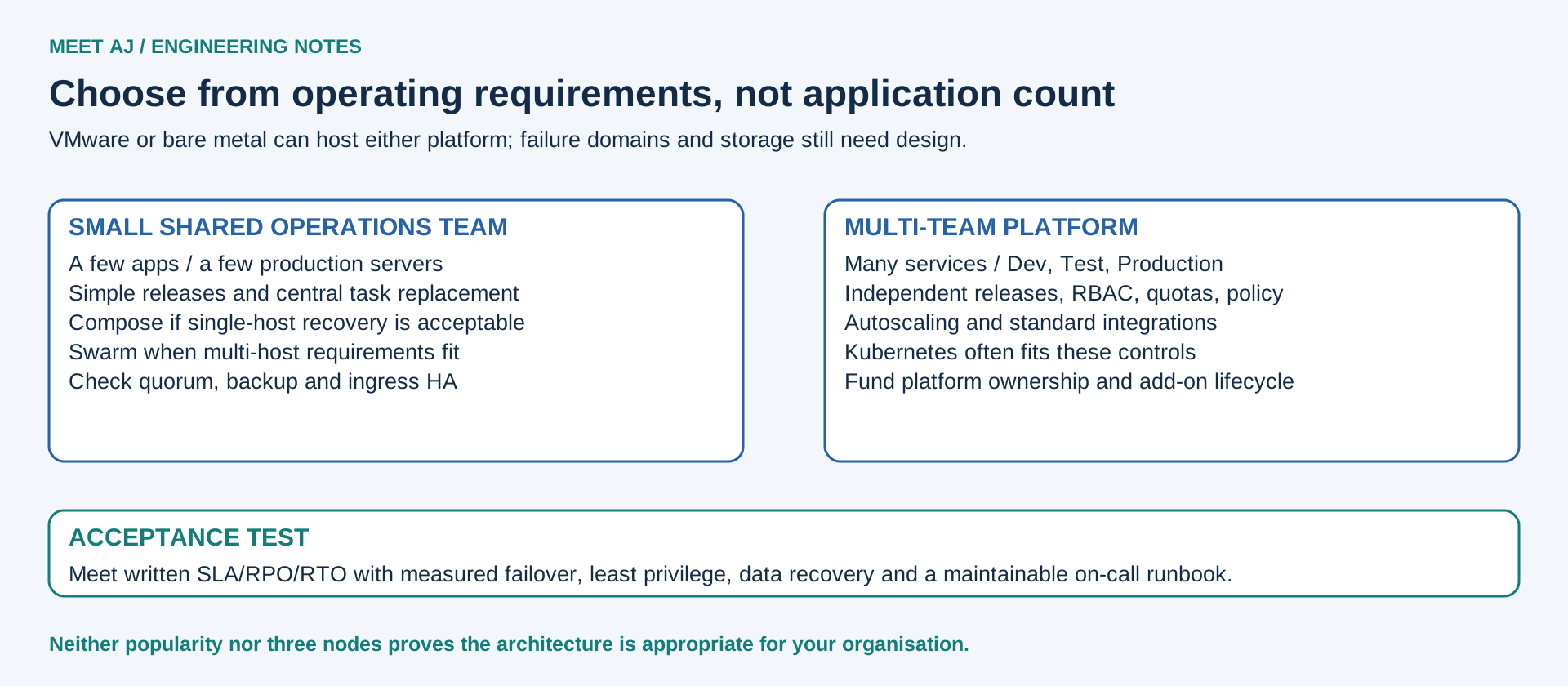
Scenario 1 — two Linux servers and three applications
If a documented restore time is acceptable and the second server is a recovery target, Compose on one host with tested backups and monitoring may be sufficient. Do not call it cross-node failover. If automatic placement and service replacement are required, Swarm is a reasonable step, but two managers do not provide quorum HA. Add an independent third voting host or accept and document the control-plane single point of failure. Kubernetes is justified only by a concrete additional requirement and the ability to maintain it, not by having two servers.
Scenario 2 — five vSphere VMs, ten apps, Nginx, GitLab and Jenkins
Swarm with three manager-capable VMs and suitable worker capacity can provide service reconciliation and rolling releases. Separate ingress health checks, central logs, manager-state backup and SQL recovery are still necessary. Kubernetes offers stronger policy and storage APIs if the organisation needs them, at the price of CNI/CSI/controller lifecycle work. Five VMs on one ESXi host or one fragile datastore are not five failure domains. Place replicas and voters across hosts; reserve capacity for the largest failure you promise to survive.
Scenario 3 — twenty applications and independent release teams
A Deployment per stateless backend gives Kubernetes a common rollout contract across Dev, Test and Production. Requests guide placement; limits bound consumption, with CPU throttling and possible OOM termination when memory is exhausted. HPA can change replica count from measured demand, but needs a working metrics source and sensible requests when using CPU utilisation. It cannot fix a saturated SQL backend and does not add worker VMs. In Swarm, service scale changes replicas explicitly; an external controller can automate it, and its failure/oscillation/security behaviour then belongs to your team.
Manual scaling is a deliberate operator or pipeline action. Autoscaling is a feedback loop: define min/max, stabilisation, metrics and a capacity ceiling, then test load and scale-down safety. Rolling update is built in on both platforms; canary traffic splitting and blue/green release need additional routing and release design. Multiple environments require separate secrets and permissions; a namespace is useful organisation, not sufficient isolation for hostile tenants.
Scenario 4 — fifty to one hundred microservices
With several teams, strict service identities, policy, GitLab CI, a private registry, Prometheus/Grafana and central logging, Kubernetes often fits the platform boundary better. Namespaces, RBAC, quotas, admission and NetworkPolicy provide composable controls; operators and CSI reduce bespoke integration when their support matrix fits. Swarm can run many services, but service count is not the deciding metric: the important question is whether its access model and your surrounding automation meet the requirements. Budget a platform owner, upgrade rehearsals, certificate renewal, etcd recovery and on-call coverage before choosing Kubernetes.
Scenario 5 — Java and React on ESXi/vCenter
Either orchestrator can run in Linux VMs. Keep React static assets and Java API releases independent; externalise sessions/uploads where appropriate. Swarm volumes need an explicitly selected shared storage/plugin strategy. Kubernetes can request persistent vSphere storage through a compatible vSphere CSI driver, with topology, access mode and StorageClass policies aligned to the datastore design. Check the exact Kubernetes, driver and vSphere support matrix; the driver is not supplied merely by installing kubeadm.
vSphere HA restarts affected VMs after a host failure. Swarm/Kubernetes HA maintains orchestration state and reconciles application tasks/Pods. These are complementary recovery loops with different detection times. VM anti-affinity spreads control-plane voters across ESXi hosts; Pod anti-affinity spreads application replicas across Kubernetes nodes. Neither protects against their common SAN, uplink, power feed or data centre failing. Avoid CPU overcommit and memory ballooning that destabilise etcd; reserve recovery capacity and measure disk latency.
Scenario 6 — SQL Server Always On already works
Containerising applications does not require moving SQL Server. Keeping a supported Always On Availability Group outside the cluster often preserves the DBA team’s established backup, patching, licensing and recovery processes. Connect through the AG listener with validated TLS and a supported client/connection configuration; test reconnection, timeouts and safe retries during failover. Redis caches and connection pools can still hold stale state. Cluster health does not prove database health.
Running SQL in Kubernetes may be appropriate when the exact SQL edition/version, Linux/container support, storage semantics, availability design and operator/support arrangement are validated. It adds volume attachment, fencing, identity, recovery ordering and upgrade interactions. A StatefulSet alone is not an Always On implementation. Moving SQL also couples database recovery to cluster and storage recovery. Compare RPO/RTO and practise restores before a migration; do not migrate a healthy AG merely to place every box inside one diagram.
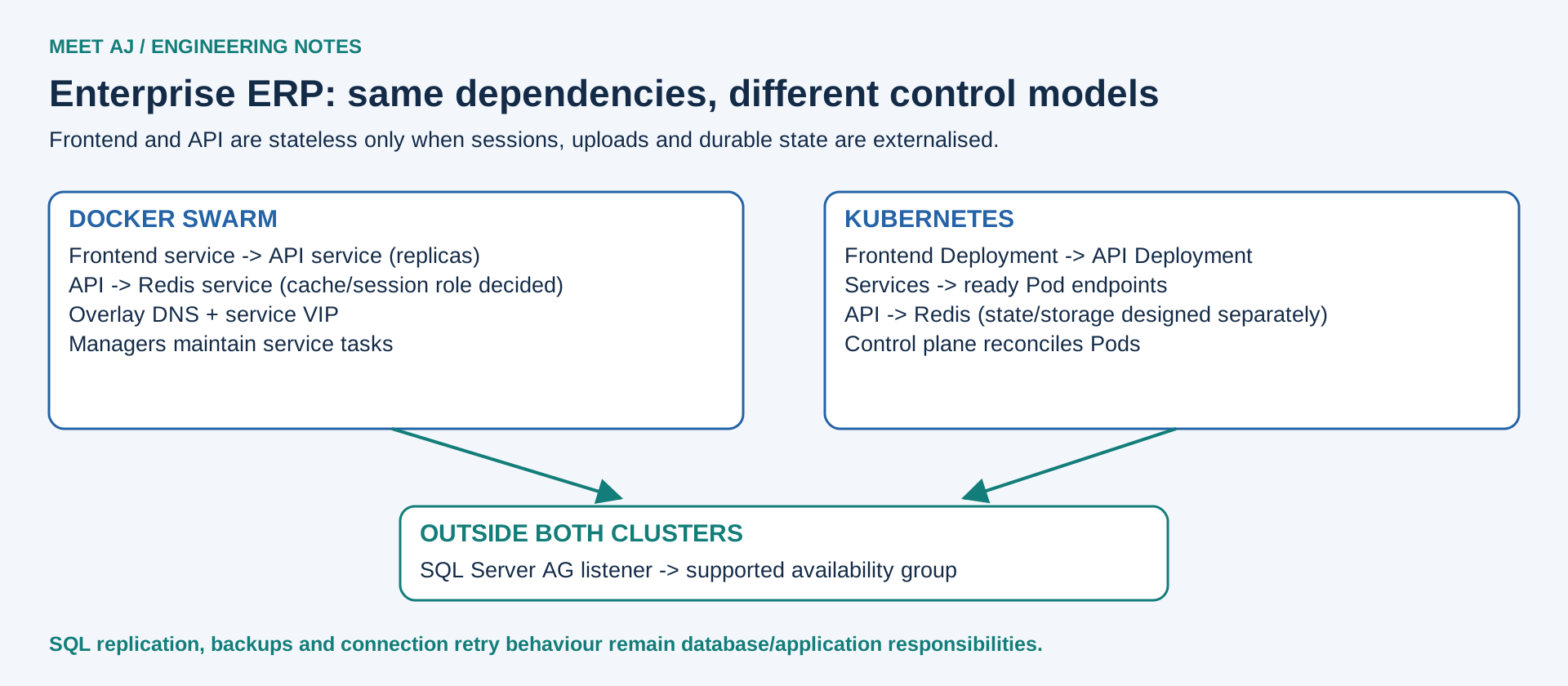
7. High availability is a chain of dependencies
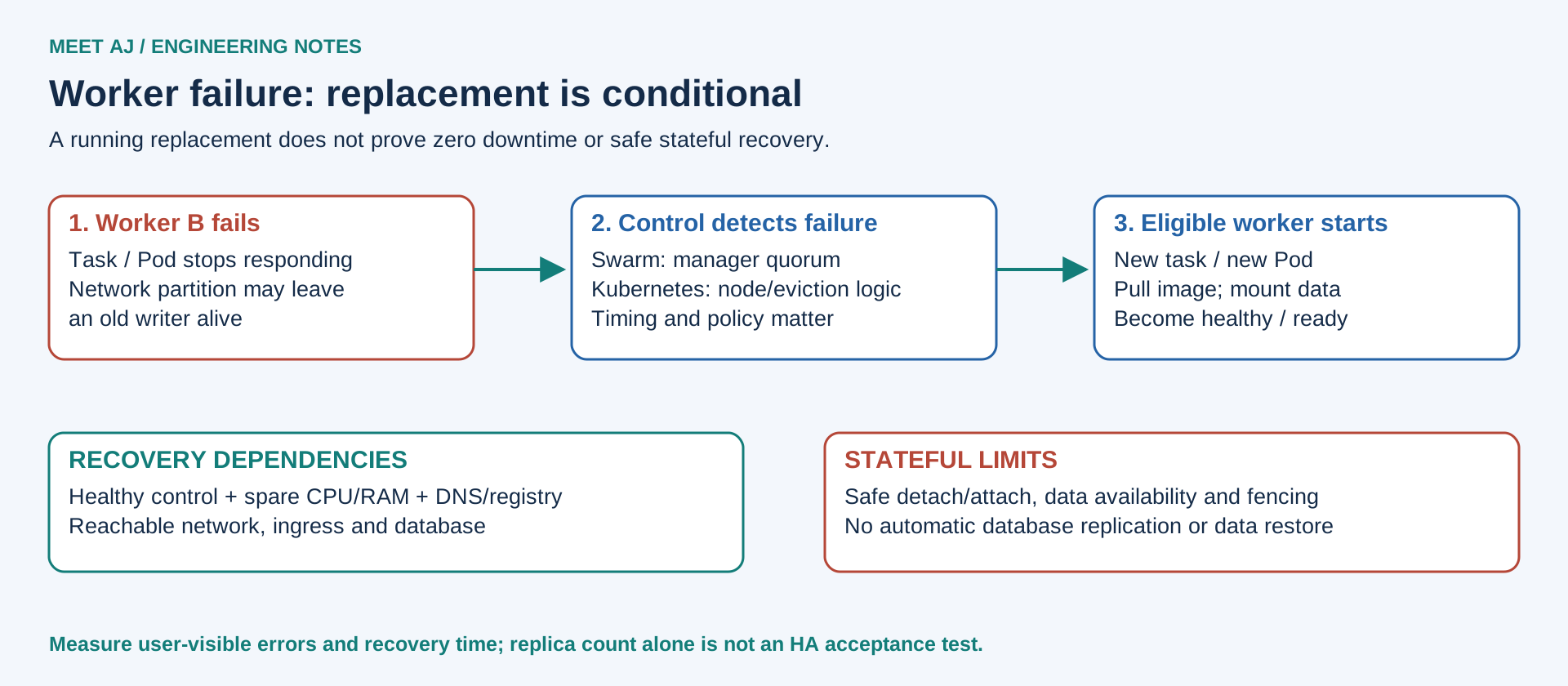
| Failure | Swarm response / limit | Kubernetes response / limit |
|---|---|---|
| Container / Pod | Failed service task replaced according to restart policy; healthcheck can trigger replacement | kubelet may restart container; controllers replace missing Pods; standalone Pod has no Deployment guarantee |
| Worker node | After failure detection, schedule replacement if manager quorum/capacity/dependencies remain | Node status/taints, eviction tolerations and controllers govern replacement; not instantaneous |
| Manager / control plane | Leader election if quorum survives; no scheduling changes after quorum loss | HA API endpoints and etcd quorum needed; existing data plane may continue while API is down |
| Network partition | Quorum side can control tasks; isolated task or storage writer may still be alive | Control and Pod traffic fail differently; fencing required to avoid unsafe duplicate stateful writers |
| Storage failure | Rescheduling cannot recover unavailable data | PVC remains dependent on driver/backend; attach/mount can block recovery |
| Data centre loss | Separate DR design, replicated data and tested restore/DNS plan | Same; stretching etcd across high-latency sites is not a casual HA solution |
Three replicas on one node share its failure. Three nodes on one hypervisor share its failure. Three replicas using one database and one NFS server still share those dependencies. Define a failure domain explicitly: node, ESXi host, rack, storage array or site. Use hard topology constraints when separation is mandatory and accept that insufficient domains can leave replicas unscheduled. A spare slot on paper is not enough if the registry, DNS or storage path is down.
Kubernetes readiness controls eligibility for Service traffic; liveness can restart a stuck container; startup probes delay the other probes during slow boot. An API should not fail liveness just because SQL is briefly unavailable: that can restart every replica during a database incident. Swarm has container healthchecks and update/restart policies but no identical readiness/startup-probe API. Design the external proxy and application health endpoints accordingly. A TCP accept alone does not prove an ERP can process a transaction.
PodDisruptionBudget constrains supported voluntary evictions, such as drain, using minAvailable or maxUnavailable. It is not protection against abrupt node loss and does not govern a Deployment’s own rolling-update strategy. Configure that strategy separately. Graceful shutdown needs the application to stop accepting new work, finish or checkpoint requests and exit within its grace period. Swarm stop-grace-period and Kubernetes terminationGracePeriodSeconds need application support and load-balancer draining. Database changes must remain compatible with old and new app versions during a rolling release.
8. Follow one request from the internet
For Swarm on premises: public DNS points to a redundant edge load balancer or reverse-proxy pair. TLS terminates there or at an explicitly secured application gateway. The LB sends traffic to reachable node published ports; routing mesh forwards it to a service task across the ingress overlay. The API uses an application overlay to reach Redis. Published ports are not application authorisation, and the manager API must stay off the public internet. With host publishing, only nodes actually hosting the task serve that port; LB discovery must match placement.
For Kubernetes: public DNS → redundant edge LB → Gateway/Ingress controller → Service → ready Pod endpoints. The exact forwarding path may be optimised by the controller/CNI; the Service is the stable logical contract. ClusterIP is internal, NodePort exposes a port on nodes, and type LoadBalancer asks an implementation to provision an endpoint. On bare metal/vSphere, that endpoint is not automatic: use a supported LB integration such as a carefully designed MetalLB deployment or an external appliance feeding NodePorts/controller endpoints. Plan address ownership, BGP/L2 reachability and failover.
Ingress remains available but its API is frozen; Gateway API supports a more expressive role-oriented routing model through separately installed implementations. NetworkPolicy is L3/L4 policy, not a web application firewall or a universal TLS policy. A supporting CNI must enforce it. Verify DNS egress, SQL listener destinations and return paths under default deny; a YAML file accepted by the API is not evidence that packets were blocked. Across both platforms, test MTU, north/south and east/west traffic and asymmetric routes before production.
Docker: routing mesh and host publishing
Kubernetes: Services and networking
9. A new replica does not bring the old disk
A stateless API can rebuild its working state from requests and authoritative external services. A stateful component owns durable records or identity. A frontend is often stateless; user uploads make it stateful unless stored in an external object/file service. Redis may be a disposable cache or an authoritative session/queue store: decide which before calling it replaceable. Replica count is not database replication. Three SQL containers mounting independent local directories are three independent databases, not an availability group.
A Swarm local volume or bind mount belongs to a node. A replacement task elsewhere may see an empty volume with the same name, fail a bind-path check or encounter a different dataset. Select shared storage or a supported volume driver intentionally, with access control, locking and failure behaviour. NFS supplies shared file access but not automatically database-safe semantics, performance or NFS-server HA. Never mount one database data directory read/write into multiple uncoordinated instances.
Kubernetes PV/PVC separates a storage request from its implementation. StorageClass and CSI can provision and attach disks, but access modes, topology, reclaim policy, attach/detach delays and backend availability still apply. ReadWriteOnce is a single-node access constraint, not a guarantee that only one Pod writes; use appropriate access modes and database fencing. Local PV remains tied to its node. A Pod moving nodes may wait for safe detach/attach, and a failed storage backend remains failed.
Back up application data with database-aware consistency, transaction logs where needed, configuration and encryption keys. An etcd snapshot restores Kubernetes API state, not every PVC’s contents. A Swarm state backup restores cluster metadata, not application volumes. Set RPO/RTO, protect an off-site copy, test an isolated restore with application-level queries and record the time. Snapshots and replication can propagate deletion or corruption; retention and recovery drills remain necessary.
10. Security needs owners and enforceable boundaries
Swarm uses mutual TLS for node identity and encrypted manager communication. Native Secrets are encrypted in the Raft log and delivered only to authorised service tasks; on Linux they are mounted in memory. Application overlay encryption is a separate option, and application-to-database TLS is a separate configuration. Rotation generally creates a new immutable secret, updates services and revokes the old credential at its source. Protect manager access, Docker socket, join tokens and unlock keys: Engine Swarm has no native equivalent of Kubernetes namespace-scoped RBAC. Commercial or external access-control tools must be assessed separately.
Kubernetes RBAC grants API permissions, not network isolation. ServiceAccounts identify workloads; use short-lived projected tokens where appropriate and disable token automount where unused. Secrets are base64-encoded values, not automatically encrypted by that encoding. Configure API encryption at rest with appropriate key custody/KMS and rotation; restrict secret reads and Pod-creation permissions that could expose secrets. Enable an audit policy and secure log retention deliberately. Namespaces alone are not a hard tenant boundary; combine RBAC, admission, quotas, supported NetworkPolicy and, for stronger isolation, separate clusters or sandboxing.
Both platforms need least-privilege containers, a non-root identity where supported, dropped capabilities, seccomp, restricted host mounts, read-only filesystems where feasible and resource limits. Scan images and dependencies, pin production images by digest, protect registry writes, verify provenance/signatures using your chosen supply-chain controls and patch hosts/runtimes. Kubernetes admission can enforce policy with configured built-in mechanisms or additional engines; image scanning and a service mesh are not automatic core features. Workload mTLS needs application configuration or an installed mesh. Monitor denied requests and practise secret rotation, rather than equating a green scanner result with security.
Docker: secret storage, access and rotation
11. The pipeline delivers a version; the orchestrator keeps it running
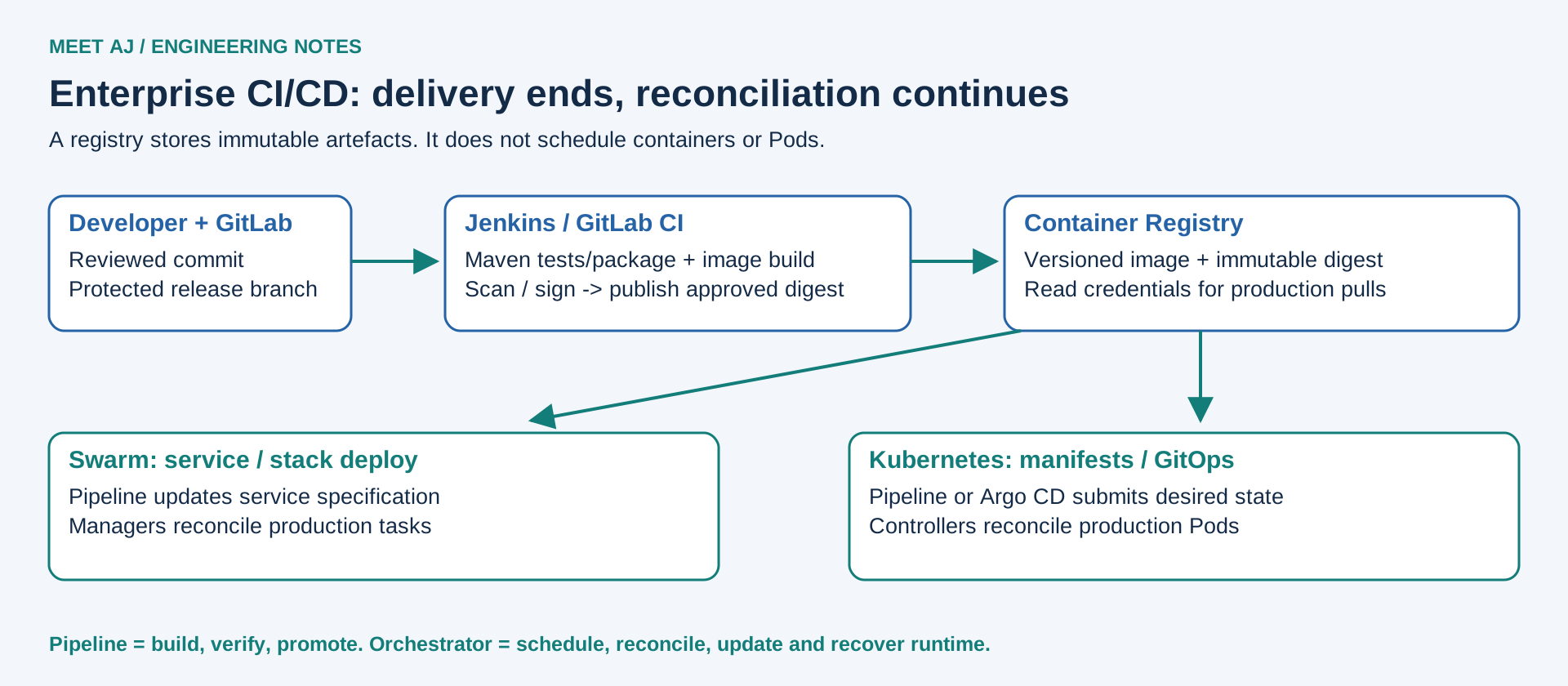
A developer pushes to GitLab. Jenkins or GitLab CI checks out a reviewed commit, runs Maven tests/package for Java and the frontend build, scans dependencies and builds an image. The registry stores that versioned artefact; it does not schedule it. CI integrates and verifies code. Continuous delivery keeps a releasable artefact and a controlled promotion path; continuous deployment automatically promotes passing changes under agreed policies. Jenkins and GitLab CI are pipeline engines. Swarm and Kubernetes reconcile the deployed runtime after the pipeline has exited.
Developer -> GitLab -> Jenkins / GitLab CI -> Maven test/package
          -> Docker image build -> scan/sign -> Container registry
          -> immutable digest promotion
             +-> Swarm service/stack update -> Production tasks
             +-> Kubernetes manifests / GitOps -> Production Pods
Use a narrowly authorised deploy identity, protected branches/environments and immutable image digests. Keep registry credentials out of source and logs. In Swarm set update parallelism, delay, monitor and failure action; rollback returns the previous service spec. In Kubernetes configure maxSurge/maxUnavailable, probes and progressDeadlineSeconds; rollout status can fail the pipeline, but Deployment does not automatically roll back simply because its progress deadline expires. A pipeline or release controller must make that decision. Keep the previous image available and use expand/contract database migrations so app rollback remains possible.
Argo CD is a separately installed Kubernetes GitOps reconciler. It compares approved Git configuration with cluster state and can reconcile drift; it is neither Maven nor a replacement runtime scheduler. It becomes useful when several teams/environments need traceable promotions and consistent desired state. Decide who owns image updates, secret delivery, emergency changes and reconciliation suspension during incidents. For a small Swarm estate, a controlled pipeline plus versioned stack configuration may be sufficient without building a bespoke GitOps controller.
12. Lab A — three-node Docker Swarm
Use three fresh Ubuntu Server 24.04 LTS VMs: swarm-manager-01 (10.20.0.11), swarm-worker-01 (.12) and swarm-worker-02 (.13). Suggested lab allocation: 2 vCPU, 4 GiB RAM and 25 GiB disk each; this is not a production sizing benchmark. Set unique hostnames, stable IPs, working DNS/time and private node reachability. Allow TCP 2377 to the manager, TCP/UDP 7946 and UDP 4789 between trusted nodes only; allow TCP 8080 only from test clients. Keep VXLAN off untrusted networks. Docker-published ports interact with host firewall rules: verify actual reachability rather than relying only on UFW. One manager is a control-plane SPOF.
Install Engine on all three fresh hosts
These commands use Docker’s signed Ubuntu repository, not a convenience-script download executed as root. On an existing host first inventory/remove conflicting packages through the official procedure; do not remove a production runtime blindly. Install the same approved Engine version on all nodes and record package candidates before promotion.
sudo apt-get update
sudo apt-get install -y ca-certificates curl
sudo install -m 0755 -d /etc/apt/keyrings
sudo curl -fsSL https://download.docker.com/linux/ubuntu/gpg -o /etc/apt/keyrings/docker.asc
sudo chmod a+r /etc/apt/keyrings/docker.asc
. /etc/os-release
echo "deb [arch=$(dpkg --print-architecture) signed-by=/etc/apt/keyrings/docker.asc] https://download.docker.com/linux/ubuntu $VERSION_CODENAME stable" | sudo tee /etc/apt/sources.list.d/docker.list
sudo apt-get update
apt-cache policy docker-ce
sudo apt-get install -y docker-ce docker-ce-cli containerd.io docker-buildx-plugin docker-compose-plugin
sudo systemctl enable --now docker
sudo docker version
sudo docker run --rm hello-world
Initialise, join, deploy and scale
# On swarm-manager-01
sudo docker swarm init --advertise-addr 10.20.0.11
sudo docker swarm join-token worker
# On EACH worker: run the join command printed above, with its real token.
# sudo docker swarm join --token <printed-worker-token> 10.20.0.11:2377
# Back on the manager
sudo docker node ls
sudo docker network create --driver overlay app-net
sudo docker service create --name web --network app-net --replicas 2   --constraint 'node.role==worker'   --reserve-cpu 0.10 --reserve-memory 64M --limit-cpu 0.50 --limit-memory 128M   --publish published=8080,target=80   --health-cmd 'curl -fsS http://localhost/ || exit 1'   --health-interval 10s --health-timeout 3s --health-retries 3   --update-parallelism 1 --update-delay 10s --update-monitor 30s   --update-failure-action rollback --stop-grace-period 30s nginx:1.28.0
sudo docker service scale web=3
sudo docker service ls
sudo docker service ps web --no-trunc
curl -I http://10.20.0.12:8080/
Expected: node ls lists three Ready/Active nodes; service ls eventually shows 3/3; HTTP returns 200. The official Debian-based Nginx image used here includes curl; verify that health command when changing the image. Version tags make the update demonstration readable, not production pinning: approve/scanning-test your chosen images and pin their digests for real releases. Three replicas over two workers deliberately permit colocation so one surviving worker can host all three if capacity permits.
# Manager: update, observe, then deliberately restore the prior service spec.
sudo docker service update --image nginx:1.28.1 web
sudo docker service ps web
sudo docker service inspect --format '{{json .UpdateStatus}}' web
sudo docker service rollback web
sudo docker service ps web
# Planned maintenance: drain worker-01, check replacement tasks, then re-enable it.
sudo docker node update --availability drain swarm-worker-01
sudo docker service ps web
sudo docker node update --availability active swarm-worker-01
# Abrupt failure test: power off worker-02 from the lab hypervisor ONLY.
# Manager: observe detection and replacement; client: measure errors throughout.
sudo docker node ls
sudo docker service ps web --no-trunc
sudo docker service logs --tail 50 web
# After powering worker-02 back on:
sudo docker node ls
# Lab cleanup, on manager (removes this lab service/network):
sudo docker service rm web
sudo docker network rm app-net
During failure, poll HTTP through a healthy node or a health-checking LB; directing all requests at the powered-off node measures a failed endpoint, not routing-mesh recovery. Record the failed requests and time to replacement; do not promise a fixed recovery time. Reactivating a node does not automatically redistribute every existing task. If tasks stay Pending/Rejected, inspect the full service ps error for capacity, constraints, image pull or networking. If the sole manager is off, workers may serve existing tasks but this lab cannot reschedule them; restore that manager or rebuild the disposable lab. Keep destructive swarm leave/reset operations out of production recovery improvisation.
13. Lab B — kubeadm, containerd and Calico
Use a separate fresh three-VM Ubuntu 24.04 lab: k8s-control-01 (10.30.0.11), k8s-worker-01 (.12), k8s-worker-02 (.13), each with 2 vCPU, 4 GiB RAM and 25 GiB disk for this exercise. This is one control plane and two workers, not HA production. The reference branch is Kubernetes 1.36, with Calico 3.33.0 (the official compatibility page lists 1.35–1.37). Select the same current 1.36 patch package on every node. Review date: 6 November 2026; check upstream lifecycle and security updates again at execution. Keep this lab separate from the Swarm hosts to avoid runtime/repository conflicts.
Set unique hostname/MAC/product UUID, stable private IP, DNS and time synchronisation. Allow the documented Kubernetes ports: API TCP 6443 to control plane, etcd TCP 2379–2380 only between control-plane members, kubelet TCP 10250 from authorised control-plane/management sources, scheduler/controller local ports as documented, and the chosen NodePort TCP 30080 from lab clients. Calico VXLAN below needs UDP 4789 between nodes. Pod CIDR 192.168.0.0/16 and service CIDR 10.96.0.0/12 must not overlap hosts, VPN or corporate networks. Do not disable the firewall globally.
Prepare all nodes and install a compatible runtime
The fresh-host example uses Docker’s signed repository for containerd.io 2.x, not Docker Engine. Inspect apt candidates and the containerd support table before installation. This configuration intentionally targets containerd 2.x; the CRI configuration keys differ from 1.x. Disable swap in both runtime and persistent fstab configuration for this lab. Retain a copy of fstab and remove/comment only the actual swap entry; do not overwrite unrelated mounts.
# All nodes; fresh Ubuntu 24.04 only.
sudo swapoff -a
sudo cp /etc/fstab /etc/fstab.before-k8s
sudoedit /etc/fstab
# Comment the swap entry, save, then verify no active swap:
swapon --show
sudo modprobe overlay
sudo modprobe br_netfilter
printf 'overlay
br_netfilter
' | sudo tee /etc/modules-load.d/k8s.conf
cat <<'EOF' | sudo tee /etc/sysctl.d/99-kubernetes.conf
net.bridge.bridge-nf-call-iptables = 1
net.bridge.bridge-nf-call-ip6tables = 1
net.ipv4.ip_forward = 1
EOF
sudo sysctl --system
sudo apt-get update
sudo apt-get install -y ca-certificates curl gpg
sudo install -m 0755 -d /etc/apt/keyrings
sudo curl -fsSL https://download.docker.com/linux/ubuntu/gpg -o /etc/apt/keyrings/docker.asc
sudo chmod a+r /etc/apt/keyrings/docker.asc
. /etc/os-release
echo "deb [arch=$(dpkg --print-architecture) signed-by=/etc/apt/keyrings/docker.asc] https://download.docker.com/linux/ubuntu $VERSION_CODENAME stable" | sudo tee /etc/apt/sources.list.d/docker.list
sudo apt-get update
apt-cache policy containerd.io
sudo apt-get install -y containerd.io
containerd --version
# For Kubernetes 1.36, upstream recommends containerd 2.2.0+ or 2.3.0+.
# Select a maintained patch in one of those branches; stop for an incompatible candidate.
sudo mkdir -p /etc/containerd
cat <<'EOF' | sudo tee /etc/containerd/config.toml
version = 3
[plugins.'io.containerd.cri.v1.runtime'.containerd.runtimes.runc]
  runtime_type = 'io.containerd.runc.v2'
[plugins.'io.containerd.cri.v1.runtime'.containerd.runtimes.runc.options]
  SystemdCgroup = true
EOF
sudo systemctl enable --now containerd
sudo systemctl restart containerd
sudo ctr plugins ls | grep cri
Install the same Kubernetes patch and bootstrap
# All nodes
curl -fsSL https://pkgs.k8s.io/core:/stable:/v1.36/deb/Release.key | sudo gpg --dearmor -o /etc/apt/keyrings/kubernetes-apt-keyring.gpg
echo 'deb [signed-by=/etc/apt/keyrings/kubernetes-apt-keyring.gpg] https://pkgs.k8s.io/core:/stable:/v1.36/deb/ /' | sudo tee /etc/apt/sources.list.d/kubernetes.list
sudo apt-get update
apt-cache madison kubeadm
# Choose ONE available, approved 1.36.x package version and use it on ALL nodes:
read -r -p 'Exact package version (for example from madison): ' K8S_PACKAGE_VERSION
sudo apt-get install -y kubelet="$K8S_PACKAGE_VERSION" kubeadm="$K8S_PACKAGE_VERSION" kubectl="$K8S_PACKAGE_VERSION"
sudo apt-mark hold kubelet kubeadm kubectl
sudo systemctl enable kubelet
# On k8s-control-01 only:
K8S_VERSION=$(kubeadm version -o short)
sudo kubeadm init --kubernetes-version "$K8S_VERSION"   --apiserver-advertise-address 10.30.0.11   --pod-network-cidr 192.168.0.0/16   --cri-socket unix:///run/containerd/containerd.sock
mkdir -p "$HOME/.kube"
sudo cp /etc/kubernetes/admin.conf "$HOME/.kube/config"
sudo chown "$(id -u):$(id -g)" "$HOME/.kube/config"
chmod 600 "$HOME/.kube/config"
# Run the printed kubeadm join command with sudo on BOTH workers.
# Add --cri-socket unix:///run/containerd/containerd.sock if runtime selection is ambiguous.
# If the join token expires, on control plane:
sudo kubeadm token create --print-join-command
The kubelet may restart before kubeadm creates its configuration. Before CNI installation, NotReady nodes and Pending CoreDNS are expected; they are not a reason to remove the control-plane taint. Protect admin.conf and join tokens. The bootstrap token is temporary; never paste it into a public issue. The next manifest uses Calico’s legacy CRD installation path, avoiding mixing the native v3 CRD/webhook migration flow into this basic lab.
# Control plane, as the user holding the lab kubeconfig.
curl -fL https://raw.githubusercontent.com/projectcalico/calico/v3.33.0/manifests/calico-vxlan.yaml -o calico.yaml
# Review the downloaded manifest and record its hash before applying.
sha256sum calico.yaml
# This upstream VXLAN-only variant already disables BIRD and its health probes.
# Change IPv4 encapsulation from CrossSubnet to Always for this fresh lab:
sed -i '/name: CALICO_IPV4POOL_VXLAN/{n;s/value: "CrossSubnet"/value: "Always"/;}' calico.yaml
# Confirm the exact resulting environment settings before applying:
grep -A1 -E 'name: CALICO_IPV4POOL_(IPIP|VXLAN)' calico.yaml
grep 'calico_backend:' calico.yaml
if grep -E -- '--bird-(ready|live)' calico.yaml; then echo 'Unexpected BIRD probe; stop'; exit 1; fi
# Expected: IPIP Never; VXLAN Always; backend vxlan; no BIRD probe. Stop if different.
kubectl apply -f calico.yaml
kubectl -n kube-system rollout status daemonset/calico-node --timeout=300s
kubectl get nodes -o wide
kubectl -n kube-system get pods
# Expected: all three Ready; CoreDNS and Calico Running/Ready.
Deploy a comparable stateless workload
apiVersion: apps/v1
kind: Deployment
metadata:
  name: web
spec:
  replicas: 3
  revisionHistoryLimit: 5
  progressDeadlineSeconds: 180
  selector:
    matchLabels: {app: web}
  strategy:
    type: RollingUpdate
    rollingUpdate: {maxSurge: 1, maxUnavailable: 0}
  template:
    metadata:
      labels: {app: web}
    spec:
      terminationGracePeriodSeconds: 30
      topologySpreadConstraints:
        - maxSkew: 1
          topologyKey: kubernetes.io/hostname
          whenUnsatisfiable: ScheduleAnyway
          labelSelector:
            matchLabels: {app: web}
      containers:
        - name: nginx
          image: nginx:1.28.0
          ports: [{containerPort: 80}]
          resources:
            requests: {cpu: 100m, memory: 64Mi}
            limits: {cpu: 500m, memory: 128Mi}
          startupProbe:
            httpGet: {path: /, port: 80}
            periodSeconds: 2
            failureThreshold: 30
          readinessProbe:
            httpGet: {path: /, port: 80}
            periodSeconds: 5
          livenessProbe:
            httpGet: {path: /, port: 80}
            periodSeconds: 10
---
apiVersion: v1
kind: Service
metadata:
  name: web
spec:
  type: NodePort
  selector: {app: web}
  ports:
    - port: 80
      targetPort: 80
      nodePort: 30080
---
apiVersion: policy/v1
kind: PodDisruptionBudget
metadata:
  name: web
spec:
  minAvailable: 2
  selector:
matchLabels: {app: web}kubectl apply --dry-run=server -f kubernetes-web.yaml
kubectl apply -f kubernetes-web.yaml
kubectl rollout status deployment/web --timeout=180s
kubectl get pods -l app=web -o wide
kubectl get service web
curl -I http://10.30.0.12:30080/
kubectl scale deployment/web --replicas=4
kubectl rollout status deployment/web --timeout=180s
kubectl set image deployment/web nginx=nginx:1.28.1
kubectl rollout status deployment/web --timeout=180s
kubectl rollout history deployment/web
kubectl rollout undo deployment/web
kubectl rollout status deployment/web --timeout=180s
kubectl drain k8s-worker-01 --ignore-daemonsets
kubectl get pods -l app=web -o wide
kubectl uncordon k8s-worker-01
# Abrupt failure: power off worker-02 from the disposable lab hypervisor.
kubectl get nodes -w
# In another terminal, observe delayed replacement and client errors:
kubectl get pods -l app=web -o wide -w
# After restoring worker-02:
kubectl get nodes
kubectl get events --sort-by=.metadata.creationTimestamp
# Remove only this lab workload when done:
kubectl delete -f kubernetes-web.yamlExpected: rollout reports successfully rolled out, three initial Pods become Ready, NodePort returns HTTP 200 and later scale shows four desired replicas. ScheduleAnyway spreads best effort without preventing recovery on one worker. Default node-unreachable/not-ready tolerations commonly delay eviction by about five minutes; actual recovery also depends on detection, controllers, image pulls and storage. PDB applies to drain, not sudden failure. Test HTTP through a healthy node or LB throughout. A NotReady node may still be running an isolated container; stateful recovery needs fencing, not blind force deletion.
If bootstrap fails, inspect journalctl -u kubelet/containerd, CRI availability, swap, cgroup configuration, ports and route selection. For NotReady after CNI, check Calico logs, VXLAN/MTU and CIDR overlap. For a rollout deadline, describe Pods and events before undoing. Application rollback is rollout undo; cluster version rollback is not the same operation. Rebuild this disposable lab from known-good VM snapshots if bootstrap is irreparably broken. Do not present kubeadm reset as a safe rollback on production nodes. These are documented runbooks; no three-VM infrastructure or failure injection was executed while authoring this article.
kubeadm: installation prerequisites and versioned repositories
kubeadm: cluster bootstrap and CNI
Calico: official on-premises installation variants
Calico: VXLAN-only manifest and health probes
14. Migration starts with dependency ownership
Move beyond Compose when cross-node recovery, controlled multi-host releases or central desired state become real requirements. Move from Swarm to Kubernetes when team isolation, policy, supported storage integrations, autoscaling or platform APIs justify the additional operating model. A large container count alone is not a migration trigger. Before committing, run one representative application through deployment, failure, backup and upgrade exercises; include SQL, authentication, DNS and outbound integrations.
| Stage | Deliverable and acceptance test |
|---|---|
| 1. Inventory | List images, owners, ports, jobs, SLA and data; identify unsupported images. |
| 2. Dependency Mapping | Map sync/async calls, DNS, database listeners and startup assumptions; simulate one dependency outage. |
| 3. Image Registry | Mirror approved digests and credentials; prove every target node can pull. |
| 4. Networking | Translate service names, ingress and policies; test user and east/west paths. |
| 5. Storage | Choose CSI/shared backend, access mode, data copy and fencing; restore and compare records. |
| 6. Secrets | Deliver new identities and credentials securely; prove rotation and least privilege. |
| 7. Deployment Configuration | Write probes, requests, limits, placement and shutdown; test failed rollout. |
| 8. CI/CD | Promote identical digests; protect deploy identity and environment approvals. |
| 9. Monitoring | Port alerts, SLO probes, logs and dashboards; verify an actionable alert reaches on-call. |
| 10. Rollback Strategy | Define traffic switchback, data ownership and schema compatibility; prohibit two unsynchronised writers. |
A YAML converter cannot decide whether a bind mount becomes a PVC, whether a healthcheck is readiness or liveness, or whether a Swarm secret maps to an external vault. Canary a stateless service first, observe representative traffic, then migrate state with an application-aware cutover and explicit write freeze/replication procedure. After new writes occur, pointing DNS back may lose or split data. Retain the old deployment and images only within a tested data-consistency rollback plan.
15. Diagnose before replacing everything
Read events and the last failed attempt, not only the current green process. In the table, outputs are expected diagnostic patterns, not captured production output. Substitute the actual service, Pod, namespace, node and PVC. Logs and describe output can contain sensitive information; keep the full evidence in restricted incident storage.
| Symptom | Diagnostic command | Expected pattern / meaning | Resolution |
|---|---|---|---|
| Container Restart Loop | docker service ps web --no-trunc; docker service logs --tail 100 web | Repeated Failed/Rejected tasks or nonzero exit | Bad config, unavailable dependency or healthcheck; fix input/command, validate image and rollback bad release |
| Pod CrashLoopBackOff | kubectl logs POD -c CONTAINER --previous; kubectl describe pod POD | Back-off restarting failed container | Inspect previous exit and probes; fix app/config rather than deleting the Pod repeatedly |
| ImagePullBackOff | kubectl describe pod POD; docker service ps web --no-trunc | unauthorized, manifest unknown or timeout | Validate digest, pull credentials, DNS, registry TLS and reachability from each node |
| Node NotReady | kubectl describe node NODE; sudo journalctl -u kubelet -n 100 | Ready=False/Unknown, runtime/CNI errors | Check host heartbeat, runtime, disk and CNI; restore connectivity before unsafe eviction |
| Resource Exhaustion | kubectl describe node NODE; kubectl top nodes; docker stats --no-stream | MemoryPressure/DiskPressure or high usage | top needs metrics-server; remove verified disk pressure, tune requests and add measured capacity |
| Memory OOM | kubectl describe pod POD; sudo journalctl -k -n 100 | OOMKilled, often exit 137; kernel OOM evidence | 137 alone is not proof; distinguish limit from host OOM, profile leaks and size memory deliberately |
| Network Connectivity | kubectl get endpointslices -l kubernetes.io/service-name=web; docker network inspect app-net | No ready endpoints or wrong network membership | Check selector/readiness, published ports, CNI/overlay MTU, policy and return routes |
| DNS Failure | kubectl -n kube-system logs deployment/coredns --tail=100; docker service inspect web | SERVFAIL, timeout or wrong service name | Check resolv.conf/search domains, CoreDNS health, DNS policy egress and upstream DNS |
| Storage Mount Failure | kubectl describe pod POD; kubectl describe pvc PVC | FailedMount, Multi-Attach or PVC Pending | Inspect CSI logs, credentials, topology/access mode, stale attachments and backend health; fence before detach |
| Failed Deployment | kubectl rollout status deployment/web --timeout=180s; docker service inspect web | ProgressDeadlineExceeded or paused/rollback update | Check image, probes, surge capacity and events; fix or deliberately rollback the app, not database history |
| Replica Scheduling Failure | kubectl describe pod POD; docker service ps web --no-trunc | FailedScheduling, insufficient cpu, taint or no suitable node | Resolve hard placement/storage conflicts or capacity; do not drop safety constraints without understanding the failure domain |
Prometheus collects metrics; Grafana visualises them; neither automatically defines your SLO. Alert on user-facing latency/error rate, unavailable replicas, queue age, certificate expiry and backup age as well as host CPU. Zabbix remains useful for ESXi/VM/OS/network monitoring; Kubernetes metrics and events add workload context. Loki or another central log system needs a collector, labels, retention and protected access. Correlate release revision, image digest and request ID so an incident can be tied to a specific change.
16. Operating cost is more than a licence line
| Organisation | Likely fit | Cost drivers to measure |
|---|---|---|
| Small: 3 apps | Compose if single-host recovery is acceptable; Swarm for justified multi-host control | Backup/restore effort, second host, monitoring, spare capacity and small-team availability |
| Medium: 15 apps | Swarm when a shared operations team owns releases; Kubernetes when policy/team boundaries justify it | Voter VMs, worker CPU/RAM, shared storage, ingress redundancy, upgrades, custom automation |
| Enterprise: many microservices | Kubernetes often offers reusable platform controls; validate staffing and support | Platform engineers, CNI/CSI, telemetry retention, DR, security/audit, rehearsed upgrades and incidents |
Build a bill of operations: control-plane/manager and worker VM count, reserved CPU/RAM, image and log storage growth, storage IOPS/latency, network paths and backup bandwidth. Add engineering time for training, patching, certificate/key rotation, upgrade rehearsals, incident response and support contracts. Count the opportunity cost of delayed releases and the bespoke scripts needed to satisfy missing requirements. An existing vSphere licence does not make those VMs or datastore capacity free. No fabricated price or benchmark can replace workload measurements and local staffing costs.
17. Mistakes we make when choosing Swarm or Kubernetes
Installing Kubernetes before defining a recovery target creates work without a clear acceptance test. Choosing by popularity ignores the people who must maintain it. Treating containers as small VMs hides shared-kernel and ephemeral-filesystem assumptions. Running a database without storage, fencing, backup and restore design makes rescheduling dangerous. Three replicas, three VMs and a green dashboard are not evidence of end-to-end HA.
No monitoring means the first failure report comes from payroll. No tested backup means a file exists but recovery is unknown. No resource limits lets one leak damage neighbours; blindly low limits create their own outages. No security policy leaves privileged workloads, public admin APIs and long-lived deploy credentials ungoverned. No rollback or DR plan turns an upgrade or site outage into improvised data surgery. Avoid adding a mesh, an operator or a second orchestrator merely because a reference diagram contains one. A simple architecture with known failure behaviour and practised recovery can be more dependable than a complex cluster whose owners cannot explain it.
18. Final decision matrix
C = Compose, S = Swarm, K = Kubernetes. A candidate is conditional, not a universal recommendation. The final column states the benefit and the limit that must be accepted. Application count is context; required operational controls decide the architecture.
| Scenario | Candidates and conditions | Benefit / limitation |
|---|---|---|
| One simple app | C; S/K if justified | Simple lifecycle; no cross-host recovery with C |
| Several containers, one server | C | Readable stack; host remains a failure domain |
| Three servers, several apps | S; K for policies | S integrated control; three managers only tolerate one voter loss |
| Five production servers | S or K | Choose from ownership/policy/storage; reserve failover capacity |
| Several development teams | K often | RBAC/quotas and self-service; requires platform operations |
| Many microservices | K often; S possible | Controllers/ecosystem; service count alone is insufficient |
| Autoscaling required | K + metrics; S + external control | K native HPA loop; metrics and node capacity separate |
| VMware infrastructure | C/S/K conditional | Use VM skills; CSI/storage and ESXi failure domains need design |
| Bare metal | C/S/K conditional | Direct resource access; provision edge LB/storage yourself |
| Hybrid cloud | K often, separate clusters | Common API; data gravity, IAM and network remain provider-specific |
| Multi-tenancy | K with controls | Composable isolation; hostile tenants may need separate clusters |
| GitOps required | K + Argo CD/Flux; S custom | Auditable reconciliation; controller ownership/add-ons cost |
| Small IT team | C/S often | Lower concept count; advanced policy must be supplied separately |
| Specialist DevOps team | K or S by requirements | Can operate richer tooling; expertise is not itself a business need |
| Enterprise, strict SLA | K often; validate S against controls | Full-stack HA/DR evidence required; no orchestrator guarantees SLA |
If I were responsible for this infrastructure, what would I choose?
For three modest apps with an accepted restore window, I would start with Compose, externalised data, monitoring and a proven restore. For a shared operations team managing a small multi-host production estate, I would evaluate Swarm first if its security and release model meet the written requirements. I would not label a two-manager setup HA. For many independent teams needing policy, quotas, GitOps and supported integrations, I would favour Kubernetes with funded platform ownership and a tested upgrade/recovery programme.
For the VMware organisation with an established SQL AG, my initial design would usually keep SQL outside the application cluster, distribute orchestrator voters and replicas across ESXi hosts, and prove the complete user-to-database path during failure. I would choose the smallest platform that satisfies the recovery and governance contract, then measure it. The decision is about who owns each dependency at 02:00 and whether recovery works, not which logo appears on the architecture slide.
19. Frequently asked questions
Is Docker Swarm obsolete?
Swarm mode remains documented in Docker Engine. Evaluate its actual capabilities, support arrangements and integration requirements rather than assuming it is unsuitable for production.
Is Compose a multi-node orchestrator?
Ordinary docker compose up manages an application on one Docker Engine; it does not provide cross-host scheduling and failover.
Do three replicas guarantee zero downtime?
No. Placement, readiness, available capacity, ingress, storage, database and graceful shutdown all affect the result.
Must SQL Server move into Kubernetes?
No. A supported external SQL AG can remain the database platform while containerised applications connect through its listener.
Does HPA create new worker VMs?
No. HPA changes workload replica count using metrics. Node provisioning/autoscaling is a separate integration and capacity concern.
Are the labs production HA clusters?
No. Both have one control-plane/manager node. They illustrate deployment and worker recovery and have not been executed as three-VM labs during article preparation.
20. Official sources and related Meet AJ articles
Technical documentation was The lab deliberately chooses a maintained 1.36 branch, rather than claiming to install the latest release. Recheck package candidates, runtime/CNI compatibility and lifecycle before execution. Native APIs, separately installed implementations and external infrastructure are distinguished throughout. The commands are reference runbooks; local site rendering/build checks do not prove cluster runtime behaviour.
Swarm services and update policies
Kubernetes cluster administration
vSphere Availability documentation
Related: GitLab installation and maintenance
Related: Maven build environment
Related: Linux command-line operations
Related: Docker Compose reverse-proxy examples
Related: Grafana and Zabbix monitoring
Download: Swarm deployment commands (read and run by stage)
Download: Kubernetes Deployment, Service and PDB