
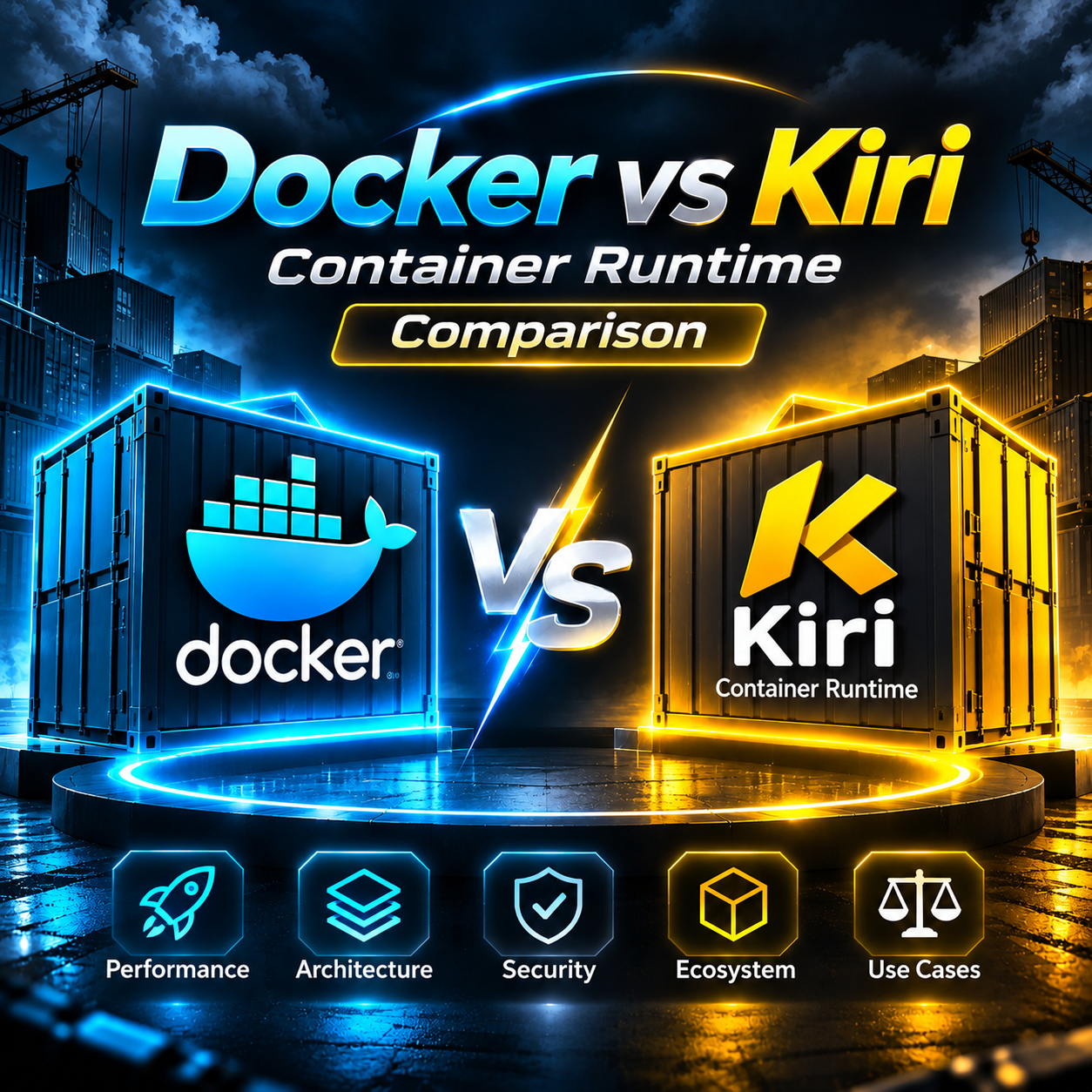
Does Docker need a replacement?
Imagine an Ubuntu Server fleet running Nginx, Redis, MongoDB, Java applications, Jenkins agents and internal APIs. Compose deployments work, backups run, and the on-call team understands the alerts. Then Kiri offers a shorter execution path and a familiar API. What problem would switching solve? Which Compose files can be reused? Who moves the data and proves that monitoring, restore and rollback still work?
How Docker Engine works
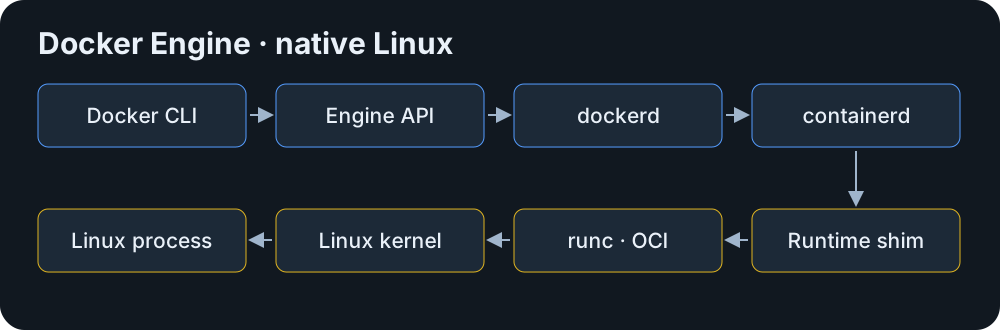
Docker CLI sends HTTP requests to dockerd over the Engine API. The daemon manages container definitions, images, networks and volumes. For Linux containers it delegates execution to containerd, which uses a runtime shim and an OCI runtime such as runc. The kernel ultimately runs the workload processes. An image provides the layered filesystem and defaults, while each container gets its own writable layer.
Compose is a client-side plugin that translates a project into engine operations. BuildKit executes builds. Engine-managed networks carry service traffic and volumes hold data across container replacement. These boundaries matter when a failure is in a build worker, a network rule or the application itself.
What Kiri ships
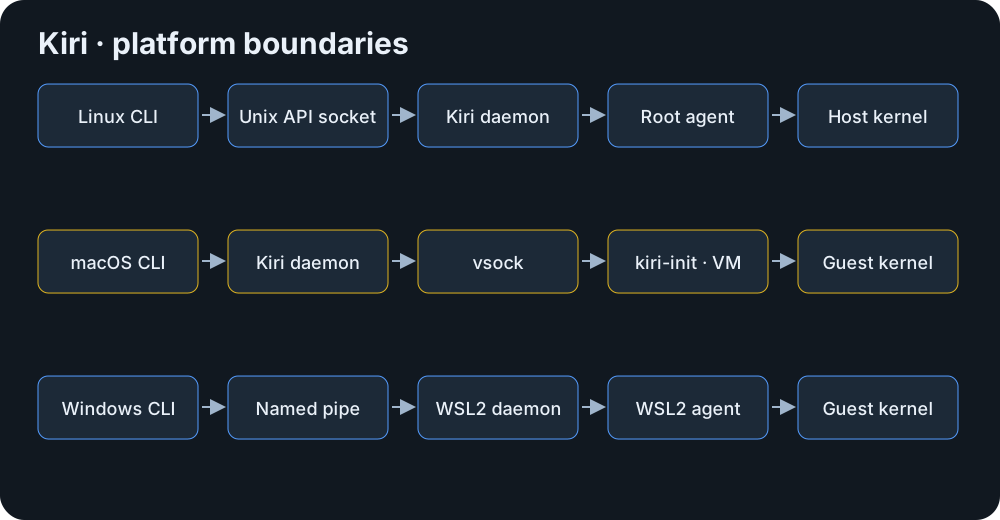
Kiri is a Rust engine with a Docker-compatible API. Its daemon stores container records and manages images. An agent starts, supervises and reaps Linux processes and relays output. On Linux the agent runs on the host, on macOS it is PID 1 inside a Linux VM, and on Windows the Linux build runs in WSL2. The installer packages and GUI vary by platform. The window can list containers, images, volumes and networks and open logs and shells.
Docker Desktop packages a development environment around Docker Engine. Kubernetes schedules workloads across nodes and Rancher manages Kubernetes clusters. Kiri can serve as a desktop container environment and can host a local Kubernetes cluster.
Where the container process starts
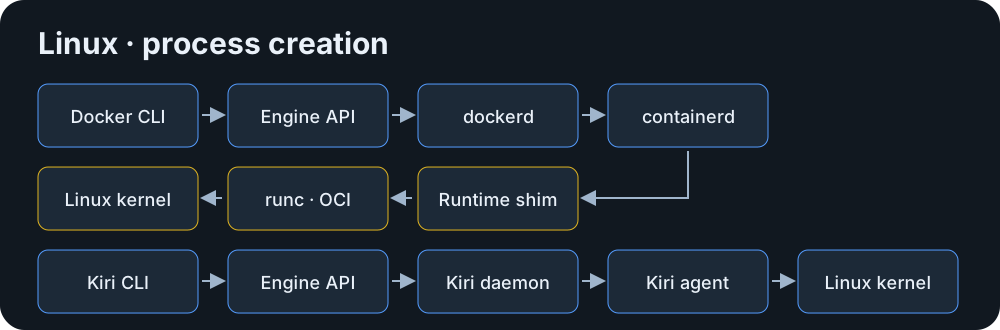
On Ubuntu, Docker calls into containerd and an OCI runtime while Kiri sends requests from its daemon to the root agent over private Unix sockets. The agent uses clone3 to create namespaces and join a cgroup, mounts the overlay root filesystem, switches root, applies capabilities and seccomp, then executes the process. On macOS the same Kiri agent is reached over vsock in an Apple Virtualization VM. On Windows a named-pipe proxy carries the request into the WSL2 guest. Docker Desktop also needs a Linux guest to run Linux containers on macOS or Windows.
Why use a shorter execution path?
Kiri avoids a persistent shim per workload by supervising the container processes directly. This can reduce process count and handoffs, and changes what the on-call engineer must inspect when a daemon or agent stops. Test signal delivery and exit codes, restart policies across daemon and host restarts, log recovery and cleanup after termination. Track app-ready latency separately from process creation. JVM warm-up or database recovery can dominate both.
Docker API compatibility
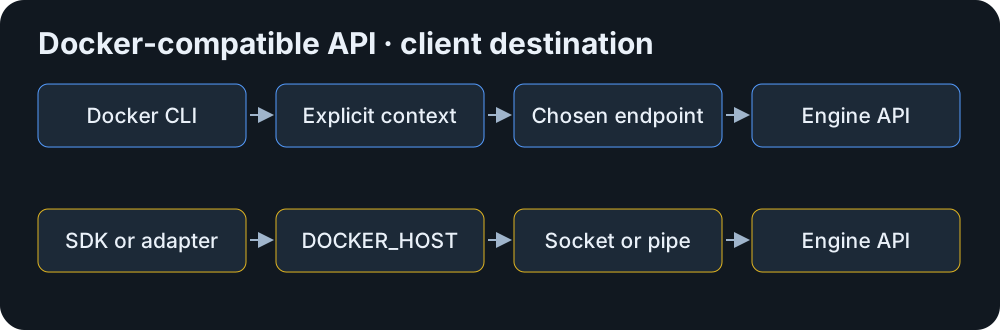
A Docker context selects an endpoint for the CLI. An SDK may instead read DOCKER_HOST or default to the system socket. Kiri documents create/start and common lifecycle operations. For each integration, exercise version negotiation, inspect fields, events, stats and streaming for logs or exec. Verify filters, status codes and reconnect behavior. Swarm, non-bridge drivers and plugin-dependent workflows need explicit alternatives or evidence. A successful version probe only proves basic connectivity.
Docker CLI and the Kiri wrapper
The kiri wrapper routes Docker CLI commands to Kiri regardless of the active Docker context. Run creates and starts a container, ps lists running containers, images lists the selected engine’s store, logs reads stdout and stderr captured by the engine, exec starts a process in a running container and stop requests graceful shutdown before the timeout. The Kiri 0.2.1 notes explicitly cover Docker stop semantics during a pending restart. Names and IDs resolve within the selected engine. Use unique lab names.
# Docker on its original context
docker --context default run --name docker-cli-lab -d nginx:alpine
docker --context default ps
docker --context default images
docker --context default logs docker-cli-lab
docker --context default exec docker-cli-lab nginx -t
docker --context default stop docker-cli-lab
# Kiri on its own endpoint
kiri run --name kiri-cli-lab -d nginx:alpine
kiri ps
kiri images
kiri logs kiri-cli-lab
kiri exec kiri-cli-lab nginx -t
kiri stop kiri-cli-lab
Compose project compatibility
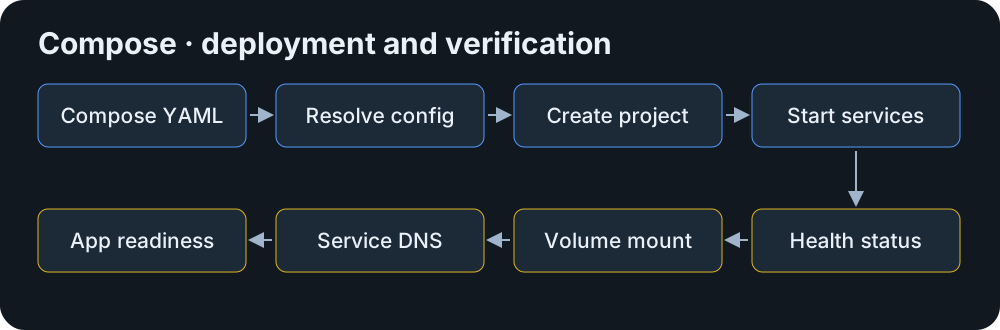
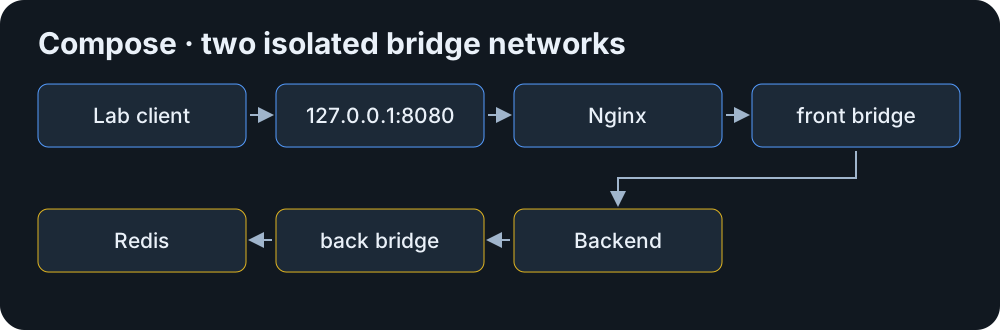
Use the Docker Compose plugin on both endpoints. The example uses two bridges: Nginx connects to the backend on front, and the backend connects to Redis on back. Provide a local nginx.conf with an upstream of backend:8080 and a backend image with a readiness endpoint that actually checks Redis. Set BACKEND_IMAGE in the lab environment. Run config first, then deploy the same project on each endpoint serially to avoid the shared host port. The Compose docs demonstrate service-name DNS and project networks. Test dependency ordering, healthy transitions, environment interpolation, restart after failure and reboot, and any build directives from the real project. Start with prebuilt images so build issues can be diagnosed independently.
services:
  web:
    image: nginx:alpine
    ports:
      - "127.0.0.1:8080:80"
    volumes:
      - ./nginx.conf:/etc/nginx/conf.d/default.conf:ro
    networks: [front]
    depends_on: [backend]
  backend:
    image: ${BACKEND_IMAGE:?Set BACKEND_IMAGE}
    environment:
      REDIS_HOST: redis
    depends_on:
      redis:
        condition: service_healthy
    restart: on-failure
    networks: [front, back]
  redis:
    image: redis:7-alpine
    command: ["redis-server", "--appendonly", "yes"]
    volumes:
      - redis-data:/data
    networks: [back]
    healthcheck:
      test: ["CMD", "redis-cli", "ping"]
      interval: 5s
      timeout: 2s
      retries: 5
networks:
  front: {}
  back: {}
volumes:
redis-data: {}server {
listen 80;
location / {
proxy_pass http://backend:8080;
}
}
# Run once per engine, setting CTX to default or kiri-lab.
docker --context "$CTX" compose -p kiri-eval config
docker --context "$CTX" compose -p kiri-eval up -d
docker --context "$CTX" compose -p kiri-eval ps
curl -fsS http://127.0.0.1:8080/ready
docker --context "$CTX" compose -p kiri-eval exec -T redis redis-cli ping
docker --context "$CTX" compose -p kiri-eval downBridges, DNS and published ports
Both engines provide a default bridge and name resolution on user-defined bridges. Kiri documents host, none and shared-container network modes, but user-created networks support the bridge driver only. Its default bridge is IPv4-only and user bridges can opt into IPv6. On macOS host networking means the guest network. Published TCP ports go via a host listener and Apple NAT when available, with vsock fallback. UDP uses vsock. Native Linux uses nftables forwarding for published IPv4 and daemon relays for loopback and IPv6 bindings. Validate from a second host as well as localhost. VPN routes, address overlap and firewall policy can make a working service unreachable or accidentally public.
Persistent data and backup
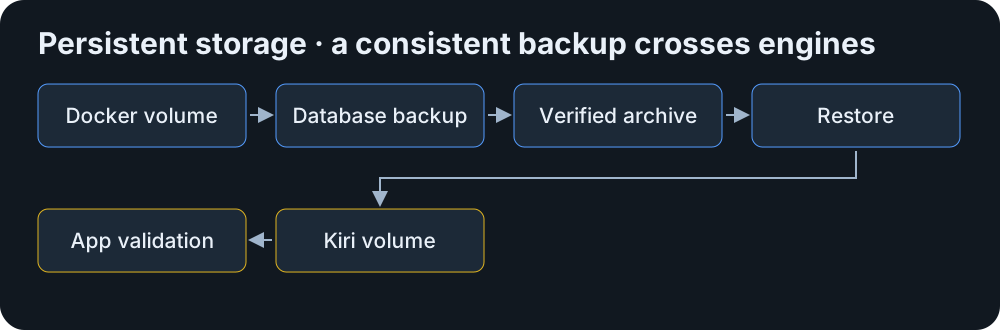
A named volume belongs to an engine’s storage and survives container recreation. A bind mount exposes a path from the engine host or its guest integration. A matching volume name on Kiri can point to an empty volume. For Redis, check RDB or AOF configuration, capture a consistent backup and validate keys and TTL after restore. For MongoDB, use a supported backup method appropriate to the topology and verify collections, indexes and application writes in an isolated restored copy. Check numeric UID/GID, permissions, SELinux policy where relevant and filesystem behavior. Copying an active database’s backing files is unsafe without a supported snapshot or quiesce procedure.
OCI images and private registries
Kiri documents pull, tag and push with Docker credentials, Docker Hub defaults and platform selection for multi-architecture images. Both engines cache layers locally in separate stores. Record the manifest digest and platform so tests actually use equivalent images. For an enterprise registry, test private CA trust, proxy settings, token expiry, credential helpers, pull, push and multi-platform manifests from the build worker as well as the runtime. Verify existing signing and admission policies independently of whether a pull succeeds.
BuildKit, buildx and the selected worker
Docker Engine uses BuildKit with buildx as the client. Kiri documents a BuildKit container and a buildx docker-container builder. On macOS, choosing Kiri as the default builder can route plain docker build and Compose builds to Kiri even with a Docker context selected. Before changing defaults, inspect the builder and where its output lands. Test multi-stage Dockerfiles, local load, tags, registry push, cache import/export, secrets, multi-platform outputs and failure propagation. Benchmark warm and cold caches separately. A container lifecycle microbenchmark says little about build throughput.
Performance evidence and a repeatable lab
RunKiri reports median API lifecycle times of 2.55 ms for Kiri and 213.4 ms for Docker Desktop on one Apple Silicon Mac with bridge networking, using Alpine and true. Thirty measured trials followed five warm-ups. Some other runtime workloads were active, and Kiri’s cleanup boundary differs. The vendor reports engine-process memory separately from VM overhead. These figures describe the project’s Mac test. Comparing the engines on native Ubuntu requires a separate benchmark with the same workload.
Use matching Ubuntu 24.04 lab snapshots on the same hardware. Record OS build, kernel, Engine/CLI/Compose/Buildx versions, CPU model, cores, RAM, disk and filesystem, image digest and resource limits. Alternate engine order and run one stack at a time. Record warm create/start/exit/remove, cold start and application readiness separately. Measure idle and steady RSS and CPU, cold and cached pulls from the same local registry, empty and warm build caches, TCP throughput, volume latency and sync writes. Raise container count at a fixed request rate and stop at a predefined latency or error budget. Report sample counts, p50, p95 and p99 with failures recorded separately. Include identical readiness and cleanup boundaries.
# Isolated Linux lab; set CTX and pin IMAGE to an Alpine digest.
docker --context "$CTX" version
uname -r
docker --context "$CTX" pull "$IMAGE"
for run in {1..5}; do
  docker --context "$CTX" run --rm --pull=never "$IMAGE" true || exit 1
done
for run in {1..100}; do
  start=$(date +%s%N)
  docker --context "$CTX" run --rm --pull=never "$IMAGE" true || exit 1
  end=$(date +%s%N)
  printf '%s\n' "$((end - start))" # nanoseconds
done
# On macOS, the vendor also ships:
kiri bench --network bridge --runs 100Isolation, privileges and the API socket
Namespaces isolate views of processes, mounts and networks. Cgroups account for and enforce resource limits. Docker documents seccomp, capability controls and a separate rootless mode. Kiri documents Linux namespaces, cgroups, overlayfs, capability dropping and seccomp, including guest-specific restrictions. The documented Linux service uses a root agent and root-equivalent socket group. A user-owned macOS daemon with a guest boundary has a different trust model. Check actual memory and CPU enforcement, seccomp and custom capability behavior, privileged mode and access to host files per platform. A smaller code path cannot establish comparative security.
Treat a Docker-compatible socket as a control interface. A job that can create containers and mount host paths may read credentials or modify data. A read-only bind mount of the socket does not make API requests read-only. Isolate build agents and monitoring tools, restrict membership and use narrowly scoped access mechanisms. Preserve image provenance and scanning in CI regardless of runtime.
Monitoring, health and logs
Docker provides container stats, events, health state and configurable logging drivers. Its Prometheus endpoint reports daemon metrics. Zabbix’s Docker integration queries the API, and Grafana normally visualizes data collected by another system. On Kiri start with documented logs and inspect, then test the actual collector against the pilot socket. Inventory timestamps, log retention and rotation, CPU, memory, network, block I/O, restart counts and health transitions. A field may be absent or have a different meaning. Use host metrics and app probes as independent signals, and test alert delivery by stopping a disposable workload.
Ubuntu Server 24.04 LTS
Docker supports Ubuntu 24.04 through its apt repository. Kiri CI tests the x86-64 package on Ubuntu 24.04. For an isolated pilot VM, choose the signed-checksum release package. Use kiri-lite if the Docker CLI and plugins are already installed. The Kiri service uses /run/kiri/docker.sock, root:kiri mode 0660, /var/lib/kiri-daemon for daemon state and /var/lib/kiri for images, containers and volumes. Docker normally uses /var/run/docker.sock. Inspect Docker’s actual data root and snapshotter storage before backup. Docker package upgrades can use apt, while Kiri documents downloading and installing release packages on Linux.
Use a dedicated lab and an explicit context. The Kiri service can add a link at the default Docker socket path when it is vacant. Leave production’s socket alone. Check the journal and group membership after setup. Rehearse recovery of application volumes and an upgrade with a preserved pre-upgrade snapshot.
# Isolated Ubuntu lab, after installing and setting up Kiri
systemctl status kiri
journalctl -u kiri -n 50
docker context create kiri-lab --docker host=unix:///run/kiri/docker.sock
docker --context kiri-lab version
docker --context kiri-lab run --rm hello-worldWindows development workflow
Kiri documents Windows 10 and 11 on x64 and Arm64. Its per-user MSI starts a setup wizard for WSL2 and the engine distro. The installer is documented as unsigned at 0.2.1. Hardware virtualization and the Windows Virtual Machine Platform must be available. The Windows CLI talks to the Kiri named pipe, and the resulting containers run in WSL2. Docker Desktop supports Linux containers through WSL2 or Hyper-V in supported configurations, plus a separate Windows container mode on eligible editions. Keep Windows-container workloads with a supported Windows runtime. Compare Windows-to-WSL mounts, VPN and published-port accessibility, named-pipe access and recovery after restarting Windows or WSL.
macOS and the Linux guest
Kiri supports macOS 14 or later with separate Intel and Apple Silicon builds. The signed and notarized app starts a user LaunchAgent and uses Apple Virtualization, virtiofs for host files and Rosetta for supported amd64 images on Apple Silicon. Intel runs amd64 natively. Docker Desktop also ships separate Mac builds and places Linux containers in a VM. For a workstation trial check bind-mount latency, file watchers, ownership, VPN behavior, host reachability and multi-platform images. Compare the complete VM and app footprint during work and idle.
Kubernetes runtime expectations
Kubelet talks to a CRI implementation over gRPC. OCI defines formats and low-level runtime contracts. Containerd exposes CRI when its plugin is enabled. Docker Engine can be used through cri-dockerd. Kiri documents running a single-node k3s cluster inside a container. That cluster is useful for local testing, while native Kiri as a supported kubelet CRI endpoint was not established by the documented setup. Check the cluster distribution’s runtime support and node lifecycle requirements before changing a production runtime.
GitLab and Jenkins integration
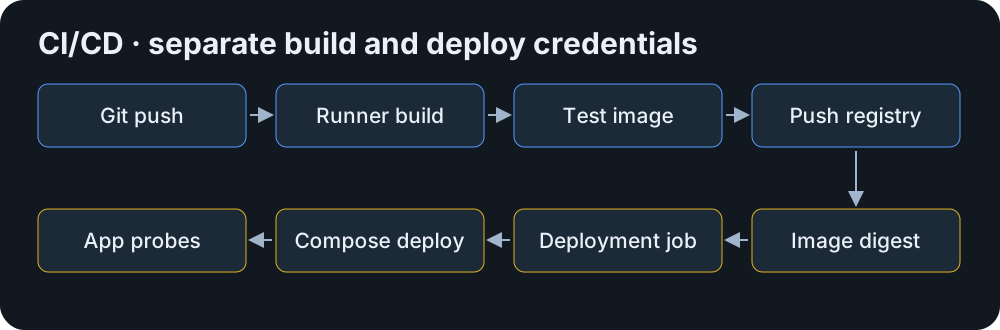
A commit can trigger a GitLab runner or a Jenkins agent to build an image, test it, push its immutable reference and deploy through Compose. Keep deploy credentials and permissions separate from build credentials. Run a shadow job on a dedicated Kiri runner that uses a disposable registry namespace. Compare outputs, test exit codes, base images, builder identity and cache behavior. A Docker executor or Jenkins Docker plugin may mount the default socket or make SDK calls independently of the CLI. Verify those calls separately. Leave production deployment on the existing runner during the pilot.
The following job fragment assumes a verified builder, an application test entrypoint at /app/test and CI-managed variables. Keep REGISTRY_TOKEN masked, use an ephemeral client configuration, and deploy a registry digest from a separate job. Do not expose a privileged engine socket to untrusted merge requests.
set -eu
export DOCKER_CONFIG="$(mktemp -d)"
trap 'rm -rf "$DOCKER_CONFIG"' EXIT
# DOCKER_HOST, BUILDER, REGISTRY, REGISTRY_USER, REGISTRY_TOKEN and IMAGE_REF
# come from the runner configuration and its secret store.
printf '%s' "$REGISTRY_TOKEN" | docker login "$REGISTRY" \
  --username "$REGISTRY_USER" --password-stdin
docker buildx inspect "$BUILDER"
docker buildx build --builder "$BUILDER" --load -t "$IMAGE_REF" .
docker run --rm "$IMAGE_REF" /app/test
docker push "$IMAGE_REF"Enterprise production readiness
Kiri 0.2.1 follows 0.2.0 and multiple 0.1 releases. The release notes show active changes to networking, restart and exit behavior. The public repo accepts issues and contributions and provides a private vulnerability reporting policy. Kiri’s code is Apache-2.0 and its guest Linux kernel is GPL-2.0. Moby’s engine code is Apache-2.0, and Docker Desktop has separate product terms. Evaluate commercial support for the specific distribution or subscription. A public issue tracker and recent releases establish activity. Enterprise operations also require patch timelines, documented API guarantees, workable upgrades, backup coverage and tested recovery. No Kiri enterprise response SLA was verified.
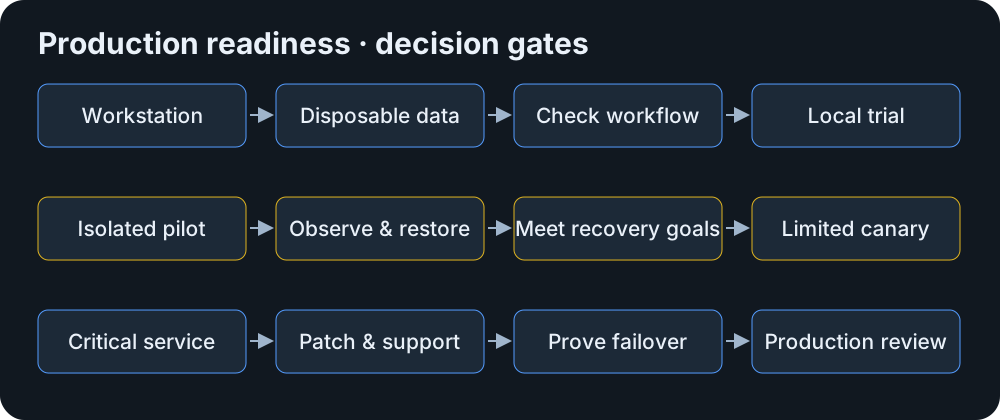
Assign an owner for upgrades and incidents. Test daemon restarts and host reboot, document how to collect diagnostics, then prove alerts, application restore and both directions of rollback against agreed recovery time and data loss limits. Approve scope one platform and workload at a time.
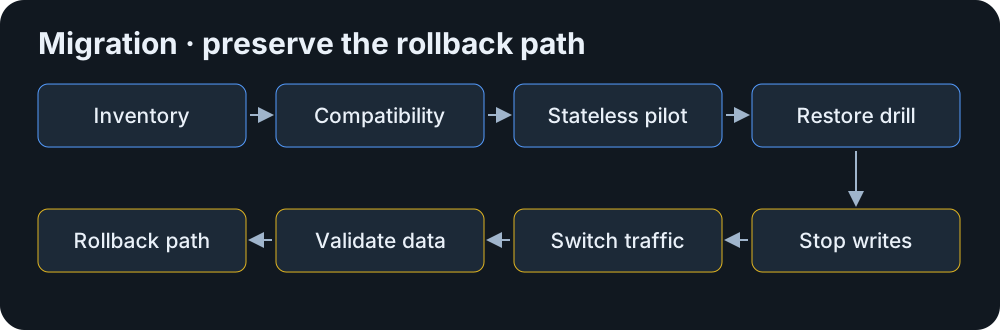
A migration plan with rollback
Inventory containers, image digests, Compose projects, named volumes, bind mounts, networks and published ports. Export deployment definitions, environment variable names and references to secrets through their normal source of truth. Archive the current configs securely. Record engine assumptions such as socket mounts, custom drivers, resource limits and healthchecks. Check each assumption against the target and prepare an isolated test environment.
Start a stateless copy first. Verify startup and application tests, network and firewall rules, volume ownership, metrics, alerts and log recovery. Restore consistent Redis and MongoDB backups into new volumes and check real reads and writes. Only schedule cutover after a recovery rehearsal meets the agreed recovery objectives. Preserve the old engine, deployment and volumes. Define a maintenance window, drain traffic, stop writes, sync and validate data, then route traffic to the new deployment. If rollback follows writes, replay or restore them using a tested procedure before reopening the old deployment. Avoid two writers.
Five enterprise scenarios
| Scenario | Decision and checks |
|---|---|
| Developer with five containers | Docker Desktop already supports the team’s tooling. Trial Kiri with disposable data if file watching, VPN and image architecture pass. Keep the previous context available. |
| Ubuntu with Nginx, Redis and APIs | Keep Docker on the server. Mirror an API in a VM and verify port binding, app checks and alert delivery. Restore Redis into a separate pilot instance before considering stateful use. |
| Thirty Compose services | Docker preserves established dependencies. Stage one dependency group on Kiri and map health conditions, external networks, volume drivers and failure ordering before expanding. |
| Jenkins image builders | Leave production builds on Docker. Use an isolated Kiri agent for a trusted branch. Check BuildKit cache, registry logins, artifact digests and plugin socket calls. |
| Business-critical fleet | Stay on the supported Docker deployment. Establish security ownership, support, failover and data recovery before considering a Kiri canary. Do not move state on benchmark evidence. |
Docker Engine and Kiri at a glance
| Area | Docker Engine 29.10.0 | Kiri 0.2.1 beta |
|---|---|---|
| Execution | dockerd, containerd, shim and OCI runtime | Rust daemon and direct agent supervision |
| Platforms | Native Linux Engine and separate Desktop products | Linux, macOS VM and Windows WSL2, all beta |
| Install | Official apt repository on Ubuntu | Release deb/rpm, DMG or MSI |
| API | Versioned Engine API | Docker-compatible surface, qualify operations individually |
| Compose | Docker Compose plugin | Same client, verify project semantics |
| Network | Bridge, host, none and additional drivers including overlay | Bridge driver with host and none modes |
| Storage | Named volumes, bind mounts and volume drivers | Named volumes and bind mounts in a separate store |
| Builds | BuildKit / buildx | BuildKit container via buildx |
| Security | Seccomp, capabilities and documented rootless mode | Seccomp and capabilities, Linux service runs with root agent |
| Monitoring | Engine events, stats and daemon metrics | Logs and inspect documented, validate collectors |
| CI/CD | Established Docker client and runner integrations | CLI and buildx documented, test executor and plugins |
| Kubernetes | CRI adapter required for Engine | Local k3s cluster, no verified node CRI integration |
| Maintenance | Release notes and package updates | Active release history, Linux release-package upgrades |
| Operations | Several runtime layers and established runbooks | Fewer process handoffs, platform-specific diagnosis |
| Maturity and support | Mature ecosystem, support depends on product contract | Beta, public issue tracker and private security reporting |
Troubleshooting the pilot
Examples assume the lab context and disposable project above. Expected observations are diagnostic targets. Start with read-only probes and keep Docker available as the recovery path.
| Symptom | Diagnostic commands | Interpretation, fix and rollback |
|---|---|---|
| Daemon unavailable |
|
Expect active and recent startup lines. Failed or missing socket suggests service or setup failure. Correct the reported package, kernel or permission issue on the lab VM. Restore its snapshot if the unit still fails. |
| Wrong engine |
|
Expect Host to name /run/kiri/docker.sock. An unexpected endpoint explains unfamiliar container IDs. Use an explicit context and adjust SDK configuration separately. Return to the known Docker context for existing workloads. |
| Container exits |
|
Expect state and an exit code. Check entrypoint, image architecture and runtime errors. Redeploy the verified digest and config. Roll back the test to Docker if failure follows the engine. |
| Port conflict |
|
A listener on 8080 or an existing published mapping can explain a bind error. Choose an unused lab port and retest from localhost and another host. Revert the Compose override when done. |
| Volume permission |
|
Expect the intended mount and app UID/GID. Permission denied can indicate wrong ownership or a read-only mount. Repair the restored lab copy and keep production volume untouched. Roll back with the consistent backup. |
| Compose mismatch |
|
Rendered YAML with a failed or unhealthy service suggests runtime behavior to check after parsing. Reduce the file to the failing feature and validate process readiness. Bring the pilot down without deleting volumes and return to the known deployment. |
| Registry authentication |
|
An unauthorized response points to credentials or token scope. An X.509 error points to trust configuration. Refresh short-lived credentials or install the approved CA in the correct trust store. Return the job to the original runner if needed. |
| Build failure |
|
Expect the intended driver and endpoint. A misplaced output or failed worker can indicate stale builder selection. Select the validated builder and verify the output image. Restore the previous builder for established jobs. |
| Missing metrics |
|
Expect samples for running lab containers. Blank fields, HTTP errors or missing series suggest endpoint, permissions or collector incompatibility. Use app and host probes while investigating and preserve existing Docker alerts. |
Frequently asked questions
Can Kiri replace Docker?
It can serve some local Docker workflows. Enterprise replacement requires workload-specific qualification.
Can it run Docker images?
It documents compatible Linux images and platform selection. Check architecture, kernel requirements and runtime flags.
Can Compose run against it?
Yes, the standard plugin can target Kiri. Verify the operations your project actually uses.
Is it faster?
RunKiri reports lower lifecycle latency in a Mac microbenchmark. Measure your application and platform separately.
Is it production-ready?
The reviewed release is beta. Start with isolated evaluation and keep critical workloads on the supported engine.
Does it need Docker Engine?
Kiri supplies its own engine. Docker CLI and plugins are clients.
Can both coexist?
Yes, with explicit sockets and contexts. Check shared ports, builder defaults and SDK socket selection.
Does Kiri support Kubernetes?
It documents a local k3s cluster. That does not establish a supported CRI integration for production nodes.
Can Docker volumes be migrated?
Yes, through verified export and restore. Kiri also documents a macOS Desktop importer. Validate data consistency and ownership.
Should enterprises migrate now?
Use a controlled pilot when it addresses a concrete need. Keep production on Docker until compatibility and recovery are proven.
Engineering verdict
For an organization already operating a healthy Docker estate, keep Docker where uptime, state and recovery matter. Evaluate Kiri on developer machines and isolated jobs if reduced local overhead or simpler daily workflows would solve a real problem. A Linux pilot can establish compatibility for a small stateless workload and expose gaps in logs, monitoring, network policy and upgrades. Widen scope only when the same workload passes a release-pinned compatibility matrix and an actual recovery rehearsal. For business-critical services the decision hangs on who can restore the service and its data within the agreed limits.