
The enterprise virtualization decision
At 02:00, one of three HPE hosts stops answering. The team can see the other two hosts, but SQL Server is down and several Windows applications cannot authenticate. The first questions are whether the surviving hosts can read the VM disks, whether they have enough reserved memory to start the affected VMs, and whether DNS and Active Directory will be ready when the applications come back.
Assume this is an 80-VM estate with Windows Server, AD, SQL Server, Linux application servers, Docker inside Linux VMs, monitoring and internal business services. The platform decision controls what the on-call team can recover, which vendors take the call, and how safely the hardware can be replaced over the next five years. Start with service recovery targets and a documented dependency map, then compare the platform and migration costs against those requirements.
What vSphere and Proxmox VE actually include
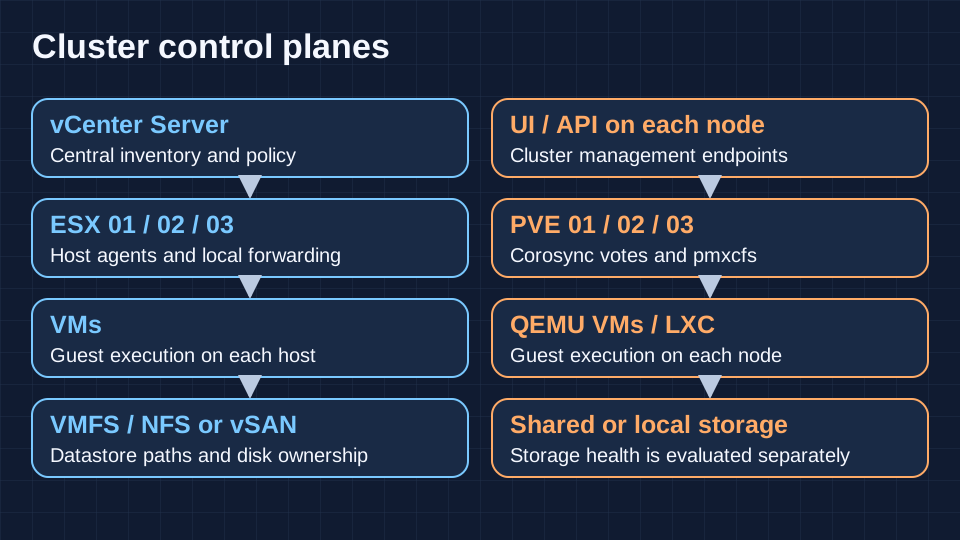
VMware vSphere pairs the ESXi hypervisor, called ESX in Broadcom’s 9.x build listings, with VMware vCenter Server. ESXi runs guests and presents their virtual devices. An individual host has a management client. vCenter holds centralized inventory, permissions, cluster policy and lifecycle workflows across hosts. vSphere HA uses host agents. DRS computes placement and balancing, and can use vMotion to act on those decisions. vSAN is integrated into the host stack but comes with separate capacity and entitlement considerations.
Proxmox Virtual Environment runs on Debian Linux. KVM supplies kernel virtualization and QEMU provides the VM process and device models. LXC containers share the host kernel and suit Linux workloads where that isolation boundary is acceptable. Windows runs in a VM. For Docker workloads that need an independent kernel or a stronger boundary from the host, a Linux VM is a sensible default. Each Proxmox VE node provides the web UI and API.
Record the product release, installed patch level, purchased entitlement and supported hardware separately in the design. Use the VMware build tables to verify ESX and vCenter updates, and check Proxmox VE and Proxmox Backup Server compatibility before planning upgrades.
Control planes, quorum and failure domains
In vSphere, losing vCenter usually leaves running guests and established switch forwarding intact. Existing HA agents can act on host failure if the cluster remains healthy enough to do so. Expect centralized provisioning, DRS decisions and ordinary vCenter-driven migrations to be unavailable. Keep a reachable host console, a recovery path for the vCenter appliance and independent DNS and time sources.
Proxmox VE replicates cluster configuration through pmxcfs and uses Corosync membership and votes. At three equally voting nodes, two maintain quorum. An isolated node generally loses the ability to write cluster configuration. A two-node design can use an independently hosted QDevice for arbitration. It contributes a vote and has no compute or storage role. With HA enabled, watchdog fencing helps prevent simultaneous ownership of a guest during a partition.
A standalone host is appropriate when local maintenance downtime is accepted. For multiple racks or sites, design around power, switch, storage and management boundaries. Corosync depends on reliable low-latency links. A stretched deployment needs an explicit partition design for both cluster and storage. Multiple smaller clusters can bound operational impact, with vCenter managing VMware clusters and the separate Proxmox Datacenter Manager product available for fleet visibility.
Installation and initial deployment
Inventory CPU flags, memory topology, NIC PCI IDs, storage controllers, SSD firmware and boot media. Confirm that out-of-band management works before touching the host network. Record firmware baselines and decide which network carries management, guest traffic, migration, storage and cluster communications. Reserve addressing and confirm DNS, NTP, forward and reverse resolution, and recovery access independent of the guest network.
On VMware, choose the supported ESX image or OEM add-on, deploy vCenter, attach hosts, stage the switch and datastore configuration, and verify the image lifecycle and access to patches. On Proxmox, choose the boot layout and repository, stage bridges and bonds, and create the cluster before adding workloads. Join empty nodes and confirm management and Corosync reachability. Install trusted certificates, constrain management ingress and test named admin and emergency access before provisioning production guests.
Write down the intended disaster state before assembling the cluster. If two hosts carry all priority workloads after a failure, measure the additional hit from taking a storage replica offline and decide which nonessential VMs stay stopped. For a fresh deployment, run a host reinstall and management restore while the design is still cheap to change. Keep an inventory of recovery credentials and boot artifacts outside the cluster. The exercise exposes dependencies such as a DHCP server, directory or certificate service that boots only after its clients need it.
VM sizing and fair performance tests
For SQL Server, start with the workload’s concurrency and working set. A VM sized across physical NUMA nodes can pay for remote memory access and scheduling contention. Compare CPU ready time in vSphere and guest steal time or host scheduler pressure on KVM as different signals. Right-size vCPUs before adding capacity. Memory ballooning depends on guest drivers and policy. When host reclaim reaches swapping, tail latency can deteriorate even if guest CPU charts look quiet.
Compare VMware PVSCSI and VMXNET3 with VirtIO SCSI and VirtIO networking where supported. Keep driver versions, queue configuration, VM firmware, storage write durability, dataset and cache state documented. Measure application p95 and p99 latency, throughput and errors during normal load, consolidation, rebuild and backup. Repeat after failure and treat the storage architecture as a separate variable. A fast cached synthetic run says little about a database log flush during an SSD rebuild.
Set the acceptance threshold with the service owner before measuring. Use the same physical cores, NUMA boundaries, firmware power profile, memory headroom, NIC speed, disk write policy and guest OS where practical. Warm the cache consistently or use a working set that exceeds it. Hold offered load constant while comparing latency, then raise load gradually to see where errors and queues grow. Record CPU scheduling, disk queue and guest metrics together. If one design uses a SAN and the other uses three replicated copies, the result describes complete designs and their durability costs.
Storage architecture and failure behavior
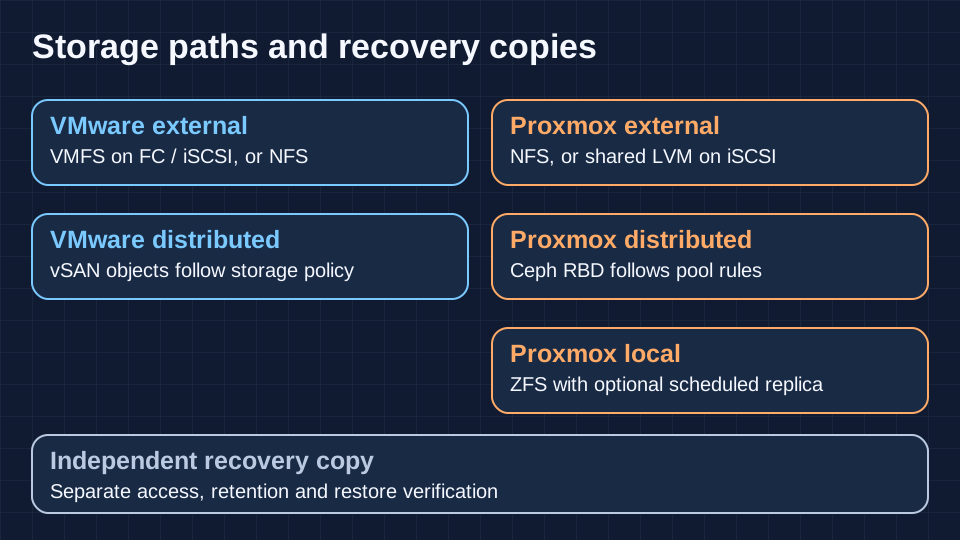
VMware commonly uses VMFS on block storage presented over Fibre Channel or iSCSI, or an NFS datastore. VMFS allows multiple hosts to access a shared filesystem on a supported LUN. Check multipathing and array ownership behavior under path failure. Thin provisioning defers allocation and needs free-space alerts at both datastore and array layers. Thick provisioning reserves capacity at the datastore level, with initialization varying by disk format. vSAN pools supported local devices and applies policy-based availability and placement. Storage vMotion can move a running VM’s disks between supported datastores with the required entitlement and compatibility.
Proxmox VE can use local LVM or LVM-Thin, local ZFS, shared NFS, iSCSI-backed shared LVM or shared Ceph RBD. LVM-Thin is generally local and snapshots depend on the backend. ZFS checksums data and can repair a bad copy when healthy redundancy exists. Native Proxmox storage replication uses scheduled incremental ZFS transfers to another node. Its recovery point is the last successful replication. Ceph RBD exposes distributed block volumes and has its own monitor quorum, replica placement, admission thresholds and recovery traffic. Corosync quorum alone cannot establish Ceph health.
For three HPE ProLiants with enterprise SSDs, compare a dual-controller array with independent fabrics against local mirrored ZFS plus scheduled replication and an all-flash distributed design. For ZFS or Ceph, choose supported direct drive exposure rather than hiding media behind opaque single-drive RAID volumes. Check power-loss protection, endurance, queue depth and rebuild behavior. An array with protected write cache can help synchronous I/O. Cache cannot replace durable writes. Test an SSD failure and a host failure separately, then check what happens to p99 SQL write latency with backups running.
Capacity planning starts with usable space after redundancy, then reserves space for snapshots, growth, evacuation and rebuilding at degraded capacity. Track latency for small synchronous writes, IOPS at the required latency and throughput under sequential load. A hypervisor snapshot usually shares the original storage failure domain and can make consolidation expensive. Give backup copies independent credentials, storage and recovery tests.
For an all-flash Ceph pilot, record replica count and failure domain, and validate the pool’s minimum replica requirement against a second failure during recovery. A three-node deployment has little room for maintenance plus a new host failure. For vSAN, read the outcome per storage policy and verify object accessibility and compliance separately. For external shared storage, pull each fabric path individually and look for retry storms rather than checking only whether multipath still reports a surviving path. Disk capacity and I/O capacity need separate budgets.
High availability, fencing and service recovery
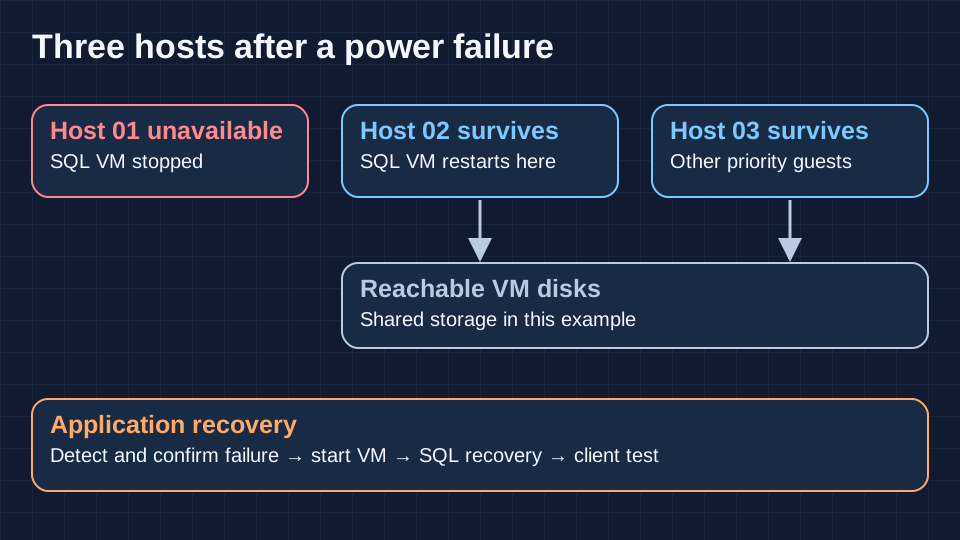
vSphere HA uses host agents, management heartbeats and, where applicable, datastore heartbeats to reason about failures. Review isolation response, restart priority and admission control. An isolation event and a network partition can produce different outcomes. Proxmox HA Manager uses quorum, resource placement rules and watchdog self-fencing. Configure guests for HA and confirm surviving hosts can access shared disks or supported replicated ZFS volumes. During a storage outage, neither scheduler can start a VM from inaccessible disks.
In the three-host scenario, remove one host from service under monitored load. The surviving pair must have free CPU, memory, storage paths and VM networks. Time detection, fencing or isolation, VM boot, SQL crash recovery and the first successful client transaction separately. Keep domain controllers apart and define application retries. If a shared array goes offline across all hosts, repair the storage path or invoke recovery from an independent copy. With asynchronous replicas, confirm the actual recovery point before opening the application for writes.
HA restarts guests and includes downtime. VMware Fault Tolerance maintains a synchronized secondary VM for eligible workloads and has its own constraints and entitlement. Validate supported virtual hardware and topology first. Live migration moves a running workload during planned work. Disaster recovery covers the loss of an environment and adds independent copies, failover orchestration, identity, routing and failback.
Live migration and maintenance windows
vMotion transfers running VM state. With shared storage the disks remain in place. Supported combined compute-and-storage migration can also move disks when datastores differ. Storage vMotion is the online disk move. DRS can recommend or automate placement and evacuation according to configuration and entitlement. EVC gives supported CPUs a common feature baseline within a vendor family. Test the return direction and verify CPU flags, virtual hardware, networking, storage and backup interoperability.
Proxmox VE can live-migrate supported QEMU VMs between compatible cluster nodes, including supported local disk transfers where configured. Test custom or baseline CPU models rather than assuming host CPU passthrough is portable. Directly assigned PCI devices and host-local resources can block moves. LXC migration generally involves stopping or restarting the container. Proxmox VE 9.2 introduces dynamic load balancing for HA-managed guests. Test its placement rules, scheduling and resource metrics on the target release before comparing it to VMware DRS.
Evacuate a canary first and observe client traffic. Confirm spare capacity during the window, cap concurrent migrations and verify the path MTU throughout. Memory dirtying can slow migration convergence and local disk copying competes with production I/O. For vSAN or Ceph, review maintenance and data availability policy and confirm rebuild health before taking the next host down.
Enterprise networking on Cisco trunks
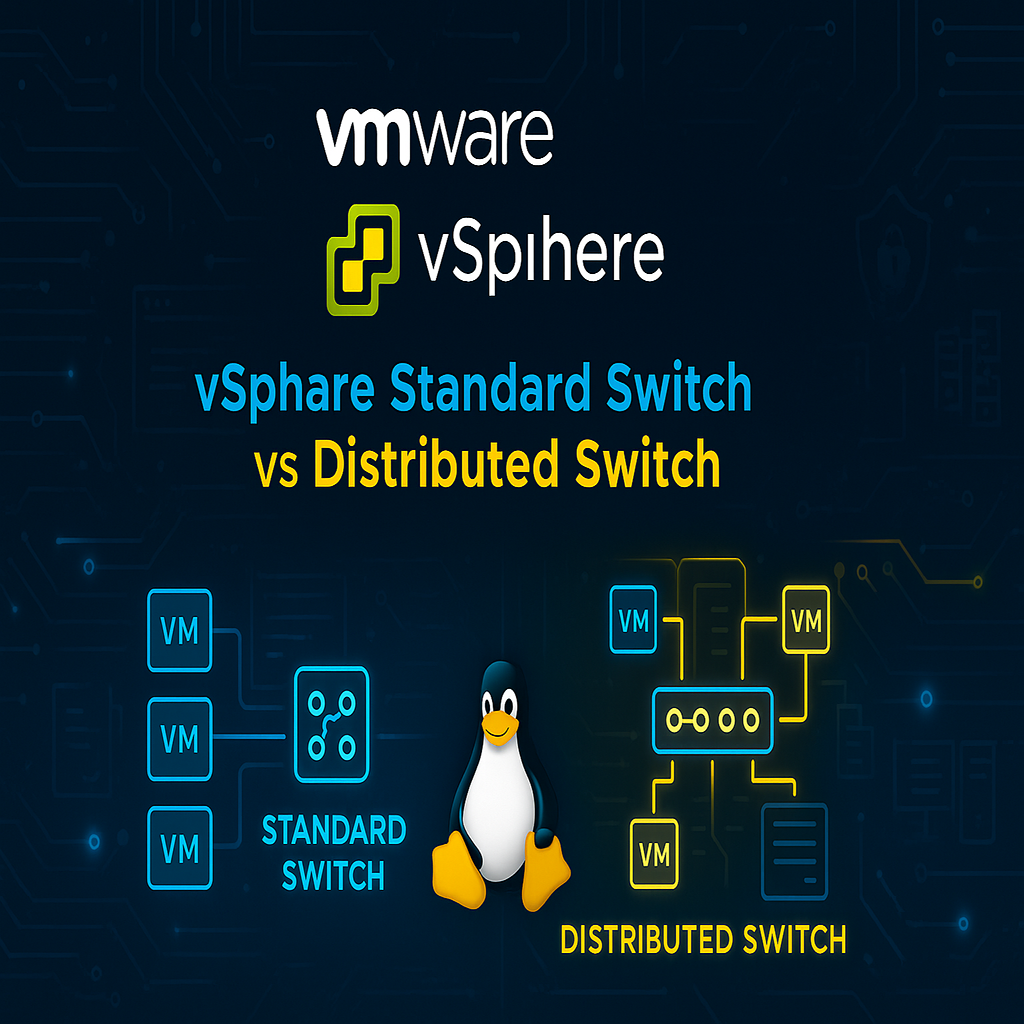
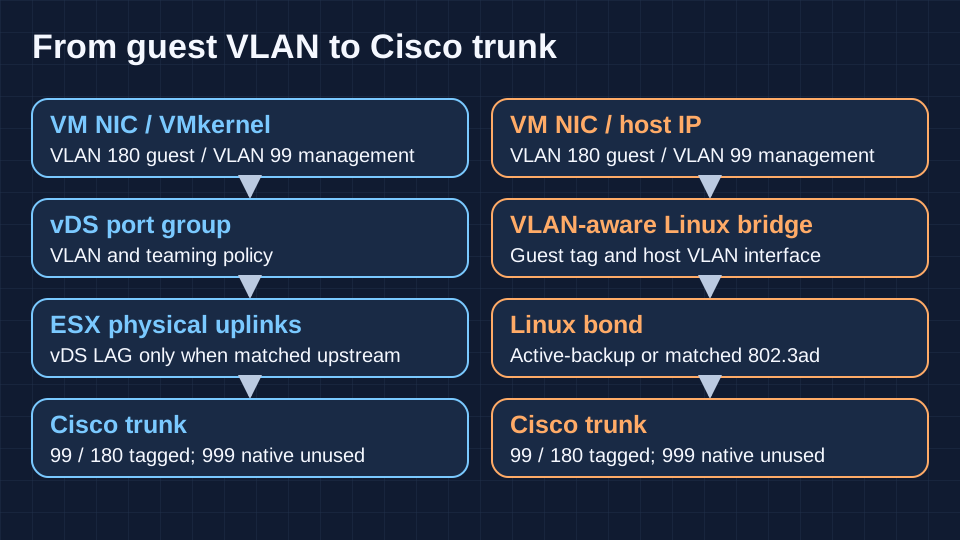
A vSphere Standard Switch is configured per host. A vSphere Distributed Switch centralizes port-group, uplink and teaming policy in vCenter while forwarding stays on the hosts. VMkernel adapters carry host services such as management, vMotion and IP storage according to configuration. Standard switches support ordinary NIC teaming and supported static aggregation designs, while LACP uses a vDS LAG with matching upstream settings. Keep a management recovery path that can be used when vCenter is unavailable.
On Proxmox, a VLAN-aware Linux bridge forwards guest traffic, and a Linux bond can provide active-backup or 802.3ad aggregation. Open vSwitch is an alternative where its operating model is justified. Proxmox SDN adds centrally configured zones and VNets, with overlay options such as VXLAN and EVPN depending on design. A VLAN-aware bridge and an SDN overlay solve different problems. For a small cluster with a straightforward VLAN plan, the bridge and bond are often enough.
Consider Cisco switches with tagged VLAN 99 for management, VLAN 180 for servers and VLAN 192 for users. Allow 192 on the hypervisor trunks only if a guest actually uses it. Use VLAN 999 as the agreed unused native VLAN in this example, with no management IP or guest traffic on it. Put administrative ingress behind ACLs and a controlled access path. For dual-switch LACP, the switch pair must present a single logical aggregation partner through a supported stacking or multichassis design. With independent switches, use a supported failover design without a cross-switch LAG.
Before touching the second uplink, test reachability from the first, then unplug each physical path separately. Check allowed VLANs, native VLAN symmetry, tag placement, MTU and upstream hashing. A bridge port tag plus tagging inside the guest can break connectivity. A missing VLAN on a standby switch can pass all normal checks until failover. Keep Corosync latency predictable when migrations or Ceph recovery saturate links. Keep iLO or another out-of-band console reachable during network changes.
Backup, SQL Server recovery and disaster recovery
On VMware, VADP is a platform interface used by compatible third-party backup products. Check API entitlement, vendor interoperability, transport mode, change tracking, backup-server placement and separate licensing. In Proxmox, native backup jobs can use the separate Proxmox Backup Server product for incremental transfer, deduplication, verification, pruning and remote synchronization. Retention decides which snapshots remain. Garbage collection reclaims unused chunks. A separate PBS host or site improves isolation only when credentials, deletion rights and recovery access are designed accordingly.
Suppose SQL Server must return within two hours with at most fifteen minutes of committed data lost. Treat those values as hypothetical RTO and RPO. A nightly image backup alone cannot meet that recovery point. Use a tested full, differential where appropriate, and transaction-log backup chain under a suitable recovery model. Validate VSS or application-aware processing if the VM backup claims application consistency. A filesystem freeze or a bootable guest alone cannot prove recoverable SQL transactions.
Restore to an isolated network, apply the required logs, check integrity and reconcile a known downstream transaction with the application owner. Include time to retrieve offsite copies, read encryption keys, start identity and DNS, restore certificates and reconnect clients. Use independent protected storage such as separately administered retention lock or offline copies if the threat model includes administrator compromise. A verified content hash or a successful sync is only one piece of recovery evidence.
Security and hardening
Use scoped RBAC, named accounts and different identities for API automation. VMware supports role assignment through vCenter and identity integration, with MFA depending on the supported identity provider and release. Proxmox supports realms such as Active Directory and OpenID Connect, built-in second-factor options and scoped API tokens. Record how emergency access works if the directory, MFA provider or management DNS is down. Test credential rotation before depending on unattended workflows.
Keep host and appliance access behind a management firewall. ESXi host service rules, distributed switching and separately entitled NSX controls operate at different layers. Proxmox firewall rules can cover nodes and guests subject to the configured backend and scope. Audit what actually reaches the management endpoints. Enforce trusted TLS, synchronized time, remote logs and change attribution. Apply security updates through a staged maintenance cycle and include BMC firmware, guest tools, backup endpoints and certificate expiry in the lifecycle plan.
Build the access review around actions someone can actually perform. A monitoring identity should read inventory and health. A provisioning identity may create a VM without touching the backup datastore or firewall. Send audit and task history off the hosts and verify actor identity, clock ordering and retention during a staged change. Include vCenter and PBS in vulnerability inventory, and rehearse management-plane recovery with one host isolated from the normal admin network.
Monitoring and infrastructure automation
Collect host CPU pressure, memory reclaim, datastore latency, path loss, backup age and restore results. Add VMware HA and vSAN health or Proxmox quorum, watchdog events and Ceph degradation as appropriate. Zabbix can use platform integrations, Grafana can visualize the resulting data, and Prometheus usually needs a suitable exporter for platform-specific metrics. Verify metric scope and credentials. Alert on an unsafe redundancy state even while all guests still answer pings.
Both offer APIs. Validate Ansible collections and Terraform providers as separately maintained integrations. Pin versions and test re-import, drift, template cloning, NIC ordering, disk resize and provider upgrades. Treat NetBox as the source for address and VLAN intent if your workflow supports it, and use GitLab CI/CD to review plans and apply them with scoped credentials. Separate human approval for destructive production changes from inventory reconciliation. Keep emergency manual operations documented and reconcile them back into code.
Licensing, support and three- to five-year cost
Broadcom’s vSphere 9 licensing documentation describes subscription licensing for VMware vSphere Foundation and VMware Cloud Foundation, managed through VCF Operations and the Business Services Console workflow. The VVF program document specifies a physical-core metric and a 16-core minimum per processor. Confirm the actual SKU, core counts, vSAN capacity rights, add-ons, DR site terms, support response and offline licensing procedure against a written quote. Older perpetual entitlements and historical edition charts cannot establish current purchase terms.
Proxmox VE makes platform functionality available without a subscription tier unlock. Paid subscriptions cover occupied CPU sockets and provide the Enterprise Repository. Ticket support varies by plan. Community provides repository access without vendor tickets, and Premium includes 24/7 support from 19 October 2026. Check response terms, maintenance expectations and partner coverage for your locale. Budget PBS and any backup, storage or application vendor contracts separately.
Build the three-year estimate from subscription and support quotes, servers, switches, SSDs or array capacity, backup and DR, staff time, training, and migration with parallel operation. Extend to five years with renewal scenarios, refresh timing, spares, power and the next exit plan. Compare costs at the same measured recovery targets. For a licensing-driven migration, model the hours to requalify recovery, rebuild automation and support two platforms during cutover. Put contractual restrictions and staffing gaps in the decision record alongside the arithmetic.
On the three-host example, dual-socket servers mean six occupied sockets for a uniform Proxmox VE subscription. For VVF, count installed physical cores with the processor minimum applied to each socket, including hosts reserved for failover if they are licensed to run the workload. Then quote the same backup retention and support coverage on both designs. Ask who absorbs an out-of-hours outage when the array vendor supports the hardware but the integration falls outside its support matrix. A cheaper subscription cannot cover an uncovered escalation path.
Hardware compatibility and escalation
For HPE ProLiant, Dell PowerEdge and Lenovo ThinkSystem, qualify the exact server generation, CPU, boot medium, NIC, HBA, disk and firmware combination. Check Broadcom’s compatibility guide and the OEM support matrix for the VMware release and validate vSAN separately. Linux recognition on Proxmox is a starting point. Verify OEM support for the intended OS and firmware tooling, Linux driver behavior with the target kernel, and any storage vendor certification. Check replacement part availability for the whole planned lifecycle.
Before migration, test controller reset, link failover, reboot, firmware update and a restore on spare hardware. Decide who takes the first call when latency rises and what logs or reproducible evidence each vendor needs. A support response target is distinct from a service recovery target. Escalation ownership should be settled before an outage spans the host, its NIC, the switch and the array.
Detailed platform comparison
On a narrow screen, scroll the table horizontally to see both platforms.
| Decision area | VMware vSphere | Proxmox VE |
|---|---|---|
| Architecture | ESX hosts and vCenter appliance | Debian, KVM/QEMU and LXC |
| Management | vCenter manages multiple clusters | Per-node UI/API; separate Datacenter Manager for fleets |
| HA | Host agents, admission control and isolation policy | Corosync quorum, watchdog fencing and HA placement |
| Balancing | DRS can recommend or act on placement | VE 9.2 dynamic balancing for HA workloads |
| Live migration | vMotion and Storage vMotion subject to eligibility and entitlement | QEMU live migration, including supported local storage transfers |
| Storage | VMFS, NFS and policy-driven vSAN | NFS, iSCSI, LVM, ZFS and Ceph RBD; scheduled ZFS replication |
| Network | vSS or vDS; LACP on vDS | Linux bridge or OVS; bonding and optional SDN |
| Backup | VADP ecosystem; verify product and API support | Built-in jobs; separate PBS for deduplication and verification |
| Security | vCenter RBAC and supported identity federation | Realm-based auth, MFA options, tokens and firewall |
| Automation | APIs, established tools and provider ecosystem | REST API; qualify collections and providers separately |
| Monitoring | Host, cluster and datastore telemetry | Node, quorum, HA and storage signals; exporter coverage varies |
| Hardware | Published compatibility and distinct vSAN certification | Qualify exact kernel, firmware, OEM and array support |
| Licensing | Core-based subscriptions for the documented 9.x bundles | Open-source platform; paid repository/support by occupied socket |
| Support | Written SKU, entitlement and escalation terms | Choose plan; vendor 24/7 on Premium |
| Operations | Appliance, lifecycle tooling and entitled components | Linux, quorum and backend ownership |
| Platform exit | Inventory, export and vendor interoperability | Integrated ESXi importer; verify each source and guest |
| Scale | Check release limits and availability boundaries | Size Corosync and each storage cluster independently |
| Ecosystem | Established array, appliance and backup integrations | Linux ecosystem, PBS and growing vendor integrations |
Four enterprise scenarios
A. Two hosts and 15 VMs
Choose Proxmox VE when the team can support Linux and the business accepts a documented recovery window or can fund a third independent vote, surviving compute capacity and resilient storage. Put the QDevice outside the two hosts’ failure domain. A modest deployment with tested restores may be preferable to promising automatic restart with no spare memory. Price support and offsite backup before calling it a low-cost design.
B. Three HPE hosts and 80 VMs
Size two hosts to carry the priority workload and test the datastore under host loss and backups. If the existing dual-controller array is supported, keeping shared storage can reduce the number of moving parts during a platform change. Proxmox is a credible option after verifying restore and degraded-state latency. VMware is lower change risk when the vSphere backup, firmware and on-call runbooks already cover the required recovery. Compare quotes for the same storage and recovery design before including any move to vSAN or Ceph.
C. Multiple clusters with critical SQL Server and AD
Keep services distributed across racks or sites with application-level recovery plans. Retain vSphere if existing vendor certification, multi-cluster operations and recovery orchestration are contractual dependencies. A Proxmox pilot can start with a bounded cluster whose backup, monitoring and escalation paths can be proven independently. Include dual-platform training and operations in the cost until the organization can own both stacks during a critical incident.
D. VMware renewal drives a migration review
Use the renewal date as a constraint on the plan. Inventory eligible guests and identify blockers, including backup APIs, appliances, encryption, passthrough, and application licensing or certification. Pilot an expendable workload, then a representative Windows and SQL restore, before estimating migration waves. If the savings require a cutover before the recovery tests can finish, retain the critical cluster for another term where commercially feasible and move workloads with a proven rollback path first.
Migrating VMware workloads to Proxmox
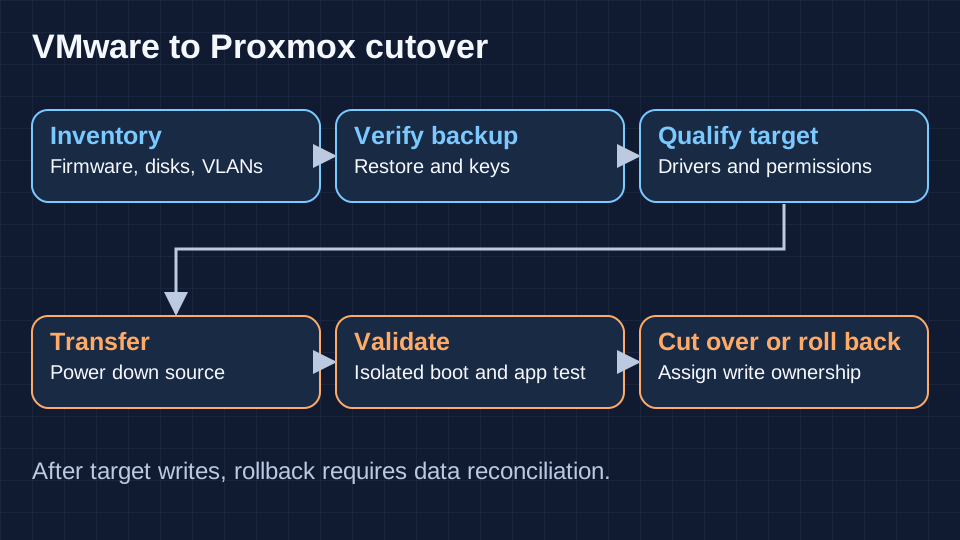
Build a per-VM inventory of OS, BIOS or UEFI, disk controller, disk size and snapshots, encryption, vTPM, MAC, VLAN, IP, VM tools and app dependencies. The Proxmox VE integrated ESXi importer can transfer supported VMware guests. Validate source connectivity, permissions, supported datastore and disk formats, importer throughput and source version. OVF or disk conversion may be another supported path. Plan a downtime window with a measured final transfer and boot time. Import functionality and live migration within a Proxmox cluster are separate workflows.
Take and verify independent backups. For Windows, match firmware and plan recovery keys before touching Secure Boot, vTPM or BitLocker. Stage signed VirtIO drivers before switching the boot disk controller, or boot with a compatible controller and migrate the driver in a controlled step. For Linux, confirm initramfs driver support, stable disk identifiers and interface names. Map port groups to bridges and tags. A first boot on an isolated network avoids duplicate identity, IP and storage writes.
Get the application owner to validate transactions, identities, DNS, monitoring and backup on the target. Keep the source powered off but recoverable until acceptance. Define the rollback deadline and write ownership before opening the destination. After the destination accepts writes, restarting the old VM alone discards newer changes or creates two primaries. The fallback then needs application replication, reconciliation or restore to a pre-agreed recovery point.
Separate the trial migration from the production migration. For a domain controller, consider introducing a supported replica on the destination and moving roles after health checks instead of relying on image conversion. For clustered SQL, check shared-disk and quorum dependencies with the database owner and test application-level replication or a restore-based cutover. Record backup chain position and last accepted writes at handover. Capturing this evidence makes the rollback decision possible inside a short change window.
Production mistakes that survive a demo
A green cluster can still have a shared power feed, a missing VLAN on its standby trunk or a QDevice in the wrong failure domain. Test each physical link and each vote path. Check whether a node can reach the datastore and authenticate when the management plane is down. Alert on loss of redundancy and stale replicas before the first VM fails.
Capacity at steady state conceals CPU incompatibility, excessive overcommit and storage saturation under failure. Run migration both ways after hardware or firmware changes. Exercise rebuild and backups under load with one node down. Verify restores and discard reliance on snapshots as the sole copy. Before moving a critical VM, record rollback ownership and the exact application checks that authorize the cutover.
Which platform would I choose?
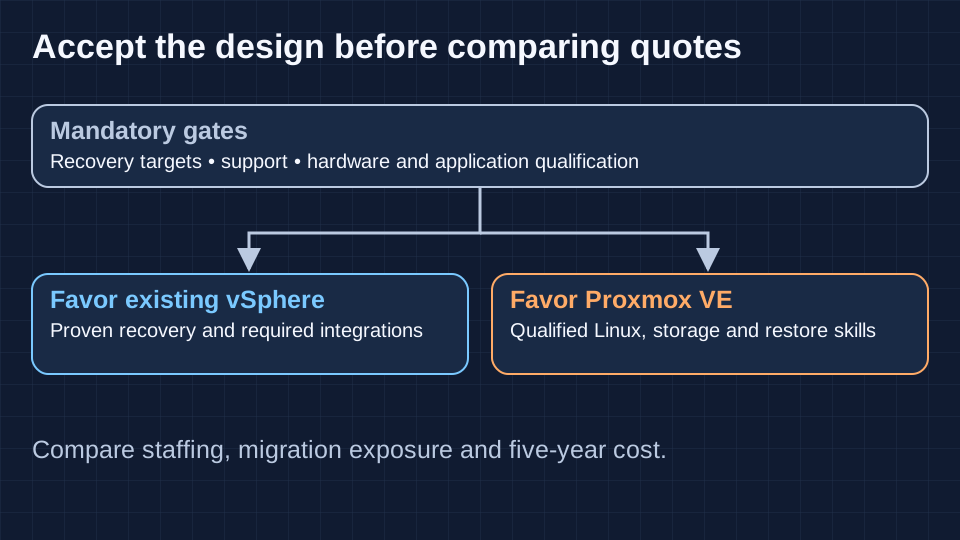
Give recovery targets, contractual support and hardware compatibility veto power. Among the remaining designs, compare staffing, existing tooling, storage, migration exposure and cost. Have the people who will carry the pager run the acceptance tests. A design that only works with one specialist in the room has an availability dependency that belongs in the risk register.
| Decision area | VMware vSphere | Proxmox VE |
|---|---|---|
| Mandatory qualification | Required integration is already supported | Target stack passes support and compatibility checks |
| Recovery and staffing | Current team has proven restore and escalation runbooks | Linux team proves quorum, storage and restore under failure |
| Migration exposure | Lifecycle or renewal timing conflicts with safe cutover | Pilot, rollback and app acceptance fit the window |
| Long-term cost | Existing tools and skills offset renewal cost | Cost advantage survives support, staffing and requalification |
Questions to settle before a rollout
Can a cluster survive a host loss during maintenance?
Treat maintenance as one unavailable host. A further loss in a three-host deployment leaves one host. Recheck available votes, reachable storage copies and reserved compute against that condition. If the service cannot tolerate it, add failure capacity or get approval for the degraded exposure.
Can I reuse the VMware SAN during a phased migration?
Possibly. Keep VMware VMFS LUNs under the VMware hosts that own them. Present separate volumes to the Proxmox environment and qualify multipath, failover and backup with the array vendor. A NAS can export separate supported datastores from the same appliance, but that still leaves an array-level failure domain.
What should still work if the management network is unavailable?
Exercise the console, local emergency access and recovery credentials from an isolated admin path. Use an independent monitoring endpoint to observe guest traffic and storage. Check the actual outcome against cluster and network design. Losing an admin route and losing host-to-host heartbeats are different failures.
Which VMs merit a different migration plan?
Start with appliances whose vendors require a specific hypervisor, VMs tied to physical devices, clustered workloads with shared disks and guests whose keys or licenses bind to virtual hardware. Ask each owner for the supported destination and a validation test. Rebuilding or moving the application can be less risky than converting its VM.
Final verdict
I would keep a supported vSphere estate where its backup, hardware and escalation chain already meets a hard recovery target and a move would put that target at risk. I would choose Proxmox VE for a qualified design where the team can own Linux, quorum, storage and restore operations and the measured recovery and support coverage meet the same target. For the three-host estate, the decisive evidence is a restart on two hosts under load and a SQL restore verified by the application owner. The hypervisor quote belongs beside those test results.